
You're probably dealing with one of two situations right now. Either you're planning a new office fit-out and trying to stop AV from becoming a last-minute procurement exercise, or you've already seen what happens when it is. The screen works but won't talk to the laptop. The camera is fine but the room audio is hollow. The meeting space looks polished on handover day, then starts generating support tickets the moment people use it.
That's why audio visual system integration has to be treated as infrastructure, not decoration. Screens, cameras, speakers and touch panels are only the visible layer. Underneath them sits the part that determines whether the room feels effortless or frustrating: cabling, power, switching, Wi-Fi, control logic, mounting, commissioning, and compliance. In UK office relocations, that hidden layer is usually where projects succeed or fail.
What Is Audio Visual System Integration Really
A common failure looks like this. The office move is complete, the boardroom furniture is in, the display is on the wall, and the first client presentation starts late because the video call won't load protected content, the room PC isn't mapped properly, and nobody can work out which input the touch panel is trying to select.
That isn't an AV equipment problem. It's an integration problem.
Audio visual system integration means designing all the moving parts so the user doesn't have to think about them. In a modern UK office, that includes displays, microphones, speakers, cameras, switching, control panels, room scheduling, power, network connectivity, mounting, and the testing needed to make them operate as one system instead of a pile of separate products.
Invisible operation is the real goal
A successful room doesn't impress people because it has expensive kit. It works because staff walk in, tap one button, join the meeting, share content, and get on with the conversation. The technology fades into the background.
That outcome matters more than generally expected. AV affects how quickly meetings start, how confidently staff use collaboration spaces, and how clients perceive the business when they visit. In practical terms, it sits somewhere between workplace productivity, facilities planning, and IT service delivery.
Practical rule: If users need a workaround sheet taped under the table, the system wasn't integrated properly.
Why businesses are taking it more seriously
The market trajectory reflects that shift. The global AV system integration market is valued at USD 71.09 billion in 2026 and is projected to reach USD 154.55 billion by 2035, driven by demand from businesses, schools, and hospitals for integrated communication tools that improve teamwork and presentations, according to Business Research Insights' AV system integration market report.
That doesn't mean every office needs a complex flagship installation. It means more organisations now realise that meeting rooms, huddle spaces, training areas, reception zones, and hybrid collaboration spaces need proper engineering.
What good integration looks like in practice
Three signs usually tell you the design is sound:
- Clear user journeys: Staff can start meetings, switch sources, and control volume without guessing.
- Stable infrastructure: The network, power, and cabling support the room instead of limiting it.
- Maintainable systems: IT and facilities teams can support the environment without relying on tribal knowledge.
That's the definition. Not connecting devices. Engineering a reliable workplace experience.
The Core Components of a Modern AV System
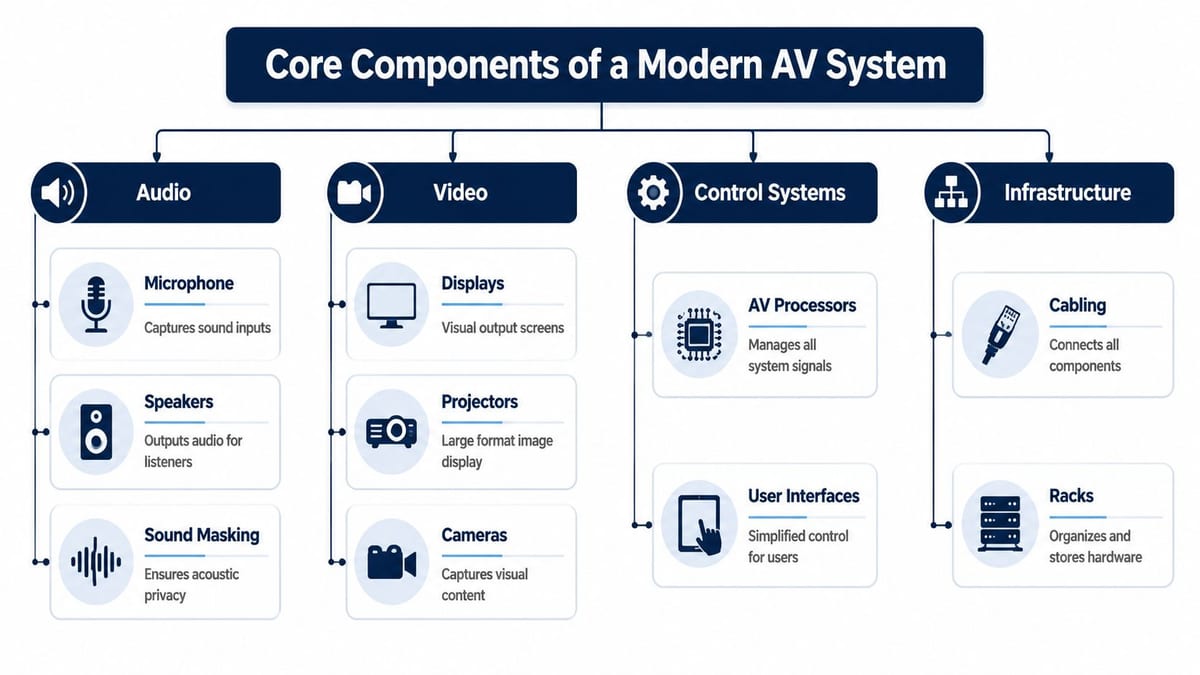
Most office AV systems look complicated because people see the endpoints first. Break them into four parts and the picture becomes much clearer.
Audio
Microphones, speakers, and sound management determine whether people can follow the meeting. In a huddle room, that might mean a compact conferencing bar with beamforming microphones. In a boardroom, it often means distributed table or ceiling microphones, DSP processing, and speakers placed for even coverage rather than raw volume.
Sound masking also belongs in this category. Open-plan offices and divisible spaces often need acoustic privacy as much as they need speech reinforcement.
Video
This is the layer most non-technical stakeholders focus on first. Displays, projectors, conferencing cameras, and presentation sources are highly visible, so they get attention early. The mistake is assuming visible equals simple.
A commercial display is not just a larger consumer television. It's selected for duty cycle, control integration, mounting compatibility, content handling, and serviceability. Cameras need the right field of view for the room geometry, not just a good spec sheet.
Control systems
Control is what turns separate devices into one usable room. That includes touch panels, room scheduling interfaces, automation software, and the processors that manage switching and logic behind the scenes.
Without control, the user sees the complexity. With control, the room feels obvious.
A practical design question is always this: what happens when the room host is under pressure and running late? If they can't start the room in a few taps, the system is overcomplicated.
Good control design removes choices users shouldn't have to make.
Infrastructure
This is the part that carries the whole project. Cabling, racks, containment, mounting, power distribution, patching, and network design are not support items. They are core AV components.
The difference between a tidy, maintainable installation and a future fault-finding nightmare often comes down to how the infrastructure was planned. Teams that need a refresher on the underlying layer should start with a practical guide to structured cabling in commercial environments.
A quick decision framework
| Component area | What to prioritise first | What usually goes wrong |
|---|---|---|
| Audio | Speech intelligibility | Echo, poor pickup, uneven coverage |
| Video | Viewing distance and room layout | Wrong display size, poor sightlines |
| Control | Simplicity for end users | Too many inputs, unclear interfaces |
| Infrastructure | Power, cabling, rack planning | Hidden faults, clutter, weak serviceability |
When these four pillars are designed together, the room works. When one is treated as an afterthought, support calls start.
The End-to-End Integration Project Lifecycle
Most AV problems are baked in before the first display is mounted. The trouble starts when teams choose equipment before they've confirmed room use, network capacity, cable routes, power availability, or support ownership.
Start with needs, not products
A sound project begins with room purpose. A boardroom used for client presentations needs different camera coverage, microphone strategy, and control logic than a training suite or a divisible multi-purpose space. The right questions are operational, not cosmetic.
Ask:
- Who uses the room?
- What platforms do they need to support?
- Is the room presentation-first, collaboration-first, or both?
- Who will support it after handover?
- What happens when the office layout changes?
That first phase should also include the building layer. AV doesn't sit outside relocation planning, so it needs to align with furniture, partitions, power, Wi-Fi, containment, and change control. If the wider move is being managed in parallel, a solid project plan for office relocation change management reduces the usual clashes between trades.
Design the hidden layer early
Many fit-outs go off course. For instance, 60% of AV failures in UK commercial fit-outs stem from poor structured cabling or Wi-Fi congestion, not the AV hardware itself, and only 35% of SMEs in office relocation projects conduct a dedicated network audit before AV installation, according to Digital Vision AV's discussion of AV systems integration.
That finding matches what practitioners see on live projects. Rooms fail because:
- Cabling routes were compromised: AV links were squeezed into whatever pathway remained after other trades finished.
- Wi-Fi was assumed, not validated: Wireless presentation and conferencing were specified in spaces with poor radio conditions.
- Rack space was underplanned: There's no room for clean cable management, cooling, or future additions.
- Power was treated generically: The AV load, location, and sequencing weren't designed around the actual room use.
Installation is coordination work
The installation phase isn't just fixing screens to walls and plugging in devices. It means sequencing trades properly, confirming containment, labelling everything clearly, keeping cable separation sensible, and making sure physical finishes don't undermine serviceability.
The best installations look simple because someone did the hard thinking before site works began.
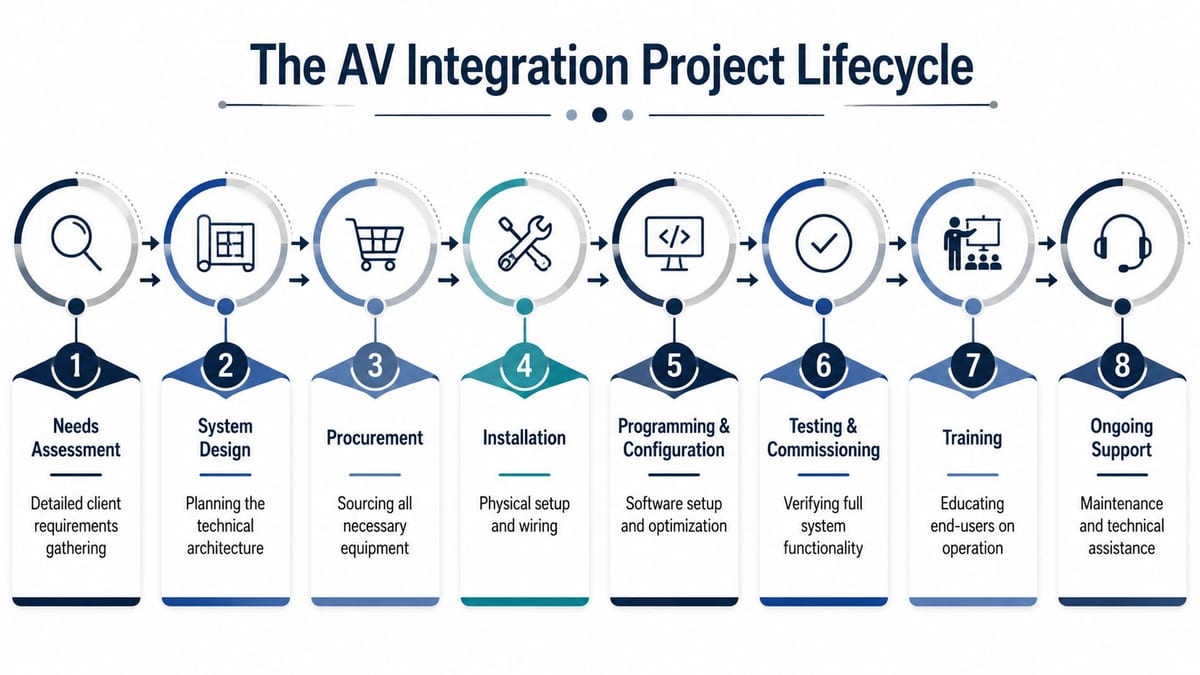
What a disciplined lifecycle includes
- Needs assessment: Room use, workflows, platforms, support model.
- System design: Drawings, device selection, cable schedules, rack layouts.
- Procurement: Matching lead times to build phases.
- Installation: Cabling, mounting, rack build, hardware deployment.
- Programming and configuration: Control logic, room presets, scheduling, permissions.
- Testing and commissioning: Signal validation, failover checks, user acceptance.
- Training: Hosts, IT support, facilities staff.
- Ongoing support: Documentation, warranties, maintenance ownership.
The room isn't finished when the picture appears on screen. It's finished when the last avoidable support ticket has been designed out.
Commissioning decides whether the room is actually ready
Commissioning is where many rushed projects pretend to be complete. Proper commissioning means testing content sharing, video calls, control sequences, camera presets, audio pickup, cable labelling, and the edge cases that only show up under pressure. It also means proving the room to the people who will run it.
A room that “worked on Friday” but fails on Monday was never commissioned properly. It was only powered on.
Navigating AV Standards and UK Compliance
Compliance is where experienced project teams separate themselves from box movers. In commercial AV, standards aren't paperwork added after the fact. They shape safety, content compatibility, power stability, and long-term reliability.
Structural and visual requirements
In UK commercial AV projects, flat panel displays require commercial-grade mounts rated for at least 5 times the device weight. That requirement matters because office walls vibrate, buildings experience thermal variation, and high-traffic environments punish weak installs. A mount that looks adequate on day one can become a liability later.
Display performance standards matter too. If the visual layer isn't specified properly, users feel it immediately in soft text, poor conferencing detail, and weak presentation clarity.
Secure content and electrical provision
Secure content handling is another critical requirement. Displays must be HDCP version 2.3 compliant so modern protected sources can pass content correctly. If they aren't, users start seeing blocked media, failed source handshakes, and inconsistent meeting behaviour.
Electrical design belongs in the same conversation. Electrical service for AV outlets must be a minimum of 20A duplex to prevent voltage drop that degrades performance, as set out in the audio visual communications standard referenced here. In practice, that means commercial electrical installation and certification can't be separated from AV planning.
A neat finish doesn't make an installation compliant. Correct mounting, suitable power, and secure content support do.
Why certified electrical work matters
Commercial electrical installation and certification protect more than the handover file. They affect insurance, maintenance, fault isolation, and whether the room remains supportable after future changes.
A few examples make the trade-offs obvious:
- Uncertified additions: They may work initially, but they create doubt around safety and future fault tracing.
- Poorly located outlets: They force awkward extension paths, overcrowded racks, and thermal problems.
- Generic power assumptions: They leave no margin for room processors, displays, charging points, or control hardware.
Compliance is also an operations decision
Facilities teams often see standards as one more hurdle during a fit-out. In reality, compliance reduces rework. IT teams can support the room more easily, insurers have a clearer record, and future upgrades don't start with discovering undocumented shortcuts hidden behind joinery.
In healthcare, education, and corporate settings alike, cutting corners on standards usually means paying for the same work twice. Once during installation, and again when the defects surface under normal use.
Integrating AV with CCTV and Building Security
The same principles that make a meeting room work also apply at building level. Once AV, network, control, and power are designed as one system, it becomes much easier to connect collaboration spaces with operational security.
One platform is better than isolated systems
A typical weak setup treats CCTV, access control, digital signage, room displays, and alerting as separate projects. That creates duplicate cabling, inconsistent support ownership, and clumsy incident response.
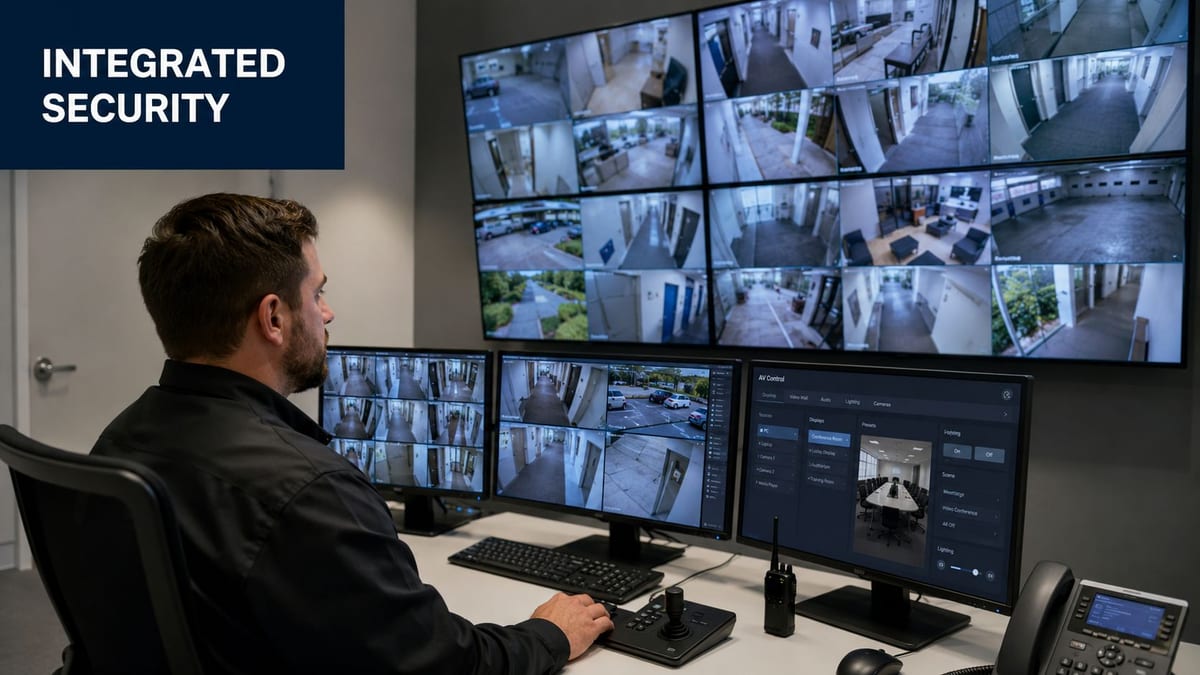
A stronger setup ties them together. A security team can view CCTV feeds in a control room, push visual instructions to designated displays, trigger audio announcements, and track access events from the same operational framework. For teams evaluating video management layers, Facility Management Insights' VMS guide is a useful reference point because it frames surveillance as part of wider facility operations rather than a standalone camera project.
CCTV is no longer just recording
In a modern office or commercial unit, CCTV supports more than after-the-fact review. It often feeds reception oversight, loading bay visibility, perimeter monitoring, and remote diagnostics for low-occupancy sites. When integrated with AV, those camera feeds can be routed to security desks, reception screens, or incident-response displays without introducing awkward parallel systems.
That only works when the underlying network and display strategy were designed with security in mind. If not, camera feeds end up living in one silo while the building's communication tools live in another.
Practical integration examples
- Access event triggers: A door event can call up the relevant CCTV view on a monitoring screen.
- Public address tie-ins: Security teams can push audio instructions to selected zones.
- Reception workflows: Staff can verify visitors visually while managing communications from the same desk.
- Incident escalation: Screens in control areas can switch automatically to priority sources.
A practical installation guide for the physical layer is this CCTV systems overview for commercial environments.
The control room logic matters
A control room filled with screens isn't necessarily integrated. It might just be crowded. Good integration gives operators priority logic, source selection rules, and predictable display behaviour under pressure.
Video can add useful context.
Security integration changes support requirements
The moment AV and security systems are joined, maintenance planning becomes more disciplined. Firmware windows, cable labelling, rack segregation, electrical certification, user permissions, and incident logging all become more important. The upside is that the building becomes easier to operate because teams stop chasing faults across disconnected platforms.
That same design philosophy scales beyond attended offices. It leads directly into autonomous building operation.
The Next Frontier Unmanned Building Management
A common UK fit-out scenario looks like this. The office reception is gone, the site only has intermittent staff presence, and the occupier still expects controlled access, verified video, remote support, incident logging, and dependable uptime. At that point, AV integration stops being a room technology exercise. It becomes part of the building operating model.
Unmanned building management is the point where AV, security, power, and network design are planned as one service, so a commercial property can run safely with little or no on-site staff. The same design discipline used to make meeting rooms reliable also applies here. Cable routes, PoE budgets, switch resilience, UPS runtime, remote access policy, and fault reporting decide whether the site works day to day.
What it looks like in practice
This model turns up in low-touch commercial units, shared workspaces with limited front-of-house staffing, utility support buildings, storage sites, plant areas, and properties visited mainly by contractors. The requirement is usually the same. Let approved people in, capture evidence, present the right information remotely, and avoid unnecessary callouts.
That is where the wider infrastructure picture matters. A display showing a remote intercom feed is only useful if the network path is stable. A door event only helps if the access system, camera coverage, and time synchronisation all match. An alert to a helpdesk only shortens downtime if the rack has labelled patching, documented power feeds, and a support path that does not depend on guesswork.
The same principles also scale upward. If a team can design a small unmanned unit properly, the same approach supports larger estates and more autonomous properties where occupancy, maintenance, and security are coordinated centrally. Adjacent sectors are already pushing in that direction. For a broader view of how automation is shaping property operations, Virtual Tour Easy's real estate AI guide is useful context.
Why these projects break down
Projects usually fail at the joins between trades.
The AV package might assume spare switch capacity that the network team never approved. The door contractor may specify hardware that changes the fire door set. The landlord electrical supply might not support the UPS runtime the occupier expected. During UK office fit-outs, these are familiar problems, and unmanned operation makes them harder to hide.
Regulation also needs early attention. Analysts publishing in Scientific Reports on barriers affecting unmanned building projects found that regulatory barriers are a major obstacle to implementation. In building projects, that translates into practical questions. Who controls the data, who can grant remote access, what happens during an alarm condition, and which contractor signs off each part of the installation.
The technical sequence matters just as much. If the team buys cameras first, decides on remote access later, and leaves structured cabling and power resilience until the end, the site inherits fragile dependencies. It may look integrated on a schematic and still fail the first time a switch drops, a breaker trips, or a remote operator needs a feed that was never segmented properly.
Unmanned operation works when the management process is designed into the infrastructure.
Access, power, and data are one design problem
On live projects, these workstreams are often split between different contractors and different budgets. That is one of the main reasons autonomous sites underperform.
Research on UAV-supported infrastructure inspection shows the value of combining sensing, connectivity, and operational response. The lesson transfers well to commercial property. Remote visibility only helps if the building can transport that data reliably, power the devices behind it, and connect those events to a usable control action.
In practical terms, the design has to cover:
- Access: Credential types, remote release rules, door states, life-safety interfaces, and audit logs.
- Power: Clean supply, UPS coverage, circuit separation, safe isolation, and clear ownership for electrical certification.
- Data: Structured cabling, VLANs, PoE capacity, secure remote support, alert routing, and bandwidth for live video and control traffic.
A weakness in any one layer shows up fast. A lock may work but fail during an outage. A camera may record locally but not reach the operator. A help point may connect, but poor echo control or packet loss makes the conversation useless.
Why low-maintenance hardware matters
Battery-free or low-maintenance access hardware can make sense in unmanned environments because each service visit costs time, coordination, and money. That trade-off is often missed during procurement. Cheap hardware with frequent maintenance needs can become the most expensive part of the design once the site is live.
Connected Places Catapult's note on housing projects using drone-supported maintenance diagnosis points to the same operational logic. Reduce avoidable site attendance where possible, then make the remaining visits count. The principle applies equally to locks, intercom endpoints, edge devices, and display hardware in remote commercial units.
Maintenance still decides whether the model works
Autonomous sites still need disciplined support. They need it more than attended ones, because there is no receptionist or local facilities lead to spot small faults early.
A workable support model usually includes:
- Scheduled physical inspections: Doors, closers, enclosures, mounts, cable terminations, and environmental conditions.
- Remote health checks: Device status, storage alerts, power events, switch health, and connectivity alarms.
- Clear escalation paths: Named owners for access issues, surveillance faults, network incidents, and electrical problems.
- Controlled software changes: Planned firmware updates, tested rollback plans, and maintenance windows that fit occupancy risk.
- Accurate documentation: Rack layouts, IP plans, labelling schedules, and as-fitted drawings that match the actual installation.
The best unmanned buildings are not the ones with the longest feature list. They are the ones where AV, security, cabling, electrical, and network decisions were coordinated early enough to support reliable operation after handover.
Planning Your Integration Project A Checklist for Success
Good AV outcomes usually come from disciplined planning rather than heroic troubleshooting. If you're preparing for an office relocation, fit-out, or operational upgrade, the checklist below keeps the focus on the decisions that affect reliability.
AV Integration Project Planning Checklist
| Phase | Key Action | Why It Matters |
|---|---|---|
| Discovery | Define how each room will be used | Stops product choices drifting away from operational needs |
| Survey | Audit cabling routes, power, Wi-Fi, and rack space | Exposes hidden infrastructure risks before installation starts |
| Design | Align AV, electrical, network, and furniture layouts | Prevents clashes between trades and avoids rework |
| Procurement | Select commercial-grade equipment with supportable lifecycles | Reduces compatibility issues and future replacement pain |
| Installation | Label, test, and document every connection | Makes support faster and faults easier to isolate |
| Programming | Build simple room controls and sensible presets | Improves adoption and reduces user error |
| Commissioning | Test real meeting scenarios, not just power-on checks | Confirms the room works under live conditions |
| Handover | Train users and define support ownership | Avoids confusion once the project team leaves site |
The decision that saves the most pain
Choose a delivery partner that understands the full stack. Not just displays and speakers, but also network design, structured cabling, power, CCTV, certification, testing, and post-move support.
That matters because office environments don't fail neatly. A room issue might begin in the rack, the wireless design, the outlet positioning, or the control programming. If every layer sits with a different contractor, fault resolution becomes political as well as technical.
A well-run integration project protects business continuity, shortens the path from move-in to productive use, and gives IT and facilities teams an environment they can support.
If you're planning a relocation, fit-out, or upgrade and want an end-to-end team that understands cabling, AV, CCTV, electrical works, and the wider infrastructure around them, Constructive-IT is worth speaking to early. The projects that run most smoothly usually start before the hardware is ordered.