
Most advice about cable ties clips is too small-minded. It treats them as a tidy-up item you buy at the end of a fit-out, once primary engineering is done.
That thinking breaks unmanned buildings.
In a building that has to open doors, power edge devices, move CCTV footage, report faults, and stay secure without someone constantly walking the floor, cable management stops being cosmetic. It becomes part of the operating model. If the physical layer is weak, every “smart” layer above it inherits that weakness.
Why Your Unmanned Building Will Fail Without Proper Cabling
An unmanned building is not just a building with fewer staff on site. In practice, it means a commercial environment where routine operation depends on systems that must keep working without local intervention. Access control has to authenticate people correctly. CCTV has to remain available. Network links have to stay stable. Electrical distribution has to support the equipment those systems depend on. Fault finding has to be fast because there may be nobody on hand to spot a loose cable or a failed clip.
That’s why many unmanned building projects fail. Not because the software was too ambitious, but because the infrastructure was treated as a collection of separate trades rather than one joined-up system.

Failure usually starts at the physical layer
A typical failure pattern looks like this:
Access gets designed in isolation: The lock vendor specifies devices, but nobody checks the cable routes, segregation, fixing method, or service loops.
Power gets added late: An electrician brings in supplies after the network layout is already set, so containment becomes cramped and messy.
Data gets squeezed around both: Structured cabling ends up bent into poor routes, over-tightened, or bundled with the wrong support method.
Maintenance becomes guesswork: Nobody can identify what serves which door, camera, cabinet, or autonomous plant area without opening everything up.
The result isn’t just an untidy riser. It’s delayed commissioning, fault-chasing during go-live, and ongoing operational risk.
Poor cable management doesn’t stay a cabling problem. It becomes an access problem, a CCTV problem, a compliance problem, and eventually a business continuity problem.
The history matters here. The cable tie was invented in 1958 by Maurus C. Logan at Thomas & Betts to solve aerospace wiring challenges, and that innovation now supports a £2.5 billion structured cabling market in the UK for office fit-outs, NHS hospital builds, and data centres where reliability matters most (justcableties.co.uk).
What unmanned building management means on the ground
In real projects, unmanned building management usually includes a mix of these systems:
Controlled entry: Doors, cabinets, comms rooms, and perimeter access need secure authentication.
Remote visibility: CCTV, alarms, monitoring dashboards, and event logs need stable connectivity.
Commercial electrical installation and certification: Supplies, containment, testing, and sign-off have to support the IT and security estate properly.
Low-touch operations: Engineers should be able to make moves, adds, and changes without causing avoidable downtime.
Scalable autonomy: The building might start with a few automated functions and grow into fully autonomous unmanned building units over time.
If you need a practical definition of how these environments operate, this guide to what is an unmanned building is a useful reference point.
Why cable ties clips matter more than people think
Cable ties clips are what turn a design into a controlled installation. They hold bundles where they should be, stop drift into airflow paths, keep low-profile runs secure, and make later certification and maintenance realistic.
Used badly, they create hidden strain, sharp routing, failed adhesive mounts, and inaccessible faults.
Used properly, they give an autonomous building a physical backbone that people can trust.
The Unified Blueprint for Access Power and Data
The fastest way to sabotage an autonomous building is to split access, power, and data into separate design conversations.
That might work in a simple office refresh. It doesn’t work in a site where door hardware, CCTV, switching, wireless coverage, edge devices, and monitored power all depend on each other. In an unmanned environment, those systems form one service chain. If one link is weak, the whole chain becomes harder to operate.

Design the building like one system
A sensible blueprint starts with pathways and dependencies, not product catalogues.
Ask these questions first:
Which doors, cameras, cabinets, and plant areas depend on live network connectivity
Where does local electrical supply need to support those endpoints
Which routes need segregation, fire-safe support, and future expansion space
How will engineers test, certify, and maintain each part without disturbing the rest
If those answers are agreed early, cable ties clips become part of a deliberate support strategy rather than an improvised fix on installation day.
The UK’s 18th Edition BS 7671 requires cable supports, including ties and clips, to be securely fixed to prevent premature collapse in a fire. The same source notes that compliant cable management can reduce network faults by up to 40% and is essential for dependable CCTV and AV integration in autonomous buildings (fabrelli.com).
Where projects go wrong
Teams often divide work like this:
Workstream | What gets missed | Operational consequence |
|---|---|---|
Access control | Physical routing and serviceability | Lock faults are harder to diagnose |
Electrical | Interaction with data containment | Congestion, heat, and awkward retrofits |
Network cabling | Support requirements for security devices | Weak routes and poor long-term organisation |
CCTV | Recording and edge connectivity dependencies | Cameras stay live, but evidence paths become fragile |
That separation looks efficient on paper. On site, it creates clashes.
A better model is to walk the building from edge to core. Start at the controlled opening, cabinet, or monitored area. Then trace back through power, data, containment, and fixing method. That’s how you avoid discovering late that a lock cable route crosses a hot electrical path, or that a camera run has no clean support between tray exit and device mount.
Battery-less NFC locks only work if the infrastructure is disciplined
Battery-less, NFC proximity locks make strong sense in unmanned properties because they remove battery replacement cycles, reduce routine maintenance, and avoid another hidden failure point at the edge. They’re especially useful on comms cabinets, plant enclosures, internal service areas, and distributed spaces where frequent manual checks aren’t practical.
But they still rely on good infrastructure discipline. The door hardware may be simple, yet the surrounding environment still needs reliable data paths, organised security cabling, and access records that aren’t undermined by poor physical installation.
The lock itself isn't the whole security system. The routes, fixings, power strategy, and service access around it decide whether the security model holds up.
For larger estates, teams planning resilient layouts often look at specialist infrastructure environments such as Data Centers to understand how disciplined physical pathways support uptime. The principle carries over directly to autonomous commercial buildings.
Choosing the Right Cable Ties and Clips for the Job
Selection is where most cable management problems are baked in. If the wrong fixing is specified, the installation team has to fight the site. If the right fixing is specified, the job becomes cleaner, faster, and much easier to certify.
That matters in server rooms, risers, cabinet rows, CCTV backbones, and door-control runs. It matters even more when the project includes battery-less NFC proximity locks, because access hardware has no room for sloppy support or avoidable strain near the termination point.
Start with load and surface
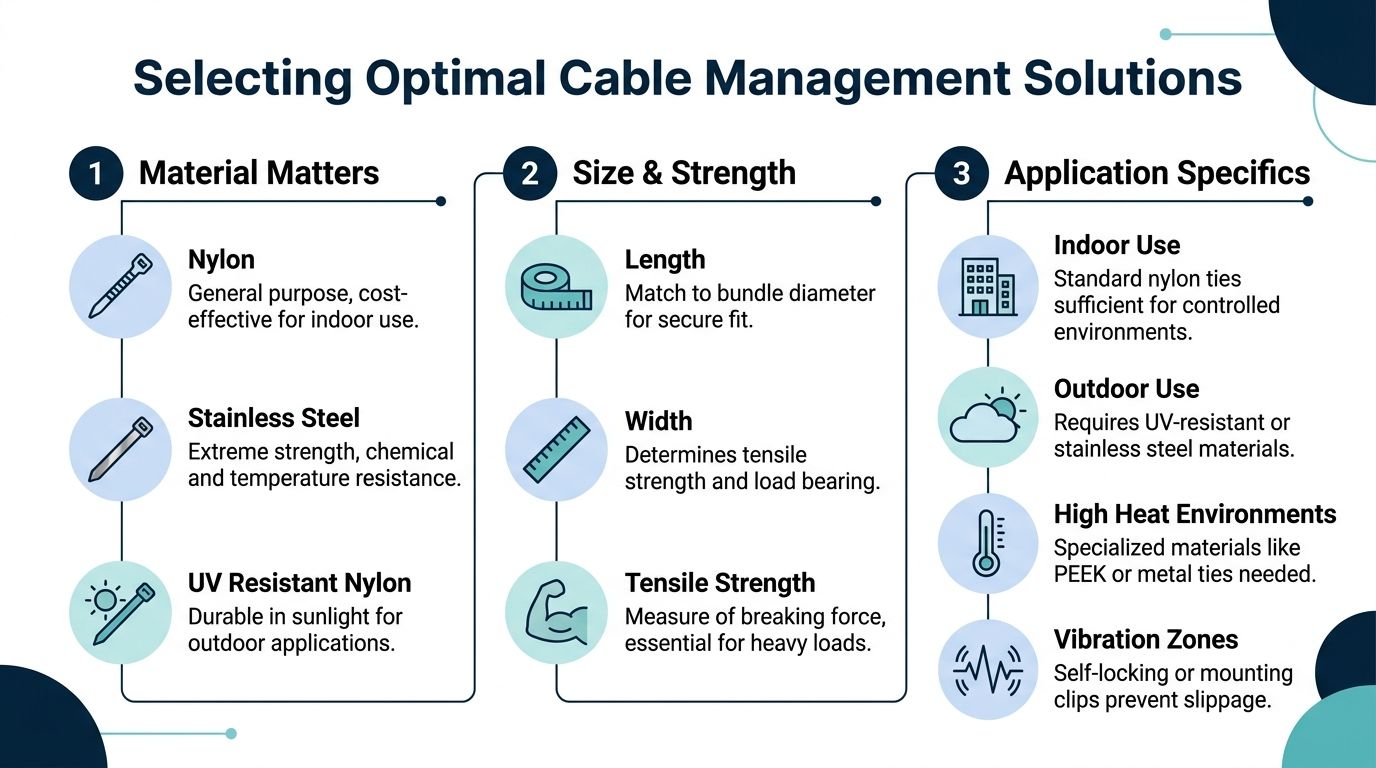
Under BS EN 62275, selecting a cable tie clip starts with bundle load and mounting surface. One practical reason this matters is that 70% of server room cable failures stem from undersized fixings. The same guidance notes that self-adhesive clips work well on smooth panels, but their success rate drops from 95% to 60% on textured surfaces without primer (nylon-cabletie.com).
That tells you something important. Product choice isn’t just about tie material. It’s about the substrate you’re asking that clip to trust.
What works and what doesn't
Here’s the practical comparison used on demanding projects.
Type | Best use | What works | What doesn't |
|---|---|---|---|
Standard nylon clip and tie | Indoor panels and controlled office spaces | Fast, tidy, cost-effective | Poor choice where surfaces are rough, oily, or unstable |
Self-adhesive mount | Smooth cabinet internals and short controlled runs | Good for clean finishes when the panel prep is right | Unreliable on textured or badly prepared surfaces |
Screw-mount clip | Chassis, backboards, service zones | Strong retention and predictable fixing | Slower if the route wasn’t planned early |
Push-mount clip | Pre-drilled panels and repeatable cabinet builds | Clean routing and fast installation | No use if hole sizes or panel spec vary across the site |
Stainless mount | Corrosive, harsh, or specialist environments | Strong mechanical confidence | Often unnecessary in standard office conditions |
UV-stabilised fixing | Outdoor or sun-exposed routes | Better durability in exposed conditions | Adds little value indoors |
Match the fixing to the operational risk
This is the part generic buying guides skip. The “best” cable ties clips depend on what failure would mean.
For example:
Door and lock cabling: Use low-profile support that keeps the route stable and serviceable. You want no rubbing, no drift, and no confusion over which cable serves which opening.
CCTV drops: Choose fixings that keep shape through corners and transitions. A camera may still power up on a poor route, but fault-finding becomes much harder later.
Structured cabling in cabinets: Avoid oversized ties on small bundles and undersized clips on growing bundles. Both create future trouble.
Electrical and data interface areas: Prioritise compliant support and segregation. Neatness alone isn’t enough.
A lot of teams focus on tie strength and ignore clip geometry. That’s backwards. If the clip doesn’t suit the route, the tie only secures a bad decision more tightly.
Practical rule: Never specify cable ties clips before you know the mounting surface, route shape, service access requirement, and likely future adds.
Material choice in real environments
Nylon 6.6 is the workhorse for internal IT and security installations because it suits most controlled indoor conditions. Heat-stabilised or UV-stabilised variants make sense where the environment justifies them. Stainless options belong in more punishing settings, not by default.
For UK office fit-outs and server room expansions, the bigger gain usually comes from choosing the right fixing style and route discipline rather than reaching for the most “heavy duty” product on the shelf.
When trays and pathways are part of the decision, this guide to cable trays sizes and selection helps frame the containment side of the specification properly.
A simple selection filter
Use this shortlist before ordering:
Bundle behaviour: Is the bundle static, expanding, or likely to be reopened later?
Mounting surface: Smooth panel, textured wall, cabinet chassis, backboard, or tray exit point?
Environment: Indoor office, server room, exposed edge zone, or harsh service area?
Maintenance need: Will someone need quick access for testing, lock replacement, CCTV servicing, or network changes?
Compliance impact: Will this route affect warranty, fire safety, or electrical sign-off?
If you can answer those cleanly, your product selection gets much easier, and your installation team stops compensating for specification mistakes.
Installation Techniques for Zero-Failure Performance
A flawless result doesn’t come from tightening every tie as hard as possible. It comes from route control, consistent tension, correct support spacing, and enough discipline to leave the cabling serviceable after handover.
That matters in office fit-outs, server room expansions, CCTV rollouts, and autonomous building units where later access might be limited.

Start with the route, not the tie
Before the first tie goes on, confirm:
Airflow paths: Don’t let bundles sag into ventilation space in racks or cabinets.
Separation logic: Keep electrical and data routes organised according to the design intent.
Exit and entry points: Tray-to-cabinet and wall-to-device transitions need support, not just the long straight runs.
Service loops: Leave enough managed slack for testing and replacement, but not so much that it turns into a snagging point.
Many neat-looking jobs fail. The bundle is tidy, but the route isn’t maintainable.
Tension control is not optional
Under BS 6701 installation protocols, using interior-serrated PA6.6 ties with a calibrated tool applying 80-220N of tension supports 85% compliance rates during HSE inspections. The same source notes that hybrid clip-tie systems can cut installation disruption by 50% during go-live support for projects that need 25-year warranties (pemnet.com).
That’s why proper tensioning tools matter. A hand-pulled tie can feel secure and still be wrong. Over-tightening can deform cable jackets or stress the route at the clip. Under-tightening lets the bundle migrate and rub.
Three installation methods and when to use them
Adhesive mounts
Use them where the surface is smooth, clean, and stable.
They’re useful inside cabinets and on controlled panels, but surface prep decides the outcome. If the panel finish is doubtful, use a mechanical fixing instead.
Screw-mount clips
Use these when retention matters more than speed.
They’re the safer option on backboards, service risers, cabinet chassis, and areas where the route must stay put for years. They also make future inspection easier because you’re not guessing whether the adhesive bond is slowly failing.
Push-mount clips
These suit repeatable builds with the correct punched or drilled holes.
They’re efficient in cabinets and prefabricated layouts, especially when you need low-profile, consistent cable support across multiple identical locations.
A cable tie gun is not just a labour-saving accessory. It’s a quality-control tool.
This short demonstration is useful if you want to see the principle in practice before specifying methods for a larger team rollout.
Tight spaces need a different approach
In tight cabinets, around lock interfaces, or behind CCTV terminations, use smaller bundles and more deliberate anchor points.
Don’t try to force one large bundle through a route that should carry two smaller ones. Don’t bury identification labels under the tie head. Don’t position clips where the next engineer has to cut half the route apart to replace one component.
For enclosed pathways and cleaner transitions, this guide to raceway for cable systems is worth reviewing alongside tie and clip selection.
The finish standard to aim for
Good installation leaves a route that is:
Secure: Nothing drifts, sags, or abrades
Legible: Engineers can identify circuits and destinations quickly
Serviceable: Components can be changed without wrecking the route
Compliant: The support method aligns with the standards and the project’s certification needs
That’s what zero-failure performance looks like in practice. Not just neat on day one, but stable when the building is live.
Long-Term Maintenance and Future-Proofing
The handover pack matters. The inspection routine matters more.
A cable management system only proves its value after the building goes live, when somebody needs to add a camera, replace a lock, trace a fault, isolate a cabinet feed, or extend a network segment without creating disruption.
Poor securing creates operational drag
In the UK, 15% of office electrical incidents stem from poor cable securing, and server rooms show a 22% higher risk. The same guidance says post-2025 Building Safety Act updates mandate fire-retardant, halogen-free clips under BS 6387, and that using compliant fixings from the start can reduce project disruptions and rework by up to 40% in complex deployments such as NHS relocations (cabletiesunlimited.com).
That’s the maintenance argument in one line. If the support method is wrong, the building pays for it later.
What a maintainable system looks like
A maintainable autonomous building usually has these traits:
Clear identification: Cables, routes, cabinets, and device groups are labelled in a way engineers can follow quickly.
Accessible support points: You can inspect clips and ties without dismantling half the route.
Controlled change process: Moves, adds, and changes don’t rely on memory or “the way we did the last one”.
Consistent materials: Engineers don’t find a mix of random fixings that all age differently and behave differently in service.
The first install should make the fifth change easier. If it doesn’t, the original job wasn’t finished properly.
Maintenance routines that actually help
Not every site needs the same schedule, but these checks are consistently worthwhile:
Check area | What to look for | Why it matters |
|---|---|---|
Cabinet interiors | Loose bundles, sagging clips, blocked airflow | Prevents faults and makes servicing easier |
Door and lock routes | Abrasion, poor slack control, disturbed fixings | Protects access reliability |
CCTV pathways | Unsupported transitions and crushed bends | Preserves stable operation and easier troubleshooting |
Mixed electrical and data zones | Drift from original segregation and support intent | Supports safety and certification |
Edge devices in tight spaces | Stress near terminations | Avoids premature failures during routine access |
For teams formalising this work, a documented preventive IT maintenance program can be a useful reference for building repeatable inspection and response habits around the wider estate.
Future-proofing means planning for change, not guessing it
Fully autonomous unmanned building units rarely stay frozen. More doors get brought under control. More cameras get added. More analytics, sensors, and edge devices appear. The physical layer has to absorb those changes without becoming brittle.
That means leaving sensible capacity in routes, choosing cable ties clips that can be maintained rather than hacked around, and documenting pathways so the next change doesn’t start with exploratory demolition.
It also means reviewing older installations against current compliance expectations. A route that looked acceptable years ago may not suit current fire-retardant and halogen-free requirements.
Building a Resilient Foundation for Your Organisation
Autonomous buildings don’t succeed because the dashboard looks clever. They succeed because the physical estate behind that dashboard is organised, compliant, and dependable.
That starts with one decision many teams still underestimate. Treat cable ties clips as engineered infrastructure, not consumables.
The strategic view
When access, power, data, CCTV, and commercial electrical installation are designed together, the building behaves like a managed system. When those disciplines are split, the site inherits hidden friction that shows up during commissioning and keeps showing up afterwards.
The practical differences are easy to spot:
Good projects have clean pathways, sensible support methods, clear labels, and straightforward certification.
Bad projects rely on improvisation, mixed fixings, inaccessible routes, and last-minute rework.
Resilient projects make maintenance easier every year.
Fragile projects become harder to touch every time a change is needed.
What to insist on before work starts
If the project matters, ask for more than a neat finish.
Ask whether the design properly integrates:
Access control and lock hardware
Structured cabling and warranty requirements
CCTV and physical security routes
Commercial electrical installation and certification
Ongoing maintenance access
A practical path to fully autonomous unmanned building units
Ask what fixing methods will be used where, and why. Ask how route changes will be handled after go-live. Ask how the installation will be tested, labelled, and handed over.
Neat cabling is easy to photograph. Reliable cabling is harder to engineer, and that’s the part that protects the organisation.
A solid cable management strategy won’t get the same attention as software, access apps, or remote dashboards. It should. It’s the bedrock that lets those systems work without constant human rescue.
If you're planning an office fit-out, server room expansion, CCTV rollout, commercial electrical upgrade, or a move toward autonomous building operation, Constructive-IT can help you design and deliver the physical infrastructure properly from the outset, with compliance, certification, and long-term reliability built in.