

Organizations often don't start a building technology upgrade because they want a change programme. They start because they need a site live by a fixed date, an office relocation without disruption, a safer access model, better CCTV coverage, or a way to run part of an estate with fewer on-site staff. Then reality hits. Doors, switches, cabinets, power feeds, Wi-Fi, cabling, CCTV, compliance paperwork, user permissions, and support handover all have to work together on the same day.
That's where change management strategies stop being management jargon and become project controls.
If you're planning an unmanned or lightly staffed building, the margin for error is smaller than in a normal fit-out. There isn't a receptionist to wave people through when access control fails. There isn't a facilities technician permanently on site to reboot a controller. If power, data, and access were designed in separate conversations, the building might look finished but still be operationally fragile.
Why Most IT Infrastructure Changes Cause Chaos
A familiar failure pattern looks like this. The contractor finishes late. The network team gets a compressed install window. Security turns up with an access control schedule no one validated. Facilities assumes the comms cabinet is energised. The first users arrive and discover half the doors won't release, the CCTV recorder is online but not mapped correctly, and the Wi-Fi signal dies in the area where the new smart lockers and meeting rooms sit.
That's not bad luck. It's ad hoc delivery.

In UK infrastructure projects, structured, step-by-step change management methodologies achieve a 68% success rate, compared with 34% for ad hoc approaches, and inadequate communication planning is cited in 42% of failed UK projects. Those figures come from the UK Department for Business and Trade and CIPS joint reporting referenced in the verified data above. The practical lesson is simple. Teams don't fail because cabling is mysterious. They fail because dependencies weren't sequenced, authorised, and communicated.
What chaos looks like on a live project
The biggest problems usually show up at the boundaries between teams:
- IT assumes Facilities owns power readiness: Rack space is built, but the final energisation certificate or testing sign-off isn't in place.
- Security assumes IT owns the network path: Controllers are installed, but VLANs, firewall rules, or uplink patching aren't ready.
- Operations assumes cutover is a single event: In reality, old and new systems often need a managed overlap.
- Project leads treat decommissioning as an afterthought: Legacy hardware remains live, undocumented, or insecure. A practical server decommissioning checklist is useful because shutdown, data handling, and asset removal need just as much control as the new install.
Practical rule: If a task can fail because another team missed a prerequisite, it belongs in the change plan, not in someone's memory.
Why formal change control matters
The UK has a long history of moving away from informal “install and hope” delivery. ITIL, first published in the UK in 1989, helped standardise traceable, authorised, and measured change management so organisations could reduce service disruption during transitions like network refreshes and office fit-outs, as noted in the verified data reference to the ITIL background summary.
That matters for building projects because the work is physical and technical at the same time. You're not just changing a setting. You're changing how people enter space, how power reaches critical devices, where data terminates, who gets alerts, and who owns support at 7am on the first working day.
Good change management strategies make those decisions explicit. They force impact assessment, approval, rollback thinking, testing criteria, and communications before anyone touches production.
Planning Success by Integrating Access Power and Data
An unmanned building only works when access, power, and data are designed as one operating system. Treat them as separate workstreams and you create hidden single points of failure.
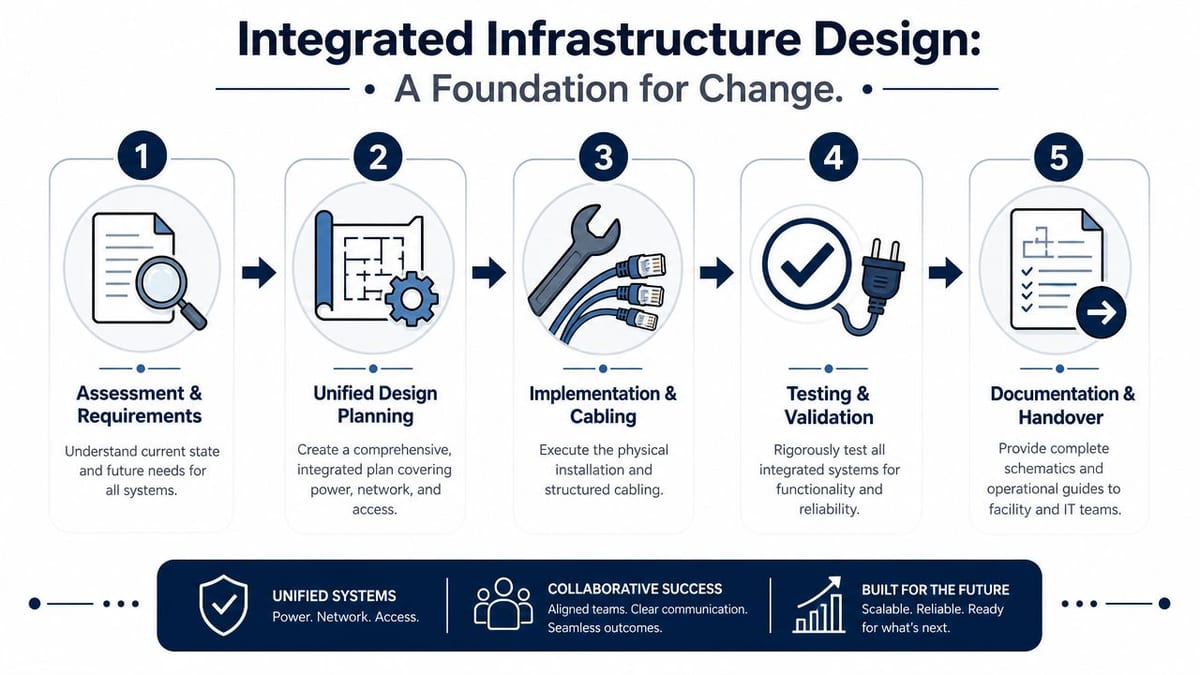
A modern proximity lock is the simplest example. It needs a door set that suits the fire strategy and escape requirements. It needs a reliable controller path. It needs power, either directly or via its wider control system. It may need integration into CCTV events, intercom workflows, alarm states, and user provisioning. If any one of those is weak, the “smart” lock becomes a support burden.
What unmanned building management means in practice
In practice, unmanned building management means a site can operate safely and predictably without a permanent on-site administrator or receptionist. That doesn't mean no human involvement at all. It means routine building access, monitoring, and event handling are controlled by integrated systems rather than by continuous manual presence.
That usually includes:
- Access control: Users enter with approved credentials, often NFC cards or phones, with central permission management.
- CCTV with remote visibility: Security teams can review events, verify entries, and investigate incidents without being physically present.
- Power designed for continuity: Core building technology stays available through planned resilience and orderly fail states.
- Data connectivity: Controllers, cameras, Wi-Fi, alarms, and monitoring platforms all need stable network paths.
- Remote administration: Moves, adds, changes, logs, and alerts can be handled centrally.
- Documented fallback procedures: If the system degrades, staff know what becomes accessible, what remains secure, and who responds.
Why siloed design fails
For UK office relocations, fit-outs, and NHS estate projects, guidance stresses that continuity during cutover depends on upfront site assessment and phased migration, especially in critical or live environments, as highlighted in this change failure guidance for physical and operational transitions.
That principle shows up early in design. Start with surveys, not assumptions.
A useful way to organise the planning work is:
Map the physical estate first
Confirm door types, containment routes, risers, cabinet locations, power availability, camera sightlines, Wi-Fi coverage constraints, and landlord limitations.Design dependencies together
Access control decisions affect cabling, switch capacity, power loading, cabinet space, and maintenance access. Commercial electrical installation and certification can't sit in a separate late-stage package if door hardware, PSUs, and edge devices rely on it.Define support ownership before install
Decide who owns first-line response for access faults, CCTV incidents, electrical defects, and network issues. If support is fuzzy before go-live, it will be chaotic after it.Document governance and standards
Teams that need a structure for approvals, accountability, and operational control often benefit from reviewing established IT governance frameworks.
The first technical drawing I ask for on a building project isn't the pretty one for stakeholders. It's the one that shows what breaks if one cabinet loses power.
Why integration planning should include information systems too
Building changes rarely stay inside the plant room. User identities, room booking, HR joiners and leavers, document control, and handover records all move with the site. That's why I treat information migration and physical migration as part of the same risk picture. If your team is already untangling operational dependencies, a practical SharePoint migration planning guide can help keep documentation, permissions, and project records from becoming their own parallel mess.
Beyond the Blueprint A People-Centric Change Approach
Technical quality isn't enough. Many unmanned building projects fail because the user journey was never designed with the same care as the cabinet layout.
A door can be correctly wired and still fail operationally if contractors don't know how temporary credentials are issued, if cleaners can't access the right zones out of hours, or if managers discover too late that a delivery route now requires escorted entry. People don't experience “the system”. They experience friction at specific moments.
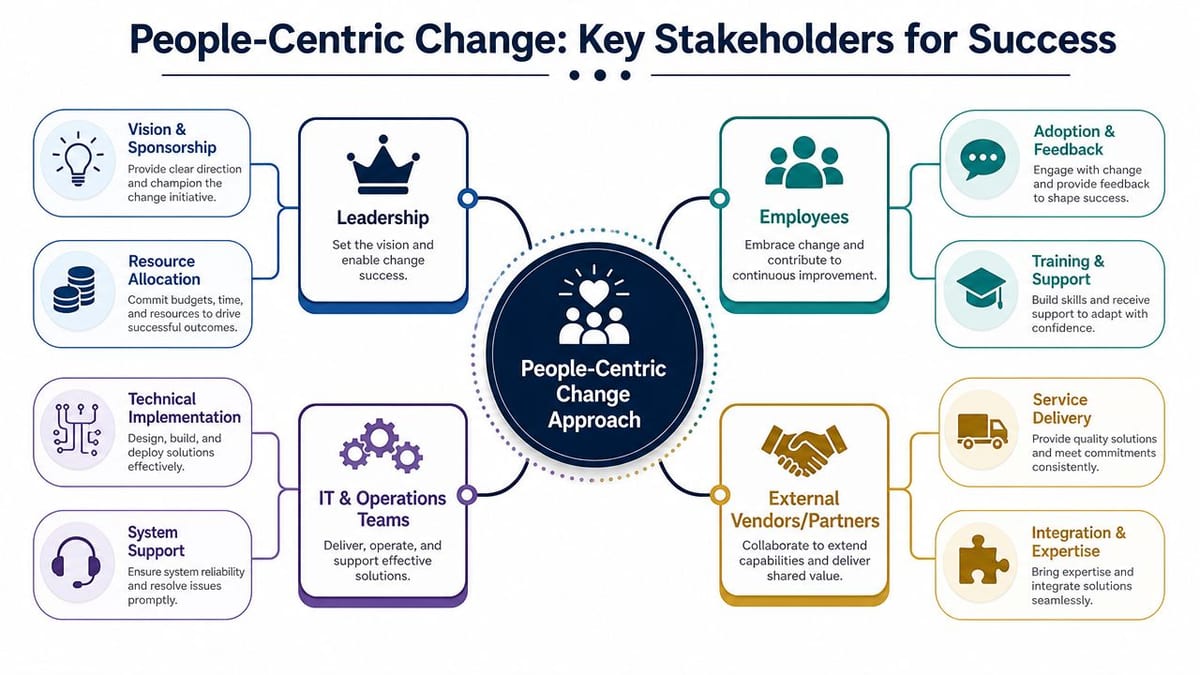
Who needs to be involved early
On a serious building technology change, the stakeholder list usually includes more groups than the project plan first admits.
| Stakeholder group | What they usually care about |
|---|---|
| IT | Network resilience, identity integration, logging, support ownership |
| Facilities | Power, maintenance access, contractor coordination, building operations |
| Security | Access levels, CCTV coverage, incident review, response workflow |
| HR and people teams | Joiners, leavers, visitor processes, staff communications |
| End users | Ease of entry, reliability, clear instructions, fast support |
| Compliance and governance | Audit trail, policy alignment, data handling, certification records |
The mistake is to send all of them the same update. They don't need the same message.
- Leadership needs risk and decision clarity
- Support teams need runbooks and escalation paths
- End users need simple behaviour changes
- Vendors need exact cutover constraints
- Facilities needs practical sequencing on site
A documented stakeholder communication plan helps because timing and audience matter just as much as the message itself.
Why overloaded teams resist even sensible change
One of the most neglected realities in change management is capacity. The NHS in England reported around 112,000 vacancies in 2023, and that matters because change plans often assume staff have spare time for workshops, pilots, and training. They often don't. The verified data ties this operational capacity problem to guidance discussed in AHRQ change activity planning.
That same pressure exists outside healthcare. Internal IT teams are already carrying BAU support, device refreshes, security patching, supplier issues, and user requests. If your project requires endless meetings and broad classroom training, adoption will slip.
A better approach is operationally realistic:
- Train by role, not by org chart: Reception, facilities, security, and floor managers need different scenarios.
- Pilot with the people who absorb the most operational friction: Don't test only with project champions.
- Use short feedback loops: Ten minutes after a shift starts is more useful than a long retrospective two weeks later.
- Protect key staff time: If a team owns day-one support, ring-fence their availability before cutover.
Later in the programme, this kind of guidance can help frame team discussions:
If staff are already stretched, the right question isn't “How do we train everyone at once?” It's “Which task changes first, for whom, and what can wait?”
Why user experience matters in an unmanned building
An unmanned site removes human workarounds. That makes small design choices more important.
Examples include:
- Visitor arrival: Is there a clear path from entry request to remote release?
- Out-of-hours access: Can approved users enter without calling someone who isn't available?
- Fault reporting: Do users know the difference between a locked door, a failed credential, and a network outage?
- Accessibility: Are door timings, intercom response, and route design suitable for real use, not just compliance on paper?
Projects like this succeed when teams map behaviours, not just hardware.
Choosing Your Tech From Smart Locks to Integrated CCTV
The technology choice for an unmanned unit should follow the operating model, not the other way round. Start with the question, “How will this site function on an ordinary Tuesday at 6:30am, at lunchtime, and during a fault?” Then choose devices and platforms that support that reality.
Building out a fully autonomous unmanned building unit
A fully autonomous unit usually combines several layers:
- Access control for staff, contractors, and approved visitors
- Integrated CCTV for verification, deterrence, and incident review
- Intercom or remote assistance for edge cases
- Structured cabling and switching to connect edge devices reliably
- Commercial electrical installation and certification so powered systems are safe, compliant, and supportable
- Central monitoring for alarms, access events, and system health
- Documented fail-safe or fail-secure logic based on the use of the space
Common locations include multi-tenant commercial properties, flexible office suites, managed industrial units, remote depots, secure clinics, server rooms, shared meeting facilities, and estate buildings that only have periodic staff presence.
Why battery-less NFC proximity locks often make sense
Battery-less NFC proximity locks are often the right choice for unmanned environments because they remove one of the most annoying maintenance variables in access control: battery replacement at scale.
That matters more than many buyers expect. In a small deployment, changing batteries sounds manageable. Across multiple doors and multiple sites, it becomes recurring planned maintenance with uneven execution. Someone misses a replacement cycle. A battery degrades faster in one location. A user hits a failed reader at the wrong time. The issue becomes operational, not technical.
Real-world reasons teams choose battery-less NFC options include:
- Lower routine maintenance: No battery schedule to track across doors.
- Fewer hidden service visits: That matters on sites without permanent on-site staff.
- Cleaner operational model: Access rights can be managed centrally without pairing every permission change to a hardware maintenance burden.
- Good fit for credential simplicity: NFC is familiar to most users through cards and phones.
- Better lifecycle predictability: Fewer consumables usually means fewer avoidable edge failures.
That doesn't mean they're right everywhere. If a door environment, fire strategy, or retrofit constraint points elsewhere, forcing NFC is a mistake. The point is to choose hardware that reduces support overhead while matching actual site conditions.
CCTV decisions that affect operations, not just security
Integrated CCTV is more than camera count. In unmanned settings, the useful questions are operational:
| Decision area | What to ask |
|---|---|
| Coverage | Can security verify entrances, delivery points, and shared internal zones? |
| Retention and access | Who can review footage, under what policy, and how quickly? |
| Event integration | Can access events be correlated with camera views during incident review? |
| Network impact | Does the switching and storage design support the video load? |
The same principle applies across the stack. A standalone “best of breed” device can become the wrong choice if it creates another login, another support contract, another data island, or another failure mode.
Selection rule: Buy components that reduce operational ambiguity, not components that merely add features.
The discipline behind this is old-fashioned in the best sense. ITIL, first published in the UK in 1989, embedded change as a traceable, authorised, and measured practice for reducing disruption during transitions like fit-outs and network refreshes, as summarised in the verified data through the earlier ITIL reference. For autonomous buildings, that means every lock, camera, uplink, and cabinet decision should fit an approved change record, an integration plan, and an operational support model.
From Plan to Reality A Staged Rollout Strategy
The worst way to launch an unmanned building is a hard cutover with no proving ground. The better route is staged deployment, where each phase tests both technology and operations before the next one expands.
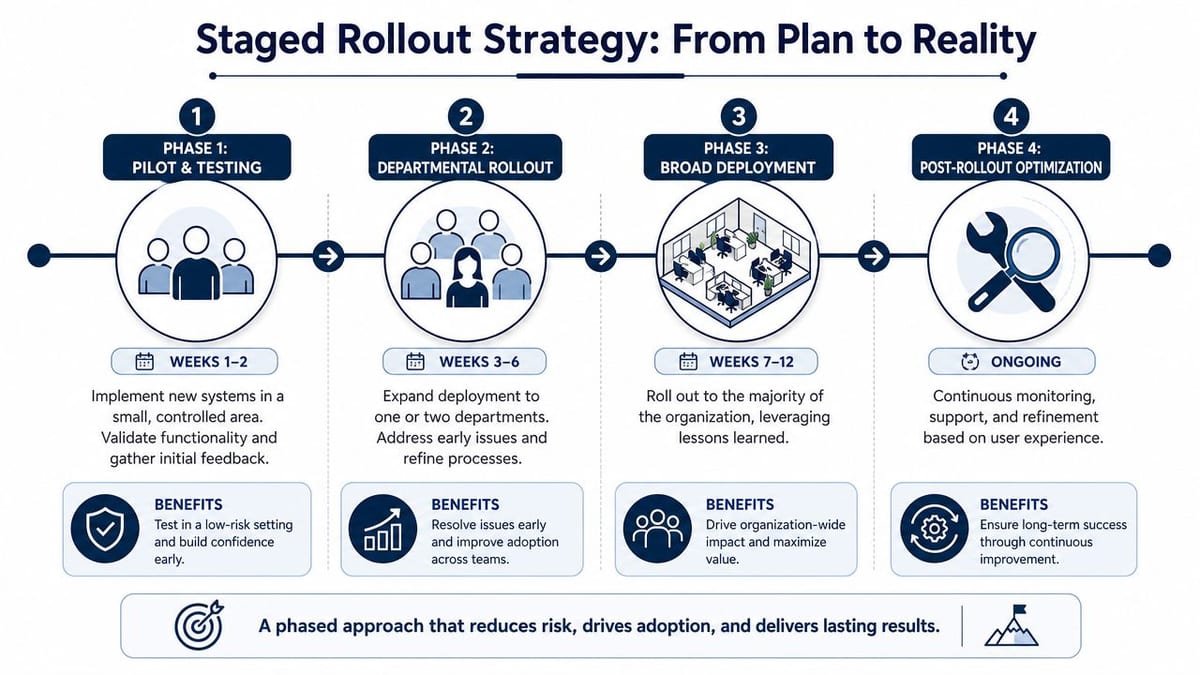
Verified UK data shows that change management strategies in hospital relocations and server expansions that use measurable milestones and phased go-live support improve project compliance and reduce operational downtime by 47%. The practical logic carries directly into commercial fit-outs and autonomous site deployments. Phase the risk. Don't compress it into one morning.
A rollout model that works in real buildings
A staged rollout often looks like this:
Controlled pilot
Use one area, one user group, or one building zone. Validate access permissions, activation timings, event logs, CCTV visibility, and support response.Limited operational expansion
Add another department, shift pattern, or contractor group, and edge cases often appear, especially around deliveries, visitors, and out-of-hours access.Main deployment
Roll out broadly once the runbooks, support ownership, and exception handling are proven.Stabilisation period
Keep project and engineering support active beyond launch. Don't disappear the moment users can badge in.
What to test before each go-live
Testing has to cover more than “does the door open?”
- Normal use cases: Staff entry, contractor access, remote release, scheduled releases, and role-based permissions
- Logging and monitoring: Event timestamps, CCTV correlation, alarm visibility, and support alerts
- Failure scenarios: Comms loss, power interruption, controller reboot, failed credential reads, and fallback procedures
- Operational edge cases: Lost cards, mobile credential issues, cleaners' access, delivery arrivals, and escorted visitors
A short cutover checklist is useful here:
| Test area | Minimum evidence needed |
|---|---|
| Access | Approved users can enter assigned zones and denied users are blocked |
| Power | Critical devices behave as designed during outage and recovery |
| Data | Controllers, cameras, and dashboards remain reachable and stable |
| Support | First-line team can diagnose, escalate, and communicate clearly |
Go-live support should stay on site or immediately available until the first real operational cycle has passed. That means actual arrivals, actual deliveries, and actual early-morning use.
Maintenance and handover are part of rollout
Maintenance planning belongs before launch, not after it. Unmanned environments especially need clean ownership because no one is physically present to absorb recurring faults.
Make sure handover includes:
- Runbooks: What to do when a door is offline, a camera drops, or a cabinet loses power
- Asset records: Installed hardware, serials, locations, warranties, and support contacts
- Electrical and network certification packs: Commercial electrical installation and structured cabling both need proper test records
- Change history: What was installed, approved, deferred, and still open
- Support training: The people taking calls need scenario-based instruction, not just PDFs
Rollback planning matters too. If one deployment phase introduces instability, teams need a defined way to isolate that phase without losing the whole site.
Making It Stick Long-Term Success and Continuous Improvement
A building project isn't successful because the install finished. It's successful when the site operates cleanly three months later, support tickets are understandable, users trust the process, and the system can absorb routine change without drama.
That requires reinforcement.
What long-term success actually looks like
For unmanned building management, the most useful post-go-live questions are practical:
- Are users getting through the right doors without support intervention?
- Can security review incidents quickly using access and CCTV records together?
- Are maintenance tasks predictable, or are hidden faults surfacing every week?
- Can IT and Facilities make permission changes, replacements, and additions without re-opening the original project?
In UK infrastructure work, verified benchmark data links continuous stakeholder engagement and measurable milestones to better compliance and less downtime in hospital relocations and server room expansions. The same verified data also warns that 39% of UK infrastructure failures involve a lack of qualified feedback loops. For building projects, that means you need structured user feedback after launch, not just technical monitoring.
Where continuous improvement usually pays off
The strongest improvements often come from boring operational lessons:
- Refining access groups: Initial permissions are often too broad or too narrow.
- Adjusting CCTV views and event workflows: Security teams usually discover better alerting and review patterns once the building is live.
- Updating runbooks from real incidents: The first few genuine support calls expose what documentation missed.
- Capturing lessons learned properly: A formal lessons learned documentation process stops the next fit-out from repeating the same avoidable errors.
These systems are commonly used in shared commercial offices, managed workspaces, secure health settings, warehouse offices, remote branch units, and mixed-use properties where access control, CCTV, and remote oversight need to work without a full on-site team.
The organisations that get the most from change management strategies aren't the ones with the fanciest hardware. They're the ones that keep improving the operating model after the install team leaves.
A final point is worth keeping in view. If your project includes live cutovers, integrated CCTV, commercial electrical installation and certification, structured cabling, Wi-Fi, access control, and autonomous site operations, you're not buying a collection of parts. You're designing a service. The service only works when people, process, and physical infrastructure were planned together from the start.
If you're planning an office relocation, fit-out, server room expansion, or a move toward autonomous unmanned building units, it often helps to work with a team that can engineer the whole environment rather than just one layer of it. Constructive-IT supports UK organisations with integrated network infrastructure, access, CCTV, electrical works, testing, certification, and go-live delivery designed to keep disruption under control.