
You’re usually not searching for command prompt ip address help because you’re curious. You’re doing it because something in the building isn’t behaving the way the drawings said it would. A lock won’t report status. A CCTV recorder is visible on one switch but not from the monitoring VLAN. A power meter is online locally and dead from the remote dashboard. In an unmanned building, those aren’t isolated snags. They’re signs that the IP layer wasn’t verified properly.
That matters more in autonomous sites than it does in a conventional office. If a receptionist isn’t there, if security isn’t permanently on site, and if plant, access, surveillance and alarms are all expected to run with remote oversight, then the network becomes the operating layer of the building. Command Prompt remains one of the fastest ways to prove what’s happening on that network, especially during fit-out, migration, go-live and post-handover support.
The Network Challenge in Unmanned Buildings
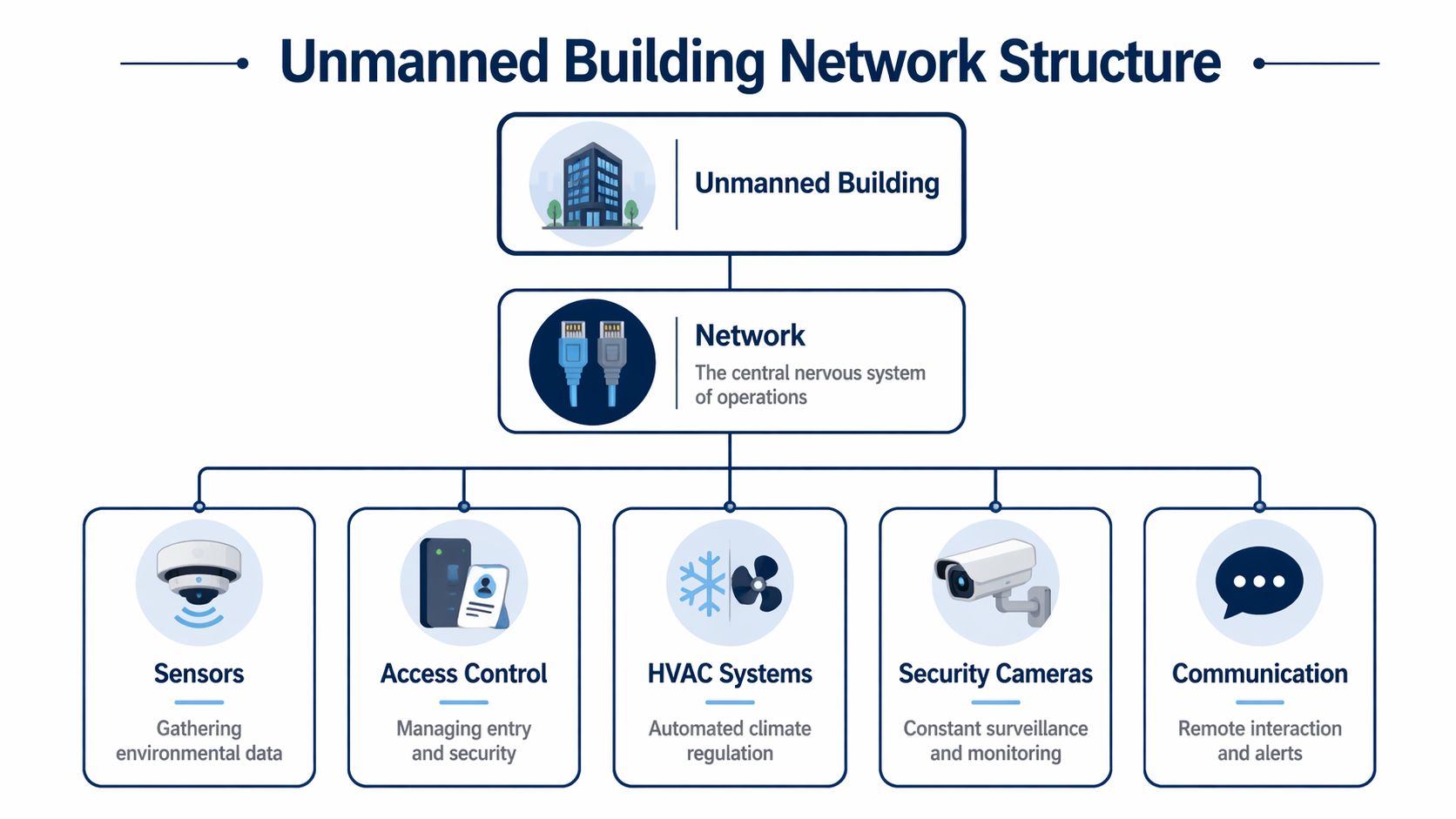
An unmanned building is a site designed to keep operating without routine on-site staff. In practice that means doors are controlled electronically, CCTV is recorded and reviewed remotely, electrical systems are monitored, alarms report back to a platform, and environmental services can be checked or adjusted without sending an engineer to the premises. The building still needs people. It just shouldn’t need people standing there all day to keep the basics working.
That sounds straightforward until different trades install systems as if they live in separate worlds. Access control wants reliable edge connectivity. CCTV wants predictable bandwidth and stable addressing. Building power and monitoring equipment often depends on network paths that electrical contractors don’t fully validate at IP level. A fit-out can look tidy on a plan and still fail in use because nobody checked how those systems talk to each other after the last cabinet was patched.
Why projects fail when the hardware is fine
Most failures at handover aren’t dramatic hardware faults. They’re basic addressing, routing, naming and segmentation issues that were never caught early enough.
Common examples include:
Access control on the wrong subnet. The controller powers up, the lock reader works locally, but remote events never reach the management platform.
CCTV with inconsistent addressing. Cameras appear during commissioning, then disappear after a reboot or switch replacement because addressing wasn’t planned cleanly.
Power and data treated as separate packages. Electrical certification may be complete, but monitored devices still can’t report over the network path they depend on.
Remote support blocked by design. The building is technically live, but no one can securely reach the systems that need ongoing checks.
Practical rule: If access, power and data are designed separately, the building won’t behave as one system.
A lot of modern fit-outs also underestimate edge device diversity. You’re no longer validating a few workstations and printers. You’re validating intercoms, CCTV cameras, door controllers, monitored power, lifts interfaces, audiovisual endpoints and gateways linking those systems to external platforms. Good Industrial Connectivity Solutions thinking helps here because it forces the right question: not “is it powered?” but “is it addressable, reachable, segmented correctly and supportable under fault conditions?”
Designing access, power and data together
The trade-offs become tangible. A beautifully specified lockset is the wrong choice if it increases maintenance overhead in a lightly attended building. A power design that ignores network resilience creates blind spots the first time a device drops off the monitoring dashboard. A data design that leaves no room for operational technology growth becomes brittle as soon as extra cameras or control points are added.
Battery-less, NFC proximity locks are often the right call in unmanned environments for practical reasons:
Less maintenance burden. You’re not building a schedule around battery replacement across multiple doors.
Fewer silent failures. A battery doesn’t have to fail before someone notices that access resilience was overstated.
Cleaner operational model. Facilities teams can manage credentials and physical access without adding another consumable maintenance stream.
Better fit for low-attendance sites. Storage units, remote logistics buildings, utility rooms and satellite offices all benefit when door hardware doesn’t need constant attention.
That choice still has to sit inside a joined-up design. The lock hardware, controller, network switch, power arrangement, monitoring path and remote support method all need to be treated as one deliverable. The same goes for CCTV, commercial electrical installation and certification, and the wider job of building out a fully autonomous unmanned building units strategy that can be maintained after the installers leave.
Finding Your Bearings with ipconfig
When a system goes missing on a live network, is where the real work starts. It tells you what the local machine believes about its own network identity. That sounds basic, but it’s often the fastest way to spot why a commissioning laptop can’t reach a door controller, why a CCTV workstation can’t see the recorder, or why a temporary support PC is sitting on the wrong adapter.
In the UK, 95% of fixed broadband connections rely on dynamic IP address assignments via DHCP, which is directly verifiable with according to Ofcom’s 2023 broadband performance research. In practice, that means many building devices and support machines won’t keep the same address unless you’ve deliberately planned reservations or static settings.
Start with the plain output
Open Command Prompt and run:
That gives you the essentials. On a commissioning laptop or plant room PC, I’m usually checking three things first:
IPv4 address. Does the machine belong on this network segment?
Subnet mask. Is it in the same local scope as the device I’m trying to reach?
Default gateway. If remote services matter, is traffic leaving through the expected route?
If the site has multiple adapters, don’t stop there. Run:
That gives you the fuller picture, including adapter names, DHCP status, DNS servers and physical addresses. In a building with separate corporate, CCTV, access control and management networks, adapter confusion is common. Engineers often troubleshoot the wrong interface because Windows has helpfully preferred Wi-Fi over the live wired port.
Interpreting what is telling you
Parameter | Example Value | What It Means for Your Building |
|---|---|---|
IPv4 Address | Local adapter address | Confirms which network the device is actually on |
Subnet Mask | Local subnet mask | Shows whether local devices should be directly reachable |
Default Gateway | Router or firewall address | Determines whether cloud platforms and remote support paths are possible |
DHCP Enabled | Yes or No | Tells you whether the address is being assigned automatically or fixed intentionally |
DHCP Server | Local DHCP source | Helps confirm whether the right network service is handing out addresses |
DNS Servers | Resolver addresses | Affects whether management platforms and hostnames resolve correctly |
Physical Address | Adapter MAC address | Useful when matching a device to switch port records or controller inventories |
Lease Obtained / Lease Expires | DHCP timing fields | Important during handover when devices seem to “move” after renewal |
What works on site and what doesn’t
works best when you use it as a verification tool, not as a ritual. Don’t just run it because every basic tutorial says to. Read it against the design.
For example:
A CCTV support workstation should show the adapter that connects to the surveillance VLAN.
A door access commissioning laptop should have a route and gateway that match the controller network, not the guest Wi-Fi.
A power monitoring gateway should be checked from the machine operations will use, not from an isolated installer laptop that won’t remain on site.
A surprising amount of “device failure” turns out to be “wrong NIC, wrong VLAN, wrong gateway”.
If you need a practical office-side example of tracing a specific endpoint, this guide on how to discover the IP address of a printer in your office shows the same discipline that applies to cameras, controllers and building support devices. The endpoint changes. The logic doesn’t.
A few signs to act on immediately
Use and stop if you see any of these:
Media disconnected on the interface you expected to use
An address from the wrong range for the cabinet or floor you’re standing in
No default gateway where cloud reporting is required
Unexpected DNS servers when a hosted platform won’t resolve
DHCP enabled on a device or support machine that was meant to be fixed for operational reasons
In autonomous sites, good commissioning isn’t about proving the device powers on. It’s about proving the address, route and naming are right before the building is left to run without daily human intervention.
Verifying System Connectivity with Ping and Nslookup
Once you know your own addressing is sane, the next question is simple. Can you talk to the thing that matters?
That’s where and earn their keep. They’re basic tools, but in fit-outs they answer high-value questions quickly. Is the lock gateway online. Is the CCTV recorder reachable from the monitoring station. Is the cloud management platform resolving the way the firewall rules expect.
UK cybersecurity reporting from the NCSC found that 42% of network breaches involved IP misconfigurations detectable via Command Prompt tools such as and in its 2024 UK cyber threat reporting. That’s why these commands matter beyond convenience. They’re also part of basic security hygiene in commercial fit-outs.
Reading properly
tests whether a target is reachable over IP. On site, that often means checking a gateway, recorder, controller or uplinked edge device before anyone signs off a room or riser.
A few practical interpretations matter:
Replies come back normally. You’ve proved basic reachability, not full application health.
Request timed out. The target may be offline, filtered, on the wrong network, or configured not to answer ICMP.
Destination host unreachable. The problem is usually closer to your own machine, route or local segment.
That distinction saves time. If a newly installed NFC lock gateway doesn’t answer, don’t assume the gateway is dead. Check whether your laptop is on the right segment first. If the central CCTV recorder answers from the rack switch but not from the control desk, that points toward segmentation, routing or firewall policy rather than recorder failure.
For teams that want a cleaner primer on latency interpretation, this walkthrough on how to measure network latency using and commands is useful background before you start judging whether a building link is merely reachable or healthy.
Using when names matter more than addresses
Unmanned buildings rarely operate as sealed local islands. They rely on remote dashboards, hosted access platforms, CCTV relay services and vendor support paths. Those systems often depend on names resolving properly, not just raw addressing.
Run:
followed by the platform hostname
That tells you whether DNS is returning an answer and which resolver is providing it. If the building management platform doesn’t load, but to the gateway is fine, helps separate local network reachability from name resolution failure.
Field note: A site can look “online” at switch level and still be operationally blind if the services it depends on don’t resolve correctly.
A related check that often helps during handover is confirming the local router or firewall address first. If you need a quick reference for that step, this guide on how to find the IP address of your router is a straightforward place to start.
Here’s a short demonstration of the sort of command-line checking that fits this stage of commissioning:
Real examples from autonomous sites
The command prompt ip address problem usually appears in one of these forms:
Remote access control portal won’t sync. to the local controller may work, while for the hosted platform fails. That points to DNS or upstream policy.
Electrical monitoring device is visible on the switch but not in the dashboard. Reachability may exist locally, but the hostname or service target isn’t resolving.
CCTV recorder is reachable by address but not by name. Operators often report this as a camera issue when it’s a naming issue.
In each case, gives you transport evidence and gives you naming evidence. Together they narrow the fault domain quickly. That’s what matters when you’re trying to leave a building in a state where nobody needs to drive back just to answer a basic connectivity question.
Advanced Network Diagnostics with Netstat and Arp
Basic reachability isn’t enough when the building is live, remote and expected to stay trustworthy. At that point, you need to know not only whether a device is online, but what it’s talking to and whether the local network contains devices that shouldn’t be there.
and are where Command Prompt becomes less of a lookup tool and more of a forensic tool.

What tells you
shows active connections and listening ports. On a building management server, NVR host or access control workstation, that helps answer practical questions:
Is the service LISTENING where it should be?
Is the machine making unexpected outbound connections?
Is a local application bound to the expected interface, or only to loopback?
Is the port conflict local rather than on the network?
If a monitoring server is supposed to accept connections from controllers and doesn’t show the right listening state, you’ve found a host-side issue. If a supposedly isolated workstation has a list of outbound sessions you didn’t expect, that deserves investigation before handover.
Why matters in secure plant and server spaces
maps recently seen IP addresses to MAC addresses on the local segment. In unmanned facilities, that matters because unauthorised physical connections are often discovered through network side effects before anyone sees the device itself.
Run after communicating with the relevant segment and compare what appears against what should exist. If a cabinet should contain a door controller, a camera uplink and a monitored power device, but you’re seeing an extra endpoint, that’s a useful clue. It may be innocent. It may be a temporary test device. It may also be the start of a security problem.
Don’t treat the ARP table as an academic list. Treat it as evidence of what the local network has actually had to resolve.
When name and cache issues look like device faults
Often, engineers go in circles. A service moves, a VLAN changes, a gateway gets replaced, and everyone starts blaming endpoints. Before you start rebooting equipment, clear the client-side name cache.
For UK data centre expansions, using resolves 92% of IP resolution delays during go-live events according to NICC 2025 standards. In practice, that makes it one of the lowest-risk first moves when a building server, CCTV platform or management host has stale resolution data after reconfiguration.
A sensible sequence is:
Run
Retry the hostname lookup or service access
Use to check whether local neighbour resolution looks sensible
Use to confirm the service state on the host you control
If repeated faults point to the local Windows stack or a misapplied address configuration, this guide on how to fix IP configuration failure in your business network is a useful reference for the underlying checks.
What works better than blind restarts
Blind restarts are popular because they’re easy. They’re also noisy and they erase useful evidence.
A better operating pattern is:
Check listening ports first with
Inspect local neighbour mappings with
Flush DNS only when name resolution is in doubt
Record what changed before and after a fix, so the maintenance team inherits something usable
That matters in certified commercial electrical and data installations because the building has to remain supportable after practical completion. If the only troubleshooting method is “turn it off and on again”, you don’t have a maintainable autonomous site. You have a future callout.
Building a Resilient Autonomous and Maintainable System
A reliable unmanned building isn’t created by adding more smart devices. It’s created by making the whole stack supportable over time. That includes structured cabling, switching, remote access, commercial electrical installation and certification, CCTV retention and retrieval, and the small command-line checks that prove the building is behaving as designed.
Maintenance is where good projects separate themselves from impressive demonstrations. A site may look fully autonomous on handover day and still become expensive to run if every fault requires a specialist visit, every access issue needs manual intervention, or every camera problem turns into a hunt for undocumented addresses.
Build a baseline before you leave site
Every autonomous building should leave commissioning with a recorded baseline. Not a vague spreadsheet. A practical support record.
That baseline usually includes:
Confirmed local addressing for key support points
Verified gateway paths for systems that need remote access
Known-good name resolution for hosted platforms
ARP visibility checks on sensitive segments
Listening service checks on management hosts and recorders
Those records matter when the building is used for remote logistics, managed storage, satellite offices, plant enclosures or shared workspace that operates outside normal staffed hours. They also matter when third parties later touch the electrical or network estate and operations need to know what “good” looked like before the change.
Choose components that reduce operational drag
Battery-less NFC locks warrant renewed consideration. They aren’t automatically right for every door, but they’re often the better operational choice where attendance is low and reliability matters more than novelty.
The reasons are practical:
No battery replacement programme to organise across distributed doors
Less dependence on routine visits just to preserve access continuity
Cleaner fit with remote administration when credentials need changing
Lower chance of a preventable lock outage becoming a building access incident
The same principle applies elsewhere. Pick CCTV hardware that’s manageable remotely. Choose network hardware with clear support visibility. Design monitored power in a way that gives facilities staff useful alarms rather than opaque device states. In other words, don’t just specify components. Specify maintenance behaviour.
Autonomous buildings fail slowly when the maintenance model is wrong.
Use PowerShell for repeatable health checks
Command Prompt gets you through diagnosis and commissioning quickly. Once the site is stable, PowerShell is the natural next step for repeatable checks.
You can script simple routines around the same logic:
test whether a known host responds
check whether a name resolves
log whether a service port is available
record changes in local adapter state
That’s useful for recurring verification across CCTV servers, access control workstations, power monitoring hosts and support laptops used during planned works. It also helps when an in-house IT team inherits the site and needs a repeatable, low-friction method rather than tribal knowledge.
Keep CCTV and network exposure under control
Security maintenance in autonomous sites is never finished. Cameras, gateways and management appliances need regular verification because they are often reachable, distributed and forgotten once the building is “done”.
A 2025 ICO audit report flagged that 22% of UK firms had IP-exposed CCTV vulnerabilities, and noted the value of command-line tools such as during network sweeps and system integrations in its data security incident reporting. That should be read as an operational warning. If you don’t know which CCTV endpoints are present, expected and segmented correctly, you’re not maintaining the site properly.
Where these systems are commonly used
The same design discipline shows up across very different building types:
Remote logistics hubs where access, cameras and monitored power must be managed centrally
Satellite offices that aren’t staffed continuously but still need controlled entry and reliable connectivity
Storage and service units where autonomous access and surveillance are core to the business model
Utility and plant buildings where environmental and electrical status has to be visible off site
Shared commercial spaces where occupancy changes but the core building controls must remain stable
The common thread isn’t the building type. It’s that access, power and data have to be designed together, validated properly, and handed over in a form that can be maintained by real people under real conditions.
If you’re planning an unmanned fit-out, a relocation, or an upgrade where CCTV, electrical works, access control and network design all need to land cleanly, it helps to involve a team that understands those dependencies from the start. Constructive-IT works with in-house IT and facilities teams to design, install and support the infrastructure that makes autonomous buildings workable, not just impressive on paper.