
You’re probably in the middle of the same conversation most IT managers have before a new office fit-out or relocation goes live. The design team wants smooth access control. Facilities wants the building to run with fewer on-site staff. Security wants high-retention CCTV. Operations wants no downtime. Finance wants one answer on what storage to buy and why.
That’s where the wrong SSD decision causes trouble that won’t show up on a glossy spec sheet.
Fast SSD drives matter in server environments because they don’t just make file copies quicker. They determine whether CCTV recording stays consistent, whether virtual machines remain responsive during peak use, whether access systems recover cleanly after a power event, and whether an unmanned building behaves like an autonomous site instead of a site that constantly needs manual intervention. In practice, the storage layer becomes the unseen dependency behind commercial electrical installation and certification, autonomous building control, and the systems that sit on top of your network.
The Unseen Engine of the Modern Intelligent Building
A modern office or hospital fit-out produces far more data than most project plans admit early on. CCTV writes continuously. Access events hit databases all day. Building controls generate logs, alerts, and telemetry. If the project includes fully autonomous unmanned building units, the expectation shifts again. The site must keep operating when no one is nearby to fix a stalled service, reboot a recorder, or manually reconcile a failed transaction.
Unmanned building management, in practice, means the building can continue day-to-day operation with minimal routine human presence on site. Doors open for authorised people, plant and environmental systems report status, alarms route correctly, CCTV records and retains footage, and operators can verify events remotely. It doesn’t mean “no maintenance ever”. It means the infrastructure has to be designed so remote oversight works and local failures don’t turn into operational chaos.

The storage layer sits underneath all of that. The move to NVMe PCIe 4.0 SSDs with speeds up to 7,000 MB/s, or 25 to 100 times faster than traditional HDDs, has been a key enabler for modern UK data centres, and enterprise capacities reached 122.88TB by 2025 with storage density improving by over 1000x since the 1976 Dataram 2MB Bulk Core, according to Payam’s SSD facts summary. Those figures matter because they make it practical to support high-speed Wi-Fi, LAN/WAN design, and large AV/CCTV estates without creating storage bottlenecks.
What fails first in badly planned projects
Many unmanned building projects fail for boring reasons, not dramatic ones. Teams buy fast-looking drives meant for desktop workloads. They separate access design from power design. They size storage for average use instead of sustained write load. Then the first fault appears during a power fluctuation, a firmware issue, or a period of heavy recording and concurrent system use.
Practical rule: If the building has to keep recording, authenticating, and reporting while no one is on site, the storage choice is an infrastructure decision, not a component purchase.
Where this shows up on real sites
You see the pressure most clearly in environments such as:
Office fit-outs with integrated CCTV where security footage, file services, and virtualised applications share the same server platform.
Healthcare and clinical estates where relocation windows are tight and delayed system recovery isn’t acceptable.
Managed or semi-unmanned buildings that rely on remote monitoring, controlled entry, and dependable audit trails.
Sites with electrical certification and staged commissioning where power events, phased energisation, and system handovers put stress on server storage early.
When clients ask about fast ssd drives, the core question usually isn’t “What’s the fastest model?” It’s “What storage will keep this building working when every connected system starts demanding I/O at once?”
Understanding the Technology That Makes SSDs Fast
A lot of SSD confusion comes from mixing up three different things. The flash memory inside the drive. The physical connection to the server. The protocol that tells the server how to talk to the drive.
If you keep those separate, the buying decision gets much easier.
SATA, PCIe and why the road matters
Think of SATA as a single-lane road designed in an earlier era. It still works, and for lighter tasks it’s perfectly serviceable. But once multiple building systems start hitting storage at the same time, that road clogs quickly.
PCIe is the multi-lane motorway. It gives the drive a much faster path back to the CPU and memory. That’s why NVMe drives attached over PCIe are the default for performance-sensitive server work. They’re built for parallel activity, not just one request after another.
A simple comparison helps:
Interface type | Best fit | Trade-off |
|---|---|---|
SATA SSD | Basic boot volumes, light duty systems | Lower bandwidth, weaker fit for heavy concurrent I/O |
PCIe NVMe SSD | Virtualisation, CCTV ingest, databases, mixed enterprise workloads | Higher cost, more attention needed for platform compatibility and cooling |
AHCI and NVMe and why the traffic system matters
Now add the protocol. AHCI was built with older storage assumptions in mind. NVMe was designed for non-volatile flash and high queue depth. The simplest analogy is this. PCIe gives you the motorway. NVMe gives you the traffic management system that keeps thousands of vehicles moving without junctions backing up.
That difference becomes decisive in enterprise server rooms. CCTV doesn’t write in polite bursts. Access control and building logs don’t wait their turn. VDI sessions, database jobs, file indexing, and security services can all request storage at once.
The NAND trade-off inside the drive
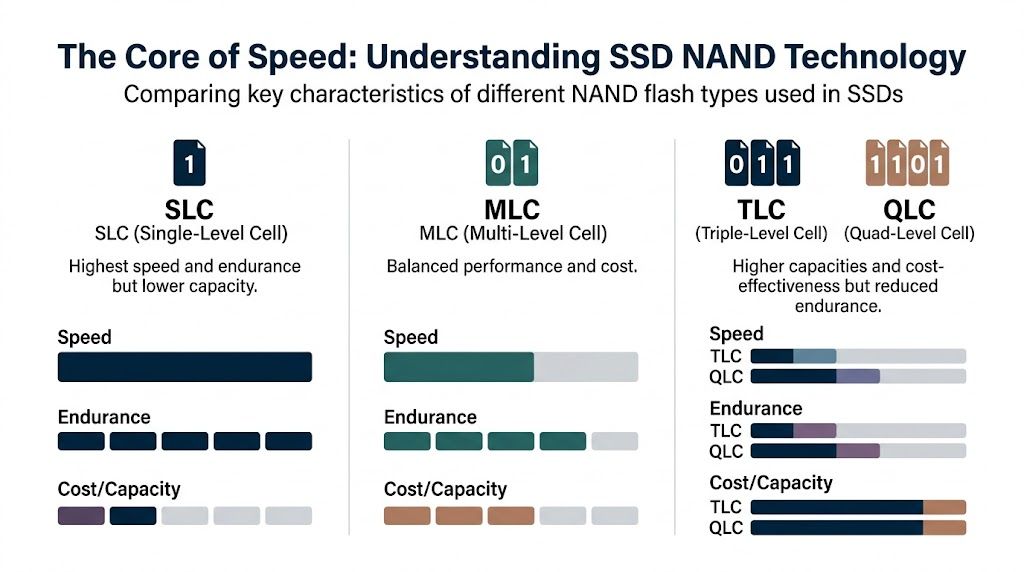
The flash itself also changes behaviour. NAND choice affects speed, endurance, cost, and capacity. That matters because clients often compare two “NVMe drives” as if they’re functionally identical. They aren’t.
SLC is the premium option for speed and endurance, but capacity is limited and cost is high.
MLC sits in the middle with a more balanced profile.
TLC is common because it offers good density and acceptable performance for many workloads.
QLC increases capacity and lowers cost efficiency per usable space, but it’s usually a poor answer for write-heavy enterprise jobs unless the workload has been properly profiled.
A drive can be technically fast and still be the wrong fit. If the NAND profile doesn’t match the workload, the system may benchmark well and behave badly in production.
Why this matters for autonomous buildings
Access, power, and data have to be designed together. That’s not a slogan. In a building expected to run with minimal on-site intervention, the storage platform sits directly in the chain between door events, CCTV retention, remote monitoring, and fault recovery.
Battery-less, NFC proximity locks fit well into this kind of design because they reduce the maintenance burden at the edge. You’re not building a lock estate that depends on widespread battery replacement cycles and the missed maintenance that comes with them. But those locks still create logs, credential events, and integration traffic. The fewer field-maintenance variables you have, the more important it becomes that the back-end server platform is dependable.
That’s why NVMe over PCIe isn’t a luxury in serious infrastructure projects. It’s the baseline for building systems that have to keep up with real-world concurrency, not just look quick in a procurement spreadsheet.
Decoding Enterprise SSD Performance Metrics
When buyers compare fast ssd drives, they usually start with sequential read and write figures. That’s understandable, but it’s only part of the story. In a server room supporting CCTV, access databases, building telemetry, and virtualised services, the more important question is how the drive behaves under many small, simultaneous requests.
Sequential speed is only the headline
A high sequential number helps with large file transfers, image deployment, and some backup tasks. It doesn’t tell you how the drive will cope when a VMS is writing footage, the access platform is updating events, users are hitting file shares, and the server is busy with background jobs.
For enterprise workloads, the T705 PCIe 5.0 NVMe SSD reaches up to 1.8 million random IOPS and uses direct CPU-to-SSD connectivity to reduce latency, while SATA SSDs are capped at approximately 600 MB/s, making them a poor fit for high-I/O work such as virtualisation and database migrations, according to TechRadar’s fastest SSD testing.
That’s the difference between a drive that looks fast in isolation and one that remains responsive when the server is doing its job.
What IOPS means in plain terms
IOPS means input/output operations per second. For building systems, that often matters more than bulk throughput.
If sequential speed is how fast a lorry can travel on an empty road, IOPS is how efficiently a city can handle thousands of smaller journeys at once. A server supporting access control, alarm logging, and CCTV indexing doesn’t need one giant uninterrupted transfer. It needs rapid handling of many requests without queueing delays.
This matters in environments such as:
CCTV platforms where recording, playback, indexing, and export requests happen together.
Virtual machines that share one storage pool and generate bursts from different services at once.
Access control databases where event writes and operator lookups must stay responsive.
Building management systems that log changes continuously while operators review dashboards remotely.
Latency is where users feel the problem
Latency is the delay before storage responds. End users rarely describe it that way. They say playback is sluggish, reports hang, dashboards feel sticky, or doors and audit events appear out of sync.
That’s why direct CPU-to-SSD communication through NVMe matters. It cuts overhead. The path is shorter and more efficient. The practical result is a system that feels composed under load instead of hesitant.
Low latency is the difference between “the server is up” and “the building systems feel normal”.
For teams looking beyond a single-server mindset, this piece on optimizing storage solutions is useful because it frames storage as part of a wider platform decision rather than an isolated hardware buy.
Mixed workloads are the real test
The hardest part of SSD selection is that most office and building environments are mixed by nature. You’re not buying for one perfect benchmark. You’re buying for collisions between workloads.
That’s where internal architecture, queue handling, firmware quality, and sustained behaviour matter more than a marketing label. It’s also why many teams should read beyond desktop-style comparisons and think about whether they need local high-speed storage, a shared array, or a NAS layer for less time-sensitive workloads. If that’s part of your planning, this guide to network attached storage for UK businesses helps frame where NAS fits and where it doesn’t.
A short demo can help if you need to show non-specialists why storage metrics differ from simple copy-speed claims.
What works and what doesn’t
What works is matching the drive to the I/O pattern. NVMe for active enterprise workloads. Sensible workload separation. Validation under load.
What doesn’t work is assuming that a drive advertised as “fast” will automatically support 24/7 mixed enterprise duty. A benchmark may tell you how quickly it can sprint. It won’t tell you how well it copes with a long day of simultaneous building services unless you test for that explicitly.
Why Endurance and Reliability Outweigh Raw Speed
A drive that wins a benchmark and fails in a live server is a bad purchase.
That sounds obvious, yet many projects still choose storage as if speed alone decides the outcome. It doesn’t. In unmanned or lightly staffed buildings, the winning SSD is the one that survives continuous use, handles power disturbance well, and gives operators fewer reasons to intervene.
Why many unmanned building projects fail
Most failed unmanned building deployments don’t fail because the concept was wrong. They fail because the infrastructure underneath wasn’t designed for unattended operation. Teams focus on visible systems like cameras, locks, dashboards, and remote portals, then under-spec the server platform carrying the load.
That mistake gets expensive quickly. Current guidance for UK organisations still focuses heavily on consumer speed while leaving major gaps around endurance ratings, failure costs, and downtime risk under sustained server workloads, as highlighted by Tom’s Hardware’s review coverage gap.
If your estate includes autonomous monitoring, access control, CCTV retention, and remote oversight, storage isn’t just a performance issue. It’s a maintenance and risk issue.
The endurance metrics buyers often skip
You’ll hear terms such as TBW and DWPD during procurement. They matter because they describe how much writing the drive is designed to handle over time.
For CCTV-heavy environments, write endurance deserves special attention. Continuous recording and indexing create a very different pattern from a read-heavy application server. If you use low-end drives in a write-heavy role, the problem may not show itself on day one. It appears later as premature wear, unstable behaviour, or service disruption during a period when the building expects to be left alone.
Here's a practical consideration:
Workload type | Storage stress pattern | Better buying focus |
|---|---|---|
CCTV recording | Sustained writes | Endurance, sustained behaviour, power-loss resilience |
Access databases | Mixed read/write, low latency sensitivity | Consistency, low latency, firmware stability |
File and VM hosting | Mixed concurrent I/O | Queue handling, sustained random performance, serviceability |
Power and data have to be designed together
Storage reliability can’t be separated from power design. During new fit-outs, power work is phased, temporary states exist, and systems may be energised in stages while commercial electrical installation and certification is being completed. That’s exactly when weak storage choices get exposed.
This is why enterprise buyers should care about power-loss protection and proper server-grade deployment. If your building systems write critical data and audit events continuously, a clean response to a power event matters more than a headline speed figure.
When the power layer is still being commissioned, the storage layer needs to be forgiving. Consumer-grade assumptions don’t belong in that window.
Why battery-less NFC locks make sense operationally
Battery-less, NFC proximity locks aren’t a storage product, but they’re relevant to the infrastructure conversation. They reduce one of the most common maintenance burdens in distributed access estates. No battery replacement schedule. No dead battery surprise on a low-traffic door. No dependence on local battery health for daily operation.
That doesn’t remove the need for solid back-end storage. It increases it. Once you reduce field-maintenance variables, the central systems become even more important. Logs, permissions, audit trails, and remote administration all depend on data integrity and responsive storage. In other words, fewer moving parts at the door means you need fewer weak points in the server room too.
The real buying priority
For enterprise projects, speed is useful. Reliability is essential.
If I had to choose between a marginally quicker benchmark and a drive with stronger endurance characteristics, cleaner power-event behaviour, and better operational fit, I’d take the second option every time for a live building system. The building doesn’t care who won a synthetic test. It cares whether footage is there when security needs it and whether the site stays operational when no engineer is nearby.
Choosing the Right SSD Form Factor for Your Servers
A form factor decision can create avoidable outages long after the server goes live. I have seen well-specced projects lose time during a drive failure because the SSD was fast on paper but awkward to replace, poorly cooled, or installed in a chassis that left no room for clean expansion.
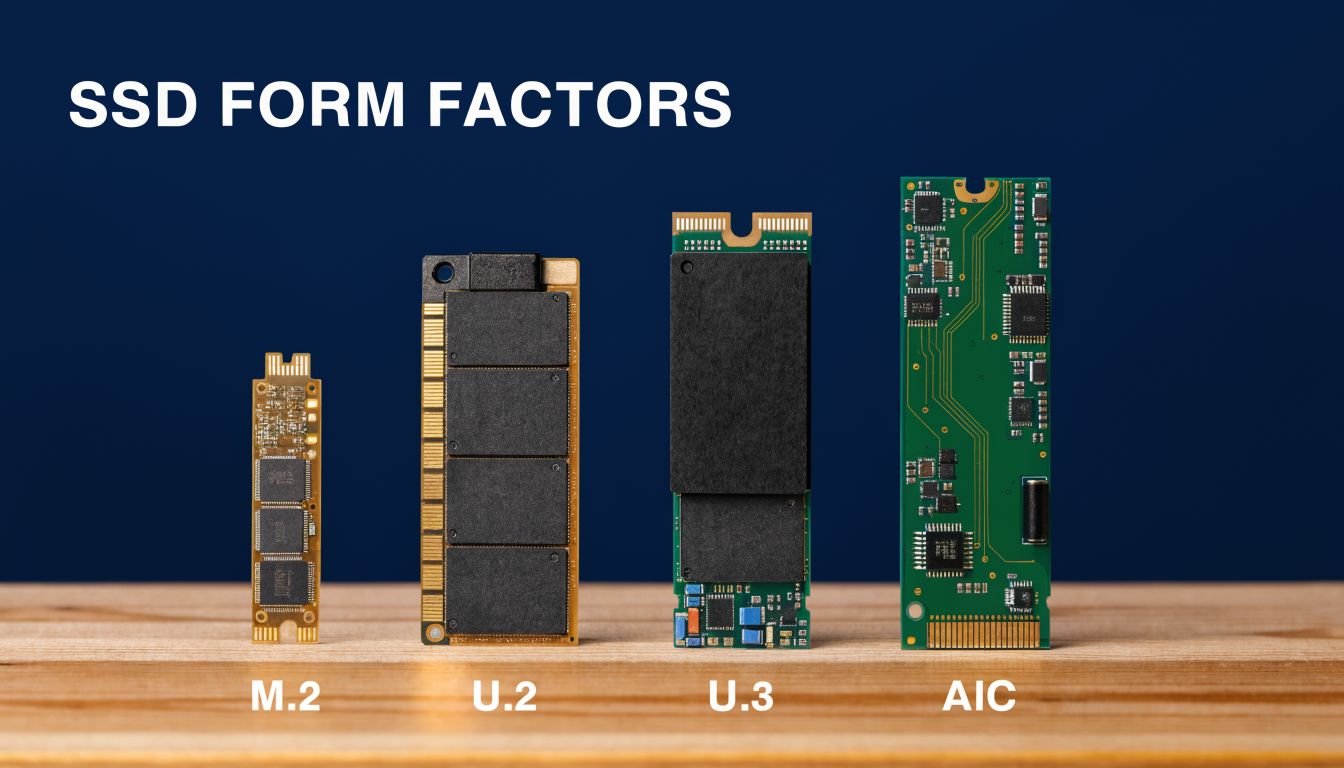
For office fit-outs, the right question is not only “how fast is the drive?” It is “how will this server be serviced at 7am on a Monday if CCTV recording has stopped or a building control VM needs to come back online quickly?” Form factor affects that answer as much as interface speed.
M.2 is space-efficient, but it can complicate service
M.2 works well in compact platforms, edge appliances, and boot roles where capacity demands are modest and write pressure is controlled.
The trade-off is access. In many server chassis, an M.2 replacement means opening the lid, working around risers or airflow shrouds, and taking a more disruptive maintenance path than a front-bay swap. Thermal headroom can also be tighter, especially in dense systems that already carry multiple hot components.
That does not rule M.2 out. It means M.2 should be chosen deliberately, usually for boot, cache, or lower-duty tasks rather than as the main workhorse in a server that supports live operational systems.
U.2 and U.3 usually fit enterprise operations better
For production servers, U.2 and U.3 are often the safer choice because they align better with how IT teams maintain equipment. Front-access bays, backplane support, clearer airflow paths, and hot-swap workflows all reduce the time and risk involved in replacing a failed drive.
That matters in mixed-use servers. A machine handling CCTV retention, access-control databases, and unattended building systems is not just a storage host. It is part of the building’s day-to-day operating fabric. If a drive can be swapped from the front of the chassis in minutes, the recovery plan is simpler and the service window is shorter.
U.3 also brings planning advantages in platforms designed for tri-mode backplanes, but only if the server vendor, controller, and firmware stack are validated together. Compatibility assumptions cause expensive delays. Check the platform support matrix before ordering.
AIC works best in specialist performance builds
An AIC, or add-in card SSD, can make sense where the server has spare PCIe slots, strong airflow, and a workload that benefits from very high throughput or low latency.
It is less forgiving in general office infrastructure. Every PCIe slot used for storage is a slot not available for networking, video, or other expansion. Service access is also more involved than a front-bay replacement, and thermal design becomes part of the storage decision. In a purpose-built performance server, that may be acceptable. In a shared infrastructure stack for a new office, it often adds complexity without enough operational benefit.
Match the drive shape to the server and the room
The chassis matters as much as the SSD. Bay layout, backplane type, cooling path, cable routing, and rack depth all affect which form factors are practical. This is one reason storage should be chosen alongside the physical infrastructure, not after the cabinet plan is fixed. If the server room design is still being finalised, this guide to server cabinet dimensions for UK businesses helps connect storage choices to rack space, access clearances, and serviceability.
Vendor product pages are useful here, not for headline speeds, but for how the drive is packaged and deployed. Micron’s 9550 data centre SSD page is a good example because it shows the enterprise focus on capacity options, interface choice, and server integration rather than consumer-style benchmark marketing.
A practical comparison
Form factor | Where it fits best | Watch-outs |
|---|---|---|
M.2 | Compact systems, boot volumes, internal appliance designs | Harder service access, tighter cooling margins |
U.2 | High-availability servers with front bays | Needs compatible bays, backplane, and cabling |
U.3 | Newer enterprise platforms where flexibility is planned in from the start | Requires careful validation across the full platform |
AIC | Performance-focused servers with spare PCIe capacity | Uses slot space, depends heavily on airflow, more complex to service |
Teams running hybrid estates should also avoid assuming local SSD behaviour maps neatly to cloud storage choices. AWS EBS Storage is useful background because it shows how storage design changes once the underlying hardware, service model, and failure domains are different.
Choose the form factor your operations team can replace, cool, and scale without drama. That is what keeps footage recording, systems available, and support calls shorter.
A Procurement and Sizing Checklist for Your Project
Most SSD mistakes happen before the order is placed. The problem isn’t lack of product choice. It’s lack of a decision framework that ties workload, timeline, integration, and support together.
That gap is still common. Existing guidance doesn’t give UK IT managers much help reconciling storage decisions with project timelines, supply-chain lead times, or compatibility with structured cabling and LAN/WAN design during relocations, as noted in DPReview’s storage roundup context.
Start with the building systems, not the drive catalogue
Before you shortlist models, define what the server will support during the first live year. A fit-out rarely runs one neat workload. It usually runs several at once, each with a different tolerance for delay.
Include:
CCTV role such as continuous recording, indexed search, playback, and export
Access and security systems including credential logs and audit events
Core IT services such as virtual machines, file shares, and directory services
Autonomous building functions where remote visibility and unattended continuity matter
If the project also involves cabinet design or room expansion, this guide to server cabinet dimensions for UK businesses helps tie storage choice back to the physical environment.
Use a procurement checklist that reflects real operations
A practical shortlist should answer all of these before purchase:
Workload fit Is the drive intended for write-heavy, mixed, or lighter-duty use? Don’t let a desktop-class part drift into a CCTV or virtualisation role by default.
Platform compatibility Confirm motherboard generation, PCIe support, bay type, RAID or HBA compatibility, and thermal requirements. Fast drives are no use if the server can’t feed or cool them properly.
Service model Can the drive be replaced quickly in a live environment? If not, the lower unit cost may disappear the first time maintenance becomes disruptive.
Warranty terms Read what the warranty covers, how returns are handled, and what level of vendor support exists during a live incident.
Firmware path Check whether firmware is maintained and whether updates can be applied without creating operational pain.
Lead times and staging Make sure the chosen model is available inside the project window. A technically perfect part that can’t arrive in time is the wrong part.
What sizing often misses
Capacity planning usually underestimates overlap. CCTV retention grows. Logs accumulate. Temporary migration datasets linger. User data expands after go-live. New applications appear because the fit-out creates room for them.
Buy for live operations, staged migration, and early growth. Projects rarely use less storage after the doors open.
The best procurement decisions aren’t the most aggressive. They’re the ones that remain sensible when timelines slip, workloads collide, and support teams inherit the system after the project team has left site.
Validating Performance Before Go-Live
Even the right SSD can disappoint if the deployment is wrong.
Go-live problems often come from the last mile. RAID is configured poorly. Cooling is marginal. Firmware is outdated. Benchmarking is skipped because everyone assumes the hardware will behave exactly as the box promised. Then the site goes live and the problems surface when real users, cameras, and control systems hit the platform together.
What to test before handover
Pre-live validation should include both infrastructure checks and workload checks.
Confirm RAID behaviour so resilience and performance match the role. Don’t assume a generic RAID profile suits write-heavy CCTV and mixed virtualisation equally well.
Check airflow and temperatures under sustained activity. Some fast drives fall away once heat builds.
Run realistic benchmarks against the actual server and controller stack, not just a drive on a bench.
Test application behaviour with CCTV ingest, access events, and normal user load running together if that’s how the system will operate.
Simulate fault conditions such as drive failover, host restart, and staged power recovery where appropriate.
Include power-state and recovery testing
This matters particularly in projects involving commercial electrical installation and certification. During handover periods, the server environment may move through planned and unplanned power states. You want to know how storage responds before the building depends on it.
That’s especially important in autonomous or unmanned building units. If no one is routinely on site, recovery has to be predictable. A server that needs manual babysitting after a routine event doesn’t belong in that design.
Validate the whole path, not just the drive
Storage performance is shaped by more than the SSD. Cabling, switching, virtualisation layout, rack airflow, and migration sequencing all affect the result. That’s why server upgrades and relocation projects need end-to-end validation, not isolated component testing.
If your project includes a move or staged transition, this guide to data centre relocation services and seamless migration is worth reviewing because migration practice often determines whether good hardware performs well after cutover.
The handover test should answer one question. Does the system behave properly under the conditions it will actually face on a live Monday morning?
A server room only counts as ready when storage, power, cooling, and application behaviour have all been proven together.
Frequently Asked Questions About Enterprise SSDs
Can I use consumer NVMe drives in a server if they’re fast enough
Sometimes they’ll work. That’s not the same as saying they’re a good idea. Consumer drives are often attractive because the headline speeds look strong, but enterprise server workloads are less forgiving. Continuous writes, mixed queue depths, and unattended operation expose weaknesses quickly. For office infrastructure, CCTV, and autonomous building systems, I’d treat consumer drives as a compromise to justify rather than a default to accept.
When does raw speed actually matter
Raw speed matters when the workload demands it. Large file movement, dense virtualisation, rapid indexing, and heavy mixed I/O all benefit. But once a drive is fast enough for the workload, the next priority becomes consistency under sustained use. A system that remains stable all day is more valuable than one that tops a benchmark and then throttles or behaves unpredictably.
Why is power-loss behaviour such a big issue
Because live buildings don’t always fail in tidy ways. During fit-outs, relocations, electrical works, or local faults, systems can face abrupt state changes. If storage doesn’t recover cleanly, the problem can spread upward into databases, recorders, and authentication systems. In unattended sites, that creates the exact sort of call-out and operational risk the design was supposed to reduce.
Are battery-less NFC locks really relevant to storage planning
Yes, because they change the maintenance model. Battery-less NFC proximity locks remove one routine failure point at the edge. That pushes more importance onto the central platform that records events, manages permissions, and supports remote administration. If the edge is lower maintenance, the core needs to be higher reliability.
What form factor should I choose if both M.2 and U.2 are possible
Choose the one that best fits serviceability, cooling, and server design. M.2 is compact and often fine for specific roles. U.2 usually gives you a cleaner operational story in live environments because replacement and thermal management are generally easier. If the server will sit at the heart of CCTV, access, and virtualised services, I’d lean toward the form factor your operations team can support with the least disruption.
Where are these systems commonly used
They’re common in modern office fit-outs, healthcare estates, managed commercial buildings, distribution sites, shared workspaces, and facilities designed for low routine on-site staffing. Any site combining CCTV, access control, building management, remote oversight, and certified electrical infrastructure benefits from treating server storage as core infrastructure rather than background hardware.
If you're planning a relocation, a new fit-out, or a server room upgrade where CCTV, access control, Wi-Fi, cabling, and autonomous building systems all need to work together, Constructive-IT can help you design the infrastructure properly from the start. The value isn’t just in installing hardware. It’s in making sure storage, power, data, certification, and go-live support are aligned so the building performs as intended on day one and stays supportable long after handover.