
You’re usually reading uninterrupted power supply reviews at the same point in a project. The racks are specified, the Wi-Fi design is nearly signed off, CCTV has a place on the drawings, access control has been chosen, and somebody finally asks a dangerous question: what happens when the building is empty and the power dips, spikes, or drops altogether?
That’s the moment a UPS stops being a box on a rack shelf and becomes part of the building strategy. In a major UK office fit-out, server room refresh, or healthcare relocation, the UPS isn’t there just to save a document or let a server shut down cleanly. It supports the systems that keep an unmanned site operational: network core, security controllers, CCTV recording, telecoms, edge compute, and the electrical logic that lets the building keep behaving properly when nobody is on site.
Most generic uninterrupted power supply reviews don’t look at that wider role. They compare brands, sockets, and battery runtime in isolation. That’s not enough for commercial environments where access, power, data, CCTV, commercial electrical installation and certification, and autonomous building behaviour all need to work as one system.
Beyond Business Continuity The Real Role of a UPS in 2026
A weak UPS strategy can undermine an otherwise well-engineered fit-out. You can install high-quality switching, structured cabling, resilient internet, smart access control, and a polished CCTV stack, then lose the practical value of all of it because the power layer was treated as an afterthought.
In 2026, the essential role of a UPS is broader than backup. It’s the foundational power layer that lets a building operate safely when staff aren’t present, when support teams are remote, and when key services must restart in the right order. That matters in headquarters spaces, managed offices, distribution units, clinics, retail estates, and satellite locations where no engineer is standing next to the rack when something goes wrong.
What that means on a live project
For a major fit-out, the UPS decision affects more than the comms rack. It affects:
Project area | What the UPS actually supports | What fails if it’s wrong |
|---|---|---|
Core networking | Firewalls, switches, WAN termination, Wi-Fi controllers | Loss of remote visibility and site connectivity |
Physical security | Door controllers, intercoms, access management hubs | Uncontrolled or unavailable entry points |
CCTV | Cameras, PoE switches, NVRs, monitoring links | Security blind spots and recording gaps |
Server room operations | Virtual hosts, storage, management appliances | Abrupt shutdowns and recovery delays |
Autonomous site functions | Remote alerts, telemetry, building logic | Site becomes dependent on manual intervention |
That’s why good uninterrupted power supply reviews should start with operational outcomes, not product marketing.
A UPS should be specified around what the building must keep doing when nobody is there, not around how many sockets are on the rear panel.
The shift towards autonomous and unmanned sites
Unmanned building operation doesn’t mean a science-fiction building with no people in it. In practice, it means a site that can open, secure, monitor, report, and recover without routine on-site attendance. The reception desk may be unstaffed. Access may be app-based or credential-based. CCTV may be reviewed remotely. Network faults may be triaged from another office. Electrical alarms may go straight to facilities and IT teams off site.
That operating model only works if the power design is as deliberate as the data design.
Temporary resilience also matters during moves, staged cutovers, and phased commissioning. Teams dealing with relocation planning often end up looking beyond fixed infrastructure and into transportable backup and interim power arrangements. If you’re evaluating that wider picture, it’s useful to spend some time understanding mobile energy solutions alongside fixed UPS planning, especially where projects involve temporary occupation, decant spaces, or construction-phase continuity.
Why this is a board-level decision, not just an IT purchase
A UPS purchase looks small compared with the overall cost of an office move or server room upgrade. The consequences of getting it wrong aren’t small. Poorly chosen systems create nuisance alarms, shorten battery life, fail under real load, and leave building systems dropping in unpredictable sequences.
That’s why a proper review needs to ask practical questions. Which services must stay live? Which ones need graceful shutdown? Which loads are sensitive to power quality? Which locations must remain operational without staff on site? Once those answers are clear, UPS selection becomes much easier and much less wasteful.
Powering the Unmanned Building Why Access Data and Power Must Be Integrated
An unmanned building is a building that can keep functioning safely and predictably without constant human presence. That usually includes remote access administration, monitored CCTV, stable networking, cloud-connected telecoms, and building services that can be supervised from elsewhere. The building may still have occupants during the day, but it doesn’t rely on someone being in the comms room or at reception to keep core systems alive.
Projects fail when teams design these systems in silos. The access contractor focuses on doors. The CCTV supplier focuses on cameras and recording. The network team focuses on switches and uplinks. The electrical package focuses on circuits and certification. If nobody owns the relationship between access, power, and data, the result is a site that looks integrated on a drawing and behaves badly under stress.
What unmanned building management looks like in practice
At site level, it often includes a mix of the following:
Remote access administration so credentials can be issued, revoked, or time-limited without someone visiting the building.
CCTV oversight with cameras, PoE switching, storage, and outbound connectivity all staying stable enough for monitoring and evidence retention.
Core network resilience so Wi-Fi, WAN, telephony, and management traffic remain available long enough for controlled continuity or shutdown.
Commercial electrical coordination so critical circuits, local isolation, rack PDUs, and certification all line up with what the IT and security systems need.
Autonomous unit behaviour in smaller building zones or plant areas, where network, cameras, locks, and environmental alarms can operate as self-contained unmanned building units.
Why many unmanned building projects fail
The common failure mode is simple. Power is designed separately from function.
In the UK, power outages averaged 52.6 minutes per customer in 2022, and downtime can exceed £10,000 per hour for IT-dependent operations, while businesses that invested in UPS reduced outage impacts by 87% after 2010, according to the cited market summary drawing on Ofgem and BEIS data in this UPS market reference. Those figures matter because the issue isn’t only blackout duration. Short disturbances, poor sequencing, and partial power loss can break a supposedly autonomous site.
Three practical problems show up repeatedly:
Door systems survive, but the network doesn’t The controller may still have power, but if the switching or uplink drops, remote administration disappears. The building is secure but effectively blind.
CCTV is installed on PoE, but the PoE path isn’t protected Cameras may be modern and properly configured, yet a small upstream power event takes out the switch stack or recorder.
Server room resilience is treated as separate from building resilience That’s a mistake in offices where access control, CCTV, telephony, visitor systems, and Wi-Fi all terminate back into the same cabinet or riser.
If the network core, access control head-end, and CCTV storage don’t share a coordinated power strategy, the building isn’t unmanned. It’s just unattended and fragile.
Why access, locks, and network design must be coordinated
Battery-less, NFC proximity locks are a good example of why system design has to be joined up. They’re often chosen because they reduce door hardware maintenance, avoid routine battery replacement at the leaf, and suit managed or lightly staffed spaces. They also fit buildings where credentials are issued digitally and updated centrally.
Their value isn’t just at the lock. It’s in the surrounding platform. The readers, gateways, controllers, software path, and supporting network all need stable power if you want reliable remote administration and audit trails. If that ecosystem loses power in pieces, the lock choice won’t save you.
That same principle applies to integrated gateways such as the Dream Machine Pro in office network design. Appliances like that often become part of the operational centre for routing, security, and camera management. If they sit outside the UPS design, the building loses the very visibility the unmanned model depends on.
Where this design approach is commonly used
This integrated pattern shows up in places that don’t always describe themselves as “autonomous”:
Multi-tenant offices with managed access and remote support
Healthcare environments where comms, clinical admin spaces, and security must remain orderly during disruption
Warehouses and light industrial sites with sparse staffing outside peak hours
Retail estates and branch networks where local intervention is slow or costly
Plant rooms, risers, and comms closets that function as self-contained unmanned building units
The lesson from uninterrupted power supply reviews is straightforward. Treat the UPS as part of the building control fabric, not as a late-stage accessory.
How to Correctly Size a UPS for Your Entire Infrastructure
UPS sizing goes wrong for two reasons. Teams either count only the servers and forget the supporting estate, or they buy from a headline VA figure without checking the exact wattage and runtime they need.
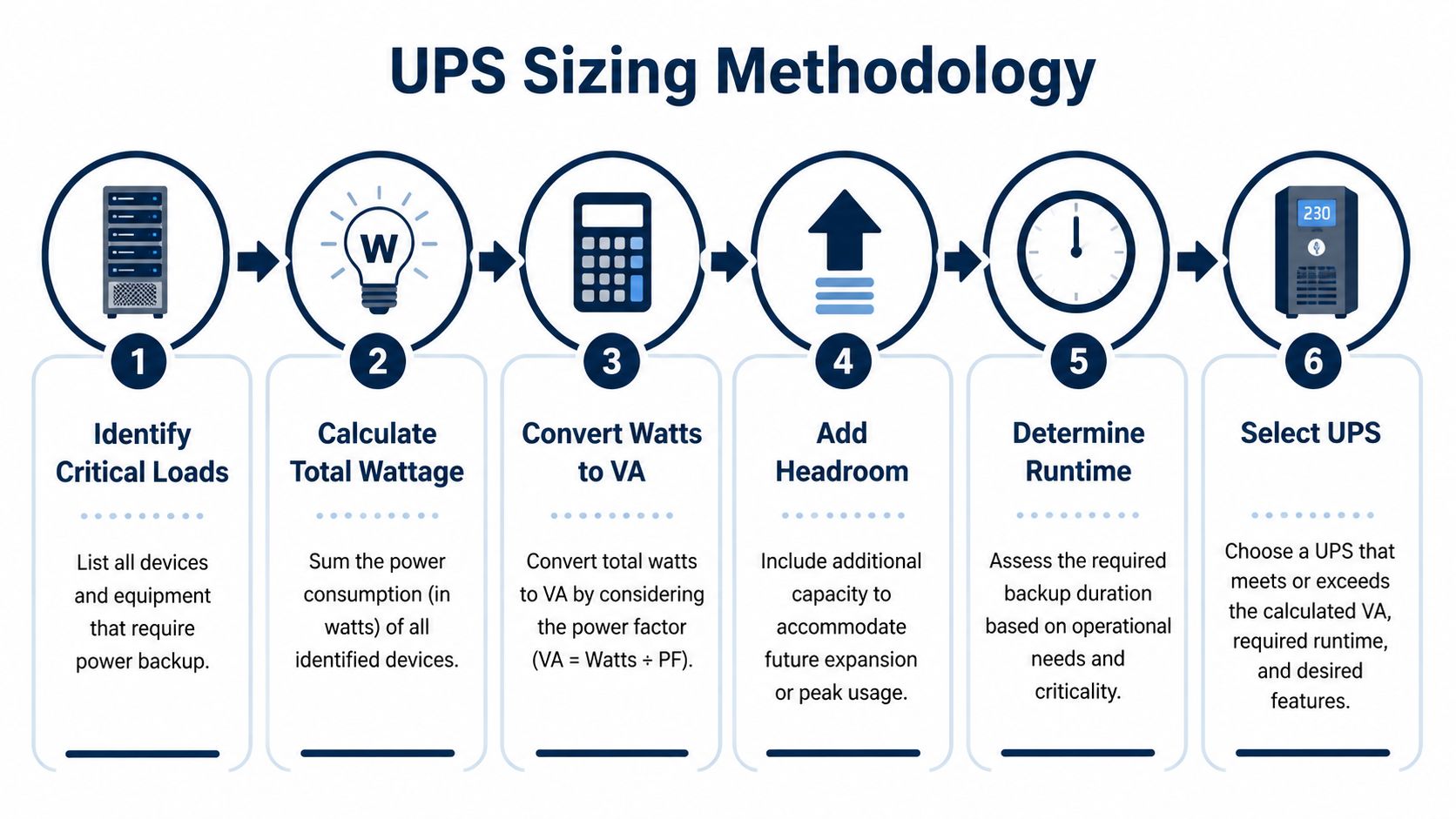
For a fit-out or server room upgrade, start with a load audit. List every device that must either stay live during an outage or shut down gracefully in the correct order. That includes obvious rack equipment and the systems people leave out: CCTV switching, NVRs, access controllers, telecoms handoff, Wi-Fi controllers, management appliances, and any edge kit that keeps the site reachable.
Start with watts, not marketing
A critical sizing rule is that UPS systems must be sized at 125% of total connected load, which means the load should never exceed 80% of total UPS capacity. The other trap is confusing VA with Watts. VA is apparent power. Watts is the actual power your equipment consumes. As one example, a unit advertised at 16,000VA may only deliver 12,800W of actual power, as explained in this UPS sizing guide.
That distinction matters because enterprise buyers often compare units by front-page datasheet numbers rather than usable output.
A practical sizing method for office and server room projects
Use this method on every project:
List critical loads Include servers, storage, firewalls, switches, wireless controllers, access control panels, intercom gateways, CCTV recorders, and any PoE switches powering cameras or readers.
Separate must-run from must-shutdown loads Some equipment has to remain live throughout a short outage. Other systems only need enough time for an orderly shutdown.
Add total wattage Use manufacturer power draw data or measured consumption where available. Don’t guess from plug type or chassis size.
Apply headroom Add capacity so the UPS runs below the 80% threshold. That gives you operational margin and room for change.
Check runtime against recovery needs A short runtime may be enough if the objective is graceful shutdown. A longer runtime may be needed for unmanned sites where remote teams need time to assess and act.
Review environmental conditions Temperature, battery age, and cabinet ventilation all affect runtime in practice.
Practical rule: If a device is operationally important but absent from the load schedule, it probably won’t be on the UPS either.
A short technical refresher can help teams align the terminology before procurement discussions:
What people forget in mixed-use racks
The neglected loads are usually the ones that matter most to unmanned operation.
PoE switching for CCTV and readers If the cameras and doors depend on PoE, the switch belongs in the calculation.
ISP and telecoms equipment A live firewall is no use if the WAN handoff or carrier device has dropped.
Management devices Out-of-band management, console servers, and monitoring appliances are often low wattage but high value.
Shared rack ancillaries KVMs, environmental monitors, and control processors may not be business critical on paper, but they’re often what lets a remote engineer recover the site quickly.
Use rack power design to avoid false confidence
UPS sizing and rack distribution need to be read together. A correctly sized UPS can still disappoint if the PDUs, outlet groups, and circuit plan don’t match the intended shutdown sequence. That’s why it helps to review server cabinet PDU power sizing for infrastructure projects before locking the final specification.
A better specification mindset
The right question isn’t “What UPS do we need for this rack?” It’s “What must this site keep doing during a power event, and for how long?”
Once you phrase it that way, sizing becomes much more accurate. You stop overprotecting low-value loads, and you stop underprotecting the devices that keep an unmanned building visible, secure, and recoverable.
UPS Topology Reviews Standby vs Line-Interactive vs Online
Most uninterrupted power supply reviews flatten the topology decision into a price ladder. Cheap standby at one end, line-interactive in the middle, online at the top. Real projects aren’t that tidy. The right choice depends on the quality of power the load needs, how much conditioning you require, and what happens operationally if transfer behaviour or voltage variation affects the equipment.
For UK enterprise environments, that judgement needs a local lens. The mains standard is 230V AC, and the practical issue isn’t only full outages. It’s also brownouts, poor-quality input, and short instability that sensitive systems dislike. According to Eaton’s buying guide, on-line UPS systems use double-conversion technology and continuously regulate output voltage within 2–3% of nominal, which is why they’re the strongest option for sensitive equipment. The same source also highlights that many reviews don’t address how UK voltage conditions affect the choice between standby and line-interactive models for less critical loads, as noted in this UPS topology guide.
Comparison of UPS Topologies for UK Enterprise Environments
Feature | Standby (Offline) | Line-Interactive | On-Line (Double-Conversion) |
|---|---|---|---|
Basic operating approach | Passes mains through until a failure occurs | Regulates input variation and uses battery less aggressively | Continuously converts incoming power and rebuilds output |
Power conditioning | Limited | Better than standby for routine voltage variation | Strongest overall protection |
Suitability for unstable input | Weakest | Good for moderate fluctuation | Best for challenging power conditions |
Typical fit | Small non-critical edge loads | General office IT and network edge | Sensitive, mission-critical, or regulated environments |
Transfer behaviour | More noticeable to sensitive equipment | Usually acceptable for many business systems | Minimal exposure because output is continuously conditioned |
Cost profile | Lowest | Mid-range | Highest capital cost |
Best use in unmanned buildings | Very limited | Useful in stable, lower-risk areas | Preferred for core services and sensitive systems |
Where standby works and where it doesn’t
Standby units have a place, but it’s narrower than many buyers think. They can be acceptable for small, non-critical devices where occasional transfer events won’t create a business or security problem. In a commercial environment, that often means isolated edge loads that don’t sit in the operational path of access control, CCTV, or core networking.
They’re a poor choice for the heart of an unmanned building. If a short disturbance takes out a gateway, management appliance, or switch feeding multiple downstream systems, the low purchase price becomes irrelevant.
Why line-interactive is often the practical middle ground
Line-interactive units are frequently the best fit for general office infrastructure. They’re often appropriate for branch networking, standard comms cabinets, and locations where the utility supply is broadly stable but not pristine. They reduce battery wear compared with a model that switches to battery too readily, and they offer better tolerance of ordinary voltage fluctuation than standby designs.
That makes them useful for:
Remote office cabinets supporting Wi-Fi, telephony, and switching
CCTV edge locations where the camera estate is important but not classed as the site’s most sensitive load
General comms rooms where continuity matters but the equipment can tolerate more variation than specialist systems
The limit is sensitivity. If the load reacts badly to transfer events, poor waveform quality, or tighter voltage tolerances, line-interactive may still not be enough.
Why online is the default for sensitive and mission-critical loads
Online UPS systems are where reviews need to be blunt. If the project involves sensitive networking, telecoms, healthcare-adjacent systems, or core infrastructure that underpins access and security, online is usually the right answer.
That doesn’t mean every rack needs double-conversion. It means the loads that define the building’s resilience usually do.
For NHS-related spaces, data centre rooms, and security-critical cores, the topology decision should start by asking what the equipment cannot tolerate, not by asking what costs least.
The waveform question also matters. Generic reviews often skip over pure sine wave versus simulated sine wave output and don’t map that to actual equipment classes. In practice, some devices are forgiving and others aren’t. Power supplies in sensitive equipment, control electronics, and specialist systems can behave unpredictably when output quality is poor. That’s one reason online systems remain the safer option when the consequences of misbehaviour are high.
A realistic selection approach
Choose topology by role, not by brand preference:
Use standby sparingly for low-risk, non-core loads.
Use line-interactive where you need a sensible balance of protection and cost for mainstream business infrastructure.
Use online for the network core, critical security platforms, sensitive equipment, and any environment where stable output quality matters more than initial capex.
That’s how practitioners should read uninterrupted power supply reviews. Not as product rankings, but as deployment decisions tied to the building’s operational design.
Essential Management and Monitoring Features for Enterprise UPS
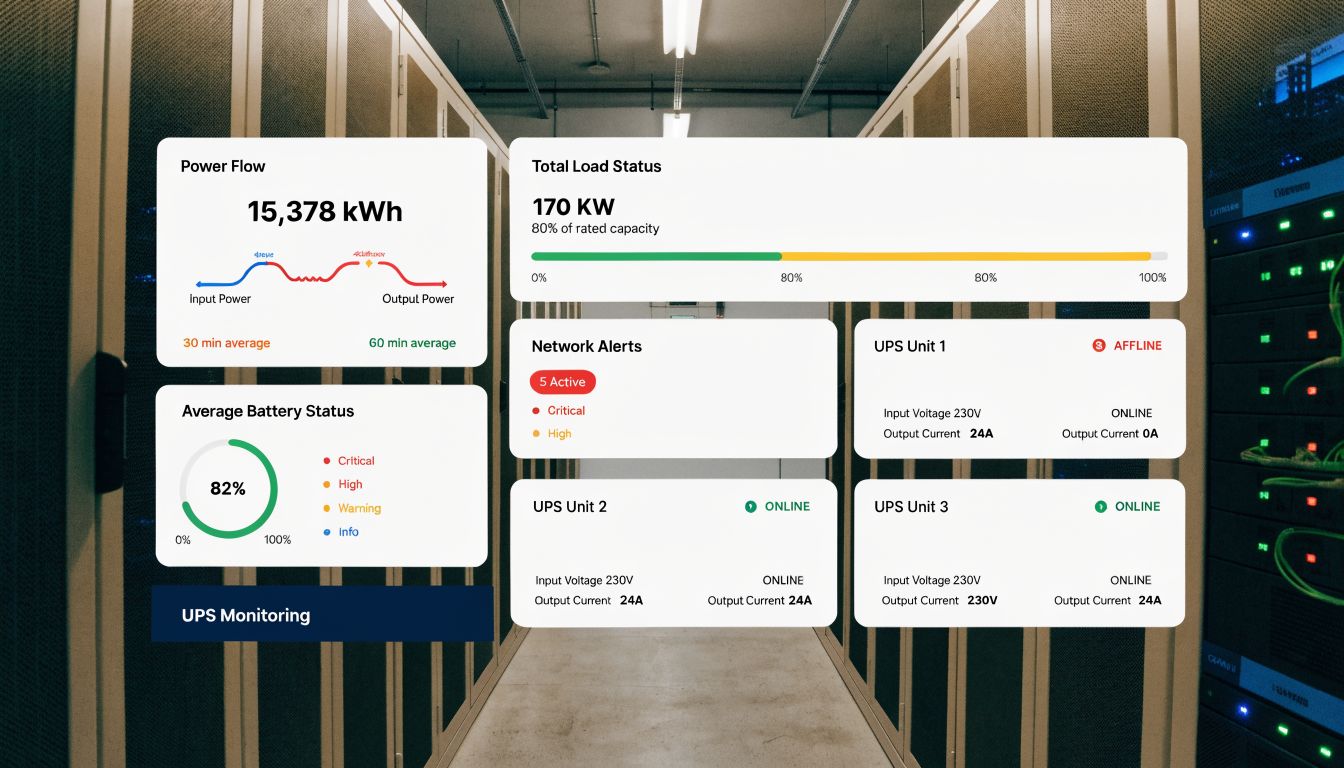
A UPS that can’t tell you what it’s doing is only half-finished for enterprise use. In unmanned environments, the management layer matters almost as much as the battery and inverter. You need to know load level, battery condition, alarm state, event history, and whether the unit can trigger orderly shutdowns or upstream notifications without someone physically standing in front of it.
That matters even more as organisations spread critical services across smaller edge spaces, comms cupboards, clinic rooms, and lightly staffed branches. Market demand reflects that broader role. The European UPS market influenced by UK demand is projected to grow by USD 4,243.5 million at a 4.2% CAGR through 2029, and usability matters too: a Which? lab test in 2024 gave the CyberPower CP1500PFCLCD a 91% score, with praise in over 12,500 UK reviews for user-friendly management software in office LAN/WAN setups, according to this market and product review summary.
The features that actually matter in live operations
Consumer-style displays and a USB cable aren’t enough for enterprise estates. Look for these capabilities instead:
Network management support The UPS should sit on the network properly, not as an afterthought. SNMP, alerting, and central visibility are basic requirements for distributed environments.
Actionable alarms Good systems don’t just beep. They tell teams about overload, battery health, input issues, self-test failures, and communication faults in a way that can feed operational workflows.
Graceful shutdown integration If hosts, storage, or management appliances need staged shutdown, the UPS software has to support that sequence cleanly.
Event history and trend visibility Repeated brownouts, load growth, and declining runtime often show up in the logs before they become incidents.
Why this matters for CCTV and autonomous access
CCTV is only as resilient as the path behind it. Cameras, PoE switches, NVRs, and uplinks all need both power continuity and operational visibility. If an unmanned site loses the recorder but not the cameras, or loses the edge switch but not the WAN, remote teams can waste time chasing the wrong fault.
The same logic applies to modern access control.
Battery-less, NFC proximity locks are often attractive in commercial spaces because they reduce routine battery maintenance at the door, simplify estate operations, and suit centrally managed credential models. In practice, they work best where the control and communications layer is stable. The lock hardware may reduce one maintenance burden, but the readers, gateways, controllers, and supporting network still need monitored power. That’s where the enterprise UPS earns its place.
What good monitoring changes operationally
A well-managed UPS changes how support teams work:
Facilities gets early warning of environmental or power quality issues.
IT sees when runtime margin is shrinking before a failure.
Security teams know whether the CCTV and access backbone stayed protected during an event.
Remote support can decide whether to hold loads up, begin shutdown, or dispatch an engineer.
The difference between a manageable unmanned site and an expensive nuisance is usually visibility, not just backup time.
What to avoid in procurement
Avoid units that look enterprise-ready but hide key functions behind add-ons that weren’t budgeted, or that expose too little information to integrate with the rest of the monitoring stack. Also avoid systems with awkward interfaces that local teams won’t use properly after handover.
The best uninterrupted power supply reviews pay close attention to software quality, remote alerting, and management clarity because those are the features that keep a building supportable after the installers have left.
Planning for Installation and Long-Term Maintenance
A UPS can be perfectly specified and still fail the project if installation is rushed or maintenance is neglected. This is where commercial electrical practice, rack design, and operational ownership all meet. For larger office fit-outs and server room upgrades, the installation isn’t just an IT task. It’s part of the building’s certified electrical environment.
Installation needs to match the building, not just the rack
Hardwired and three-phase deployments need proper planning around circuits, isolation, bypass arrangements, earthing, ventilation, and physical access for service. Even smaller single-phase units can become awkward if they’re wedged into cabinets with no thought for battery replacement, airflow, or cable management.
That’s why the electrical package matters. Commercial electrical installation and certification should reflect the actual resilience design, not merely provide a socket near the rack. Critical loads need clearly identified circuits and clean coordination between electrical engineers, IT, and security installers.
A useful precursor is reviewing electrical tray and cable planning for infrastructure projects, because poor containment and routing decisions often create avoidable pain later when UPS feeds, rack power, data cabling, and CCTV paths all compete for space.
Maintenance is where resilient designs survive or fail
UPS maintenance is not glamorous, but it’s what turns a specification into a dependable asset. The ongoing plan should cover:
Battery health checks so decline is identified before the next outage exposes it.
Firmware and management updates to keep monitoring, shutdown behaviour, and security current.
Environmental review because heat and poor airflow shorten useful life and distort runtime expectations.
Load review after project changes so the UPS isn’t unknowingly pushed beyond the original design envelope.
Physical inspection of terminals, fans, filters, bypass arrangements, and alarm indicators.
Think in service windows, not just warranties
Many organisations buy a UPS and file away the warranty paperwork as if that solves lifecycle management. It doesn’t. What matters operationally is whether the unit can be tested, serviced, and parts-replaced without causing unnecessary disruption.
That’s especially true in buildings aiming for autonomous or lightly staffed operation. If the building depends on the UPS for access, CCTV, and network continuity, then maintenance needs change control, ownership, and documented recovery procedures. Somebody must know what happens during a battery test, a firmware update, a manual bypass, or an end-of-life replacement.
A neglected UPS usually looks healthy right up until the day it’s needed.
Common deployment mistakes
A few mistakes come up repeatedly on live sites:
Installing for day-one load only and forgetting future additions such as cameras, readers, or extra switching
Protecting the rack but not the dependencies, especially WAN handoff devices and PoE distribution
Ignoring service access, which turns simple maintenance into a partial outage
Leaving ownership unclear between IT, facilities, and security teams
Good uninterrupted power supply reviews should always end at the same place. Procurement is only the beginning. The system has to be installable, supportable, certifiable, and easy to maintain over years of operational change.
Your UPS Procurement Checklist for UK Infrastructure Projects
When a project team asks for uninterrupted power supply reviews, what they usually need is a buying framework. Product comparisons help, but only after the operational requirements are clear. For UK office fit-outs, server room upgrades, healthcare works, and autonomous building deployments, the checklist below keeps the decision grounded in how the site must behave.
The checklist to use before you buy
Define the operational objective Decide what the building must keep doing during a power event. Keep the answer specific: remote access control, CCTV continuity, network reachability, controlled shutdown, or all of them.
Map critical loads Include servers and storage, but also access control heads, PoE switches, NVRs, telecoms equipment, firewalls, Wi-Fi, and management appliances.
Choose topology by risk Use standby only where the load is low risk. Use line-interactive where mainstream business continuity is the priority. Use online where the load is sensitive or operationally critical.
Check power quality needs Don’t assume every device is tolerant of the same output characteristics. Sensitive systems often justify better conditioning and cleaner output.
Specify monitoring from day one Remote alerts, event logs, and shutdown integration are part of the requirement, not optional extras.
Questions that prevent expensive mistakes
Ask these in procurement meetings:
If the building is empty, which systems must remain visible and controllable?
Which devices can tolerate interruption, and which cannot?
Does the UPS cover dependencies outside the rack, including telecoms and PoE paths?
Can facilities, IT, and security all see the same operational status?
How will battery testing, service access, and replacement happen without creating avoidable downtime?
What good procurement looks like
A good buying process ties together power, data, access, CCTV, and electrical installation rather than treating them as separate lots. It also plans for the building you’ll have in two years, not only the one you’re commissioning now. That matters in office environments where occupancy patterns shift, camera coverage expands, or autonomous building units are added later.
The best outcome isn’t just a UPS with enough capacity. It’s a site that remains orderly under stress, supports remote teams, and doesn’t force someone to travel in just to recover a preventable failure.
For complex environments, especially relocations, fit-outs, healthcare projects, and server room upgrades, specialist input usually costs less than redesigning a power strategy after handover.
If you’re planning a fit-out, relocation, server room expansion, or a move towards fully autonomous unmanned building units, Constructive-IT can help you design the power, network, CCTV, access, and electrical layers as one resilient system, so the building works properly when people are on site and when they aren’t.