


Choosing Network Cabling Installers You Can Trust
- Craig Marston
- Dec 8, 2025
- 16 min read

Your network cabling is the central nervous system of your business. It's the unseen foundation that quietly powers every transaction, video call, and data transfer. That's why choosing the right network cabling installers isn't just an IT decision—it’s a business continuity strategy that determines your company's speed, reliability, and readiness for future growth.
Why Your Business Runs on Professional Cabling

Think of it this way: your network infrastructure is the difference between a shaky, single-lane bridge and a modern superhighway. One creates constant bottlenecks and risks collapse, while the other enables the seamless, high-speed flow of information a competitive business needs to thrive.
This guide will walk you through everything you need to know. We'll cover how to evaluate installers, understand technical standards, and appreciate the long-term value of warranties and proper project management. By the end, you'll be ready to ask the right questions and find a reliable network partner for your next project, whether it’s a new office fit-out or a complex relocation.
The Foundation of Performance and Growth
A haphazard cabling job is a recipe for disaster. It leads to intermittent connectivity, slow data transfers, and frustrating downtime that hits productivity and revenue right where it hurts. Professional installers, on the other hand, build a robust and organised system from the ground up.
They make sure every connection is solid and every cable performs to its maximum potential. This approach delivers:
Guaranteed Performance: Through rigorous testing and certification, professionals ensure your network meets or exceeds industry standards for speed and reliability.
Future Scalability: A well-designed structured cabling system can easily handle new technologies, more users, and higher bandwidth demands without a complete overhaul.
Reduced Downtime: Meticulous installation and high-quality components minimise the risk of physical failures that can bring your entire operation to a standstill.
Investing in a certified, tested network delivery is an investment in your company's operational resilience. It transforms a potential point of failure into a dependable platform for growth, ensuring business continuity for years to come.
The demand for these specialised skills is only growing. The UK structured cabling market is poised for significant expansion, with forecasts showing a compound annual growth rate (CAGR) of around 7.6% from 2025 through 2033. This reflects just how much businesses rely on solid digital infrastructure, highlighting the critical role that skilled installers play in the UK’s commercial growth. You can explore more on the importance of data network installation to understand its impact.
More Than Just Wires
Expert installers bring much more to the table than just running cables. They provide a methodical, experienced approach to complex projects, from fibre optic installations to large-scale office relocations.
As an Excel network accredited partner, a certified installer can offer a comprehensive 25 year equipment warranty, guaranteeing the performance of your entire system. This assurance covers everything from the physical cables to the patch panels and outlets, giving you long-term peace of mind.
Their expertise also extends to meticulous cable management, creating a clean, organised server room and tidy desk environments. This doesn't just look good—it improves airflow, simplifies maintenance, and dramatically reduces the risk of accidental disconnections.
Understanding Your Core Cabling Options
Choosing the right cabling for your business is a lot like planning a city's transport network. You need reliable local roads for daily commutes and super-fast motorways for long-distance travel. In the world of IT infrastructure, those two systems are copper and fibre optic cables.
Think of standard copper network cabling, like Cat6 or Cat6a, as the city's road system. It’s dependable, cost-effective, and absolutely perfect for connecting individual workstations, printers, and VoIP phones across an office floor. It handles the everyday data traffic with ease, which is why it’s still the top choice for wiring to the desk.
Fibre optic cabling, on the other hand, is the high-speed maglev train of your network. It sends data as pulses of light, not electrical signals, letting it move enormous amounts of information over huge distances at blistering speeds with almost zero signal loss. This makes fibre cable installation the clear winner for the network's backbone—linking different floors, connecting buildings across a campus, or forming the core of a data centre.
When to Use Fibre vs Copper
The real skill lies not in choosing one over the other, but in knowing how to blend them. A professional network cabling installer won't force you into an "either/or" decision; they’ll design a hybrid system where each cable type plays to its strengths, giving you the best performance for your budget.
A well-designed office network typically looks like this:
Fibre Optic Backbone: High-capacity fibre runs vertically between floors, connecting your main server rooms and comms cabinets. This creates a powerful, fast-flowing data artery for the entire building.
Copper to the Desk: From each floor's comms cabinet, more affordable copper cables branch out horizontally to individual desks and devices, providing solid gigabit connectivity right where your team needs it.
A smart network design isn't about picking a single winner. It's about using each technology where it truly excels. This strategic mix gives you lightning-fast speed for your critical data pathways and practical, affordable connectivity for every user.
For a deeper dive into the nitty-gritty of different cable types, check out our guide on the categories of computer network cables and what’s right for your project.
To help you see the differences clearly, here's a quick comparison.
Fibre Optic vs Copper Cabling at a Glance
This table breaks down the key characteristics of each cabling type to help you understand where each one fits best within your infrastructure.
Attribute | Fibre Optic Cabling | Copper Cabling (Cat6/Cat6a) |
|---|---|---|
Speed & Bandwidth | Extremely high, capable of 100Gbps and beyond. Future-proof. | Very good, typically up to 10Gbps. Perfect for end-user devices. |
Distance | Can run for many kilometres without signal degradation. | Limited to 100 metres before performance drops. |
Cost | Higher initial cost for materials and specialised installation. | Lower material cost and faster to terminate/install. |
Interference | Immune to electromagnetic interference (EMI). Ideal for factories. | Susceptible to EMI from power lines, motors, etc. |
Ideal Use Case | Building backbones, data centres, connecting separate sites. | Horizontal runs to workstations, printers, phones, and access points. |
Durability | Thinner and more fragile (glass core). | Robust and flexible, can withstand more physical stress. |
Ultimately, the best network infrastructures almost always use a combination of both fibre and copper, leveraging the strengths of each to create a reliable, high-performance, and cost-effective system.
The UK's Big Shift to Fibre
This isn’t just a trend for private businesses; it’s a nationwide movement. The UK's entire communications infrastructure is moving away from old copper lines. The latest figures from Point Topic show Openreach’s full-fibre network has now reached 18 million premises, with its FTTP subscriber base hitting 6.53 million. At the same time, legacy DSL connections have fallen by 13%.
This national upgrade makes it clear: future-proofing your own office is non-negotiable. Even if copper meets your needs today, integrating a fibre backbone is a smart investment. It prepares you for future growth and bandwidth-hungry applications, ensuring your network can handle whatever comes next without needing a disruptive, floor-by-floor overhaul. This forward-thinking is what a properly certified, tested network delivery is all about.
The Blueprint for a Flawless Installation Project
A professional cabling project is a carefully orchestrated process. It's a world away from the chaotic tangle of wires many people picture. Top-tier network cabling installers follow a clear, five-phase roadmap to make sure every installation is efficient, reliable, and built to last.
Understanding this process gives you the language and confidence you need to oversee your project, from the first conversation to the final handover. It’s a structured approach that ensures every detail is managed meticulously, from your initial requirements to the final performance guarantees.
This visual guide breaks down the typical project flow you should expect.
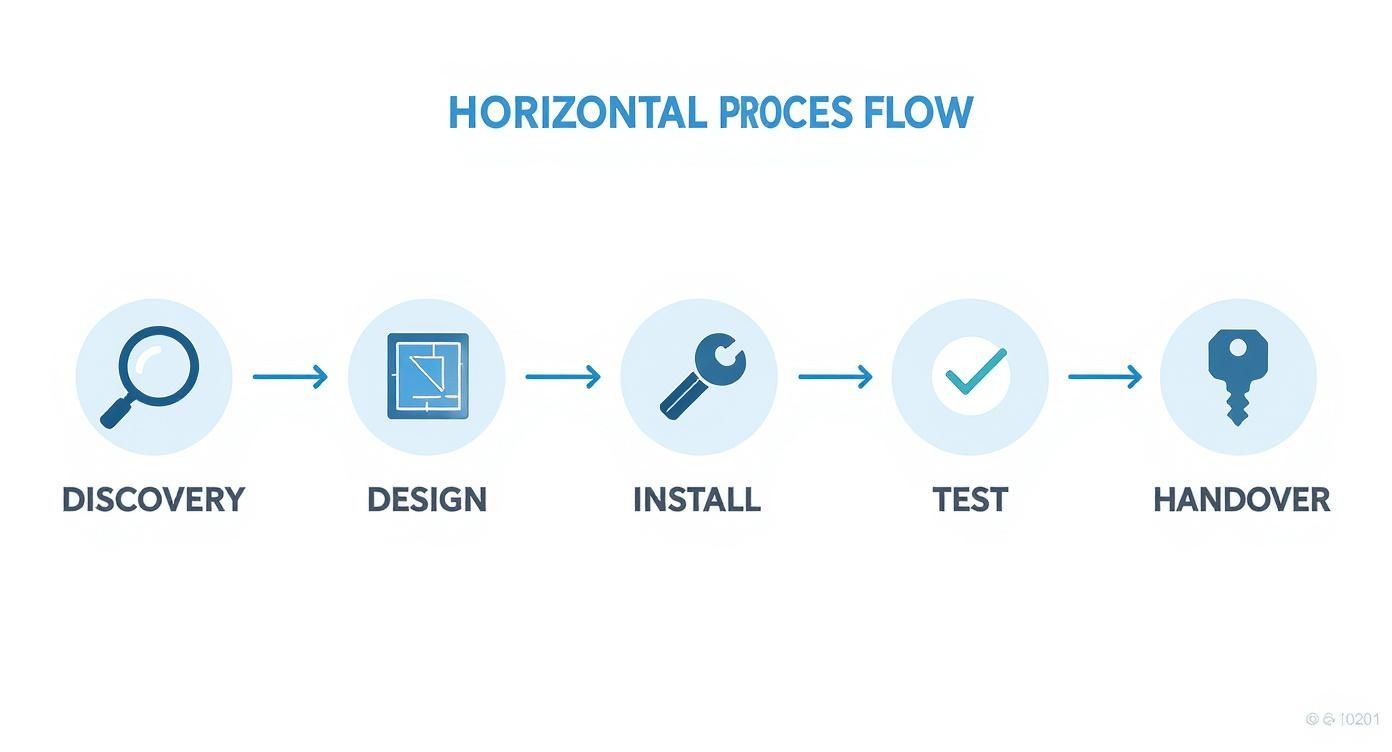
As you can see, a flawless installation moves logically from understanding your needs to delivering a fully certified, working network. Each step builds on the last, preventing costly errors and guaranteeing the final system meets your exact specifications.
Phase 1: Discovery and Consultation
The project starts long before a single cable gets pulled. This first phase is all about deep listening and thorough investigation. Professional installers will conduct a detailed site survey to get a feel for your physical environment—that means spotting potential obstacles, mapping out cable pathways, and locating comms rooms.
They’ll also sit down with your IT and facilities teams to understand your current network pain points and what you’re hoping to achieve. Are you planning an office relocation? Do you need to support a new VoIP system or high-bandwidth video conferencing? This is where all those crucial requirements are put down on paper.
Phase 2: Strategic Design
With all that information gathered, the installers move into the design phase. This is where the technical blueprint for your network gets drawn up. They'll map out the entire infrastructure, specifying the exact types of cables—like high-speed fibre cable installation for the backbone and Cat6a to the desk—and exactly where they need to go.
A massive part of this stage is planning for effective cable management. A good design doesn't just connect points A and B; it ensures server racks are organised, airflow is optimised, and every single cable is labelled. This meticulous planning is what leads to a tidy desk environment and makes future maintenance a whole lot simpler.
Phase 3: Meticulous Installation
Now we get to the physical work, where the design becomes a reality. Certified engineers will run, terminate, and connect all the cabling according to strict industry standards. This is where the difference between an amateur and a professional really shows.
An expert installer works efficiently to keep disruption to a minimum, often scheduling work outside of your core business hours. They stick to the design plan with precision, making sure every connection is secure and every cable run is neat and safe. This disciplined approach is what builds a network that performs reliably for years.
A truly professional installation is defined by what you don't see. It's the perfectly dressed cables in the server cabinet, the secure connections behind the wall plate, and the adherence to standards that prevents problems down the line.
This level of quality is often a requirement for the best warranties. For instance, installers who are an Excel Network Accredited Partner have the training and skills needed to install systems eligible for a comprehensive 25 year equipment warranty.
Phase 4: Rigorous Testing and Certification
Once the physical installation is done, the most critical phase begins: testing. And this isn't just a "plug it in and see if it works" check. Professionals use specialised diagnostic tools, like Fluke network analysers, to test every single cable run against tough performance metrics.
Each cable is tested for things like signal loss, crosstalk, and bandwidth capacity to ensure it meets its specified standard (e.g., Cat6a). This process is what verifies that your network can actually handle the data speeds you've paid for.
The result is a complete set of test reports. This paperwork is your proof of a certified, tested network delivery. It confirms that every part of your new infrastructure performs exactly as it should and is a non-negotiable part of any professional project. It’s also what you need to activate that valuable 25-year warranty.
Phase 5: Seamless Handover
The final phase is the formal handover of the completed project. Your installer will walk you through the new system, explaining the layout and providing all the necessary documentation. This includes the "as-built" diagrams showing the final cable locations and, of course, the complete certification test results.
This is also when they’ll give you details on your warranty and any ongoing support options. A smooth handover leaves your team fully equipped to manage the new network with confidence, knowing you have a robust, high-performance infrastructure built to support your business for the long term. This structured approach, including meticulous equipment testing, is especially vital during high-stakes projects like an office relocation.
Why Certifications and Warranties Are Your Safety Net

When you bring in network cabling installers, you’re not just buying cable and labour. You're making a long-term investment in the operational backbone of your entire business. This is where credentials and guarantees become your most important safety net, protecting that investment from day one and for decades to come.
These aren't just logos on a van or a few lines of small print. They are solid proof of expertise, a commitment to rigorous industry standards, and a promise to deliver a network that performs exactly as it should. Skipping over these checks is like building a house without vetting the architect—you're gambling with the very foundation of your operations.
The Power of an Accredited Partner
Choosing an installer with manufacturer accreditations is one of the smartest moves you can make. For instance, working with an Excel Network Accredited Partner means your project is in the hands of a team that’s been formally trained and vetted by one of the UK’s leading cabling manufacturers.
This kind of certification isn't just handed out. Installers have to earn it by proving their deep expertise in fitting systems like copper and fibre cable installation to the highest possible standards. For you, this translates directly into a higher quality, more reliable network where every single connection is made correctly.
An accredited partnership is a mark of trust. It tells you the installers don't just use the products; they understand them inside and out and follow the precise methods needed to unlock their full performance and activate the best warranties.
What’s more, these partnerships often give installers access to better products and direct support from the manufacturer itself. That can be a real game-changer when tackling complex technical problems during a project, adding a layer of expertise that brings genuine peace of mind.
Why a 25 Year Equipment Warranty Is Non-Negotiable
A solid warranty is the ultimate proof of a professional installation. While some installers might offer a basic one-year guarantee on their labour, a comprehensive 25 year equipment warranty, like the one offered through the Excel system, is in another league entirely.
This type of guarantee covers the performance of the entire cabling system—from the patch panel in the comms room right down to the outlet at a user’s tidy desk. It’s a promise that every component will perform at its certified speed for the next quarter of a century. This turns your cabling from a short-term cost into a long-term, protected asset.
Securing a warranty like this demands a flawless installation. It requires:
Certified Installers: Only an accredited partner can register the project for the warranty.
Approved Components: The entire system must use components from a single manufacturer.
Rigorous Testing: Every link must be individually tested with calibrated equipment to prove it meets strict performance benchmarks.
Following this process is what delivers a certified, tested network. The final test reports are your concrete proof of performance and the key that unlocks that long-term warranty.
The Real-World Value of Long-Term Protection
So, what does this actually mean in practice? Let’s say you’re managing a full office relocation. Your team designs the new layout, and the installers fit out the entire building. A 25 year equipment warranty gives you absolute certainty that this new infrastructure will support your business not just on moving day, but for its entire lifecycle.
If a cable link fails to meet its certified speed in year five, or a wall outlet develops a fault in year fifteen, the warranty has you covered. This protects you from surprise repair bills and performance bottlenecks, ensuring your network remains a reliable and powerful tool for your business. It's the ultimate assurance that your investment was built to last.
Navigating Complex Projects Like Office Relocations
Network installation isn't always about wiring up a clean, empty space. Some of the most high-stakes projects involve huge organisational shifts, like a full office relocation or a major infrastructure overhaul. These situations demand more than just technical ability; they require a watertight strategy to keep the business running without a hitch.
The absolute goal during a move is a zero-downtime transition. That’s only possible with meticulous forward planning.
A professional network cabling installer doesn’t just turn up with the removal vans. They become a strategic partner long before that, starting with a crucial phase of equipment testing on your existing hardware before a single plug is pulled. This pre-move audit is designed to spot any potential points of failure, making sure you don’t accidentally pack up old problems and move them to your new location.
This proactive approach is all part of a much bigger, coordinated plan. Your installers will map out the new layout in minute detail, accounting for every single data point, server, and workstation. It's this level of detail that ensures when moving day comes, the whole process is seamless and every piece of kit connects and works as expected from the moment you switch it on.
Upgrading for Future Demands
In a similar vein, a major network upgrade needs a deep dive into your current setup. Installers will analyse your existing infrastructure to pinpoint performance bottlenecks and work out the smartest way to integrate new technologies. This is a common challenge for businesses that have simply outgrown their legacy systems.
A classic example is integrating a high-speed fibre cable installation to act as a new, super-fast backbone for an older copper-based network. This hybrid solution massively boosts overall capacity and speed, but without the eye-watering cost of ripping out and replacing every single cable. It’s a strategic move that prepares your business for whatever data demands are coming down the line.
During complex projects like these, the right installers stop being technicians and start acting like consultants. Their job is to protect business continuity, manage risk, and deliver a future-proof network that will support your company’s growth through big changes.
During an office move, deciding what to do with the old, redundant network infrastructure is a key consideration. For a thorough guide on responsible IT equipment recycling, this resource offers valuable insights that align with sustainable business practices.
The Value of Certified Expertise and Warranties
In these high-pressure scenarios, using a certified team is non-negotiable. An installer who is an Excel network accredited partner, for instance, brings a level of proven expertise that is absolutely essential for complex projects. Their training is a guarantee that they can deliver a certified, tested network delivery that will perform flawlessly when it matters most.
This accreditation is also your key to unlocking a comprehensive 25 year equipment warranty. This kind of long-term protection is invaluable, offering peace of mind that your new infrastructure—whether it's in a relocated office or an upgraded one—is built to last for decades.
Finally, meticulous cable management and planning for a tidy desk environment are the hallmarks of a truly professional job. This focus on the small details makes future troubleshooting far simpler and fosters a more organised, efficient workspace for your team. To get a better handle on the project management side of things, our guide on mastering IT infrastructure project management strategies is a great place to start, as these skills are fundamental to a smooth transition.
Key Questions to Ask Before You Hire
Choosing the right network cabling installer is one of the most important decisions you'll make for your IT infrastructure project. The answers they give to a few probing questions will tell you everything you need to know about their professionalism, technical skill, and commitment to doing the job properly. Going beyond just the price, this is your chance to really vet a potential partner and make sure they’re the right fit for a reliable, long-term network.
It’s also worth understanding the wider trends in the IT world. Knowing why more companies are turning to IT contractors gives you some valuable context. A specialist team brings a level of focus and experience that’s often hard to find in-house, especially for critical, one-off jobs like a full office fit-out or relocation.
Credentials and Experience
First up, you need to check their qualifications and track record. A history of successfully completing projects like yours is a massive green flag. Don't be shy about digging into the details of their experience and the formal training their engineers have.
“Are you an accredited partner for any specific manufacturers, such as an Excel Network Accredited Partner?” * Good Answer: “Yes, we’re fully accredited. This means we can offer the full 25-year equipment warranty on all qualifying installations because our engineers are trained to meet their strict standards.” * Red Flag: Any vague answers or a lack of formal accreditation probably means you won’t be eligible for the best warranties. That leaves your investment unprotected.
“Can you show me examples of recent fibre cable installation projects you've done for businesses in our industry?” * Good Answer: A confident installer will happily share case studies or put you in touch with references from similar-sized companies. It proves they have relevant, real-world experience. * Red Flag: If they hesitate or can't provide any solid examples, it’s a sign they might not have the specific skills your project demands.
Project Process and Standards
Next, find out how they actually work. Their methods for installation, testing, and documentation speak volumes about their attention to detail and whether you'll get a truly professional, certified network at the end.
A great installer doesn't just run cables; they deliver a fully documented and guaranteed system. The final handover should include a complete set of test results for every single port, proving the network performs to the certified standard you paid for.
This is more important than ever. The UK is in the middle of a massive push for full-fibre broadband, so skilled installers are in high demand. With around 63% of UK SMEs now having access to full-fibre networks, and connections jumping by 13% in just one quarter, the ability to properly install and certify this tech is crucial. You can find more insights on UK business broadband statistics on yellowcom.co.uk.
“What’s your process for testing and certifying the network once it’s installed?” * Good Answer: “We test every single link with calibrated Fluke network analysers to ensure it meets its specified category standard. You’ll receive a full PDF report with every pass/fail result, which is what you need for the 25-year warranty.” * Red Flag: Be wary of anyone who just mentions simple “connectivity checks.” Without formal certification testing using proper equipment, you're getting an amateur job.
“How do you handle cable management to keep desks tidy and the server room organised?” * Good Answer: They should be talking about a clear strategy: using colour-coding, proper labelling, Velcro ties (never plastic ones that can crush cables), and planning cable routes that allow for easy access and future maintenance. * Red Flag: If they dismiss cable management as just “making it look pretty,” it shows they don’t understand its importance for airflow, safety, and long-term serviceability.
Your Cabling Installation Questions Answered
To wrap things up, let's tackle a few of the most common questions we hear when clients are planning a new network infrastructure project. Getting these practical details straight from the start will help you feel confident when you start talking to network cabling installers.
What Exactly Is a 25-Year Equipment Warranty?
Think of a 25-year equipment warranty, like the one from manufacturers such as Excel, as a complete performance guarantee for your entire cabling system. It's not just a promise that a single cable won't fail; it certifies that every single component—from the patch panel in the server room right down to the outlet on the wall—will work together to meet specific performance standards for a quarter of a century.
This warranty is your long-term insurance policy. It can only be offered by a certified, accredited installer—someone who is an Excel Network Accredited Partner, for example. This is because they have to follow exacting installation and testing protocols to the letter. Ultimately, it’s about protecting your investment and giving you total peace of mind.
How Do You Guarantee a Tidy and Organised Installation?
A clean, organised server room and a tidy desk environment don't happen by accident. For professional installers, meticulous cable management is a fundamental part of the design phase, not something that gets sorted out at the end.
It all comes down to a few core practices:
Strategic Routing: We meticulously plan the most efficient and discreet paths for every cable run.
Proper Labelling: Every cable is clearly marked at both ends. This simple step is a lifesaver for future maintenance or troubleshooting.
Secure Bundling: Cables are grouped neatly using appropriate ties (like Velcro, never plastic zip ties that can crush cables) to prevent damage or signal interference.
This isn't just about looking good. This level of detail makes the entire system more reliable, much easier to manage, and safer for everyone in the workplace.
Is It Possible to Handle an Office Move with Zero Downtime?
Yes, absolutely. A key part of what an experienced installer does is manage a complex office relocation while keeping your business running. The real work begins long before the moving trucks arrive, starting with a crucial phase of equipment testing on all your existing hardware to spot any potential problems ahead of time.
From there, we’ll work with you to map out a detailed migration plan. This almost always involves scheduling the main installation work over a weekend or outside of core business hours. By combining this strategic approach with a certified, tested network delivery at the new site, we can ensure your team walks in, plugs in, and gets straight back to work without a hitch. This often includes more complex jobs like running fibre cable installation to connect the new building's main comms room.
At Constructive-IT, we live and breathe network infrastructure. Our certified team provides end-to-end services that guarantee performance, reliability, and long-term value for your investment. From the first chat to a fully warrantied installation, we’re ready to support your next project.
Comments