


How to Improve Wifi Coverage: Practical Tips to Boost Signal
- Craig Marston
- Nov 16, 2025
- 13 min read

Before you can even think about fixing your office Wi-Fi, you've got to play detective and figure out what’s actually causing the problem in the first place. Sometimes, it’s a surprisingly simple fix – I’ve seen a router moved away from a big metal filing cabinet completely change the game. Other times, a quick firmware update is all it takes.
But when you're dealing with stubborn dead zones and speeds that make you want to throw your laptop out the window, you need to dig a little deeper. The real culprits are often hidden in plain sight, from physical barriers to invisible signal interference.
Diagnosing Your Office Wi-Fi Dead Zones
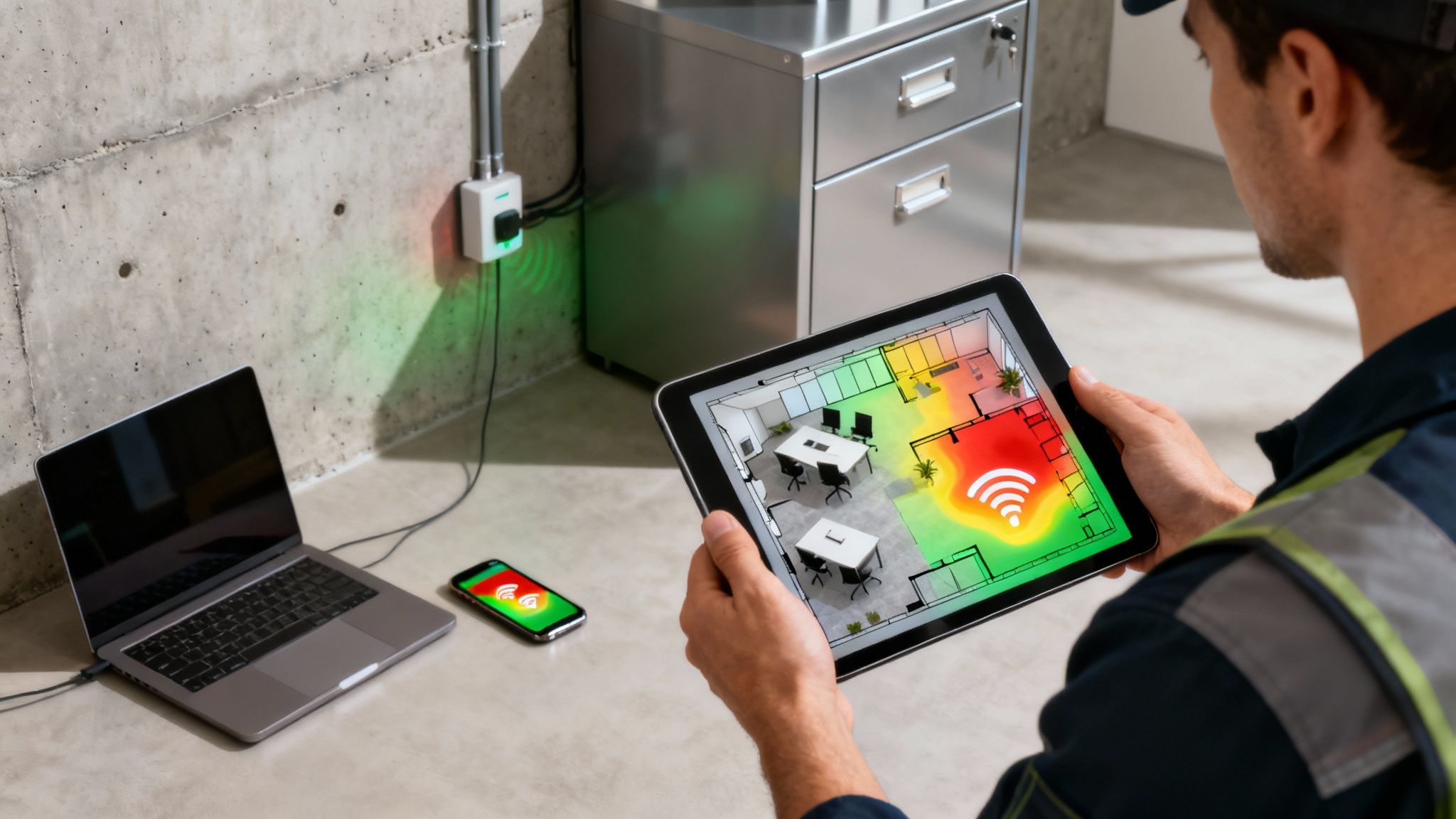
It’s time to move past guesswork. Those frustrating dead spots and sluggish connections are just symptoms, not the disease. The real problems are almost always physical barriers, signal interference, or hardware that just isn't up to the job anymore.
Think about the modern office layout. Concrete walls, glass partitions, and even densely packed rows of desks and filing cabinets can absorb or reflect Wi-Fi signals, creating frustrating blackouts in connectivity. On top of that, your network is constantly battling interference from other electronic devices.
Common Causes of Poor WiFi Coverage
Before you rush out and spend a fortune on new kit, run through this practical checklist. A quick walk around the office can often reveal more than you'd think.
Signal Obstructions: Thick walls are an obvious one, but don't forget about metal shelving, large fish tanks, or even big groups of people. These things can kill a Wi-Fi signal.
Electronic Interference: Microwaves are notorious Wi-Fi killers. Cordless phones and Bluetooth devices can also cause chaos, especially if you're still relying on the older 2.4 GHz frequency.
Neighbouring Networks: If you're in a busy office block, you could be competing with dozens of other networks for the same limited wireless channels. This congestion slows everyone down.
Outdated Hardware: Let’s be honest, that router from five years ago probably can't handle the sheer number of devices in today's office – from laptops and phones to printers and smart speakers.
A common mistake I see is people just cranking up the power level on their access points. This can actually make things worse by creating more signal "noise" and interference, especially in a crowded office.
Your Diagnostic Toolkit
The goal here is to stop assuming and start knowing. A fantastic starting point is to conduct a simple signal audit to map out where the signal is strong and where it drops off.
We've got a detailed guide on how to test WiFi signal strength in your UK home, and most of the principles apply just as well to an office environment. Once you identify whether the issue is an overloaded router, a poor setup, or just a few too many concrete walls, you'll have a clear plan of attack for building a reliable network that your whole team can count on.
Finding the Best Spot for Your Wi-Fi Router
Before you rush out and buy new kit, one of the simplest and most effective things you can do for poor signal is often just moving your hardware. Sometimes, getting better Wi-Fi coverage isn’t about spending money; it’s about being smarter with what you’ve already got. The right placement can make a massive difference, turning frustrating dead zones into productive hotspots.
The old advice to stick your router in the "centre" of your office is a decent starting point, but let's be honest, a real-world office is never just a simple square. You've got high-demand areas like conference rooms and clusters of desks that absolutely need a rock-solid signal. Then you have the signal killers—metal filing cabinets, thick structural walls—that can stop a Wi-Fi signal in its tracks.
Do a Quick Walk-Around First
Before you start unplugging anything, just take a few minutes for a quick visual survey of the office. This isn't some complex technical audit. It's a practical walkthrough to get a feel for your office's connectivity needs and challenges.
Pinpoint High-Priority Zones: Where does your team really need flawless Wi-Fi? Think meeting rooms for video calls, busy open-plan areas, and maybe the senior management offices.
Spot the Signal Blockers: Make a mental note of the big physical obstacles. Concrete pillars, lift shafts, dense metal shelving, and even the microwave in the kitchen are notorious for weakening Wi-Fi signals.
Think in 3D: If your office is spread across multiple floors, router position becomes even more crucial. Wi-Fi signals really struggle to travel vertically, especially through concrete floors.
This little exercise helps you think about signal paths rather than just physical distance. That’s the real key to finding the best location for your equipment.
The goal is to get the clearest possible line of sight between the access point and the most critical user devices. Every wall, partition, or hefty piece of furniture a signal has to punch through weakens it significantly.
Smart Placement for Common Office Layouts
Different office layouts need different strategies. If you’ve got a long, narrow office, a single router plonked in the middle is going to leave people at the ends with a weak, unreliable connection. In that kind of space, placing the access point on the middle of the longest wall often gives you much more even coverage. If that still doesn't cut it, you'll probably need to look at adding a second access point.
For multi-floor offices, putting access points near stairwells or in central atriums can sometimes help the signal bleed between levels. But honestly, the most reliable fix is to have dedicated access points on each floor, properly wired back to your network. It takes the guesswork out of it and makes sure everyone gets a strong, consistent connection, no matter where they're working. These are cost-free adjustments that can give your Wi-Fi coverage an immediate boost and get your team back to being productive.
Building a Strong Foundation with Fibre Cabling
Your Wi-Fi can only ever be as good as the wired network that supports it. This is where a professional fibre cable installation becomes a complete game-changer for any serious business. It provides the high-speed backbone that modern wireless equipment desperately needs to perform at its best.
Think of it this way: upgrading your core infrastructure demolishes the data bottlenecks that even the most advanced Wi-Fi gear can't overcome on its own. This isn't just about faster internet browsing; it's about building a robust digital foundation that can handle dozens of simultaneous video calls, huge file transfers, and cloud applications without breaking a sweat.
Once that solid foundation is in place, the final step is delivering that speed wirelessly. This chart gives a great overview of the fundamental principles for placing your access points.
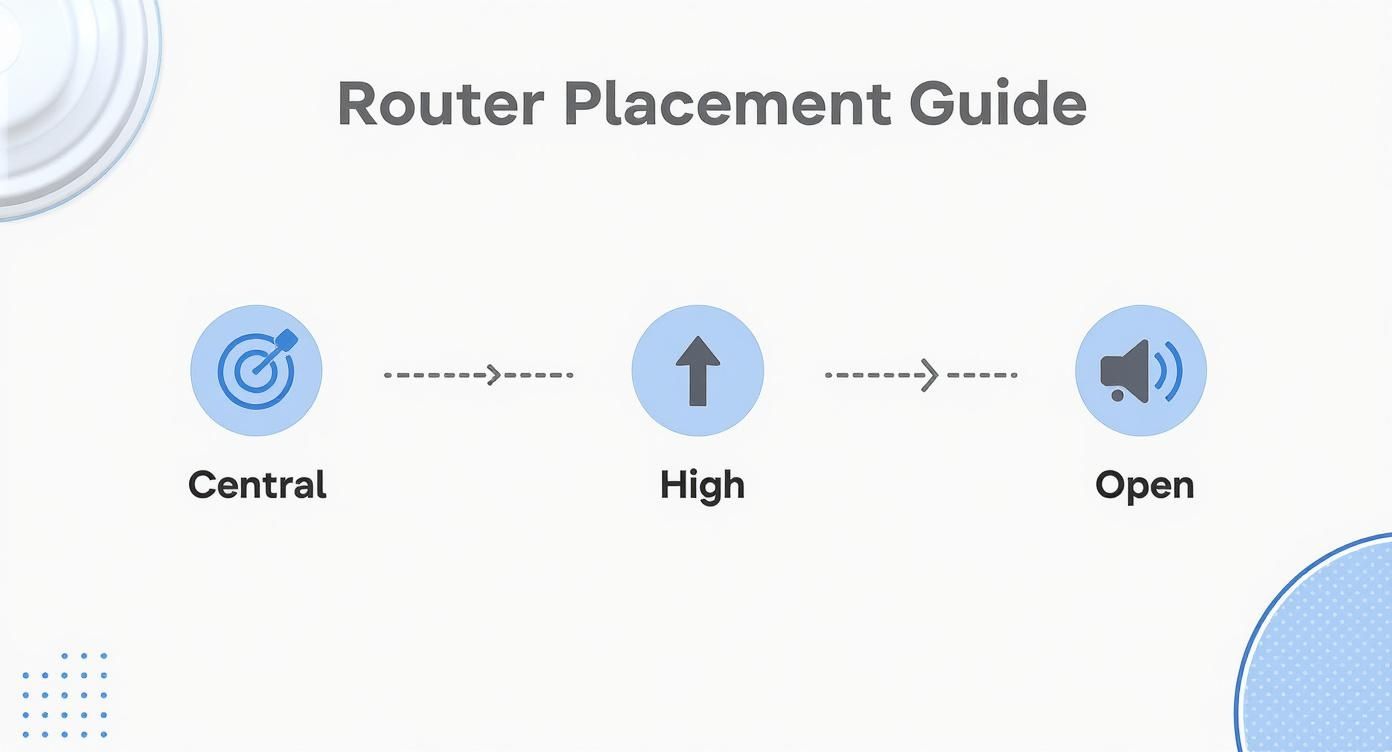
The key takeaway here is that strategic placement is everything. Central, elevated, and open areas are crucial for maximising the signal broadcast from your access points and getting that performance you’ve paid for.
The Power of a Certified, Tested Network
When you work with an Excel network accredited partner, you're not just getting cables run through the walls. You're investing in a system where every single component is certified and tested to meet incredibly stringent performance standards.
This commitment to quality means your network is reliable from day one. It also comes with the peace of mind of long-term guarantees, like a 25 year equipment warranty, which protects your investment for decades to come. This certified approach is absolutely critical during complex projects like an office relocation, where all your equipment must be moved and re-tested efficiently to keep downtime to a minimum.
A professional job also includes meticulous cable management. It’s a detail that might seem small, but it makes a huge difference in day-to-day operations, contributes to a tidy desk environment, and results in a far more organised and reliable server room. If you want to dive deeper, you can explore our guide on the different categories of computer network cables to see which options would suit your office.
Leveraging the UK’s Growing Fibre Infrastructure
There has never been a better time to upgrade your network. The UK’s digital infrastructure is expanding at a phenomenal rate, making high-speed connectivity more accessible than ever for businesses looking to boost their Wi-Fi coverage.
By early 2025, full-fibre broadband coverage in the UK had surged to 73% of properties. This rapid expansion provides the essential backbone for businesses to build powerful and dependable internal networks.
This progress means the external connection coming into your building is faster and more reliable than ever. By matching it with an internal fibre installation, you ensure that top-tier speed is delivered consistently to every single user and device. For example, the UK smashed its 2025 target by reaching 86% gigabit-capable coverage, connecting 25.9 million properties to next-generation speeds. You can learn more about the UK’s impressive broadband expansion on okoone.com.
Ultimately, a certified, tested network delivery is the single most effective way to prepare your office for the demands of the future, ensuring your Wi-Fi can support your business as it grows.
Why Professional Cable Management Matters
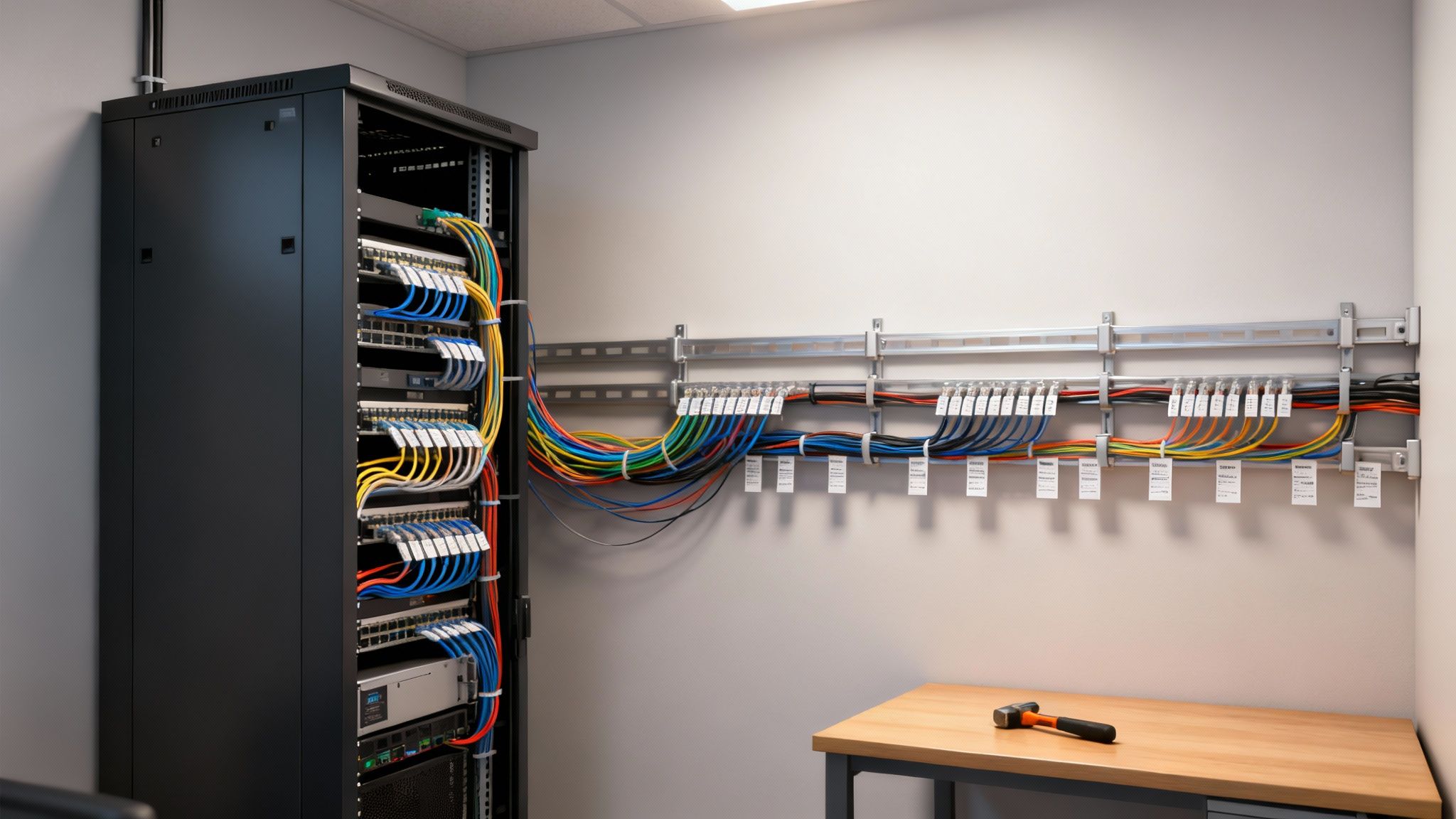
That tangled nest of cables tucked behind a desk or hidden in a server closet is more than just an eyesore. It's a genuine threat to your network's performance and stability, quietly strangling even the most powerful Wi-Fi hardware you've invested in. That's why professional cable management is such a vital, yet often ignored, part of a healthy office network.
When an expert plans and implements a structured cabling setup, they're designing it to prevent signal interference right from the start. Cramming data cables alongside power lines is a recipe for electromagnetic interference, which can corrupt data packets and slow your entire network to a crawl. Proper management keeps these pathways separate, preserving the integrity of your signal.
It also drastically cuts down on accidental disconnections. A stray foot or an overzealous cleaning crew can easily knock a critical connection loose in a chaotic jumble of wires. The result? Instant downtime that’s a nightmare to trace.
The Foundation of a Reliable Network
Think of your network cabling as the central nervous system of your office. A clean, organised system allows data to flow smoothly and predictably, which is the bedrock of consistent Wi-Fi performance. This is where bringing in an Excel network accredited partner makes a world of difference.
Certified, Tested Network Delivery: Every single connection is rigorously tested and verified to meet strict performance benchmarks, guaranteeing reliability from day one.
Simplified Troubleshooting: When things do go wrong, organised and labelled cables mean an engineer can pinpoint and fix the problem in minutes, not hours.
Future-Proofing Your Office: A structured system makes it infinitely easier to add new connections or upgrade equipment down the line without causing a massive disruption.
This attention to detail is never more important than during an office relocation. The ability to efficiently test, disconnect, and redeploy every piece of your network hinges entirely on having an organised infrastructure. Without it, the move becomes a logistical headache, leading to prolonged downtime and lost productivity. You can find out more about the key benefits of professional cable management and why it's such a smart investment.
A tidy desk and an organised network are reflections of a well-run business. This meticulous approach ensures your system is not only reliable and easy to maintain but also backed by a long-term 25 year equipment warranty when installed by a certified professional.
DIY vs Professional Network Installation
The long-term consequences of how your network is first installed can be huge. A DIY approach might look like it's saving money upfront, but it almost always leads to hidden costs and performance headaches later on. A professional partner provides accountability and results you can count on.
Here’s a quick breakdown of what you’re really choosing between:
Feature | DIY Approach | Professional Accredited Partner |
|---|---|---|
Installation Quality | Inconsistent, often without testing | Certified and tested to industry standards |
Cable Management | Often an afterthought, leading to clutter | Structured, organised, and labelled for easy maintenance |
Warranty | No long-term equipment protection | Comprehensive 25 year equipment warranty |
Troubleshooting | Slow and difficult due to lack of order | Fast and efficient, minimising network downtime |
Long-Term Reliability | Prone to interference and accidental unplugging | Engineered for maximum stability and performance |
Ultimately, investing in professional cable management and a certified, tested network delivery from the get-go is one of the smartest moves you can make if you want to improve Wi-Fi coverage and build an infrastructure that will support your business for years.
The Assurance of a Certified Installation
When you invest in your office’s network, you’re not just buying cables and access points; you’re laying the foundation for your entire business's connectivity. That’s why a certified installation isn’t just a nice-to-have—it’s your assurance that everything will work as promised, for years to come.
Working with a certified partner is the difference between a simple purchase and a guaranteed, long-term solution. A certified, tested network delivery is a formal guarantee that every single component, from the fibre optic cable in the ceiling to the port on the wall, performs to strict, measurable standards. An Excel network accredited partner, for instance, has the specific training and tools needed to verify your system delivers the speed and stability you've actually paid for.
The Power of a Long-Term Guarantee
What really provides peace of mind is the comprehensive 25 year equipment warranty that comes with a certified installation. This isn't just a simple promise of quality. It's a rock-solid guarantee that protects your investment and ensures your network remains a high-performing asset for the long haul.
This warranty means you never have to second-guess the physical layer of your network. It’s a commitment that your cabling infrastructure will support your business not just today, but for decades to come, even as technology evolves.
This kind of long-term protection is invaluable, especially during a major project like an office relocation. When everything needs to be flawlessly tested and redeployed, a certified system makes the process smoother, minimises expensive downtime, and ensures a seamless transition to your new space.
Capitalising on UK Infrastructure Upgrades
A properly certified installation allows your business to take full advantage of the UK's rapidly expanding full-fibre infrastructure, which is the backbone for better Wi-Fi. As the national network gets faster, your internal cabling has to be up to the job of handling those speeds.
The UK is making huge strides here. Adoption of full-fibre broadband is expected to hit 80% of UK premises by mid-2025, a significant jump from 75% in March 2025. This growth, driven by providers like Openreach, is building a high-speed digital backbone for the entire country. You can read more about the UK's gigabit broadband expansion on computerweekly.com.
Ultimately, a professionally installed network is the only way to make sure the speed you get at the building is the speed your team actually experiences at their desks. This meticulous approach to cable management also creates a tidy desk environment, reflecting an organised and efficient business. For comprehensive IT solutions that include professional network installation and ongoing support, it's worth exploring various professional IT and network services.
Common Questions About Office WiFi
Still have a few lingering questions about getting the best WiFi coverage in your office? It's completely understandable. Let's walk through some of the most common issues we see that can impact both performance and your budget.
We'll cover everything from those tempting off-the-shelf extenders to what's really involved in a professional fibre cable installation or network testing during an office move.
Are WiFi Extenders a Good Fix for Office Dead Spots?
It’s a common first thought: a weak signal in one corner of the office, so you grab a WiFi extender. The problem is, an extender works by capturing your existing signal and simply rebroadcasting it, which often cuts its data throughput in half right from the start.
This bottleneck quickly becomes a problem when multiple users connect, leading to frustratingly slow speeds. On top of that, extenders don't support seamless roaming, meaning that as people move around the office with their laptops or phones, their connection will drop and stutter as it tries to jump between the extender and the main router.
We once worked with an office using three extenders that saw a staggering 50% drop in bandwidth for every single device compared to a properly wired access point. A far better, more reliable solution is always to install additional Wireless Access Points (WAPs) connected directly with structured cabling.
Limited Bandwidth: Extenders literally halve the available throughput.
Unstable Connections: The handover between the router and extender is clunky and often causes connection dropouts.
Maintenance Headaches: Each extender is another device with its own firmware that needs to be updated and managed separately.
Pro Tip: Before you even think about buying an extender, use a mobile heatmap app to identify where your dead zones truly are. You might find the issue is simpler to solve than you think.
Why Does Professional Cable Management Matter So Much?
Having organised cabling is about so much more than just a tidy server cabinet. When data and power lines are jumbled together, you create a perfect storm for electromagnetic interference (EMI), which can corrupt data packets and cause mysterious network errors.
Properly separating and managing these cables is fundamental to a stable network. In our experience, a well-organised server rack with clearly labelled and bundled cables can slash troubleshooting time by as much as 70%. It’s the difference between a quick fix and hours of frustrating detective work.
Beyond that, professional installation is what underpins a certified network that you can truly rely on.
Benefit | DIY Setup | Professional Setup |
|---|---|---|
Signal Integrity | High risk of EMI | Low risk of EMI |
Downtime | Frequent & unpredictable | Rare & planned |
Warranty Eligibility | None | 25 year warranty |
We saw this firsthand with a law firm that was plagued by intermittent connection issues. After we reorganised their server room and installed proper cable trays, they cut their IT troubleshooting costs by 40%.
What Is an Excel Network Accredited Partner?
Choosing an Excel network accredited partner means you're not just hiring an installer; you're bringing in a team whose expertise has been officially certified. These professionals are trained to deliver fibre and copper cabling installations that meet incredibly strict performance and quality standards.
This accreditation is what makes your network eligible for the comprehensive 25 year equipment warranty. It’s a guarantee that every single port, panel, and cable has been installed and tested to perform exactly as it should, giving you complete peace of mind.
Key reasons to work with an accredited partner:
Guaranteed compliance with all industry standards.
Access to premium Excel Cat6 and fibre optic solutions.
Certified post-deployment testing, crucial during office relocations.
A much faster and smoother project, from start to finish.
Ultimately, it ensures every stage of your project, especially a complex office move, benefits from a certified, tested, and reliable network delivery.
How Disruptive Is Installing New Fibre Cabling?
The idea of running new fibre cables through a busy, functioning office can sound like a recipe for chaos, but it really doesn't have to be. A professional team knows how to plan the work to cause minimal disruption to your day-to-day operations.
Most of the installation can be scheduled for off-peak hours, like evenings or weekends. During the day, our technicians are experts at discreetly routing cables through ceiling voids and wall cavities, staying out of your team's way. Afterwards, we conduct thorough equipment testing to ensure every newly connected access point is running perfectly.
With careful planning and clear communication, most businesses we work with experience less than 2% downtime during the entire installation process.
Work is scheduled during quiet hours to avoid interrupting your team.
Cables are tested at every segment to ensure integrity.
Work areas and desks are left clean and tidy immediately after.
A clean workspace isn't just polite—it ensures no stray cables get snagged, preventing unexpected outages down the line.
Ready to transform your office network? Partner with Constructive-IT for end-to-end solutions including certified fibre cable installation, structured cable management, and WiFi optimisation. Enhance performance, security, and reliability with a team that delivers a 25-year equipment warranty and tested network delivery. Discover more at our website.
Get a free network survey when you book today with our team now.
Comments