

You're probably staring at a new white space, a relocation plan, or a fit-out programme that's moving faster than your comfort level. The drawings look complete. The contractors say they're nearly there. Someone asks when the racks can go live, and that's the moment data centre commissioning stops being a line item and becomes your safety net.
For an in-house IT manager, projects often encounter problems at this stage. A facility can look finished and still be nowhere near ready. Power can be installed but not sequenced correctly. Cooling can run but not hold stable under real load. Access control can be fitted but not integrated with CCTV, alarms, and remote operating procedures. If you're building out a fully autonomous unmanned building units model, those gaps become operational risks on day one.
Beyond the Blueprint What Data Centre Commissioning Really Means
At the point a new data hall looks finished, risk is often at its highest. Panels are live, plant is running, doors are fitted, cameras are on the wall, and everyone wants a go-live date. None of that proves the facility can operate safely, recover cleanly from faults, or support an unattended model at 2am when a breaker trips and no engineer is on site.
Data centre commissioning is the process that proves the building works as one operational system. ASHRAE describes commissioning as a quality-focused process for confirming that building systems meet defined project requirements. In a UK data centre, that means witnessed testing, recorded results, and clear evidence that power, cooling, controls, network paths, fire systems, access control, CCTV, alarms, and operating procedures perform properly before handover.
For a modern facility, that scope has to go beyond M&E. If the site is expected to run with minimal on-site attendance, commissioning must prove the building can protect itself, report clearly, and be managed remotely without guesswork. An unmanned data centre is not merely a staffed site with fewer visits. It depends on integrated monitoring, reliable remote access, event logging, secure entry workflows, and predictable behaviour when systems fail.
That is where weaker projects get exposed.
A UPS can start and still fail a transfer sequence under load. Cooling can hold a room at idle and drift out of tolerance once containment, rack density, and control logic interact. Access control can grant entry but still leave gaps if CCTV bookmarks, alarm escalation, door release logic, and comms failover have not been tested together. The same applies to the network that carries your BMS, security traffic, and out-of-band management. If that foundation has not been designed and tested properly, the facility is harder to run than it needs to be. Good structured cabling design for critical environments supports commissioning just as much as generators and chillers do.
The practical rule is simple. If a system has not been tested in the condition you expect it to survive, you do not yet know that it works.
Commissioning also sets the standard for how the project is controlled commercially. Test scripts, hold points, defect closure, witness records, and asset schedules all depend on clear scope and disciplined coordination between trades. Tools such as Exayard electrical estimating software help teams price and define electrical packages earlier, but its full value only appears if that scope carries through into testable outcomes on site.
The pressure on UK projects is rising. Analysts at Oxford Economics on the UK's data centre boom found a sharp increase in investment and delivery activity, which means internal teams are reviewing more complex sites under tighter programmes and greater power constraints. In practice, that leaves less room for soft sign-off, informal workarounds, or handovers built on vendor assurances.
A proper commissioning programme gives an in-house IT manager evidence. Evidence that the plant can fail over. Evidence that alarms reach the right people. Evidence that remote operators can see, decide, and act without being physically present. Evidence that the building you are accepting is ready to run, not just ready to tour.
Successful Commissioning Starts Before Construction
The biggest commissioning mistake happens long before any test script is written. Teams design power, data, access control, and operations in separate conversations, then try to bolt them together near the end.
That approach creates expensive clashes. The reader location for access control affects door hardware, containment routes, PSU provision, fail-secure or fail-safe behaviour, and how events are reported into monitoring. CCTV needs power, network capacity, storage decisions, and operational ownership. Structured cabling needs to support production traffic, management traffic, security devices, and out-of-band recovery paths. If these are designed in silos, your handover inherits those silos.
Start with operational intent
Before construction, define how the facility will be used.
Will authorised staff enter rarely or frequently? Will third-party maintainers need escorted access? Will remote operators manage alarms out of hours? Will the site be staffed, lightly attended, or effectively unmanned apart from planned visits? Those decisions drive commissioning scope just as much as rack count or cooling topology.
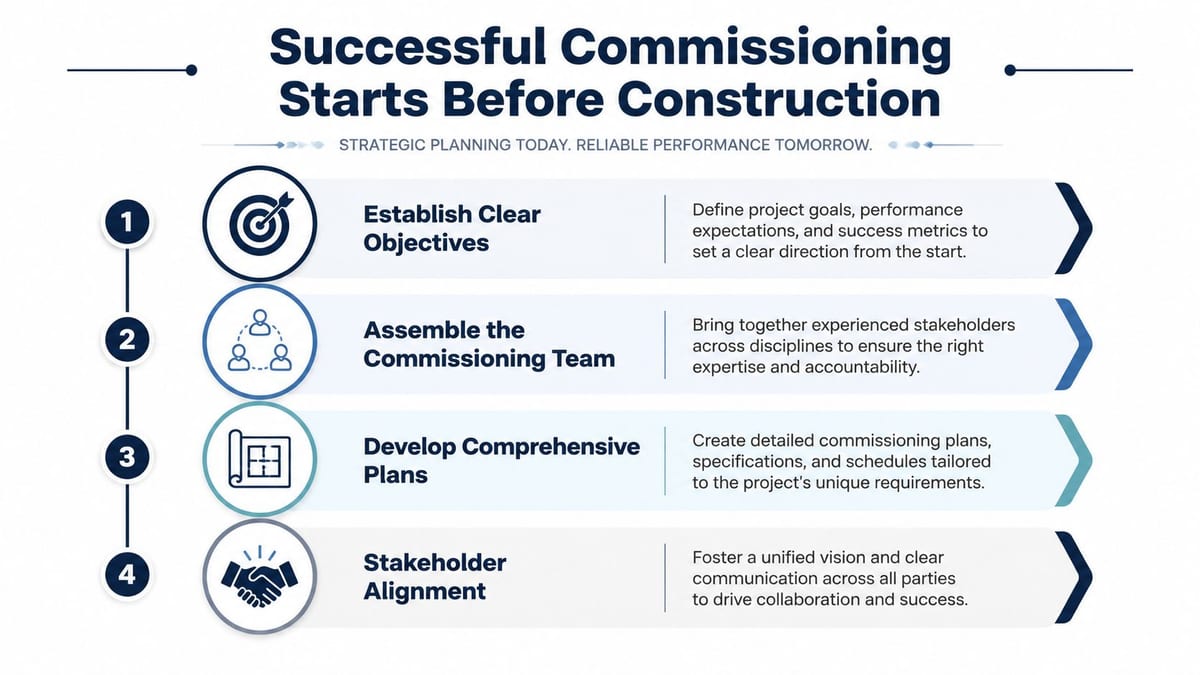
A useful way to structure early planning is to lock down four items first:
Business-critical outcomes
Decide what “ready” means in operational terms. That usually includes resilience expectations, access rules, maintenance model, evidence required for sign-off, and who has authority to accept residual risk.System boundaries
Be explicit about what is in scope. Include M&E, structured cabling, CCTV, access control, monitoring, fire interfaces, remote alerting, and the documents needed for commercial electrical installation and certification.Owners of each risk
Name who signs off network design, electrical testing, security logic, maintenance procedures, and escalation paths. If responsibility is vague now, it'll be disputed later.Test evidence format
Decide early what reports, witnessed records, asset schedules, and certifications you'll require at handover.
Align power applications with commissioning planning
Timing matters more than many first-time project teams realise. Commissioning planning must begin at the same time as NESO and DNO connection applications. AI-driven demand is pushing campus power needs into the hundreds of MWs, and grid reinforcement timelines are extending beyond 2026, which can create costly delays if these workstreams aren't aligned, as set out by BCLP on UK data centres and power strategy.
That matters even on smaller enterprise projects. If your internal programme assumes one power date and your commissioning sequence depends on another, every downstream activity moves with it. Generator proving, UPS load testing, cooling validation, remote monitoring setup, and final go-live all get squeezed.
The earlier you connect design intent, utility reality, and commissioning logic, the fewer “surprises” appear in the final month. Most of those surprises were visible much earlier.
Design access, power and data as one system
Experienced teams prevent difficulties. Don't ask the electrical contractor to finish power, then the network team to “pick up data”, then the security installer to add access around the edges. Design them together.
A simple planning view looks like this:
| System area | What must be coordinated early | What commonly breaks when it isn't |
|---|---|---|
| Access control | Door hardware, lock power, emergency release, logging, remote admin | Doors work locally but fail in outage or don't report status correctly |
| Power | UPS-backed circuits, segregation, monitoring, certification | Security or network devices die during transfer events |
| Data | Cabling routes, switch ports, VLAN planning, resilience | CCTV and access devices install late and overload poor network design |
| Operations | Alarm ownership, remote access, maintenance windows | No one knows who responds when faults arrive out of hours |
For the cabling side, structured cabling design considerations should be decided before walls are closed and cabinets are fixed. Late changes in pathways and cabinet positions ripple into access readers, cameras, sensors, and patching layouts.
Pre-construction estimating also needs more discipline than many IT-led projects get. If you're trying to compare contractor submissions with any confidence, a specialist tool such as Exayard electrical estimating software can help teams structure electrical scope, quantities, and assumptions more clearly before procurement decisions harden into programme risk.
Designing for Autonomy The Unmanned Data Centre
A modern data centre doesn't have to depend on constant on-site presence to be secure and operational. But “unmanned” doesn't mean unsupervised, and it certainly doesn't mean lightly designed.
In practical terms, unmanned building management for a data centre means creating a facility where authorised users can access and use the space without permanent on-site staff. That relies on integrated digital access controls such as NFC locks, remote monitoring through CCTV, and automated operational systems that maintain both security and functionality, as described by Constructive-IT on unmanned building management in practice.
What that looks like in the real world
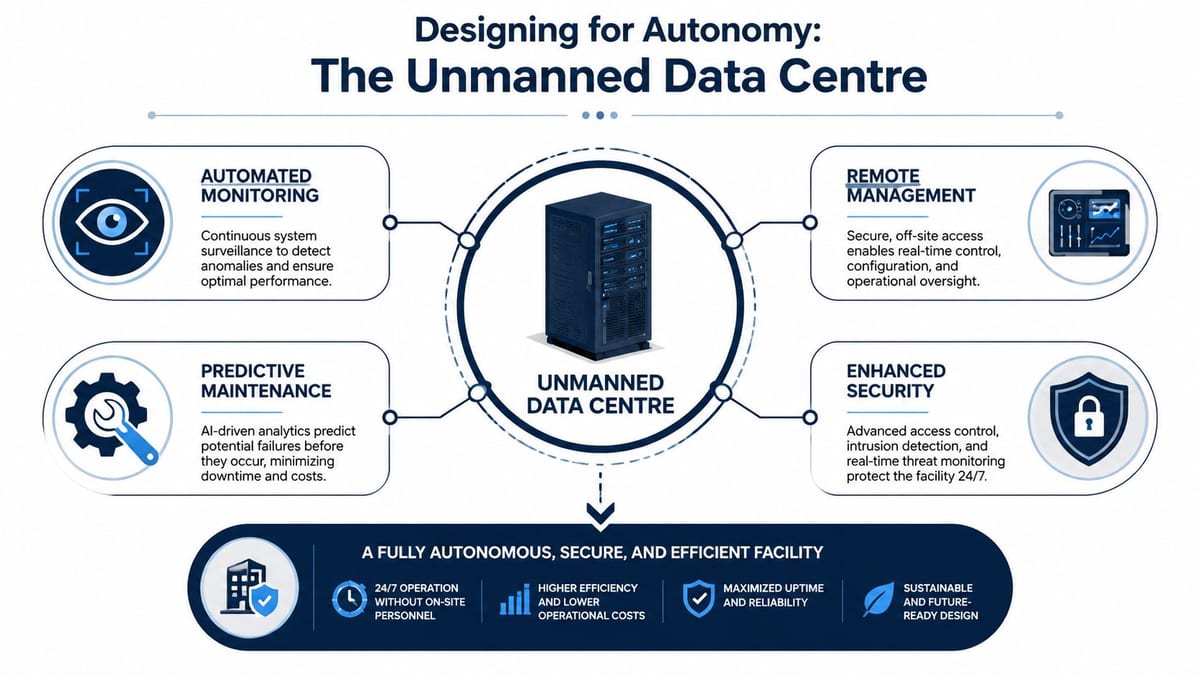
An unmanned data centre has to answer four questions cleanly:
- Who can enter? Access rights must be role-based, auditable, and easy to revoke.
- Who can see what's happening? CCTV has to give operators usable views, not just legal coverage.
- What happens when systems fault? Alerts need escalation rules and remote triage.
- How does the building behave without staff present? Doors, lighting, alarms, environmental monitoring, and remote access all need defined logic.
This model is common in co-location suites, regional edge sites, server rooms in distributed estates, utility-linked plant spaces, and smaller satellite facilities where staffing every location doesn't make operational sense.
Why battery-less NFC proximity locks often win
Traditional access hardware causes more maintenance trouble than many teams expect. Batteries fail at awkward times. Key management drifts. Mechanical wear creeps in unnoticed. For unmanned facilities, those are operational liabilities, not minor annoyances.
Battery-less, NFC proximity locks are often the right choice for a few practical reasons:
Lower maintenance burden
There are no lock batteries to inspect and replace on a rolling basis. That matters when sites aren't routinely staffed.Cleaner credential control
Access can be issued, changed, and revoked through managed workflows rather than physical key handling.Better fit for audited access
You need to know who entered, when they entered, and under what authority. NFC systems support that discipline far better than ad hoc keys.Less downtime tied to hardware neglect
A flat battery in a lock is an inconvenience in an occupied office. In a remote technical space, it can stop maintenance or force emergency attendance.
That doesn't mean every door needs the same setup. Comms rooms, loading areas, cage entries, and landlord interface points often require different hardware logic. Commissioning has to prove those distinctions were understood.
CCTV and autonomous operation need to be commissioned together
CCTV isn't a bolt-on after security design. In an autonomous site, it's part of the operating model.
Remote monitoring only works if camera placement, recording policy, storage retention, network resilience, and alarm response are all aligned. The useful question during commissioning isn't “do the cameras work?” It's “can an authorised operator confirm the right event, from the right view, in enough time to make a decision?”
A camera that records everything but helps nobody respond isn't delivering operational security.
The same goes for building out a fully autonomous unmanned building units approach. You're validating a system of systems. Access, CCTV, environmental alerts, remote reboot capability, and support procedures all need to function together under normal conditions and fault conditions. If one of those pieces depends on someone “usually being around”, the building isn't autonomous in any meaningful sense.
Executing the Five Levels of Commissioning Tests
Commissioning turns drawings and specifications into proof. By the time plant is on site, the question is no longer what the building should do. The question is whether every power, cooling, control, security, and monitoring path behaves as intended under normal operation and under fault.
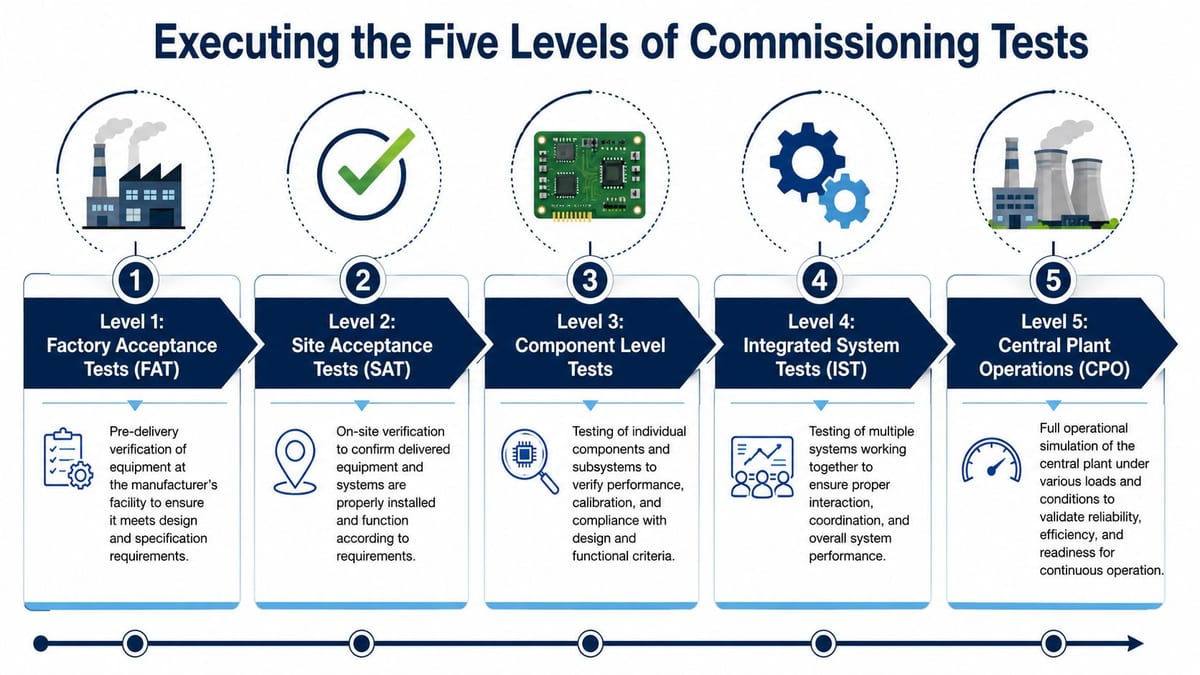
In practice, the five levels matter because each one removes a different type of risk. Skip an early stage and the defect usually resurfaces later, when fixing it is slower, more expensive, and far more disruptive. In an unmanned facility, that risk is sharper. A missed interface between a UPS alarm, access event, CCTV view, and remote monitoring workflow is not a minor snag. It can leave a remote operator blind at the point they need to make a decision.
A useful visual summary sits below.
Level 1 and Level 2 proving the kit is right
Factory Acceptance Testing (FAT) happens before delivery. It confirms that major equipment and packaged systems were built, configured, and documented correctly before they leave the manufacturer.
Site Acceptance Testing (SAT) follows installation. It confirms the same equipment arrived intact, was installed properly, and performs correctly in the building, with the actual cabling, controls, containment, and upstream dependencies in place.
These stages catch the sort of errors that otherwise waste weeks late in the programme:
- Incorrect control logic on UPS, generators, or cooling packages
- Panel and field labelling mismatches between drawings and installed equipment
- Missing BMS or DCIM points that stop alarms and status signals reaching operators
- Wrong device addressing on access control, CCTV, or other IP-connected security systems
For an unmanned site, FAT and SAT should cover more than pure M&E performance. If door controllers, camera encoders, interlocks, or remote access gateways are arriving as part of the operating model, prove them early. Waiting until integrated testing to discover firmware mismatches or missing I/O is a common and expensive mistake.
Level 3 component testing by discipline
Level 3 is discipline-by-discipline proving. It is methodical work. It can also feel slow, particularly when programme pressure is building, but this is where teams establish whether each subsystem is safe, labelled correctly, and testable on its own.
| Discipline | Typical focus during component testing | What you should expect to see |
|---|---|---|
| Mechanical | CRAH or CRAC units, valves, pumps, chillers, control responses | Stable operation, correct alarms, sensible sequencing |
| Electrical | UPS, generators, switchgear, ATS, earthing, protective devices | Correct installation, safe energisation, witnessed certification |
| IT and security | Structured cabling, switching, access control, CCTV, environmental sensors | Labelling accuracy, continuity, device visibility, event logging |
Electrical certification needs close checking here. Certificates should match the installed asset registers, final circuit references, protection settings, and test records. If they do not, the paperwork is not supporting handover. It is obscuring uncertainty.
The same standard applies to life safety. Fire alarm cause and effect, plant shutdown interfaces, door release logic, and monitoring outputs need to be tested as installed, not assumed from drawings. If you need a reminder of the standard expected on that side of the project, see how to secure your property with fire alarms.
Level 4 integrated systems testing
Level 4 proves whether the building works as a system. Many projects look healthy until this point because individual packages have passed in isolation. Integrated testing exposes the coordination faults.
The tests that matter are the ones that reflect real operating conditions:
Mains loss and transfer behaviour
Confirm the UPS carries the load cleanly, the generator starts and stabilises in time, and load shedding follows the intended sequence.Cooling response during electrical events
Check whether cooling plant restarts in the correct order and whether room conditions remain within acceptable limits during transfer and recovery.Security behaviour through power transitions
Prove that readers, locks, controllers, and CCTV recording behave as designed on UPS-backed and non-backed supplies. An unmanned site cannot rely on a guard or engineer being nearby to compensate for a poor transition.Alarm routing and operator visibility
Confirm alarms reach the right team, with the right description, through the right platform. A vague fault banner is not enough if the operator also needs camera context, door status, rack temperature, and escalation guidance.Environmental visibility for remote operation
Remote teams need usable thresholds, alarm delays, trend history, and clear sensor naming. Good environmental monitoring in UK facilities should already be tied into commissioning scripts, because operators cannot manage an unmanned building on raw data alone.
A short explainer video can help frame how staged testing is typically approached in live projects.
Level 5 central plant operations and live condition simulation
Level 5 is full operational proof. The site is tested under planned modes of operation and selected failure scenarios to confirm that the facility, the controls, the monitoring stack, and the operating procedures all line up.
For a conventional data centre, that usually means demonstrating resilience. For an unmanned data centre, it also means demonstrating autonomy. Can the site detect, report, record, and contain an incident without someone local improvising the response? Can remote staff verify what happened and decide on the next action from the tools provided?
That is the standard worth aiming for.
The best handovers rarely come from projects with a perfect first pass. They come from projects where the client team insisted on realistic test scripts, failures were logged properly, remedial works were closed out, and the affected sequences were tested again until the evidence matched the design intent.
Anticipating Failure and Mitigating Project Risk
Most failures discovered during commissioning aren't dramatic. They're small coordination problems that only become serious once the site is live.
A UPS may transfer correctly but restore loads in the wrong sequence. A generator may start on command but take too long to settle. Cooling may look fine in partial operation yet create hot spots when airflow and rack load interact. Network paths may be installed redundantly but still fail over poorly because the actual switching logic was never exercised end to end.
Why unmanned projects fail more often than teams expect
Unmanned facilities magnify planning errors because there's no resident team papering over design gaps. If a reader fails, if an alarm is unclear, or if a camera view doesn't support remote decision-making, the site can't rely on someone nearby to improvise.
A major reason many unmanned projects fail is incomplete risk assessment. One example is the inability to distinguish between private and organisational drones used in site monitoring or security contexts, which creates identity confusion and can undermine regulatory compliance, as discussed in Nature on drone identity and regulatory trust. That may sound niche until your site security model depends on remote verification and clear event attribution.
The broader lesson is simple. If the commissioning scope only covers M&E and ignores operational edge cases, you haven't commissioned the facility you're going to run.
What good risk mitigation looks like
Teams reduce risk when they test real workflows rather than ideal drawings.
Scripted failover tests
Power events should be rehearsed with named roles, witness sheets, and restoration steps. Sequencing errors are caught during these rehearsals.Thermal and airflow validation
Don't assume the cooling design behaves as modelled once racks, blanking, and containment details meet real installation conditions.Security scenario testing
Authorised entry, denied entry, escort access, remote release, alarm acknowledgement, CCTV verification, and out-of-hours escalation all need to be exercised.Operator response drills
An unmanned building still depends on humans. It just depends on them remotely and under pressure.
For power resilience planning, UPS review and selection considerations can help internal teams ask better questions before testing begins.
Maintenance and operational considerations after go-live
A site can pass commissioning and still become hard to operate if maintainability wasn't part of the review.
Check these points before sign-off:
| Area | What to confirm |
|---|---|
| Access hardware | Replacement process, credential administration, override procedure |
| CCTV | Camera naming, retention policy, remote access rights, evidence export |
| Electrical systems | Maintenance isolation method, certificate pack, breaker labelling |
| Network and security devices | Patch schedules, support ownership, backup configs |
| Documentation | As-builts, test scripts, alarm matrix, escalation contacts |
If those basics are vague, the building will become dependent on tribal knowledge. That's the opposite of resilience.
The Handover Checklist Documentation and Operational Readiness
Handover is where many internal teams feel pressured to sign because the programme has run long and everyone wants closure. Don't treat that pressure as proof of readiness. Your acceptance should be based on documents, witnessed evidence, and operator confidence.
The practical test is this. Could your team run the facility safely next week, at night, under fault conditions, without having to call back the original installers to explain how it works? If the answer is no, the handover isn't finished.
What must be in the handover pack
A proper final package should include more than a summary report.
Commissioning reports
Full test records, not just pass statements. You need failures, retests, witness notes, and final outcomes.Commercial electrical installation and certification documents
Electrical certificates, schedules, and references that match installed assets and labelling on site.As-built drawings
Power, data, CCTV, access control, containment, rack layouts, and plant interfaces.Asset and configuration schedules
Device lists, cabinet schedules, reader and camera maps, monitoring points, software versions, and warranty details.Operating procedures
Planned shutdown, startup, access issue response, alarm handling, maintenance isolation, and escalation paths.
What the in-house team should verify in person
Paperwork matters, but a final walk-through matters just as much.
Before signing, ask someone from your own team to perform routine tasks using only the handover documents. If they can't, the documents aren't finished.
Use a short acceptance checklist:
- Can operators identify every critical asset on site from the drawings and labels?
- Can authorised users access the space exactly as intended, with logging and CCTV verification?
- Are maintenance routes and isolation steps clear and safe?
- Do alarms reach named responders with actionable detail?
- Are warranties, certifications, and support contacts complete and current?
Operational readiness is the real return
The value of data centre commissioning reveals itself. You're not paying for ceremony. You're buying confidence that the facility can be operated, maintained, audited, and expanded without constant firefighting.
That matters even more if the site is part of an office relocation, a new fit-out, an NHS hospital environment, or a distributed estate where downtime has immediate business consequences. A clean handover gives your team a stable baseline. It also gives future contractors fewer excuses when they touch the site later.
If you're planning a relocation, fit-out, server room expansion, or a more autonomous facility model, Constructive-IT can support the work from design and installation through testing, certification, and go-live, so your handover isn't just complete on paper but operationally ready.