
You're probably dealing with one of two situations right now. Either your current network still “works” but keeps creating friction, or you're planning a relocation, fit-out, hospital upgrade, or security project and you don't want to build tomorrow's problems into today's budget.
That's where most fibre conversations go wrong. People reduce the discussion to speed. Speed matters, but it's only part of the picture. Key fibre optic benefits show up when your business depends on stable cloud access, clean CCTV feeds, dependable Wi-Fi, secure access control, certified commercial electrical installation, and infrastructure that won't fall apart the moment you move offices or add more devices.
In practice, a fibre-first strategy is less about buying a faster line and more about removing operational risk. It gives IT, facilities, and project teams a stable foundation for growth, especially when the end goal is bigger than internet access, such as building out a fully autonomous unmanned building units environment or supporting critical NHS imaging workflows.
Why Legacy Copper Cabling Holds UK Businesses Back
Most copper problems don't announce themselves with a major outage. They show up as daily nuisance. Video calls stutter. Shared files crawl into cloud platforms. CCTV recordings drop frames. A door controller goes offline because data, power and network design were treated as separate jobs.
That's why old cabling often survives longer on paper than it should in reality. The infrastructure is still present, but it no longer supports the way the business operates.
Where copper fails in real business conditions
In the UK, 69% of homes and a growing number of businesses can now access full fibre broadband, which offers symmetrical speeds up to 1Gbps, while traditional copper typically maxes out at 70–100Mbps for downloads and a restrictive 10Mbps for uploads (UK full fibre rollout overview). That upload ceiling is where many organisations feel the strain first.
Modern business traffic isn't one-way. Staff upload design files, sync cloud backups, push security footage, run Teams or Zoom calls, and connect multiple SaaS platforms at once. Copper was built for an earlier pattern of use. It doesn't cope well when upload demand becomes part of normal operations.
A second problem is environmental sensitivity. Copper-based networks are more vulnerable to electromagnetic interference and distance limitations, which means performance can degrade in busy buildings, mixed-use sites, plant-heavy environments, and temporary event spaces.
If your team also handles live productions, conferences or short-term installations, this guide to stable event networking links is useful because it shows how cabling quality and network stability affect real-world delivery, not just lab performance.
Legacy cabling rarely fails at a convenient time. It usually fails during a move, an expansion, or a system integration when the business can least tolerate delay.
Why the business impact is bigger than the cable itself
Copper creates bottlenecks that spread across departments. IT sees support tickets. Operations sees delays. Facilities sees unexplained device behaviour. Security teams see unreliable endpoints.
A simple comparison makes the issue clear:
| Network characteristic | Typical copper outcome | Business effect |
|---|---|---|
| Uploads | Limited and uneven | Slow cloud sync, poor calls, delayed backups |
| Distance | Shorter practical runs | More cabinets, more workarounds |
| Interference | More exposure to noise | Unstable endpoints and inconsistent performance |
| Scalability | Harder to expand cleanly | Rework during fit-outs and refurbishments |
Once a business depends on connected systems instead of isolated ones, copper stops being a neutral legacy asset. It becomes a constraint.
The Core Technical Benefits of Fibre Optic Cabling
The clearest way to understand fibre is to stop thinking about it as a faster version of copper. It's a different medium with different behaviour. That matters because network design decisions are really decisions about how much risk, complexity and headroom you're willing to accept.
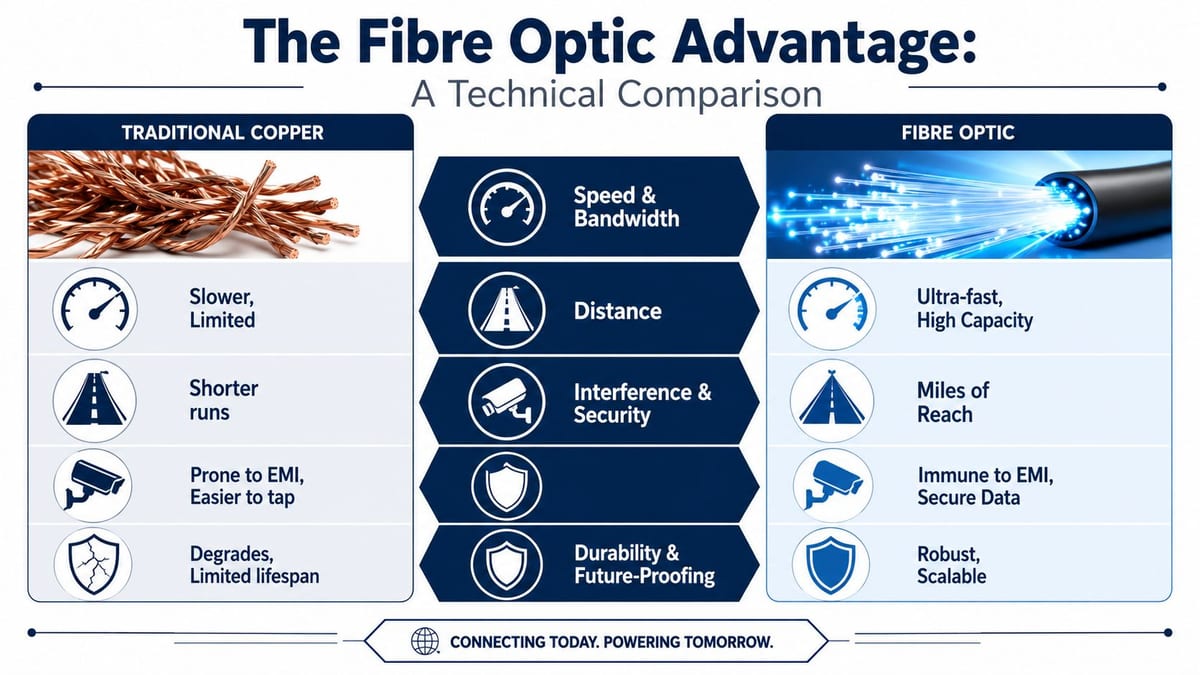
Bandwidth and symmetrical performance
Bandwidth is easiest to picture as road capacity. Copper is the road that keeps narrowing when traffic rises. Fibre is the route built for heavier, simultaneous flow.
That's why fibre works so well for organisations that rely on cloud platforms, shared storage, hybrid meetings, VoIP, and remote monitoring. It handles modern traffic patterns without punishing uploads.
Distance without constant compromise
Distance is where fibre changes project design. Fibre optic cables offer a transmission distance of up to 100 km without signal loss, dwarfing copper's strict 100 m limit, making it ideal for large UK office estates and data centre clusters without needing signal-boosting repeaters (technical comparison from Fluke Networks).
For a multi-floor office, campus building, warehouse, hospital estate or connected outbuilding, that isn't an abstract spec. It changes where you place cabinets, how much containment you need, and how many workarounds the design team has to invent.
A useful starting point for the physical layer is this overview of wiring for internet in commercial environments, especially when you're deciding what belongs in the backbone and what should remain at the edge.
Reliability and lower operational noise
Fibre transmits data optically, so it isn't affected by electromagnetic interference in the same way as copper. In practical terms, that means fewer unexplained issues around lifts, plant equipment, construction activity, traffic corridors, heavy electrical environments, and dense risers.
That reliability matters more than headline speed in most business settings. Staff can tolerate a network that isn't the absolute fastest available. They won't tolerate one that behaves inconsistently.
Here's what tends to work well with fibre-led designs:
- Backbone first: Use fibre for the core network paths where uptime matters most.
- Edge where appropriate: Keep copper only where the endpoint requirement justifies it.
- Integrated planning: Design CCTV, access control, Wi-Fi and server connectivity as one estate, not separate packages.
- Room to grow: Leave capacity for future devices, not just the day-one count.
Practical rule: If a building will carry security, communications, building controls and cloud workloads on the same estate, the backbone shouldn't be the weakest part of the project.
Security and future-proofing
Fibre is also harder to interfere with physically than traditional metallic cabling. For clients handling sensitive operations, that adds another reason to use it as the default backbone.
Future-proofing isn't a slogan here. It means your physical infrastructure won't need replacing every time the business adds more cameras, more users, more data, or more automation.
Translating Fibre Benefits into Business ROI
A lot of projects get delayed because fibre is treated as an upgrade cost instead of an operating decision. That framing is usually wrong. The stronger business case sits in total cost of ownership, especially during change events such as relocations, refurbishments, mergers and new fit-outs.
The hidden cost of keeping copper in place
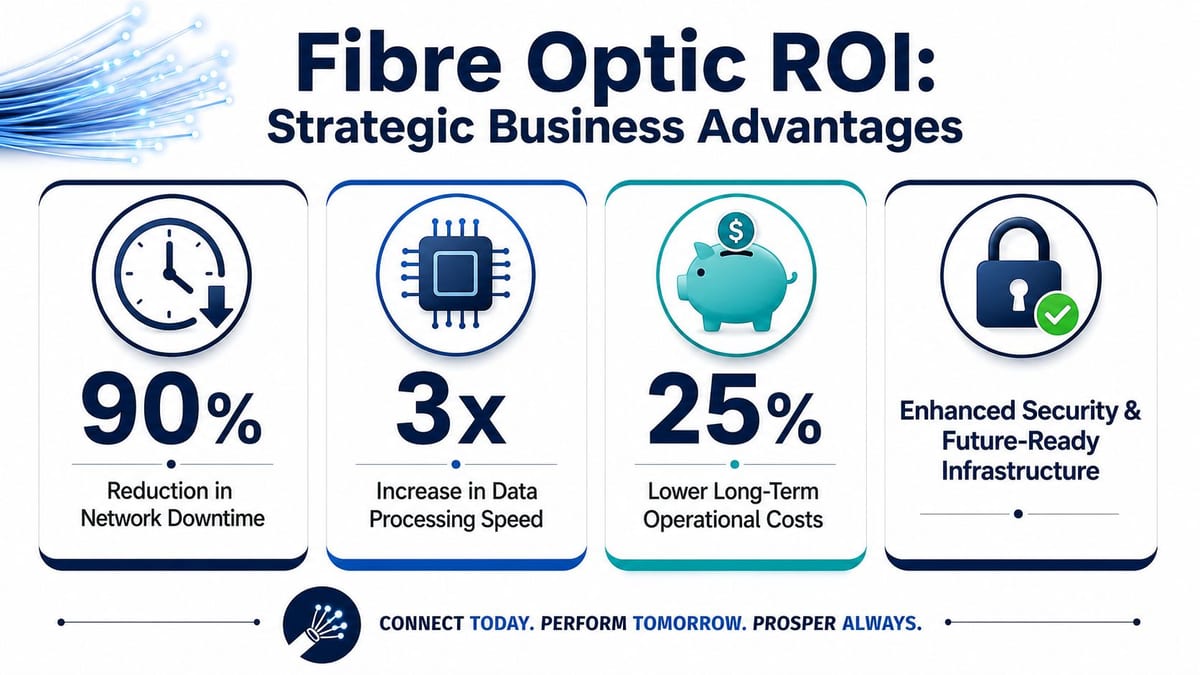
The problem with legacy cabling isn't just day-to-day inconvenience. It's what happens under stress. A 2024 UK Infrastructure Data report reveals that 68% of UK businesses face unplanned downtime during office moves due to outdated copper cabling, with fibre's immunity to interference and corrosion eliminating 92% of these transition-related failures.
That's the point many budgets miss. A cheaper retained-copper decision can become an expensive move-day decision. When patching, extending, reterminating and fault-finding start during a live transition, labour costs rise and operational confidence drops.
TCO is where fibre usually wins
When I assess ROI on infrastructure, I don't start with cable cost per metre. I start with questions like these:
- How often will this environment change?
- What's the cost of downtime during moves or fit-outs?
- How many systems depend on the same backbone?
- Will the business add more CCTV, access control, wireless coverage or cloud services?
- How difficult will future certification, troubleshooting and expansion be?
A fibre-first backbone often wins because it reduces the amount of future rework. It also gives project teams more predictable behaviour during relocation and commissioning.
What works and what doesn't in financial terms
The strongest ROI cases usually come from environments where a business is already spending money on symptoms.
| Decision path | What usually happens |
|---|---|
| Retain copper and patch around it | Lower upfront spend, higher troubleshooting and transition risk |
| Replace selectively without redesign | Some improvement, but persistent integration issues remain |
| Design fibre as core infrastructure | Better resilience, cleaner expansion path, fewer compromises |
If your building programme includes AV, CCTV, Wi-Fi, access control and cloud-dependent workflows, a fibre decision isn't just about network speed. It's about how many times you want to pay for the same project.
The ROI conversation becomes even more compelling when the network is expected to support automation and remote operations, not just desks and laptops.
The Ultimate Use Case A Fully Autonomous Unmanned Building
A fully unmanned building isn't just a building with smart devices. It's a commercial environment designed so core functions continue without routine on-site human intervention. That includes CCTV, access control, environmental sensing, alarms, connectivity, remote diagnostics, and coordinated response when something changes.
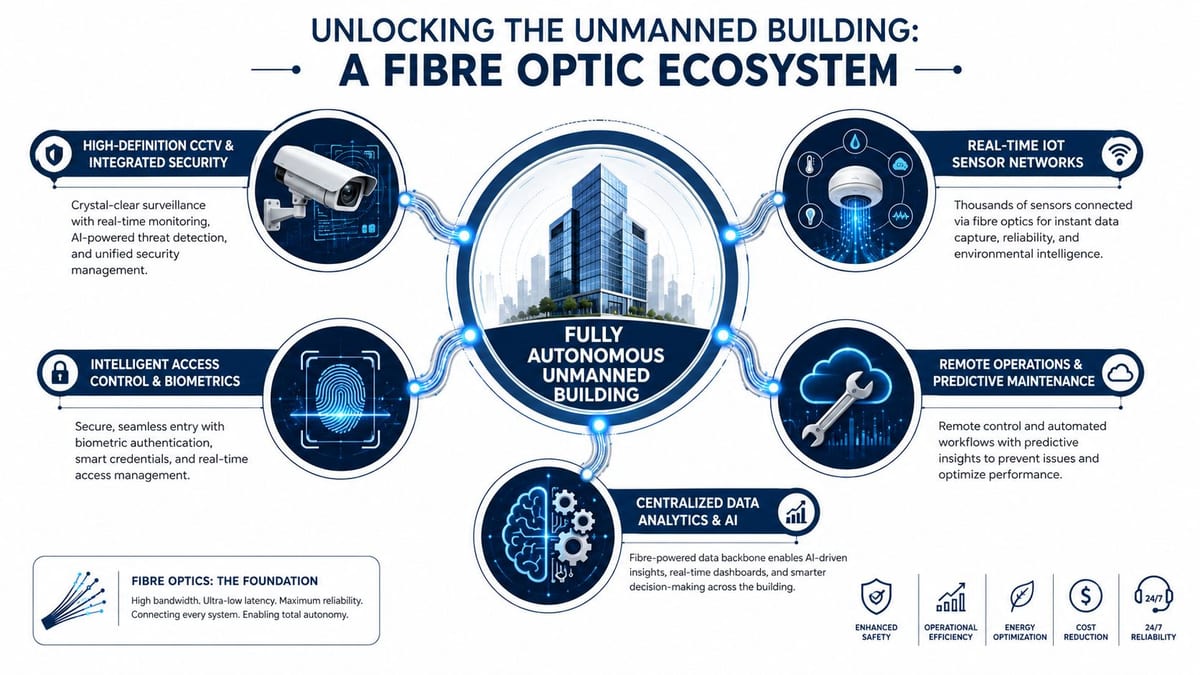
In UK practice, unmanned building management refers to creating fully autonomous commercial properties where integrated systems reduce site visits by up to 40% while maintaining 99.5% operational uptime through real-time remote monitoring enabled by high-bandwidth connectivity (practical definition of unmanned building management). That's the operational target. The infrastructure challenge is making sure all the systems behave as one estate rather than a pile of unrelated products.
What unmanned building management means in practice
In a working commercial unit, unmanned management typically includes:
- Remote security oversight: CCTV streams, event alerts, playback access, and health monitoring from off site.
- Connected access control: Door entry, audit trails, temporary permissions, and emergency lock states managed centrally.
- Sensor-led building awareness: Temperature, leak, occupancy, plant status, and environmental alarms reported in real time.
- Low-touch maintenance: Engineers attend when the system signals a need, not because somebody happened to notice a fault.
For this to work, access, power and data have to be designed together. Treat them as separate scopes and the building becomes fragile very quickly.
A useful planning reference for this combined approach is ethernet and wireless design for integrated estates, because unmanned buildings rarely rely on one transport method alone. They need a dependable wired backbone and carefully planned wireless coverage at the edge.
Why many unmanned building projects fail
Many projects fail because teams buy “smart” devices before defining infrastructure rules. They install cameras, controllers, locks and gateways, then discover there's no coherent backbone, inconsistent power delivery, weak certification paperwork, or no agreed response model when systems lose connectivity.
Another known issue is compliance fragmentation. Many UK unmanned building projects fail because regulatory frameworks for drone and sensor integration remain fragmented, with 62% of failures linked to non-compliance with CAA drone rules and inadequate data certification standards for commercial electrical installations (research on regulatory failure points). Even where drones aren't involved, the wider lesson still applies. Integration fails when governance, certification and physical infrastructure don't line up.
Why battery-less NFC proximity locks are often the right choice
Battery-powered locks look attractive at procurement stage because they appear quick to deploy. The trade-off comes later. Batteries need replacement cycles, health checks and manual intervention. In an unmanned unit, that means the “autonomous” model still depends on site visits.
Battery-less, NFC proximity locks make sense when the goal is lower maintenance and cleaner operations. They reduce dependency on battery schedules, avoid another layer of consumables, and support a simpler long-term support model. They're especially useful in multi-unit commercial settings, plant rooms, managed storage, remote entry points and facilities where infrequent but controlled access matters.
Commercial electrical installation and certification matter
Autonomous buildings don't run on data alone. They rely on sound commercial electrical installation and certification. Power quality, containment routes, segregation, backup strategy, testing and certification all affect whether access systems, sensors, network hardware and CCTV remain trustworthy in service.
What usually works:
- Joint design reviews: Electrical, network, access and security teams review routes and dependencies together.
- Certified installation: Every critical path is tested, labelled and documented for future support.
- Maintenance planning: Locks, cameras, switches and controllers are chosen with supportability in mind.
- Single operational model: Alerts, escalation, remote access and on-site intervention are mapped before handover.
A building isn't autonomous because it has more devices. It's autonomous because those devices share a reliable foundation and a support model that operators can trust.
Real-World Applications and Sector-Specific Demands
The easiest way to judge fibre optic benefits is to look at environments where failure has immediate consequences. Hospitals are the clearest example because the network isn't just supporting administration. It's supporting clinical action.
In NHS relocations and new builds, the physical properties of fibre matter far more than marketing language about speed. Imaging systems, clinical systems, secure data transfer, and connected devices all depend on a backbone that can operate reliably in electrically complex environments.
NHS hospitals and medical imaging reliability
A major issue in healthcare settings is electromagnetic interference around specialist equipment and high-radiation areas. A 2024 NHS Digitalattice audit found that 57% of UK hospital network delays in transferring MRI/CT scans stemmed from copper-based EMI disruption. Fibre's immunity enables the 99.9% real-time transfer reliability required for NHS Critical Care standards.
That's a direct link between physical media choice and patient-facing operations. In a hospital setting, “good enough” networking isn't good enough. Delays in moving large imaging files can affect decisions, workflows and compliance expectations.
Other common environments for fibre-led systems
Unmanned and fibre-heavy environments aren't limited to healthcare. They're commonly used in:
- Multi-tenant commercial buildings: Shared risers, controlled access, central CCTV and remote facilities management.
- Warehouses and logistics sites: Long cable runs, edge devices, surveillance and building management across large footprints.
- Office relocations and new fit-outs: New backbone design, integrated Wi-Fi, AV, telephony and access systems.
- Remote commercial units: Managed storage, plant areas, utility spaces and low-occupancy buildings that still need full visibility.
What these sectors have in common
They all need the same underlying discipline. A stable fibre backbone, properly certified electrical work, clear containment and labelling, and a realistic maintenance model.
That's where project teams often separate strong outcomes from expensive disappointments. They stop buying isolated products and start designing the whole operational environment.
Planning Your Fibre Migration and Deployment Project
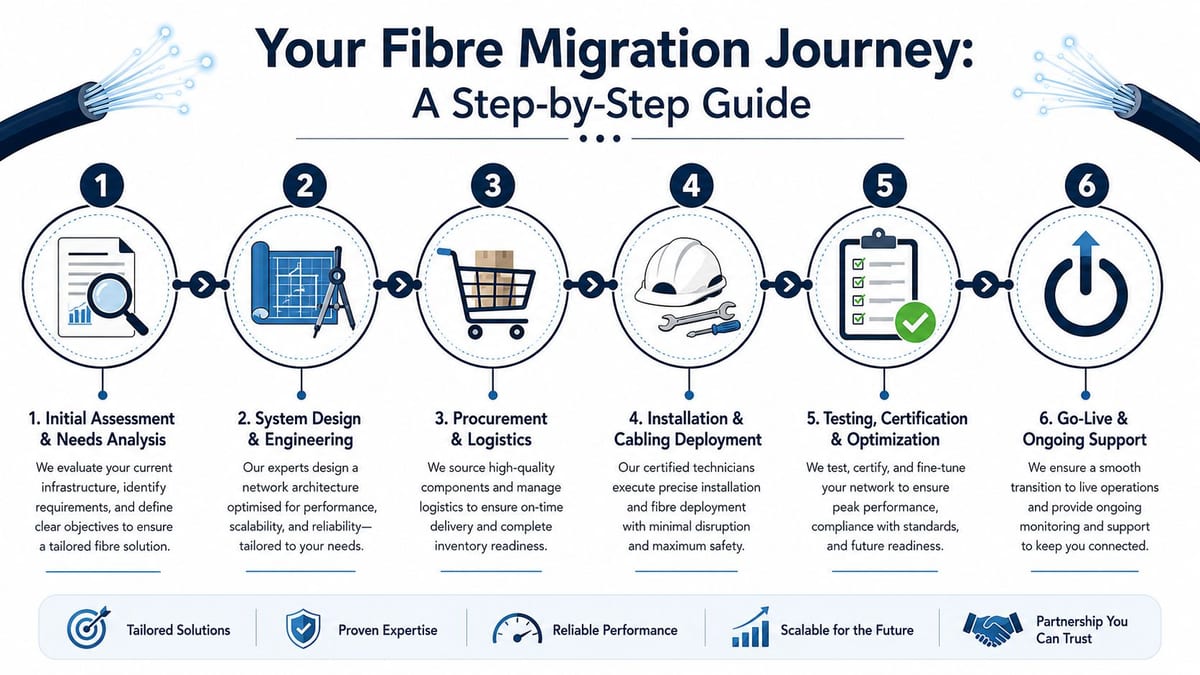
The success of a fibre project is usually decided before anyone pulls cable. Poor deployments start with assumptions. Good deployments start with discovery, dependency mapping, and realistic staging.
Start with the building, not the cable
The first step is understanding the site. That means cabinet locations, risers, containment routes, existing plant, electrical constraints, endpoint density, CCTV positions, Wi-Fi coverage expectations, and any requirement to keep the business live during works.
A grounding resource for this stage is structured cabling planning in commercial environments, because migration becomes much smoother when the physical layout and system hierarchy are agreed before procurement.
A practical deployment sequence
The cleanest projects usually follow a sequence like this:
Survey the existing estate
Document what's installed, what's reusable, what's undocumented, and what creates risk during migration.Design around business continuity
Build staging plans that protect critical services, especially if the site remains occupied.Coordinate trades early
Network, electrical, AV, access control and facilities teams need one programme, not overlapping assumptions.Install, test and certify properly
Labelling, testing and certification aren't admin tasks. They're what make future troubleshooting manageable.Support go-live actively
The first live days reveal issues drawings won't. Keep engineering support available.
For teams preparing stakeholders, this article on achieving a smooth fibre upgrade is a sensible companion read because it focuses on transition quality rather than just installation.
Maintenance and operational considerations
The handover is where many projects lose value. If monitoring access, test records, lock schedules, electrical certification, and support ownership aren't clear, the building becomes harder to manage from day one.
A strong operational handover should include:
- As-built records: Accurate layouts, labels and routes.
- Certification packs: Electrical and cabling documentation that support compliance and maintenance.
- Support responsibilities: Clear ownership across IT, facilities, security and contractors.
- Expansion logic: Spare capacity and documented pathways for future adds and changes.
Good fibre projects don't end when the cable is installed. They end when operations can run the environment confidently without guesswork.
Your Next Steps to a Future-Ready Network
The strongest argument for fibre isn't that it's newer than copper. It's that it supports the way UK organisations operate now. Cloud-heavy workflows, integrated CCTV, modern access control, hybrid collaboration, autonomous site management, and high-stakes healthcare environments all place demands on infrastructure that copper struggles to meet reliably.
That's why a fibre-first strategy usually becomes a business decision, not just an IT preference. It reduces friction in daily operations. It lowers transition risk during moves and fit-outs. It gives project teams a cleaner route to compliance, certification and future expansion.
What to prioritise first
If you're reviewing your estate, start with these questions:
- Where does the current network create operational risk?
- Which systems depend on the same backbone today?
- Are access, power and data being designed as one environment?
- Will the building need to support remote management or low-touch operations?
- Does the current design make future expansion easier or harder?
If the answer to those questions exposes patchwork infrastructure, temporary fixes, or fragmented ownership, the right next step is usually a proper design and migration plan, not another isolated upgrade.
The strategic view
Businesses rarely regret installing a backbone with headroom. They do regret underbuilding and then paying twice when the estate becomes more connected, more automated, or more critical to day-to-day delivery.
That applies whether you're refreshing a head office, relocating a live team, modernising CCTV and access systems, or building out a fully autonomous unmanned building units model. The core requirement stays the same. The infrastructure has to be stable enough to carry the operational future of the building, not just the current tenant list.
If you're at the point where the network needs to support more than desks and internet access, treat fibre as foundational infrastructure. That's usually the difference between a network that survives change and one that keeps generating it.
If you're planning a relocation, fit-out, hospital project or infrastructure refresh, Constructive-IT offers a practical three-step route: schedule an initial discussion, collaborate on the design and delivery plan, then move into ongoing support once the environment is live. It's a sensible way to turn a fibre upgrade into a stable, certified platform for long-term operations.