

You're often brought in when the promise has already started to fray. The app looked polished in the demo. The access control supplier said it was simple. The CCTV platform was “cloud managed”. Then the site goes live and doors drop offline, cameras lose connectivity, contractors can't get in, and the blame lands on IT or facilities.
That's the wrong diagnosis.
In practice, most “smart” or autonomous sites don't succeed because of software. They succeed because someone designed the physical layer properly. If the power is unstable, the structured cabling is poor, the access hardware is wrong for the use case, or the network handover was treated as an afterthought, no dashboard will rescue the project.
As a senior infrastructure project manager, I've seen the same pattern for more than two decades. The teams that get reliable results focus first on the things people rarely put on the front page of the proposal: electrical design, certified cabling, resilient switching, door hardware, CCTV placement, and realistic maintenance. That's what makes unmanned operation workable.
The Reality of Unmanned Building Management
The phrase unmanned building management sounds cleaner than its true nature. It suggests a tidy control interface, a few automations, and a building that runs itself. What it means is that the building has to remain secure, accessible, observable, and safe without depending on someone sitting at reception or walking the floor all day.
That changes the engineering standard.
When there's no permanent on-site presence, small faults become operational faults very quickly. A reader that intermittently drops off the network isn't a minor defect if it stops a contractor entering a plant area. A camera that loses power during a local electrical issue isn't an annoyance if security needs to review an incident. A comms cabinet without proper resilience becomes a business continuity problem, not just an IT tidy-up.
What this means in day-to-day operation
An unmanned site still needs people to enter, leave, deliver, maintain, inspect, clean, and respond to faults. The difference is that the building has to coordinate that with remote controls, remote visibility, and dependable local infrastructure.
That usually includes:
- Controlled access: Doors, gates, cabinets, and secure zones need permissions that can be issued, changed, and revoked without sending someone physically to site.
- Remote visibility: CCTV, alerts, and event logs need to give operations teams enough confidence to make decisions from elsewhere.
- Stable services: Power, network connectivity, and control hardware need to keep operating through routine disruption, not just in ideal conditions.
- Clear fallback procedures: If a link fails or a controller faults, the site still needs a safe and practical response.
Practical rule: If a system only works when everyone involved assumes the network, power, and device estate are perfect, it isn't ready for an unmanned building.
Why the foundations matter more than the interface
The software layer is only as good as the physical decisions beneath it. That's why projects go wrong when building teams buy separate smart products and expect integration to sort itself out later. It rarely does.
A reliable unmanned building is an infrastructure discipline. It sits at the intersection of CCTV, commercial electrical installation and certification, structured cabling, door hardware, switching, network policy, and operational process. Once you look at it that way, the project starts to make sense. The technology stops being a collection of gadgets and becomes a managed building asset.
What an Unmanned Building Actually Is
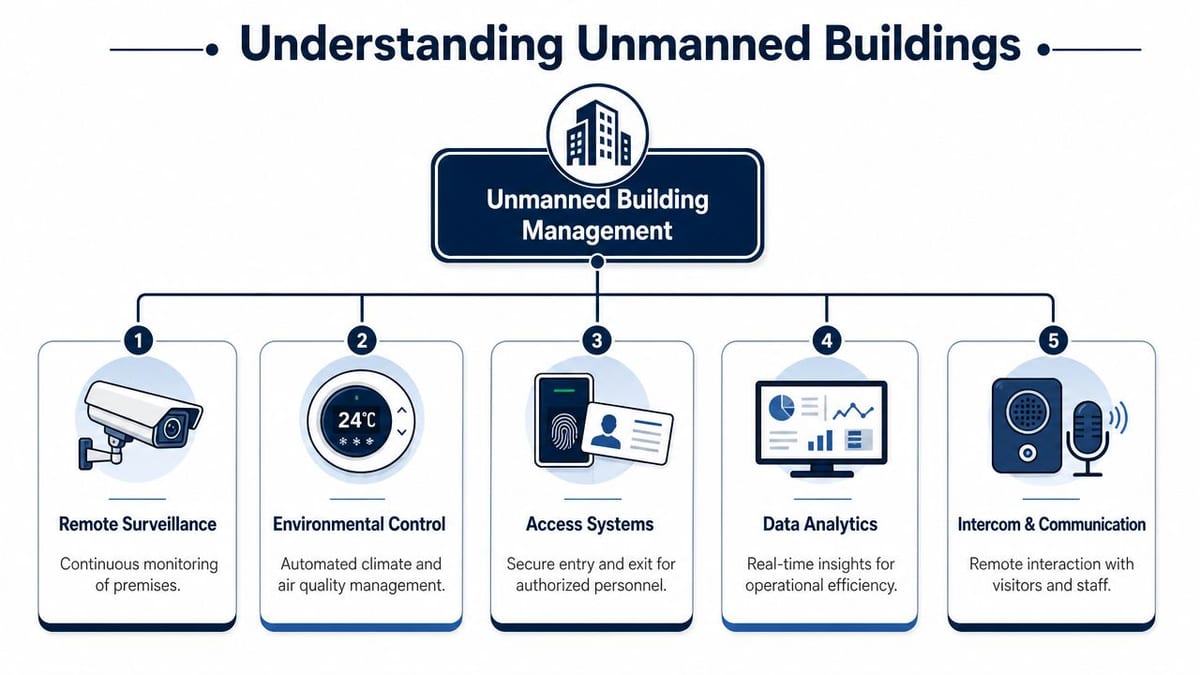
An unmanned building isn't a building with no people in it. It's a building that can operate for long periods without routine on-site supervision. Staff, contractors, tenants, and visitors may still come and go. The difference is that entry, oversight, and many building responses are coordinated remotely.
That usually combines physical security, networked control, and operational policy into one working model.
The core parts that make it work
Most workable unmanned environments rely on the same set of components, even if the scale changes from one site to another.
| Component | What it does in practice | What managers care about |
|---|---|---|
| Access systems | Controls who can enter which areas and when | Security, audit trail, remote permissions |
| Remote CCTV | Shows live and recorded activity across the site | Verification, incident response, deterrence |
| Environmental controls | Manages temperature, airflow, lighting, and alarms | Equipment protection, comfort, energy discipline |
| Data and reporting | Brings events into one operational view | Faster decisions, cleaner troubleshooting |
| Intercom and communication | Lets remote teams speak to people at entrances or service points | Visitor handling, delivery control, escalation |
The key point is integration. If access control says someone entered at a certain time, CCTV should help verify that event. If a room alarm triggers, the operations team should know whether it's a local issue, a wider power issue, or a connectivity problem affecting multiple devices.
Where these systems are commonly used
The concept is broad, but the use cases are quite familiar.
- Logistics depots: Entry often needs to be granted to drivers, maintenance teams, and authorised staff outside traditional office hours.
- Server rooms and technical spaces: Access needs to be tightly restricted, logged, and reviewable without assigning permanent front-of-house staff.
- Multi-tenant commercial property: Landlords and facilities teams need controlled common areas, shared services, and remote oversight.
- Flexible offices and co-working environments: Temporary permissions, contractor visits, and room access need to change quickly.
- Utility and plant locations: Sites need controlled entry and incident visibility even when they aren't continuously staffed.
A building becomes “unmanned” operationally when access, monitoring, and response no longer depend on someone being physically present to make the routine decisions.
What that looks like for an IT or facilities manager
In practical terms, it means you can issue a time-limited credential to a contractor, review arrival on CCTV, log the entry event automatically, and maintain a record without posting someone to the door. It also means your infrastructure has to support that reliably. If the reader is online but the switch stack isn't protected, or the cameras are installed but the storage and network paths are weak, the whole operating model becomes brittle.
That's why good projects start with the site fabric, not the app screens.
Why Most Unmanned Projects Fail
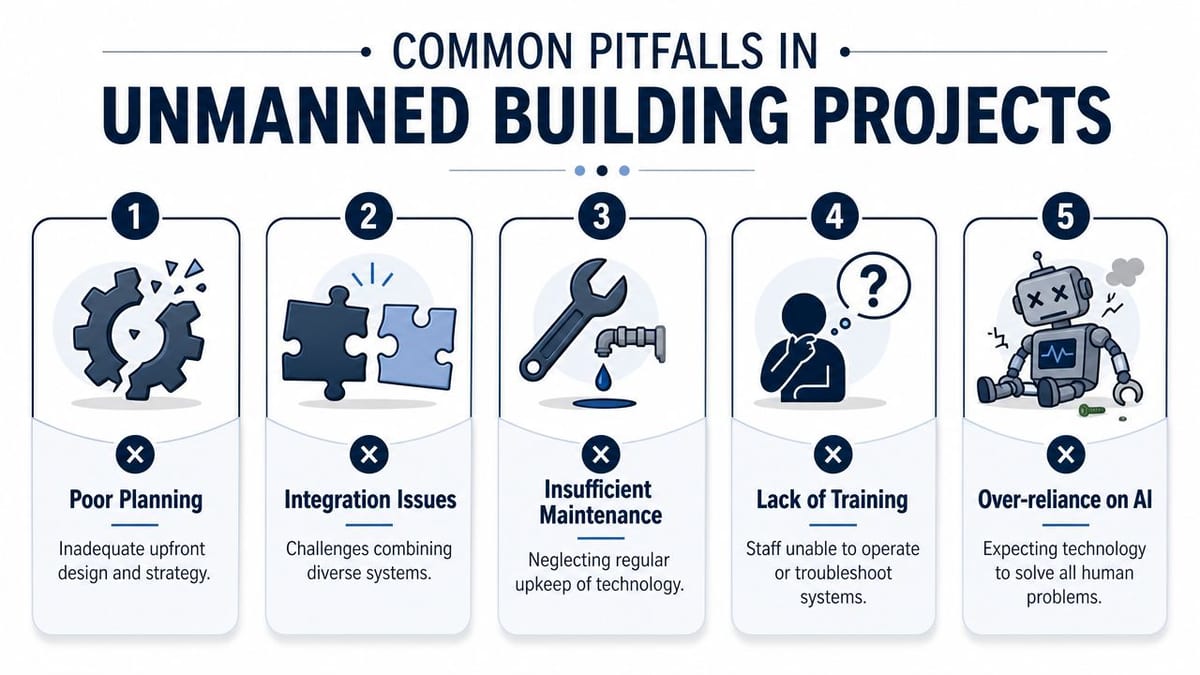
Most failures aren't dramatic. They usually arrive as constant friction. Doors occasionally stop responding. The CCTV image is available most of the time, but not when someone needs it. A remote release works for one entrance but not another. Staff start inventing manual workarounds, which defeats the point of the original investment.
The common cause is fragmentation.
Teams often design access, power, and data as separate packages. One contractor handles the doors. Another installs the electrical work. IT is expected to “provide connectivity”. Then everyone acts surprised when controllers are in the wrong place, cable routes are compromised, or resilience wasn't defined clearly enough for an unmanned environment.
The main failure patterns
- Siloed design decisions: Door hardware gets specified without checking power strategy. CCTV gets quoted without validating switching capacity or storage design. The result is a set of products, not a working building system.
- Consumer-grade thinking: Cheap hardware can look attractive during procurement, but unmanned sites punish weak components. Locks, readers, cameras, and edge devices need to cope with constant use, environmental exposure, and remote dependency.
- Poor cabling standards: If the structured cabling isn't properly designed, terminated, tested, and certified, you inherit intermittent faults that are expensive to diagnose later.
- Electrical work treated as basic enabling: It isn't. Autonomous operation depends on proper circuit design, segregation where required, resilience planning, and certification that stands up operationally and commercially.
- No Day 2 model: Teams buy equipment and plan the install, but they don't define firmware ownership, fault response, spare strategy, device lifecycle, or who reviews alerts.
Why software-first projects underperform
A lot of the market still talks as if integration software will smooth over weak infrastructure. It won't. If a door controller loses stable power, no cloud platform can hide that. If the uplink to a camera location is poor, analytics won't fix packet loss. If the lock hardware is wrong for the door set and traffic pattern, the user experience will stay poor however modern the interface looks.
Over-reliance on AI fits the same pattern. Automated monitoring can help operators prioritise events, but it can't compensate for poor placement, poor lighting, bad cable routes, or weak commissioning. Human design still decides whether the system is dependable.
The fastest way to break an unmanned project is to assume intelligence at the software layer can compensate for shortcuts at the infrastructure layer.
A less obvious failure point
Even routine Windows troubleshooting can create false confidence if teams don't understand where the fault lies. For example, the standard Windows client command to clear the local DNS resolver cache is ipconfig /flushdns, and supported guidance says it should be run from Command Prompt opened as Administrator to clear the local client cache and force fresh lookups on the device, not in the wider network, as described in UCSF IT's guidance on flushing the DNS cache. That matters on managed estates. A laptop-side fix may appear to help one user while the underlying issue sits elsewhere in DNS, routing, or policy.
That same operational blind spot appears across building projects. Local symptom relief isn't the same as system design.
Designing the Foundational Trio of Access Power and Data
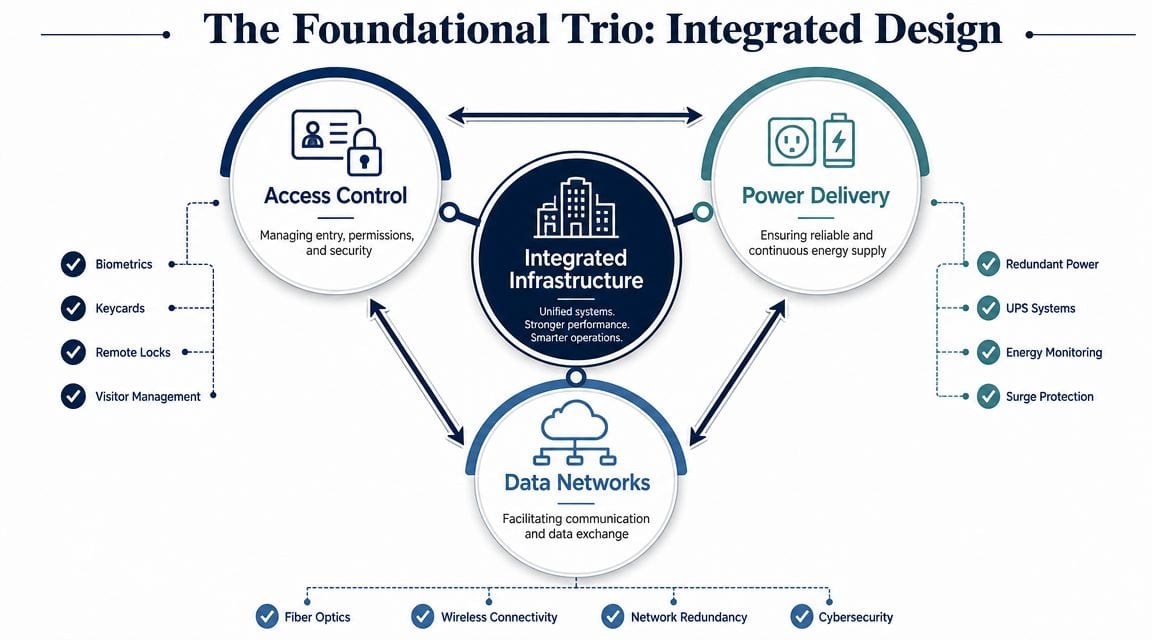
If you want to build out a fully autonomous unmanned building unit that works beyond the handover week, treat access, power, and data as one design problem. They aren't parallel workstreams. They're interdependent parts of the same operating fabric.
A decision about lock type changes the power model. A decision about power delivery changes cabinet design and UPS requirements. A decision about switching changes how CCTV, controllers, intercoms, and edge devices survive faults and maintenance.
Access choices drive ongoing maintenance
One of the most practical examples is the choice of battery-less, NFC proximity locks. They don't suit every opening, but where they do fit the use case, they remove one of the most common maintenance headaches in distributed estates: battery replacement programmes.
That matters more than many teams expect.
A battery-powered lock estate may look simple on paper, but someone still has to track battery condition, schedule replacement, gain access for maintenance, hold stock, and deal with the inevitable failures that happen at the wrong time. In multi-site operations, that turns into recurring labour and avoidable disruption. Battery-less NFC options shift more of the design emphasis towards door suitability, reader compatibility, credential strategy, and installation quality, but they can simplify the operational burden substantially.
Power can't be an afterthought
Unmanned sites need a realistic power plan. That means understanding what must remain available during a local outage, what can fail safely, and what has to be backed by UPS. Controllers, switches, communications equipment, and critical monitoring devices usually sit high on that list.
A sensible review includes:
- UPS coverage: Critical control points need runtime long enough for safe continuity or managed shutdown.
- Circuit discipline: Security and network equipment shouldn't be placed on casual, poorly documented power arrangements.
- Surge and fault protection: Sensitive electronics need protection that matches the environment.
- Electrical certification: Commercial installation and sign-off matter for compliance, insurance, and fault tracing later.
Data quality is operational quality
Cabling is where many projects succeed or fail. A certified structured cabling install gives you more than tidy patching. It gives you predictable performance, cleaner fault finding, and confidence that power delivery and data transport are behaving as designed.
That's especially important where PoE-fed devices are involved. Cameras, readers, intercoms, and edge controllers all depend on the network layer doing its job consistently. If you're troubleshooting endpoint connectivity on a Windows estate, the local command path is still the familiar one. The same ipconfig /flushdns workflow has remained the recommended Windows approach across older and current desktop versions, while server-side cache issues require different tools entirely, as outlined in DNSstuff's notes on clearing Windows DNS caches. The lesson carries across building infrastructure: fix the correct layer. Don't mistake a client symptom for a core fault.
For teams checking endpoint behaviour during commissioning, a basic understanding of Command Prompt IP address checks also helps distinguish a local naming issue from a wider network problem.
Design test: If your lock, camera, and controller strategy can't be explained on one dependency map covering power, structured cabling, switching, and fail-state behaviour, the design isn't mature enough.
Building Your Autonomous Unit from the Ground Up
The cleanest unmanned projects are built in the same order as any dependable infrastructure project. Start with the physical layer. Validate the electrical layer. Install the field devices. Then commission the whole thing as one working environment, not as a stack of isolated trades.
That order sounds obvious, but plenty of sites still do it backwards. Hardware arrives before routes are confirmed. Readers are mounted before cable containment is finalised. CCTV is fitted before storage, retention, switching, and viewing workflows are properly signed off.
Start with cabling and certified electrical work
The first serious job is building the physical backbone. That means fibre where uplinks and distances require it, copper where endpoints need structured runs, and containment and cabinet locations that still make sense once the site is occupied.
At this stage, I'd expect the team to lock down:
- Cable routes and segregation so data and electrical work don't interfere with each other operationally or compliantly.
- Cabinet and comms locations that support maintenance access instead of hiding critical equipment in awkward cupboards.
- Commercial electrical installation and certification for the loads that matter to access control, switching, CCTV, and any associated building systems.
- Labelling, testing, and records that the next engineer can use.
For organisations also thinking about the software side, this is the point where infrastructure and application teams need to align. A useful read on the application layer is Wonderment Apps' piece on building successful IoT applications. It's helpful because it reinforces a point building teams sometimes miss: device data is only valuable when the field estate feeding it is reliable.
Then install the operational hardware
Once the substrate is right, install the endpoints and control hardware. In most projects that means door readers, controllers, locking hardware, intercoms, CCTV cameras, recording equipment, switching, and any site sensors needed for the operating model.
A short practical checklist helps here:
- For CCTV: Confirm sightlines, lighting conditions, mounting height, network path, and how footage will be reviewed during an incident.
- For access control: Check door condition, fire-door implications, lock compatibility, egress method, and remote release behaviour.
- For cabinets and controllers: Leave room for maintenance. Tidy installs look good, but maintainable installs save time for years.
Commission as one system
Commissioning is where a lot of expensive work gets undercut by haste. It isn't enough to confirm that each item powers up. The site has to be tested in realistic operating conditions. Remote entry should be tested with actual permissions. CCTV should be reviewed from the location where operators will use it. Power loss scenarios should be discussed and, where appropriate, simulated safely.
Network basics matter during this stage as well. Teams often lose time because they haven't documented gateway paths, switching logic, or local connectivity properly. Even something as simple as knowing how to find the IP address of a router can speed up practical fault isolation when systems are first being brought online.
Ensuring Long-Term Success and Reliability
Go-live isn't the finish line. It's when the system starts proving whether the design was disciplined enough. An unmanned building becomes a long-term operational asset only if someone owns the ongoing health of the estate.
That means planned maintenance, not reactive panic.
What Day 2 really looks like
The actual workload usually sits in the ordinary things:
- Firmware and software control: Readers, controllers, cameras, switches, and management platforms all need an update policy that doesn't create avoidable downtime.
- Physical inspections: Doors move, hinges wear, seals fail, cabinets gather dust, and field devices get knocked or obstructed.
- Event review: Alerts should lead to action, not just noise. If no one reviews recurring faults, the site drifts into unreliability.
- Lifecycle planning: Every estate ages. A lock, camera, UPS, or switch shouldn't stay in service indefinitely just because it still powers on.
Reliability depends on disciplined validation
Troubleshooting has to stay evidence-led. On Windows endpoints, support guidance notes that the standard local DNS cache clear uses ipconfig /flushdns in a Command Prompt run as administrator, but the wider operational question is whether that local action solved the actual problem or just changed the symptom on one device, a concern reflected in this discussion of operational risk around DNS flushing and validation. Building operations work the same way. You need to verify whether the issue was local, site-wide, or architectural.
That's why runbooks matter. So does simple network validation. If a device appears online but the service path is still failing, teams should confirm the route methodically. Basic checks such as testing connectivity to a specific port can help separate application issues from access path issues during support.
“Reliable autonomous operation comes from repeatable maintenance and clear ownership, not from assuming installed technology will look after itself.”
For facilities teams reviewing wider electrical resilience thinking, even domestic-focused guidance like this house rewiring Dublin guide can be a useful reminder of a broader truth: safe, dependable systems begin with the hidden electrical fabric, not the visible finish.
The organisations that get the best long-term value usually take the same approach. They treat autonomous access, CCTV, network infrastructure, and electrical installation as part of one managed estate. They document it properly, maintain it properly, and review it before faults become incidents.
If you're planning an office fit-out, relocation, CCTV deployment, access control refresh, or a fully autonomous unmanned building unit, Constructive-IT can help you design the infrastructure properly from the start, with the cabling, power, certification, networking, and project delivery discipline that keeps smart buildings working in practice.