
A commercial four-camera wired CCTV install in the UK is commonly budgeted at about £800 to £1,200 all-in, and labour alone typically makes up 25% to 40% of the total project cost (UK cost guide). That's why the number on the quote moves quickly once the project stops being a simple camera purchase and becomes a real installation.
Most buyers start by asking how much does CCTV installation cost, then get caught out by everything wrapped around the cameras themselves. In office relocations, fit-outs, and small commercial upgrades, the expensive part is usually not the box on the wall. It's the cabling routes, the recorder, power, certification, support, and the time needed to make the system work cleanly with the rest of the building.
What Drives CCTV Installation Costs in the UK
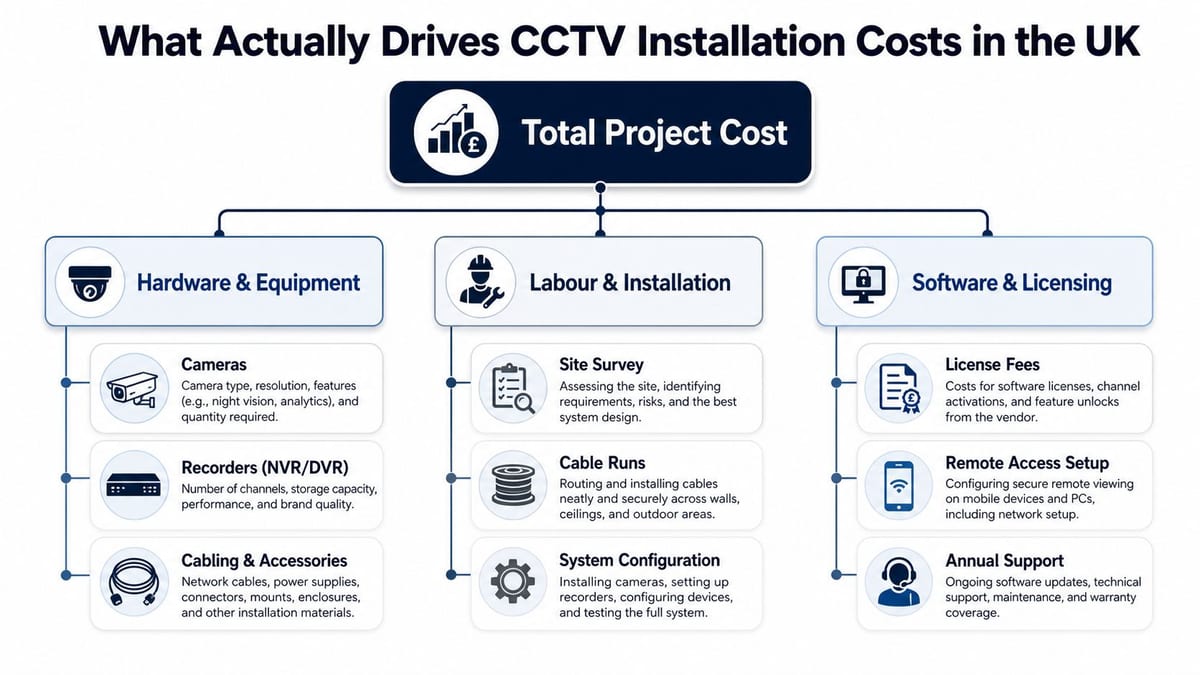
A CCTV quote for a commercial site is usually a stack of decisions, and each one changes the labour, commissioning, and support work underneath it. If a supplier prices only the camera count, the figure is usually incomplete.
A basic 4-camera CCTV system in the UK has been surveyed at an average all-in cost of £584, with equipment for 4-camera DVR kits typically ranging from £198 to £307 and installation usually between £250 and £500 (UK survey). The same survey shows advanced 8 to 16 camera systems pushing equipment to £738+ and installation to £350 to £650, which is a clear sign that cabling runs, access conditions, and commissioning effort start to drive the price as the system grows.
The quote is rarely just cameras
A commercial quote usually includes hardware, labour, and some form of ongoing support or software. That split matters because two suppliers can quote the same camera count and still end up hundreds or thousands apart by choosing different recorder sizes, cable routes, switch designs, or commissioning methods.
Practical rule: if the supplier cannot explain where the cable runs go, the quote is incomplete.
The core question is whether the system can be delivered cleanly in the building you have, not the one on the brochure. Ceiling voids, plant rooms, risers, fire stopping, and access restrictions change the labour profile long before the camera brand does.
For a practical installation sequence, the Constructive-IT installation guide is useful because it follows the survey, cabling, configuration, and handover work that shape the final bill.
Why commercial costs jump
The moment a project moves from a domestic-style install into an office, clinic, or warehouse, the hidden work starts. You are paying for structured cabling, recorder capacity, PoE switching, electrical work, certification, and the time needed to make the system fit the rest of the building without disrupting the business.
That is also why the same camera count can be cheap in one building and expensive in another. A neat retrofit with easy containment is one thing. A fit-out with restricted access, multiple zones, mixed IT ownership, and retention requirements is another.
Designing CCTV alongside access control, power, and data from the start usually changes the final bill more than camera count alone. That is the part many buyers underbudget, because the cost sits in the integration work, not the camera box itself.
For a broader view of how security system projects are scoped, the Bidwell security systems guide frames CCTV as part of a wider infrastructure package, which is how most commercial installs should be priced.
Line by Line Cost Breakdown for Commercial CCTV
A credible quote should let you see the project line by line. If it doesn't, you're probably looking at a price-led bid that hides the actual delivery effort somewhere else.
The practical structure is simple. There's the camera hardware, the recording platform, the cabling and containment, the network and power layer, the labour to install and configure it, and then the certification and support that keep the system maintainable.
| Cost line | Small site, under 8 cams | Medium site, 8 to 16 cams | Large site, 16+ cams |
|---|---|---|---|
| Cameras | Lower hardware count, but often higher unit price if spec is better | Better unit economics as the system grows | Usually a mixed spec across zones, so camera choice matters more than count |
| NVR or DVR | Often a fixed cost that feels heavy on small jobs | Easier to absorb across more cameras | Needs more storage planning and resilience |
| Cabling and containment | Short runs can still be expensive if access is awkward | Becomes a major driver where floors or risers are involved | Often one of the biggest lines because route length and complexity rise |
| PoE switching and network integration | May be a simple edge switch or small PoE setup | Usually needs better switch planning and uplink design | Often requires managed switching and careful port budgeting |
| Electrical works | Can be modest if power is already nearby | More likely to include dedicated feeds or UPS support | Can become significant where resilience and segregation matter |
| Labour and commissioning | Often a large share of the quote | Usually the main differentiator between suppliers | Can dominate if multiple zones or out-of-hours work are needed |
| Certification and handover | Often overlooked on small quotes | Starts to matter when the site is handed to IT or FM | Essential if the building needs proper documentation and future maintenance |
| Ongoing fees | Optional on some small systems | More common where remote access or software is included | Usually part of the support model, especially on managed deployments |
For a broader supplier comparison, the Bidwell security systems guide is helpful as a sector-level reference point, especially if you're comparing CCTV alongside other building systems.
What scales and what doesn't
Cameras, ports, and cable runs scale with the project. NVR or DVR chassis, some switch costs, and parts of electrical work behave more like fixed costs. That's why medium systems often look better value than tiny ones, the shared infrastructure gets amortised.
There's also a practical point many buyers miss. A quote that looks low on hardware can still be expensive on labour if the installer has to fight the building. Access panels, ceiling void restrictions, and containment changes often matter more than brand names.
A note on commercial electrical works
If the supplier is doing commercial electrical installation and certification, that needs to be explicit. CCTV doesn't live in isolation. It depends on clean power, reliable switching, and a handover that your facilities team can support later.
The cheapest-looking line item often leaves out the tasks that create the stable result. That's where cost surprises appear.
Real-World Budgets for Small, Medium and Large UK Projects
A budget that works on paper starts with the site layout, not the camera count. A four-camera office floor, a twelve-camera building split across levels, and a thirty-camera campus all carry different costs because the building, the cabling routes, and the handover work are different jobs.
A small project with 4 to 6 cameras usually sits in the range where the recorder, labour, and cable runs still make up a noticeable part of the total. A medium project with 12 to 20 cameras usually gets better value from shared infrastructure, but it also exposes more of the hidden work in containment, switching, and commissioning. A large project with 30+ cameras often spends more on labour coordination, backbone design, and support than on the cameras themselves.
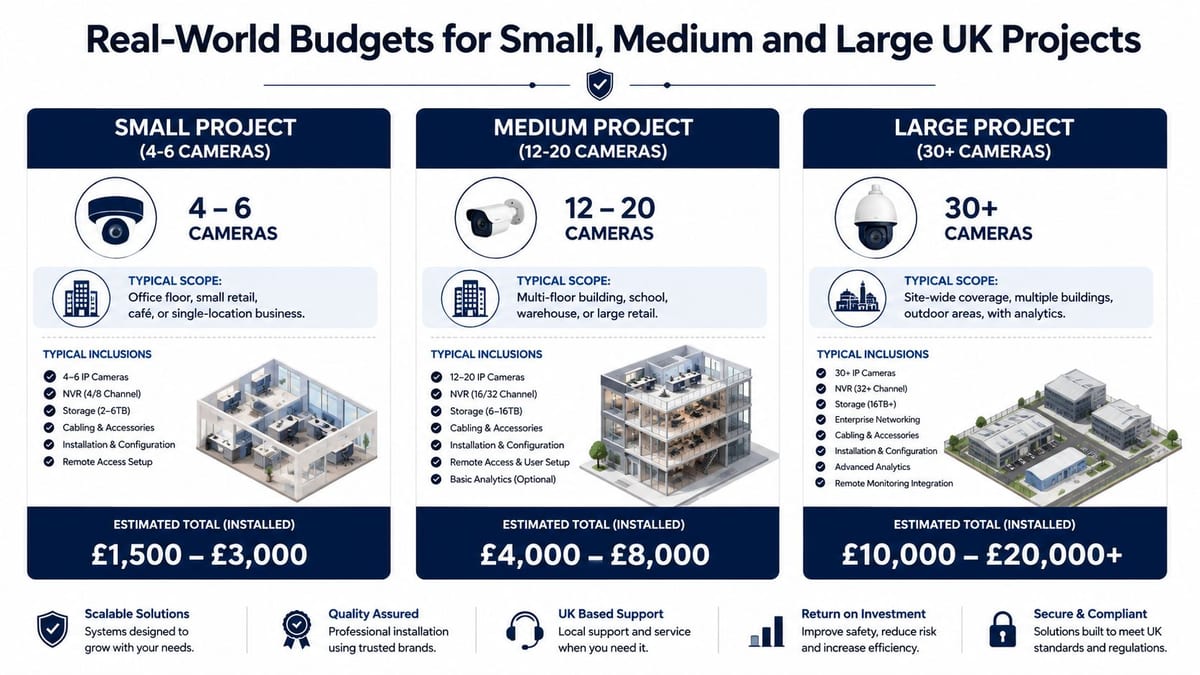
| Project type | Typical scope | Budget signal |
|---|---|---|
| Small project, 4 to 6 cameras | Office floor, clinic suite, reception and entrances | The recorder, labour, and cabling still carry real weight in the total |
| Medium project, 12 to 20 cameras | Multi-floor office, warehouse wing, NHS department | Shared equipment improves value, but cabling and commissioning become more visible |
| Large project, 30+ cameras | Site-wide coverage with wider monitoring needs | Backbone design, support, and delivery complexity drive the bill |
A standard wired four-camera system in the UK is often budgeted at £800 to £1,100, while a simple eight-camera system is about £1,000 plus VAT (UK pricing guide). Another guide places typical four-camera wired setups around £800 to £1,200 and eight-camera wired systems at £1,000 to £1,500, with advanced smart systems running to £1,300 to £3,000+ (UK setup guide).
Those ranges are useful as a first pass, but the main question is what the building will tolerate. A wireless option can look cheaper upfront, and UK guides place installation at £450 to £750 plus VAT in some cases, yet that only works where resilience, supportability, and coverage requirements are modest enough to accept the trade-off (UK pricing guide).
The quote that feels expensive at survey stage is often the one that avoids rework later. On occupied sites, access windows are tight, downtime carries a cost, and getting the first install right matters more than chasing the lowest headline figure.
Hidden Cost Drivers That Change the Final Number
Most price guides stop here, and commercial projects often go sideways. The line on the quote might look neat, but the building decides how painful the delivery is.
Route complexity matters more than people expect
A straight cable path in a clear ceiling void is cheap compared with a route that crosses fire compartments, tight risers, old containment, or live tenant areas. In older buildings, the installer may also have to work around awkward access conditions or delayed approvals before anyone can start pulling cable.
If the route is hard, the project isn't “just another camera”. It's a building problem with cameras attached.
That matters because each extra intervention creates more labour and more future maintenance friction. When access is poor, even simple fault-finding gets slower later.
Power, switching and resilience are real budget items
CCTV needs stable power and enough network capacity. PoE switching, uplink planning, and any UPS requirement all sit outside the camera box but inside the live system. If you ignore them, the install can technically finish while still being fragile.
That is why designing access, power, and data together is the correct move. A camera on the wall without the supporting network and power layer is just a partial job.
Professional installation can reduce lifecycle pain
A frequent mistake is choosing the cheapest quote because the equipment list looks similar. UK guidance on total cost of ownership points out that quotes often miss hidden drivers like cabling routes, network switching, storage, maintenance, and compliance work, and that professional installation can reduce rework and future access issues (UK ownership guide). The cheapest system is not always the lowest-risk option.
That is especially true if the installer has to come back later to fix a bad route, re-terminate a cable, or change the cabinet layout. Those second visits are where the budget leaks.
Questions that expose hidden costs
- Cable route clarity, have they surveyed the path and checked access?
- Switching capacity, are they provisioning enough PoE ports and uplink headroom?
- Resilience, is there a UPS or power-backup plan if the brief needs it?
- Maintenance access, can future staff get to the recorder, cabinet, and patching cleanly?
- Future expansion, will the design support extra cameras without rework?
If the answers are vague, the quote is incomplete. Good installers show their working.
GDPR, Retention and Compliance Costs You Should Budget For
CCTV in the UK is never just a technical install. It also creates a data-handling obligation, and that has a cost whether the supplier spells it out or not.
A practical budget should cover the time needed for lawful basis checks, signage, retention policy decisions, access controls, and any review of the footage-handling process. In commercial environments, especially NHS and education sites, that overhead is often larger because more people can access the footage and the risk profile is higher.
What the compliance work usually includes
The minimum practical set is straightforward.
- Signage and notices, so people know recording is taking place.
- Retention settings, so footage isn't kept longer than needed without a reason.
- Access controls, so only approved staff can view or export recordings.
- Impact assessment work, where the installation creates a higher privacy risk.
- Processor terms, where the installer may have to handle recorded images during support.
For retention context, commercial guidance commonly warns that default storage windows can be too short for investigations or claims, and a risk-based policy is more defensible than a lazy default. For wider reading on the data side, IP data logging rules 2026 is a useful adjacent reference because it reinforces how quickly technical logging becomes a privacy issue once systems start recording identifiable activity.
Where the money goes
The budget hit is usually not one giant compliance fee. It's a set of smaller tasks, policy drafting, signage, storage configuration, and occasional redaction or export support. On busier sites, that work can push a project from “camera install” into “operational system”.
Practical rule: decide retention and access before the survey, not after the installer has already priced the hardware.
That advice matters because storage choices and policy choices are linked. If a site needs longer retention or tighter access, the recorder and support model can change.
The mistake I see most often is leaving compliance until the handover. By then, the system is already installed, and every change costs more.
Designing CCTV Alongside Access, Power and Data
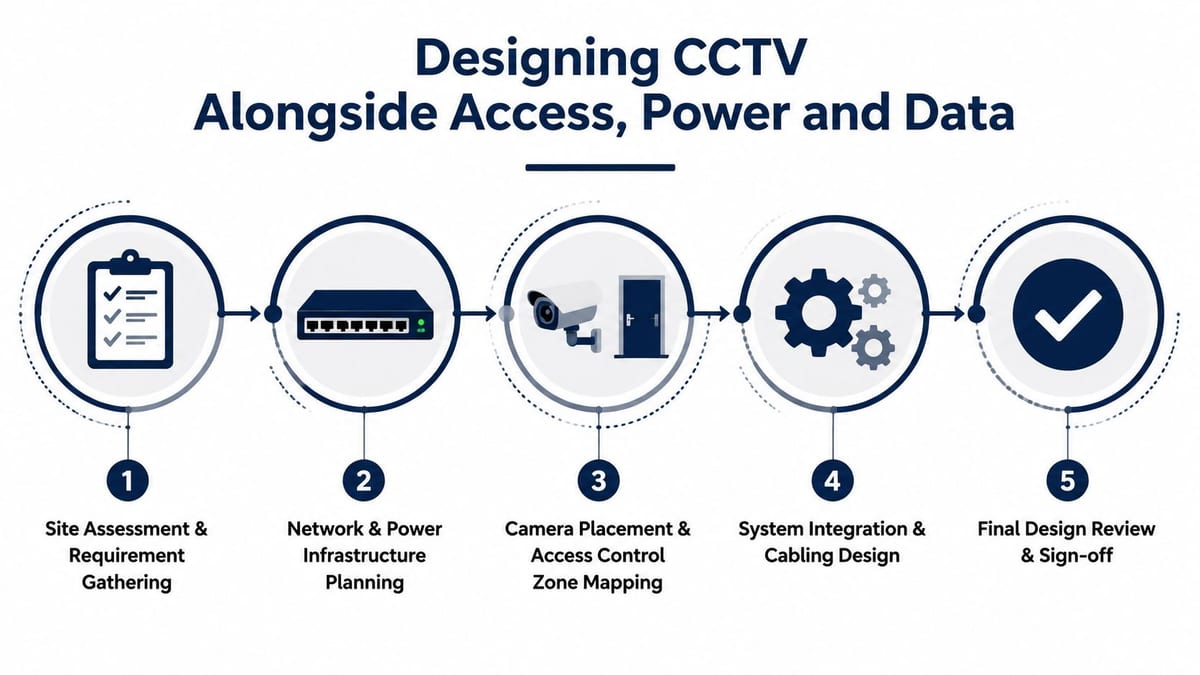
The lowest-friction CCTV projects are planned with the rest of the building from the start. Once the fit-out is complete, every extra camera feels like a compromise. When access control, power, and data are designed together, the system behaves like one integrated plant rather than a pile of separate purchases.
A typical office relocation makes that clear. The IT lead wants clean network separation, facilities wants minimal disruption, and the security brief wants cameras at entrances, reception, and key circulation points. If those conversations happen late, the installer has to cut in extra containment, work around finished ceilings, and return for another commissioning visit.
Why the integrated route costs less
Planning CCTV alongside structured cabling and power lets you share containment, label it once, and commission it once. That avoids the common failure mode where the security supplier arrives after the electrical contractor has left, then has to improvise routes, add containment, or reopen finished areas.
A proper Power over Ethernet layout also needs to be set out early, because the switch ports, power budget, and cable routes all have to match the actual device count and placement. The Power over Ethernet cabling guide is a useful reference for that part of the design, since PoE planning lives or dies on the detail.
For office fit-outs, that usually means deciding where the recorder sits, which cabinet holds the switch gear, and whether the routes can stay inside the same containment as the rest of the low-voltage infrastructure. If those choices are left to the last minute, the CCTV quote tends to rise because the installer is buying flexibility, not just hardware.
Battery-less, NFC proximity locks make sense in the right buildings
For unmanned building management, battery-less, NFC proximity locks can be a smart choice because they remove a common maintenance headache. No batteries means fewer emergency visits, fewer dead-device failures, and less dependence on local staff remembering to swap consumables.
That matters in places where the building may be unattended for long stretches. Storage areas, plant rooms, satellite offices, and controlled-access back-of-house zones benefit from hardware that keeps working without routine battery intervention.
What unmanned building management actually means
In practice, it means the building can be opened, monitored, and maintained with minimal on-site attendance. Access control, CCTV, power monitoring, and networked alerts work together so the site does not rely on someone being physically present to notice a fault or grant entry.
That is why building out a fully autonomous unmanned building units approach needs a unified system approach. If access control, cameras, and the network are planned separately, the building becomes harder to run, not easier.
The projects that work best give one team responsibility for the whole stack. The projects that fall apart let three suppliers solve three different problems in three different ways.
Procurement Checklist and Questions to Ask Suppliers
The best procurement conversations are boring in a good way. Everyone knows the scope, the exclusions are clear, and the quote can be compared like-for-like.
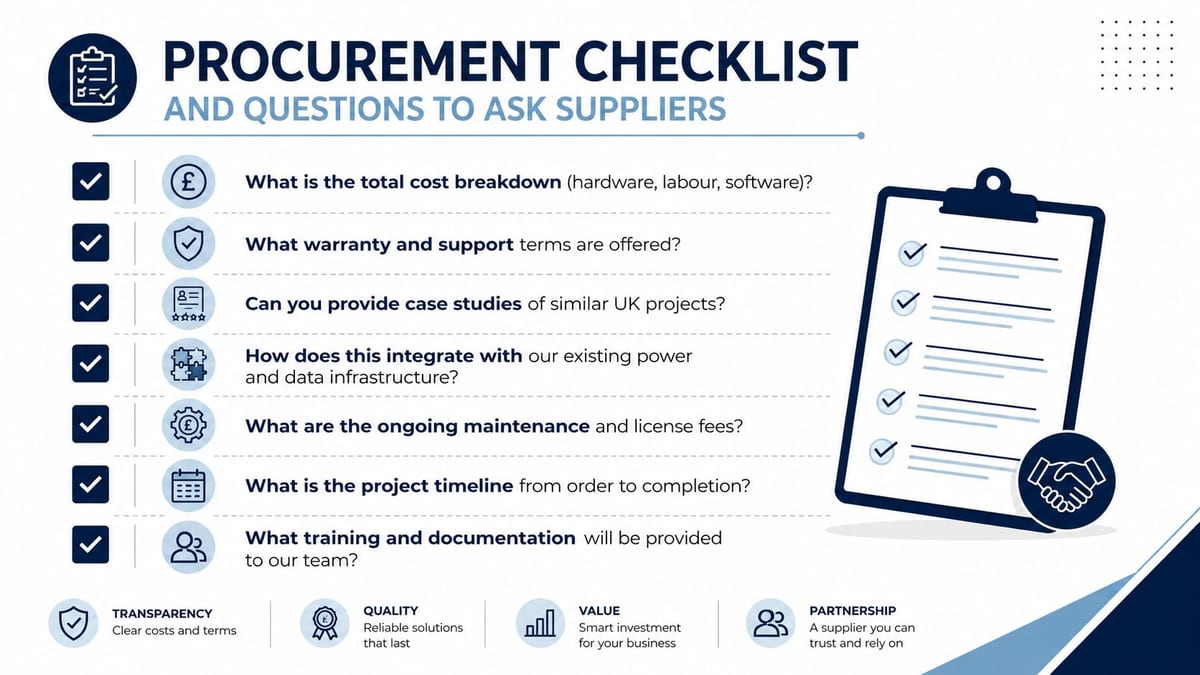
Start with a checklist that forces clarity on the basics. Ask for the total cost breakdown, the warranty terms, the support model, the cabling standard, and the integration points with your existing power and data infrastructure. If the installer is vague on any of those, the quote isn't ready for approval.
High-value questions to put in front of every supplier
- What exactly is included, hardware, labour, software, commissioning, and support?
- What is excluded, especially electrical works, containment, and certification?
- Which cabling standard are you using, and can you warrant it properly?
- What PoE switch model and capacity are you specifying, and why?
- How is retention configured, and who owns future changes?
- What response times do you commit to for faults?
- Do you subcontract any part of the delivery?
- What documentation do we receive at handover?
- How do you handle maintenance and firmware updates?
- Can you show similar UK project experience?
The structured cabling companies guide is useful background if you're comparing CCTV installers who also touch the wider cabling plant. That crossover matters because the weakest part of the delivery often isn't the camera, it's the infrastructure behind it.
What a good answer sounds like
Good suppliers answer in specifics. They name the switch, describe the cabling route, explain the support window, and say who signs off certification. Weak suppliers stay vague and hope you won't ask again.
You don't need the cheapest number. You need the quote that describes the system you'll live with after the installers leave.
ROI, Lifecycle Costs and Next Steps
CCTV usually pays back through avoidance rather than revenue. It helps with incident investigation, dispute resolution, access discipline, and the operational confidence that comes from knowing the building is recorded properly.
The financial conversation is total cost of ownership. That includes maintenance, firmware updates, storage growth, access changes, and the cost of rework when the original install was rushed. UK guidance already shows how installation cost mixes equipment, labour, and ongoing fees, so it's better to think in lifecycle terms than in a single purchase price (UK installation guide).
A system that is easy to maintain is usually cheaper over time than a system that was cheap to install.
That's the same logic people use when justifying other infrastructure investments. The fleet tracking cost justification guide follows a similar pattern, because the business case only makes sense when you include the operational cost of not doing it properly.
For CCTV, the ROI isn't only the camera count. It's the downtime avoided during fit-out, the fewer return visits, the cleaner handover to facilities, and the reduced risk of a retrofit that never quite fits the building.
If you're early in a relocation, fit-out, or upgrade, get the CCTV conversation into the same room as access, power, and data. That's usually where the budget becomes realistic, and where the final system becomes supportable.
If you're scoping a commercial CCTV project and want the infrastructure designed properly from day one, Constructive-IT can help with the survey, cabling, certification, and handover around the wider fit-out. Book an early conversation before the ceiling goes in, and you'll get a more accurate price, fewer surprises, and a system that's built to last.