

You're usually not looking for IT infrastructure support because everything is calm.
You're looking because a fit-out has started, a relocation date is fixed, a landlord wants handover details, or the business has decided a building should run with little or no on-site staff. At that point, “we need some cabling and Wi-Fi” stops being a small technical request and becomes an operational risk. If the access system fails, people can't get in. If the power design is wrong, remote devices drop out. If the network is patched together, CCTV, alarms, telecoms, and building controls all become unreliable at the same time.
That's where modern infrastructure work lives. Not at the helpdesk end of the process, but at the planning, engineering, integration, testing, and go-live end. In unmanned building projects, that distinction matters even more, because there often isn't a receptionist, facilities officer, or local IT contact on site to cover for bad design.
What Is Modern IT Infrastructure Support
A building is due to open on Monday with no permanent staff on site. The doors are IP-controlled, the cameras record to the network, the alarm panel reports remotely, and the heating plant is visible through a management portal. If the cabinet layout is wrong, the uplink is unstable, or lock power has been tied to the wrong circuit, the problem is no longer “IT support.” It is a building that cannot operate as intended.
That is the standard modern IT infrastructure support has to meet. It covers the design, installation, integration, testing, and support planning that let a site function day to day, especially when nobody is present to reset a switch, re-seat a patch lead, or let an engineer in.
In practice, the work sits across several disciplines at once. It includes structured cabling, switching, Wi-Fi, internet services, rack design, telephony, CCTV, access control, power coordination, remote access, and commissioning. The point is not to install each element in isolation. The point is to make them work together under normal use, during faults, and at handover.
On an unmanned fit-out, that changes the brief completely. A poor Wi-Fi survey is not just an annoyance if wireless locks or mobile credentials depend on coverage. A badly placed cabinet is not just untidy if engineers cannot patch or replace equipment without disrupting security systems. An undersized uplink is not just a performance issue if CCTV, alarms, VoIP, and remote monitoring all share the same path. If bandwidth planning is part of the design, these expert tips for upload speeds are a useful reminder that upstream capacity matters just as much as download speed once cameras, backups, and remote access are in play.
What the work looks like on a real project
In delivery terms, infrastructure support starts before first fix. Someone has to decide where the cabinets go, how cable routes avoid future clashes, which services need segregated networks, what stays online during a power event, and who gets remote access to what. Those decisions affect builders, electricians, security contractors, network engineers, and the client team at the same time.
The trade-offs are rarely tidy. A cabinet position that suits cable routes may be poor for maintenance access. Keeping every service on UPS may sound safe, but it increases cost, heat, rack space, and battery maintenance. Full network segregation improves control, but it can make support and third-party integrations harder if it is done without a clear access model. Good infrastructure support is the process of making those calls early, documenting them, and testing the consequences before go-live.
At Constructive-IT, this is usually the point where a generic support request turns into an infrastructure project. The client may ask for internet, Wi-Fi, and door access. Our role involves defining dependencies between those systems, setting standards for the build, and removing the failure points that only show up once the site is live.
A large part of that work rests on the physical layer. If you need a clear reference for layouts, standards, and what good installation practice looks like, this guide to structured cabling for business networks explains the foundation the rest of the system depends on.
Why the older definition falls short
The older view of IT support treated data, telephony, security, and electrical works as separate packages. That can still work in a small, lightly used office. It breaks down fast in a building expected to run autonomously.
The usual failure pattern is familiar. Cabling is installed to drawing, but not to device reality. Security hardware is fitted before network ports are proven. Internet service goes live late, so testing is compressed into the final days. Then handover exposes the gaps. Cameras are on the wrong VLAN, doors fail during a local power trip, remote support needs an access method nobody approved, and the client inherits a live building with no clear fault boundary between trades.
Modern IT infrastructure support exists to prevent that outcome. It turns a collection of products and subcontractors into an operating environment with clear dependencies, defined recovery methods, and a support model that still works when the site is empty.
The Building Blocks of a Resilient Network
A resilient building network isn't one product. It's a stack of decisions that either support each other or get in each other's way. The basics are familiar, but the difference between a tidy installation and a dependable one is usually in the detail.
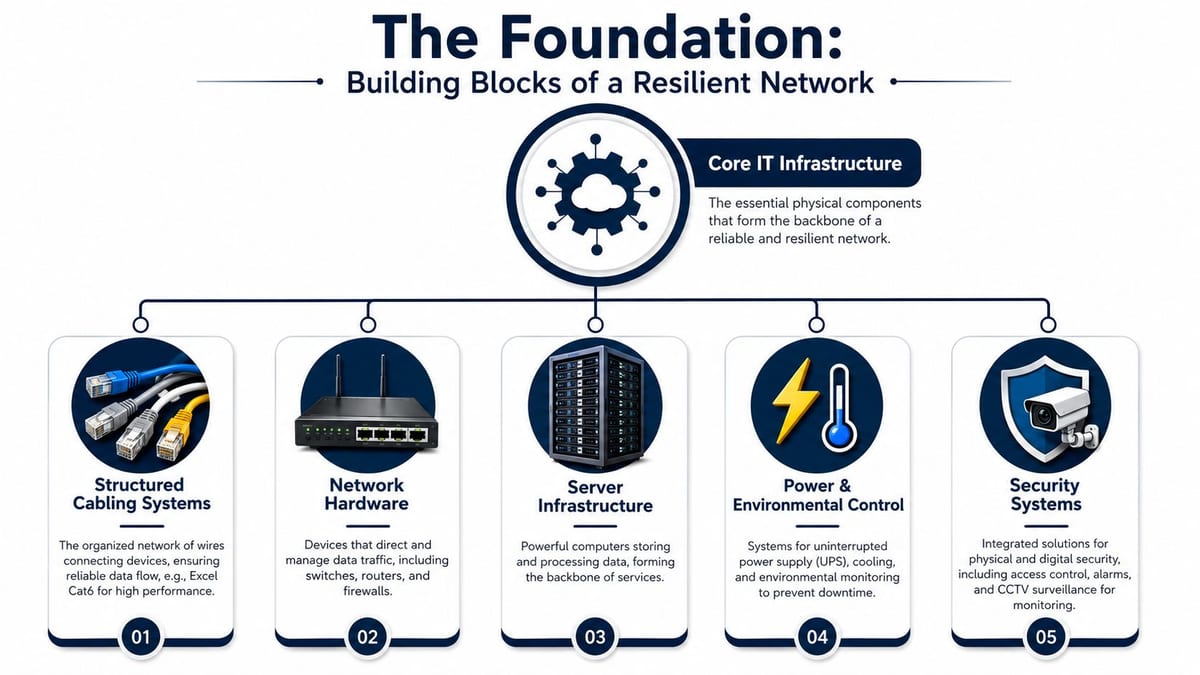
Structured cabling is the physical foundation
Structured cabling is still the part many teams leave too late. That's a mistake, because every later decision depends on it. If the cabinet location is poor, if cable pathways are congested, or if outlets are placed for furniture plans rather than device reality, everything above it becomes harder to fix.
For most office environments, that means a clear standard for copper and fibre runs, sensible patch panel layout, labelled termination, and enough spare capacity to handle moves and future changes. If you need a plain-English primer on layouts, standards, and why neatness is not just cosmetic, this guide on what structured cabling is is a useful reference point.
A few common design choices matter more than people expect:
| Component | What works | What causes trouble |
|---|---|---|
| Horizontal cabling | Consistent outlet planning tied to actual device use | Installing to a floorplan that changes before occupancy |
| Fibre backbone | Separate uplinks for resilience and future growth | One uplink path with no room for expansion |
| Cabinet layout | Space for patching, power, airflow, and maintenance | Overfilled racks that can't be serviced safely |
Wi-Fi needs surveying, not guesswork
Mounting access points where they “look about right” still happens. It rarely ends well.
The problem is that office wireless now has to serve staff on site, remote workers dropping in, guests, mobile devices, collaboration rooms, CCTV links in some environments, and a much more varied device mix than older LAN-first offices ever had. The Office for National Statistics reported that 43% of UK workers did some work at home in 2024, which is why support teams now have to design for simultaneous on-site, remote, and guest usage rather than a single office LAN, making professional Wi-Fi surveying and capacity planning far more important than generic placement rules, as noted in this infrastructure support overview citing ONS data.
That's why survey work matters. A proper design looks at wall materials, ceiling height, interference, roaming behaviour, occupancy patterns, and where demand sits. Meeting rooms, reception, breakout space, and shared desks don't load the network in the same way.
Good Wi-Fi design is less about maximum coverage and more about predictable performance under normal working conditions.
For organisations dealing with cloud backup, media uploads, remote collaboration, or off-site sync, network performance also needs to be considered in both directions, not just download. These expert tips for upload speeds are helpful because they focus on the practical causes of poor upstream performance that often get missed during office planning.
LAN, WAN, telecoms, and services around them
Inside the building, the LAN handles local traffic flow. Between sites and providers, the WAN determines how resilient your external connectivity really is. Telecoms now sit in the same conversation because voice, call routing, intercoms, and door entry increasingly rely on the same underlying data environment.
A resilient network usually depends on four habits:
- Separate critical services so one issue doesn't take down everything
- Choose switching and firewall hardware around actual use, not just lowest initial cost
- Allow for support access from day one, with clean documentation and controlled remote management
- Treat power and cooling as network issues too, because a switch without stable power is still a network failure
The strongest projects don't chase feature lists. They build a network that can be understood, maintained, and expanded without reworking the whole site.
Designing for an Unmanned Building
An unmanned building doesn't mean an empty shell with no activity. It means a building designed to operate without permanent on-site staff handling day-to-day access, monitoring, and routine intervention. People still use it. Engineers still visit when needed. Deliveries still arrive. But the building's normal state is autonomous operation under remote oversight.
That changes the design brief completely.
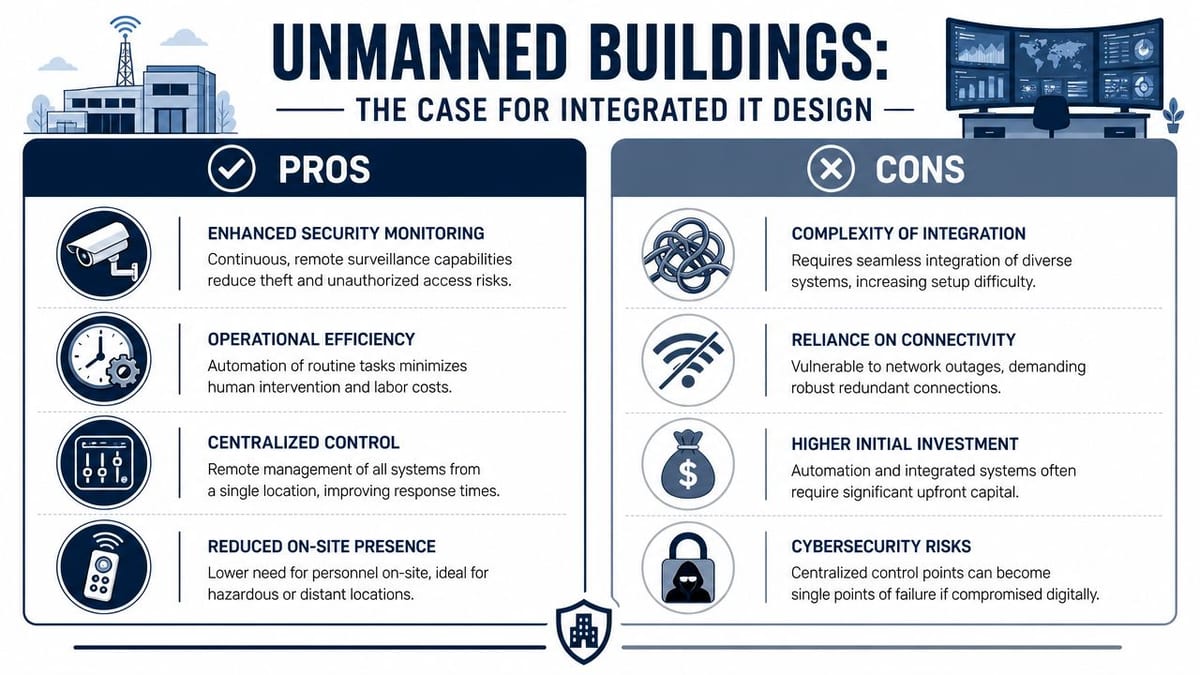
What unmanned management means in practice
In a working project, unmanned management usually includes:
- Remote access administration for doors, gates, and internal zones
- Live CCTV visibility with retained recordings and secure remote review
- Automated alerting for intrusion, environmental issues, cabinet access, and service faults
- Managed power distribution for critical devices and controlled restart procedures
- Central control of connectivity-dependent systems such as intercoms, telephony, and monitoring gateways
That setup is common in managed commercial units, plant spaces, utility-related sites, small satellite offices, storage and distribution environments, shared tenancy spaces, and specialist rooms where regular occupancy is low but security expectations are high.
The temptation is to buy separate solutions for each problem. One supplier for locks. Another for CCTV. Another for electrical. Another for data. On paper that looks flexible. On site it's often why projects fail.
Why many unmanned building projects fail
Most failures aren't dramatic. They're design failures disguised as installation progress.
A lock system gets selected before anyone confirms how power will be protected. CCTV storage is specified without enough rack space or uplink planning. Electricians energise circuits correctly, but not in a way that supports remote reboot priorities. Network cabinets end up in awkward plant areas that are hard to secure and harder to maintain. By handover, every package works “in isolation”, but the building doesn't work reliably as a whole.
The root cause is simple. Access, power, and data were designed in silos.
Here's where that shows up most often:
| Design area | What integrated planning solves | What siloed planning creates |
|---|---|---|
| Door access | Correct lock type, door hardware, power path, network dependency | Doors that fail awkwardly during outages or need repeated engineer visits |
| CCTV | Camera placement, recording capacity, switching, retention, remote review | Blind spots, poor playback, overloaded links |
| Electrical | Clean segregation, protected circuits, certification, maintainability | Shared circuits, unclear isolation, difficult fault finding |
| Comms and racks | Secure layout, airflow, patching, serviceability | Cabinets that are full on day one or impossible to expand |
A lot of this work ends up around the rack, too. Physical layout matters more than people expect, especially where access control hardware, switching, recording equipment, and power protection all converge. For compact deployments and edge locations, good decisions around U rack mount planning save a lot of pain later.
Why battery-less NFC proximity locks make sense
Battery-powered locks can work well in some buildings. In unmanned units, they create a maintenance burden that many teams underestimate. Batteries need schedules. Schedules slip. Different door sets age differently. Environmental conditions vary. Then a “simple” battery issue turns into an access failure at the exact moment no one is nearby to fix it.
That's why battery-less NFC proximity locks are often the better choice where the door design allows it.
The practical reasons are straightforward:
- Less routine maintenance because there's no battery replacement programme to manage across multiple openings
- Lower risk of silent failure caused by neglected battery health
- Cleaner operational handover for facilities teams who don't want another consumables task
- Better fit for autonomous units where reliability matters more than adding another maintenance schedule
That doesn't remove the need for careful door hardware specification. You still have to think about fail-safe versus fail-secure behaviour, emergency egress, fire interface, local override procedures, and how credentials are issued and revoked. But removing batteries eliminates one of the most common weak points in lightly staffed sites.
An unmanned building is only autonomous if the maintenance model is realistic. If the design depends on frequent manual intervention, it isn't really unmanned.
CCTV and commercial electrical work have to sit inside the same design
CCTV in an unmanned building isn't just a deterrent. It becomes the site's eyes. That raises the standard for placement, storage, retention policy, lighting assumptions, remote access security, and supportability. Cameras mounted without thought for reflections, loading bays, shared entrances, or service corridors often meet the specification and still fail the operation.
The same applies to commercial electrical installation and certification. If the building is expected to run autonomously, circuits feeding access control, network hardware, recording devices, and protected monitoring equipment need clear design intent and proper certification. This is one area where “the electrician will sort it” causes repeat faults. They can only install to the brief they're given.
Building out a fully autonomous unmanned unit means treating electrical, security, and data systems as one operating model from the start. That's what modern infrastructure support enables.
From Survey to Go-Live An Infrastructure Project Lifecycle
Successful infrastructure projects rarely feel dramatic on launch day. That's the point. The noisy work should happen earlier, during survey, design, coordination, and testing, not during occupancy.
The delivery model that works is methodical. It's less about rushing into installation and more about removing uncertainty in the right order.
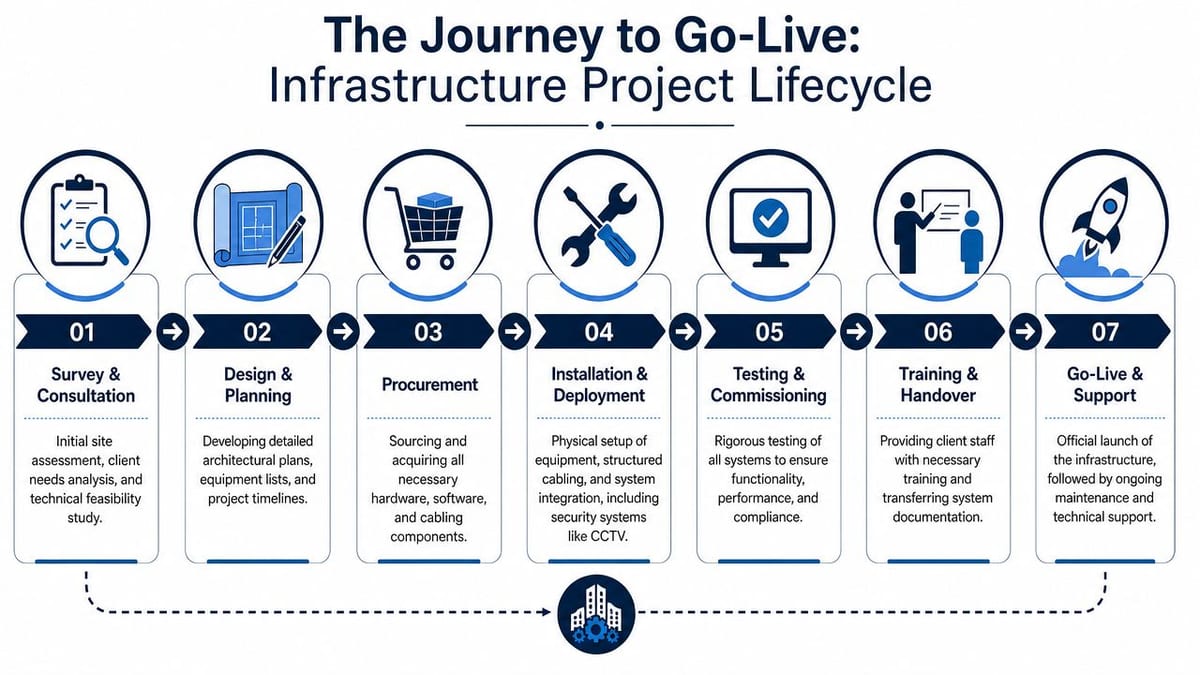
Survey and consultation
The first site visit should answer operational questions, not just count outlets.
That means checking entry points, risers, containment, cabinet locations, power availability, likely WAN routes, mobile signal behaviour, security requirements, and how the business expects the building to function once live. In UK projects, this stage also has to account for local connectivity constraints. Ofcom reported that 98% of UK premises had access to superfast broadband in 2023, but only 72% had access to full-fibre broadband, which is why survey and design work has to account for postcode-level differences in line quality and backhaul capacity, as described in this summary of UK connectivity constraints and infrastructure planning.
In practice, that affects more projects than clients expect. A site can look ideal on the floorplan and still create delay because supplier availability, street works, building entry routes, or landlord permissions constrain the final circuit design.
Design and planning
Once the survey is done properly, the technical design becomes sharper and cheaper to deliver.
A solid design pack usually covers cabinet elevations, patching logic, uplink paths, segregation, AP locations, camera schedules, power dependencies, door hardware assumptions, electrical interfaces, testing standards, and the order in which systems should be commissioned. It also needs a clear line between what must be live for opening day and what can follow in a controlled phase two.
This short video gives a useful view of how structured delivery reduces chaos during implementation.
Installation and deployment
Weak planning gets exposed. If trades are tripping over each other, the earlier stages weren't tight enough.
The cleaner approach is to sequence the work around dependencies:
- Containment and first fix need to be complete enough for cable routes and power paths.
- Structured cabling and fibre backbone go in before equipment positioning is finalised.
- Commercial electrical installation supports racks, lock interfaces, power protection, and service segregation.
- Network hardware, CCTV, access control, and telecoms are installed in an order that allows staged testing rather than one big reveal at the end.
Where clients want one delivery partner to coordinate network, cabling, security integration, electrical works, and on-site go-live support, Constructive-IT is one example of a UK provider that handles that type of combined infrastructure scope.
If the first time all systems are tested together is the day before occupancy, the project is late even if the programme says it's on time.
Testing, certification, and handover
A professional job doesn't end with devices powered on. It ends when the installation is tested, certified, documented, and supportable by someone who didn't build it.
That usually includes:
- Cable certification for copper and fibre performance
- Wireless validation against the design intent
- Door and access testing under normal and exception conditions
- CCTV review for image quality, coverage, recording, and retrieval
- Electrical certification and labelling so future maintenance doesn't become guesswork
- Rack schedules and as-built documentation for support teams
Handover also needs an operational layer. Who gets alerted. Who can grant access remotely. Who can isolate a failed circuit. Who can review cameras. Who takes first call during the first live week. Those decisions matter as much as the hardware.
Securing Your Infrastructure During and After Fit-Out
Office moves and fit-outs create a dangerous window. Systems are half-installed, temporary permissions appear, contractors need access, cabinets are open, Wi-Fi is being tuned, and telecoms cutovers are happening under time pressure. That's exactly when organisations are most likely to overlook simple controls.
The risk isn't theoretical. The UK Government's Cyber Security Breaches Survey found that 50% of businesses reported a cyber breach or attack in the last 12 months, which is why securing networks during re-cabling, Wi-Fi configuration, and telecoms cutovers has to be treated as business continuity work, not just technical setup, as summarised in this note on cyber risk during infrastructure change.
Where fit-out risk usually appears
Most exposure during a fit-out comes from preventable shortcuts:
- Temporary flat networks that leave CCTV, access control, user devices, and contractor equipment sharing too much trust
- Default credentials or unmanaged handover accounts left in place to save time during commissioning
- Poor cabinet discipline where patching changes aren't recorded and ports stay live without clear purpose
- Remote access enabled too broadly for convenience during testing, then never properly reduced
In regulated environments, the standard needs to be even tighter. NHS and similar settings can't treat downtime and auditability as separate concerns, because a service outage and a control failure often arrive together.
Controls that hold up after handover
The strongest security designs are boring in the best way. They rely on clear segregation, limited access paths, documented ownership, and simple support procedures that people follow.
A practical baseline includes:
| Area | Strong approach | Weak approach |
|---|---|---|
| Network segregation | Separate service zones for users, CCTV, access, guest, and management | One broad network with exceptions bolted on |
| Credentials | Named accounts, role-based access, controlled offboarding | Shared logins used by multiple suppliers |
| Power resilience | Critical systems protected and tested | UPS installed but never reviewed after commissioning |
| External exposure | Tested before and after go-live | Assuming firewall rules are correct because the install completed |
External validation helps here. If you need an independent view of what your internet-facing estate exposes after a move or cutover, comprehensive external vulnerability tests are a sensible complement to internal commissioning.
It also pays to treat power resilience as part of the security posture, not just uptime planning. A practical review of uninterrupted power supply considerations can help teams think more clearly about what needs protection, how long it needs to stay live, and what should shut down in a controlled way.
Security during fit-out comes down to discipline. Most breaches around moves don't happen because the technology is advanced. They happen because the environment is unsettled and someone assumes a temporary shortcut will be cleaned up later.
Ongoing Support Maintenance and Operations
At 02:13, an autonomous site reports three faults within the same minute. One external door stops responding, two cameras drop offline, and the monitoring dashboard shows an access control alert that looks unrelated until someone checks the switch stack and sees a power issue on a single PoE segment. That is what ongoing infrastructure support looks like in practice. It is not a helpdesk script. It is coordinated operations across systems that were designed to work together and now have to fail in a controlled, diagnosable way.
Once the building is live, the install team is no longer the main risk. Drift is. Firmware versions separate. documentation falls behind real changes. A supplier swaps a device and does not update the port schedule. Six months later, a simple fault takes hours to isolate because nobody can tell whether the problem sits with the lock hardware, the controller, the switch, the WAN circuit, or the rule set that governs remote access.
Support tiers still matter, but only if the handoffs are clear. First line should confirm symptoms, check live alerts, and follow agreed runbooks. Second line should read logs, test service dependencies, validate configuration, and coordinate third parties. Infrastructure engineers should pick up the faults that cross boundaries between network, power, security, telecoms, and building systems, then decide whether the fix is corrective or architectural.
In an unmanned building, vague ownership is expensive.
A user saying "the door did not open" can mean a failed credential, a dead reader, a controller fault, a patching issue, exhausted PoE budget, a local power problem, or a carrier outage affecting the path back to the management platform. A camera outage can be storage saturation, corrupted firmware, a failed uplink, poor optics on a replacement switch, or a recording policy change nobody documented. If every ticket starts and ends in a generic queue, recovery slows and repeat faults become normal.
The better model is operational discipline built around the building's real dependencies:
- Scheduled health checks across switching, wireless, CCTV, access control, telephony, and edge connectivity
- Patch and firmware planning with maintenance windows, rollback steps, and approval records
- Battery and consumables tracking for any peripheral devices that still depend on them
- Capacity reviews for recording storage, uplinks, rack power, wireless coverage, and PoE headroom
- Recovery testing that proves failover paths, remote access methods, and alerting still work as designed
- Supplier coordination focused on optimizing supplier relationships so faults are not passed around between installer, carrier, software vendor, and facilities team
Reactive support keeps services running for now. Preventive operations keep the site supportable next year.
That difference shows up in maintenance decisions made long before the first fault. Battery-less NFC locking reduces routine visit overhead and removes a class of failures that otherwise needs a schedule, stock holding, and repeated engineer time. Clear rack layouts, labelled patching, current drawings, and tested remote access do the same. None of that is glamorous, but it determines whether a site can be supported remotely most of the time or whether every second incident turns into a callout.
I have seen technically sound fit-outs become expensive to run because nobody designed for replacement. A failed switch should be swapped without taking half the building down. A single camera fault should be isolated without touching the recording server. A support engineer should be able to trace a door controller from documentation and naming conventions in minutes, not by ringing three subcontractors who each know one part of the story.
A maintainable site is one where a new engineer can follow the logic of the original design, test the likely failure points quickly, and make a safe change without guessing.
Choosing the Right Infrastructure Partner
The right infrastructure partner isn't just the firm that can install equipment. It's the team that can carry technical responsibility from survey through handover and then support the environment without relearning it every time something changes.
That's especially important for autonomous sites, where bad coordination shows up months later as false alarms, failed locks, camera blind spots, inaccessible racks, and expensive callouts that should never have been necessary.
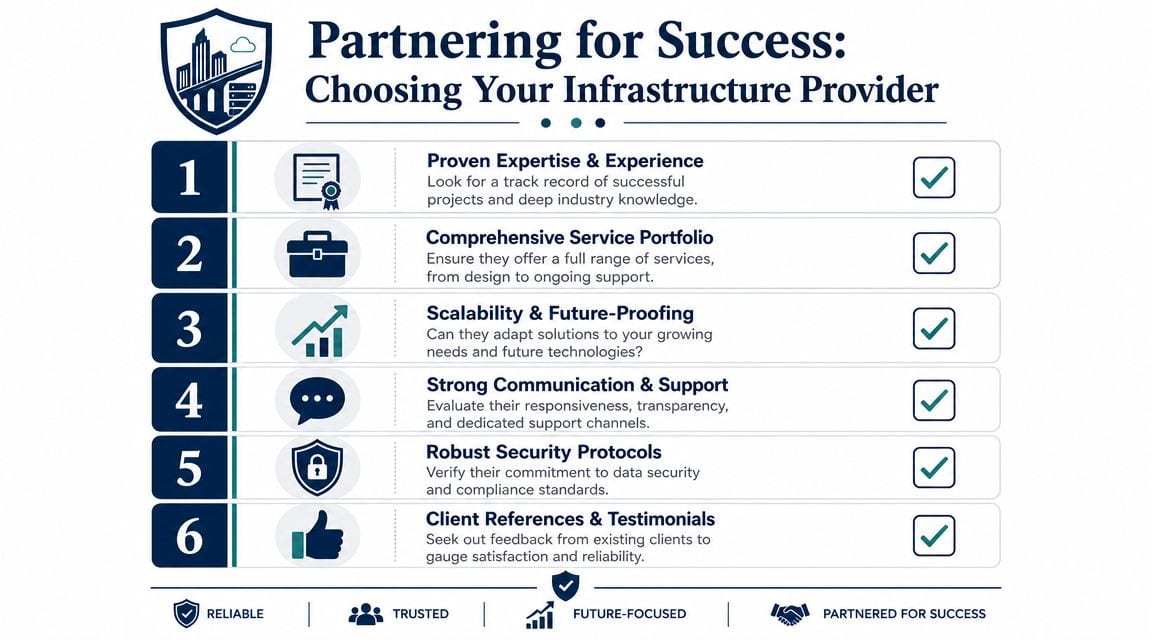
What to look for in practice
Vendor selection gets clearer when you stop asking “can they install this” and start asking “can they own the outcome”.
A useful checklist includes the following points:
- Relevant engineering depth. UK employers commonly look for 3+ years of IT support or helpdesk experience for infrastructure support roles and expect knowledge of networking, security, and backup and recovery, which reflects how infrastructure work functions as engineering rather than basic helpdesk activity, according to this infrastructure support recruitment overview.
- Joined-up delivery. Ask whether the provider can coordinate data, electrical, CCTV, access, rack design, telecoms, testing, and handover under one project method.
- Evidence of maintenance thinking. A good partner won't just specify what works on day one. They'll explain how it will be patched, documented, supported, and expanded later.
- Strong project controls. You want clear surveys, design sign-off, dependency management, commissioning records, and named responsibilities during go-live.
- Security and compliance awareness. This matters even more in healthcare, shared commercial buildings, and sites with remote or low-staff operation.
Questions worth asking before you buy
Some of the best due diligence is simple.
Ask how they handle design changes after survey. Ask who signs off electrical interfaces for access control and CCTV. Ask what their handover pack includes. Ask how they test integrated systems, not just individual ones. Ask who takes first escalation in the first live week. The answers tell you more than a polished proposal ever will.
Supplier management matters here too. If your project involves multiple trades and specialist vendors, this guide on optimizing supplier relationships is useful because it focuses on communication, accountability, and coordination issues that directly affect project delivery.
The partner should fit the building's operating model
A staffed office can sometimes absorb rough edges. An unmanned site can't. That's why the right partner for an autonomous building usually has three traits: they design around operational reality, they document properly, and they don't separate physical infrastructure from security and power decisions.
If you're comparing providers, look for the team that talks most clearly about integration risk, maintenance burden, and commissioning detail. Those are usually the people who've seen where projects go wrong.
If you're planning a fit-out, relocation, CCTV upgrade, server room change, or a fully autonomous unmanned building, it's worth having an early technical conversation before layouts and procurement harden into constraints. Constructive-IT works on UK infrastructure projects that combine cabling, network design, Wi-Fi, electrical works, security integration, testing, and go-live support, and a scoped review of your site plans can often surface the risks that generic project checklists miss.