

You've just moved teams into a new office, the desks are in, the Wi-Fi is live, and the first flood of tickets has nothing to do with laptops. It's phones. Staff can't call, can't use data, and the screen says Not registered on network.
At user level, that error feels random. In practice, it rarely is. Sometimes it's a SIM that hasn't authenticated properly with the carrier. Sometimes it's a coverage gap inside the building. Sometimes it's a bad handover between old and new telecoms infrastructure. In a new fit-out, it can be all three at once.
Most guides treat this as a one-phone problem. That's fine if one person's handset has gone wrong. It's the wrong mindset when several users hit the same fault on go-live day. Then the phone says not registered on network because your building, carrier setup, or migration process isn't giving devices a clean path to register.
Quick Fixes When a Phone Says Not Registered on Network
The first job is triage. Don't jump straight to “carrier outage” and don't send every user to a shop for a new SIM. Work through the short list that resolves the largest share of cases first.
Statistical analysis of UK mobile network diagnostics indicates that 65% of “Not Registered on Network” cases are resolved within the first three steps of the expert protocol, restart, SIM reseat, manual network selection, while 25% require carrier intervention to refresh the HLR record (supporting discussion).
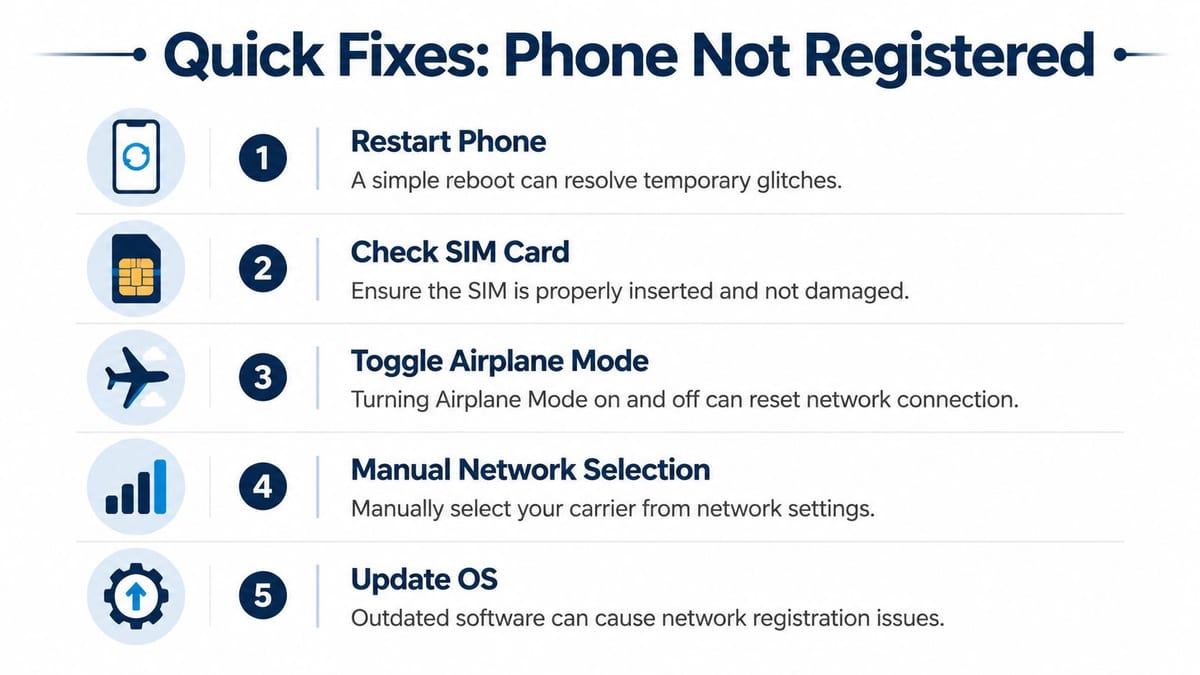
Start with the three fixes that clear most cases
Restart the handset
A reboot forces the phone to renegotiate its connection to the mobile network. After software updates or a rough transition between cell sites, that can be enough.Reseat the SIM
Power the phone down, remove the SIM, check for visible wear, then reinsert it properly. If the SIM tray is loose, dirty, or slightly out of position, registration can fail even when signal bars appear normal.Manually select the network operator
This matters more than people expect. After updates or network mode changes, some phones stay stuck trying to register automatically against the wrong available option. On Samsung and other Android devices, go into mobile network settings and manually choose the correct operator.
Practical rule: If one user is affected, start with the handset. If a whole team is affected, start with the environment and carrier status.
The next checks that save time
After the first three, I'd look at settings and symptoms rather than trying random resets.
- Toggle Airplane Mode: Turn it on, wait briefly, then turn it off. That forces a fresh radio session without changing deeper settings.
- Check for OS updates: The error often appears after software changes, but an incomplete or pending update can also leave the radio stack in a bad state.
- Review network mode: If 5G is weak in the area, forcing LTE-only or a more stable mixed mode can help the device register reliably.
- Test another SIM in the same handset: If another valid SIM works, your original SIM or account state is the likely issue.
- Test the same SIM in another handset: If the SIM fails there too, stop blaming the phone.
For users struggling with weak indoor reception more generally, this guide on how to boost mobile phone signal at home is useful because the same physical barriers often show up in offices, meeting rooms and lower-ground spaces.
Know what the message usually means
In the UK, the error is commonly tied to SIM registration failures with the carrier's Home Location Register (HLR). If the device can't register, the network hasn't authenticated that SIM properly. Technical guidance also points to outgoing service bars, expired contracts and SIM degradation as common causes, and carrier support content treats SIM swaps as a standard fix when the problem persists. O2, for example, directs users to its SIM swap process when needed (technical overview).
That's why this message is different from plain “no signal”. It isn't always about radio strength alone. It can be an authentication failure between the handset, SIM and carrier platform.
What usually doesn't work
There are a few moves that waste time or make things worse.
| Approach | Why it often fails |
|---|---|
| Repeated factory resets | They consume time and rarely fix an HLR or SIM-side issue |
| Blaming Wi-Fi | Wi-Fi quality affects calling apps and VoIP, not SIM registration itself |
| Entering service mode blindly | It can alter radio settings and create new faults |
| Replacing handsets too early | If several users are affected, the pattern points elsewhere |
If SIM wear is the culprit, it's worth using a provider or repair partner that knows how to locate quality telecom maintenance rather than swapping hardware blindly and hoping for the best.
If the first-line checklist fails and the SIM is known good, the next action is usually with the carrier, not with the user.
Diagnosing Network Errors in New Office Fit-Outs
When the same complaint lands from multiple users on the same floor, the phones probably aren't the main story. The building is.
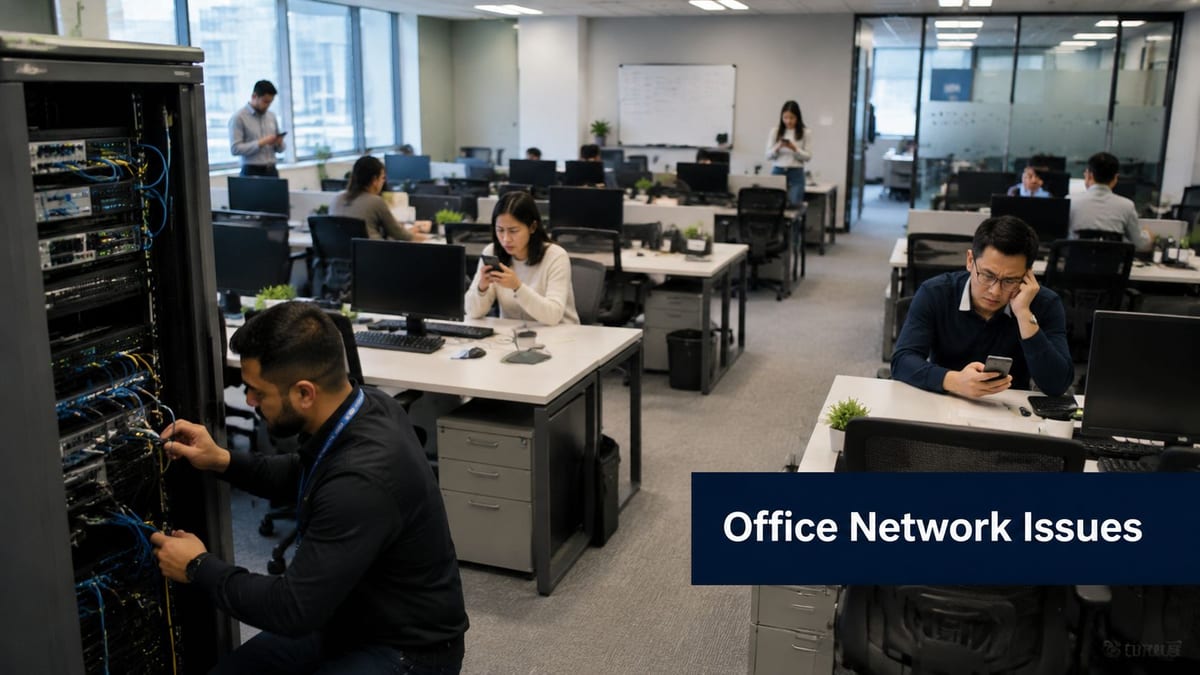
Industry data indicates that 68% of UK office relocation projects experience telecom-related disruptions, with 42% reporting mobile network registration failures in the first week due to incomplete handover of legacy telecoms lines to new infrastructure (reference).
That matches what tends to happen on the ground. A relocation plan may cover desks, access control and broadband activation, but the handover details around carrier provisioning, internal patching, temporary reroutes and address-level service status often get treated as someone else's problem.
Check the building before blaming the handset
Modern office materials can be brutal for mobile reception. Energy-efficient glazing, steel framing, foil-backed insulation, risers, basements, comms rooms and concrete cores all reduce penetration. In those spaces, users may still see a weak signal while the phone fails to complete registration cleanly.
Coverage also varies by postcode, and no single operator guarantees complete coverage in every UK location. Signal conditions can change dramatically between street level, a rear meeting room and a lower-ground workspace. Ofcom's Connected Nations reporting shows that approximately 95% of the UK population has access to 4G coverage from at least one operator, which still leaves areas where poor or absent service can contribute to registration failures (coverage context).
The fit-out checks that matter
When several people report that the phone says not registered on network, use an environment-led checklist:
- Test by location: Compare reception at windows, entrances, basements, lift lobbies and plant-adjacent rooms.
- Compare by carrier: If EE users fail in one wing but Vodafone users don't, you're looking at a coverage or provisioning pattern, not random handset faults.
- Confirm network handover status: During moves, old lines, hosted telecoms services and new infrastructure don't always line up on the planned cutover day.
- Review structured cabling and active kit locations: Dense plant areas, comms racks and poorly planned equipment rooms often reveal broader design shortcuts. This is why early planning for wiring for internet matters well beyond desktop connectivity.
- Check for wireless congestion and adjacent systems: Heavy wireless density doesn't create SIM registration errors directly, but it can muddy troubleshooting and hide the actual root cause.
A good parallel is CCTV performance. If you've ever had camera feeds stutter in a newly occupied building, the same underlying design flaws often show up across different systems. This piece on preventing IP camera buffering is a useful reminder that weak planning at the network edge usually affects more than one service.
A phone problem that appears only after a move is often a building problem wearing a user-support label.
Separate outage, coverage and provisioning
These three are easy to confuse.
Outage means the carrier has a temporary service issue.
Coverage means the carrier signal in that exact space is poor or blocked.
Provisioning means the user, SIM or service state hasn't been carried over correctly.
You solve each one differently. That's why reactive troubleshooting alone never scales during a fit-out.
Beyond Reactive Fixes The Unmanned Building Strategy
A building that needs constant manual intervention is badly designed. That applies to doors, cameras, power distribution, telecoms and user connectivity. If the same category of issue keeps resurfacing, the answer isn't a better helpdesk script. It's a different infrastructure model.
In practice, unmanned building management means automating the core functions of a property so day-to-day operation doesn't rely on on-site staff. That includes automated access control through digital keys or fobs with remote permission changes, AI-powered CCTV that flags unusual activity, and remote HVAC, lighting and power control from a central dashboard (overview of unmanned building management).
Why projects fail
The failure point is usually simple. Teams design access, power and data as separate workstreams, then try to bolt them together later.
Many unmanned building projects fail because access, power and data are not designed and implemented together from day one; for an autonomous building, these three pillars must be integrated simultaneously (supporting article).
That's the difference between an autonomous site and a collection of smart gadgets.
- Access without data gives you locks that can't report status cleanly or sync permissions reliably.
- Data without resilient power gives you dashboards full of offline devices.
- Power without joined-up access logic gives you locked doors during edge-case failures and poor user journeys.
What a robust strategy looks like
A well-designed unmanned building starts with a single operational model. Who books the space, how they enter, how systems verify them, what happens if connectivity drops, who receives alerts, and how remote recovery works.
For mobile reliability, the same mindset applies. Don't treat indoor signal problems, Wi-Fi calling, WAN failover, structured cabling and user support as disconnected tasks. They're part of one resilience plan.
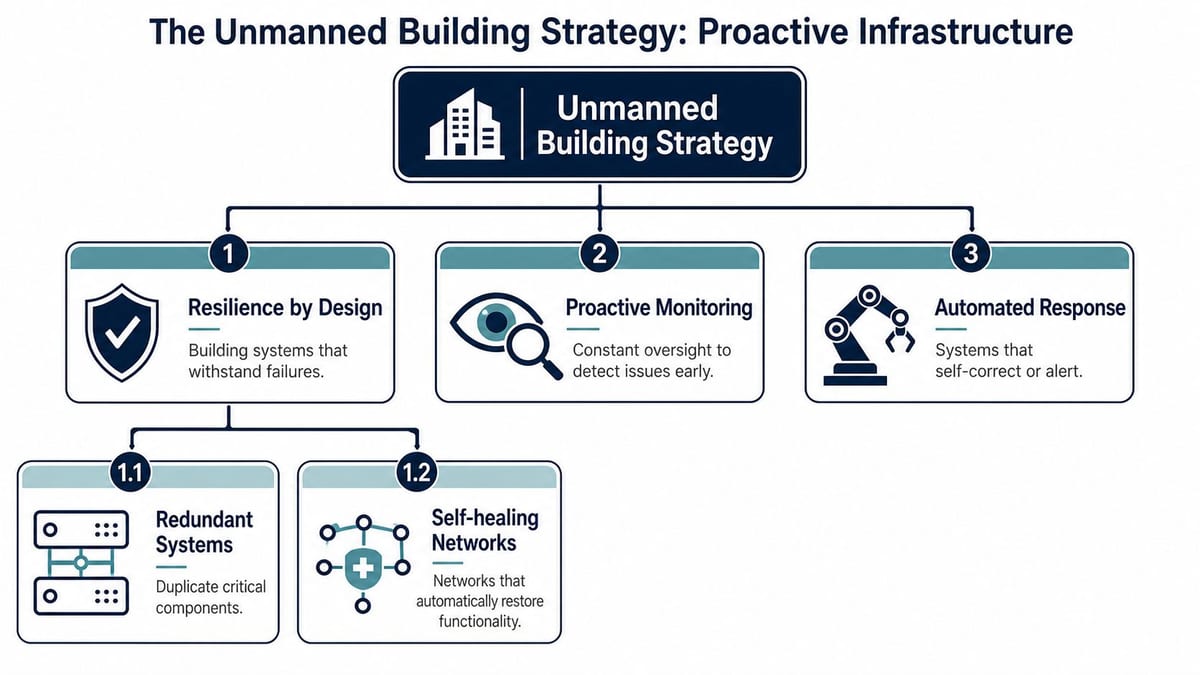
A practical design stack usually includes:
| Strategic pillar | What good looks like |
|---|---|
| Resilience by design | Redundant links, clean rack layouts, protected power, sensible equipment locations |
| Proactive monitoring | Alerts before users notice faults, device health visibility, remote diagnostics |
| Automated response | Remote reboots, failover internet, permission changes, centralised power control |
A mixed office environment almost always needs both fixed and wireless thinking. This is why understanding Ethernet and wireless as one joined system matters more than picking one side and ignoring the other.
Later in the design conversation, this visual helps frame the operating model:
Reactive support keeps buildings running. Integrated design stops them from failing so often in the first place.
Integrating Access Power and Data for Autonomy
The practical question isn't whether autonomy sounds good. It's how to build it in a way that survives real use, real tenants and real edge cases.
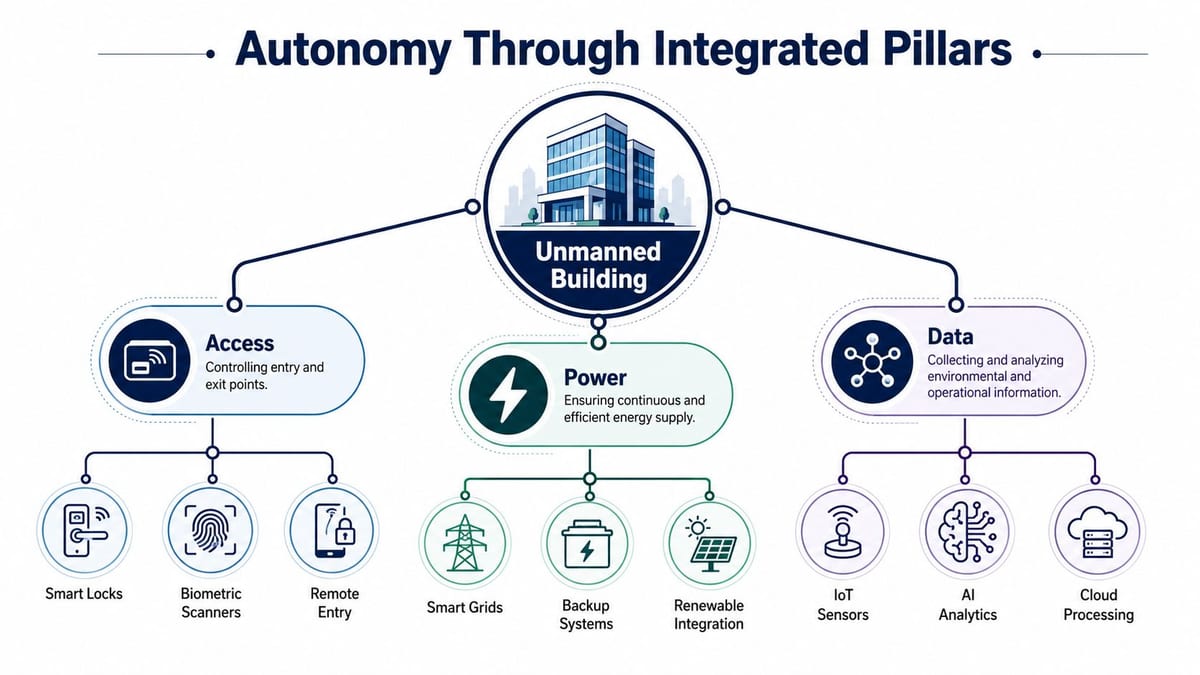
Access that doesn't become a maintenance burden
Battery-less, NFC proximity locks make sense in unmanned environments because they remove one of the most common points of failure: lock battery maintenance. In a distributed estate, changing batteries sounds minor until doors start failing outside staffed hours.
They also fit the way users move through a building. A tenant books a room, unit or desk. Their credential is issued remotely. Entry permission can be revoked in real time if needed. No key handover, no on-site receptionist, no waiting for someone to let a contractor in.
Common reasons engineers choose battery-less NFC proximity locks include:
- Less routine maintenance: There's no battery replacement cycle to manage across dozens of doors.
- Cleaner remote control: Permissions can align with bookings, access schedules and service windows.
- Better failure profile: Fewer consumable components means fewer silent failures.
- Improved user flow: Staff, visitors and approved contractors can move through the building without manual intervention.
Data and CCTV that support operations
Access control on its own isn't enough. You need visibility. That's where CCTV becomes part of the operational system rather than just a security add-on.
AI-enabled camera platforms can flag unusual activity, monitor entry points and support remote verification workflows. In an unmanned site, cameras often help teams decide whether a fault needs a physical visit or whether it can be handled remotely. That reduces unnecessary callouts and gives facilities teams better evidence when incidents happen.
The best CCTV setup in an unmanned building does two jobs at once. It secures the site and it shortens decision time when something goes wrong.
Power that has been properly installed and certified
Autonomy falls apart fast if critical systems don't stay powered. Locks, networking gear, controllers, cameras and gateways all depend on dependable electrical design. That means commercial electrical installation and certification has to be treated as core infrastructure, not a late-stage compliance box.
A proper electrical package in this setting usually supports:
- Protected supply for critical systems
- Remote power control where appropriate
- Clear labelling and segregation
- Support for failover and recovery procedures
Consequently, many projects drift into risk. The software layer may look polished, but if the underlying electrical work hasn't been planned around resilience, the building won't behave like an autonomous unit under pressure.
Where this model works well
These integrated systems are commonly used in:
| Environment | Why autonomy fits |
|---|---|
| Co-working sites | High user turnover, time-bound access, remote support needs |
| Self-storage facilities | Out-of-hours entry, perimeter monitoring, minimal staffing |
| Managed office suites | Shared services, segmented permissions, central oversight |
| Utility or plant sites | Restricted access, remote operations, low staffing presence |
Building out a fully autonomous unmanned building units model only works when the user journey, lock logic, CCTV coverage, electrical resilience and network path all support one another. If one pillar is weak, the whole system becomes manual again.
Maintenance and Operations in an Unmanned Environment
Unmanned doesn't mean unattended. It means the building is designed so operators can manage it remotely, predict issues earlier and intervene with precision rather than dispatching someone on guesswork.
What good operations look like
The maintenance model should be preventive first. Critical devices need health monitoring, sensible alert thresholds and remote recovery options. If a gateway freezes, someone should be able to power-cycle it remotely. If a connection drops, failover internet should keep the site operational long enough to avoid disruption.
Operationally, I'd prioritise four controls:
- Remote rebooting: For switches, gateways, cameras and controllers where supported.
- Failover connectivity: So one line fault doesn't blind the whole building.
- Predictive maintenance schedules: Based on device state and known wear points, not just calendar habits.
- Clear escalation paths: So facilities, IT and security know who owns what.
The 5G problem older estates run into
Technology shifts don't wait for building refresh cycles. That matters with mobile registration problems, especially in urban areas where carrier infrastructure changes faster than handset estates.
A recent Ofcom report found that 23% of UK smartphones purchased before 2024 experience network registration failures on newly deployed 5G nodes in urban areas, specifically due to incompatible Network Mode settings that default to outdated 5G configurations (supporting reference).
That's a strong reminder that operations teams can't treat mobile issues as purely user-side. Network mode policy, device lifecycle planning and indoor coverage expectations all need ongoing review. The building may be stable, but the surrounding mobile environment won't stand still.
An unmanned site still needs stewardship. The difference is that maintenance becomes planned, observable and faster to execute.
From a Single Error to a Resilient Future
When a phone says not registered on network, it looks like a small fault. In a live workplace, it rarely stays small. Calls fail, MFA prompts don't arrive, mobile data drops, and users lose confidence fast.
The bigger lesson is structural. Repeated registration failures, patchy coverage and awkward go-live support aren't isolated annoyances. They're signs that connectivity, power, access and operational planning weren't treated as one system. That's why the same organisations that struggle with mobile registration often struggle with CCTV reliability, door access edge cases, comms room resilience and support handover.
A better result comes from integrated design. Structured cabling, telecoms, LAN and WAN planning, Wi-Fi, CCTV, access control, commercial electrical installation and certification all need to line up if you want a site that keeps working without constant intervention. That's especially true when you're building out fully autonomous unmanned building units or upgrading an occupied office with minimal disruption.
The phone error is the symptom most users notice first. It shouldn't be the thing that forces the infrastructure conversation, but often it is.
If you're planning an office relocation, new fit-out, CCTV upgrade, electrical certification work or a move towards autonomous building operation, Constructive-IT can help you design the access, power and data layers as one resilient system instead of fixing the same faults one ticket at a time.