

You're probably dealing with one of these situations right now. An office move is booked, the fit-out programme is tight, the racks are specified, and somebody has added “PDUs” to the procurement list as if they're a minor accessory. Or you're expanding a server room and trying to balance continuity, compliance, and future growth without overbuying hardware you won't use.
That's usually where problems start.
Power distribution units sit in the background until they don't. When they're underspecified, poorly installed, or chosen with no regard for access control, monitoring, and upstream electrical constraints, they turn a straightforward IT project into an operational risk. When they're planned properly, they become the power foundation for everything that matters: uptime, remote recovery, CCTV continuity, access control availability, and the practical reality of running sites with minimal on-site intervention.
Beyond the Power Strip Why PDUs Are Critical Infrastructure
A lot of buyers still treat a PDU like a rack-mounted extension lead. That view doesn't survive contact with a real project. In live environments, the PDU is where facility power becomes usable, manageable rack power. That change in perspective matters because the wrong decision here affects every server, switch, recorder, firewall, controller, and edge device downstream.
In the UK, the electricity distribution infrastructure delivered 312.4 terawatt-hours in 2023, and within critical facilities such as data centres, improved PDU design has helped reduce total electricity distribution losses from 9.3% in 2010 to approximately 7% today, according to UK electricity statistics. That's a useful reminder that PDUs aren't peripheral kit. They're part of the efficiency, resilience, and control layer.
What a PDU really does on a project
A good PDU choice solves more than outlet count.
It shapes:
- Uptime: If a rack loses a feed, the quality of the PDU strategy shows up immediately.
- Scalability: Future additions fail fast when input ratings, outlet formats, or rack space were guessed.
- Supportability: A switched or monitored unit can save a site visit. A basic unit can't.
- Operational visibility: If you can't see current draw or outlet status, you're troubleshooting blind.
- Security design: Network-connected infrastructure depends on stable, auditable power.
That's why power planning belongs in the same early conversation as cabling routes, rack elevations, UPS strategy, cooling, and access systems. Teams that care about energy-efficient data centres usually realise this quickly. You can't optimise what you can't distribute cleanly at the rack.
Practical rule: If the rack is critical, the PDU is critical. Treat it like infrastructure, not consumables.
Why this matters beyond the server room
The strategic part often gets missed. Modern projects don't stop at “power up the rack”. They need remote management, power telemetry, controlled restarts, and support for integrated building systems. Once a site includes access control, CCTV, BMS connectivity, and remote operations, the PDU becomes part of a larger service model.
That's the significant shift. The question isn't “Which strip fits the cabinet?” It's “What power layer will still work when the building is occupied, audited, remotely managed, and expected to run without constant human intervention?”
PDU Types Explained From Basic to Intelligent
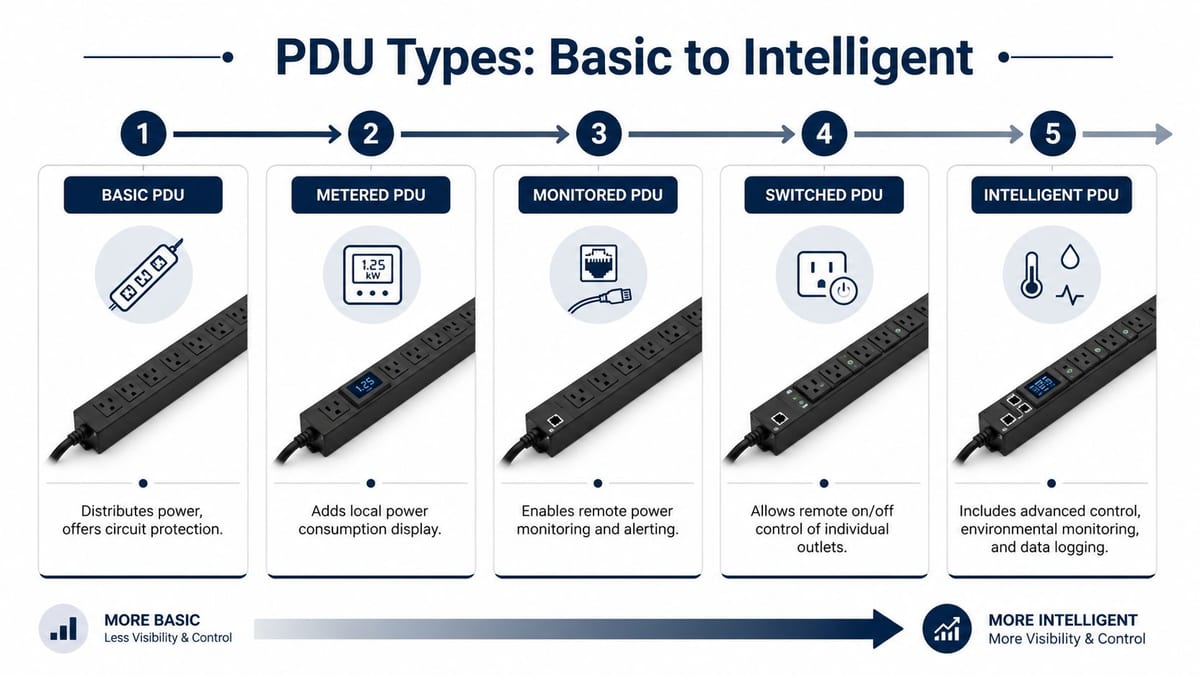
The easiest way to explain PDU types is to think of them like vehicle trims. They all move power from one place to another, but the level of visibility and control changes a lot.
Basic PDUs
This is the no-frills model. A basic PDU distributes power and may provide circuit protection, but it doesn't tell you much about what's happening. It's suitable where the load is simple, stable, and non-critical, or where upstream systems already give you the visibility you need.
That said, basic units often end up in places they shouldn't. They're cheap to buy, but they can be expensive to support because fault-finding takes longer and remote teams have no visibility at outlet or unit level.
Metered PDUs
A metered PDU adds local load display. That sounds modest, but it solves a real operational problem. During install, moves, or refresh cycles, you can see whether you're approaching the unit's practical limits without getting out separate test equipment for every check.
These are useful where a local engineer needs quick confirmation on rack load during commissioning. They're less useful when the site is remote and nobody is there to read the display.
Monitored PDUs
A monitored PDU is where things become operationally mature. You can check power status remotely, review usage, and set alerting. If a rack starts drawing outside its normal pattern, the team can investigate before it turns into service impact.
For multi-site environments, this is usually the minimum sensible starting point. If the business expects central oversight, out-of-hours support, or audit-friendly reporting, monitored units are hard to argue against.
Remote monitoring isn't a luxury once the site is unattended. It's how the support team knows whether the problem is device-side, rack-side, or supply-side.
Switched PDUs
A switched PDU adds remote outlet control. That gives you one of the most useful functions in real operations: the ability to power-cycle a non-responsive device without dispatching an engineer or asking a non-technical person on site to unplug the wrong thing.
Switched units are especially valuable in:
- Edge cabinets: Small sites where there's no technical staff.
- Office comms rooms: Spaces that must stay live during relocations and reconfigurations.
- Critical services: Equipment that occasionally needs controlled restart procedures.
The trade-off is governance. If remote switching is available, access permissions and change control have to be tight. A useful feature becomes a dangerous one if everyone has access.
Intelligent PDUs
An intelligent PDU combines monitoring, switching, and broader environmental or logging capability. With these features, power distribution becomes part of the wider infrastructure management layer rather than a passive rack component.
Choose this class when the project needs:
- Power telemetry for compliance or reporting
- Remote troubleshooting
- Environmental awareness in the rack
- A stronger operational record of what happened and when
If that sounds closer to your project than “we just need some sockets”, you're not buying a commodity item. You're buying control.
Planning Your Power Needs Without Guesswork
Most power mistakes happen before anyone touches a rack. They start on spreadsheets, procurement forms, and assumptions. Someone totals nameplate ratings, picks a PDU with enough outlets, and moves on. That approach ignores diversity, startup behaviour, dual feeds, future adds, physical plug formats, and the local supply context.
The better approach is simple. Build the power picture in layers.
Start with the actual load
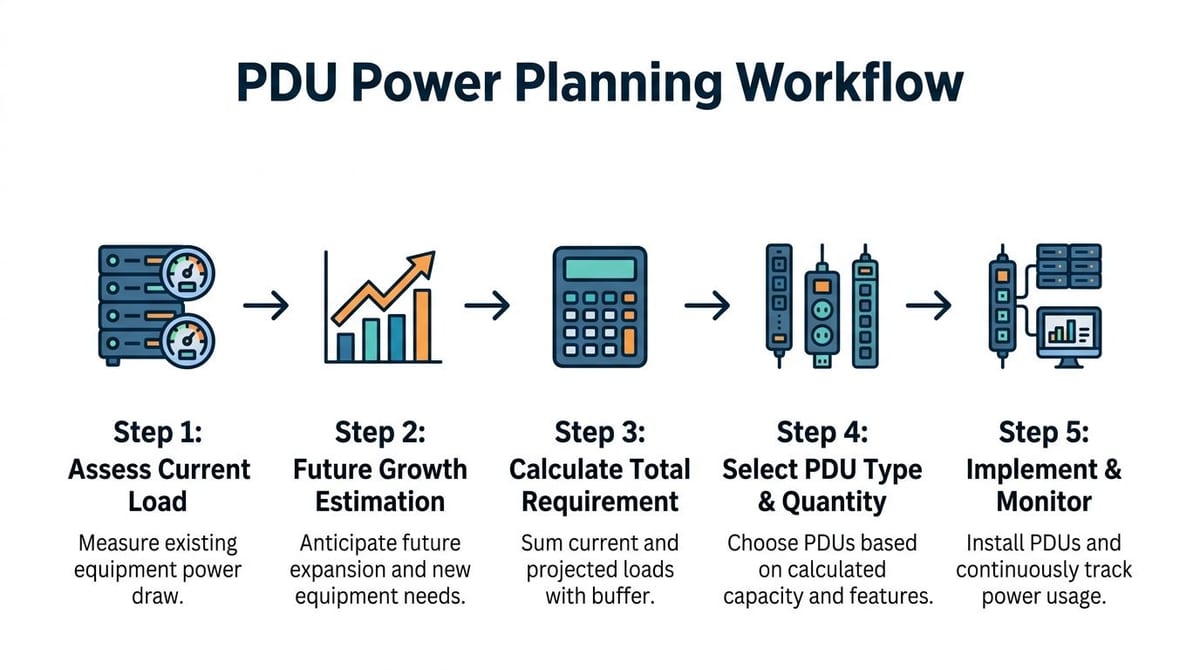
Don't begin with catalogue maximums. Begin with the equipment list you will really install.
Look at:
- Current estate draw: What the existing servers, storage, network switches, firewalls, NVRs, and controllers consume
- Feed design: Single supply, A/B supply, or staged resilience
- Plug type and inlet compatibility: A good rating on paper is useless if the connectors don't line up
- Rack count and location: One overloaded rack can be harder to fix than several well-balanced racks
This is also where terms matter. Volts are the supply pressure. Amps are current draw. Watts are real power consumption. kVA is the apparent load the electrical infrastructure has to support. You don't need to turn every project manager into an electrical engineer, but you do need a design team that understands the difference.
Add future growth before procurement
A common failure is buying for day one and forgetting year two.
An office move often triggers more than a location change. Teams add collaboration rooms, denser Wi-Fi, extra CCTV retention, new access controllers, or a larger virtualisation host once they have a cleaner space. That means the rack load changes after go-live.
A practical planning sequence looks like this:
- List installed devices by rack
- Separate critical and non-critical loads
- Decide what needs dual power
- Reserve capacity for planned additions
- Choose PDU types that match how the site will be supported
If you're also trying to reduce computer power consumption, do that work before locking in final capacity. Device efficiency improvements can change rack design, UPS sizing, and heat load assumptions.
Don't ignore DNO constraints
Generic buying guides usually fall short here. They tell you how to compare outlet counts and features, but they don't help you align the rack power plan with what the site can support from the local network side.
Data from UK Power Networks shows that 34% of pre-application support queries in 2024 related to mismatched power distribution planning in commercial fit-outs, often because teams failed to align PDU load balancing with regional DNO feed limits, causing project delays, as noted in this PDU buying guidance reference.
That's not a niche issue. It shows up in office relocations all the time. The rack design may be fine in isolation, but the building intake, landlord constraints, or regional supply assumptions can break the programme.
A rack power design can be technically correct and still fail the project if it doesn't match the site's available capacity.
For that reason, proper planning usually includes an electrical load assessment before the final PDU schedule is signed off.
What works in practice
The designs that hold up best usually share the same habits:
- They separate resilience from convenience: Don't put everything critical on one unit because it tidies the rack.
- They match the support model: Unattended sites need monitoring and remote recovery options.
- They plan cable paths with power paths: A neat rack isn't just cosmetic. It reduces maintenance error.
- They leave room to operate: Full utilisation on paper rarely feels comfortable in live service.
What doesn't work is guesswork. Power foundations fail subtly during design and loudly during operations.
How PDUs Enable Fully Autonomous Building Units
Unmanned building management sounds futuristic until you break it down into daily operations. In UK practice, it means automated access control, AI-powered CCTV, and remote utilities management of HVAC, lighting, and power from a central dashboard, eliminating the need for on-site staff for day-to-day operations, as described in this guide to unmanned building management.
That only works if access, power, and data are designed together. If they're procured in separate workstreams, the project usually develops hidden failure points.
Why many unmanned building projects fail
They fail because somebody treats each system as a standalone package.
The locksmith installs door hardware. The electrical contractor powers the plant. The network team provisions cabling and switching. The CCTV provider adds recording and cameras. Each package works in isolation, but the building doesn't behave like one coordinated environment.
Typical failure patterns include:
- Access control without resilient backend power
- CCTV recording on equipment with no remote recovery path
- Network cabinets with no environmental or power visibility
- BMS dashboards that assume permanent availability from unsupported edge kit
- Locks, readers, and controllers chosen without considering cabling routes or maintenance access
When no one owns the whole operating model, the site becomes “automated” only while nothing goes wrong.
Designing access, power, and data as one system
A fully autonomous unit needs three layers that support each other.
Access layer
Battery-less, NFC proximity locks are often the right fit where reliability and maintenance burden matter more than gadget value. They remove routine battery replacement, reduce the chance of lock failure caused by depleted cells, and simplify planned maintenance across dispersed or lightly staffed estates.
Real-world reasons to choose them include:
- Lower maintenance overhead: Facilities teams don't have to track battery schedules across multiple doors.
- Fewer service interruptions: A lock isn't waiting to fail because someone missed a replacement cycle.
- Cleaner audit process: Credentials can be granted and revoked centrally without managing a separate battery maintenance regime.
- Suitability for controlled spaces: Plant rooms, comms rooms, risers, and utility spaces benefit from predictable operation.
That doesn't mean battery-less is always perfect. Some doors and legacy openings still need different hardware choices. But for many commercial and mixed-use environments, simpler locking hardware is the more dependable option.
Power layer
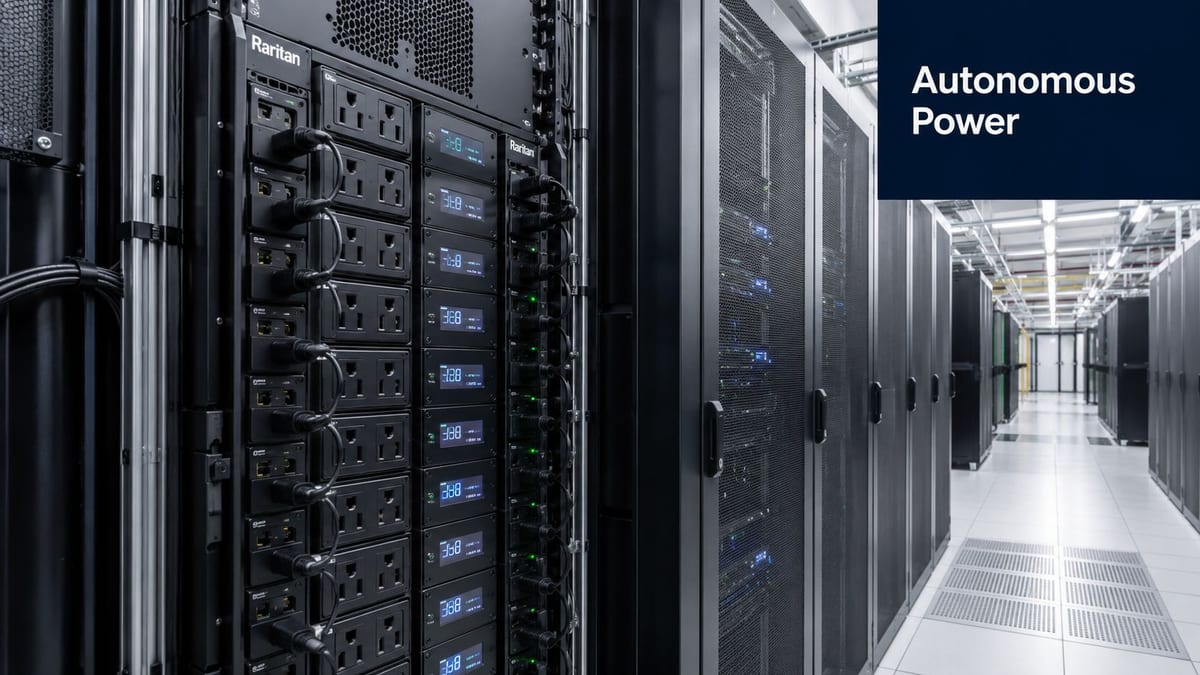
The autonomous building still depends on physical equipment. Controllers, readers, switches, NVRs, gateways, and server-room systems all need stable power. Intelligent PDUs support that by providing monitored and remotely manageable distribution to the systems that keep the building operable.
If a recorder hangs, if a controller needs a controlled restart, or if one branch of a rack starts behaving abnormally, the support team needs visibility and options. That's what turns “smart building” ambitions into a maintainable operating model.
Data layer
Every automated decision rides on cabling and network design. Access events, CCTV streams, remote utility telemetry, and management traffic all depend on structured, resilient connectivity. If the data design is weak, the building isn't autonomous. It's opaque.
The building only feels unmanned to the occupants. Behind the scenes, it needs carefully engineered power and data paths.
Where these systems are commonly used
This model is already practical in places such as:
- Serviced offices and managed workspaces
- Multi-tenant commercial buildings
- Remote depots and utility sites
- Healthcare support buildings and administrative estates
- Distribution and logistics facilities
- Plant-heavy autonomous units with restricted access
In each case, the goal is the same. Reduce routine on-site intervention without losing control, auditability, or uptime.
PDU Installation Best Practices and UK Compliance
A good PDU can still perform badly if it's installed badly. Physical placement, airflow, cable dressing, input selection, and certification all matter. In real racks, reliability often comes down to how disciplined the installation was on the day.
Get the rack layout right first
Vertical and horizontal PDU mounting both have their place. Vertical units usually preserve rack space and often make sense in full-height cabinets. Horizontal units can work well in smaller cabinets or where the equipment and lead lengths make front-to-side routing more manageable.
The main thing is consistency. Engineers should be able to identify feeds, circuits, and device paths quickly under pressure.
A sound install usually includes:
- Clear feed separation: If the rack has resilient power, the A and B sides must stay visually and physically distinct.
- Airflow awareness: Don't create cable bundles that obstruct intake or exhaust paths.
- Service loops with discipline: Enough slack to maintain equipment, not so much that the rack turns into a cable store.
- Outlet mapping: Every critical device should be documented against the exact PDU and outlet.
For racks with denser cable paths, good electrical tray cable management upstream makes the rack-level work much cleaner.
Follow UK socket and plug standards properly
In UK server rack environments, PDUs must comply with BS 1363 for socket outlets. Professional-grade units from vendors such as Excel Networking are engineered with 13A outlets per BS 1363 and often use 16A or 32A industrial plugs under IEC 60309, handling loads of up to 3.68kW or more per PDU, according to this UK rack PDU specification reference.
Those details matter. Too many projects still mix domestic expectations with commercial rack realities. A PDU that appears compatible because “it fits a UK supply” may still be the wrong choice for the load profile, connector standard, or cabinet arrangement.
Commercial electrical installation and certification matter
This isn't just about plugging hardware in. Commercial electrical installation and certification are part of the power design. The rack side has to align with the wider installation under current wiring regulations and site-specific requirements.
That usually means checking:
- Input protection and isolation
- Circuit labelling and documentation
- Earthing and bonding arrangements
- Compatibility with the wider commercial electrical installation
- Testing, sign-off, and handover records
If drones are used for site inspection in autonomous or hard-to-access units, operators must be fully trained and registered with the Civil Aviation Authority, and since 30 November 2019, owners of drones weighing 250g or more must register the drone with the CAA, as outlined in this legal note on unmanned aerial devices in UK construction. That's not a core PDU issue, but it becomes relevant on larger surveys and refurbishment programmes.
Poor installation hides defects until the first outage. Good installation makes faults easier to isolate and recovery faster to execute.
What usually goes wrong
Most avoidable problems are mundane:
- Underrated inputs for the intended rack load
- No allowance for maintenance access
- Messy lead routing that obscures live work
- No distinction between critical and convenience loads
- Incomplete certification records at handover
Professional installs don't look dramatic. They look calm, labelled, and obvious.
Securing Your Power and Ensuring Uptime
A modern PDU strategy has two jobs. Keep services running, and avoid turning power management into a new attack surface. That's why non-networked PDUs are becoming harder to justify in critical environments. If the site needs remote operations, auditability, or fast fault isolation, blind power distribution is a weakness.

The demand for monitoring-enabled PDUs is rising in UK NHS and public sector work. A 2025 NHS Digital infrastructure review found that 48% of server room upgrades were delayed due to missing power monitoring in PDUs, where logged power data was needed for NIS2 and Cyber Assessment Framework compliance, according to this overview of PDU monitoring requirements.
Build uptime into the rack, not the response plan
If uptime matters, design for failure before it happens. The standard pattern is separate A and B feeds to dual-supply equipment, using distinct PDUs and circuits. That way, maintenance or fault conditions on one path don't take the whole rack down.
Where equipment has only one power supply, teams need a deliberate policy. Some loads warrant transfer arrangements or different hardware selection. Others can remain single-fed if the service impact is understood and accepted.
Useful operational habits include:
- Keep critical services on defined power paths
- Document outlet-to-device mapping clearly
- Test remote reboot procedures before go-live
- Review alert thresholds so they're actionable, not noisy
Secure the PDU like any other networked device
Once a PDU is on the network, it deserves the same discipline as a switch, firewall, or controller. Too often it gets commissioned, given an IP, and forgotten. That's poor practice.
At minimum:
- Change default credentials immediately
- Restrict administrative access
- Keep firmware current within change control
- Use network segmentation for management traffic
- Log who accessed what and when
If the organisation relies on remote recovery and telemetry, the PDU is no longer a hidden utility. It's part of the security boundary.
A switched PDU without access control is a convenience for the wrong person.
A short overview of the operational mindset is below.
Maintenance and operational considerations
Power hardware tends to be ignored when everything is stable. That's exactly why maintenance routines must be explicit.
A sensible support plan covers:
- Firmware review: Include PDUs in the normal maintenance cycle.
- Alert validation: Make sure alarms still reach the right team.
- Load review: Changes in equipment often creep in after go-live.
- Physical inspection: Check leads, strain relief, labelling, and signs of heat stress.
- Recovery testing: Confirm remote switch actions still behave as expected.
In unattended sites, the best design is the one that support teams can trust at 02:00 without improvising.
A Project-Ready PDU Procurement Checklist
Most procurement mistakes happen because buyers ask narrow questions. They compare outlet count, price, and lead time, then discover too late that the unit doesn't fit the operating model. A better checklist starts with the project type and the consequences of getting power wrong.
Questions worth asking before you buy
- What is the rack supporting? Office comms, CCTV recording, access control, virtual hosts, or mixed critical services all drive different choices.
- Does the site need remote monitoring or remote switching? If yes, basic units will become a limitation quickly.
- What input and outlet standards does the install require? UK compliance and connector compatibility need checking early.
- How will the site be maintained? Local hands, central support, or mostly unattended operation all point to different PDU classes.
- Is the power design aligned with the wider electrical installation and building operation? If not, procurement is premature.
PDU Procurement Checklist
| Consideration | Office Relocation | Data Centre Expansion | NHS/Enterprise |
|---|---|---|---|
| Primary objective | Fast cutover with minimal disruption | Capacity, resilience, and orderly growth | Compliance, auditability, and service continuity |
| Best-fit PDU approach | Metered or monitored, depending on support model | Monitored or switched with clear A/B strategy | Monitoring-enabled or intelligent with logging |
| Physical format | Match rack depth and patching density | Prefer layouts that preserve usable rack space | Prioritise maintainability and clear separation of critical loads |
| Input and outlet checks | Confirm building-side compatibility before move day | Validate all server and network inlets across new racks | Standardise where possible to simplify support and certification |
| Operational requirement | Quick fault isolation during transition | Remote management and outlet-level control where justified | Power telemetry for audits and controlled recovery procedures |
| Risk to avoid | Buying on outlet count alone | Concentrating too many critical loads on one path | Treating PDUs as passive strips instead of managed infrastructure |
What experienced teams check that others miss
Experienced teams usually push beyond the datasheet. They ask who will own the device after handover, how firmware will be maintained, whether the labels match the rack drawings, and how a failure will be handled outside business hours.
They also ask a harder question. If this building becomes more automated over time, will the power layer support that change, or hold it back?
That's the right test. A successful project starts with a power foundation that is safe, supportable, compliant, and ready for what the site is becoming.
If you're planning an office relocation, server room refresh, autonomous unit, or wider commercial infrastructure upgrade, Constructive-IT can help you scope the power, cabling, access, CCTV, and electrical dependencies properly from the start, so the project works in live operation, not just on the drawing.