

The call comes at the worst possible time. A server room is warm, the helpdesk is already dealing with user complaints, and someone finally notices that the UPS batteries were never logged, never tested, and never replaced on time. In UK offices and NHS estates, that sort of miss usually starts much earlier than the outage, because the maintenance record, the asset register, and the actual-world installation drift apart until nobody can tell what should have been checked, when, or by whom.
Preventive maintenance programs exist to stop that drift. In formal terms, preventive maintenance is scheduled work done on a time- or machine-run basis to detect, preclude, or mitigate degradation before obvious failure shows up, and the government-backed guidance behind that definition also frames it as a discipline for keeping operating costs predictable when it's done properly (U.S. Department of Energy guidance). That matters in practice because office relocations, fit-outs, server rooms, and healthcare estates don't fail gracefully. They fail in the middle of changeovers, around occupied desks, or during clinical pressure when there's no appetite for surprises.
Why Preventive Maintenance Programs Fail Before They Start
A lot of programmes fail on day one because the team thinks the schedule is the plan. It isn't. The plan is the asset, the failure history, the ownership, the evidence trail, and the trigger that tells you a task still earns its keep.
The hidden failure is usually missing data
If a UPS battery age was never recorded, or a Cat6 run was installed without a clean handover pack, the maintenance conversation starts from guesswork. A proper PM discipline needs a complete asset inventory with location, age, manufacturer specifications, current condition, criticality tier, replacement value, and known failure history (Fiix guidance). Without that, people default to calendar-only routines, which look tidy on paper and waste effort in the field.
Practical rule: if the engineer can't tell what the asset is, where it lives, and what it has done before, the programme isn't mature enough to trust.
The difference between reactive firefighting and preventive maintenance is not philosophical. Reactive work starts after the user reports an outage. Preventive work starts before that point, with scheduled inspection, cleaning, lubrication, testing, and parts replacement that aims to keep the asset useful for longer. In a UK office, that can mean less disruption during relocations and fewer emergency callouts around network cutovers. In a healthcare estate, it can mean fewer avoidable interruptions in areas where downtime carries a heavier operational cost.
Ownership fails when everyone is involved and nobody is responsible
Many weak programmes have tasks, but no real owner. The facilities team assumes IT is checking the UPS. IT assumes the landlord or maintenance contractor is covering the power chain. The contractor assumes the client will raise a ticket if anything looks odd, and nothing gets closed out.
A cleaner model is to treat PM as a control system, not a to-do list. A benchmark often used in programme reviews is 90% PM compliance, meaning at least 9 out of every 10 scheduled tasks land inside the compliance window, with 95%+ for critical A-class assets (PM KPI benchmark). That benchmark is useful because it tells you whether the programme is being executed, not just documented.
A good starting question is simple. Which assets would make the loudest mess if they failed, and who is accountable for checking them before that happens? Answer that first, and the rest of the programme becomes much easier to build.
Building the Asset Foundation and Criticality Tiers
A solid programme starts with the boring part nobody wants to rush, the asset register. If the register is wrong, every interval, spare part decision, and inspection route built on top of it will wobble.
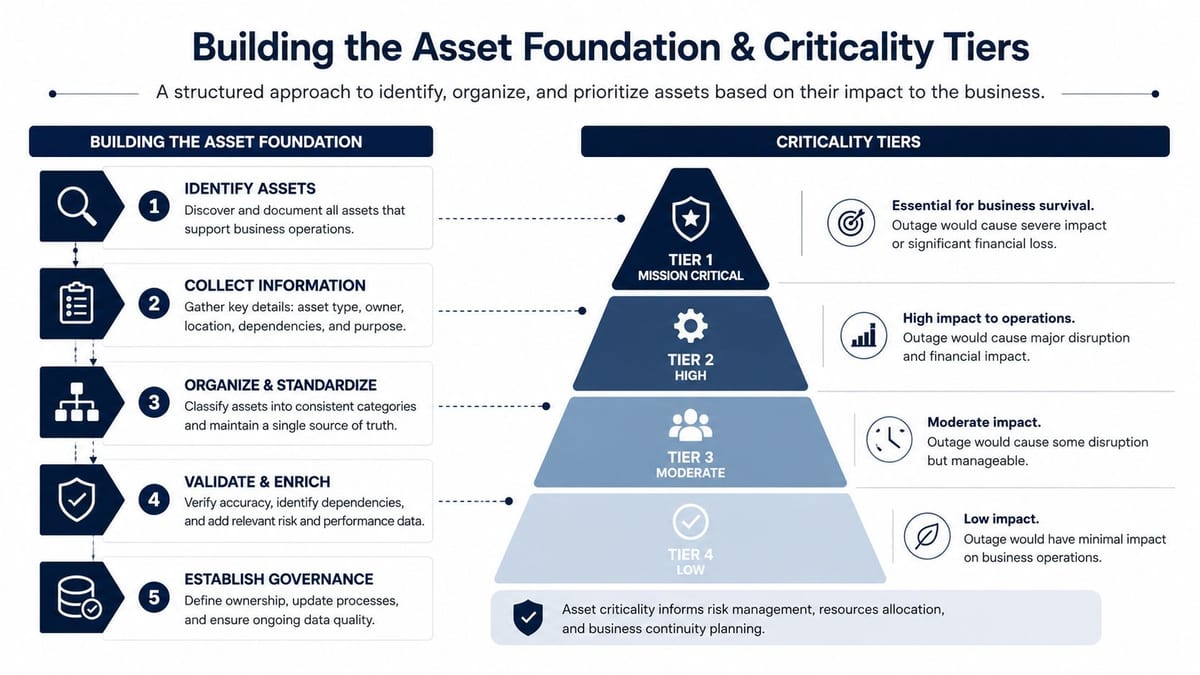
Build the register like you expect to defend it later
For office and network environments, the register needs to cover more than racks and switches. It should include structured cabling, fibre runs, Wi-Fi access points, controllers, UPS units, server room cooling, CCTV heads, AV racks, and the electrical backbone behind them. Each record should say where the asset is, when it was installed, what condition it's in, and what it costs to replace.
That detail matters because cabling, power, and active network equipment don't age in the same way. An access point can drift due to firmware, heat, or poor placement. A fibre link can hold up for years but still deserve verification after moves, patching, or fibre management changes. A UPS can look healthy right up until the battery set ages out, which is why the register needs install date and failure history, not just a label.
Rank assets by impact, not by habit
The most useful criticality ranking uses failure impact, safety risk, replacement cost, and compliance exposure to decide where labour goes first (WorkTrek guidance). That is the difference between a focused programme and a busy one. The focused version spends time where outages are costly. The busy version spreads labour evenly and hopes for the best.
The CMMS should reflect that ranking immediately. High-criticality assets get tighter task ownership, clearer escalation, and closer review. Low-criticality items might still be inspected, but not all of them deserve the same cadence or the same level of human touch.
Useful test: if a task can't be linked to a failure mode, a compliance need, or a service interruption, it probably belongs on a shorter list.
If you need a practical way to extend the register into environmental monitoring and related site data, this UK environmental monitoring guide is a useful companion for thinking about how site conditions affect equipment life. And for teams managing office layouts alongside the asset list, enhance employee experience with indoor maps can help connect people flow to the physical locations that maintenance teams visit.
Don't let calendar-only PM flatten the whole estate
The common mistake is to give every asset a date and call it done. That over-services low-risk kit and still misses the things that really hurt when they fail. A better approach is to start with the criticality tier, then assign the lightest effective touch that still protects uptime, compliance, and warranty cover.
Designing Schedules, Task Libraries and Condition Triggers
A schedule only works if the team can run it and justify it to the people paying for it. If it turns into a long list of recurring tickets, engineers start treating it as background noise, and the programme loses credibility quickly. In UK offices and NHS estates, that usually means the loudest schedule is not the best one, it is often the one that has not been challenged hard enough.
Build tasks from evidence, not from habit
Good task libraries come from OEM guidance, regulatory requirements, and historical failure data, not from whatever someone copied into last year's spreadsheet. For a network room, that means separating simple visual checks from tasks that need readings, testing, or specialist sign-off. It also means writing SOPs that a junior engineer or a third-party contractor can follow without improvising.
For example, a quarterly patch-panel inspection can be as simple as verifying label integrity, strain relief, and bend radius. Fibre work is different. It is usually better to tie an annual OTDR check to the asset's actual role and change history, rather than to some arbitrary habit. Wi-Fi health should also follow change events, firmware cycles, or measured drift, not just a neat calendar slot.
For estate teams that need a more practical frame for service ownership, the guide to landlord HVAC agreements is a useful reference for setting out who does what when several parties touch the same building system.
Use condition triggers where the data is strong enough
Time-based PM still has a place, especially where compliance or warranty evidence matters. Condition-based work is where programmes stop wasting visits. UPS temperature, cooling performance, switch health, and Wi-Fi controller status can justify a move away from fixed frequency if the telemetry is reliable and the response rule is clear.
That matters in hybrid offices, where occupancy changes through the week and the same floor can swing from quiet to full without much warning. A building that looks lightly used on paper can still create heavy local load in meeting rooms, comms cabinets, and hot-desking zones. A PM schedule that ignores that reality is easy to write and hard to defend.
Smart building telemetry helps here, especially where occupancy and environmental conditions should shape maintenance decisions. For teams linking condition triggers to live site data, smart building sensors can support a more selective schedule by showing when equipment is drifting and when a visit is not yet justified.
The same logic applies to landlord-owned plant versus tenant-managed IT infrastructure. If the HVAC agreement says one party owns filters, another owns controls, and the engineer on site does not know which is which, the task library becomes legal noise instead of operational control. The best schedules are explicit about trigger, owner, evidence, and escalation.
KPIs That Actually Tell You Whether the Programme Is Working
A programme without measures is just hope with a spreadsheet. In practice, the right KPIs show whether work is planned, whether it lands on time, and whether the estate is getting calmer or more congested.
The core metrics that matter
| KPI | Calculation | Healthy UK Target | What It Tells You |
|---|---|---|---|
| Planned Maintenance Percentage | planned hours ÷ total maintenance hours | Rising over time, with unplanned work below 20% of total work if PM is working properly (Eptura guidance) | Whether the team is shifting from firefighting to controlled work |
| PM Compliance Rate | completed PMs ÷ scheduled PMs | 90% baseline, 95%+ for A-class critical assets | Whether the schedule is being executed reliably |
| MTBF | average time between failures | Improve on the asset's own history | Whether reliability is improving on key assets |
| MTTR | average time to repair | Reduce against past performance | Whether faults are being cleared quickly |
| Equipment downtime | total unavailable time | Keep trending down | Whether outages are easing in real operational terms |
Those metrics are useful because they force honest conversations. A full calendar of completed tasks means little if failures are still repeating. A high compliance score matters, but only if the tasks were worth doing in the first place and reduced fault frequency. On a mixed UK estate, I would also check whether the PM route is still aligned to the asset's actual risk, because a tidy report can hide over-servicing just as easily as missed faults.
Review the last six months, not the last nice-looking month
Pull the last six months of work orders, then calculate the preventive-to-reactive ratio and ask which failures still happened despite the PM. That shows whether the issue was task design, interval length, or execution quality. If the same fault keeps appearing, the answer is usually to fix the wrong PM or stop pretending the task works.
Skipped tasks need separate visibility. So do skipped-PM percentage and Scheduled Maintenance Critical Percentage, because both show backlog risk before it becomes a visible outage. Those figures belong in a monthly review, not an annual audit.
The cleanest review I've seen also checks whether the schedule still matches the asset class. For example, a power distribution units route that keeps finding nothing on stable kit may be a sign to extend the interval, change the trigger, or remove the task altogether. The point is to spend engineer time where it lowers risk, not where it pads out the calendar.
Practical rule: if a task can't be tied to a defect, a downtime reduction, or a compliance obligation, challenge whether it still belongs on the route.
A good monthly review should stay short. Compare trendlines, then change the schedule in the same meeting. The value comes from the adjustment, not from the dashboard.
Cutting Waste Without Cutting Uptime
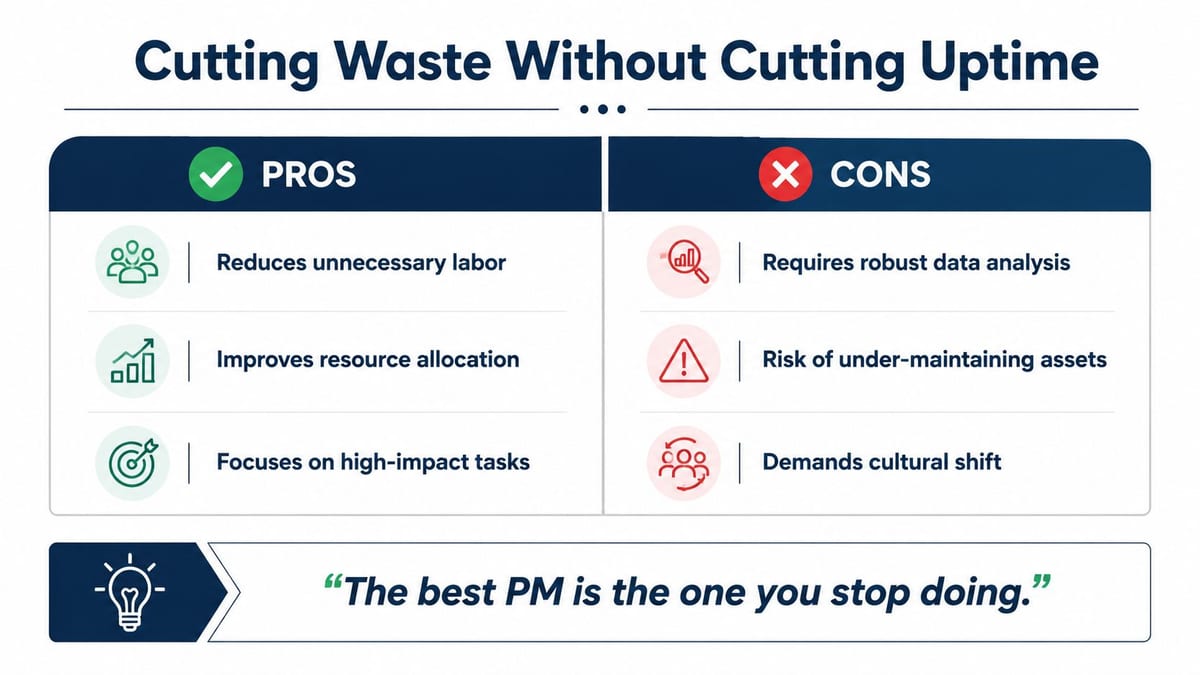
The strongest PM programmes are not the busiest ones. They're the ones that can prove a task still earns its keep, or can justify removing it without putting uptime at risk.
Retire, extend, or convert the task
Failure history is the first filter. If a task hasn't found a defect across several cycles and the asset is mature and stable, it may be a candidate for extension or removal. If data shows a trend rather than a hard failure point, the task may fit better as condition-based work. If the asset is low-risk and failure is obvious and tolerable, run-to-failure can be the smarter option.
That's not a licence to strip the schedule bare. It's a way to spend time where it matters. The NHS estate backlog has been reported in the billions, with a significant share of that backlog tied to critical or high-risk items, so blanket routines are the wrong answer when engineering time is scarce and the consequence of missing the right asset is high (Reliability Academy discussion of PM optimisation). The point is to free capacity for failure-prone and compliance-critical kit, not to cut corners.
A practical decision rule works well. Remove or extend a PM task only when the task has produced no useful defect findings, the failure mode is well understood, the asset is not safety-critical, and the risk can be justified with evidence. If any one of those isn't true, keep the task in place and review the interval instead.
Don't confuse more visits with better control
Over-servicing is easy to defend emotionally and hard to defend financially. It eats technician time, crowds the schedule, and can even introduce risk if well-running assets are disturbed too often. That's why the best programmes keep asking the same question, which tasks are still producing a return and which ones are just consuming labour.
The internal rule I've seen work best is simple, if a task never finds anything, never prevents anything, and never supports compliance, it should be challenged. That's where the engineering judgement earns its keep.
For teams managing power distribution and server-room resilience, this power distribution units guide is relevant because it helps separate useful checks from habits that just keep people busy.
UK Use Cases From Office Relocations and Healthcare Estates
A PM programme only proves itself when it survives a move, a fit-out, or a live estate handover. Two settings show the difference quickly, a UK office relocation and a healthcare project.
The office relocation with a clean handover
In a typical fit-out, structured cabling, Wi-Fi, AV, CCTV, and certification records need to land together. If the Cat6 and fibre package arrives with warranty evidence, labelled ports, test results, and a clear maintenance baseline, the incoming IT team can run the building without guessing which run was tested and which rack was left to chance. Annual inspection records stop being admin and become warranty protection.
A clean handover also gives facilities and helpdesk teams a better way to understand how people use the space. Indoor routing and workplace mapping help when staff are split across meeting rooms, quiet zones, and shared collaboration areas, especially during hybrid occupancy changes. If you need to connect space planning with operational support, enhance employee experience with indoor maps fits that need.
The hospital wing with stricter controls
In an NHS setting, the same framework tightens fast. Access is more controlled, compliance exposure is higher, and change windows are narrower. UPS resilience, critical power, cooling, and server-room conditions often need condition-based triggers rather than loose routine checks, because downtime tolerance is lower and a routine visit that adds no value still consumes scarce engineering time.
Commercial electrical installation and certification records matter as much as the physical work. If the maintenance trail and certification trail diverge, warranty and compliance problems can surface later, usually when nobody wants the paperwork headache. A disciplined PM programme keeps those records aligned from the start, so the team can show what was done, what was tested, and what still needs attention.
Sensor data changes how hybrid workplaces get maintained
Hybrid workplaces change the maintenance rhythm. BMS data, occupancy patterns, energy management, and remote monitoring give facilities teams better clues about when to visit and when to leave systems alone. That does not replace engineering judgement. It means a visit should be justified by load, condition, or risk, not by habit.
CCTV, server rooms, Wi-Fi, and electrical assets all benefit from the same rule. If the room stays stable, the schedule should calm down. If the trend changes, the task should tighten before users feel it. In practice, that is where wasted visits get removed, overdue work gets targeted, and the programme starts showing reduced risk per pound spent rather than just more activity.
Putting It All Together and Your Next Practical Step
A programme that works week to week usually follows a steady rhythm, schedule the work, collaborate on the exceptions, and keep support tied to the asset record. That rhythm only holds when the register is accurate, the criticality tiers are honest, the KPIs are reviewed monthly, and the team is willing to retire tasks that no longer justify the visit. Start with one asset class, run one full review cycle, and let the data shape the next version.
If you're planning a UK office relocation, fit-out, server-room expansion, or healthcare project, Constructive-IT can help build the maintenance logic into the infrastructure from the outset. Visit Constructive-IT to see how the team ties schedule, certification, and handover support into a practical delivery plan that's built to reduce disruption.