
You're often brought in when the hard work appears to be done. The fit-out is finished. The desks are in. The comms room looks tidy. The boardroom screen lights up perfectly. Then the complaints start on day one. Calls break up. Laptops cling to weak Wi-Fi in meeting rooms. Mobile coverage disappears the moment staff walk deeper into the floorplate.
That usually happens because somebody relied on bars, assumptions, or a vendor promise instead of measuring signal strength dBm properly.
In office relocations, new fit-outs, and autonomous sites, dBm isn't a niche engineering detail. It's the number that tells you whether your building will work as designed. If you get it wrong, the cost shows up fast in re-cabling, extra access points in the wrong places, failed remote access, patchy CCTV streams, and avoidable site visits. If you get it right, you avoid the familiar situation where a polished new environment still feels unreliable.
The Hidden Cost of Poor Signal in Your New Office
A common scenario goes like this. A company signs off a major office fit-out. The furniture installer leaves. The electrical contractor has energised the space. Staff arrive expecting a clean, modern workplace. Within hours, Teams calls are stuttering and people are hot-spotting off their phones by the windows.
That failure usually starts long before go-live. Someone checked mobile signal on a handset and decided the building was “fine”. That's the gap that causes trouble. UK consumer guidance teaches people to check mobile dBm for 4G and 5G, with good mobile signal at -70 to -90 dBm, but internal enterprise Wi-Fi has a different target entirely. In office environments, good internal Wi-Fi is typically planned around -50 to -60 dBm, and using a weaker mobile benchmark for Wi-Fi leads to under-engineered networks that fall short for video conferencing and dense device usage in modern offices, as outlined in Worcestershire County Council's mobile connectivity advice.
That difference catches in-house teams out all the time. Mobile and Wi-Fi are both wireless, but they don't serve the same purpose inside a fitted office. A building can have acceptable mobile readings near the perimeter and still deliver poor internal Wi-Fi where people work.
Where the money gets lost
The first cost is usually operational. Staff lose confidence in the move. The second cost is remedial. Contractors return, ceiling tiles come back down, more cabling gets pulled, and access points get added after the fact instead of being designed in.
Practical rule: If connectivity is being validated after furniture placement and occupancy, you're already late.
This is why relocation planning has to include network performance, not just logistics. Teams coordinating seamless IT and office transitions tend to avoid the worst disruption when physical moves and signal planning happen together, not as separate workstreams.
Bars don't build networks
Consumer signal bars are vague by design. dBm is not. It gives IT and facilities teams a measurable way to accept or reject a design before the building becomes a problem. In practice, that small negative number decides whether your new office supports modern work or immediately starts generating tickets.
What Is Signal Strength dBm Really
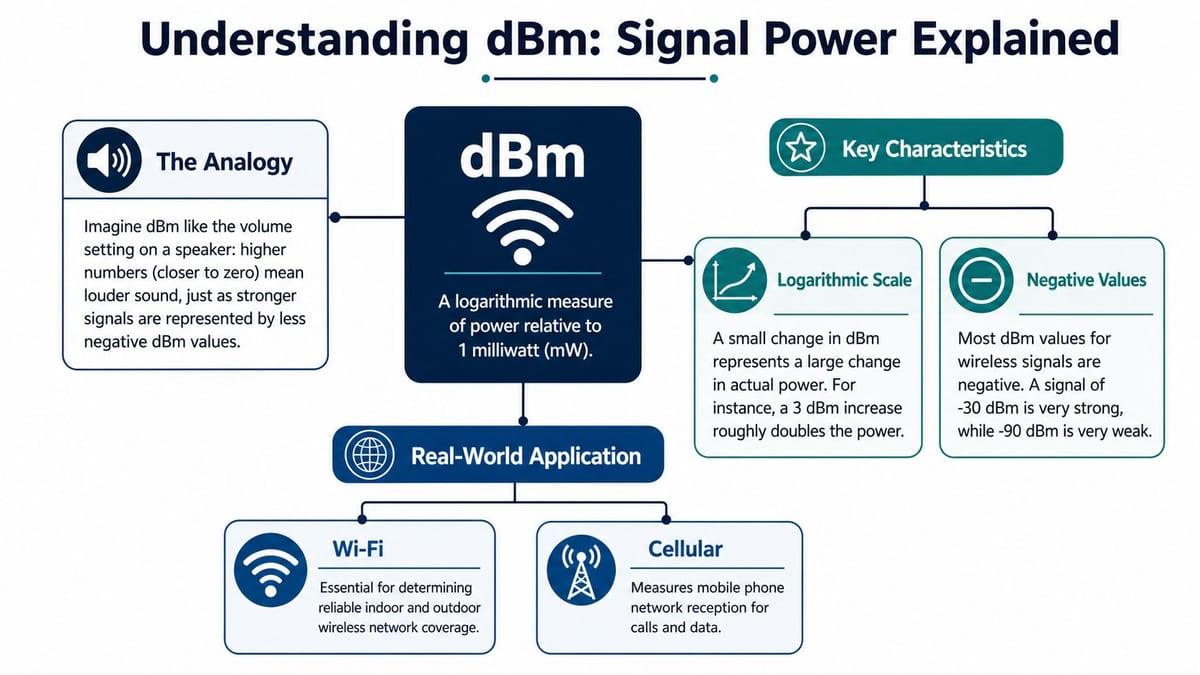
dBm is a way of measuring signal power. In practical terms, it tells you how strong the received wireless signal is at a device.
The part that confuses non-engineers is the scale. Most wireless readings appear as negative numbers, so people assume -90 must be “bigger” than -50 because ninety is larger than fifty. In reality, -50 dBm is much stronger than -90 dBm. The closer the number is to zero, the stronger the signal.
Think of it like a volume control
A simple way to explain signal strength dBm is to think about speaker volume. If the volume is turned up, speech is clearer and easier to hear. If it's turned down too far, you catch bits of it and miss the rest. Wireless behaves similarly. A stronger signal gives devices more room to maintain a reliable connection.
dBm uses a logarithmic scale, which means small changes matter more than many people expect. A shift that looks minor on paper can be very noticeable in performance. That's why experienced engineers don't dismiss a small drop in measured signal as harmless.
Why the values are negative
Wireless clients in real buildings don't usually see positive values. By the time signal has travelled through the air, bounced around partitions, and pushed through glazing, metalwork, plasterboard, concrete or risers, the reading sits below the reference point and shows as negative.
You don't need the maths to use it properly. You only need to remember this:
| dBm reading | What it usually means |
|---|---|
| Closer to zero | Stronger, more reliable signal |
| More negative | Weaker signal, more likely to struggle |
| Very weak readings | Connections may become unstable or unusable |
A wireless design doesn't fail because someone forgot what dBm stands for. It fails because nobody defined what minimum dBm the space had to deliver.
Why this matters outside networking
Once you understand dBm, a lot of project decisions become clearer. You can judge whether a survey is good enough. You can challenge an access point layout. You can see why a server room with no mobile fallback is risky. You can also spot the difference between a building that merely has “coverage” and one that supports business use reliably.
For offices, data centres, CCTV backhaul, and remote sites, that distinction matters. Weak but detectable signal often looks acceptable during a quick walk-round. It doesn't stay acceptable once staff, devices, doors, cameras and control systems all depend on it at the same time.
Key dBm Thresholds for Wi-Fi and Cellular
You need different benchmarks for enterprise Wi-Fi and cellular. Mixing them up is one of the fastest ways to approve the wrong design.
For mobile networks in the UK, strong 4G and 5G signal is generally defined as RSRP between -70 dBm and -90 dBm, while below -100 dBm is weak and often leads to dropped calls or unusable data. For high-throughput uses such as VoIP or wireless CCTV streaming, engineers recommend -65 dBm to -67 dBm, and -65 dBm to -85 dBm is the standard range for good cellular and IoT applications, as described in Virgin Media's signal strength guide.
Wi-Fi and cellular are not interchangeable
Inside a commercial building, Wi-Fi is usually the primary service for laptops, collaboration platforms, handhelds and corporate devices. Cellular often plays a different role. It may be staff convenience, resilience, out-of-band access, or fallback for specific systems.
That's why the thresholds aren't the same. Wi-Fi for a busy office has to support roaming, meeting room density, voice, and sustained data use. Cellular may only need to support stable backup connectivity in key locations, or reliable voice and data where staff depend on it.
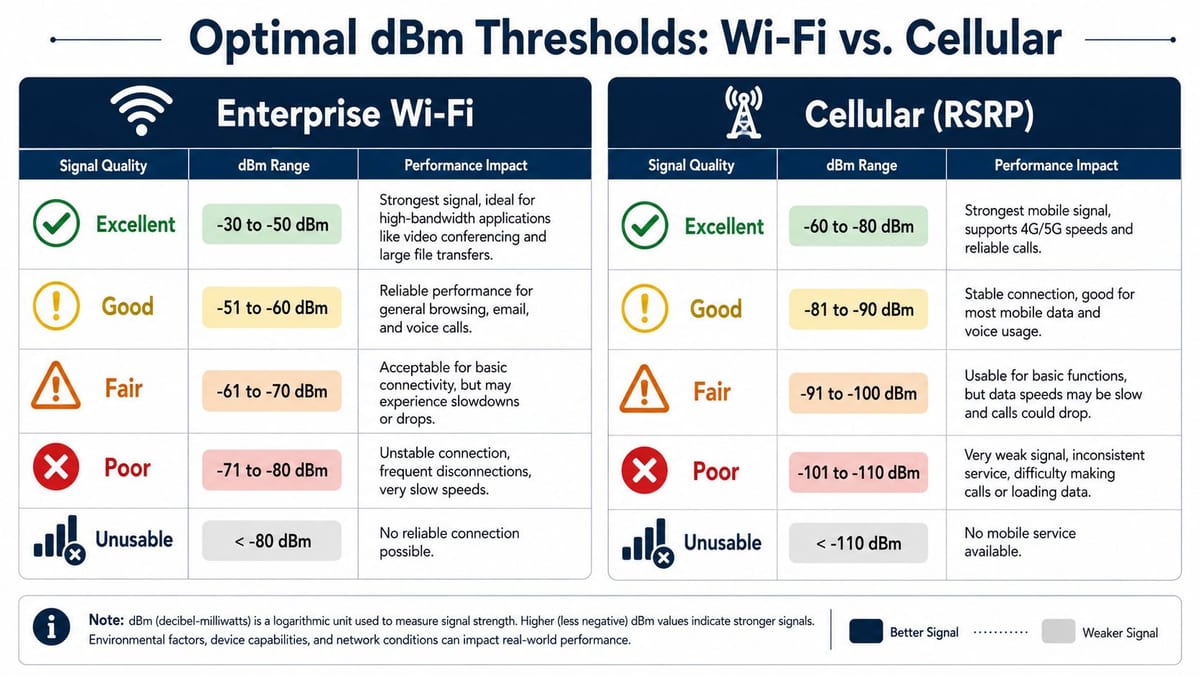
Wi-Fi vs Cellular dBm Thresholds
| Signal Quality | Wi-Fi dBm (Ideal for VoIP & Video) | Cellular dBm (4G/5G for Data & Voice) |
|---|---|---|
| Excellent | -30 to -50 dBm | -60 to -80 dBm |
| Good | -51 to -60 dBm | -81 to -90 dBm |
| Fair | -61 to -70 dBm | -91 to -100 dBm |
| Poor | -71 to -80 dBm | -101 to -110 dBm |
| Unusable | < -80 dBm | < -110 dBm |
These bands are useful as planning language, but they only become meaningful when mapped against actual use. A warehouse scanner network has a different tolerance from a boardroom used for client calls. A corridor camera uplink has different priorities from a shared collaboration area.
How to use these thresholds properly
Use thresholds to define acceptance before installation, not to explain problems afterward.
- For meeting rooms: Plan Wi-Fi to support stable voice and video, not just casual browsing.
- For wireless CCTV: Treat uplink reliability as operational infrastructure, not a nice-to-have.
- For mobile fallback: Check where the reading sits during normal occupancy, not just at an empty shell stage.
- For audits: Review actual survey output, not a statement that the office has “full coverage”.
If you're evaluating proposed wireless performance, a proper Wi-Fi coverage mapping approach will show whether these thresholds are being met in the spaces that matter.
Planning and Surveying for Reliable Connectivity
Good wireless starts before installation. If you wait until desks, partitions and people are in place, you're no longer designing. You're troubleshooting.
A proper survey establishes expected signal levels, identifies material impact, and shows where wireless will fail before money is spent on the wrong layout.
What a serious site survey includes
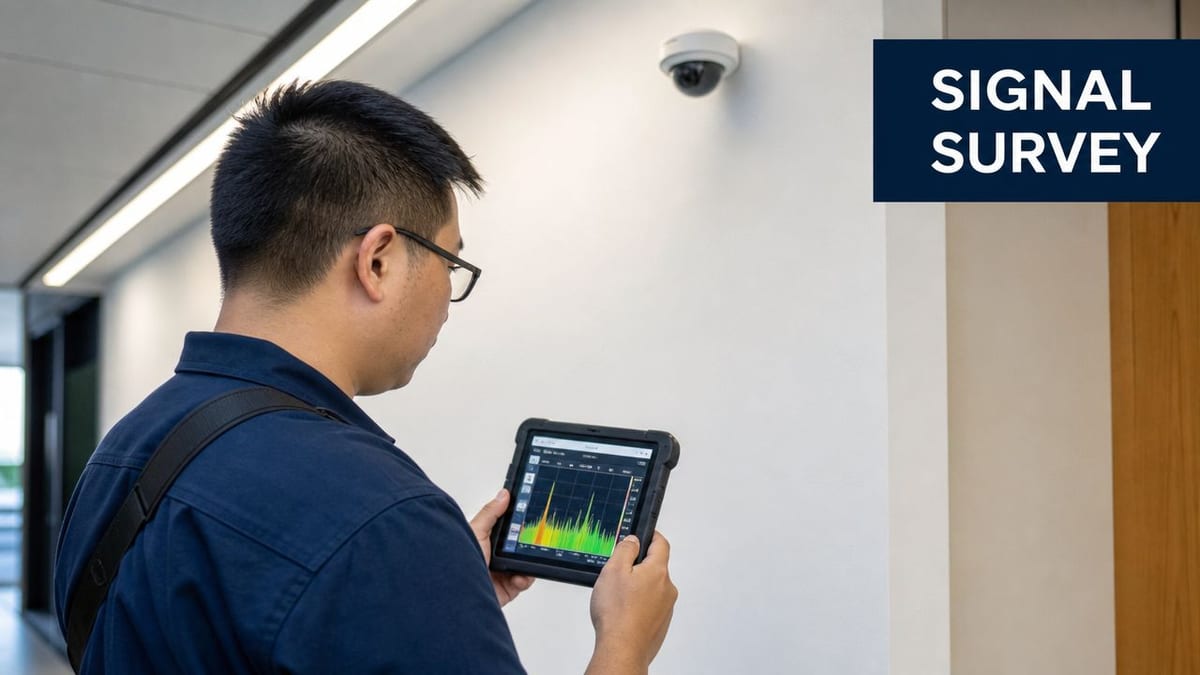
At minimum, an engineer needs to walk the building with the right tools and the right questions. Consumer apps can be useful for a quick sense check, but major fit-outs need proper survey methodology and professional software.
That process should cover:
- Physical construction: Concrete cores, steelwork, risers, acoustic insulation and specialist glazing all affect propagation.
- Use case by area: Open-plan desks, boardrooms, comms rooms, stairwells and welfare spaces don't need identical designs.
- Interference conditions: Nearby networks, channel overlap and noisy devices all change the result.
- Cable path reality: The best access point position on paper may be the wrong one if the structured cabling route is poor.
For UK office environments, -65 dBm to -85 dBm is the optimal threshold for reliable 4G and 5G data throughput, and readings below -90 dBm typically trigger packet loss and voice degradation. Building materials such as concrete and steel can attenuate signal by 10 to 20 dB, which is enough to drag a usable outdoor reading of -70 dBm down to -100 dBm indoors without dedicated Wi-Fi or repeater design, as explained in Millbeck's RSSI glossary.
Reading the heatmap properly
A Wi-Fi heatmap is not decoration for the project file. It's a decision tool. The colours should tell you where clients will connect well, where roaming may become sticky, and where coverage tails off into unreliable space.
A useful interpretation usually looks like this:
- Strong colour in priority areas: Good. Those are the spaces where staff need dependable service.
- Thin edges at the perimeter: Often acceptable, depending on use.
- Weak patches in meeting rooms or circulation routes: Not acceptable. That's where complaints will land first.
- Overlapping strong zones everywhere: Also a problem. Too much overlap can create contention and poor roaming behaviour.
Site reality: A beautiful access point plan can still fail if it ignores steel beams, bulkheads, glass film, ceiling height, or where people actually sit.
Understanding wired and wireless dependencies matters here as well. A strong survey should connect the RF design to switching, uplinks and structured cabling, not treat wireless in isolation. That's why this broader view of Ethernet and wireless design matters in fit-outs that need to work on day one.
A short technical walkthrough helps clients understand what engineers are looking for during validation:
The Foundation of Unmanned Building Management
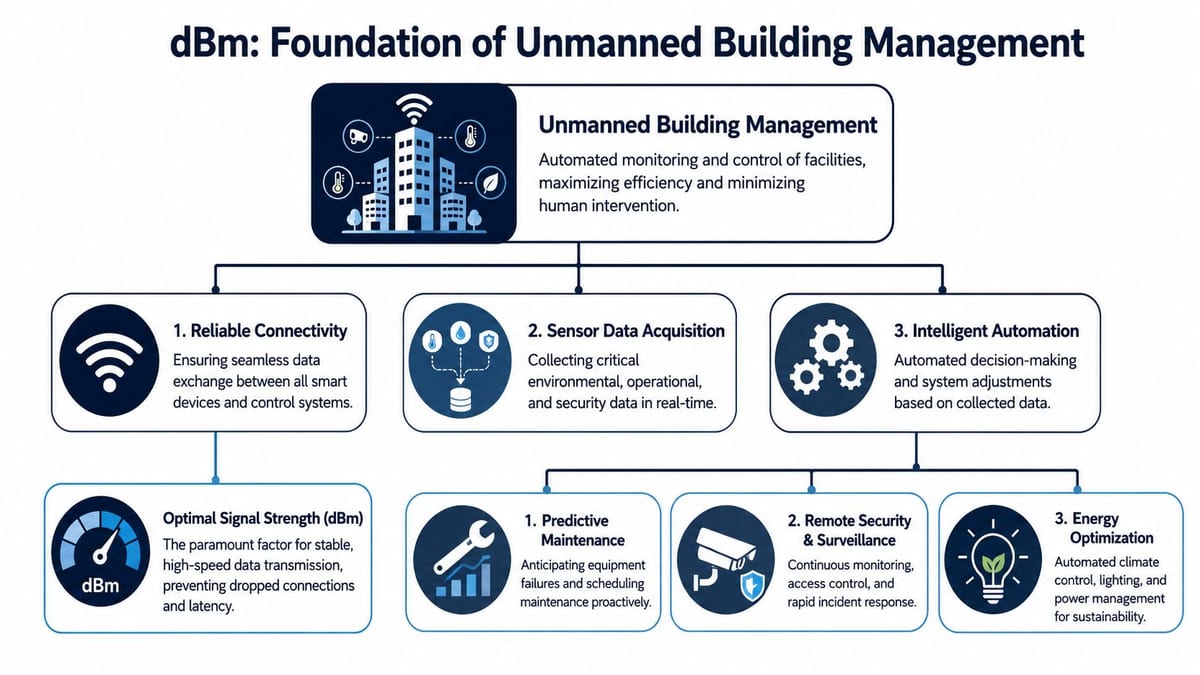
Unmanned building management sounds straightforward until you define what “unmanned” requires. In practice, it means a fully autonomous unit where routine access, monitoring, fault visibility, and basic control happen remotely without permanent on-site staff. The building needs to answer four questions every day. Who can get in, what's happening inside, are critical systems powered and connected, and can someone diagnose and act remotely, as set out in this practical guide to unmanned building management and connectivity.
That's not just a security brief. It's an infrastructure brief.
Why unmanned projects fail
Many UK unmanned building projects fail because one of five layers gets treated as optional: access control, CCTV, power distribution, data connectivity, or environmental monitoring. When one layer is weak, the site stops being autonomous. A simple benchmark applies. If a routine issue still forces a site visit because nobody can see power state, network status, or access history remotely, the building isn't properly unmanned, as noted in this Constructive-IT article on wireless access points and building autonomy.
The common mistake is sequencing. Teams buy locks first, cameras second, connectivity third, and then try to stitch the whole lot together. That approach produces blind spots and brittle dependencies.
Access, power and data must be designed together
An unmanned unit works when access, power and data are treated as one system.
| Layer | What it must do in practice |
|---|---|
| Access control | Grant and revoke entry remotely, record events, and fail predictably |
| Power resilience | Keep critical systems available and visible during faults |
| Data connectivity | Carry access, CCTV, alarms and monitoring traffic reliably |
| Environmental monitoring | Show temperature, leaks, cabinet state or other operational conditions |
| Remote visibility | Give staff enough information to diagnose without travelling |
If one of those elements drops out, autonomy degrades fast. A door controller without resilient connectivity becomes a site visit. A camera with weak backhaul becomes false reassurance. A powered cabinet with no remote visibility becomes guesswork.
Weak signal in an unmanned building doesn't stay a network issue. It turns into a security issue, an operations issue, and then a cost issue.
Why battery-less NFC proximity locks often make sense
Battery-less, NFC proximity locks are a practical choice in many autonomous environments because they reduce one of the most irritating maintenance burdens in distributed estates. You don't have to manage battery replacement cycles across multiple doors, cupboards or enclosures. That matters when sites are lightly visited and spread across regions.
They're also useful where operators want controlled local access without relying on a permanently powered lockset at every point. In real deployments, that can simplify maintenance cupboards, comms enclosures, self-storage areas, plant spaces, cabinets, and service rooms where authorised access matters but regular battery servicing doesn't add value.
That doesn't remove the need for design discipline. The lock choice has to sit alongside reliable identity handling, event logging, and networked oversight where required.
Where fully autonomous unmanned units are commonly used
These systems are regularly used in places such as:
- Self-storage facilities: Remote entry control, CCTV review, and site-wide monitoring.
- Small warehouses and depots: Controlled staff access, environmental alarms, and resilient connectivity for scanners or cameras.
- Plant rooms and utility spaces: Restricted access with remote fault visibility.
- Edge comms rooms and data rooms: Secure entry, monitored power, and dependable remote diagnostics.
- Multi-tenant service buildings: Shared infrastructure with limited permanent staffing.
In all of them, building out a fully autonomous unmanned building units depends on one invisible requirement. The signal has to hold up where the systems are, not just where somebody did a quick handset check by the front door.
Practical Troubleshooting and Optimisation Steps
When signal readings are poor, the wrong fix is usually the fastest one. Teams add another access point, move a lock controller, or blame the ISP. That can mask the true issue for a week and make it worse for years.
In an unmanned building, routine access, monitoring, fault visibility and remote control all depend on a joined-up ecosystem of access control, CCTV, power resilience, data connectivity and environmental monitoring. If those layers don't support the same operational goal, the site won't function remotely in the way it should, as described in this unmanned building management overview.
Start with the failure point
Don't begin by ordering more hardware. Begin by identifying where the failure appears and what service is affected.
- A roaming problem in meeting rooms: Usually points to placement, overlap, or design density.
- Random disconnects on cameras: Often comes back to marginal signal, uplink instability, or power issues.
- Doors or readers dropping offline: Frequently a data path or resilience problem, not just wireless strength.
- General slowness near plant or risers: May indicate interference, shielding, or bad cable routing.
Fix design before adding kit
A lot of commercial wireless problems are self-inflicted. Access points are mounted where it's convenient for first fix, not where RF performance is best. Cabling follows the easiest route instead of the right one. Electrical containment is packed tightly with data routes and noise starts appearing where nobody expected it.
A sensible optimisation pass usually includes:
- Re-check AP placement against actual occupancy and final fit-out conditions.
- Run channel analysis to spot overlap, contention and local interference.
- Inspect the wired backbone because poor wireless often sits on top of poor cabling.
- Review power quality and segregation where noisy electrical environments may be degrading service.
- Validate switching and uplinks so wireless isn't being blamed for a bottleneck elsewhere.
Don't ignore electrical and certification issues
The relevance of commercial electrical installation and certification becomes clear. If containment, grounding, segregation, or installation quality are poor, the network suffers. Wireless performance depends on a stable physical foundation. The same applies to CCTV and access control. You can't certify an autonomous site with confidence if the electrical and network layers have been designed in silos.
A strong wireless result usually sits on top of boring, disciplined work. Good cabling, sensible power design, proper mounting, clear labelling, and thorough testing.
That's also why field testing matters. A post-install validation should confirm the design against real use, not just prove that devices can technically connect. If you're checking whether weak coverage is a radio problem or a deployment problem, a structured access point test process gives you far better answers than moving hardware at random.
Maintenance is part of the design
Buildings that depend on remote operations need maintainable infrastructure. That means labelled circuits, documented lock behaviour, known camera dependencies, clear support paths, and predictable replacement planning. A site that only works because one engineer remembers its quirks isn't an unmanned building. It's a fragile one.
From Measurement to Mission-Critical Success
dBm looks like a small technical detail, but it drives some of the biggest success or failure points in a fit-out. It tells you whether Wi-Fi will support daily work, whether mobile fallback is viable, whether CCTV streams stay available, and whether an unmanned site can remain unmanned.
The commercial lesson is simple. You can't separate signal from outcomes. Weak planning around signal strength dBm leads to rework, support noise, avoidable attendance, and frustrated users. Strong planning gives you a building that behaves properly from day one.
For office projects, that means surveying before install, setting the right thresholds for the right service, and reading the building as it really is, not as the drawing suggests. For autonomous sites, it means treating access, power, CCTV, monitoring, and data as one integrated operating environment.
The teams that get this right don't rely on assumptions. They measure, design, validate and certify. That's how you turn wireless from a recurring problem into part of the building's core reliability.
If you're planning an office fit-out, relocation, server room expansion, or an autonomous site, Constructive-IT can help you engineer the full stack properly, from structured cabling and electrical works through to Wi-Fi, CCTV, certification, and go-live performance.