
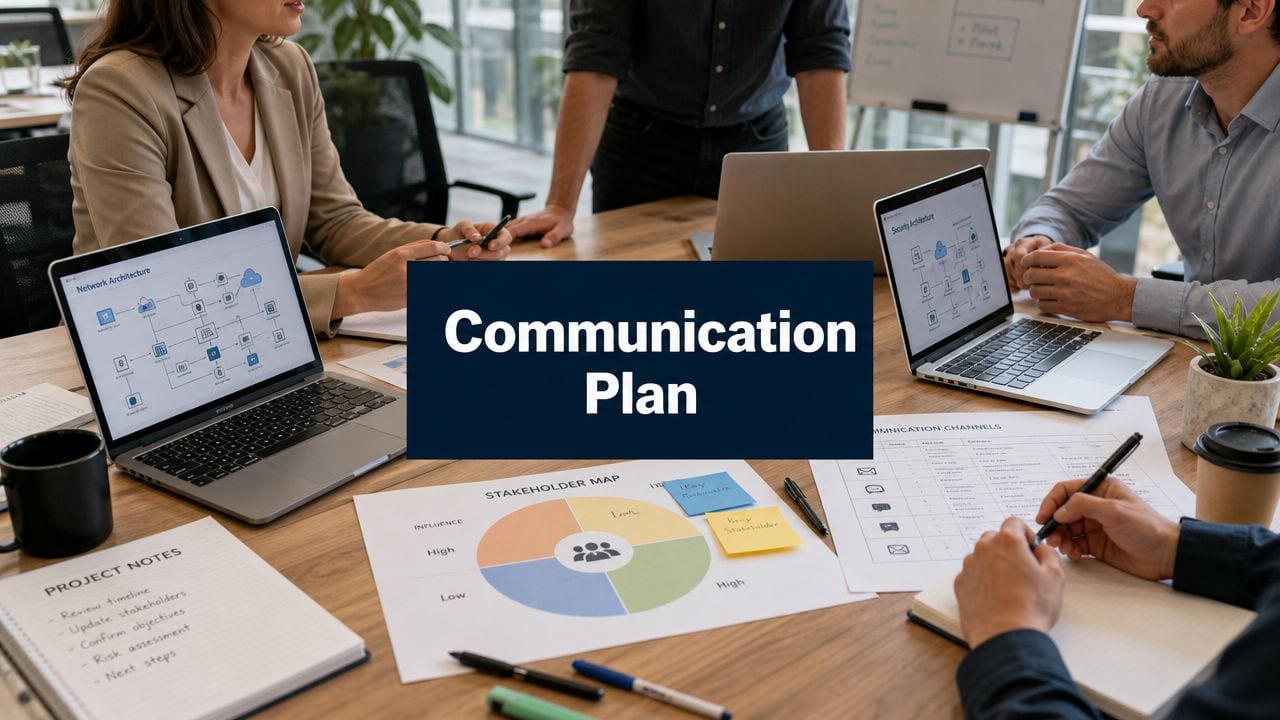
An office move usually looks under control on paper. The racks are specified, the cabling schedule is signed off, the power works are booked, and the migration weekend is ring-fenced. Then the problem starts. Staff hear half a rumour about downtime, the facilities team gets a different version of the plan, the board wants certainty in one page, and suppliers begin asking who can approve a change.
That's when a stakeholder communication plan stops being admin and starts being operational control.
In major IT projects, the technical risk is rarely the only risk. Confusion causes missed handovers. Vague ownership creates duplicate messages. Late updates trigger unnecessary escalations. During office relocations, server room upgrades, CCTV cutovers, commercial electrical installation and certification, or building out fully autonomous unmanned building units, the team that communicates clearly usually keeps the project calm. The team that relies on ad hoc emails usually spends go-live firefighting preventable issues.
Beyond the Project Plan Why Communication Fails
A common failure pattern starts with good intentions. The project manager has a plan. The engineers know the sequence. Someone assumes that because the technical team is aligned, everyone else must be aligned too.
They aren't.

What failure looks like on a live project
Take a straightforward office relocation. IT has planned the WAN handover, floorbox patching, Wi-Fi install, telephony migration, printer moves, and user desk setup. Facilities is arranging access. The electrical contractor is handling isolation windows and certification. Security wants CCTV live before the first staff arrive. Leadership wants no disruption.
Without a formal communication plan, updates become fragmented. Engineers send technical notes to people who don't need them. End users get broad messages with no action. Executives receive long email chains when they only need risk, decision, and status. One contractor says access starts at 7am, another arrives expecting 6am, and nobody has issued a single source of truth.
Practical rule: If stakeholders are asking each other what's happening, the communication plan has already failed.
This is why communication has to be treated as part of risk control, not a courtesy. In UK public-sector guidance, stakeholder management is a formal element of the communications plan, built around a five-part structure: define what you want to achieve, identify critical stakeholders, decide how to engage them, implement channels, and evaluate whether objectives were met. The same guidance also recommends a tiered stakeholder database, a named relationship lead, and regular reporting so activity stays accountable rather than ad hoc, as set out in the UK public-sector approach to ensuring effective stakeholder engagement.
For teams working through regulated projects or moves with compliance pressure, it also helps to think about communication alongside managing project risks for compliance. The practical point is simple. Risk logs and comms plans shouldn't live in separate worlds.
Why many unmanned building projects fail
The same pattern is worse in unmanned building management projects. In practice, that means a site is designed to operate with minimal or no permanent on-site staff, relying on remote monitoring, controlled access, resilient connectivity, CCTV, power systems, and clearly defined support procedures. Think remote utility compounds, small telecoms rooms, distributed plant spaces, edge data locations, storage facilities, or autonomous service units attached to larger estates.
These projects fail when teams treat access, power, data, security, and operations as separate packages. They also fail when nobody defines who gets informed during an outage, who authorises access changes, who responds to alarm events, and what users should expect when the site is unattended.
A technically clever unmanned building can still become operationally chaotic if:
- Access is specified in isolation and nobody checks how locks, credentials, remote support, and emergency override work together.
- Power resilience is discussed too late so comms cabinets, readers, controllers, and CCTV don't share the same operational assumptions.
- Data paths are assumed, not verified and remote visibility disappears the first time a circuit fails.
- Maintenance ownership is vague so batteries, readers, cameras, locksets, and certifications drift out of date.
- Stakeholder messages are generic and the security team, facilities team, IT team, and external service providers all act on different versions of the operating model.
A project plan gets the work booked. A stakeholder communication plan keeps the building usable.
Mapping Your Stakeholders for IT Projects
Most communication plans go wrong before anyone sends the first update. The team creates a list of names, calls it a stakeholder register, and leaves it untouched for the rest of the project. That isn't enough for office moves, fit-outs, server upgrades, or unmanned sites where risk shifts as the work progresses.
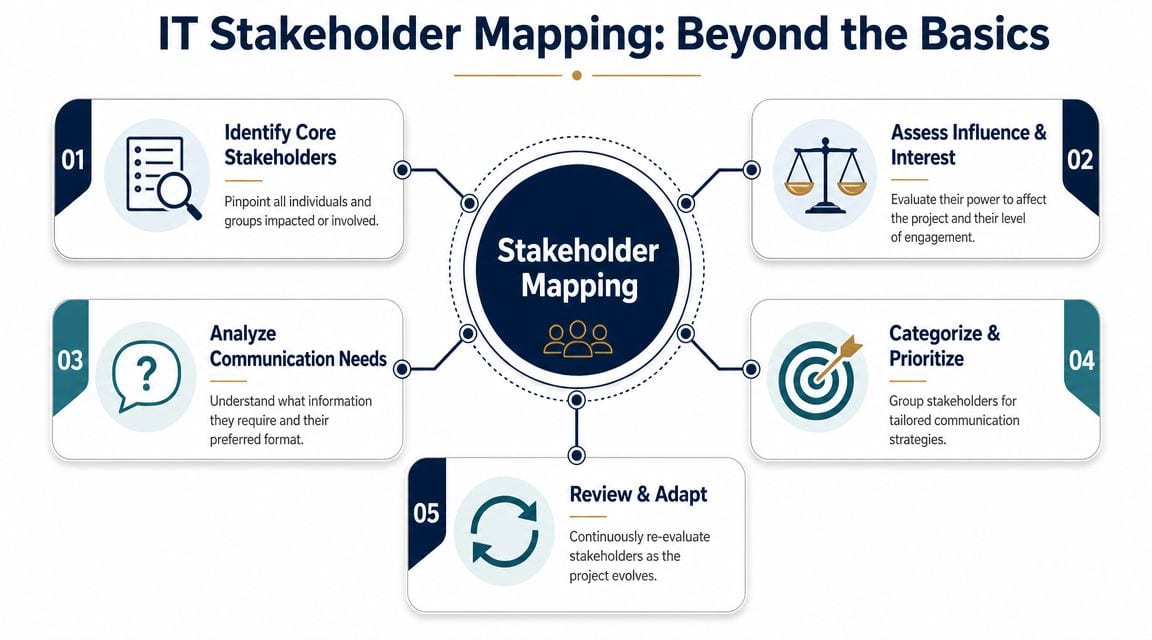
Use a live map, not a static register
A better approach is a dynamic stakeholder map. PMI describes stakeholder management as a cycle: build the map, frequently re-prioritise influence and commitment, and develop key stakeholders over time in its guidance on engaging stakeholders for project success. That matters in IT infrastructure because influence changes at each gate.
At survey stage, facilities and site access teams may dominate. At design freeze, network architects and electrical contractors carry more weight. During migration weekend, service desk leads, application owners, and incident contacts become critical. After go-live, operations and user champions matter more than the people who approved the design.
A practical grid for real projects
The simplest working model is an influence and interest grid. It doesn't need to be academic. It just needs to help the team decide who hears what, when, and in what level of detail.
A typical office move or server expansion often includes groups like these:
- Executive sponsor. High influence, lower appetite for technical detail. Needs short updates, decision points, headline risks, and confidence that downtime is controlled.
- Facilities manager. High influence, high interest. Needs logistics, access windows, contractor coordination, and dependencies between power, building fabric, and IT.
- Internal IT leads. High interest and usually high influence. Need design decisions, change windows, rollback detail, and escalation rules.
- Third-party engineers. High interest but focused only on their work package. Need precise scopes, site rules, install sequencing, and sign-off routes.
- End users and department leads. Lower influence on design but high impact on adoption. Need plain-English instructions, timings, desk moves, and support routes.
If everyone gets the same message, the important people usually get the wrong one.
For projects that include Wi-Fi redesign, core switching changes, or site rationalisation, it also helps to map who owns operational service after handover. Too many teams stop at delivery and forget the people who'll inherit support. At this point, practical infrastructure planning and communication meet. A useful reference point is this overview of IT infrastructure support, especially when you need to define who supports the environment after installation rather than just who signs off the project.
Stakeholders specific to unmanned buildings
Unmanned building projects need a wider map than standard office IT. The obvious users aren't the only users.
Include these groups early:
| Stakeholder | Why they matter |
|---|---|
| Security and guarding providers | They often handle alarms, access events, and first response |
| Electrical contractor | Power design affects access control, CCTV, comms cabinets, and remote recovery |
| Network and telecoms team | Remote visibility depends on resilient connectivity and monitored devices |
| Facilities and estates | They own practical building access, landlord rules, and maintenance windows |
| Compliance or governance leads | They care about certification, records, and controlled change |
| Remote operations team | They live with the consequences of design shortcuts |
That map should move with the project. If it doesn't, your messages won't match the risk on site.
Building Your Communication Matrix
Once the stakeholder map is clear, the next job is to turn it into something people can use on a live project. That's the communication matrix. It should be short enough to read quickly and specific enough to stop guesswork.
Project guidance generally defines a stakeholder communication plan as a document covering goals, audience groups, key messages, and timelines, with communication tied to milestones. The UK Government Communications Service toolkit also reinforces that communication should be milestone-driven and channel-specific, as summarised in this guide to stakeholder communication in project management.
What goes into the matrix
A workable matrix for IT infrastructure doesn't need ten tabs and colour coding for its own sake. One page is often enough if the fields are useful.
Use these core columns:
- Stakeholder group. Group by need, not by every individual name.
- Goal. What should this audience know, approve, do, or avoid?
- Channel. Email, workshop, call, dashboard, site briefing, SMS alert, or meeting.
- Frequency. Weekly, at milestone, pre-cutover, daily during migration, post-go-live.
- Owner. One person accountable for that communication.
If you need more detail, add key message and escalation route. If the matrix becomes a dumping ground for every thought in the project, nobody will use it.
Sample Communication Matrix for a Server Room Expansion
| Stakeholder Group | Goal | Channel | Frequency |
|---|---|---|---|
| Executive sponsor | Approve milestones and understand business risk | Short status call and one-page summary | At each major gate |
| Facilities and estates | Coordinate access, power, cooling, and contractor sequencing | Working meeting and shared action log | Weekly, then daily near install |
| Internal IT operations | Prepare service impact, support cover, and rollback readiness | Technical workshop and change review | Weekly, then pre-go-live brief |
| Cabling and electrical contractors | Confirm scope, method, dependencies, and sign-off requirements | Site meeting and task pack | Before each work package |
| End users or department reps | Understand any outage or access implications | Plain-English email and service notice | Before and after disruption |
A live example from infrastructure work
In a server room expansion, communication has to track the actual sequence of work. The business doesn't need cable tray detail. The cabling team does. Facilities needs to know when noisy works, power isolation, and access restrictions happen. Operations needs early warning of any monitoring blind spots.
That's where teams often miss the dependency between access, power, and data. In both office projects and unmanned sites, these three must be designed together. There's no point fitting controlled doors if the reader loses availability under the same conditions as the comms cabinet. There's no point promising remote monitoring if the network path and local power assumptions don't match. There's no point installing CCTV if storage, uplink, and access control events aren't aligned operationally.
This is also where a broader internal comms discipline helps. If your project team struggles to keep messages consistent across departments, this guide on how to create an effective internal communication strategy is worth a read because the same principles apply during infrastructure change.
What works and what doesn't
What works:
- Milestone-linked updates tied to survey completion, design freeze, installation start, migration, and handover.
- Named owners so nobody assumes someone else sent the update.
- Audience-specific wording for executive, operational, and technical groups.
- A short format that people can scan under pressure.
What doesn't work:
- Long email chains used as a substitute for decisions.
- Single-channel communication for every stakeholder.
- Late outage notices sent after teams have already planned around the wrong assumption.
- Matrices with no owner and no review cadence.
A matrix shouldn't just describe communication. It should drive it.
Choosing Channels and Crafting Effective Messages
Most project communication problems aren't caused by silence. They're caused by the wrong message in the wrong format going to the wrong audience.
That's why the all-staff email blast fails so often. It feels efficient to the sender, but it creates work for everyone else. Senior stakeholders don't read the detail they don't need. Technical teams can't act on vague wording. End users miss the one instruction that mattered because it's buried under background context.
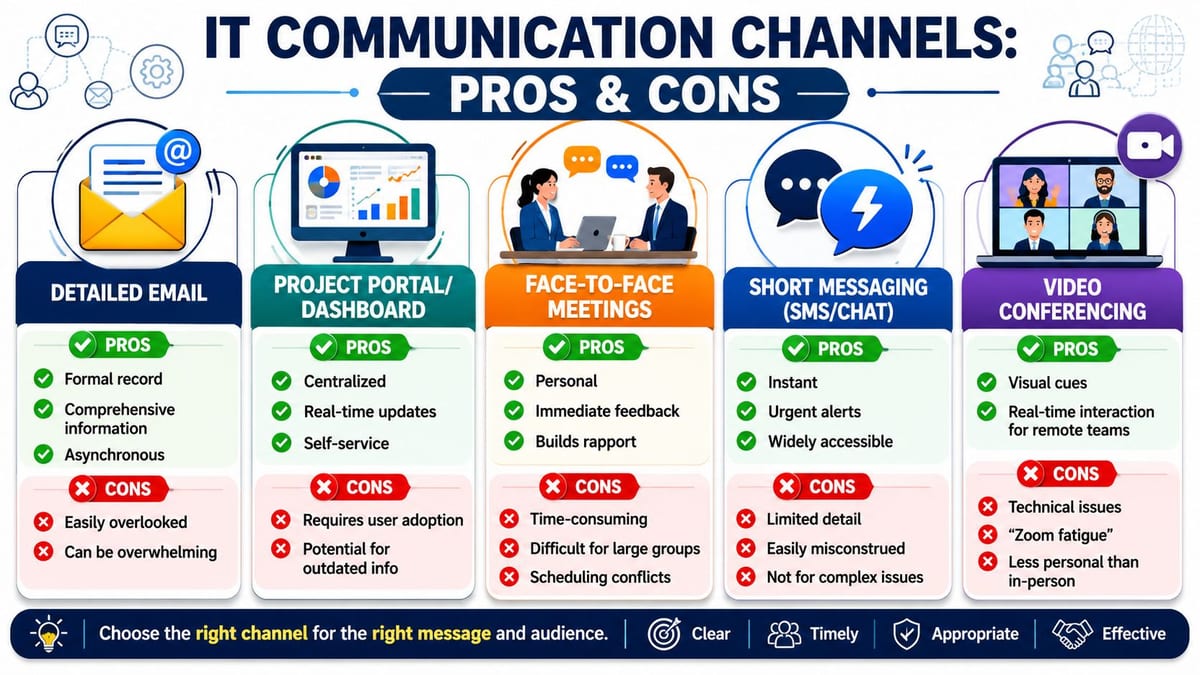
Match the channel to the decision
There's a strong reason to take this seriously. Projects with planned stakeholder management succeed 83% of the time, versus 32% without it, according to this summary of stakeholder engagement effectiveness. The same source recommends a 15-minute check-in every two weeks to test whether messages are landing and whether anyone is disengaging.
That short review rhythm matters because communication failure usually shows up as drift before it becomes a crisis. Attendance drops. Questions become repetitive. Rumours start. Someone senior asks for an update that was already “sent”.
What to use for whom
A few practical rules hold up well on UK IT projects:
- Executives need compression. Give them visual status, current risk, pending decisions, and business impact. Don't send switchport detail unless it changes risk.
- Technical teams need precision. They need dates, dependencies, methods, service impact, rollback assumptions, and who owns each task.
- Operational users need action. Tell them what changes, when, what they need to do, and where to get support.
- Contractors need controlled instructions. Scope, access windows, inductions, permit conditions, and sign-off routes should be explicit.
A message is only clear if the recipient knows what to do next.
For remote and hybrid estates, channel choice also affects delivery quality. Video briefings can work well for distributed teams, but only if the underlying network supports them properly. If voice and video quality are poor during cutover planning, key details get missed. That's why understanding QoS for video is relevant beyond the network team. It supports the communication layer as well as the service layer.
Message examples that work in practice
The strongest project updates usually follow simple patterns.
Initial project announcement State the purpose, scope, dates that matter, expected user impact, and where future updates will appear. Keep jargon out unless the audience is technical.
Planned downtime notice Say what service is affected, the window, what users should do beforehand, whether intermittent impact is possible, and how support will operate during the change.
Post-migration update Confirm completion status, note any known issues in plain English, set expectations for support, and tell people when the project moves into business-as-usual support.
For broader leadership communication, there's a useful crossover with performance management. The same discipline that helps teams improve OKR adoption also helps projects communicate priorities clearly. The lesson is the same. People act on simple, consistent messages tied to outcomes.
Why battery-less NFC proximity locks are often the right choice
In unmanned building units, the communication plan also has to explain design choices that non-technical stakeholders may question. A good example is battery-less, NFC proximity locks.
They're often chosen for practical operational reasons:
- Less routine maintenance because there are no lock batteries to replace across dispersed sites.
- Better fit for unattended spaces where avoidable call-outs are expensive and disruptive.
- Cleaner credential control when access rights need to be updated centrally and issued to contractors or support teams with tight time limits.
- Useful audit discipline because access events can be tied more clearly to managed credentials and operating procedures.
That doesn't make them universal. If the site conditions, door type, fallback requirements, or integration model don't suit NFC-based locking, another option may be better. But in autonomous units, remote compounds, comms rooms, and utility-style spaces, battery-less proximity access can remove a regular maintenance burden that many teams underestimate during design.
Defining Roles Escalation and Milestone Cadence
At 6:15 on a Sunday morning, the server team may still be testing failover while the client's office manager is already asking whether staff should come in on Monday. If nobody owns the message, three different answers go out, and confidence drops before the change window has even closed.
That is why communication ownership needs naming in the same way you name the technical lead, the cabling contractor, or the person signing off power works. On UK infrastructure projects, especially office moves, server upgrades, and NHS fit-outs, confusion usually starts when everyone assumes someone else has told the right people. It rarely fixes itself.
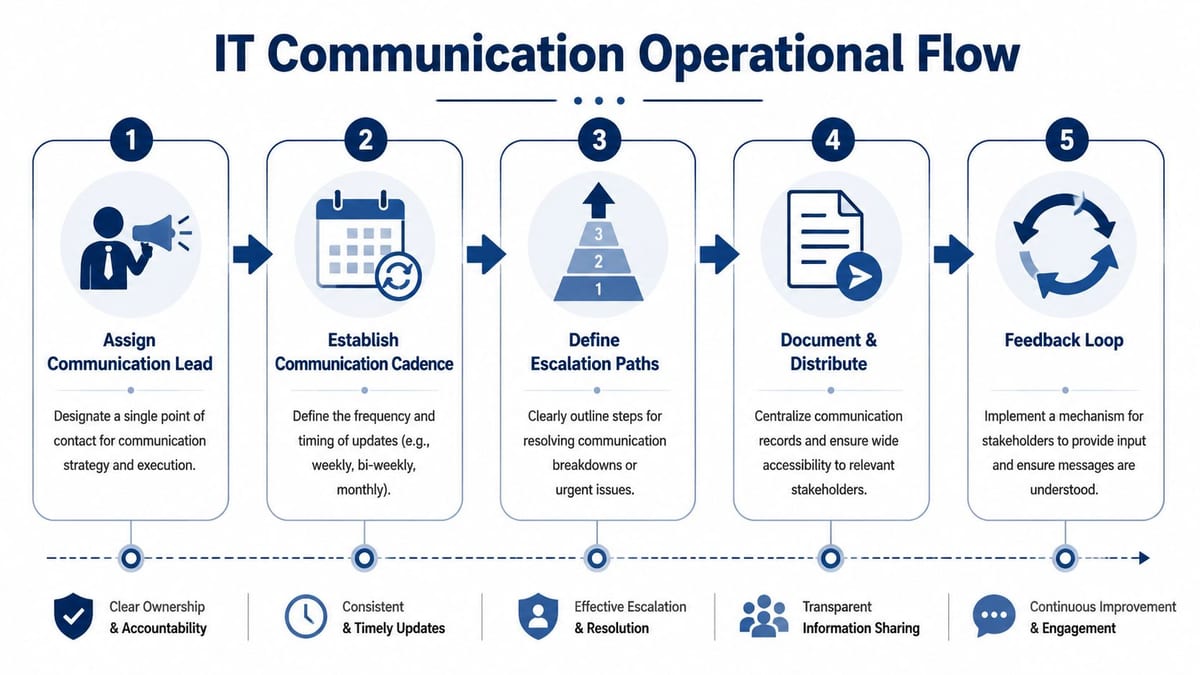
One lead, clear approvals
A workable model is simple:
- Communication lead owns the matrix, message timing, approvals, stakeholder log, and version control.
- Technical owner checks engineering accuracy before anything operational goes out.
- Project sponsor signs off messages that affect risk, budget, business timing, or executive visibility.
- Service desk or operations lead issues user-facing notices and handles support messaging during live change.
This avoids a common failure on infrastructure work. The network engineer explains the issue accurately, the supplier softens the wording, and the site manager adds a workaround that has not been approved. By lunchtime, users, leadership, and support are all working from different versions.
Escalation needs a clock, not just a contact name
Escalation covers more than major incidents. It also covers silence.
If a key stakeholder has not approved a shutdown notice, if estates are disputing access times, or if a department head is telling staff a move has been delayed when it has not, the communication issue is already affecting delivery. Treat it like an operational risk.
A practical path usually looks like this:
- Define the issue fast. Is the problem accuracy, delay, disagreement, or missing audience coverage?
- Send it to the right owner. Technical correction goes to the engineer. Business impact goes to the sponsor. User disruption goes to operations.
- Set a response time. During a migration weekend, "as soon as possible" is useless.
- Log what happened and what changed. Repeated confusion often points to a weak message, a bad approval route, or the wrong audience list.
I have seen office move projects lose an hour because nobody could confirm who had authority to tell staff that floor access was changing. The technical work was on schedule. The communication chain was not.
Milestone cadence beats routine status habits
Weekly updates have their place, but infrastructure projects stay under control when communication follows delivery gates. People need different information at site survey, design freeze, delivery booking, cabling completion, rack build, migration rehearsal, cutover, and handover. Sending the same style of update every Friday often hides the moment when a decision is needed.
This matters even more on projects with mixed audiences. Engineers need specifics on rollback, dependencies, and testing. Department leads need plain language on downtime, access, and who to call. In an NHS fit-out, clinical teams do not need switch config detail. They do need a clear view of room availability, outage windows, and what happens if kit is not signed off on time.
Handover is where weak plans usually show themselves. A room can be physically complete and still not be ready to support. Someone must own alarm routing, access permissions, CCTV retrieval, patching responsibility, certification records, and visibility from the support side. If those responsibilities are vague at project close, they become service problems a week later.
Good teams bake that into the cadence and capture the handover decisions properly. A disciplined lessons learned and project documentation process helps stop the same gap appearing on the next office move or server refresh.
Maintenance needs the same treatment. UPS checks, lock and reader support, firmware reviews, warranty contacts, patch schedules, and vendor escalation details should already be assigned before go-live. If they sit outside the communication plan, they usually disappear into the gap between project delivery and live service.
Measuring Success and Adapting Your Plan
Sending updates isn't success. Stakeholders understanding them, acting on them, and trusting them is success.
A good communication plan should be reviewed like any other operational control. If users are surprised by downtime, if executives ask for status that already exists, or if contractors repeatedly arrive with the wrong assumption, the plan needs changing.
What to measure on a real project
You don't need a complicated dashboard to spot whether communication is working. Start with signs that matter operationally:
- Questions quality. Are stakeholders asking informed questions, or basic ones that show they missed the message?
- Helpdesk pattern. Are support tickets aligned with expected impact, or spiking because people weren't prepared?
- Meeting behaviour. Are the right people attending and making decisions, or are sessions becoming status theatre?
- Escalation trend. Are problems being raised early, or only once they've already affected delivery?
- Feedback usefulness. Are replies specific enough to improve the plan, or are people expressing that they feel out of the loop?
These aren't vanity measures. They show whether the communication layer is reducing disruption or creating it.
Why this matters more in critical environments
In healthcare, estates, and regulated infrastructure, poor communication can create operational consequences fast. Recent UK data shows that around 19,000 NHS staff were affected by the June 2024 Synnovis cyberattack disruption, as noted in this discussion of stakeholder communications planning in critical settings. The lesson for infrastructure projects is obvious. When services are sensitive, communication has to distinguish between executives, on-site users, third-party suppliers, and incident-response stakeholders.
A hospital move, live network cutover, or estates upgrade can't rely on a single generic update. Executives need service risk and decision clarity. Clinical or on-site users need immediate practical instructions. Contractors need exact operating conditions. Incident responders need direct escalation routes and unambiguous authority.
Adapting the plan after each phase
The strongest teams treat the stakeholder communication plan as a working control, not a one-off document approved at kickoff and forgotten.
A short review after each major gate usually catches what matters:
- After survey. Did we identify the right stakeholders?
- After design freeze. Did any audience need more detail or earlier visibility?
- After installation. Were contractors, facilities, and IT working from the same assumptions?
- After migration. Which messages reduced noise, and which ones caused it?
- After handover. Did support teams inherit enough context to run the environment cleanly?
Lessons learned become useful rather than ceremonial. If you want a practical model for capturing those improvements, this guide to lessons learned documentation is worth using as part of project closeout.
A final point matters for unmanned buildings and autonomous units. The project isn't finished when the doors lock, the cameras record, and the network comes online. It's finished when the site can be operated, supported, and recovered without confusion. That means the communication model has to cover maintenance, remote response, vendor coordination, credential changes, fault handling, and certification records, not just installation milestones.
A well-designed unmanned building management setup in practice should give the operator a clear picture of who can access the site, what happens if power or connectivity is interrupted, how CCTV and alarms are monitored, who handles commercial electrical certification records, and how maintenance is triggered before failure becomes service impact. The systems that work best are the ones where access, power, and data were designed together from the start, and where the communication plan kept every party aligned from design through live operation.
If you're planning an office relocation, server room expansion, CCTV rollout, electrical upgrade, or a fully autonomous unmanned building unit, Constructive-IT can help you deliver the infrastructure and the operational clarity around it. The difference on complex projects is rarely just the hardware. It's whether the design, installation, certification, and stakeholder communication are managed as one coordinated piece of work.