

You're usually brought into an unmanned building project after someone has already bought the shiny parts.
The readers are on order. The locks have been chosen. CCTV is on a spreadsheet. Someone has promised remote management, zero-touch access, smart energy control, and a clean handover date. Then the practical questions arrive. What powers the door hardware during an outage? Where does the access controller live? What happens if the WAN drops? Who certifies the electrical work? How do you get event logs from doors and cameras into something operations can use?
That's where most projects stop being “smart” and start becoming expensive.
A lot of content around this topic has the same weakness as content around standard laptop size. It talks in labels, not in operational reality. A standard laptop size sounds simple until you realise screen size doesn't tell you whether the device fits the dock, the locker, or the bag. Unmanned building management has the same problem. Product labels sound clear. Real deployment depends on dimensions, tolerances, dependencies, and failure modes.
What Is Unmanned Building Management in Practice
A new office opens on Monday. Staff arrive, tap cards at the entrance, and half of them don't get in. Facilities resets the access platform. IT finds the controller is online but the switch stack feeding part of the door estate isn't. Reception can't issue temporary passes because the visitor tablet has lost connectivity. The lights in one meeting area won't trigger because occupancy logic depends on another system that wasn't commissioned properly.
That building isn't unmanned. It's under-managed.
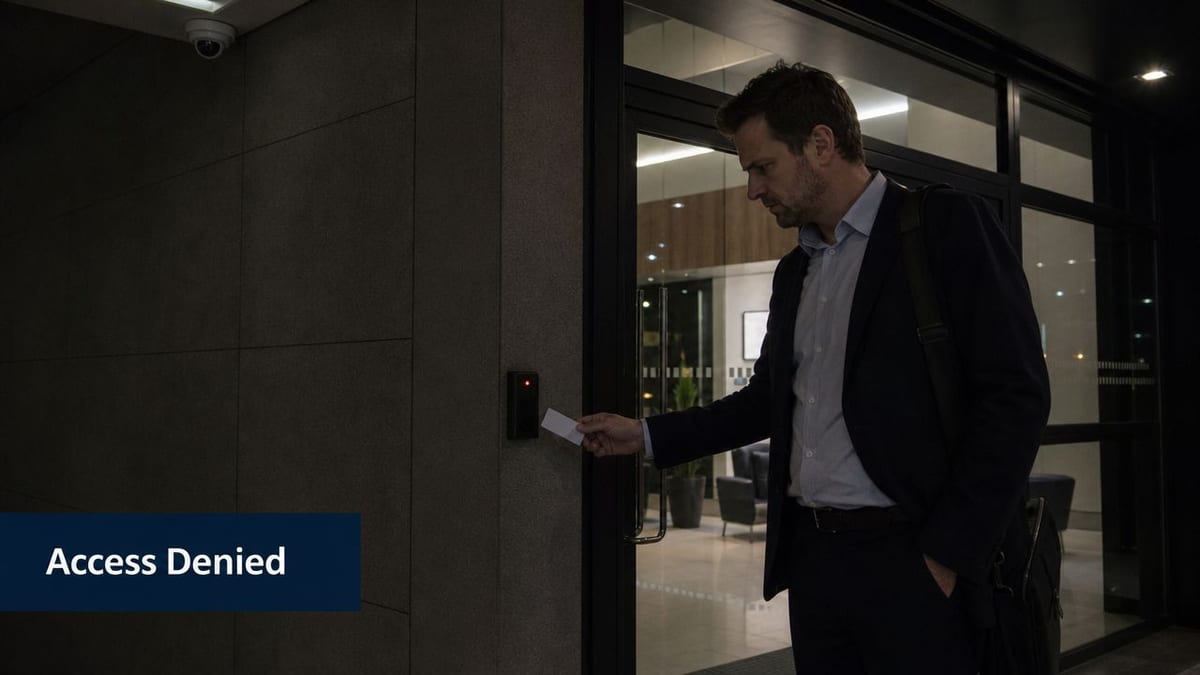
Unmanned building management means the site can run day to day without constant on-site intervention for routine access, security, monitoring, and environmental control. It does not mean there are no people involved. It means the building has been engineered so the core services can make predictable decisions, recover cleanly, and surface the right alerts to the right team.
What it actually includes
In practice, an unmanned setup usually combines several layers:
- Access control that enforces policy. Staff, contractors, cleaners, and deliveries don't all need the same permissions.
- CCTV tied to events. A door alarm without matching footage is only half useful.
- Network infrastructure that treats building systems as critical endpoints. Readers, cameras, controllers, intercoms, and sensors all depend on resilient connectivity.
- Electrical design that supports uptime. If power is unstable, the building stops being autonomous very quickly.
- Remote administration. Changes to schedules, permissions, and monitoring rules need to happen without waiting for someone to drive to site.
Practical rule: If a door, camera, alarm input, or sensor depends on the network, treat it like production infrastructure, not like an accessory.
The common failure isn't bad hardware. It's poor integration planning. Industry reports from 2025 show that over 60% of smart building projects experience significant operational issues or fail to meet their ROI targets within two years, primarily because integrated infrastructure planning was missing from the outset (smart building ROI study).
What it means for day-to-day operations
For a UK office, that can mean controlled entry for hot-desking areas, scheduled access for cleaners, remotely managed meeting rooms, monitored comms spaces, and CCTV-linked event review. In healthcare or clinical environments, it usually means stronger separation between public zones, staff-only areas, and controlled storage, with the audit trail to support governance.
There's also a cyber layer that people ignore at their cost. Readers, cameras, panels, tablets, and admin workstations all create a broader attack surface. If your building systems touch your network, you need visibility into endpoint behaviour. That's why teams planning remote and lightly staffed sites should understand continuous endpoint monitoring before they finalise operating procedures.
An unmanned building is not a gadget stack. It's an operational model backed by access, power, data, and support processes that still work when something goes wrong.
Why Many Unmanned Building Projects Fail
The most common reason these projects fail is simple. Three teams design one building as if they're working on separate jobs.
IT handles switching, Wi-Fi, internet breakout, and admin devices. Facilities chooses doors, readers, and room controls. Electrical contractors deliver containment, circuits, and certification. Security specifies cameras and recording. Each decision looks sensible on its own. The failures appear at the joins.
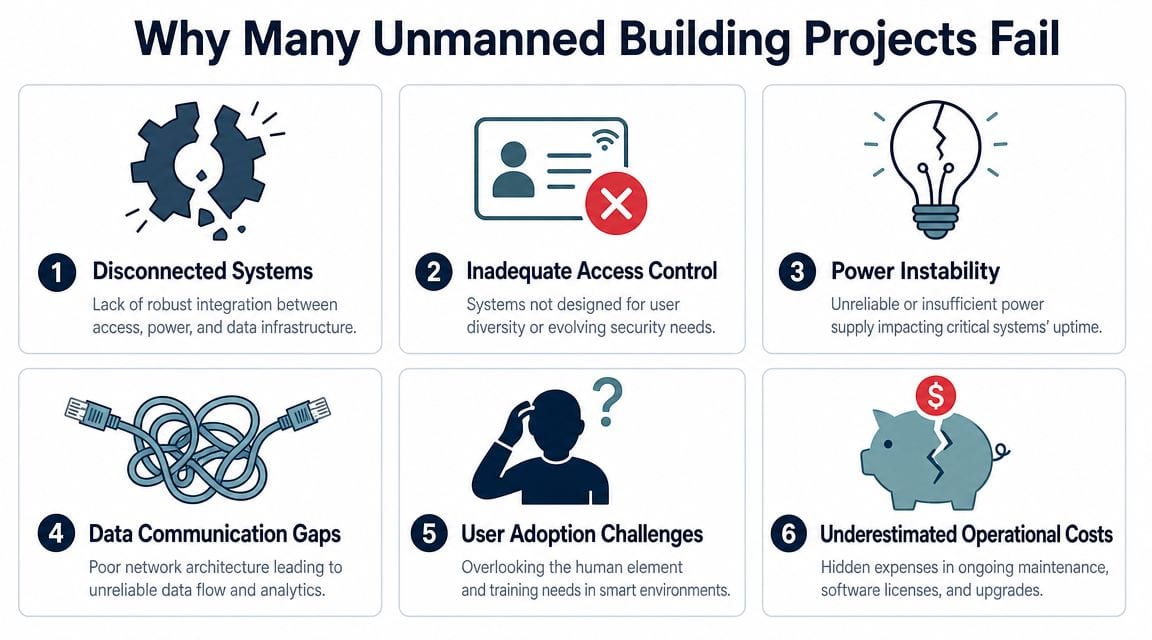
A door reader isn't just a door reader. It's a security endpoint, a power load, a network dependency, and part of a user workflow. If one of those assumptions is wrong, the system behaves badly at exactly the point the building is supposed to help.
The silo trap
I've seen this in fit-outs where the access vendor expects PoE at every location, the cabling plan was built around desk density instead of edge devices, and the electrical package assumes a separate local power arrangement that never got coordinated. Everyone technically delivered their bit. Nobody delivered a reliable whole.
The operational cost of that mistake is well understood. A 2026 analysis of commercial fit-outs found that projects with siloed planning across IT, electrical, and security systems had an average budget overrun of 22% and were four times more likely to suffer critical system failures during the first six months of operation (commercial fit-out failure analysis).
Failure points that show up after handover
These are the issues that usually trigger the first painful month:
- Power assumptions are wrong. Readers, controllers, cameras, switches, and wireless links aren't mapped to the same resilience plan.
- Network design is too shallow. Someone allowed for office users, but not for the building systems that now depend on switching and uplink capacity.
- The CCTV estate is isolated from access events. Security teams can record footage, but they can't verify incidents quickly.
- Commissioning is fragmented. Each subcontractor signs off their own portion, but no one tests the complete operational sequence.
- Support ownership is unclear. When a door fails, the helpdesk, facilities team, and installer all assume it belongs to someone else.
When a site goes live, the first question shouldn't be “Is the app working?” It should be “What happens if a switch fails, a circuit trips, or the WAN drops?”
Questions worth asking before procurement
A strong pre-deployment workshop usually surfaces more risk than another product demo. Ask questions like these:
- What is the failure mode for each critical door? Locked, unsecured, local credential fallback, or manual override.
- Which systems share switches, UPS coverage, and circuits?
- Can CCTV footage be reviewed alongside access events, or are they separate islands?
- Who owns adds, moves, and changes after handover?
- What gets tested during commissioning, and who signs off the integrated result?
Many projects go off course when people buy capability before they've designed operability.
Designing Access Power and Data Together
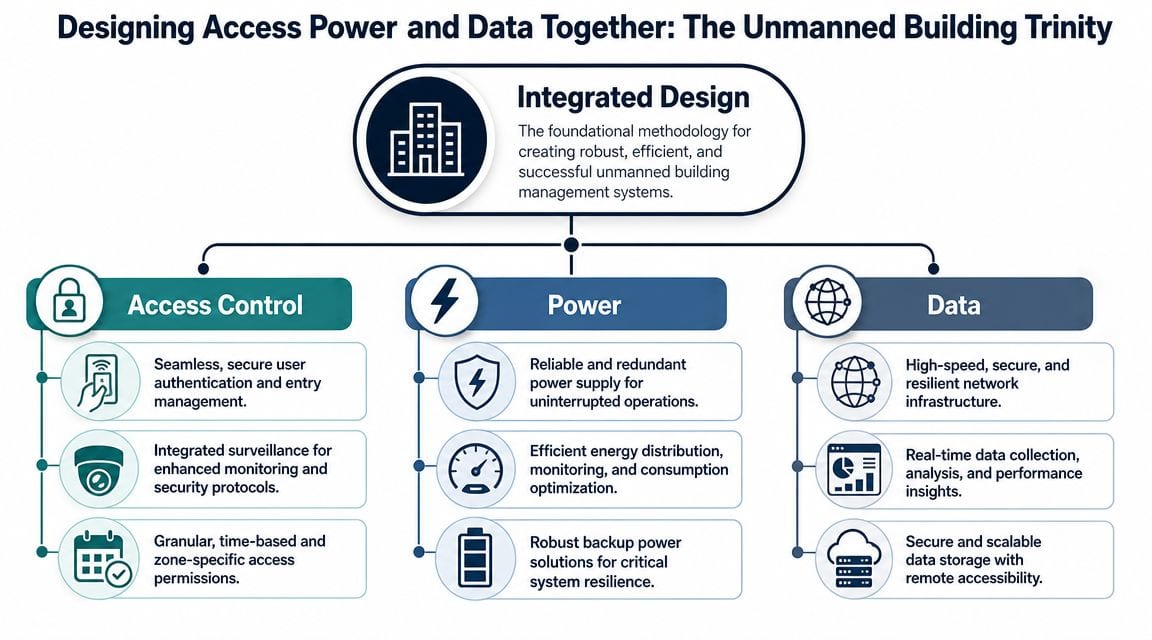
The only reliable way to build an unmanned site is to design access, power, and data as one system. Not three procurements. One system.
That sounds obvious, but it changes the whole job. A lock becomes a power decision. A camera becomes a switching decision. A controller cabinet becomes an electrical and thermal decision. Once you design from those dependencies outward, the building starts to behave predictably.
Access is not just about doors
Access control should be designed as a live operational system. That means user groups, time zones, visitor handling, alarm states, fire interface behaviour, and CCTV event correlation all need to be defined before hardware goes on the wall.
Good deployments also account for workflow. If a courier entrance, rear service corridor, and plant room all have different access rules, those rules need to match how the building is used. Otherwise staff prop doors open or share credentials, which defeats the whole point.
A useful technical reference for teams balancing wired and wireless decisions is this guide on Ethernet and wireless design considerations. It helps frame where fixed infrastructure is essential and where wireless flexibility makes sense.
Power has to be deliberate
Power is where many “autonomous” sites reveal they were only automated under ideal conditions.
Critical building systems need clear power paths, protection, and recovery behaviour. That often means separating convenience loads from operational loads, defining UPS-backed equipment properly, and making sure the access and surveillance estate doesn't die because someone treated it like ordinary office kit.
Commercial electrical installation matters here for two reasons. First, the work must be compliant and certifiable. Second, the electrical team has to understand the operational importance of what they are feeding. A spur that looks minor on a drawing may support a switch that keeps multiple doors and cameras alive.
Data is the backbone, not the afterthought
Structured cabling and network design are what turn stand-alone devices into a manageable building. If the cabling standard is poor, the patching is undocumented, or cabinet space is unrealistic, the system becomes hard to support from day one.
A stable unmanned environment usually depends on:
- Warrantied structured cabling for readers, cameras, intercoms, APs, and edge devices
- Clear network segmentation so building systems don't sit in a flat estate with user traffic
- Documented cabinet layouts that operations staff can understand under pressure
- Resilient WAN planning where remote visibility matters
For sites that rely heavily on cloud-managed systems or remote administration, upstream connectivity matters just as much as local switching. If your project team is comparing options for resilient connectivity, this primer on high-speed business internet is a practical starting point for understanding where fixed wireless can fit.
Integrated design doesn't slow a project down. It removes the rework that appears after everyone has already “finished”.
Choosing the Right Locks and Security Systems
Lock choice creates years of consequences, often leading projects to save a little money up front and buy themselves a maintenance problem.
For most unmanned environments, battery-less NFC proximity locks are the better long-term decision than battery-operated alternatives. They remove one of the most predictable causes of service tickets, inconsistent lock behaviour, and routine labour drain. If you're reviewing the basics of user authentication, permissions, and system architecture, this guide to understanding access control is worth a read before you compare vendors.
Why battery-less matters operationally
Battery-powered locks look convenient in early-stage proposals because they reduce some cabling complexity and can be deployed quickly in awkward locations. The issue arrives later. Batteries age at different rates, replacements get missed, and lock health becomes a recurring operational task across the estate.
That burden is not small. For a typical 100-door office, battery-less access control systems can reduce operational and maintenance costs by up to 90% over five years compared with battery-powered locks, while eliminating thousands of battery replacements and the labour that goes with them (access control total cost report).
Access Control Lock Comparison Battery vs Battery-less NFC
| Consideration | Battery-Operated Locks | Battery-less NFC Locks |
|---|---|---|
| Routine maintenance | Requires battery checks and replacement scheduling | Removes battery replacement from the normal maintenance cycle |
| Failure risk | Can degrade unpredictably if battery health isn't tracked well | Fewer failures linked to local power depletion |
| Labour demand | Ongoing site visits across the door estate | Lower recurring labour once properly installed |
| Suitability for unmanned sites | Can work, but needs tighter maintenance discipline | Better suited to low-touch operation |
| Estate management | More consumables and more variables to monitor | Simpler long-term support model |
CCTV should verify events, not just record them
A modern IP CCTV system becomes far more useful when it's integrated with access events. If a staff member forces a door, if an out-of-hours credential is used, or if a delivery entrance is opened at the wrong time, operations should be able to review the related footage quickly.
That turns CCTV from passive storage into an operational tool. It also helps when reception is remote or the site is only lightly staffed. Event-linked footage gives facilities, security, and IT a common record of what happened.
For teams using UniFi in smaller or mid-sized estates, the architecture matters. Combining routing, switching, surveillance, and access in one environment can work well, but only if the limitations and support model are understood. This piece on the Dream Machine Pro is a useful reference when weighing that route.
Don't overlook certified electrical work
Door hardware, controllers, cabinet feeds, CCTV power, and any related containment have to be installed and certified properly. That's not paperwork for its own sake. It's how you avoid nuisance faults, unsafe additions, and commissioning disputes.
Use commercial electrical installers who understand security and network dependencies, not just circuit delivery. In unmanned buildings, electrical quality shows up later as reliability.
Unmanned Systems in Action Across UK Sectors
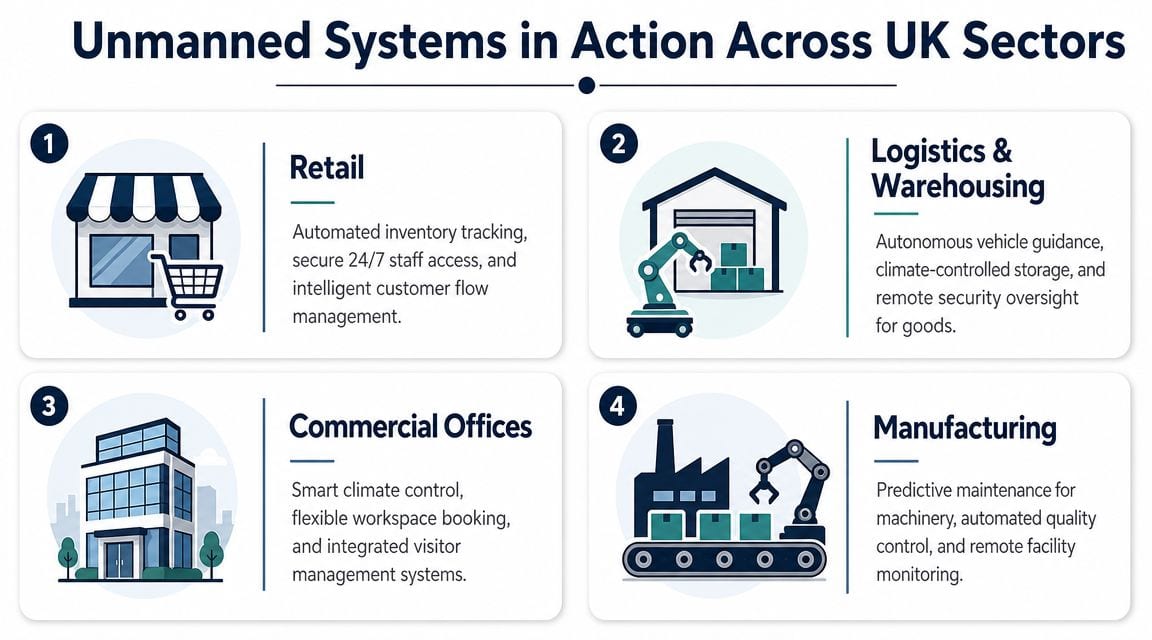
The value of integrated infrastructure is easiest to see in live operating environments. Different sectors use the same building blocks in different ways, but the logic is consistent. Access, CCTV, power, and network design have to support the actual workflow.
Flexible office space
A co-working site doesn't just need a front door reader. It needs controlled access by membership type, time-based permissions for meeting rooms, monitored comms areas, and a simple way to handle contractors and cleaners without handing out physical keys.
The important design decision is usually around lifecycle management. People join, leave, upgrade, downgrade, and need temporary permissions. If access isn't tied into a reliable admin process, the building quickly fills with stale credentials and ad hoc workarounds.
Healthcare and clinical environments
Healthcare sites need stronger separation between public areas and restricted areas such as medicine stores, labs, and staff-only treatment spaces. In that context, integrated access control and CCTV does more than improve security. It improves reporting and incident review.
In regulated environments such as healthcare, integrated access control and CCTV systems that provide a unified audit trail can reduce the time required for compliance reporting by over 75% and strengthen data points for incident investigations (healthcare compliance technology reference).
A unified audit trail changes the quality of a post-incident review. Staff aren't trying to reconcile separate logs and separate footage after the fact.
Retail and multi-site operations
Multi-site retail businesses often want central control without local key management. That means permissions can be issued, revoked, and scheduled remotely for managers, staff, delivery teams, and maintenance contractors.
What tends to work well is a standardised edge design. Same cabinet logic, same camera policy, same reader behaviour, same support model. What doesn't work is mixing unrelated hardware and expecting one operations team to support it cleanly across dozens of locations.
Light industrial and warehouse settings
Warehouses and logistics spaces usually add another layer. Roller shutters, delivery access, plant areas, yard coverage, and environmental conditions all push the design away from office assumptions.
In these sites, practical details matter more than product brochures. Reader placement, cable protection, power quality, remote fault visibility, and after-hours access control all need to be engineered for rougher conditions and lower on-site staffing.
Building Your Fully Autonomous Building Unit
A fully autonomous building unit isn't the result of buying access control, CCTV, cabling, and electrical work from four separate lists and hoping they line up on install day. It comes from treating the site as one operating environment from the start.
That means the sequence matters. Survey first. Map workflows next. Define access groups, cabinet locations, power paths, uplinks, failure modes, and support ownership before final procurement. Then install, test, certify, and hand over against the actual operating model.
What a solid deployment path looks like
A practical rollout usually follows this order:
- Site and asset survey. Confirm physical constraints, routes, containment, comms spaces, and user flows.
- Integrated design workshop. Put IT, facilities, security, and electrical stakeholders in the same conversation.
- Detailed scope and bill of works. Define exactly what gets installed, powered, labelled, tested, and certified.
- Installation and commissioning. Test full workflows, not isolated components.
- Operational handover. Make sure support teams receive drawings, labels, admin access, and escalation paths.
Maintenance starts at design stage
Maintenance is not a separate phase that begins after go-live. It's the outcome of your design choices.
A good system is easier to support because cabinets are documented, lock choices reduce routine visits, circuits are traceable, footage can be found quickly, and user administration follows a clear process. A weak system creates ongoing labour because every small task needs detective work.
This is also where physical form factor thinking matters. The same way people misunderstand standard laptop size by confusing screen diagonal with actual device footprint, building teams often misunderstand “standard” infrastructure by assuming one label means one physical outcome. Rack space, controller enclosure size, switch depth, patch lead management, UPS clearance, and wall-mount dimensions all need checking. If you're planning compact comms spaces, this guide on U rack mount options is a useful reference point.
Why this matters now
The market is moving in this direction, but growth on its own doesn't fix poor delivery. The UK commercial smart building market is projected to grow by 15% annually through 2028, making future-ready integrated infrastructure a meaningful differentiator for tenant appeal and operational efficiency (UK smart building market forecast).
Teams that get results won't be the ones with the longest feature list. They'll be the ones that design access, power, data, CCTV, and certified electrical work as one dependable system, then support it like critical infrastructure.
If you're planning a relocation, fit-out, or upgrade and need the building to work properly from day one, Constructive-IT is worth speaking to early. They help UK organisations design and deliver the cabling, networking, CCTV, electrical work, certification, and on-site integration that unmanned environments depend on.