

You're planning an office move, a new fit-out, or a major refresh of your workplace technology. The floorplans are moving. Furniture decisions are underway. Facilities is talking about power drops and access control. Meanwhile, the communications platform discussion often gets parked as a software choice to sort out later.
That's usually where trouble starts.
Unified communications promises a cleaner working day. One platform for calling, messaging, meetings, presence, and collaboration. In the UK, that matters at scale. The UK unified communications market was valued at approximately £3.8 billion in 2023 and is projected to reach £6.2 billion by 2027, and 72% of UK organisations implemented UC solutions to support remote and hybrid working models, with 85% of IT managers citing improved team productivity as a primary outcome according to the verified market data provided in the brief.
The problem is that many teams buy the platform before they've proven the building can support it.
A UC rollout lives or dies on physical reality. Structured cabling. Wi-Fi design. switching. WAN resilience. Power continuity. CCTV and access control where the site has autonomous zones. Commercial electrical installation and certification. If those elements are treated as separate workstreams, the software ends up taking the blame for faults created further down the stack.
That's why an office move is the right moment to treat unified communications as an infrastructure programme, not just a licence purchase. If you design the physical and digital layers together, users experience clear calls, stable meetings, fast handoff between devices, and fewer support tickets. If you don't, you get dropped audio, frozen video, patchy roaming, and a new office that feels worse than the old one.
Introduction Why Your Next Office Move Needs a UC Strategy
An office move compresses every hidden dependency into one deadline. You're not only moving people and desks. You're moving identity, telephony, wireless coverage, meeting room behaviour, access permissions, power resilience, and often the relationship between a head office and satellite sites.
That's why unified communications should be designed at the same time as the floorplate and comms room. If UC is left until the end, the project team tends to discover too late that the building was never prepared for real-time traffic, room devices, or secure guest and staff access.
Why timing matters more than software choice
Most vendor conversations focus on features. Chat, calling, mobile apps, contact sync, presence, meeting rooms. Those matter, but they don't solve poor cabling routes, undersized cabinets, badly placed wireless access points, or inadequate power planning.
A practical UC strategy for a move should answer questions like these early:
- Where will call quality break first: In dense open-plan areas, meeting rooms, warehouse edges, or reception spaces?
- Which services are business-critical: Voice, contact centre, executive conferencing, clinical systems, or mobile handoff between sites?
- What must be integrated physically: CCTV, AV, access control, structured cabling, and electrical works.
- What can't tolerate downtime: Core switching, firewall uplinks, server room cooling, or site-to-site connectivity.
Practical rule: If the building design team is finalising containment, power, and ceiling plans without IT sign-off on UC requirements, the project is already carrying avoidable risk.
What changes in a hybrid workplace
UC became central because work patterns changed. Staff expect to move between laptop, mobile, headset, meeting room kit, and home connection without losing continuity. That expectation pushes pressure onto infrastructure in ways old desk-phone estates never did.
For IT Directors, the move creates a choice. Either use the relocation to standardise network and communications properly, or carry forward a mixture of old telephony habits and new cloud tools, then spend the next year troubleshooting user complaints.
A good UC strategy doesn't start with “which platform?”. It starts with “what kind of building performance do we need, and what must the infrastructure support from day one?”
What Is Unified Communications in Practice
Unified communications is best understood as the business's digital central nervous system. It connects the channels people use every day so communication doesn't splinter into separate tools and disconnected workflows.
In practice, it means a member of staff can message a colleague, see whether they're available, turn that exchange into a voice call, escalate to video, and bring in shared documents or project context without switching between unrelated systems.
The parts users actually notice
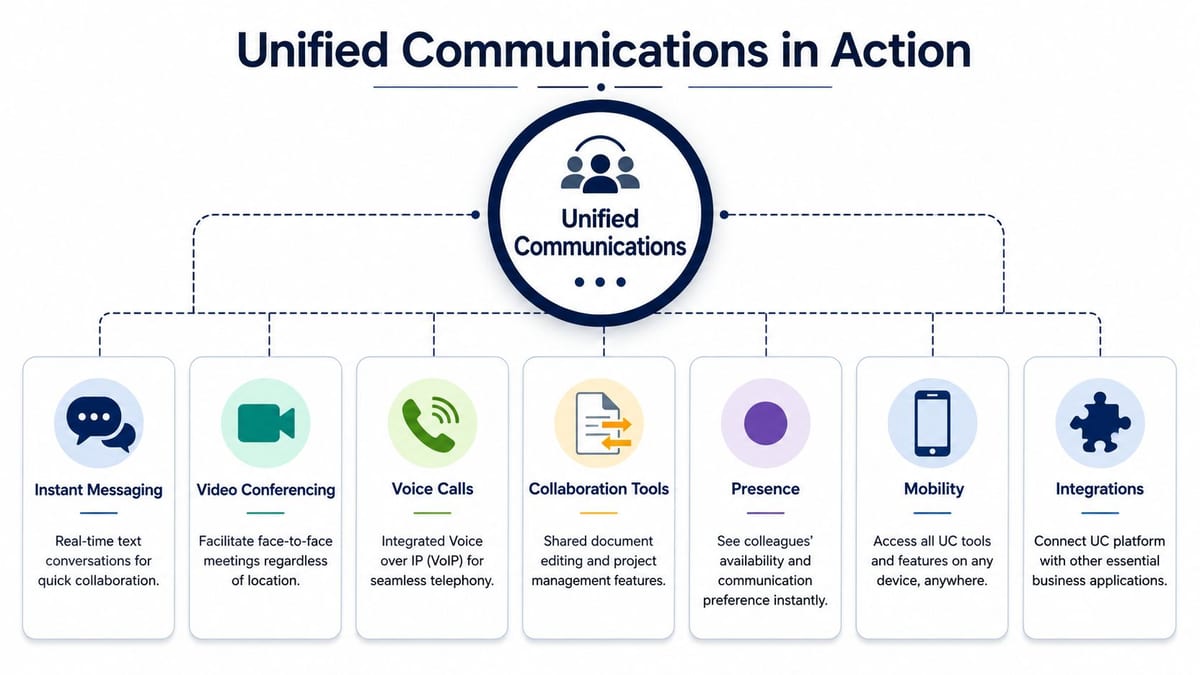
The components are familiar. The difference is the way they work together.
- Instant messaging: Quick operational conversations without email lag.
- Voice calls: Telephony delivered through the wider platform, often replacing fragmented PBX habits.
- Video conferencing: Internal and external meetings from desks, rooms, and mobile devices.
- Presence: Visibility of whether someone is available, busy, in a meeting, or away.
- Collaboration tools: Shared files, channels, tasks, and project context around the conversation itself.
- Mobility: The same user experience across office, home, and travel.
- Integrations: Links into CRM, ITSM, directory, and line-of-business systems.
What good unified communications feels like
When UC is implemented properly, users stop thinking about channels as separate tools. They just contact the right person through the most appropriate route.
A sales lead can take a call on mobile, move to laptop for a screen share, and update the CRM during the conversation. A service desk agent can see presence before escalating an issue. A project manager can start in chat, pull in a room-based meeting, and continue afterwards in a shared workspace.
That's also why network quality matters so much. Presence updates and chat may tolerate minor delay. Voice and video won't. If the underlying network can't prioritise real-time traffic, the platform looks unreliable even when the application itself is working as designed. Teams that want a better handle on traffic prioritisation should look at QoS for video in business networks.
Unified communications isn't one more app. It's the operating layer that decides how quickly people can make decisions together.
What it isn't
It isn't just softphones on laptops. It isn't a meeting tool with chat bolted on. And it definitely isn't “plug and play” during a building move.
If your business treats unified communications as a front-end feature set without planning the building services underneath it, users will still end up juggling workarounds. That defeats the point.
The Unseen Foundation of a Successful UC Project
A high-end UC platform on weak infrastructure will fail in very ordinary ways. Calls sound robotic. Video freezes. Screen sharing lags. Roaming users drop out when moving between coverage zones. Meeting room kits behave differently from floor to floor.
Users don't report “WAN jitter” or “bad structured cabling”. They report that the new system is poor.
Where failures usually begin

The physical layer is where UC reliability is won or lost. Verified data shows that over 60% of UC implementation failures in hospital relocations were caused by inadequate structured cabling, and that optimal UC performance requires latency under 150ms and jitter below 30ms, supported by infrastructure such as Excel Cat6 or fibre with 25-year warranties according to the 2025 NHS Digital data summarised in the brief.
That's a useful lesson well beyond healthcare. If you inherit old cabling runs, unknown patching standards, or underpowered comms spaces, the platform can't compensate for it.
What works and what doesn't
Here's the practical difference.
| Design choice | What usually happens |
|---|---|
| Certified Cat6 or fibre backbone | Consistent throughput, cleaner voice performance, better tolerance for room devices and growth |
| Legacy cabling carried forward to save time | Signal issues, inconsistent port performance, harder fault-finding |
| Wireless designed around density and roaming | Fewer call drops during movement across the office |
| Wi-Fi planned as generic internet access | Voice and video instability in exactly the spaces users depend on most |
| Proper rack layout and patch discipline | Faster support, easier certification, cleaner handover |
| Ad hoc cabinet expansion | Heat, power, patching and capacity problems later |
The same applies to uplinks and switching. If the LAN and WAN aren't built with UC traffic in mind, quality degrades first in meeting-heavy periods, then confidence collapses.
Why office moves expose weak assumptions
Moves often reveal hidden technical debt. Teams discover that old patch schedules are incomplete, Wi-Fi was never surveyed for voice density, or a server room has no sensible path for resilience. During a live migration, those gaps become operational outages.
That's why structured cabling shouldn't be treated as a commodity line item. It's part of the UC service itself. A useful baseline for planning is to review what structured cabling should include in a modern fit-out.
If the project board is debating premium licences but not cabling standards, cabinet capacity, or wireless design, they're looking at the wrong risk first.
The business case IT leaders can defend
Infrastructure spend is easier to justify when tied directly to user outcomes. Stable calls, reliable room systems, fewer go-live issues, and less time spent chasing intermittent faults are not cosmetic wins. They determine whether the business adopts the platform or bypasses it.
The strongest UC projects are rarely the ones with the most features. They're the ones where cabling, switching, wireless, power, and room readiness were planned before the first account was provisioned.
UC Deployment Security and UK Compliance
Choosing between UCaaS, on-premise, and hybrid isn't only a budget decision. It's a control decision, an integration decision, and in regulated sectors, a compliance decision.
A smaller organisation with limited internal telephony expertise may prefer UCaaS because the vendor manages most of the platform overhead. A larger enterprise with heavy custom integration or strict site requirements may keep some functions on-premise. Many UK businesses end up in hybrid because they're balancing legacy estates, phased migration, and departmental constraints.
Comparing the deployment models
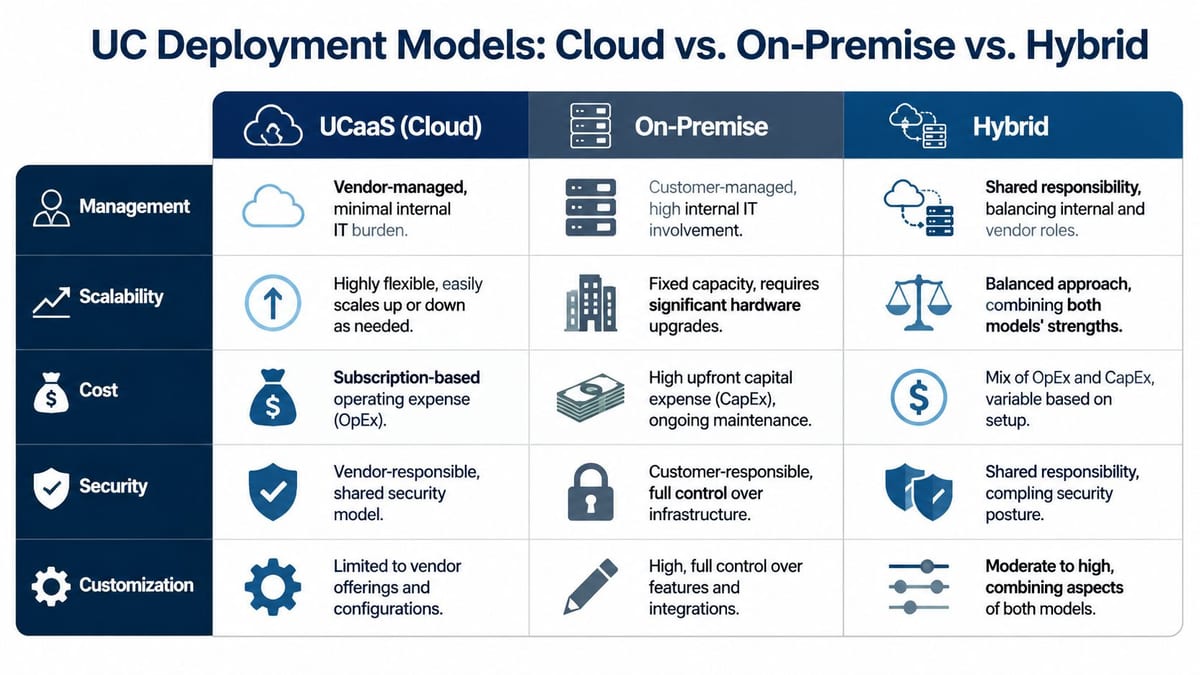
The right model depends on what you need to keep local, what you're willing to outsource, and how much legacy you still carry.
UCaaS Works well when the priority is speed, scale, and lower day-to-day platform management. It suits businesses that want standardised calling, meetings, and mobility without running their own telephony core.
On-premise Still relevant where organisations need tighter infrastructure control or have site-specific dependencies they can't unwind yet. It demands stronger in-house capability.
Hybrid Usually the most realistic choice during relocation programmes. It lets teams migrate in phases, keep selected services local, and avoid a risky all-at-once cutover.
The real security issue is integration
Verified data from Ofcom's 2024 report shows that 72% of UK enterprises face issues integrating UC with legacy systems. The same verified guidance states that, for compliance with UK GDPR and FCA standards, organisations should mandate end-to-end SIP support with SRTP for encryption, and that this approach has been shown to reduce security incidents by 60% and compliance violations by 55% in regulated sectors.
That matters because many UC failures aren't caused by the front-end application. They happen in the seams between systems. Old PBX environments, incomplete identity integration, and insecure network access design create exposure.
A sensible design review should test:
- Voice signalling and media security: SIP end to end, with SRTP where required.
- Identity controls: SSO and MFA integrated properly, not added as an afterthought.
- Auditability: Logging, retention, and administrative traceability.
- Application interoperability: CRM, ITSM, and directory integration that won't break under live use.
- Network admission: Wired and wireless access policies that separate trusted, guest, and operational devices.
For wireless authentication in environments with multiple user groups, devices, or sites, Purple's cloud RADIUS solution is worth reviewing because it helps centralise policy and access control without adding unnecessary friction at each location.
What to ask before sign-off
A deployment model is only safe if the surrounding infrastructure is equally mature. That includes the switching estate, because segmentation, power delivery, and port management affect both security and reliability. IT teams evaluating readiness should review how a managed network switch supports control and resilience.
“Secure by default” only counts if identity, transport encryption, switching policy, and logging all line up in production.
If a supplier can explain features but can't explain integration boundaries, device trust, and operational ownership after go-live, they're not describing a deployment model. They're describing a demo.
The Future of Integration Building Autonomous Unmanned Facilities
The most demanding version of a UC-enabled environment is the fully autonomous unmanned building unit. In practice, that means a building or contained area designed to operate with minimal on-site staff intervention while still maintaining communications, security, monitoring, and service continuity.
This isn't a futuristic concept. It shows up in comms rooms, controlled service buildings, satellite operational spaces, healthcare environments, and other sites where remote oversight matters as much as physical access.
What unmanned building management means in practice
In a real project, unmanned building management usually includes:
- Remote access control: Staff, contractors, and approved visitors enter through managed credentials rather than a permanently staffed desk.
- CCTV oversight: Cameras provide continuous visibility for security, incident review, and remote verification.
- Power continuity controls: Critical equipment is supported and monitored so communication services remain available.
- Data and network resilience: Core connectivity for UC, monitoring, and operational systems is treated as a shared dependency.
- Commercial electrical installation and certification: Electrical works are designed, installed, and signed off to support the operational model, not merely the fit-out aesthetic.
The key point is that these aren't separate packages. In an unmanned environment, access, power, and data are one system.
Why many unmanned building projects fail
Verified data states that 68% of unmanned building management projects fail due to poor integration of access control, power, and data systems, and that successful projects often co-locate these systems and use battery-less NFC proximity locks, according to the Marconet article on unified communications and collaboration.
That failure pattern is easy to recognise on live jobs. Access control is specified by one contractor. Electrical design is handled elsewhere. IT receives a late-stage request to “make the room live”. CCTV arrives as a separate package. Nobody owns the combined operating model.
The result is predictable:
- Doors work but the network cabinet isn't resilient
- CCTV is installed but not aligned with access events
- Power is present but not designed for communications uptime
- Certification exists in parts, not as a coherent handover
- Remote troubleshooting becomes slow because the systems were never mapped together
How access, power, and data should be designed together
A properly built autonomous unit starts with co-design. The access point location, power provision, cabinet placement, CCTV view, and switching layout need one coordinated plan.
A practical approach usually includes:
| Element | Design concern | What good looks like |
|---|---|---|
| Access control | Entry method, fail state, credential management | Integrated with remote administration and event review |
| Power | Continuity, isolation, safety, installation quality | Backed by certified electrical design and clear support boundaries |
| Data | Connectivity for locks, CCTV, switching, and UC-related services | Structured, labelled, and supportable during faults |
| CCTV | Coverage, retention, remote visibility | Aligned to entry points, critical racks, and operational risk zones |
Operational advice: Build the autonomous unit on paper as one service. Don't let four contractors each deliver a quarter of it.
Why battery-less NFC proximity locks are often the right choice
There are straightforward operational reasons for choosing battery-less NFC proximity locks in unmanned settings. Verified data says they reduce maintenance costs by 58% compared to traditional battery-operated alternatives.
That matters because battery maintenance becomes a repeated operational burden across distributed or low-touch sites. In an unmanned facility, every avoidable site visit counts. Battery-less hardware reduces one of the most common low-level maintenance tasks and removes the risk of an access issue caused by a depleted local power source in the lock itself.
Where these systems are commonly used
These designs are commonly used where uptime, access control, and remote oversight need to work together. NHS environments are an obvious example, especially during relocations and new builds. They also make sense in controlled plant areas, network edge locations, satellite offices, and specialist operational rooms where full-time staffing isn't practical.
Building out a fully autonomous unmanned building unit isn't mainly about smart gadgets. It's about disciplined coordination between physical security, electrical delivery, network design, and support ownership. That's the same lesson that sits underneath every successful unified communications rollout.
Your UC Migration and Readiness Checklist
Most UC projects don't fail because the chosen platform is incapable. They fail because the migration plan ignores the prerequisites around the building, the network, and the old estate that still has to be unwound.
Verified data from a 2025 bitc survey found that 35% of UK office relocation projects experience delays due to underestimating the infrastructure prerequisites for UC, such as QoS-enabled LAN/WAN and appropriate structured cabling. Those delays usually surface as hidden cost, rushed remediation, and downtime that nobody budgeted for.
A practical checklist before you commit
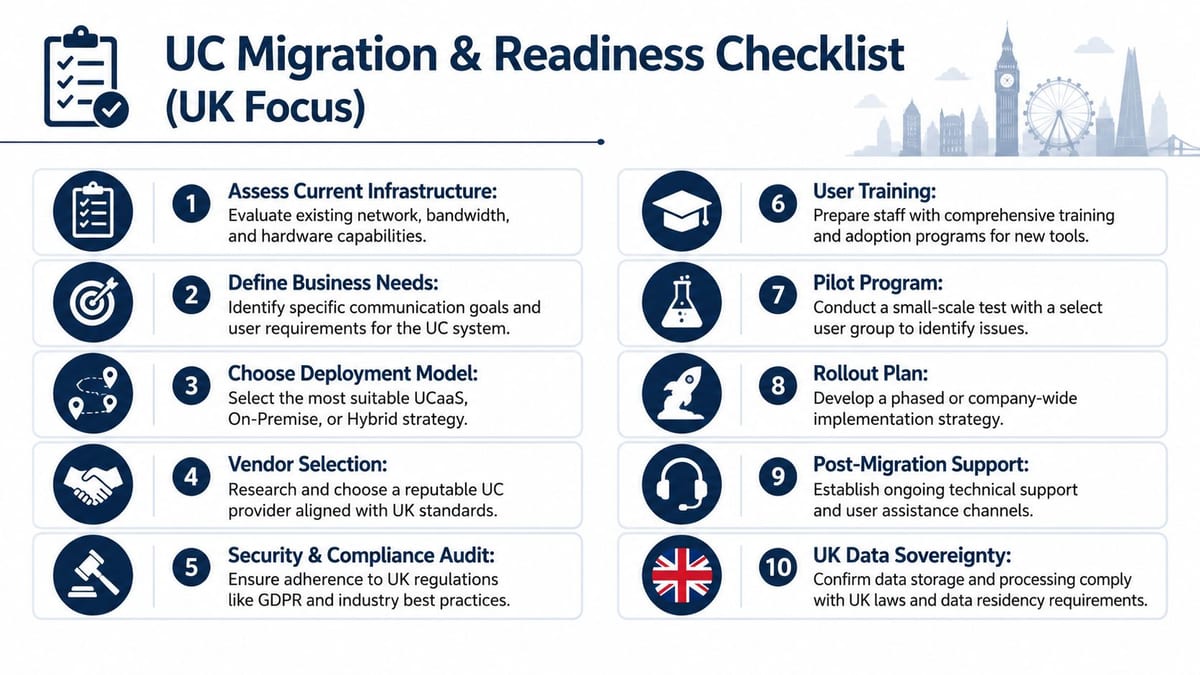
Use this as a working review, not a tick-box exercise.
Audit the physical estate first
Check cabling standards, cabinet capacity, wireless coverage, power resilience, and room readiness before comparing licence bundles.Map the legacy dependencies
Identify PBX links, analogue edge cases, building systems, old conference kit, contact flows, and anything that still depends on local telephony behaviour.Decide what must be uninterrupted
Executive calling, service desk queues, clinical workflows, remote site access, or meeting room availability. Prioritise around operational consequence.Choose a deployment model that matches your support reality
Don't pick hybrid because it sounds flexible if your team can't support the added complexity.Validate security design at the integration points
Identity, encryption, device trust, switching policy, and audit logging need sign-off together.
Questions to put to suppliers and internal stakeholders
Not every partner can deliver both the digital service and the physical groundwork needed around it. That gap is where projects drift.
Ask these questions early:
- Who owns end-to-end performance: Platform vendor, MSP, network provider, fit-out contractor, or internal IT?
- How will the site be tested before migration: Voice quality, roaming, room systems, failover, and access dependencies.
- What work is warrantied and certified: Especially structured cabling and electrical installation.
- What is the rollback position: If one building zone or user group fails at cutover.
- How will CCTV, access control, and comms spaces be coordinated: Particularly on new builds and controlled areas.
Buy confidence, not only licences. The cheaper proposal often assumes the building is already ready.
The final readiness check
A strong UC migration plan connects business outcomes to technical proof. It doesn't stop at procurement. It confirms that the office, the network, the power design, and the security model are all ready to carry real-time communications reliably on day one.
If you're reviewing potential partners for a move, fit-out, or upgrade, the simplest test is this: ask them how they'll guarantee performance across both the physical and digital layers. The answer usually tells you whether they've delivered this kind of project before.
If you're planning a move, a fit-out, or a communications refresh and need a partner that can handle both infrastructure and delivery, Constructive-IT is worth speaking to. Their work spans structured cabling, Wi-Fi, LAN/WAN, CCTV, electrical integration, testing, certification, and go-live support, which is exactly the combination complex UC projects tend to need.