
You're halfway through a server migration. Users are still working because the cutover window is tight, the fit-out schedule is slipping, and the old file server has to be decommissioned before the electricians finish in the new comms room. Then a live share goes wrong. A permissions change lands badly, an application writes incomplete data, or a restore request comes in for a file that existed earlier in the day but not now.
If your recovery plan depends on last night's backup, you're already negotiating downtime and data loss. If Volume Shadow Copy is healthy and properly sized, the conversation changes. You can often recover a clean point-in-time state from the same working day, without pretending a full restore is the only answer.
That's why VSS matters during migrations, storage refreshes, office relocations, and server upgrades. It isn't glamorous. It is, however, one of the Windows features that effectively determines whether a bad change becomes a service interruption or a contained incident.
The Critical Role of VSS in Modern IT Projects
The easiest time to ignore VSS is when nothing's failing. The hardest time to understand it is when a migration is already live.
In most Windows estates, critical data isn't sitting still. File servers are being written to all day. SQL Server is changing constantly. Exchange, line-of-business systems, and user profiles never pick a convenient maintenance window. During a relocation or server refresh, you're asking those systems to stay coherent while storage paths, backup jobs, network dependencies, and cutover timings all change around them.
Where projects become fragile
The problem usually isn't the copy itself. It's the gap between “the server is running” and “the data is recoverable”.
A project can look well planned on paper and still fail operationally because these dependencies weren't lined up together:
- Access: Admin teams need the right console access, service permissions, and escalation paths before the move starts.
- Power: Server rooms, cabinets, and temporary comms areas need stable power, proper sequencing, and enough resilience to avoid dirty shutdowns.
- Data: Backup software, storage headroom, writer health, and rollback options must be validated before workloads move.
That same joined-up thinking applies outside the data centre too. In an unmanned building management setup, “unmanned” doesn't mean unmanaged. It means the building has to function safely and predictably without someone on site to intervene every time a door, camera, cabinet, or power feed needs attention. In practice, that means remote visibility, controlled access, resilient power, and predictable recovery processes. If one of those is designed in isolation, the building stops being autonomous and starts being a source of avoidable call-outs.
Practical rule: In both a server migration and an unmanned building, the failure point is rarely the headline technology. It's the hand-off between systems.
Why many unmanned projects fail, and why that matters here
A lot of unmanned building projects fail for the same reason IT cutovers fail. Teams treat access control, electrical work, CCTV, data cabling, and remote monitoring as separate procurements instead of one operating model.
That leads to familiar outcomes:
- Doors are fitted before access rules are finalised.
- CCTV is installed without proper network and storage planning.
- Electrical works are signed off, but cabinet power and comms resilience weren't coordinated.
- Remote sites end up “autonomous” on paper, but still need frequent engineer visits.
For server estates inside those buildings, the impact is direct. If your comms room power is unstable, if cabinet access is poorly controlled, or if network links and CCTV are bolted on late, your migration risk goes up. VSS sits in that same risk chain. It gives you a recoverable state on live Windows systems, but only if you treat it as part of the project plan rather than a backup checkbox.
What Is Volume Shadow Copy and Why It Matters
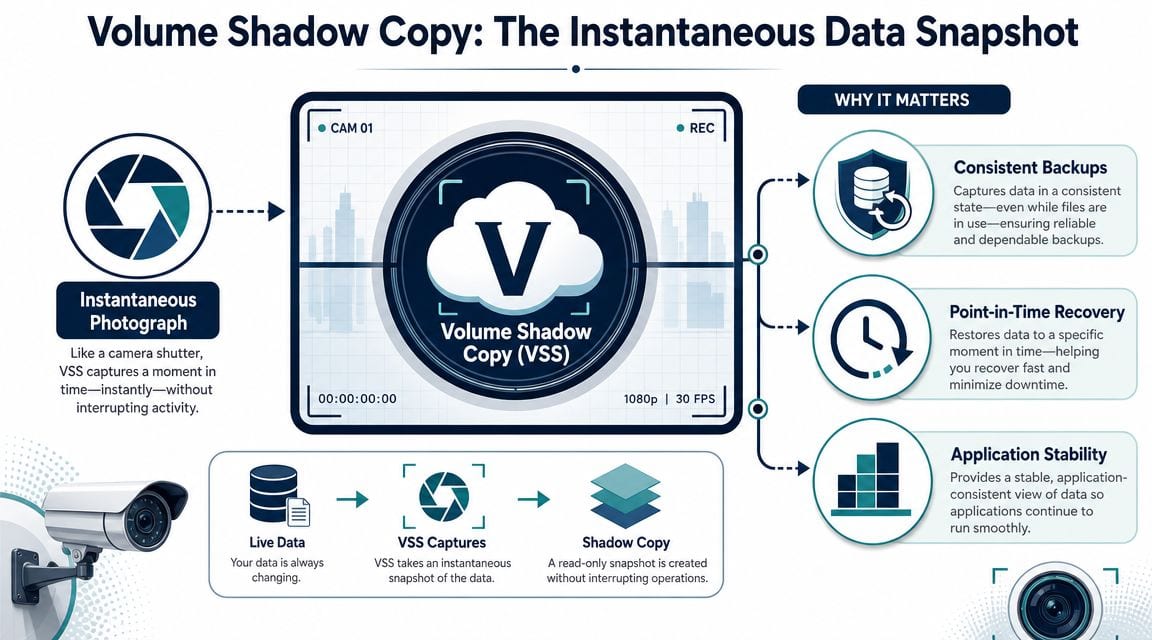
Volume Shadow Copy Service, usually shortened to VSS, is Windows' built-in mechanism for taking a point-in-time snapshot of data on a live system. The simplest way to think about it is as a photograph of a volume at a specific moment. Applications can still be running. Users can still be connected. The operating system captures a recoverable state without requiring you to shut the server down.
That matters because a backup of a live system is only useful if the captured state is coherent. A file server might tolerate a straightforward copy more often than a transactional application, but when databases, mail stores, and active services are involved, “copied” and “recoverable” aren't the same thing.
The practical meaning of the snapshot
For an IT manager, the value is straightforward. VSS lets backup tools and recovery workflows work against a stable moment in time, even while the server is still serving users.
That's why it became such a foundational part of Windows backup and recovery. On supported Windows platforms including Windows Server 2003, Windows Server 2008, Windows 7, Windows 8, and Windows Server 2012, VSS became a standard Microsoft capability for point-in-time snapshots. Microsoft's VSS documentation also explains that shadow copies can be created using full-copy or copy-on-write methods, with copy-on-write typically using only a small percentage of the original disk space because it stores changed blocks rather than a full duplicate, as described in the Arcserve guide to Microsoft VSS.
Why copy-on-write is useful
This is the part many people miss. VSS usually doesn't duplicate the entire volume every time it creates a recovery point. With copy-on-write, Windows keeps track of changed blocks after the snapshot is taken. That makes multiple restore points operationally feasible on active systems.
In real terms, that gave Windows environments a practical middle ground between “take the application offline” and “accept inconsistent backups”. It also changed how teams approached user recovery. Restoring a deleted or overwritten file from a shadow copy is a much smaller event than restoring an entire server because one department lost a folder.
A healthy VSS setup reduces the blast radius of routine mistakes. That's its real business value.
Where it fits in building and site operations
There's also a less discussed overlap with physical infrastructure projects. In fully autonomous unmanned building units, the same principle applies: systems have to keep operating while still remaining recoverable. That includes comms cabinets, edge servers, access controllers, CCTV recording systems, and the Windows platforms often supporting local services.
Battery-less, NFC proximity locks are often chosen in those environments for practical reasons rather than novelty. They remove battery maintenance cycles, reduce site visits, and suit locations where someone isn't routinely walking the floor. But they only work well when access control, structured cabling, power design, and remote administration are planned together. VSS belongs in that same operational discipline. It's one of the controls that lets you recover without sending the whole site backwards.
Understanding the VSS Architecture
You can't troubleshoot VSS properly if you treat it like a black box. The framework is simple at a high level, but the reliability of a snapshot depends on several moving parts acting in the right order.
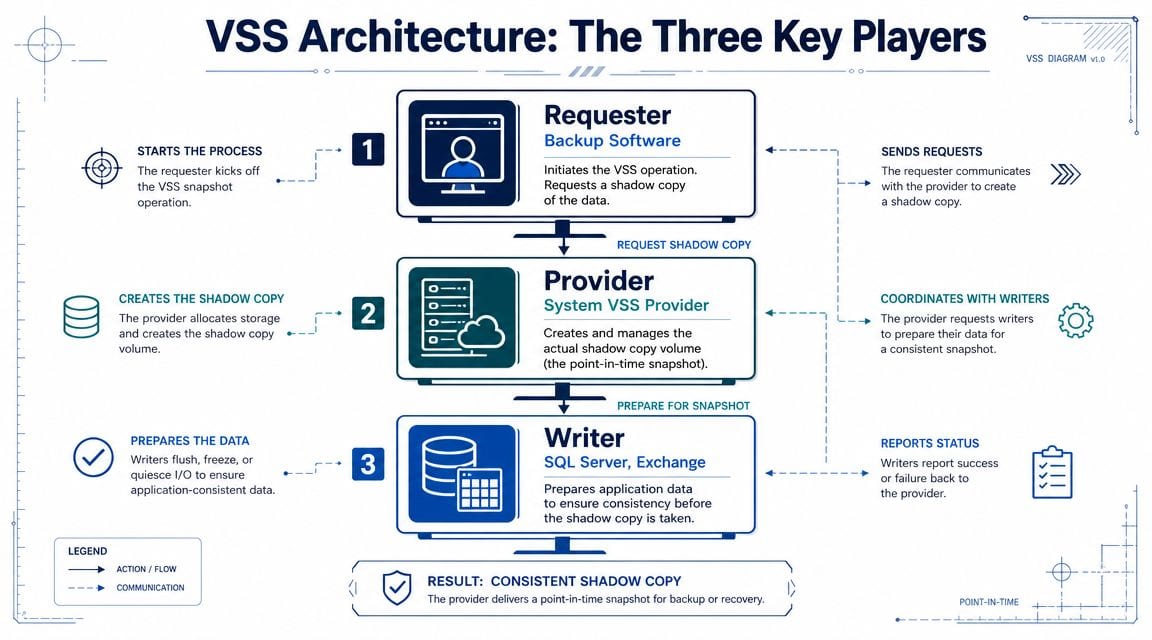
The three actors are the requester, the writers, and the provider. If one of them is unhealthy, the backup may still start, but the resulting snapshot can fail or be unusable.
The three roles that matter
Imagine it as a coordinated photo shoot.
The requester is the director. That's usually your backup application. It asks VSS to create the snapshot and tells the rest of the process when to begin.
The writers are the people preparing the scene. These are application components such as SQL Server or Exchange that know how to put their data into a consistent state. They flush pending writes, prepare metadata, and get ready for the freeze.
The provider is the camera system. It creates the actual shadow copy once the applications are ready.
Microsoft documents that VSS coordinates these roles and briefly freezes application write I/O while read I/O can continue. The freeze is limited to 60 seconds, and VSS can support volumes up to 64 TB, which Microsoft details in its Windows Server VSS documentation.
What usually fails in practice
The snapshot engine itself often gets blamed, but that's not usually where the core issue sits.
In production, failures tend to come from one of these conditions:
- Writer instability: SQL Server, Exchange, or another application writer can't quiesce cleanly.
- Peak-load timing: The workload is too busy during the freeze window, so consistency checks fail.
- Poor maintenance hygiene: Pending patches, stale services, or known application issues leave writers in a bad state before the backup even starts.
- Storage assumptions: The platform can support large volumes, but the team hasn't allowed enough operational headroom around the protected data.
What works: checking writer health before a migration, patch cycle, or datastore move.
What doesn't: discovering a failed writer after the backup job has already overrun the change window.
Why this matters during migrations
When a team is relocating servers or refreshing storage, there's usually pressure to focus on the obvious hardware choices. Throughput matters, but recoverability matters more. If you're comparing storage options for Windows workloads, the difference between latency, queue depth, and endurance has knock-on effects for backup and snapshot behaviour too. That's one reason it's worth understanding the trade-offs in SATA vs SAS storage choices before the migration design is signed off.
Here's the practical sequence that matters during a cutover:
- The backup platform requests a snapshot.
- Application writers prepare their data.
- VSS freezes application write I/O briefly.
- The provider creates the shadow copy.
- The application resumes write activity.
- The backup process reads from that stable point-in-time image.
If any writer fails to prepare in time, the whole chain is suspect. That's why “the backup software ran” isn't enough evidence that the recovery point is trustworthy.
A short technical walkthrough helps if you want to see the framework described visually in action:
Configuring and Managing VSS with Common Commands
For day-to-day administration, VSS management sits in two places. The Windows GUI is fine for enabling shadow copies on a volume and reviewing basic settings. The command line is where you verify health, inspect storage allocation, and make changes cleanly during maintenance work.
Start with the GUI, but don't stop there
On a Windows server, the basic workflow is familiar:
- Open the properties of the target volume.
- Go to the Shadow Copies tab.
- Enable shadow copies for the volume.
- Review the storage location and schedule.
- Confirm the configuration before a backup or migration window.
That gets the feature turned on. It doesn't tell you whether writers are healthy, whether old copies are being deleted too aggressively, or whether another provider is involved. For that, use vssadmin.
Essential commands to keep close
The following commands are the ones I'd expect a Windows infrastructure team to know before any relocation, storage move, or backup redesign.
| Command | Description |
|---|---|
vssadmin list writers |
Shows the state of VSS writers. Use it to confirm whether application writers are stable before backups or cutovers. |
vssadmin list providers |
Lists installed VSS providers. Useful when third-party backup or storage products add their own provider components. |
vssadmin list shadows |
Displays existing shadow copies. Helpful for confirming snapshots exist and for checking what's currently retained. |
vssadmin list shadowstorage |
Shows where shadow copy storage is allocated and how much is currently in use. |
vssadmin resize shadowstorage /for=<volume> /on=<volume> /maxsize=<value> |
Changes the reserved shadow copy storage area for a volume. Use carefully and only after reviewing real change patterns. |
vssadmin delete shadows /for=<volume> |
Removes shadow copies for a volume. Usually a cleanup action, not a first-line fix. |
vssadmin create shadow /for=<volume> |
Creates a manual shadow copy. Useful for testing behaviour outside scheduled backup jobs. |
How to use the outputs sensibly
Don't just run the commands and tick a box. Read them in context.
- If
list writersshows instability, stop there and investigate the application or service behind it. - If
list shadowstoragelooks tight, assume retention may be shorter than the business expects. - If
list providersshows more than you expected, verify which backup or storage products are participating in the snapshot chain. - If
list shadowsreturns little or nothing on a busy system, check whether snapshots are being rolled off under storage pressure.
A reboot can clear symptoms. It rarely explains the cause. If you're about to move a server, explanation matters more than temporary relief.
A workable operating routine
For migration work, a simple routine is more useful than a long checklist:
- Before the change window: run writer and shadow storage checks.
- Before first production backup on the new platform: confirm providers and create a test snapshot.
- After cutover: verify that scheduled snapshots are still being retained as expected.
- During early-life support: watch for changes in churn, especially on file shares and profile volumes.
Teams that do this consistently avoid the classic trap of assuming VSS is healthy because Windows says the service is running.
Best Practices for Enterprise Environments
The default settings are good enough for a lab. Enterprise environments need more thought than that.
The most common mistake is assuming VSS retention is governed by intention rather than space. It isn't. Shadow copy storage is space-governed, and if the reserved area is too small, older copies are deleted to make room for new ones.
Stop trusting the default quota
By default, the shadow copy storage limit is 10% of the source volume, and if that's too small, VSS will delete older shadow copies to free space for newer ones, as outlined in Axcient's Windows shadowstorage guidance.
That default can be fine on a quiet volume. It can be hopeless on a busy file server during a document migration, mailbox export, profile move, or VM-heavy workload. The issue isn't volume size alone. It's the rate of change on that volume.
Size for churn, not optimism
This is where strategy matters. If the business expects several restore points across the day, you need to understand how fast blocks are changing when the system is busiest.
A more realistic approach looks like this:
- Measure actual churn: watch what happens during normal business activity, not just overnight.
- Add migration headroom: large file copies, relocation tasks, and fit-out activity often increase write activity temporarily.
- Align retention with recovery expectations: if users expect to recover earlier versions from the same day, the quota must support that expectation.
- Review after storage changes: moving from older disks to faster SSD tiers can change write patterns and turnover on active volumes.
If you're refreshing the underlying platform, storage performance still matters. Faster media can improve workload behaviour, but it won't fix poor retention design on its own. That's why storage planning and VSS planning should happen together, particularly when evaluating fast SSD drives for infrastructure upgrades.
Treat VSS as one layer of rollback
VSS is valuable because it gives you fast, local recovery points on live Windows workloads. It is not a substitute for a proper backup strategy.
For infrastructure projects, the strongest designs separate these concerns:
| Recovery need | Best use of VSS | What else you still need |
|---|---|---|
| Accidental file overwrite | Quick point-in-time restore from shadow copy | Standard backup retention |
| Application-consistent backup capture | Stable snapshot for backup software to read | Verified backup jobs and restore testing |
| Server migration rollback | Short-interval recovery points before and during cutover | A documented rollback plan and tested recovery path |
| Site or storage failure | Limited use if the underlying platform is gone | Off-host or off-site backup strategy |
That last row matters most in projects. If you're moving data, changing storage, or replatforming services, local snapshots help but they don't remove the need for a structured rollback plan. For teams planning cutovers, this guide to designing data migration rollback plans is worth reading because it focuses on the decision logic around recovering safely when a migration doesn't behave as expected.
The mature approach is simple. Use VSS for fast point-in-time recovery, and use broader backup and rollback design for everything VSS can't protect.
Physical estate considerations still apply
This discipline also carries into building operations. In remote or unmanned sites, maintenance planning matters as much as feature lists. CCTV recording, commercial electrical installation and certification, cabinet access control, and server or edge compute placement all affect whether recovery is easy or painful.
Battery-less NFC proximity locks are often a sensible choice in those sites because they cut routine battery replacements and reduce avoidable engineer visits. But the lock decision only pays off if power, cabling, access policy, and monitoring were designed together. VSS follows the same rule. It works well inside an organised operating model, not as a bolt-on.
Troubleshooting Common VSS Failures
When a backup fails, the lazy response is to add more storage, restart a couple of services, and try again. Sometimes that clears the alert. It doesn't tell you whether the next backup will fail in the middle of a migration weekend.
The better approach is to treat VSS failures as signals. They usually point to one of three things: writer problems, storage pressure, or timing issues under load.
Check writers before you blame the backup product
If a writer is in a failed or unstable state, the backup application may only be the messenger.
Start with:
vssadmin list writersto check whether any application writer is unhealthy.- Windows Event Viewer to look for VSS and application events around the time of the failed snapshot.
- A manual test snapshot to separate VSS issues from backup software workflow issues.
If the writer is the problem, restarting the backup application won't solve it. You need to identify the application or service behind that writer and fix the underlying condition.
Storage pressure has a pattern
One operational challenge that catches teams out is shadow copies disappearing under high churn. Generic advice often says “increase shadow storage”, but a more effective strategy is to monitor event logs, understand per-volume change rates, and set realistic headroom for each critical drive. That operational view is reflected in the Shadow Copy overview on Wikipedia, which notes the importance of sizing and management in practice.
Look for these signs:
- Restore points vanish sooner than expected
- Backups fail after large file-copy activity
- Problems appear during relocations, fit-outs, or migration bursts
- The issue recurs even after resizing because the workload pattern was never measured
Don't ask “how much space should VSS get?” in the abstract. Ask “how much change does this volume generate when the business is busiest?”
What to do during a live issue
When the problem is active, keep the response structured:
- Confirm writer state.
- Review recent event logs tied to VSS and the affected application.
- Check current shadow storage allocation and whether snapshots are being purged.
- Test outside the production backup schedule if possible.
- Only then decide whether resizing, service remediation, or workload scheduling changes are needed.
This matters more during server-room upgrades and office moves because those projects create abnormal churn. File copies spike. Users work around temporary arrangements. Storage paths change. If you only discover VSS weakness once the project is under way, you've lost the safest time to fix it.
Building VSS Into Your Next Infrastructure Project
VSS earns its place in a project plan because it protects the thing that matters when a change goes wrong. Recoverable state.
For a Windows migration, that means checking writer health before the cutover, sizing shadow storage around real churn, and making sure your backup platform is reading from a trustworthy snapshot. For a wider infrastructure project, it means recognising that data resilience sits alongside cabling, switching, power, room design, CCTV, and access control. These aren't separate workstreams in practice. They affect the same outcome: whether the organisation stays operational during change.
That's also true in unmanned or lightly attended buildings. Building out fully autonomous unmanned building units only works when access, power, data, remote visibility, and recovery are engineered as one operating model. The same goes for edge storage, Windows services, and local backup behaviour. If your wider design includes centralised file services or local NAS workloads, it's worth reviewing how those platforms fit into recovery planning alongside best network access storage options.
A migration plan looks stronger when VSS is healthy before anything moves, not after the first failed restore request.
If your team is planning a relocation, server-room upgrade, fit-out, or wider infrastructure refresh, Constructive-IT can help you align the physical and technical details that usually decide whether a project goes smoothly. That includes the cabling, power, access, and recovery planning needed to minimise downtime and keep Windows workloads recoverable throughout the move.