

You're probably dealing with some version of the same brief I see again and again. The business wants an unmanned unit, comms room, plant space, satellite office, storage site, or edge facility. They want no permanent staff on-site, remote visibility, controlled entry, CCTV, dependable connectivity, and no surprises once the keys are handed over.
That sounds straightforward until the first lock drops offline, a switch hangs, a camera stops recording, or someone asks a basic question like: which exact Windows box is installed in rack three at the remote site? That's where high-level building strategy collides with small operational details. One of those details is still WMIC Bios Get SerialNumber, a simple Windows command that has historically been part of everyday endpoint identification, and in unmanned environments that kind of fast, no-touch lookup still matters.
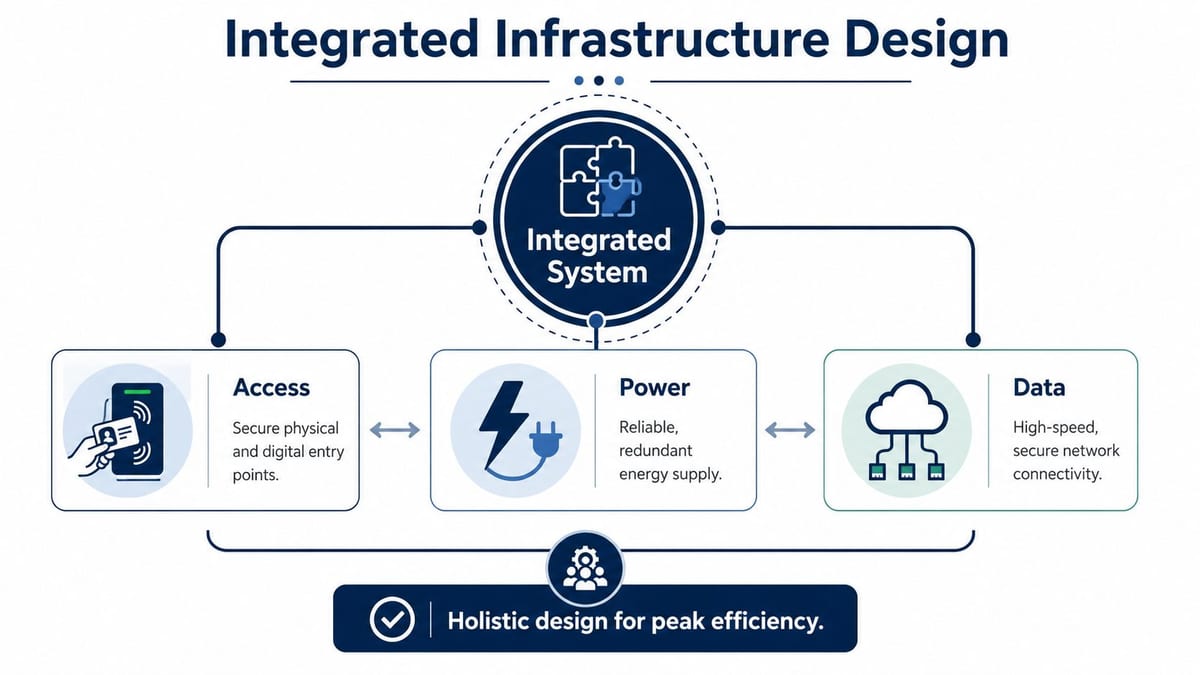
If you're building out a site that nobody will routinely staff, success depends on whether access, power, data, security, and asset management were designed as one operating model rather than separate procurement lists.
What Unmanned Building Management Actually Means
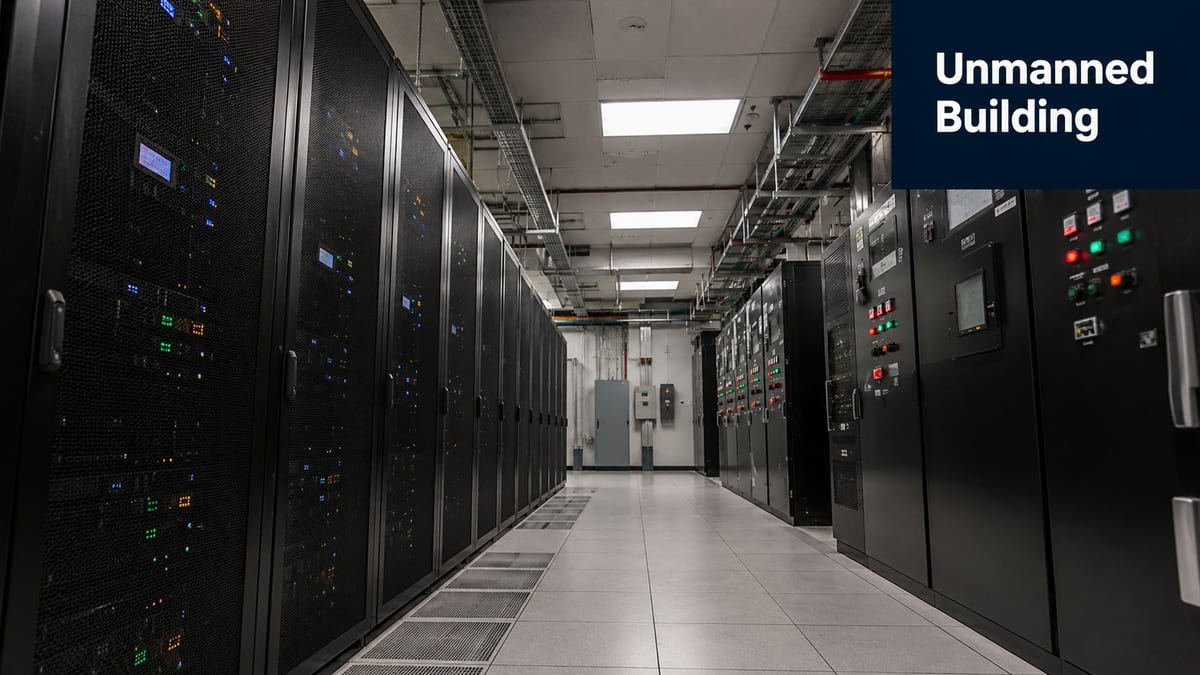
Unmanned building management doesn't mean a building runs itself. It means the building is designed so people don't need to be there for normal operation.
In practice, that usually means remote control and remote verification of the systems that matter most:
- Access control that can grant, deny, audit, and revoke entry without someone on reception
- CCTV that lets teams confirm events instead of guessing what happened
- Environmental controls that keep equipment and spaces within safe operating conditions
- Network services that stay available and are manageable from off-site
- Power resilience so one local issue doesn't turn into a site visit
- Documented asset visibility so support staff know what device they're dealing with before anyone travels
Smart kit isn't the same as an unmanned building
A lot of projects get sold as “smart” because they include app-controlled devices, sensors, or a cloud dashboard. That's not enough.
An unmanned facility has to keep functioning when one component misbehaves, when broadband flaps, when a door controller needs attention, or when support staff need to identify equipment without physically standing in front of it. If the answer to every fault is “send someone out”, the building isn't unmanned in any meaningful operational sense.
Unmanned doesn't mean unmanaged. It means management has moved off-site, so the design has to carry more of the burden.
What it looks like day to day
The practical test is simple. Ask what happens during ordinary operational tasks.
| Task | A workable unmanned setup | A weak setup |
|---|---|---|
| Staff or contractor access | Managed remotely with clear audit trail | Depends on a local keyholder |
| Camera review | Live and recorded footage accessible securely off-site | Footage only checked after a visit |
| Device support | Equipment identifiable and reachable remotely | Team doesn't know what's installed where |
| Power issue | Critical systems protected and prioritised | Single fault takes out everything |
| Change control | Moves and adds documented centrally | Site knowledge lives with one person |
Where this model is commonly used
The pattern turns up in more places than people think:
- Plant rooms and utility spaces
- Shared office annexes
- Storage and distribution sites
- Small data rooms and edge compute locations
- Temporary project compounds
- Commercial units between occupancies
- Remote welfare or service buildings
- Multi-site estates where only periodic attendance makes sense
The common thread isn't glamour. It's operational discipline. Someone still owns the site. Someone still supports it. The difference is that the building, the cabling, the electrical installation, the remote access path, and the physical security all have to be good enough that routine management happens from elsewhere.
Why Many Unmanned Building Projects Fail
Most failures aren't caused by one dramatic technical error. They come from teams treating the building as a collection of separate systems.
Facilities handles doors. Electrical handles power. IT handles switches and internet. Security handles cameras. Then everyone is surprised when the whole thing behaves badly under real conditions.
The design is fragmented from day one
A common failure pattern starts at procurement. Each package looks reasonable on its own, but nobody owns the combined operating model.
That's how you end up with doors that rely on network components sitting on non-resilient power, CCTV that records but can't be reviewed efficiently off-site, and remote support tools that were never tested across the actual WAN path. The building looks complete on handover day, but it isn't operationally coherent.
Practical rule: If access, CCTV, networking, and electrical works are signed off as separate islands, expect trouble later.
Consumer thinking gets pushed into commercial environments
Another reason projects fail is that decision-makers buy for demo value rather than service life. Consumer-grade locks, cameras, access readers, mesh Wi-Fi, and “smart” gadgets often look attractive because the interface is polished and the upfront cost appears lower.
But unmanned commercial sites don't need novelty. They need predictable behaviour, proper mounting, certified electrical work, structured cabling, managed switching, and equipment that support staff can diagnose remotely. If a system only works well when someone is nearby to reset it, it's the wrong system.
Day-two operations are ignored
A lot of installations are built for launch day. Very few are designed properly for month eighteen.
That's when mundane problems surface. Firmware drift. Asset records get messy. A failed endpoint needs replacement. A remote user reports a machine by desk location even though the layout changed months ago. Nobody knows whether the device is under warranty because the serial data isn't clean.
Historically, WMIC Bios Get SerialNumber has been a standard way to pull a BIOS-embedded serial number or service tag from a Windows PC, and it remains widely documented in help guidance such as Stony Brook University's instructions for finding a Windows PC serial number. That matters because unmanned sites depend on quick, no-touch identification during audits, relocations, and support calls.
Small asset mistakes become big support problems
If a remote site has five devices, people can muddle through. Once the estate grows, poor identification starts costing time and creating risk.
Typical failure points look like this:
- Unknown endpoint identity means support can't match the machine in front of CCTV with the machine in the ticket.
- Messy rack documentation means the wrong device gets rebooted.
- Weak handover records mean moves, adds, and changes are done from memory.
- No remote lookup standard means every engineer uses a different method.
That's why something as simple as a reliable serial lookup matters. In an unmanned building, granular IT tasks aren't side issues. They are the operating fabric.
The project assumes site visits will always be available
Emergency call-outs are always possible in theory. In practice, they're expensive, slow, and disruptive.
If the building can't tolerate a failed card reader, a locked-up switch, or an unknown endpoint without sending someone on-site, then the project has only moved labour around. It hasn't produced real autonomy. Good unmanned design assumes visits will happen, but treats them as exceptions rather than the default maintenance method.
Designing Access Power and Data Together
The projects that work all share one trait. Access, power, and data are designed together. Not coordinated late. Not patched together after fit-out. Designed together from the beginning.
That includes commercial electrical installation and certification, structured cabling, switching, controller locations, lock type, UPS coverage, WAN resilience, and physical routes through the building. If one of those pieces is treated as someone else's problem, the whole site becomes fragile.
Access decisions are infrastructure decisions
A door reader isn't just a security item. It has dependencies.
If the lock hardware, controller, and supporting network path aren't thought through together, the access system can fail for reasons that look unrelated on paper. A poor cabinet location, an unprotected circuit, badly planned cable routing, or a switch with no resilience can all become a door access incident.
That's one reason it helps to understand what PoE is and where it makes sense. In many commercial environments, PoE simplifies deployment, but only if the switching layer, cable standards, and backup power strategy are right.
Power has to match the operating priority
Not every device deserves the same level of resilience. An unmanned site should define what must remain available during a disturbance and what can drop safely.
A practical hierarchy often looks like this:
Life and safety obligations first
Anything with a legal or safety dependency takes priority.Access and comms next
If nobody can get in remotely authorised or nobody can see what's happening, operations degrade quickly.Core network path
The devices that keep management traffic alive need cleaner protection than non-essential edge equipment.Monitoring and verification tools
CCTV, controller visibility, and alerting should stay available long enough for the team to respond intelligently.Non-critical loads
These can be sacrificed early if needed.
Data design can't be an afterthought
I still see buildings where network design gets treated as a late-stage patch. A few cables are dropped where someone thinks they might be useful. Cabinets are placed where there's spare room rather than where routes and thermal conditions make sense. Then the site struggles for years.
For unmanned operation, data design has to account for:
- Controller locations that allow support access without awkward physical intervention
- Segregation between security, user, and management traffic where appropriate
- Cabinet placement that supports maintenance and cable discipline
- Labelling that survives staff turnover
- Remote management paths that are tested, not assumed
- CCTV storage and access requirements as part of the network design, not bolted on later
Design reviews should ask one blunt question: if this component fails at 21:00 on a Sunday, can the team diagnose it from off-site without guessing?
Certified electrical work matters more in unmanned sites
Commercial electrical installation and certification aren't administrative nice-to-haves. They are part of service continuity.
An unmanned facility relies on known load paths, clean segregation, dependable termination, and documented circuits. If electrical quality is poor, IT and security teams spend years chasing symptoms that aren't network problems. Faulty feeds, nuisance trips, poor earthing, and undocumented changes all become harder to resolve when nobody is routinely present.
The building has to behave as one system
The right mindset is simple. Don't ask whether the door works, whether the CCTV works, or whether the internet works. Ask whether the site remains controllable, visible, and supportable when conditions aren't ideal.
That's the standard for building out a fully autonomous unmanned building unit. Not shiny features. Coherent behaviour under stress.
Choosing the Right Hardware for Autonomy
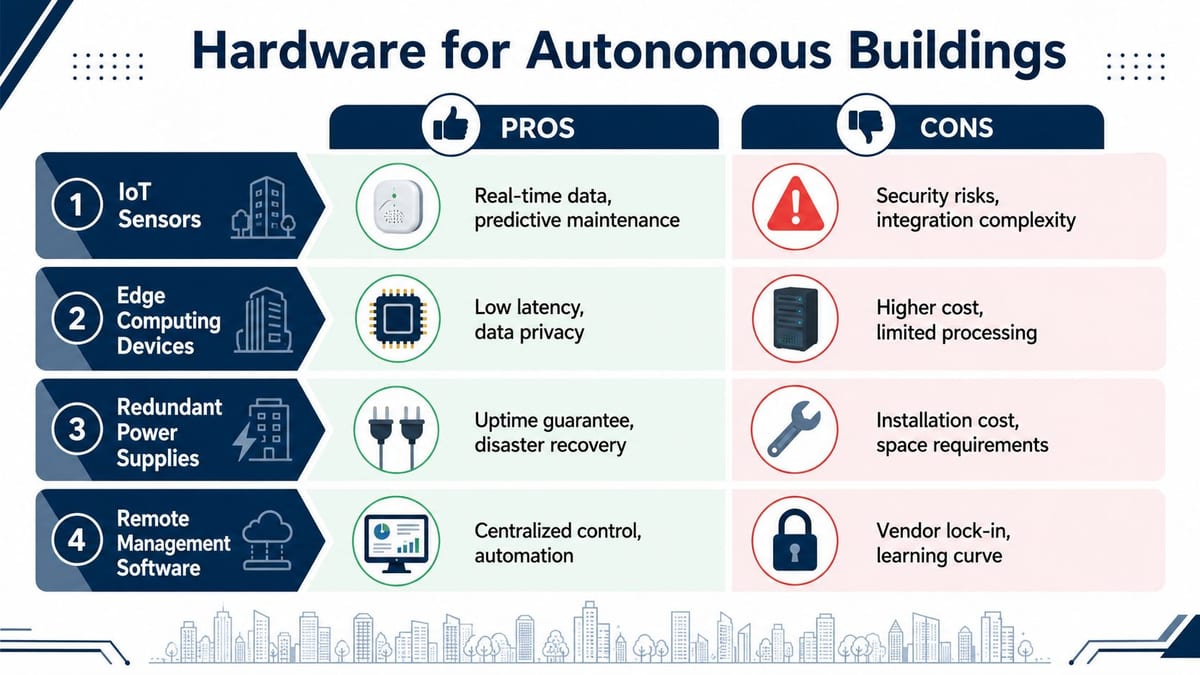
Hardware choices decide whether an unmanned site stays calm in service or turns into a maintenance treadmill. The right kit usually isn't the cheapest on paper. It's the kit that removes failure points, reduces attendance, and behaves consistently across the estate.
Why battery-less NFC proximity locks are often the right call
For many unmanned commercial spaces, battery-less NFC proximity locks solve a very specific operational problem. They remove the maintenance burden of battery replacement from a device category that people tend to forget until access fails.
That matters in remote or lightly attended sites. A dead battery in a lock isn't just a minor defect. It can become an access incident, a contractor delay, a failed handover, or a security workaround that nobody wanted.
Good reasons to choose them include:
- Lower routine maintenance because there's no battery change schedule to manage
- Predictable estate behaviour across multiple sites
- Fewer silent failures caused by neglected consumables
- Cleaner fit for controlled commercial use than improvised standalone smart locks
- Better alignment with remote-first operations where site visits should be deliberate, not reactive
CCTV should be part of the operating model
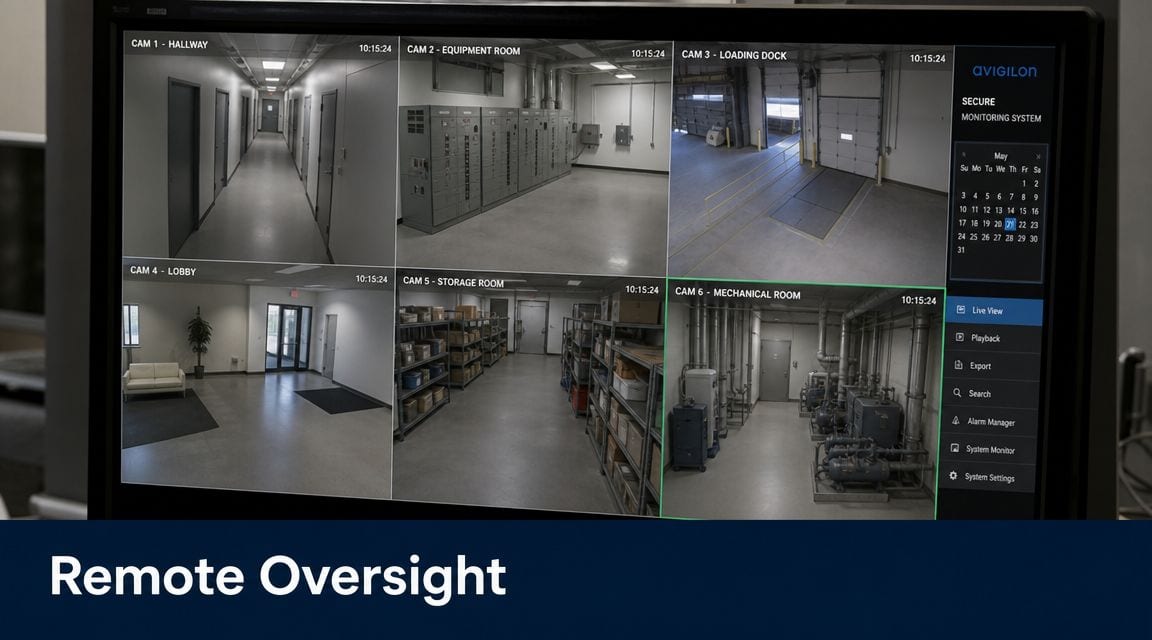
CCTV in an unmanned building isn't just there to record wrongdoing. It's part of remote verification.
If an engineer restarts a device, if a courier needs guided access, if a contractor claims a cabinet was locked, or if an alarm triggers out of hours, video gives operations staff context. It lets them verify doors, corridors, plant spaces, rack rooms, and loading points without inventing a story from partial alerts.
The mistake is buying CCTV as an isolated security package. In practice it belongs inside the wider data and resilience design, because storage, uplink behaviour, user access, and retention handling all affect whether it's useful.
Standardise hardware where visibility matters
Mixed estates create admin drag. Different vendors expose different identifiers, and not all firmware is equally clean.
For endpoint inventory and asset registration, WMIC Bios Get SerialNumber is a hardware query rather than a guaranteed vendor-standard identifier. Output quality depends on OEM BIOS programming. In practice, Dell systems may return a service tag while HP systems may return the system serial, and some devices expose placeholders or blank values, as discussed in this Spiceworks community discussion on pulling system serial numbers from BIOS.
That's why a sensible triage process is to:
- Run the BIOS query first
- Check the result against msinfo32
- Compare with baseboard and computer-system product identifiers
- Standardise collection in PowerShell for bulk work
If you're protecting equipment inside comms rooms or controlled data areas, physical containment matters too. In environments where rack separation or restricted access inside shared areas is needed, resources like MH-USA security enclosures are useful for understanding how cage and enclosure strategies support physical segmentation around sensitive infrastructure.
The best hardware choice is often the one that removes an entire class of future support ticket.
Remote Operations and Maintenance Realities
Once the site is live, operational reality arrives quickly. Somebody needs access out of hours. A workstation stops checking in. A camera is reachable but a local controller isn't. A support ticket says “the small PC in the cabinet by the side entrance” and nobody trusts that description.
Remote tooling stops being a nice extra and becomes the daily operating method.
A practical way to identify a Windows endpoint
For legacy and mixed Windows estates, WMIC Bios Get SerialNumber is still a familiar check when you need fast local identification.
A basic local query looks like this:
- Open Command Prompt on the target machine.
- Run
wmic bios get serialnumber. - Read the returned value and compare it with your asset record.
If you need broader remote support workflows around secure access methods, Cloudvara's remote access guide is a useful primer on the wider remote access model that sits around tools like this.
When you need more than one identifier
One serial value on its own isn't always enough, especially in mixed OEM fleets or inherited estates. A stronger support habit is to capture several identifiers and store them consistently in the asset register.
A simple comparison framework looks like this:
| Check | Why it helps |
|---|---|
| BIOS serial | Fast first pass for many physical devices |
| Baseboard serial | Useful cross-check when BIOS output is odd |
| Computer-system product ID | Helps reconcile ambiguous records |
| msinfo32 summary | Good human-readable validation step |
This matters in unmanned sites because remote staff need confidence before they approve changes, arrange replacements, or tell a contractor which box to touch.
The command isn't universal any more
This is the point a lot of older documentation misses. WMIC is effectively a legacy Windows management interface in modern environments, so WMIC Bios Get SerialNumber is less reliable as a universal method on newer installations. Support discussions and Microsoft-related guidance show that WMIC may be absent unless the optional feature is installed, and users have reported empty results where firmware or virtual machine settings don't expose a serial value, as noted in this GitHub issue covering blank WMIC serial output and SMBIOS handling.
That has operational consequences. If your unmanned site procedure assumes the command will always work, your support runbook is incomplete.
Build your remote process on the assumption that some devices will return nothing useful the first time you query them.
What to do when WMIC fails
When the command returns a blank value or the tool isn't present, don't waste time pretending the problem is mysterious. Work the problem in order.
Check whether WMIC is available
On some newer Windows builds, it may need to be enabled as an optional feature.Confirm whether the device is physical or virtual
Virtual machines may not expose the serial in the way you expect.Validate firmware quality Some devices don't present a useful BIOS serial.
Use modern PowerShell methods
Query WMI throughGet-CimInstanceinstead of relying on WMIC alone.Update the asset record once verified
Don't solve the same identity problem twice.
For remote environments, secure transport matters just as much as the command itself. If you're reviewing how engineers reach isolated sites, a guide on choosing the right VPN router for business use is relevant because remote management only works well when the connectivity path is stable and supportable.
PowerShell should be in the standard toolkit
Even if your team still uses WMIC for quick checks, modern estates should standardise PowerShell collection for repeatable inventory and bulk administration. That gives you a cleaner path for automation, scheduled auditing, and future-proofing as Windows evolves.
In practical terms, the lesson is simple. Don't anchor your unmanned building operations to one legacy command. Use it where it's convenient, but build your support model around multiple verification methods, documented remote access, CCTV-assisted verification, and disciplined asset records.
Building Out Your Fully Autonomous Unit
A fully autonomous unit isn't created by buying smart products. It's created by joining infrastructure decisions together so the site can be operated, supported, and secured without constant attendance.
That means the access model has to fit the power design. The power design has to support the network. The network has to carry CCTV, monitoring, and remote management reliably. The electrical installation has to be commercial-grade, certified, and documented. The hardware has to reduce maintenance rather than generate it. The asset register has to be good enough that a remote engineer can identify the right device without guesswork.
The build standard that actually holds up
A workable unmanned unit usually has these traits:
- Integrated design across access, power, and data
- Commercial electrical installation and certification instead of improvised additions
- Battery-less NFC proximity locks where reduced maintenance matters
- Enterprise CCTV used for verification as well as security
- Structured asset identification so remote support can act quickly
- Runbooks for failures instead of informal tribal knowledge
Some of the best small-footprint deployments also benefit from compact but capable gateway hardware. If you're assessing all-in-one edge designs, this look at the Dream Machine Pro is a useful reference point for thinking about security, routing, and management at the site edge.
The important point is that autonomy is earned in design and proven in operations. If the building can't cope with ordinary faults, controlled access changes, and remote troubleshooting, it isn't autonomous yet. It's only lightly staffed.
If you're planning an unmanned facility, office fit-out, remote comms room, or secure edge site, Constructive-IT can help you design the access, power, data, CCTV, and operational processes as one joined-up system so the building works in practice, not just on the handover sheet.