
You're probably dealing with a continuity conversation that sounds familiar. The board wants resilience. Facilities wants the move completed on time. IT wants clean cutovers, stable Wi-Fi, and no surprises in the comms room. Security wants access control and CCTV signed off. The problem is that these workstreams often run in parallel, not as one design.
That's where most business continuity strategies go wrong. They treat continuity as a document, a cloud backup policy, or an incident response exercise. In practice, continuity starts much lower down. If the doors don't open, the power isn't clean, the network cabinet overheats, or the fibre path shares a single point of failure with the landlord's riser, your recovery plan is already compromised.
This becomes even clearer when the goal is building out a fully autonomous unmanned building units. An unmanned site puts pressure on every assumption in your design. If nobody is regularly on site, access, power, data, CCTV, environmental monitoring, and commercial electrical installation and certification all have to work together without hand-holding. That makes the physical layer the most overlooked part of resilience, and often the deciding factor in whether the project works at all.
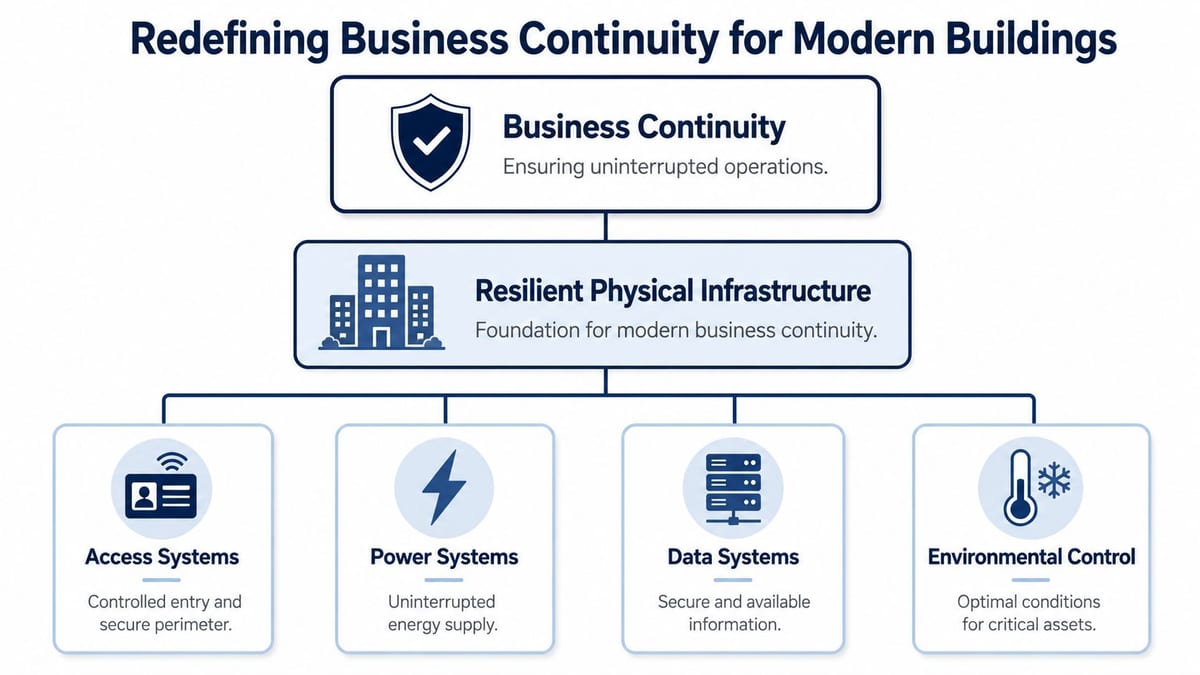
Redefining Business Continuity for Modern Buildings
Many still associate business continuity with backups, failover, and cyber response. Those matter. But the building itself is part of the continuity plan. If your office, warehouse, clinic, or unmanned unit can't provide secure access, stable power, and predictable connectivity under stress, the rest of the plan becomes theoretical.
For UK organisations, aligning business continuity strategies with ISO 22301 is a core technical requirement. That standard mandates a formal Business Impact Analysis, plus defined RTOs and RPOs, which forces an integrated approach connecting business priorities to network topology and physical infrastructure design, as outlined in this ISO 22301 and continuity planning guidance.
What BIA means on a live infrastructure project
A Business Impact Analysis sounds corporate until you apply it to an actual fit-out. Then it becomes practical very quickly.
If the BIA says a clinical records system, production line, or front-office platform can't be unavailable beyond a defined window, that requirement has to flow into design decisions such as:
- Cabling routes: One riser route isn't resilient if a single building incident can take out every uplink.
- Power design: A comms cabinet on a shared spur with office kettles and cleaners' sockets isn't a continuity strategy.
- Access control: If a network failure locks staff out of critical rooms, the access system has become an outage multiplier.
- Cooling and environmentals: A small server room without monitored airflow can fail long before core systems report an issue.
The physical layer is where continuity becomes real
In office relocations and new builds, IT directors often inherit site decisions made earlier by estates, contractors, or landlords. By that stage, the expensive mistakes are baked in. Continuity isn't something you bolt on after first fix. It has to sit in the same early conversations as containment, distribution boards, rack positions, ISP entries, and door hardware.
Practical rule: If a service is business-critical, trace the physical path that keeps it alive. Don't stop at the application diagram.
That's also why continuity planning benefits from looking beyond the usual IT stack. In projects where temporary energy resilience or alternative fuel logistics matter, this guide to mobile gas for industrial facilities is a useful example of how operational continuity often depends on infrastructure outside the server room.
A good continuity design doesn't separate building systems from business systems. It treats the site as an operational platform. Structured cabling, telecoms, power, access, and environmental control are not support services. They are the foundation that every recovery target depends on.
Core Continuity Strategies in an Infrastructure Context
At infrastructure level, business continuity strategies usually fall into four groups. Preventive, detective, corrective, and recovery. The useful question isn't which one you have. It's whether each one exists in physical form at the site.
A 2022 BCI report found that 76% of UK organisations experienced at least one operational disruption in the last year, with technology failures cited by 42%, which is a strong reminder that continuity has to be designed into the systems people rely on every day, as summarised in this BCI Horizon Scan coverage.
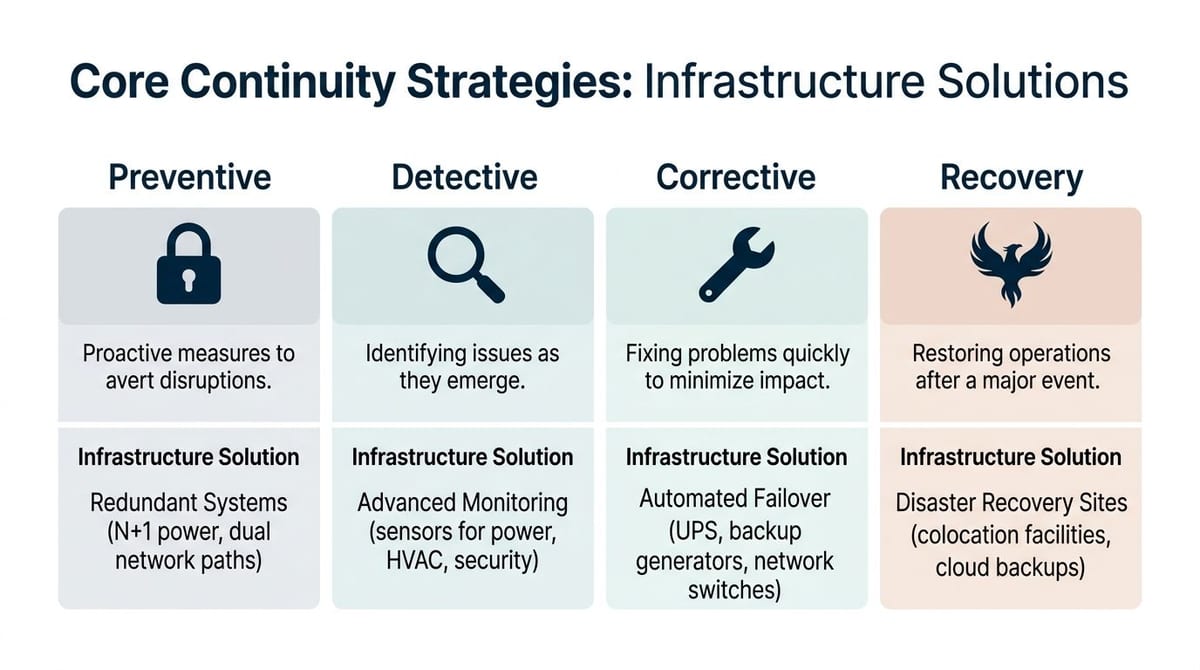
Four strategies mapped to real infrastructure decisions
| Strategy | What it looks like on site | What usually fails |
|---|---|---|
| Preventive | Diverse fibre paths, labelled Cat6 and fibre, segregated power circuits, resilient rack layouts | Shared routes, messy patching, single-carrier dependence |
| Detective | UPS alerts, cabinet temperature sensors, switch monitoring, CCTV health checks | Monitoring only at server level, nothing at edge or room level |
| Corrective | Automatic WAN failover, redundant switches, UPS ride-through, remote reboot capability | Manual interventions that depend on someone being nearby |
| Recovery | Secondary workspace, cloud restores, spare hardware strategy, documented rebuild sequence | Backups that restore data but not operations |
The reason these categories matter is simple. If all your resilience spend goes into recovery, you're choosing disruption and hoping to shorten it. That's expensive and operationally messy. A preventive measure, such as dual carrier entry points, often costs less than the downtime caused by losing a single building feed.
What works better than theory
A practical continuity review usually compares alternatives side by side:
Single comms room vs distributed edge design
- A single room is simpler to manage.
- It also concentrates heat, power, and physical access risk.
One premium ISP vs two diverse carriers
- One carrier may look cleaner commercially.
- Two routes usually offer better continuity if they enter the site through separate paths.
Generator-only mindset vs layered resilience
- Backup generation helps.
- It doesn't fix poor UPS design, weak transfer arrangements, or bad downstream distribution.
For organisations reviewing power resilience alongside wider infrastructure planning, this overview of commercial solar battery storage solutions is useful background. It helps frame the trade-off between short-duration ride-through, longer autonomy, and how alternative energy resilience fits with your electrical design.
The same logic applies to UPS design in office and comms spaces. A well-scoped review should look at load, runtime, transfer behaviour, maintenance bypass, and what remains energised during an incident. This UPS review article is a good reference point for that discussion.
A short walkthrough of continuity planning in operational environments is worth watching before a design workshop:
Resilient buildings don't rely on one clever component. They rely on ordinary components arranged so that one failure doesn't become a site-wide outage.
The Unmanned Building A Case Study in Continuity
An unmanned building doesn't mean no human ever enters the site. In practice, it means the building can operate for long periods with minimal on-site staff, while core services are monitored, controlled, and supported remotely. Access control, alarms, CCTV, network health, power status, and environmentals all have to remain visible and manageable without someone sitting at reception or walking the floor every day.
That model is common in satellite offices, self-contained business units, utility sites, storage and logistics facilities, plant rooms, some healthcare support buildings, and mixed-use developments where occupancy is intermittent. It's also becoming more relevant for organisations trying to reduce staffing overhead while maintaining secure, available buildings.
Why many unmanned building projects fail
The failure pattern is usually the same. Teams design access, power, and data in separate silos. Security specifies the locks. Electrical contractors install the distribution and emergency arrangements. IT handles the WAN, Wi-Fi, switching, and remote management. Each workstream may be competent on its own, but the site still fails operationally because the interfaces weren't engineered.
Many firms still treat physical infrastructure decisions separately from Business Continuity Management, despite evidence that network and cabling faults are common causes of unplanned downtime. That gap is a primary reason why ambitious autonomous building projects fail, as discussed in this research on infrastructure integration and resilience.
Here's what that looks like on the ground:
- Access depends on data. If the lock controller or reader path relies on a fragile network segment, a minor switch fault becomes a building access issue.
- Power supports security. If door hardware, CCTV, and comms cabinets don't sit on the right backed-up circuits, a local electrical event creates both a security problem and an outage.
- Remote management needs visibility. If nobody can confirm what's happening through CCTV, environmental alerts, and out-of-band access, the site isn't autonomous. It's blind.
What unmanned building management means in practice
The workable version of unmanned management is less glamorous than the sales brochures. It's disciplined engineering.
That normally includes:
- Remote access governance: Staff, contractors, and emergency responders need clear access rules, not ad hoc badge exceptions.
- Commercial electrical installation and certification: Every critical feed, final circuit, and protective arrangement has to be documented, tested, and signed off for the operating model.
- CCTV integrated with operations: Cameras are there to verify conditions, confirm arrivals, support incident response, and reduce unnecessary callouts.
- Known failure behaviour: Doors, barriers, comms, and lighting need predictable states during network loss, local power failure, and wider site incidents.
A modern management platform can help, but it won't rescue a poor physical design. The same goes for networking hardware. Even in smaller sites, the architecture matters more than the brochure. If you're evaluating compact network platforms for distributed environments, this Dream Machine Pro overview gives a useful example of the kind of all-in-one thinking teams often reach for. The important part is making sure the device choice matches the continuity model, not the other way round.
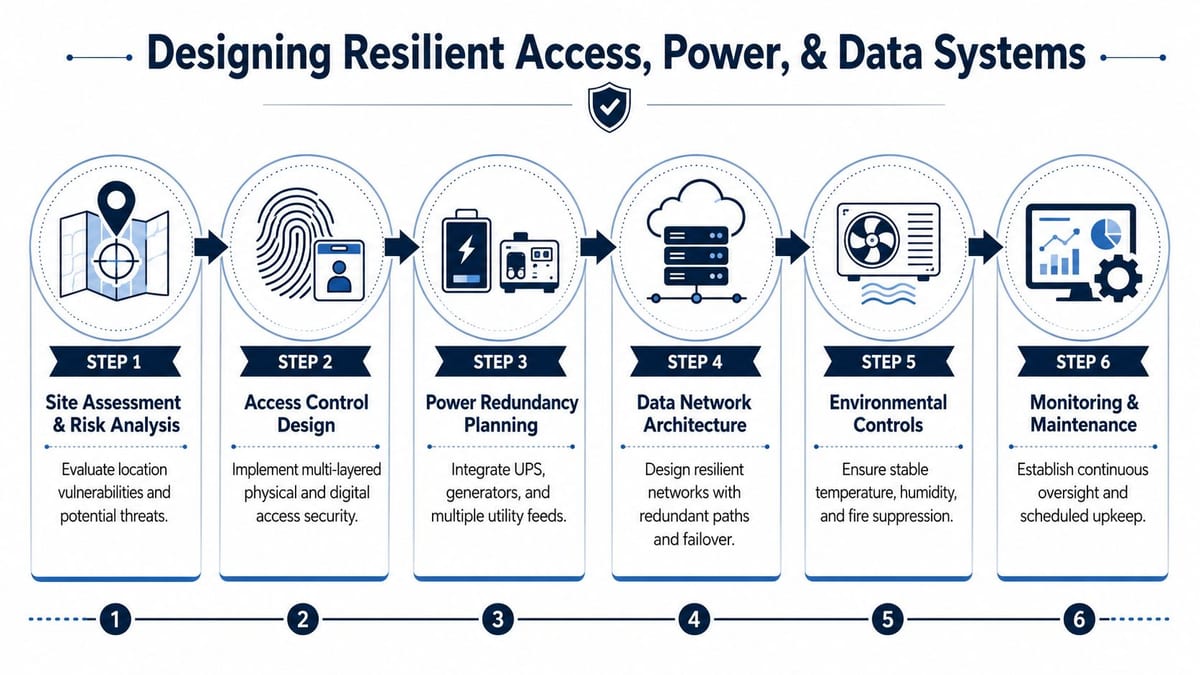
Designing Resilient Access Power and Data Systems
If you want an unmanned or lightly staffed site to stay operational, access, power, and data have to be designed together. Not coordinated later. Not “made compatible” at handover. Designed as one system.
The reason is straightforward. Every building event crosses disciplines. A power dip affects switching. A network outage affects doors. A failed reader affects contractor access, which delays repairs to the electrical fault that caused the issue in the first place. The systems aren't separate in operation, so they can't be separate in design.
The 2023 UK Cyber Security Breaches Survey found that 87% of UK businesses have at least one basic cyber security control in place, but only 24% have a formal business continuity plan that explicitly addresses cyber incidents, a gap that matters because cyber disruption can disable building access or communications if those systems aren't designed with continuity in mind, as noted in this summary of the UK cyber breaches survey.
Why battery-less NFC proximity locks make sense
Battery-powered wireless locks are attractive because they reduce first-fix work. On many continuity-led projects, though, battery-less NFC proximity locks are the better call.
Real-world reasons include:
- No battery replacement programme: Batteries create a maintenance estate. In unmanned buildings, missed replacements become access incidents.
- Fewer silent failures: Mechanical wear is obvious. Battery degradation is often not, especially when reporting is inconsistent.
- Cleaner operating model: Facilities teams don't need another recurring schedule spread across multiple doors and sites.
- Better fit for low-touch areas: Comms rooms, riser cupboards, plant spaces, and controlled internal doors often need reliability more than convenience features.
That doesn't mean battery-less is always right. If a door needs high-frequency wireless management, temporary access changes, or difficult heritage routing, there may be reasons to choose other hardware. The point is to make the decision on continuity grounds, not only install speed.
Design rules that hold up under pressure
A resilient design usually follows a few principles.
Separate critical door hardware from fragile network assumptions
Decide what happens if local data is lost. Some doors should fail secure. Others need managed fail-safe behaviour. Write that down before hardware selection.Back up the paths that matter, not every socket
UPS support should prioritise access control panels, switching, WAN edge, CCTV recording where required, and remote management. Protecting non-critical loads wastes runtime.Treat CCTV as an operational tool
CCTV isn't only for post-incident review. In unmanned sites it verifies deliveries, confirms engineer attendance, checks plant areas, and helps triage alarms before dispatching staff.Use certified electrical work as a continuity control
Commercial electrical installation and certification isn't just compliance paperwork. It's how you confirm circuit integrity, discrimination, earthing arrangements, and the quality of the power environment your IT and security stack depends on.Plan connectivity like a utility, not a purchase
ISP diversity, internal switching resilience, Wi-Fi coverage, and out-of-band access need to support the operating model. For teams comparing provider options, a SwiftNet Wifi business internet review can be a helpful starting point for discussing service type, failover expectations, and support realities.
For mixed wired and wireless estates, this Ethernet and wireless design article is a useful reminder that Wi-Fi doesn't replace the need for a reliable fixed layer. It sits on top of it.
On site, the best continuity designs are usually the least dramatic. They remove avoidable dependencies before anyone notices them.
Infrastructure Testing and Operational Readiness
A continuity design isn't proven when the install team leaves. It's proven when the site behaves correctly under fault conditions. Until then, you have assumptions, not readiness.
The 3-2-1-0 data protection rule, meaning three copies of data, on two media, with one off-site or immutable copy and zero unverified errors, provides a strong mental model for infrastructure resilience as well. Applying that logic to physical systems, such as diverse carrier paths and redundant power feeds, is critical for meeting aggressive recovery targets, especially in NHS or public sector environments, as explained in this data continuity and 3-2-1-0 guidance.
Test the building, not just the backup
Too many teams test only what's easy to schedule. They restore a file. They confirm a VM boots. They tick off “DR tested” and move on. For a real site, that misses the harder questions.
Can the building still function if the primary WAN fails? What happens to access control if the controller loses upstream communications? Which CCTV views remain available during partial network loss? Does the UPS runtime match the actual load, not the spreadsheet load?
A stronger test regime includes:
- Power event testing: Simulate mains loss and confirm transfer behaviour, protected loads, and alarm visibility.
- Network path testing: Fail the primary carrier and observe routing, session persistence, and remote access continuity.
- Door state testing: Verify how each critical door behaves during controller, power, and communications faults.
- Environmental alarm testing: Confirm monitored thresholds trigger the right escalation path and reach the right people.
Maintenance is part of continuity, not an afterthought
Unmanned and lightly staffed buildings only work if someone owns operational discipline. That includes firmware windows, electrical inspections, CCTV retention checks, UPS battery health where applicable, lock function checks, and clear support boundaries between IT, facilities, and security vendors.
A simple operating table usually exposes gaps fast:
| Area | What should be verified regularly | Common blind spot |
|---|---|---|
| Access | Credential rules, override procedures, door health | No documented response when remote release fails |
| Power | Protected loads, alerting, transfer performance | Added loads eroding UPS runtime |
| Data | WAN failover, switch health, remote management | No test after moves, adds, and changes |
| CCTV | Camera visibility, storage health, time sync | Cameras recording but not usable operationally |
“If you haven't tested it under controlled failure, you don't know how it behaves. You only know how it behaves when everything is fine.”
Operational readiness also depends on paperwork being useful. Drawings need to reflect the built environment. Labels must match schedules. Incident playbooks should be short enough for an engineer or duty manager to follow at speed. The best continuity documentation is boring, accurate, and close to hand.
From Blueprint to Resilience Your Next Steps
The practical lesson is straightforward. Business continuity strategies don't begin with the disaster recovery platform or the cloud tenancy. They begin at the blueprint stage, where someone decides how power enters the site, where data paths run, how doors are controlled, where CCTV sits, and what still works when one of those layers fails.
That's why office relocations, server room expansions, and new fit-outs are continuity projects whether they're labelled that way or not. A clean-looking install can still be fragile. A well-documented BCP can still collapse if the comms room overheats, the access system depends on a single failed switch, or the electrical design doesn't support the loads people assume are protected.
What to review before your next project starts
Before the next move, refit, or unmanned unit deployment, pressure-test these questions:
- Business priorities: Which services drive your RTO expectations, and what physical systems keep them alive?
- Dependency mapping: Have you linked applications and operations to doors, circuits, carrier entries, cabinets, and environmental controls?
- Failure behaviour: Do you know what the building does during partial power loss, WAN failure, or controller isolation?
- Operational ownership: Is there a clear handover model for IT, estates, security, and maintenance after go-live?
The biggest improvement usually comes from one change in timing. Bring infrastructure specialists into the planning phase earlier. Not after the lease is signed, not after first fix, and not a week before cutover. Early design input prevents expensive redesigns and closes the gap between continuity policy and site reality.
A resilient building doesn't happen because every component is premium. It happens because the design accepts that failures will occur and makes sure they stay contained.
If you're planning an office relocation, a new fit-out, a server room upgrade, or a site that needs to operate with minimal downtime, Constructive-IT can help at the stage where continuity decisions matter most. Bringing network, cabling, power, Wi-Fi, CCTV, and site-readiness planning together early usually avoids the rework, delays, and hidden single points of failure that show up later.