
Most advice on energy efficient data centres is too narrow. It treats efficiency as a utility-bill problem, measured in a rack room and solved with better cooling kit.
That misses the operational reason many UK organisations now care about it. An efficient data environment is easier to power, easier to automate, easier to monitor remotely, and far easier to trust when nobody is standing next to the racks. In practice, that makes efficiency a building strategy, not just an engineering target.
The UK context sharpens the point. The government's 2024 AI Energy Council highlighted the need for secure power to support data centre and AI growth, while electricity demand is expected to rise sharply as digital infrastructure expands, according to guidance discussing power pressure and efficiency in data environments. If power availability, connection timing, and site constraints are becoming harder, efficiency stops being optional. It becomes part of resilience planning.
That's why the better question for an IT Director isn't “How do we lower energy spend?” It's “How do we build a site that can keep running, keep reporting, and keep controlling access with minimal human intervention?” The answer usually starts in the server room, plant room, and comms spaces long before anyone talks about dashboards.
The New Imperative for Data Centre Efficiency
Efficiency now decides whether some projects can operate as designed at all.
For UK organisations adding on-site compute, upgrading comms rooms, or supporting AI workloads in commercial buildings, a primary constraint is often power capacity, power quality, and what the building can support continuously without adding operational fragility. A design that wastes energy also wastes headroom. That matters far more in a site expected to run safely overnight, across weekends, or with only exception-based attendance.
An efficient data environment does more than trim consumption. It reduces heat rejection, eases pressure on cooling plant, simplifies backup power planning, and gives facilities and IT teams more room to handle faults without sending someone to site. In practice, that is what makes remote operation credible.
Efficiency now affects whether projects are workable
Early design decisions now carry operational consequences well beyond the server room. If the load profile is unstable, the UPS is poorly sized, or cooling control cannot respond cleanly to part-load conditions, the building inherits those weaknesses. The result is higher alarm noise, more maintenance callouts, and less confidence in unattended operation.
That is the shift many IT Directors are dealing with. Energy performance is no longer a reporting metric that sits beside uptime. It shapes uptime, because inefficient sites run hotter, cycle harder, and leave less margin for abnormal conditions.
Efficient infrastructure is easier to automate because it is calmer infrastructure. Lower thermal stress, fewer power anomalies, and cleaner monitoring data make remote control more credible.
The building angle many teams miss
Many “smart building” projects begin with apps, occupancy logic, and remote access workflows. The harder work starts earlier, with electrical capacity, cooling behaviour, fail-safe access, and the data path that ties those systems together.
That matters most in autonomous commercial units, remote comms rooms, service risers, and technical floors visited only for planned works. If the data environment is efficient, the building has more tolerance for running unattended. If it is not, every avoidable watt shows up somewhere else as heat, battery runtime pressure, fan wear, nuisance alarms, or a manual reset.
This is why data-centre efficiency belongs in the same conversation as access control, remote monitoring, and building autonomy. Design for low overhead and stable operation first, and unmanned operation becomes realistic. Treat efficiency as a narrow energy target, and the building still depends on people turning up to keep it running.
Defining Real-World Data Centre Energy Efficiency
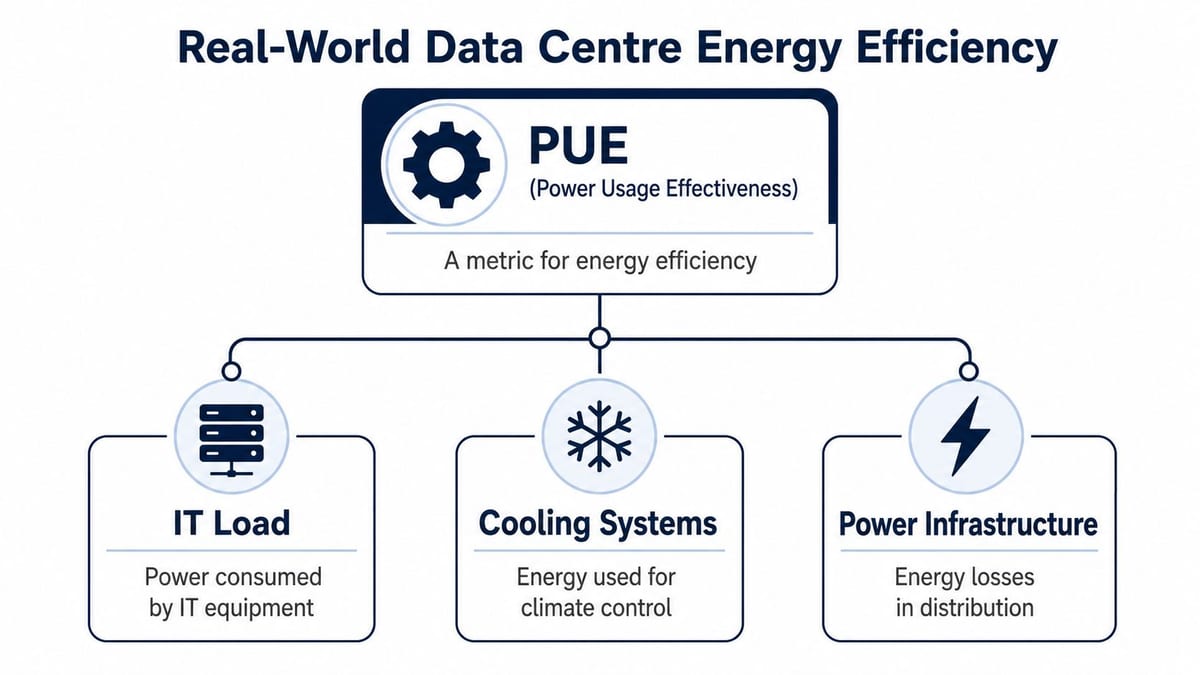
Real-world efficiency starts where facilities teams can measure waste, not where marketing claims sound impressive. PUE, or Power Usage Effectiveness, remains the standard facility metric because it shows how much site energy is going into cooling, power conversion, lighting, and support systems instead of the IT load itself.
That makes PUE useful, but only if it is read in context.
A low PUE does not guarantee an efficient operating model. A site can post respectable facility numbers and still carry idle servers, oversized UPS capacity, poor rack density decisions, or network paths that force inefficient layouts. I have seen rooms with acceptable PUE figures that still generated avoidable callouts because the electrical and cooling design did not match how the space was being used.
What PUE tells you and what it doesn't
PUE answers a direct facility question: how much extra building energy is required to support the IT estate?
That matters because many efficiency failures sit outside the servers. Poor airflow discipline, badly loaded UPS systems, over-provisioned cooling plant, and conservative setpoints left untouched for years will all inflate energy overhead. The IT kit may be modern. The room around it may still be working too hard.
PUE also leaves gaps. It does not tell you whether applications are placed sensibly, whether rack power is balanced, or whether the network design is forcing equipment into the wrong rooms. It says nothing about whether the site can keep operating sensibly during a WAN issue, a door access fault, or a partial power event. For buildings expected to run with limited attendance, those details matter as much as the utility bill.
Cooling is still where many sites gain ground
Cooling usually offers the fastest practical savings because it interacts with almost every other design choice in the room. If airflow is unmanaged, power losses rise, fan speeds rise, hot spots trigger alarms, and operators respond by lowering temperature setpoints across the whole space. That is expensive and usually unnecessary.
UK conditions can help, provided the design is disciplined. Outside air, economisation strategies, containment, sensor placement, and control logic all need to work together. Cooling efficiency is not about chasing the lowest room temperature. It is about holding stable conditions with the least mechanical effort.
The network matters here too. Remote monitoring, environmental sensing, and automated control all depend on resilient connectivity between plant, racks, access systems, and management platforms. That usually means planning the right mix of Ethernet and wireless infrastructure early, rather than treating building telemetry as an afterthought.
What usually works and what usually doesn't
| Approach | What works in practice | What tends to fail |
|---|---|---|
| Airflow management | Hot/cold aisle containment, blanking panels, disciplined rack layout | Mixed rack orientations, cable sprawl, bypass airflow |
| Cooling control | Real-time adjustment of setpoints and output based on live load | Fixed conservative settings left untouched for years |
| Power path | Right-sized distribution and efficient support systems | Large safety margins that become permanent inefficiency |
| Refresh strategy | Replace equipment when it solves a measured bottleneck | Swapping servers while ignoring the room around them |
Practical rule: If airflow is unstable, every later efficiency measure costs more and delivers less.
For IT Directors, the operational point is straightforward. Real efficiency is the result of coordinated design across room layout, cooling, electrical distribution, monitoring, and connectivity. That is why it supports autonomous buildings so well. A site with lower thermal stress, cleaner power behaviour, and better telemetry is easier to supervise remotely, easier to secure, and far less likely to need someone on site for routine intervention.
The Ultimate Goal Unmanned Building Operations
In practice, unmanned building management doesn't mean a building with no people in it. It means a building that can operate safely and predictably without routine on-site supervision. The site still gets visits for maintenance, inspections, deliveries, faults, and change work. What changes is the default mode. Access is controlled by exception, systems are monitored remotely, and the building can make or support operational decisions without someone standing at the panel.
That model is common in more places than many teams realise. Remote server rooms, edge cabinets in regional offices, comms rooms in mixed-use developments, plant spaces in logistics units, out-of-hours office floors, utility enclosures, and small technical rooms in healthcare and education estates often need exactly this kind of operating pattern.
What unmanned looks like when it's done properly
A workable unmanned site usually has the following characteristics:
- Remote visibility first. Operators can see power state, environmental conditions, alarms, CCTV views, and network status without going to site.
- Physical access by policy. Doors, cabinets, and secure zones open only for authorised people, approved windows, or specific tasks.
- Graceful failure behaviour. If a network path drops or a sensor faults, the site remains safe and controlled.
- Documented local fallback. Engineers know what happens if the WAN is down, if a door controller loses comms, or if a cooling unit alarms overnight.
A surprising number of projects call themselves autonomous when they only have cloud dashboards and app-based access. That's not autonomy. That's remote dependence.
Why many unmanned projects fail
Most failures are design failures, not software failures. Teams buy monitoring tools, smart locks, occupancy analytics, and cloud control layers, but they don't harden the underlying physical estate.
Common examples include:
- Access planned in isolation. The lock vendor assumes the network will always be up. The network team assumes facilities will handle the doors. Nobody defines fail-secure versus fail-safe behaviour by area.
- Power treated as a background service. Door hardware, controllers, switches, cameras, sensors, and environmental systems all need power continuity. If they sit on mismatched circuits or unprotected supplies, the building becomes blind before it becomes inaccessible.
- Data paths overlooked. Remote control is only as trustworthy as the wired and wireless design carrying telemetry and commands. Poor segmentation, single points of failure, and weak coverage undermine the entire concept. This is why Ethernet and wireless design needs to be settled as part of the core infrastructure, not as a late-stage add-on.
- No operational model. Alerts go to too many people, nobody owns response windows, and maintenance teams inherit systems they didn't help specify.
Unmanned projects usually fail at the seams between trades. The software is visible, so it gets attention. The interfaces between electrical, access control, CCTV, networking, and cooling are less visible, so they get missed.
The server room sets the standard
If the technical core of the building can't run cleanly, the rest of the autonomous model won't survive contact with reality. A room that overheats, trips support systems, or requires constant local adjustment won't support remote-first operations elsewhere in the estate.
That's why energy efficient data centres matter beyond the data-centre boundary. They create stable, low-drama infrastructure. And stable infrastructure is what unmanned operation runs on.
Integrated Design for Power Access and Data
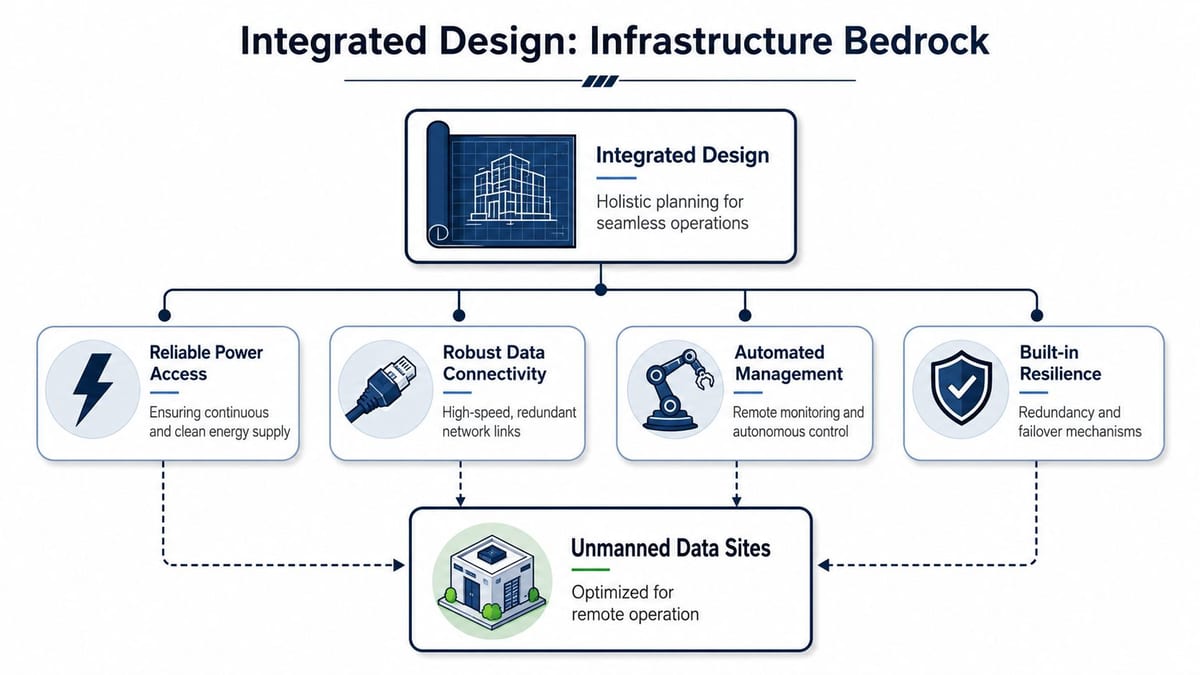
The most reliable unmanned buildings are designed as one system, not a pile of specialist packages. Power, physical access, data cabling, wireless coverage, CCTV, monitoring, and electrical certification all affect one another. If those workstreams are split too early, you get a building that looks integrated on a drawing but behaves like separate subsystems in service.
The UK moved in the right direction years ago. The 2012 government code of practice for data centres helped establish energy efficiency as a design criterion from the outset of a project, shaping how office and server-room projects are specified and audited, as outlined by the IEA 4E summary of the UK code and related work. That same principle applies to autonomous buildings. Design the operating model first, then design the infrastructure that supports it.
Why access control belongs in the electrical conversation
A door isn't just a security device. In an unmanned environment, it is part of the building's resilience model.
That's one reason battery-less, NFC proximity locks are attractive in the right settings. They remove a routine maintenance burden that catches out many remote sites. There are no lock batteries to degrade, no large estate of battery replacement dates to track, and fewer avoidable callouts caused by neglected hardware. For small technical rooms, riser cupboards, plant enclosures, remote cabinets, and secondary office areas, that's a serious operational advantage.
They also suit controlled, credential-based access where you want:
- Low maintenance overhead for dispersed sites
- Simple credential administration without constant physical intervention
- Cleaner auditability of who opened what and when
- Less dependence on local battery condition in doors that may see infrequent use
Battery-less doesn't solve every access requirement. High-traffic entrances, life-safety routes, and doors with complex integration needs may require different hardware. The point is broader. Access choice should follow operating reality, not catalogue preference.
Power design decides whether autonomy is believable
Unmanned buildings don't tolerate vague electrical design. Commercial electrical installation and certification are not paperwork exercises. They establish whether the supplies, protection, segregation, labeling, and testing support continuous operation and safe maintenance.
A panel that was acceptable for a conventional fit-out may be the wrong foundation for a remote-operated technical space. If you're reviewing upstream capacity or resilience, a practical reference on commercial panel upgrade considerations can help frame the conversation around load growth, protection, and maintainability.
The rack layer matters too. Cabinet layout, PDU placement, patching discipline, and service access all affect remote operability. That is why U rack mount planning should be treated as part of infrastructure design, not just hardware installation.
Design decisions that need to be made together
| Domain | Question to settle early | Why it matters later |
|---|---|---|
| Power | Which systems must ride through a local outage? | Determines UPS scope, circuit design, and shutdown logic |
| Access | What should each door do when comms fail? | Prevents unsafe or unworkable fail states |
| Data | Which control paths need redundancy? | Stops remote management becoming single-homed |
| CCTV | Which alerts need visual confirmation? | Reduces unnecessary dispatches and misdiagnosis |
| Electrical compliance | What must be tested and documented for handover? | Supports safe maintenance and future fault finding |
Integrated design sounds slower at the start. In reality, it removes the expensive rework that appears when electrical, security, and IT teams discover they've all made different assumptions.
Essential Technologies for Efficient and Autonomous Sites
The technology stack for an autonomous site is less glamorous than many brochures suggest. It is mostly made up of dependable components that expose good telemetry, tolerate faults well, and can be serviced without drama.
Start with the power chain
Modern unmanned sites need a power path that can be monitored in detail. That usually means high-efficiency UPS platforms, intelligent PDUs, and clear circuit-level visibility. The technical objective isn't only ride-through time. It's knowing which load changed, where capacity is tight, and whether a fault is local, upstream, or environmental.
This is also where many retrofits go wrong. Teams keep an ageing UPS because it still “works”, then add remote locks, cameras, environmental sensors, edge switches, and more rack equipment around it. The support estate becomes more important just as visibility into it remains poor.
For many operators, a useful way to think about building and energy management systems is that they should connect operational data across building services rather than sit as isolated dashboards. If your electrical state, environmental alarms, and access events can't be read together, diagnosis stays slow.
DCIM and monitoring have to be operational, not decorative
DCIM is often sold as a single pane of glass. It can be. It can also become an expensive screen nobody trusts.
Good monitoring does a few things well:
- Correlates events so a cooling alarm, rising intake temperature, and switch issue can be interpreted together
- Sends actionable alerts to the right people, instead of flooding everyone
- Retains clean history for maintenance planning and root-cause review
- Supports remote intervention where safe, rather than only reporting failure after the fact
The lesson from unmanned environments is simple. If an alert doesn't help someone decide what to do next, it's noise.
CCTV is part of operations, not just security
CCTV earns its place quickly in remote sites. It lets operators verify whether an alarm reflects a real incident, a maintenance visit, a blocked aisle, a water ingress concern, or a false trigger. In a dark server room or a remote comms enclosure, visual confirmation can save a wasted callout and speed up the right response when something is wrong.
That's why camera placement should follow operational scenarios, not just perimeter coverage. You want sight of entrances, racks, plant interfaces, and any area where an alert may need human confirmation.
Here's a useful overview of resilient power thinking before selecting the support layer:
Reduce the physical estate before you automate it
One of the simplest ways to improve both efficiency and autonomy is to reduce the amount of physical equipment you need to power, cool, patch, and inspect. Virtualisation, workload consolidation, and disciplined application placement can shrink the operational footprint of a site before any facilities upgrade begins.
That matters because every extra physical server adds some combination of heat, cabling, monitoring points, and maintenance effort. Fewer boxes usually mean fewer surprises.
Common technologies by use case
- Remote comms rooms often benefit most from compact UPS, smart PDUs, environmental sensors, NFC-based controlled access, and CCTV verification.
- Office server rooms usually need stronger airflow management, DCIM or integrated monitoring, formal electrical certification, and tighter rack discipline.
- Mixed-use commercial units often need access control, cameras, network segregation, and remote environmental visibility tied together from day one.
- Healthcare and clinical support spaces typically need stricter operational procedures, better audit trails, and clear local fallback during outages.
For teams reviewing resilient backup design, UPS review criteria for business environments can help separate headline specifications from real operating fit.
Your Retrofit and Upgrade Roadmap
Retrofitting for efficiency is usually less about chasing a lower PUE figure and more about making the site dependable enough to run with very little human presence. Many organisations inherit server rooms and edge spaces where power, access control, cooling, and monitoring were installed years apart by different suppliers. The roadmap has to bring those layers into one operating model without creating new points of failure.
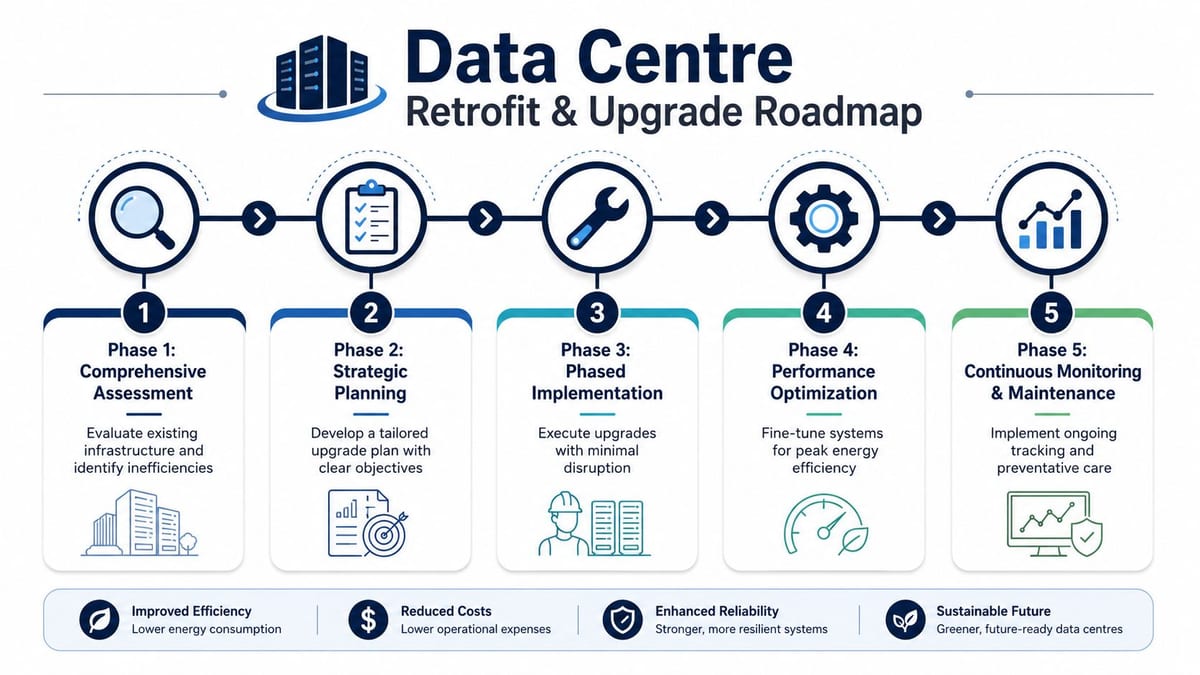
Phase one and phase two
Start with a site baseline and a clear operating intent.
That means more than measuring energy use. It means deciding which rooms can be left unattended, which still require periodic visits, how long each critical load must survive a power event, and who is expected to respond when something fails at 02:00. Without that context, retrofit work tends to optimise isolated components rather than the building as a whole.
The first survey should expose technical debt that blocks autonomous operation. In practice, the same problems show up repeatedly. Poor rack discipline, bypassed cooling paths, undocumented circuits, weak labelling, unmanaged door hardware, and alarms that nobody trusts. None of these are headline projects, but they are often the reason a site stays dependent on regular attendance.
A useful first pass should answer:
- Which loads are critical and which can shut down in a controlled sequence
- Which doors, cabinets, and plant areas need managed access
- Which alarms require immediate action and which only need logging
- Which spaces need camera verification before remote intervention
- Which power paths, cabinet feeds, and network links are still undocumented
Phase three and phase four
Once the baseline is clear, upgrade the systems that limit safe remote operation. That usually means replacing ageing UPS units with equipment that offers better telemetry and battery visibility, tightening cooling control, adding rack level power data, and removing access hardware that fails closed or fails without warning.
Trade-offs matter here. A highly efficient cooling design can still be the wrong answer if it adds maintenance complexity your team cannot support across multiple small sites. In the same way, a cheaper access control refresh can undermine the whole autonomy model if credentials, door state, camera evidence, and alarm handling remain split across separate tools.
UK operators do have one practical advantage. Temperate conditions can support free cooling and more controlled airflow strategies, but only if the room layout, containment, control logic, and maintenance standards are good enough to use that advantage. Legacy rooms often leave that benefit on the table because the physical design and the monitoring model were never aligned.
A retrofit should remove uncertainty before adding automation. If engineers still cannot trust the single-line diagram, the door event log, or the environmental alarms, more software will only make the room look tidier than it is.
Phase five and the handover question
The final phase is where good retrofit programmes either become an operational platform or fall back into a collection of disconnected systems. Handover has to prove that power, access, data, and monitoring work together under fault conditions, not just that each supplier finished their own checklist.
Use a cross-discipline test plan that includes:
- Power events such as mains loss, UPS transfer, generator start if present, and controlled shutdown behaviour
- Access events including authorised entry, denied entry, forced door alarms, and controller comms loss
- Monitoring events such as sensor failure, temperature excursion, water ingress detection, and alert routing
- Network events including loss of remote access, secondary path failover, and recovery
- Maintenance scenarios like camera replacement, electrical isolation, battery service bypass, or credential changes
For retrofit work, documentation is part of the engineering outcome. Electrical test results, structured cabling certification, rack and circuit labels, as-built drawings, escalation routes, and named support ownership all need to be finished before anyone calls the site autonomous. Otherwise the building runs unattended only until the first real fault forces someone to guess how it was put together.
Achieving Long-Term Operational Excellence
Efficient autonomous sites don't stay good by accident. They stay good because someone owns the maintenance model, the alert strategy, the testing routine, and the change control around every connected system.
That matters even more when no one is routinely on site. A minor fault can sit unnoticed if thresholds are poor, camera views are wrong, or maintenance tasks depend on memory instead of schedule. Unmanned buildings need quieter operations, but they also need tighter discipline.
Maintenance changes when attendance becomes exceptional
A conventional building can absorb a surprising amount of drift because someone eventually sees it. In an unmanned environment, drift becomes risk.
The practical response is to build maintenance around remote evidence and planned attendance:
- Review alarm quality so engineers receive useful notifications rather than constant background noise
- Schedule preventive visits based on asset criticality, not convenience
- Test fail states deliberately including comms loss, power transfer, and access exceptions
- Keep documentation live so the next engineer doesn't inherit a drawing that no longer matches the room
Real-time management beats static efficiency
Static design still matters, but operational timing matters too. Research discussed by MIT Sloan notes that workload shifting can reduce costs while its emissions effect depends on the local grid mix, and in the UK a poorly timed shift can increase emissions because grid carbon intensity varies by hour, as explained in MIT Sloan's discussion of flexible data-centre operations.
That is a useful reminder for building operators. “Efficient” doesn't always mean the same thing at every moment. Sometimes it means lowering cooling overhead. Sometimes it means choosing when loads run. Sometimes it means deciding not to overbuild a room that will sit half-used but fully energised.
Heat reuse and wider building value
The longer-term opportunity is to treat technical spaces as part of the wider building system. In some commercial buildings, waste heat can become useful. In others, the scale, layout, or lack of nearby demand makes heat recovery impractical.
That trade-off needs honest design work, not slogans. The same is true of autonomous operation overall. The concept is straightforward. The execution isn't. Success depends on whether electrical, access, CCTV, cooling, rack design, monitoring, and maintenance were planned as one estate from the start.
If you're planning an office fit-out, server-room upgrade, relocation, or a more autonomous commercial building, Constructive-IT can help you scope the power, access, cabling, CCTV, and technical-room infrastructure as one joined-up project, with the certification, testing, and ongoing support needed to make it dependable in day-to-day operation.