
The worst advice in gaming-router shopping is to pick the flashiest SKU and hope the ping sorts itself out. In a UK office, shared house, or mixed-use building, the router is often just one part of the chain, and not usually the weakest one. Cabling, switch setup, Wi-Fi placement, VLAN design, and even the building fabric usually matter more than the badge on the box.
That matters more now because UK households had 85% fixed broadband availability at the end of 2024, the UK average fixed broadband download speed reached 223.0 Mbit/s in Q3 2024, and full fibre coverage reached 78% of UK premises by the end of 2024. Those figures mean the question is no longer whether a home or office can get usable access, but whether the local network can stop that access being wasted by poor design. Good routers for gaming are really about keeping the inside of the network honest.
If you manage office gaming rigs, lab stations, or a small venue network, the buying decision starts with placement, cabling, traffic control, and coverage planning. The router SKU only becomes important after those pieces are under control.
Why the Router Is Rarely the Primary Issue
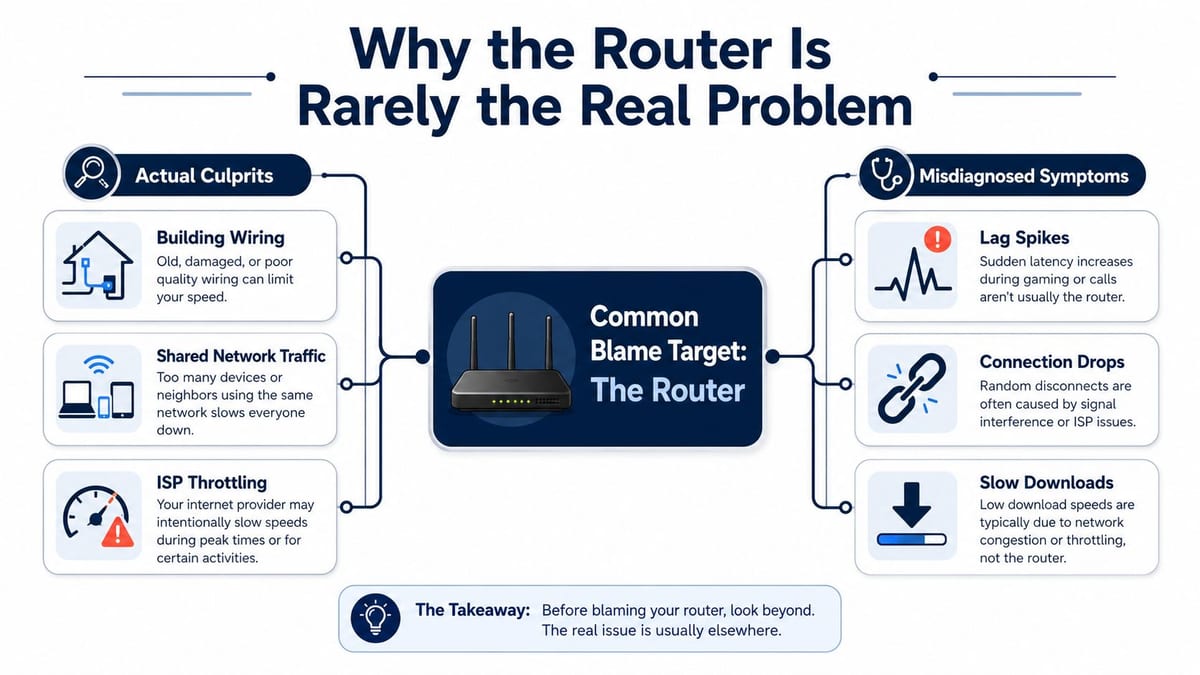
The first mistake is blaming the box on the shelf when the fault sits elsewhere. In real deployments, the router is often the third or fourth thing affecting latency. A badly terminated cable, a congested switch, an access point in the wrong room, or a shared connection dragging traffic through the same path will do more damage than a pricier gaming label.
What actually moves the needle
A lot of product pages talk about features, but office reality is simpler. If the gaming desk is on Wi-Fi through two brick walls, the router's chipset matters less than the radio path. If backups run during play time, queueing policy matters more than a logo that says “gaming”.
Practical rule: if you want lower ping, reduce contention before you chase raw specs.
That is why consumer gaming routers can outperform enterprise gear in the wrong layout, and enterprise gear can outperform a gaming router when the network is properly designed. The box itself is not magic. The surrounding network decides whether the hardware gets a fair chance.
For a clear breakdown of how those roles split up, see this guide on router and modem. The distinction matters because the modem, the router, and the LAN each solve different problems, and gaming suffers when those roles are muddled.
If you need a practical benchmark for the connection side, the lower gaming ping guide is useful background. It helps set expectations before anyone starts blaming the router for a problem that comes from the wider path.
The useful mindset shift
The question should stop being “which router?” and become “which network design?”. That changes procurement conversations immediately. You start asking about cable routes, radio placement, traffic classes, and whether the building can support wired backhaul where it counts.
In practice, good routers for gaming are the ones that fit the network plan instead of trying to compensate for a bad one. That is the right way round.
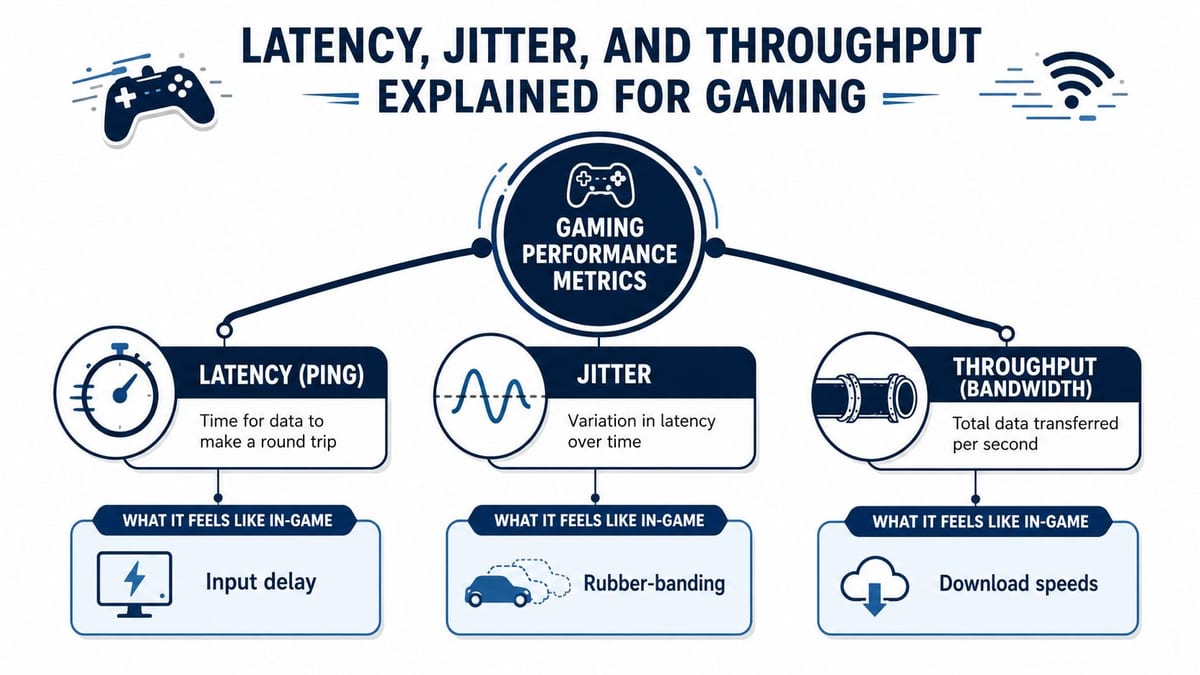
Latency, Jitter, and Throughput Explained for Gaming
Latency is the time it takes for a packet to travel out and come back. In games, that's the delay between a key press and the server acknowledging it. Low latency feels responsive, high latency feels like you're always half a beat behind.
Jitter is the wobble in that timing. A stable 20 ms round trip can feel better than a network that swings around because the game is constantly adjusting to delay changes. Shooters and competitive titles suffer first, because tiny timing errors show up as missed peeks, rubber-banding, or broken voice chat rhythm.
Throughput is different again. It is the amount of data the link can move, not how quickly one packet gets there. A fast download helps updates, cloud sync, and patching, but it doesn't automatically make gameplay feel smoother.
The UK broadband numbers matter here because they show most sites no longer need a router that just “keeps up” with basic internet access. The challenge is local traffic control. A network can have plenty of headline speed and still feel awful if queueing and congestion aren't managed properly.
Round-trip time versus “feels fast”
Round-trip time is the metric gamers care about most, even if they don't call it that. If the network keeps the return path steady, the game engine can predict movement properly. If it doesn't, the client keeps correcting itself and the player sees stutter or delayed hits.
The practical translation is simple. Latency is the delay. Jitter is the inconsistency. Throughput is the volume pipe. If a spec sheet only bragged about throughput, I'd treat it as incomplete.
For a clear consumer-friendly baseline on the topic, the lower gaming ping guide is a useful reference point because it frames ping in actual player terms rather than marketing language.
How to read a router spec sheet
Ignore slogans first. Look for whether the device can keep latency stable under load, whether it supports decent traffic prioritisation, and whether the radio can cope with multiple active users.
A router that looks fast on paper can still feel slow if the queue fills up every time someone starts a backup.
That's why raw bandwidth is only one part of the decision. For gaming, predictability beats peak speed.
Here's a quick video reference if you want a visual refresher on how the metrics relate in practice.
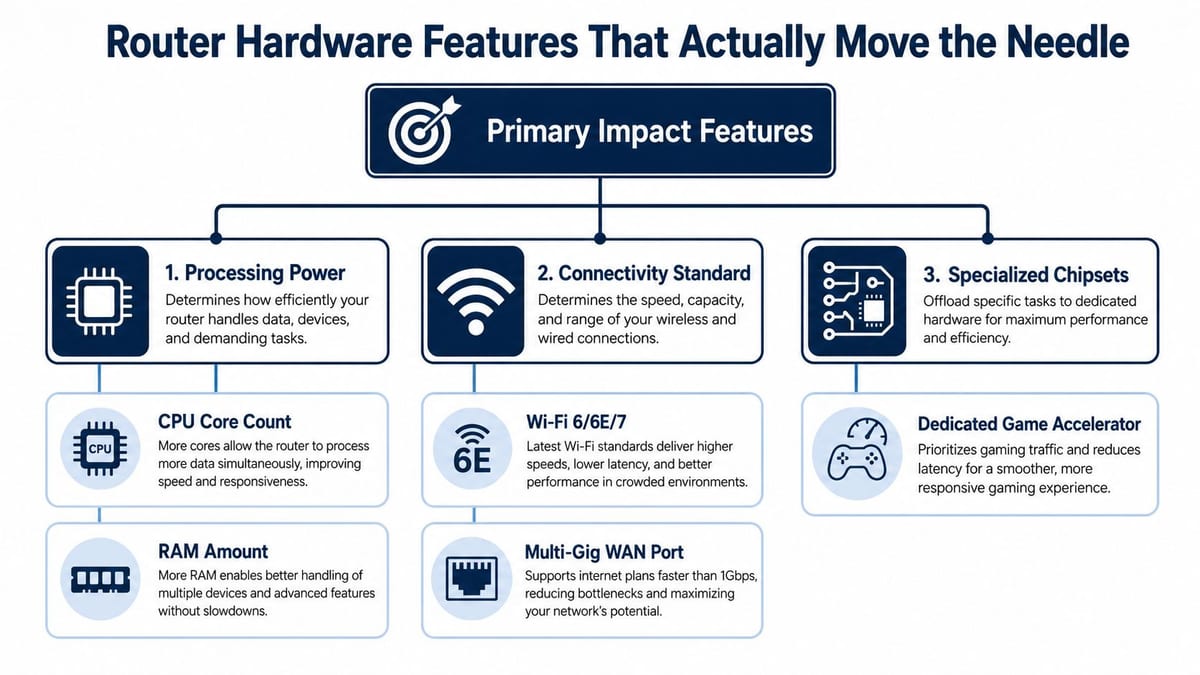
Router Hardware Features That Actually Move the Needle
The best hardware choices are the ones that reduce queueing and retransmits, not the ones that sound impressive in a brochure. In gaming networks, that usually means a router that has enough processing headroom to keep traffic moving when multiple devices are active. A weak CPU or too little memory becomes visible the moment inspection, filtering, or QoS starts doing real work.
Processing, radios, and ports
Look first at CPU and RAM, because routing, security features, and traffic shaping all consume resources. If the router is underpowered, latency climbs under load even when the internet circuit is fine.
The next decision is radio generation. Wi‑Fi 6, 6E, and 7 are more useful in busy spaces than older standards because they're built for denser traffic patterns and better spectrum use. The 6 GHz band has the shortest reach, but it also gives you room to run a cleaner, faster local segment when the client devices support it.
A multi-gig WAN or LAN port only matters if the upstream or internal path can use it. Paying for a 10G port on a line that won't exceed 1G is wasted budget unless you're planning for near-term changes or heavy internal transfers.
| Feature | Why it matters for gaming | What to watch |
|---|---|---|
| CPU headroom | Keeps routing and QoS responsive | Cheap hardware can choke under load |
| RAM | Helps with tables, sessions, and feature overhead | Low memory hurts stability first |
| Wi‑Fi 6/6E/7 | Better density handling and cleaner spectrum | Needs compatible client devices |
| Multi-gig ports | Useful for faster uplinks and LAN backhaul | Don't overbuy for a slower circuit |
Hardware offload and gaming labels
Hardware NAT acceleration can help when the router is carrying a lot of traffic and the software stack would otherwise do the heavy lifting. That said, “gaming-only” firmware toggles are often less important than the underlying chipset and how well the router handles queues.
MU-MIMO and OFDMA are worth caring about in dense environments, because they help multiple devices share airtime more gracefully. That's useful in an office where the gaming kit sits alongside phones, laptops, collaboration tools, and printers.
If the spec sheet leans heavily on peak speed numbers but stays vague on processing, queue handling, or multi-user behaviour, treat it as consumer marketing, not engineering evidence.
A practical shortlist for vendor briefings is simple. Ask for the chipset, the available wired ports, the Wi‑Fi generation, and whether the router can keep latency stable when other users are active. That tells you far more than a “gamer” badge ever will.
QoS, Traffic Shaping, and VLAN Design in Practice
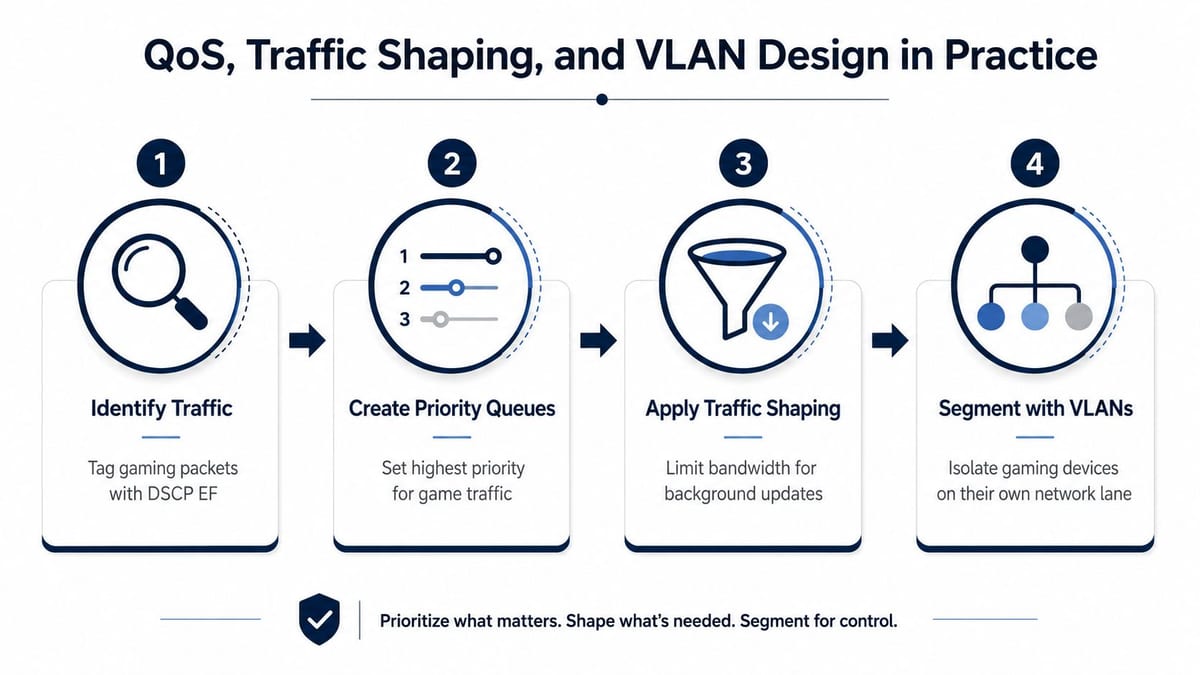
QoS only works if you map traffic classes with some discipline. Gaming packets need priority, voice does too, and collaboration traffic cannot be left to fight bulk sync jobs for airtime. If the office runs Teams calls, cloud backups, and a few game stations on the same WAN, the router has to make deliberate choices instead of treating everything as one queue.
Put traffic into lanes
A clean setup starts with clear traffic categories. Gaming traffic gets the highest practical priority, voice and video conferencing sit just below it, and background jobs like patching or backups get shaped so they do not crowd the queue.
For a more detailed view of the voice side of that same problem, the internal QoS for video piece is worth reading because the mechanics overlap. Once you understand how voice survives congestion, gaming becomes much easier to plan.
A workable pattern in a mixed-use office is straightforward.
- Gaming traffic: Tag it and keep its queue short.
- Voice and meetings: Protect it from bulk transfers so calls do not break up.
- Backups and updates: Limit them so they do not flood the uplink.
- Guest and IoT traffic: Keep it separate so it cannot interfere with business or gaming devices.
VLANs are the primary mechanism
VLAN segmentation matters because it creates separation before congestion turns into user complaints. Put gaming devices on one VLAN, corporate endpoints on another, guests on a third, and low-trust devices like smart screens or controllers on their own lane. That way, one noisy device cannot poison the rest of the network.
Bufferbloat is the other hidden problem. A network can be technically up and still feel awful when the queue backs up under load. The usual test is to run a latency check while someone starts a large upload or backup, then watch whether ping stays stable or balloons.
Good QoS does not make a bad network good. It keeps a good network from becoming bad the moment people get busy.
For IT teams, the win is predictability. If the office knows that game stations are isolated, voice traffic has priority, and background work is shaped, the network stops feeling random. That is the difference between a router setting and a proper design decision.
Wi-Fi Coverage, Mesh Placement, and the Cabling Question
Wireless performance lives and dies by the building around it. Tom's Guide measured some top Wi‑Fi 7 routers dropping from multi-gigabit throughput at 15 feet to very low rates at 90 feet (Tom's Guide's gaming-router testing). That spread is exactly why a listed building, a stone wall, or a mezzanine floor can ruin a neat-looking spec sheet.
Survey before you buy the second box
A Wi‑Fi survey should be treated as a deliverable, not a nice-to-have. In UK offices, the question is where the signal can travel cleanly, not where the router looks tidy on a shelf. Old materials, dense partitions, and shared spaces all distort coverage in ways that showroom demos never reveal.
The main mistake is placing a flagship router behind a printer or in a comms cupboard with no thought for radio path. A cheaper unit in the right position will often outperform an expensive one in the wrong cabinet. That's not theory, that's daily deployment reality.
Mesh, backhaul, and hard cable
Mesh can help, but only if the backhaul is planned properly. Wired backhaul is usually the cleaner option because it avoids making the access layer do double duty. If you can pull cable to the node, do it.
For some desks, the best answer is not better Wi-Fi at all, but a direct run of Cat6 or fibre. That is especially true where gaming rigs, media workstations, or fixed consoles won't move. Once the distance gets awkward, cabling wins because it removes radio uncertainty from the equation.
For a practical primer on access point planning, the internal guide on Wi‑Fi access points for home is relevant because the placement principles carry over cleanly into small offices and hybrid spaces.
Radio design is a building problem first, a hardware problem second.
That's why good routers for gaming in real offices are often paired with a sensible AP layout, a surveyed floor plan, and wired links wherever possible. The router matters, but only after the path to the device has been engineered properly.
Wired, Wireless, and 5G Offload Compared
The transport choice depends on the use case. Serious gaming desktops and consoles should be wired wherever possible, because cable gives the lowest practical latency and the least jitter. Mobile devices, temporary desks, and lighter-use stations can live on a well-designed wireless segment.
| Connection | Typical Latency | Mobility | Security | Best Fit |
|---|---|---|---|---|
| Wired Ethernet | Lowest and most stable | None | Strong on managed LANs | Fixed gaming PCs and consoles |
| Wi‑Fi 6E/7 | Very good when designed well | High | Good with proper segmentation | Laptops, handhelds, mixed-use desks |
| Powerline | Variable and often inconsistent | Low | Depends on the mains environment | Only as a last resort |
| 5G offload | Useful for resilience or temporary sites | High | Depends on the deployment | Events, branch pop-ups, backup connectivity |
What each option does well
Ethernet wins because it removes radio uncertainty and keeps the path simple. That makes it the first choice for a room with repeat use, especially when you want to hold response times steady during peak activity.
Wi‑Fi 6E and Wi‑Fi 7 are the right compromise when mobility matters and the building can support proper design. They work best when the coverage is surveyed, the channels are planned, and the clients are kept on the appropriate band.
5G offload has a place, but it is a support tool, not a default gaming path. It's useful for resilience, events, and temporary workspaces where cable isn't available in time. For ordinary office gaming, it's a contingency rather than the main solution.
What usually goes wrong
The failure mode is mixing all three without a plan. A wired game station, a wireless laptop, and a backup internet link can coexist neatly, but only if VLANs, traffic shaping, and the failover policy are thought through together. Without that, the network becomes unpredictable and the users blame the wrong layer.
The decision rule is simple. Cable the fixed kit, survey the wireless, and reserve offload for resilience or temporary deployments. That keeps the design clean and the latency complaints low.
Security, Support, and the Procurement Checklist
Security gets ignored too often in gaming-router conversations, and that's a mistake. A router that runs good traffic today but can't be patched safely tomorrow is a liability. In office environments, the support story matters just as much as the headline performance.
What to ask vendors
Firmware cadence is the first question. If the vendor doesn't update quickly or clearly, the device ages badly. You also want a clear vulnerability disclosure process, because security issues never stay theoretical for long in a business network.
Support terms matter too. Warranty length, response path, and whether the vendor offers real troubleshooting guidance all affect how usable the device is after rollout. If a router is part of a managed estate, check whether it can be monitored through the tools your team already uses.
For a shortlist, ask these questions in writing.
- Patch process: How are firmware updates released, tested, and applied?
- Support model: What happens when a device fails after deployment?
- Security controls: Does it support guest isolation, filtering, and sensible access control?
- Operations fit: Can it integrate with your RMM or SIEM stack?
- Deployment fit: Does the design account for site survey findings and cabling realities?
Security is part of gaming uptime
DDoS protection is worth asking about if the network touches public-facing services or remote play scenarios. Guest network isolation matters because you do not want visitors sharing the same trust zone as the machines that carry gaming or corporate traffic. Content filtering can also help in mixed environments where not every device should have the same reach.
Maintenance is not an afterthought. Someone has to document the VLAN layout, label the ports, record the firmware version, and know which change caused which side effect. If that housekeeping doesn't happen, the next incident becomes a guessing game.
The cheapest router is the one nobody can support properly.
That is the procurement test. If a device is fast but opaque, it will cost more in support time than it saved in purchase price.
If you want a network that supports gaming in a UK office, Constructive-IT can design the cabling, Wi-Fi, VLANs, and rollout around the building instead of forcing a router to cover for weak planning. They handle office fit-outs, surveys, certification, and go-live support, which is exactly the sort of end-to-end work this problem needs.