

You're handed a 400-page O&M manual on practical completion day. The network diagrams are missing, warranty certificates are scattered through email threads, and the facilities team can't identify the right asset when the first fault appears a few weeks later. The project may be technically complete, but the building isn't operationally ready.
That's the gap good handover documentation must close. In UK infrastructure projects, handover information forms the bridge between delivery and day-one operation. It should help facilities, IT and engineering teams operate, maintain and troubleshoot systems without calling the original contractor for every routine question.
Why Handover Documentation Fails in Practice
A handover pack often fails long before anyone opens its final folder. The common mistake is treating documentation as a closeout task, then asking subcontractors to reconstruct months of decisions, changes and test results at the end. That approach produces volume, but not necessarily usable information.
BSRIA's BG 79/2020 guidance, published in 2020 and amended on 7 April 2021, treats handover as a distinct phase focused heavily on operating and maintenance manuals. Its relevance to offices, fit-outs and technical infrastructure projects is that it formalises the information needed for reliable operation after practical completion, alongside outputs such as as-built drawings, commissioning records, certificates, warranties and building user information. BSRIA's guidance on handover and O&M manuals reflects the fact that handover isn't an informal exchange of files.
The 400-page problem
The IT manager in this scenario doesn't need a larger manual. They need an answer to a specific operational question:
- Which switch serves the failed access-control panel?
- Where is the matching patch-panel port?
- Which certificate covers the installed electrical alteration?
- Who handles the warranty claim?
- What safe isolation or access procedure applies?
A generic binder rarely answers those questions quickly. Facilities teams need asset-level information, linked documents, clear identifiers, and current revisions. They need to know whether the drawing reflects the installation they can see, not whether a drawing exists.
The UK public-sector Defence Estates transfer guidance demonstrates the breadth of controlled transfer on complex estates. It refers to formal handover reports, health and safety files, inspection, operation and maintenance records, asbestos registers, management plans, risk assessments, clearance certificates and closure reports. That isn't administrative decoration. It supports continuity, safety and responsibility transfer.
Where project teams lose control
The failures are familiar:
- Retrospective collection: engineers remember changes after the fact, or not at all.
- Weak revision control: the issued drawing differs from the installed cabling or configuration.
- Disconnected formats: PDFs, spreadsheets, email attachments and portal links don't share identifiers.
- Unclear ownership: nobody knows who must update the asset schedule or approve a revision.
- Late training: operators receive documents without the practical knowledge to use them.
A sensible project should capture information when work happens, then validate it at agreed gates. Guidance on lessons learned documentation is useful here because recurring handover problems usually reveal a process failure, not an isolated missing file.
Practical rule: If an operator can't find the relevant asset, document and responsible party during a fault, the handover isn't finished.
For telecoms-heavy projects, disciplined version control for telecom networks is particularly important. A network diagram that lacks revision history can be more dangerous than an obviously incomplete one because users may trust information that no longer matches the building.
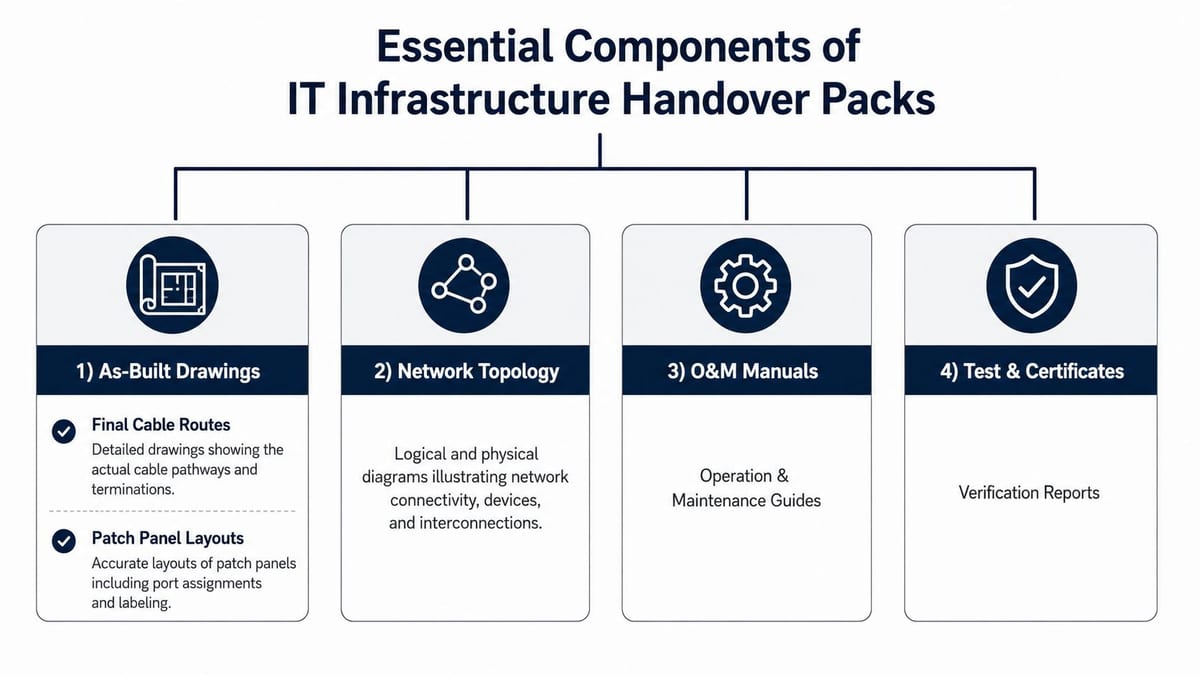
Essential Components of IT Infrastructure Handover Packs
A useful handover pack is an integrated operational reference, not a collection of documents with a cover sheet. Start by agreeing the information structure, then make every drawing, certificate, asset and procedure refer to the same equipment identifiers.
Drawings and topology
As-built drawings should show the installation as delivered, including final cable routes, containment, outlets, cabinet locations and patch-panel layouts. For networks, the topology should identify the relationship between core, distribution and edge equipment, uplinks, resilient paths and connected building systems.
That detail matters during an outage. A facilities engineer may start with a failed door controller, while the IT team needs to trace its route through the local cabinet, patching, switching and power. If the drawings use different naming conventions from the asset register, diagnosis slows immediately.
O&M manuals
An O&M manual should explain how to operate and maintain the installed system. Include manufacturer specifications, maintenance schedules, approved procedures, fault symptoms, reset boundaries and escalation routes.
Don't copy a manufacturer's entire catalogue into the pack without context. Extract the information operators need, then link to the full source document where appropriate. A manual for a UPS, Wi-Fi system, CCTV platform or access-control controller should identify the installed model, location, configuration and maintenance responsibility.
Certificates and verification records
Compliance evidence should sit beside the asset or system it supports. Commercial electrical installation must follow an appropriate formal route. NICEIC guidance on commercial and industrial installations explains that approved contractors are assessed against BS 7671, while IET guidance recognises certification by a registered competent person, third-party certifier or building control body for notifiable work in England and Wales.
Include Electrical Installation Certificates for new installations or major alterations, relevant fire documentation, building regulations approvals, commissioning records and test results. For IT infrastructure, that can include network performance tests, Wi-Fi coverage surveys and UPS load testing.
Safety, warranty and user information
The health and safety file should contain relevant risk assessments, method statements and asbestos information where applicable. Warranty records need clear start dates, coverage terms, exclusions, supplier contacts and claim procedures.
Finally, write building user guides for people who aren't specialists. Explain how to report a fault, use meeting-room technology, access a restricted area, respond to a CCTV or alarm event and escalate an emergency. Electronic delivery is usually essential, but hard-copy material still has a place where site procedures, emergency instructions or client requirements demand it.
The quality test is simple: select an installed asset at random and trace it through the drawing, asset schedule, certificate, manual, maintenance instruction and warranty record. If the chain breaks, the pack is incomplete in an operational sense.
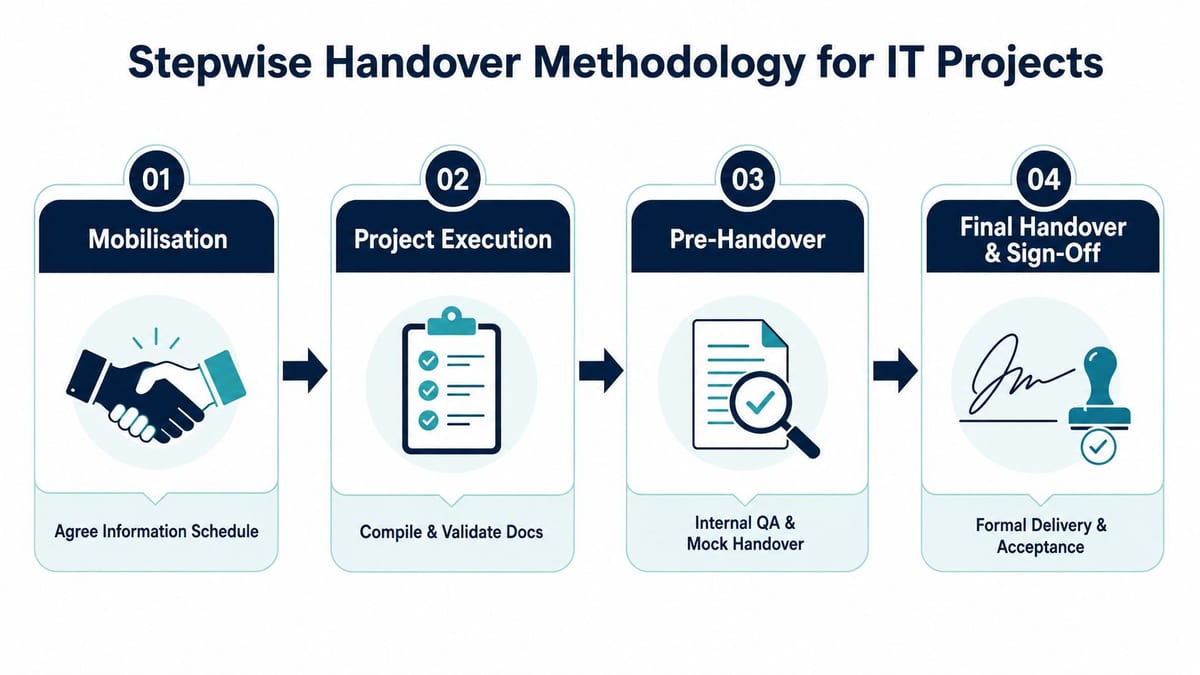
Stepwise Handover Methodology for IT Projects
Handover works better when the team treats it as a sequence of evidence checks. The process should begin during mobilisation, not during the final week of construction.
Mobilise with an information schedule
Agree the handover information schedule before installation begins. Define each required deliverable, its owner, format, naming convention, review route and delivery date. Include drawings, asset schedules, O&M manuals, test evidence, certificates, warranty records, training material, spares, keys, tools and access credentials.
Assign a person to maintain the closeout log. A lightweight task board, including a lightweight Chrome extension for projects, can help teams track document owners and outstanding actions, provided the controlled record remains in the project's agreed information environment.
Capture evidence during execution
Commissioning and witness programmes should produce records as systems are completed. Don't wait for practical completion to recreate test results from notes and memory.
For each system, record what was tested, the equipment identifier, date, tester, witnessed outcome, exceptions and linked evidence. This approach also supports cutover planning, where operational teams need a clear view of dependencies, rollback decisions and responsibilities.
Close defects before compiling the pack
A defect log should distinguish between a cosmetic issue, a documentation correction and a condition that prevents safe operation. The project team should verify that completed remedial work updates the related drawing, asset record, test evidence and maintenance instruction.
A mock handover is valuable because it exposes practical gaps. Ask a facilities representative to find a specific asset, locate its isolation procedure and explain how a warranty claim would be raised. If they can't do that without project-team assistance, the pack needs restructuring.
Deliver, train and accept
The final pack should include the validated O&M material, user guides, asset schedules, spares, keys, tools and access credentials. Training is part of the deliverable, not a courtesy. UK standards guidance on project handover requires at least two training sessions per system, with documented attendee records, so the client can demonstrate knowledge transfer and identify people who still need support. The UK National Occupational Standards handover guidance also frames handover as completing outstanding work before responsibility and documentation transfer.
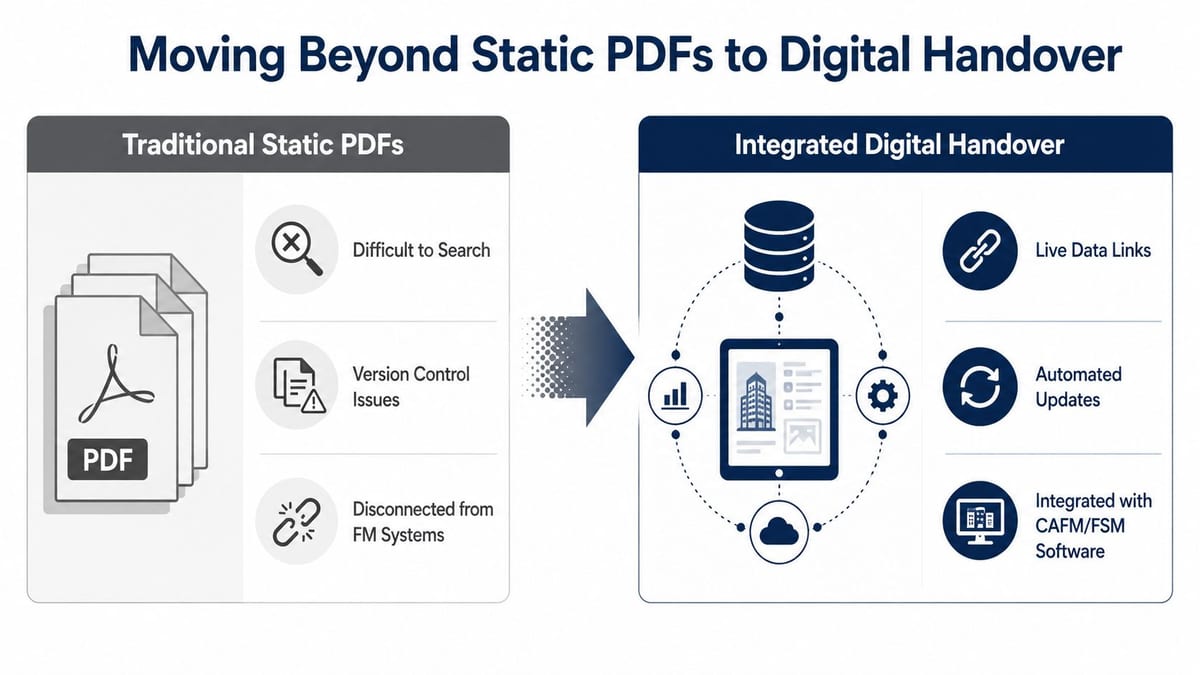
Moving Beyond Static PDFs to Digital Handover
A PDF is a delivery format, not an information strategy. It may preserve a drawing or manual, but it doesn't automatically connect an asset to its maintenance plan, warranty, inspection record or fault history.
UK guidance increasingly points towards digitised O&M manuals, transferred project information and BIM-aligned data exchange before sign-off. The BSRIA-aligned handover information guidance describes structured packages that can include electronic and hard-copy material, formal checklists and records of delivery.
What structured information changes
In a structured digital handover, an asset record can link to:
- the as-built location and drawing reference
- the manufacturer and installed model
- commissioning and test evidence
- planned maintenance requirements
- warranty terms and supplier contacts
- operating and isolation procedures
- replacement or spare-part information
That structure makes searching easier and reduces the risk of different teams working from conflicting revisions. It also gives a facilities team something they can use inside a CAFM or facilities service-management workflow, rather than forcing them to search a project archive during an incident.
The UK BIM Framework commentary on digital handover reinforces the direction of travel towards defined information requirements, digital asset information and staged exchange. The important point isn't that every client needs an advanced BIM platform. It's that the client should define the information their operational system can consume before contractors start producing files.
When PDFs still make sense
Traditional documents remain appropriate where the client has limited systems, where a regulator requires a fixed record, or where a field team needs an offline instruction. The practical answer is often hybrid: structured asset data and searchable links, supported by controlled PDFs for formal records and detailed procedures.
The transition has trade-offs. Subcontractors may lack data skills, clients may not have a ready CAFM environment, and platforms may use incompatible fields or naming schemes. Agree the minimum data schema early, test a sample asset, and avoid accepting a digital portal that merely hides the same unstructured files behind a login.
This short video can help project teams visualise the difference between document delivery and operational information management:
Acceptance Criteria and Sign-Off Procedures
Sign-off becomes contentious when the client and contractor hold different definitions of “complete”. A handover certificate should therefore confirm evidence, not just declare that the project has finished.
Start with an agreed checklist tied to the information schedule. Each line should identify the deliverable, revision, format, reviewer, approval status and location. The receiving team should be able to confirm not only that a file was uploaded, but that it matches the installed system and can be used by the intended operator.
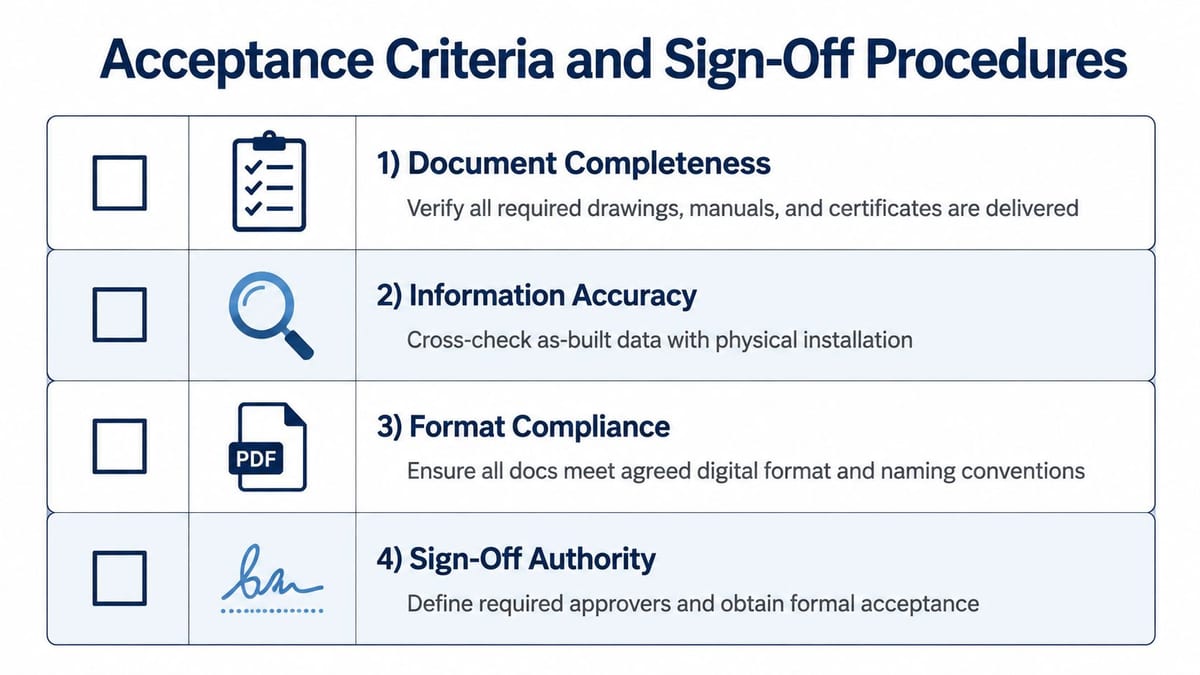
Use four acceptance tests
Document completeness means every agreed drawing, manual, certificate, test record, warranty and user guide is present. Missing material should appear as an explicit outstanding action, not disappear inside a general “subject to completion” note.
Information accuracy requires physical verification. Compare cabinet labels, cable routes, equipment models, controller locations and asset identifiers with the documents. A technically polished pack that describes a different installation fails this test.
Format compliance covers naming, revision, file type, metadata, folder structure and any required electronic or hard-copy delivery. It should also confirm that links open and that users have the permissions needed to access them.
Sign-off authority identifies the people authorised to accept each discipline. IT, facilities, health and safety, electrical and client representatives may have different responsibilities. Put those responsibilities in the acceptance matrix before the final meeting.
Manage conditional handover properly
Minor defects don't automatically block handover, but the certificate must state what remains, who owns it, the target completion condition and how closure will be verified. Safety-critical defects, incomplete commissioning, missing statutory evidence or systems that can't support intended occupation should block acceptance.
Witness testing and demonstration sessions provide stronger evidence than a document review alone. Have the contractor demonstrate normal operation, alarm handling, reset boundaries, failover behaviour, user administration and escalation procedures in front of the receiving team.
The final certificate should record:
- the accepted systems and locations
- document revisions and delivery locations
- outstanding defects and owners
- warranty and support arrangements
- training sessions and attendees
- restrictions, assumptions and exclusions
- the date responsibility transfers
Use a formal transmittal and obtain receipt confirmation. That protects the client from ambiguity and protects the contractor from later disputes over whether information was delivered.
Connecting Handover Documentation to Operational Readiness
A facilities team can't prepare for operation if it receives the asset register and maintenance plan at the last minute. UK BIM Framework guidance cited in the handover commentary expects asset registers and maintenance plans eight weeks before asset operation or by handover, making the timing explicit. The UK BIM Framework and handover discussion also highlights why information should be captured once during delivery rather than re-collected at the end.
The operational pack should map directly into the client's maintenance process. If the CAFM system uses an asset ID, that same ID should appear on the drawing, equipment label, O&M record, warranty file, test certificate and planned preventative maintenance task.
Design the pack around a fault
Take a common incident: a door controller stops responding. The operator needs the door ID, controller location, power source, network path, access procedure, CCTV relationship, reset instruction, supplier contact and warranty status. A system-level manual may describe the controller family, but only asset-linked information tells the team what is installed at that door.
This principle applies to power, Wi-Fi, structured cabling, telecoms, audio-visual systems and CCTV. For commercial electrical installation, the handover should connect the installed distribution equipment and circuits to the relevant Electrical Installation Certificates, inspection records and maintenance responsibilities. For larger technical environments, a data centre commissioning approach helps align commissioning evidence, electrical certification, configuration schedules, operating procedures and final acceptance.
Unmanned building management in practice
An unmanned building isn't a building with no systems or no responsibility. It's a site that can run routine operations safely and predictably without constant on-site human intervention. Access control, alarms, environmental controls, CCTV, power monitoring, network connectivity and remote support must work as one operational model.
Many projects fail because the team designs these systems in silos. The access installer specifies a lock, the electrical contractor specifies power, the IT team provides network connectivity and the security team deploys CCTV, but nobody owns the complete chain from authorised entry to event logging and remote response.
The practical model depends on a coordinated triad of access, power and data. A UK guide to unmanned buildings from NAPIT advises teams to define what “unmanned” means for the site, survey the building properly and design the three elements together. If any part is weak, the building becomes unreliable.
Battery-less NFC proximity locks
Battery-less NFC proximity locks can be a sensible choice in selected internal doors, storage areas, plant spaces and low-traffic controlled zones. They draw energy from the user's NFC interaction rather than relying on a local battery, which removes a recurring replacement task and avoids a lock becoming unavailable because its battery has depleted.
They aren't a universal answer. Check door hardware, user volume, emergency egress, fire strategy, credential policy, offline behaviour, vandal resistance and the consequences of lost or damaged credentials. In a fully autonomous unmanned building unit, the lock still needs a documented operational path covering authorised access, temporary access, maintenance override, audit requirements and escalation when the door or reader fails.
CCTV should be documented in the same operational context. Record camera locations, coverage intent, retention ownership, network and power dependencies, recording platform details, privacy considerations and fault escalation. The pack should let a remote operator understand whether an access event, camera issue or network outage is isolated or part of a wider failure.
For a new unmanned unit, build the handover around realistic scenarios:
- authorised user entry
- failed credential
- power interruption
- network loss
- fire or security alarm
- CCTV recording fault
- remote reset
- planned maintenance access
- emergency attendance
That is what turns a document pack into an operating model. It also exposes maintenance requirements that a static manual may hide, including remote monitoring, inspection routines, spare hardware, credential administration and site-visit triggers.
The most useful handover document is the one a facilities team can use at the moment something goes wrong. Give operators an asset register they can search, diagrams that match the installation, procedures written for their role and evidence that proves the system was tested. Handover documentation then becomes the foundation for safe occupation, predictable maintenance, warranty claims and long-term building performance, rather than an archive created solely to close a project.
Constructive-IT supports UK office relocations, fit-outs, server-room and data-centre projects with surveys, network infrastructure, Wi-Fi, CCTV, electrical works, testing, certification and go-live support. If your handover pack needs to become a usable operational system, visit Constructive-IT to discuss the documentation, commissioning and readiness work your project requires.