
A UK office move always looks manageable until the last fortnight. The desks are built, the switches are racked, and someone is already asking why the meeting room Wi‑Fi keeps vanishing, why the new IDF can't power the access points sitting in the tray, and why a contractor is re-terminating fibre in a corridor while the floor is due to open next week. That's the point where LAN design best practices stop being abstract and become a live test of whether the network was planned from the endpoint outward, or guessed at from the switch room inwards.
Good LAN design is rarely about one clever product choice. It's about access, power, cabling, Wi‑Fi, security, and resilience being decided together, because the wrong choice in one layer can wreck the others. Best practice for the physical layer is also conservative for a reason, the classic large-scale design guidance recommends sizing trunks to handle two end segments peaking at the same time plus 25% of the remaining segment capacity, with the allowance sometimes reducible to 2.5% depending on the network profile, and it advises planners to often pull two LAN drops per desk even when the user is expected to need only one device (large-scale LAN design guide). In a real fit-out, that conservatism is what keeps the project from becoming an expensive rework later.
Why Most LAN Designs Fail Before Go-Live
The failure usually does not arrive as a dramatic outage. It shows up as the new floor being almost ready, then the integrator discovers that the APs are lit from the wrong cabinet, the printer corner has no spare drops, and the “temporary” patching plan has turned into a permanent mess. A relocation team can live with a slightly awkward desk layout, but it cannot live with a network that was designed on optimistic assumptions and then forced to improvise after the furniture plan changed.
The break point is usually physical, not logical
Most bad LAN projects start with a spreadsheet that counts ports, not people, devices, or power draw. That approach misses the fact that a cabinet is not just a place to land copper, it is also where electricity, switching capacity, and fault containment either come together or fail apart. The result is predictable, the team ends up patching around the design instead of deploying the design itself.
A better mental model is to treat each endpoint as a bundle of requirements. A desk might need a laptop dock, a phone, a wireless AP nearby, a badge reader in the wall, or a camera above the door, and each of those pulls on the network differently. In UK fit-outs, that means the cabling plan, the power plan, and the logical segmentation plan need to be drawn together, because the same floor plate has to satisfy all three once the contractor starts fixing out rooms and people begin asking for changes.
Practical rule: if the cabling schedule, the electrical drawing, and the VLAN plan do not tell the same story, the project is not ready to build.
The other hidden failure is documentation drift. If the as-built record is poor, the move team spends the first week reverse-engineering what was installed. That is why tidy, current records matter as much as neat cable dressing, and why a project can benefit from disciplined documentation practices like those discussed in lessons learned documentation.
Shortcuts that look cheap and cost later
The common shortcut is to assume one drop per desk will be enough forever. It almost never is, especially once softphones, docking, secure badges, printers, room systems, and wireless access points are all competing for the same physical estate. Another shortcut is to treat “we'll use Wi‑Fi” as a substitute for wired capacity, which only pushes the problem into the wireless layer and makes troubleshooting harder.
Good LAN work is boring in the best possible way. It leaves headroom, labels things properly, and refuses to pretend that the first design draft will survive contact with the move programme unchanged.
Choosing the Right Topology and Physical Layer
A resilient LAN in a UK office usually works best when it follows a hierarchical campus model, with access, distribution, and core layers doing different jobs instead of every switch trying to do everything. Cisco's campus design guidance recommends containing the STP domain diameter to 7 hops maximum and 9 hops total, which matters because loops are easier to isolate and convergence is faster when failures stay close to the edge (Cisco campus wired LAN design guide). That's not academic neatness, it's how you stop one bad port from taking out more of the building than it should.
What the hierarchy actually means on a floor plate
In a smaller office, a flatter design can be acceptable if the failure domain is tiny and the switch count is low. Once you have multiple floors, mixed services, or any real dependency on uptime, the flat design starts to look fragile because a fault spreads too easily. Routing boundaries belong where you want to stop the blast radius, not wherever the cheapest cable run happens to end.
The access layer should connect endpoints. The distribution layer should aggregate and apply policy. The core should stay focused on fast backbone movement and clean routing. When the topology is built that way, a fault at the edge doesn't become a building-wide event.
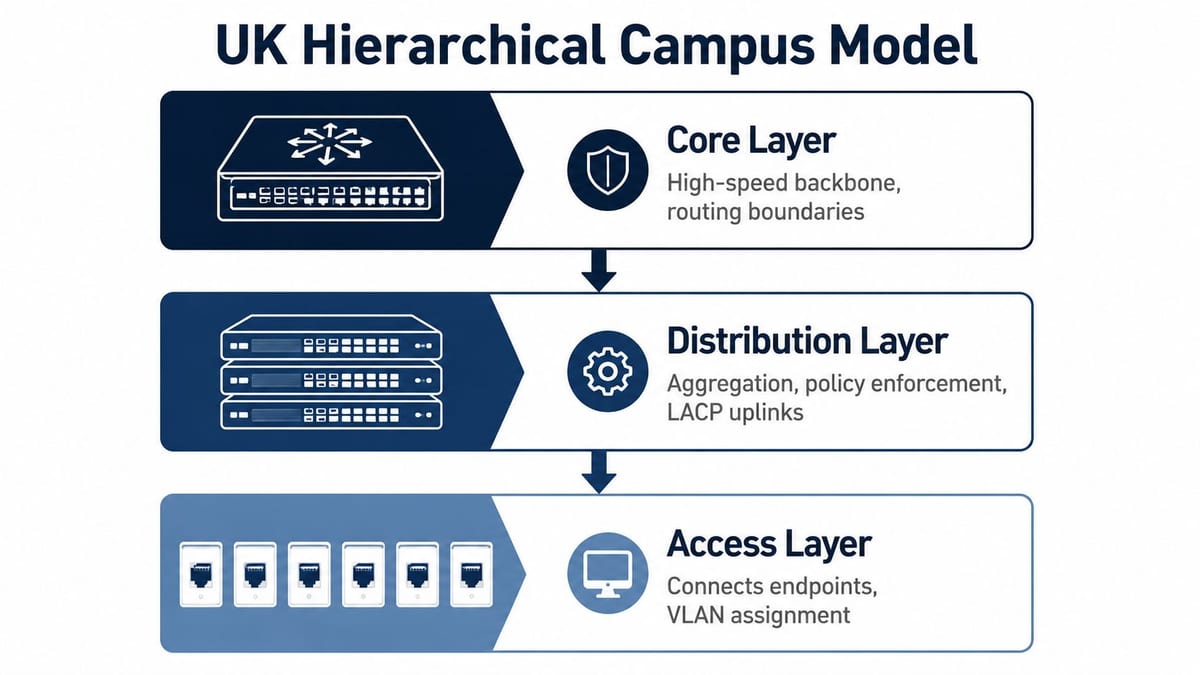
A good question to ask an integrator is simple, where do the routing boundaries sit, and what fails if one access switch dies. If the answer is vague, the design is probably too flat. If the answer is crisp, you can usually trace the resilience back through the topology.
Overbuild the desk layer before the ceiling layer
The classic advice to pull two LAN drops per desk still earns its keep because floor plans change faster than cable trays do (large-scale LAN design guide). Even when a user starts with one device, the spare drop gives you room for a dock, a phone, a room panel, or a future endpoint class without reopening the floor. In a live office move, that flexibility is worth more than the tiny saving from shaving a cable run.
The same source's trunk-sizing rule matters for the same reason, growth isn't theoretical once the building opens. If the uplink design is only large enough for today's use case, the first busy week of occupancy can expose the weakness immediately. That's why the wall diagram matters less than the failure domains behind it.
Cabling Standards and the Cat6 Versus Fibre Decision
The cabling plant fixes a lot of future cost on day one. Cat6, Cat6A, and fibre each solve different problems, and the wrong default leaves a site with a network that is awkward to certify, awkward to power, or awkward to expand cleanly. In UK office fit-outs, the right answer is usually not the flashiest cable, it is the media that fits the endpoint, the distance, and the way the warranty will be signed off.
How to choose without overcomplicating it
Cat6 is often the practical answer for standard office desks and shorter structured runs, especially where the endpoint profile is stable and the power demand is modest. Cat6A is the safer choice where higher PoE loads, denser AP deployments, or a longer service life before the next refresh are part of the plan. Fibre belongs where distance, bandwidth aggregation, inter-cabinet links, or building backbone requirements make copper the wrong tool.
A structured cabling warranty only helps if the whole channel is designed and installed as a system. A 25-year warranted solution is useful because it gives you a manufacturer-backed structured plant, but it does not make a bad layout good. It will not rescue poor termination discipline, hidden patching chaos, or a cabinet plan that was undersized from day one.
| Cable type | Max channel distance | PoE suitability | Typical UK office use case | Warranty relevance |
|---|---|---|---|---|
| Cat6 | Standard copper runs | Good for lighter endpoint loads | Desks, printers, simple office endpoints | Strong when installed as part of a certified structured system |
| Cat6A | Standard copper runs with more headroom | Better for power-hungry endpoints | APs, VoIP-heavy desks, denser workplaces | Strong when future proofing and higher load tolerance matter |
| Fibre | Depends on optics and design intent | Not for PoE delivery, used for data transport | Backbone, inter-floor links, data-centre-adjacent rooms | Important for backbone integrity and interconnect reliability |
For the backbone side of the decision, single-mode versus multimode fibre shows why the optical choice has to match the building, not just the shopping list. That matters most when the site needs a long-life backbone rather than only desk connectivity.
What the hierarchy means on a floor plate
The hierarchy matters because the endpoint layer is where most design mistakes show up first. If the floor plate is full of desks, printers, APs, room kits, and phones, the cabling choice has to cover all of those loads without forcing a rework in the next move cycle. In that sense, cabling, power, and access are one design decision, not three separate ones.
UK relocations make this obvious. A tenant rarely gets a perfect second chance at the cabling once the floor is live, so the first install has to leave room for change, patching, and turnover between teams. That is why the spare capacity at the desk and the spare capacity in the cabinet are part of the same conversation.
Excel and similar systems are about system-level certainty
Branded systems such as Excel exist because procurement teams need predictable performance, not just cable in a box. The value is in the tested channel, the matching components, and the paper trail that supports certification and warranty sign-off. What they do not guarantee is good intent from the installer, so the design still has to be right first.
In practical terms, that means checking the whole route against the endpoint plan before anything is ordered. If a room is likely to absorb more PoE kit, higher density Wi-Fi, or a different desk layout after handover, Cat6A usually gives more breathing room. If the building spine needs clean uplinks between cabinets or floors, fibre keeps the copper plant focused on the edge and lets the backbone do the transport work.
If you are comparing backbone choices alongside site resilience and vendor support, it can help to browse Luxembourg South data centers and see how backbone design choices are treated where uptime and interconnect handling matter. The same logic applies in an office fit-out, the media choice should match how long the building will stay in service and how often the layout will move.
Field observation: the cheapest cable is rarely the cheapest project. The cost shows up later in changes, faults, and time spent proving whether the plant was installed correctly.
Building Resilience and Redundancy Into the LAN
Resilience is not the same thing as “we bought two of everything”. A design can have redundant hardware and still fail badly if both uplinks share the same route, if the cabinet loses power, or if the failover path was never tested under load. Good resilience design answers three questions at once, what fails, where does it fail, and how fast does the site recover.
Containing faults close to the edge
The hierarchical model helps here because it limits the scope of a problem. If access switches feed into a clean distribution layer and the routing boundaries are set properly, a fault doesn't have to ripple through the whole office. That's the practical value of keeping the STP domain diameter tight, it reduces the impact of loops and helps convergence stay manageable in larger sites (Cisco campus wired LAN design guide).
Dual uplinks are useful only when they're diverse enough to matter. LACP can aggregate links and smooth traffic, but it isn't a substitute for path diversity. Device-level failover and link-level failover are different problems, and the tender should state which one is being solved.
Cabinet power and diverse routes are part of the same story
A cabinet with poor power resilience can undo a beautifully cabled floor. Redundant supplies, sensible UPS coverage, and clean electrical separation should be treated as part of the LAN design, not as someone else's problem. The same applies to path diversity, because a single corridor route or a single riser can turn a minor fault into a site-level outage.
For a practical sense of how resilience is handled in highly demanding environments, browse Luxembourg South data centers. The value there isn't the site itself, it's the reminder that resilient design is always about route diversity, failure containment, and clear operational discipline.
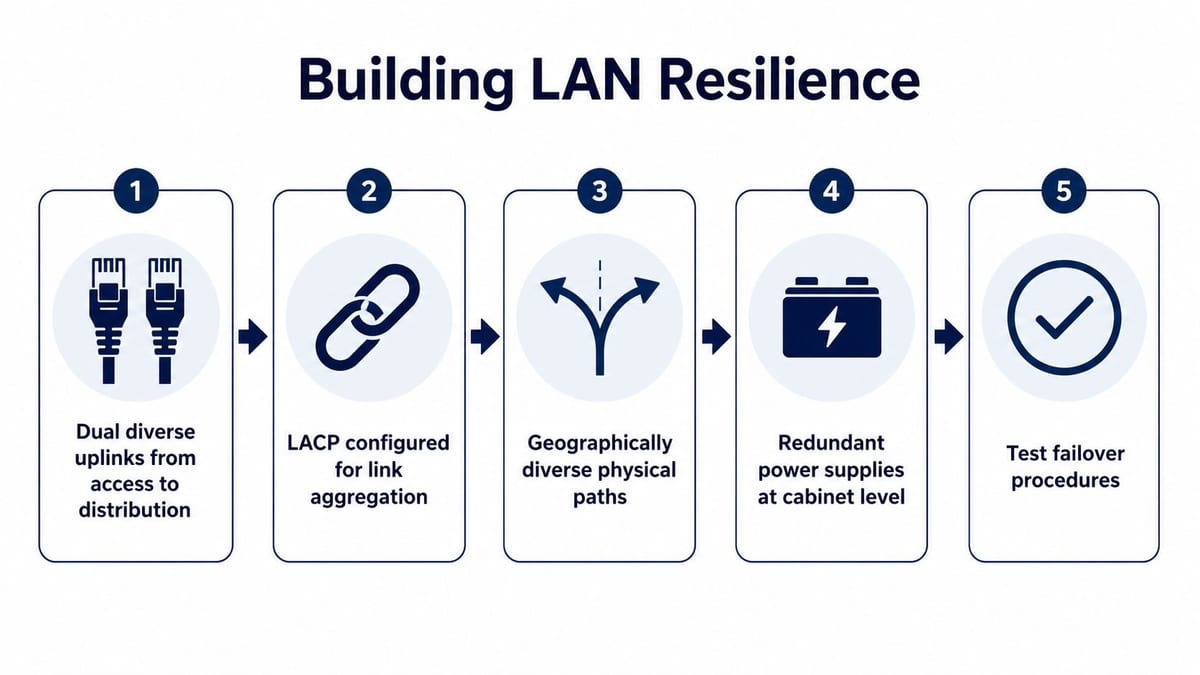
Testing matters as much as architecture. If a design team can't demonstrate failover, the resilience is only theoretical. That's why the engineer's job doesn't end at build completion, it ends when the failure paths have been exercised and understood.
Addressing, VLAN Strategy, and a Realistic QoS Model
A LAN gets messy fast when the logical design is left until the end. IP ranges, DHCP scope layout, VLAN boundaries, and QoS classes need to follow how the business works, because that is what makes the network supportable during a move, an expansion, or a tenant churn in a UK office. A clear logical plan cuts down on avoidable change requests, makes audits easier, and gives the engineering team fewer surprises when someone asks for a last-minute floor rework.
Keep the address plan human, not heroic
The address plan should be simple enough for the local IT team to understand without chasing a pile of notes. In practice, that usually means grouping by function, floor, or service class where it helps operations, then keeping the same naming pattern across VLANs, DHCP scopes, and switch templates. The point is not to create something clever for the design pack, it is to make the next engineer, or the next relocation contractor, understand the site quickly.
A useful VLAN strategy does not try to mirror every physical segment one for one. That approach creates clutter and makes growth awkward when the office changes shape. Keep the logical groups tied to business use instead, such as users, voice, guest access, clinical kit, building systems, or management traffic, depending on the site. That gives you cleaner policy boundaries without forcing every patching change into a new VLAN.
The true test is whether the design still makes sense after the first office move, not on day one.
QoS needs a small number of traffic classes
Cisco's campus guidance recommends keeping the traffic model tight, with four to twelve classes, to cover real-time voice, real-time video, high-priority data, interactive traffic, batch traffic, and default traffic (Cisco campus LAN and WLAN design guide). That limit matters because it stops teams from building a policy maze nobody can explain when the switch config needs to be checked under pressure. A compact QoS model is easier to maintain, easier to validate during a relocation, and easier to hand over to support staff who did not build it.
In a UK office, those classes usually map to the traffic people feel every day. Voice calls need predictable treatment, video meetings need a fair share of bandwidth, critical business applications should not get stuck behind backups or updates, and background sync can be pushed to the back of the queue. The design value is not in labelling every packet, it is in protecting the traffic that keeps the office usable.
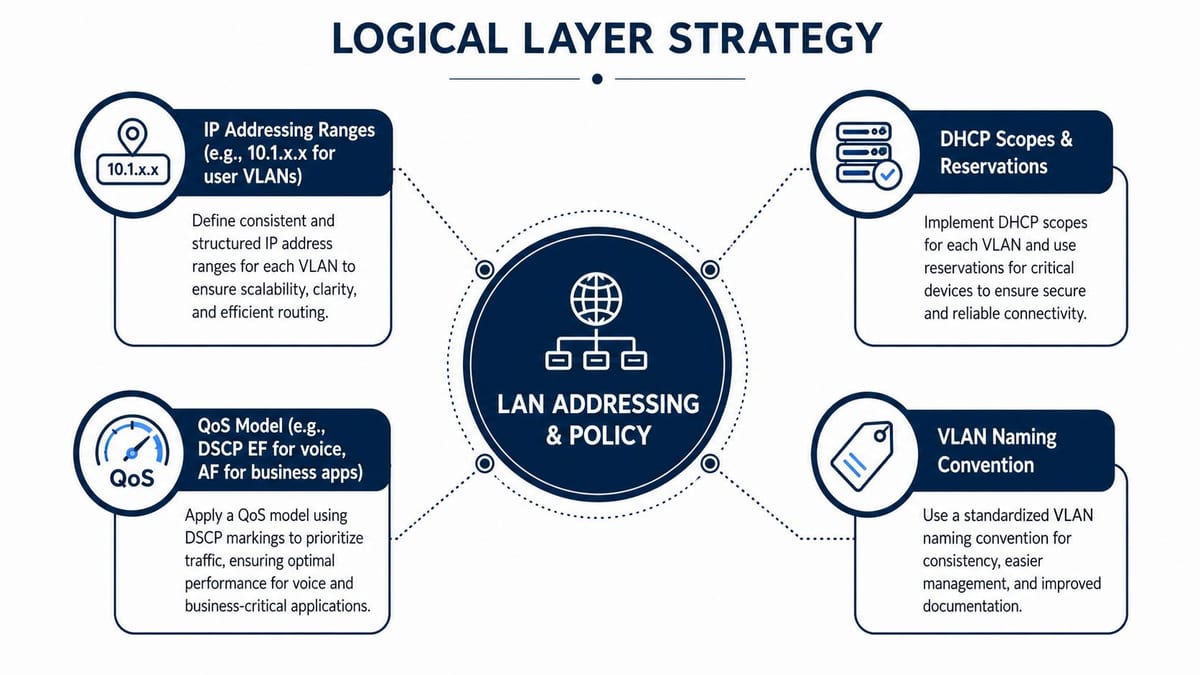
A QoS policy should also be explainable to the people who have to live with it. If the helpdesk cannot talk through the priority model, and if the network team cannot show what gets marked, trusted, or remarked at the edge, the policy is too complicated for day-to-day use. That is the sort of design that looks neat in a workshop and falls apart during a move weekend.
For the same reason, address and policy decisions should stay tied to endpoint reality. A badge reader, a softphone, a guest laptop, and a finance workstation do not deserve the same treatment, but they do need a scheme that is predictable enough for support, security, and change control to follow. When the team later needs an auditor-ready network audit, that consistency is what keeps the review from turning into a hunt through exception rules and one-off fixes.
A simple, well-documented layout survives staff changes and office reshuffles far better than a clever one that only the original designer understands.
Security Segmentation, PoE Budgeting, and Wi-Fi Integration
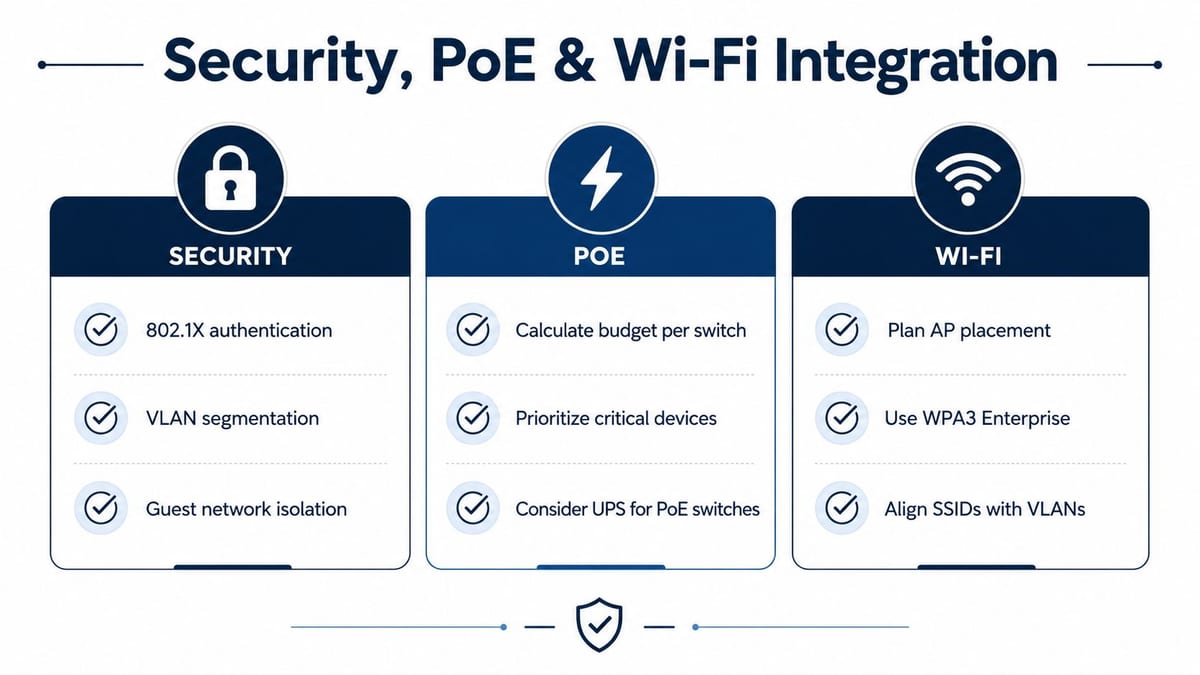
Security, power, and wireless are often treated as separate workstreams, but the device list doesn't care about departmental silos. A badge reader, an AP, a camera, a room booking panel, or a guest device all affect the same switching and cabling plant, just in different ways. The best designs treat VLANs, 802.1X, PoE budgets, and WLAN layout as one joined-up decision.
Segmentation starts before the first patch lead is plugged in
Cisco's guidance is clear that security should be designed early, not bolted on later, and that resilience against incidents and outages should be tested as part of the design process (Cisco campus LAN and WLAN design guide). In practical terms, that means deciding where guest traffic lives, where managed devices sit, and how far trust should extend at the access edge. VLANs and 802.1X are useful because they give the security team a defensible starting point from day one.
PoE budgeting belongs in the same discussion because power draw changes port counts, switch choice, and cabinet cooling. If the design ignores those loads, the network can be logically tidy and still fail physically. For a straightforward explanation of the power side, see what PoE is.
Wi-Fi capacity has to be designed with the LAN, not on top of it
Cisco's campus WLAN guidance recommends custom site tags for roaming domains, limiting them to 400 APs per site tag, and capping SSIDs at 5 per AP to reduce probe airtime contention (Cisco campus LAN and WLAN design guide). Those limits matter because wireless design choices affect the wired network's capacity, management overhead, and latency profile. If the SSID list is bloated, the whole wireless estate becomes noisier than it needs to be.
The design team should also think about the device mix. Cameras, APs, and controllers can all push the PoE plan in different directions, while guest and corporate WLANs can increase the number of logical segments the team must maintain. That's why Wi‑Fi is never just a radio project.
For teams trying to validate all of that in one place, an auditor-ready network audit can be useful when the security team wants evidence rather than promises. That kind of review is most valuable when the LAN, the wireless layer, and the access policy are already aligned.
Testing, Certification, Phasing, and Handover
A LAN project isn't finished when the last switch lights up. It's finished when the plant has been certified, the move has been phased cleanly, and the in-house team can run it without guessing. That's the part many suppliers gloss over, but it's the part that decides whether the network feels solid six months later or becomes a recurring support headache.
Certification is not the same as a quick continuity check
Copper and fibre should both be tested properly, because the test result is what separates a neat installation from an evidence-based one. Manufacturer warranty sign-off is valuable, but it isn't the same thing as ongoing performance validation during the build and closeout process. A good handover pack should show what was tested, what passed, and what was documented as installed.
The handover itself should be treated like a procurement deliverable, not an admin afterthought. If the supplier can't produce an as-built package, the internal team inherits hidden risk. That risk shows up later when someone asks which port feeds a camera, where the spare fibre lives, or why a patching move created a fault.
Phase the move, don't force it
Office relocations and new fit-outs go smoother when the migration is split into controlled phases over nights and weekends. That lets the team cut over critical services while reducing daylight disruption and giving engineers space to recover from surprises. It also gives facilities, IT, and the installer time to validate each stage before the next one starts.
A practical procurement-to-handover checklist usually includes:
- Scope clarity: confirm which floors, zones, and endpoint types are in scope.
- Certification records: obtain copper and fibre test results for the installed plant.
- As-built documentation: secure labelled drawings, cabinet schedules, and port mappings.
- Warranty evidence: confirm what the system warranty covers and what it requires.
- Operational notes: capture the failover behaviour, cabinet dependencies, and escalation path.
- Cutover plan: agree the phased migration sequence and rollback approach.
That checklist is useful because it keeps the project honest. It also helps the in-house team take ownership without spending the first month untangling someone else's shortcuts.
Planning, Power, and Data as One System
The strongest LAN designs don't start with a switch catalogue. They start with the endpoint list, then work backwards into power, data, security, and wireless as one system. That's the practical lesson behind most successful fit-outs and relocations, the network works best when it's designed around what the building must do, not around what a single product line happens to support.
Unmanned building management is a good example of why this matters. In practice, it means the building runs with minimal on-site staff by combining remote monitoring, automated control, and predefined access and security policies (NVT modern LAN white paper). That model only works when the network understands the power, bandwidth, and application requirements of each physical device, because every endpoint helps determine the topology and the infrastructure that supports it.
That same endpoint-first approach is what makes battery-less, NFC proximity locks worth considering in the right projects. They reduce the maintenance burden of battery replacement, they simplify access-control servicing, and they fit neatly into buildings where the aim is low-touch operation. They're especially sensible in spaces that include CCTV, controlled access, and other managed building systems, because the access layer, the electrical design, and the data layer all need to behave predictably together. Commercial electrical installation and certification matter here too, because a clean access-control deployment still depends on a properly verified power and data environment.
That's also why fully autonomous unmanned building units need a broader design view than “just add devices”. The access system, the cameras, the cabling, the switches, the cabinet power, and the management policy all have to be planned as one estate, or the building becomes hard to support very quickly. If you're dealing with a relocation, a new fit-out, or a building systems refresh, it pays to have a specialist map the endpoint requirements first and then design the network, power, and access layers around them.
If you're planning a fit-out, relocation, or building systems refresh, talk to Constructive-IT about a design-led LAN review that brings cabling, power, Wi‑Fi, and access control into one workable plan. A structured consultation now is far cheaper than untangling a weak design after go-live, and it gives your team a clear path to a certifiable, supportable estate.