
You're probably looking at a floor plan, a relocation date, and a list of systems that all need to work on day one. Staff want fast Wi-Fi and smooth access to Microsoft 365. Facilities want CCTV live from the moment the doors open. Leadership wants a modern office with fewer manual processes, tighter security, and no messy snagging period after the move.
That's where many fit-outs go wrong. The project team treats the WAN, the cabling, the locks, the cameras, and the electrical package as separate jobs. They aren't. In a modern office, each one depends on the others.
If the new site has poor WAN performance, cloud apps drag, video calls fail, access logs arrive late, remote monitoring becomes unreliable, and your unmanned building features stop feeling smart very quickly. Good WAN optimization doesn't just help file transfers. It supports the essential operating model of the office you're building.
Your New Office Needs More Than Just Fast Internet
An empty office floor can fool people. It looks simple. Run circuits, install desks, light the rooms, bring in broadband, and move the users across. But the second the design includes automated entry, smart surveillance, remote utility control, and a server room cutover, that simple picture disappears.
Most IT managers already know the obvious risks. ISP delays. Cabling mistakes. Switches arriving late. The less obvious risk is assuming internet bandwidth alone will carry the whole design. It won't. A new office often has to connect back to existing systems, cloud platforms, identity services, voice platforms, storage, and security tooling from the first morning of occupancy.
That's why WAN design has to sit alongside the physical fit-out, not after it. If you're extending fibre into the space, the practical gains start with the local infrastructure and continue through the wide-area path. Good fibre optic network planning for office infrastructure matters because the backbone inside the building and the path outside it have to behave as one service.
What the pressure looks like on site
By the time relocation week arrives, there's no appetite for theory. The business wants the badge readers opening doors, CCTV recording, guest Wi-Fi working, Teams calls stable, printers visible, and shared drives or cloud apps responsive. If any one of those lags, the complaints start immediately.
A smart office that can't maintain reliable connectivity is just a collection of disconnected devices.
Where WAN optimization enters the picture
WAN optimization is the operational layer that helps the new office behave like part of the wider business from the start. It matters most when you're linking a fresh site to cloud services, a head office, a data centre, or temporary transition environments during a move. It reduces the friction users feel and gives building systems a more stable path back to the services that manage them.
Understanding WAN Optimization for Business-Critical Apps
WAN optimization is easiest to understand if you stop thinking about raw bandwidth and start thinking about road conditions. A motorway with enough lanes can still perform badly if traffic bunches up, vehicles keep braking, and priority vehicles get stuck behind everything else. Networks behave the same way.
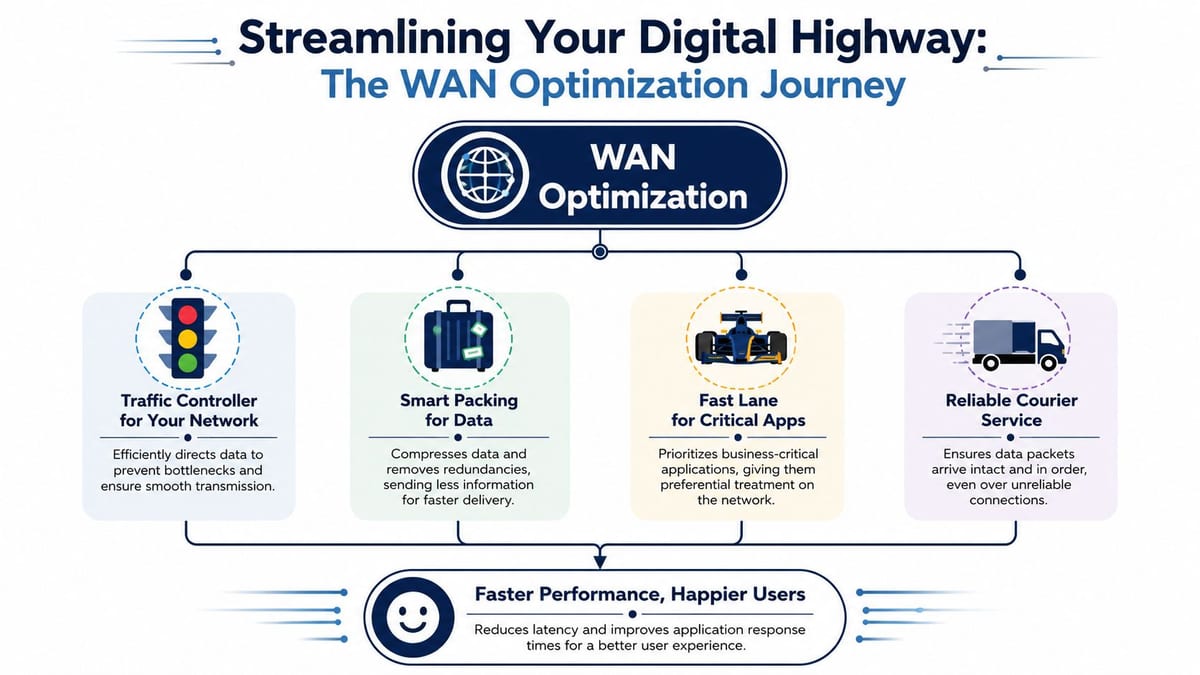
Bandwidth is the width of the road. Latency is how long traffic takes to travel. Packet loss is what happens when parts of the load never arrive cleanly and have to be resent. During an office move, that shows up as slow SharePoint access, poor voice and video performance, lag in remote desktop sessions, and painful data transfers between old and new sites.
What WAN optimization actually does
In practice, WAN optimization combines several disciplines:
- Traffic control: It steers traffic so important applications don't get buried under bulk transfers.
- Efficiency techniques: It reduces waste in the way data is sent across the link.
- Recovery behaviour: It helps maintain better performance when links aren't perfectly clean.
- Application awareness: It treats Microsoft 365, voice, replication, and general browsing differently because they don't have the same business value.
In UK-managed networks, WAN optimization reduces latency by 30 to 50 per cent and packet loss by up to 40 per cent through TCP window scaling, packet pacing, and forward error correction, improving responsiveness for cloud applications such as O365 and SharePoint without extra bandwidth spend according to Palo Alto Networks' explanation of WAN optimization and WAN acceleration.
Later in the same deployment cycle, this is often what separates a smooth migration from a noisy one. Staff don't care whether the fix came from TCP window scaling or packet pacing. They care that files open properly and calls stop breaking up.
A useful companion read is expert WAN as a Service insights because many teams are now weighing appliance-heavy designs against managed and more flexible WAN delivery models.
Where the old thinking falls short
Classic WAN optimization used to lean heavily on compression and deduplication. Those still have a place, but they aren't universal answers now. In SD-WAN and cloud-heavy environments, a lot of traffic is encrypted or sent directly to SaaS platforms, so some older acceleration methods lose impact.
Practical rule: If your application path bypasses the control point, the optimiser won't fix the user experience.
That's why it's worth pairing WAN optimization with application-aware routing, QoS, and visibility. For real-time collaboration, quality of service for video traffic becomes part of the same conversation. Voice and video need predictable handling. They can't compete fairly with every other workload on the link.
A short overview is often enough to align technical and non-technical stakeholders before design decisions harden:
From Fast Networks to Autonomous Buildings
Unmanned building management sounds more futuristic than it is. In practice, it means the office can run its daily operational routines without permanent on-site staff handling doors, surveillance, and utilities in person. That usually means automated access control, AI-powered CCTV, and remote utilities management tied into one operating model.
In the UK housing sector, unmanned building management has been described as eliminating on-site staff for daily operations by integrating automated access control, AI-powered CCTV, and remote utilities management into a single ecosystem, and it has been shown to improve productivity and safety in construction through progress monitoring and site surveying without human intervention, as outlined in this research on unmanned building management practice.
What that means in a real office
For an office fit-out, the practical components are straightforward:
- Access control: Doors, internal zones, server rooms, and shared spaces open based on centrally managed permissions.
- CCTV: Cameras monitor entry points, circulation areas, receptions, and critical rooms.
- Remote utilities oversight: Lighting, HVAC, and other systems can be monitored or adjusted without sending someone on site.
- Central visibility: Events, alerts, and logs flow back to a management platform, not a clipboard at reception.
That model is common in satellite offices, flex workspaces, secure internal suites, and buildings where facilities coverage is shared across multiple locations.
Why many unmanned building projects fail
The failures are usually dull, not dramatic. The devices work in isolation, but the building doesn't work as a system.
A camera installer finishes the CCTV package. The access control supplier commissions readers and controllers. The network team delivers switching and internet. The electrical contractor signs off the power. Then the office opens and nobody owns the end-to-end behaviour between them.
Common failure patterns include:
| Failure point | What it looks like in practice |
|---|---|
| Network planned too late | Cameras stream poorly, cloud-managed doors respond slowly, logs arrive inconsistently |
| No operational model | Alerts go nowhere, failed devices sit unnoticed, remote unlock procedures are unclear |
| Siloed procurement | One contractor blames switching, another blames power, another blames software |
| Weak resilience planning | A minor outage disables multiple systems that were assumed to be independent |
Why WAN performance matters to unmanned systems
Autonomous or unmanned building units run on data. Credentials, event logs, camera streams, policy updates, and remote support sessions all rely on network behaviour that's stable enough for operators to trust. If the WAN path is unpredictable, remote management becomes hesitant. Staff stop relying on it and fall back to manual workarounds.
That matters most when your office depends on cloud-managed platforms or centralised support across multiple sites. If your CCTV review, access permissions, or device health checks are being handled from elsewhere, WAN optimization becomes part of building operations, not just IT performance tuning.
The expensive part of an unmanned office isn't the hardware. It's the moment users stop trusting it.
Building out fully autonomous unmanned building units also forces a mindset change. The question isn't whether each component can connect. The question is whether the whole stack can keep operating cleanly when links are busy, support teams are remote, and the building still has to function outside core hours.
The Unified Design for Power Access and Data
The biggest design mistake in smart office projects is splitting access, power, and data into separate workstreams and hoping they line up later. They rarely do. A door controller needs power, network connectivity, and a secure path back to management. A CCTV camera needs the same. So does an intercom, a sensor, or a remote environmental monitor in the comms room.
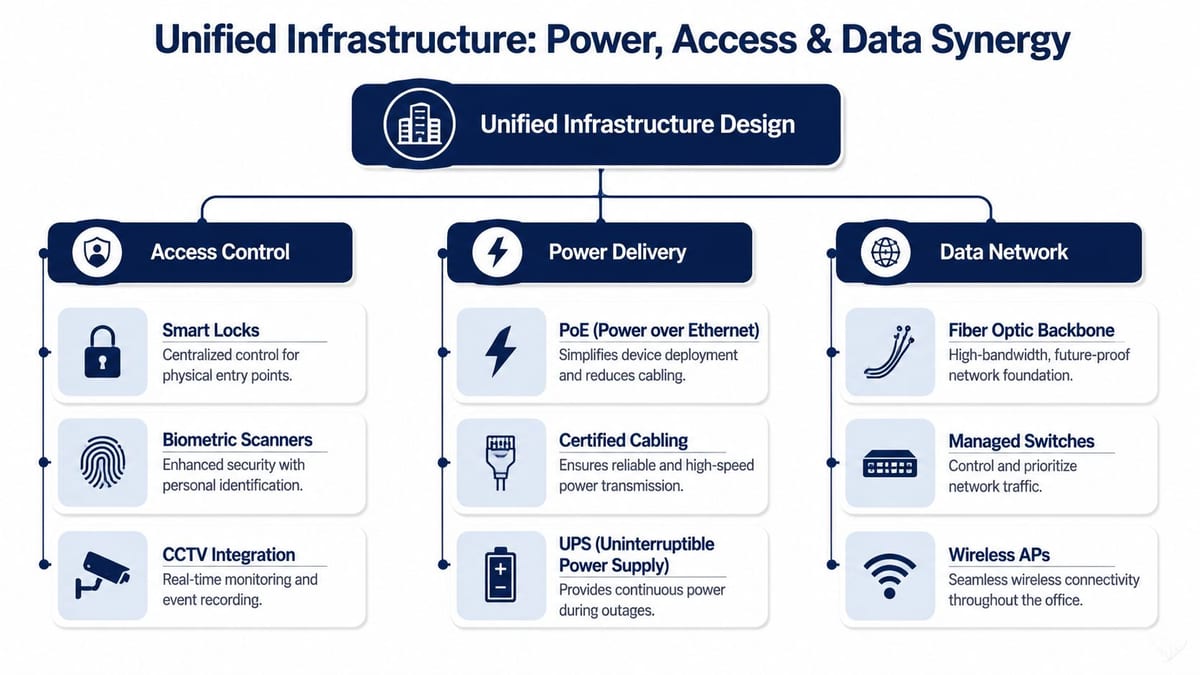
If those dependencies are designed separately, single-point failures creep in fast. One undersized PoE switch can knock out cameras and badge readers together. One badly placed cabinet can create cable runs that work on paper but fail in the ceiling void. One missing certification step can leave you with an install that's hard to sign off and harder to support.
Why integrated design is the only safe option
Access, power, and data must be designed together in unmanned building units by ensuring PoE switches and power infrastructure can handle the full demand of connected devices, while automated access control, remote utilities management, and AI CCTV sit on a cohesive network layer. In the UK, commercial electrical installation must also meet certification standards such as BS 7671, as outlined in this guide to unmanned building infrastructure design.
That single statement carries most of the practical workload for the project. You need load calculation. You need switching design. You need structured cabling routes. You need electrical compliance. And you need all four locked together before hardware orders are placed.
A useful way to design the stack
Think of the office as three layers that must be commissioned together:
| Layer | Questions to answer before installation |
|---|---|
| Access | Which doors need control, what credentials are used, what happens during link loss, who approves permissions |
| Power | Which devices rely on PoE, what the total draw is, where backup power is needed, what electrical certification applies |
| Data | Which VLANs, switching policies, uplinks, wireless coverage zones, and WAN paths support the building systems |
The mistake is treating those as separate checklists. They're one engineering task.
CCTV, switching, and certified electrical installation
CCTV exposes weak planning quickly. Cameras aren't just endpoints. They create storage demand, uplink demand, power demand, and operational demand. If the team installs cameras first and works out the network later, performance suffers. If they size switching for desks and phones but forget surveillance, the PoE budget gets consumed early.
Commercial electrical installation and certification matters just as much. Smart offices often rely on low-voltage systems that look simple from a distance, but the project still needs proper coordination with mains supply, distribution, containment, UPS strategy, and sign-off requirements. If your electrical contractor and network team don't share drawings and revision control, snags multiply near handover.
Design the camera, the lock, the switch, and the circuit as one system. That's how you avoid finger-pointing after go-live.
What good coordination looks like
A well-run fit-out usually has these traits:
- Shared drawings: Electrical, data, access control, and CCTV layouts reference the same room names and cable pathways.
- PoE budgeting before procurement: Teams don't guess. They calculate.
- Defined fail states: Doors, cameras, and controllers have clear behaviour during local or WAN disruption.
- Single integration ownership: One lead coordinates commissioning across trades.
That's the difference between a smart office that feels polished and one that feels patched together.
Choosing the Right Tech for Your Unmanned Office
Product choices matter more in an unmanned office because every maintenance burden gets amplified. If there's no one routinely walking the site, avoid devices that create routine avoidable visits.
That's why I usually favour battery-less, NFC proximity locks for the right office use cases. They reduce one of the most common failure points in access control. Dead or degraded batteries at the door. They also simplify maintenance planning because the lock lifecycle is less dependent on manual battery replacement schedules spread across multiple rooms or sites.
Battery-powered versus battery-less NFC locks
Here's the practical comparison many organizations need:
| Criteria | Battery-powered lock | Battery-less NFC proximity lock |
|---|---|---|
| Maintenance overhead | Regular battery checks and replacements | Lower routine intervention |
| Security risk | Battery failures can create access problems at the worst time | Fewer battery-related lockouts or service tickets |
| User experience | Can be fine when maintained well, but degrades if upkeep slips | Predictable day-to-day use in managed environments |
Battery-powered hardware isn't automatically wrong. It can suit some retrofits and low-use spaces. But for an unmanned office, secure internal zone, or distributed estate, battery-less options often align better with the operating model.
Why this choice connects back to WAN planning
The lock itself is local. The operating model around it isn't. Permissions, logs, alerts, and remote administration all depend on the broader network path. If your WAN and management systems are brittle, even good access hardware becomes frustrating to operate because admins can't trust what they're seeing in real time.
That's also why support coverage matters. Data from the UK's Digital Marketplace shows WAN optimisation units cost £400 to £1,200 per day, but only 9 to 5 UK-time support is offered, which leaves off-hours gaps for environments that can't wait until the next business morning, as noted in this discussion referencing UK Digital Marketplace WAN optimisation support constraints.
If your office, server room, or security perimeter needs continuity beyond office hours, don't buy a WAN-related service on day rate alone. Buy on support model, escalation path, and operational fit.
Maintenance and operations after handover
An unmanned office still needs active care. It just needs it remotely first.
The strongest operational setups include:
- Remote diagnostics: Engineers can see whether a reader, camera, or switch is reachable before attending site.
- Health monitoring: Offline devices, unusual power draw, or link instability trigger action early.
- Clear fallback procedures: Staff know how access is handled if a subsystem fails.
- Accurate documentation: Door names, cabinet labels, patching records, and power schedules match the actual install.
If the new site includes branch routing hardware, it's also worth revisiting the role of the WAN port on a business router because edge design choices affect how resilient your remote management and cloud connectivity will be.
Where these systems are commonly used
You'll see this stack used in:
- Satellite offices where there isn't a permanent facilities team
- Secure server rooms inside larger buildings where access needs tighter control
- Co-working or shared offices with centralised administration
- Clinical or operational support spaces where remote oversight matters
- Multi-site businesses trying to standardise access and surveillance across locations
The key isn't the building type. It's whether the operating model depends on reliable remote control.
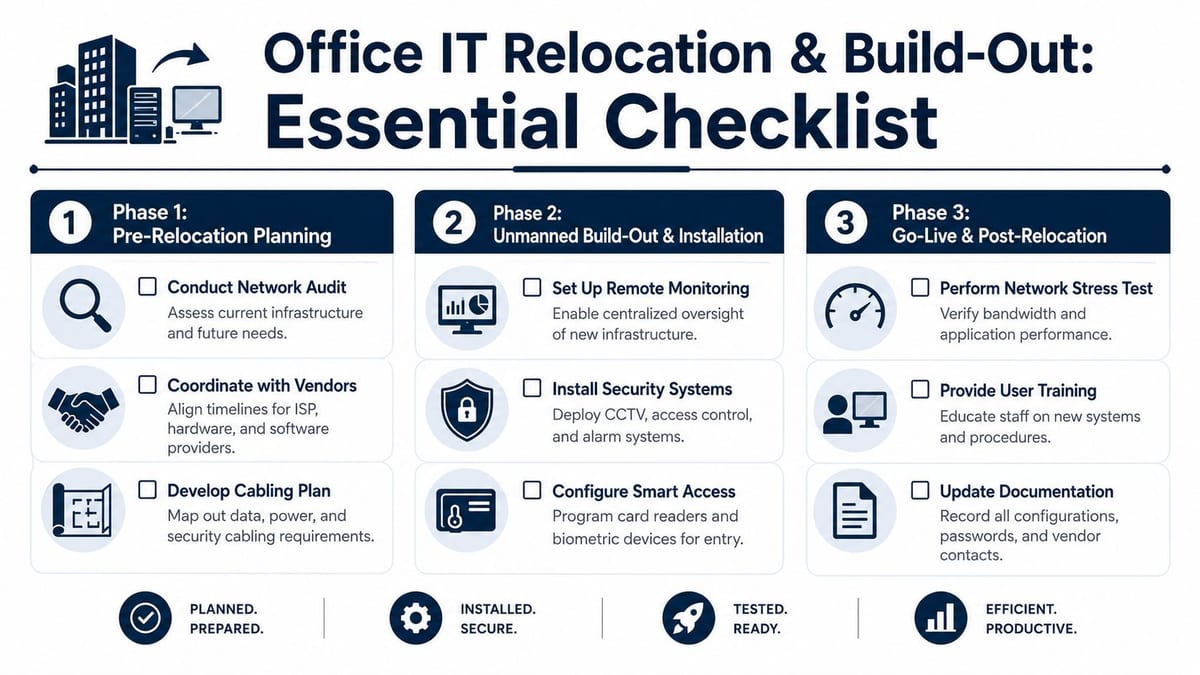
Your IT Relocation and Unmanned Build-Out Checklist
Office moves fail when teams jump from high-level planning straight into installation. The safer approach is phased. That gives you time to test assumptions about the WAN, the fit-out, and the operating model before people arrive with laptops and expectations.
Demand for this kind of network capability is still rising. The UK and Ireland WAN optimization market is projected to grow from USD 1.82 billion in 2023 to USD 3.95 billion by 2032 at a CAGR of 8.99%, driven by bandwidth-efficient, low-latency connectivity requirements in office relocations, server room expansions, and NHS projects, according to Market Research Future's WAN optimization market outlook.
Phase 1 Planning and design
Before any installation starts, lock down the design assumptions.
Benchmark the incoming WAN service
Check expected application paths, cloud dependencies, and how the new office will reach core services during and after the move.Map the unmanned operating model
Decide which functions will be remote from day one. Access approvals, CCTV review, utility oversight, and fault response all need owners.Design the physical and logical network together
Cabinets, uplinks, switching, wireless coverage, CCTV placement, and access control aren't separate drawings. They should be reviewed as one system.Validate electrical requirements
Confirm commercial electrical installation scope, containment, UPS requirements, and certification responsibilities early.
If the site can't be supported remotely on paper, it won't be supportable after handover.
Phase 2 Installation and integration
At this point, coordination either pays off or collapses.
- Build the structured cabling first: Patch panels, backbone links, and cabinet layouts need to support the final device count, not today's minimum.
- Confirm PoE budget under load: Don't rely on nominal switch capacity. Validate what the live access and CCTV estate will draw.
- Commission systems in dependency order: Core switching, uplinks, WAN edge, access control, CCTV, and then management integration.
- Test remote visibility: Make sure alerts, logs, camera feeds, and controller status can all be seen from the teams that will support them.
A common mistake at this stage is accepting partial commissioning. A door that opens locally but doesn't report correctly upstream is not finished. A camera that powers on but drops out under sustained load is not finished.
Phase 3 Testing and go-live
The final phase should feel disciplined, not rushed.
| Checklist item | Why it matters |
|---|---|
| Test cloud application responsiveness | Confirms users won't hit performance issues on day one |
| Verify CCTV recording and remote review | Proves security operations work beyond the local monitor |
| Simulate access events | Ensures permissions, logging, and exception handling behave correctly |
| Check fail conditions | Validates what happens during local device, switch, or WAN disruption |
| Freeze documentation | Gives support teams an accurate baseline after handover |
Run the go-live like an operational rehearsal. Test the path from user action to remote response. Badge a user through a door, confirm the event appears where it should, review the relevant CCTV, and make sure the supporting infrastructure records the right data.
The handover standard worth aiming for
A solid relocation handover includes:
- As-built drawings that match reality
- Device inventories linked to cabinets and patching
- Support runbooks for both IT and facilities
- Escalation paths for in-hours and out-of-hours issues
- Evidence of testing for WAN performance, access control, CCTV, and power resilience
If any of that is missing, the office isn't finished. It's occupied.
Building Your Future-Ready Workspace
A successful fit-out isn't defined by how modern the office looks. It's defined by how cleanly the office operates when users arrive, systems are under load, and support teams are dealing with real conditions rather than design assumptions.
That's why WAN optimization matters in office projects. It helps the new site behave like part of the wider organisation, not a disconnected branch with nice finishes. And that's why unmanned building design matters just as much. Automated access, CCTV, and remote utilities only deliver value when the network, power, and operational model support them properly.
The projects that run well usually share one trait. Someone takes responsibility for the full stack. Not just internet access. Not just locks. Not just cabling. The full stack.
If you're building a workspace that needs to be secure, responsive, and supportable from day one, treat WAN strategy and on-premise systems as one design problem.
Planning an office relocation or unmanned fit-out is easier when one team understands both the WAN and the physical infrastructure. Constructive-IT works with in-house IT teams on UK office moves, new fit-outs, server room expansion, cabling, CCTV, electrical works, and network performance upgrades, helping projects reach go-live with less downtime and fewer integration problems.