

You can spend heavily on a smart office fit-out, move staff into a polished new space, and still end up with the same complaint on day one: calls drop in the meeting rooms, the lower-ground floor is a black hole, and reception sounds robotic whenever the office gets busy.
That problem catches both IT and facilities teams because wifi calling phones look simple from the user side. Someone opens Settings, turns on Wi-Fi Calling, and expects the building problem to disappear. In practice, the phone has only shifted the call path. If the WLAN is patchy, congested, badly roamed, or poorly secured, the call quality falls apart anyway.
That's why enterprise Wi-Fi calling has to be treated as part of the building infrastructure. It sits alongside structured cabling, switching, access control, CCTV, electrical installation, and the operational model for the site itself. If you're fitting out a modern office, clinic, managed unit, or unmanned building, mobile voice continuity now depends as much on AP placement and PoE budget as it does on the mobile operator.
Why Mobile Calls Still Fail in Modern Offices
A new office often makes indoor mobile signal worse, not better. Dense partitions, metallic finishes, low-emissivity glass, plant rooms, reinforced concrete, and basement spaces all work against radio coverage. Staff only notice after go-live, when sales calls cut out in booths and engineers lose signal in comms rooms.
That's one reason Wi-Fi calling became a mainstream UK capability. It isn't a niche workaround anymore. Major UK carriers including EE, Vodafone, O2 and Three support it on compatible handsets, which matters in offices, basements, and dense city buildings where indoor signal can be weak, as outlined in this overview of UK Wi-Fi calling support. Ofcom has also repeatedly highlighted that indoor mobile signal remains a real user issue even where outdoor coverage exists.
The fit-out trap
The failure pattern is familiar. The project team signs off cabling, desk power, meeting room AV, CCTV, and internet circuits. Someone tests mobile signal casually during an empty-site visit and assumes it will be fine. Then the building fills up, AP contention rises, partitions go in, and users start relying on wifi calling phones without anyone having engineered the WLAN for voice.
Practical rule: If the building needs reliable mobile calls indoors, treat voice as a design requirement before furniture goes in, not as a handset setting after complaints arrive.
The issue gets worse in sites that are only lightly staffed or fully autonomous. In an unmanned building, building management means the unit is designed to operate with minimal or no permanent on-site staff. Access is controlled remotely or through scheduled permissions. Power and networking are monitored centrally. CCTV provides visibility. Alarms and door events are handled off site. Contractors enter through controlled workflows rather than through a staffed reception desk.
That operating model sounds efficient, but many unmanned building projects fail because the core systems are designed separately. Access control gets specified without thinking about power resilience. CCTV goes in without enough structured cabling. Internet connectivity is treated as a utility rather than an operational dependency. Then the first time someone needs to make a mobile call over Wi-Fi in a comms cupboard or secure plant area, the network isn't ready for it.
Why this becomes a business issue fast
When voice fails indoors, users don't file elegant technical tickets. They say the building Wi-Fi is bad, the phones are unreliable, or the move was rushed.
The business impact is immediate:
- Front-of-house disruption: Reception, security, and facilities teams miss calls where signal drops at entry points or in lobby areas.
- Operational friction: Staff walk around hunting for signal instead of working.
- Support noise: IT inherits complaints that are really a mix of RF, switching, internet breakout, and carrier compatibility.
- Risk in autonomous sites: In unmanned units, poor voice continuity undermines remote operations, contractor coordination, and incident response.
What Wi-Fi Calling Means for Your Business Network
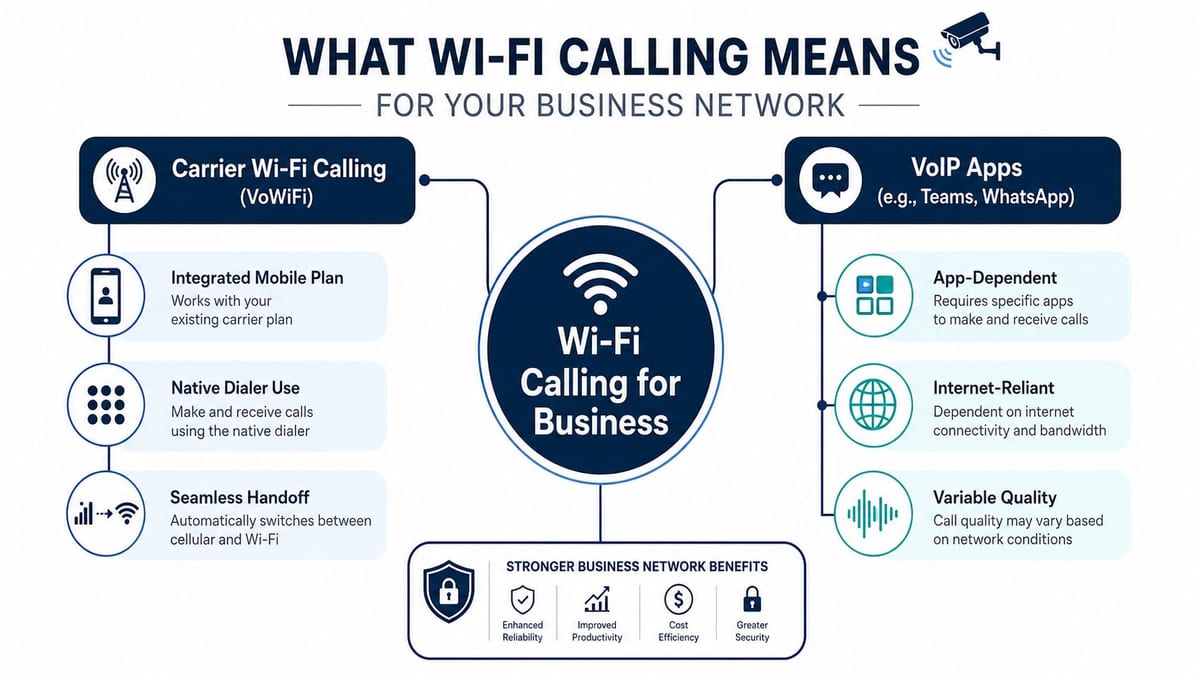
Wi-Fi calling in a business environment is not the same thing as placing a call in Teams, WhatsApp, or another over-the-top app. With carrier Wi-Fi calling, the call still belongs to the mobile operator. The handset uses the office WLAN as transport, then hands the session into the carrier's network for normal numbering and call control.
That distinction matters because it changes who owns the user experience inside the building. The operator still provides the mobile service, but your LAN and WLAN now sit directly in the path of that call.
What the phone is actually doing
In the UK, Wi-Fi calling is implemented as an operator feature, not a generic handset trick. The device, SIM profile, and carrier all need to support VoWiFi end to end. The handset converts voice into IP packets over the local WLAN, then the session is anchored to the mobile operator's core network, as described in this technical summary of Wi-Fi calling architecture.
That's why two people standing side by side can have different outcomes on the same SSID. One handset works cleanly because the operator profile is supported and provisioned. The other falls back to cellular or never registers properly.
What changes for IT and facilities
Once wifi calling phones become part of day-to-day operations, the office network takes on a voice role it may not have been designed for. That has direct implications for fit-outs, relocations, and autonomous units.
A practical design view looks like this:
| Area | What matters in practice |
|---|---|
| Wireless coverage | Calls need stable coverage in corridors, pods, reception, lift lobbies, and lower-ground areas, not just at desks |
| Switching and PoE | AP density, AP location, and power budget affect roaming and coverage continuity |
| Structured cabling | Cable routes decide where APs and CCTV can be placed, which shapes both visibility and voice reliability |
| Security policy | Firewalls and segmentation must allow the service to work without exposing the wider network |
| Building operations | Access control, alarms, and remote support workflows depend on usable mobile communication indoors |
This is also where broader infrastructure planning matters. Good fit-out teams usually don't look at Wi-Fi in isolation. They consider access, surveillance, power, and connectivity together. If you're reviewing options around secure wireless coverage in managed spaces, Wisenet Security Ltd's Wifi offerings are useful context because they sit closer to the way real buildings are operated, with CCTV and site oversight in the picture.
Wi-Fi calling works best when the network is designed as building infrastructure, not treated as a convenience feature.
For unmanned units, that integrated approach becomes more important. Access, power, and data must be designed together. A remote lock is only useful if the door controller has resilient power. CCTV only helps if uplinks stay live. Mobile voice continuity only helps if Wi-Fi reaches plant, entry, and service zones. Building out a fully autonomous unmanned building unit means those dependencies have to be mapped early, including commercial electrical installation and certification for the powered elements that support networking, access, and surveillance.
Choosing Your Path Carrier Integration vs VoIP Apps
A typical fit-out decision lands here: the leadership team wants staff to keep using their mobile numbers, while IT wants call control, auditability, and a support model it can run. Those goals are not always served by the same voice path.
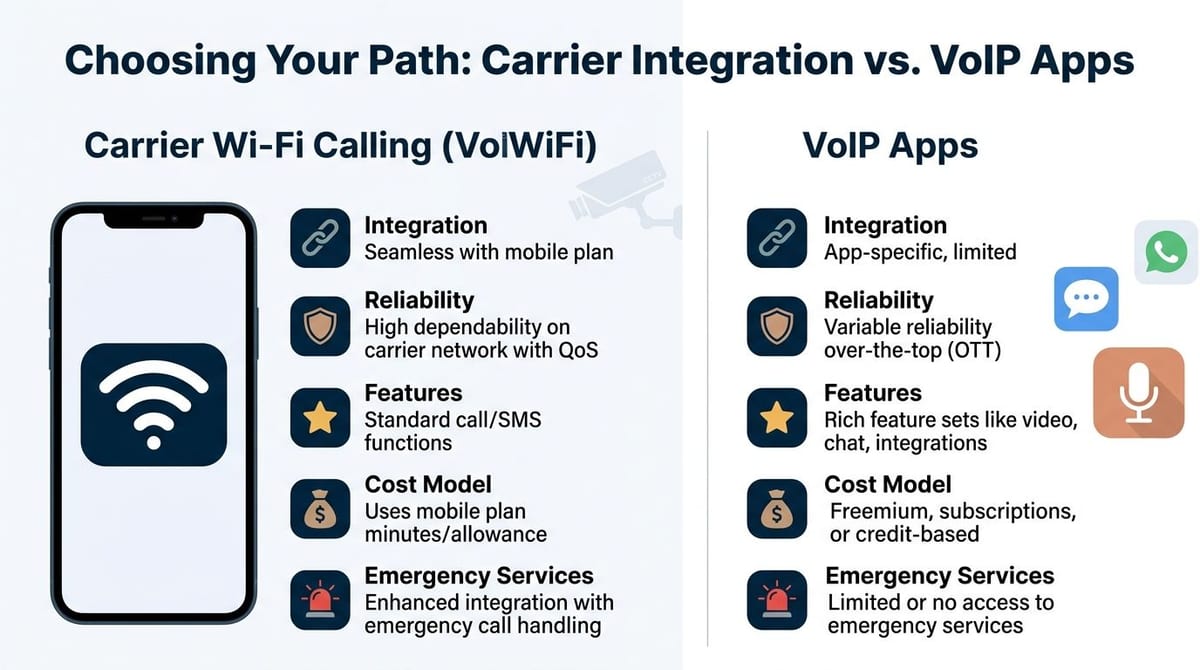
In practice, UK businesses usually choose between two workable models. One is carrier Wi-Fi calling, where calls stay tied to the employee's mobile service and native dialler. The other is app-based voice, such as Teams Phone or another softphone, where the business controls the calling environment more directly. Before choosing either route, it helps to review the underlying business Wi-Fi setup requirements, because voice failures often trace back to the network design rather than the handset.
Where carrier Wi-Fi calling wins
Carrier Wi-Fi calling fits organisations that need staff to answer on their normal mobile number with no change in user behaviour. That matters for directors, reception teams, site managers, on-call engineers, and any role where inbound calls come straight to a personal work mobile.
The advantage is operational simplicity. Users open the phone app they already use. There is no extra sign-in, no app training, and less risk that someone misses a call because the softphone was closed or muted.
The trade-off sits with support and consistency. Performance depends on the handset, the SIM, the carrier profile, and how that network handles VoWiFi. In mixed estates, one employee may have a reliable experience while the person next to them does not, even on the same SSID. Emergency calling setup can also vary by carrier process, which means IT has less direct control than it would with a managed voice platform.
Where VoIP apps win
VoIP apps suit businesses that want voice treated as an IT service rather than a mobile feature. That usually means centralised policy, standard call routing, shared numbers, recording options, compliance controls, and predictable administration across managed devices.
This model is often easier to govern at scale. IT can push configuration through device management, tie calling to the user's business identity, and troubleshoot against one platform instead of several mobile operators.
Users will feel the difference, though. They have to stay inside the app, keep notifications working, and understand which number they are presenting. In high-pressure environments, that friction matters. If staff fall back to the native dialler because it is faster, the business loses the control it was trying to get.
Side-by-side decision points
| Decision point | Carrier Wi-Fi calling | VoIP apps |
|---|---|---|
| User experience | Native handset dialler | App-based workflow |
| Number identity | Usually the user's mobile identity | Usually business platform identity |
| Support dependency | Carrier, SIM, handset compatibility | App, endpoint, and platform policy |
| Emergency handling | Tied to carrier process and user setup | Tied to platform design and business controls |
| Management overhead | Lower for users, variable for IT | Higher policy control, more app administration |
A mixed model is common, and often sensible. Mobile-first staff keep carrier Wi-Fi calling because clients and contractors already know those numbers. Desk-based and service teams use the business voice platform because hunt groups, reporting, and call handling matter more than personal mobile identity.
That split only works if it is deliberate. Document which roles get which service, what devices are supported, who owns troubleshooting, and how users escalate faults. Without that, the helpdesk ends up dealing with grey-area complaints where the carrier blames Wi-Fi, Wi-Fi blames the handset, and the user just hears a broken call.
Choose by operating model, not by feature list
The right decision comes from role design and support boundaries.
- Choose carrier Wi-Fi calling for users who must keep their mobile number and will not tolerate app switching.
- Choose VoIP apps for teams that need policy control, shared calling features, or closer compliance oversight.
- Run both when the workforce includes mobile staff, office teams, and lightly staffed or unmanned areas with different communication patterns.
Battery-less, NFC proximity locks also fit this kind of planning in autonomous sites. They are often selected because they reduce maintenance visits, remove routine battery replacement, and simplify door hardware in spaces that are not permanently staffed. They still need clear permission design, audit logging, and fail-safe planning, but they remove one recurring support burden from unmanned environments.
Engineering Your Network for Flawless Voice Quality
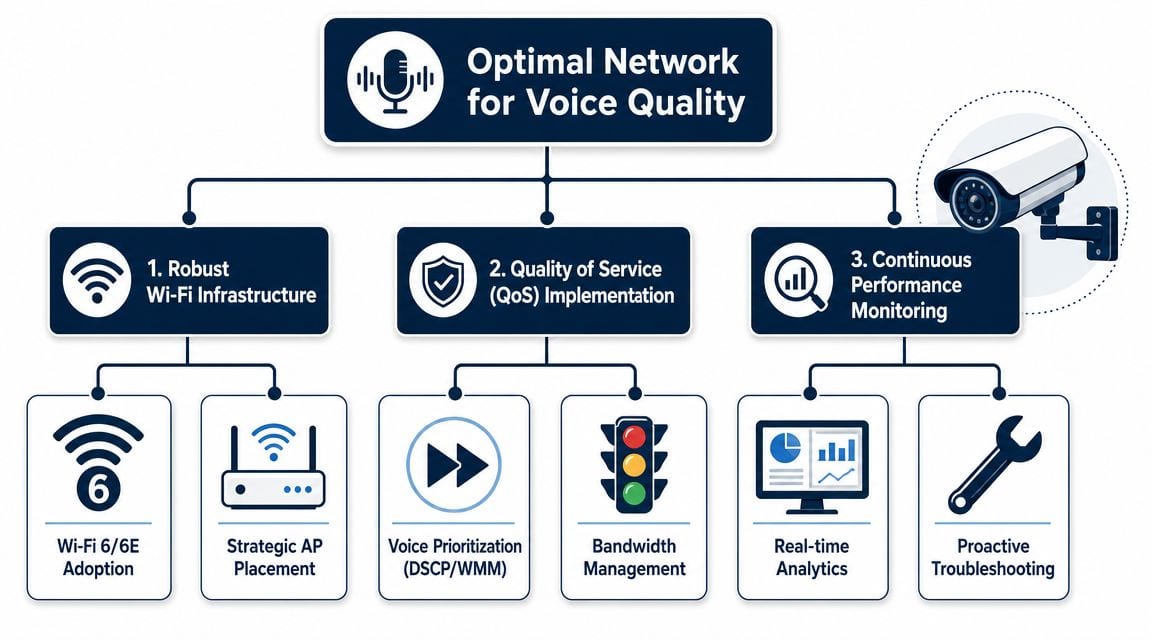
Most projects find their success or failure determined by factors like these. Wi-Fi calling doesn't need much bandwidth, but it does need a reliable network. Independent telecoms guidance commonly cites about 1 Mbps upload and download as the minimum for usable Wi-Fi calling, with 5 Mbps or more recommended for better clarity, according to Nextiva's explanation of Wi-Fi calling bandwidth and reliability. In an office, that means the bottleneck is rarely raw speed. It's coverage, contention, roaming, and policy.
Coverage has to follow user movement
A Wi-Fi heatmap that looks acceptable for laptops may still be poor for voice. Staff don't sit still on calls. They leave a desk, walk to a booth, go through a corridor, stop at a printer, and head into a meeting room. Roaming has to work cleanly throughout that path.
That pushes a fit-out team towards disciplined AP placement:
- Design for pathways, not just desks: Corridors, reception, service routes, and stair cores matter because people talk while moving.
- Use AP locations that support overlap: Dead edges between cells create the classic dropped-call complaint.
- Plan around building materials: Glazed partitions, risers, plant walls, and dense cores all change propagation.
- Check lower-ground and enclosed areas: Comms rooms, stock rooms, and secure back-of-house spaces are common blind spots.
If the office is being built from scratch or reworked substantially, a proper WLAN design should sit alongside the wider wireless plan. A practical starting point is to set up Wi-fi with the assumption that handsets, laptops, CCTV backhaul, and building systems all compete for the same airspace unless you design otherwise.
QoS is not optional
Voice suffers quickly when the office gets busy. Someone starts a large sync. Meeting room devices push video. Guest traffic spikes. If you haven't prioritised real-time traffic properly, the handset call gets treated like any other packet flow.
QoS needs to be consistent from wireless edge to switching and onward to internet breakout. On the wireless side, voice traffic must land in the correct access category. On the wired side, switch policy needs to preserve and honour prioritisation. The firewall and WAN path must not flatten everything back into best effort.
Field note: Most “Wi-Fi calling is unreliable” complaints turn out to be network behaviour problems, not lack-of-bandwidth problems.
Cabling, switching and power are part of voice quality
Wi-Fi calling often gets discussed like a phone feature. In fit-out work, it's an infrastructure outcome. AP placement depends on structured cabling routes. AP performance depends on switch uplinks and PoE availability. Expansion options depend on whether the cabinet space, patching, and electrical design were thought through early enough.
That becomes even more obvious in mixed-use or autonomous buildings:
| Infrastructure element | Why it affects voice |
|---|---|
| Structured cabling | Determines where APs, CCTV, and access devices can actually be installed |
| PoE switching | Powers APs and many security devices that share the same network estate |
| Commercial electrical installation | Supports cabinet power, resilient circuits, and certified delivery for active systems |
| Certification and testing | Confirms the physical layer is solid before blame lands on Wi-Fi or carriers |
Later in the project, it helps to visualise the voice path in operational terms.
Continuous monitoring beats reactive support
Voice complaints are often intermittent. Users say a call dropped in one corner of the third floor or sounded poor during a busy afternoon. If you only look after the complaint, you'll chase symptoms.
A better operating model includes:
- Baseline the WLAN before occupancy
- Monitor AP load and roaming behaviour after go-live
- Review problem areas with facilities, not just IT
- Correlate user complaints with physical locations and times of day
That matters in unmanned units too. If a site depends on remote operation, your monitoring needs to include not only Wi-Fi health but CCTV visibility, access device status, power events, and internet resilience. Otherwise the building looks autonomous on paper and fragile in practice.
Your Wi-Fi Calling Deployment Checklist
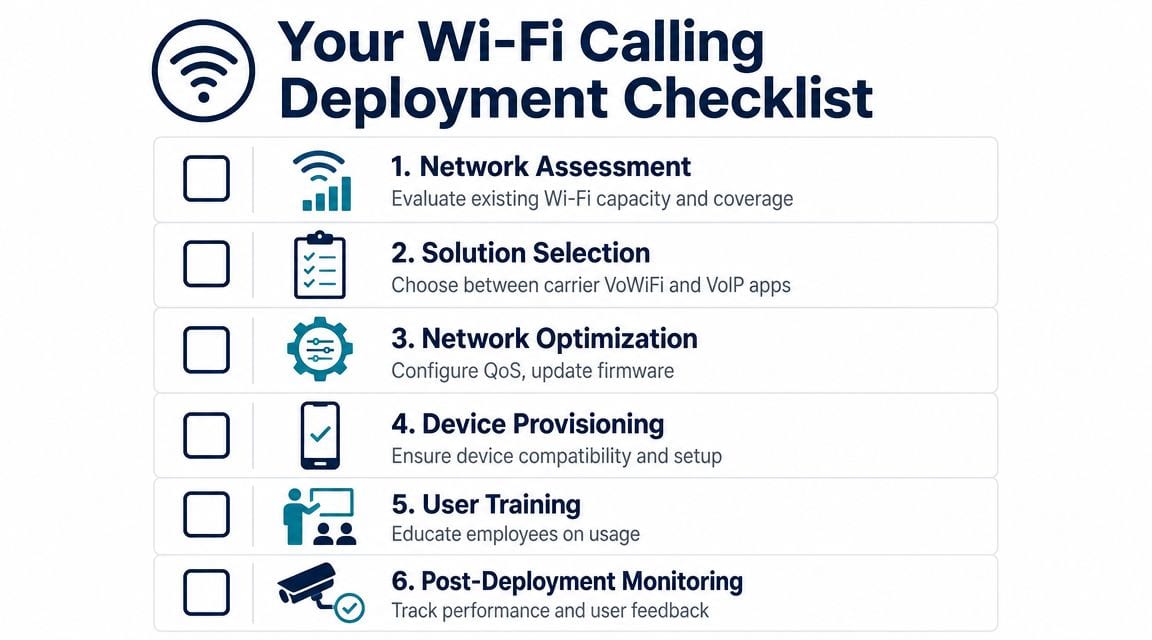
Projects go wrong when teams treat Wi-Fi calling as a toggle instead of a deployment. The safest approach is a checklist that covers devices, carriers, wireless design, switching, user readiness, and ongoing support.
Pre-deployment checks
Start with what you already own and what your users carry.
- Audit the handset fleet: Confirm which devices support the relevant operator implementation. Mixed BYOD estates create support gaps quickly.
- Check carrier policy: Don't assume every SIM profile is provisioned the same way. Verify what each business mobile estate supports.
- Review the building usage model: A staffed HQ, a clinic, and an unmanned serviced unit need different coverage priorities.
- Map operational spaces: Include reception, plant, risers, service corridors, stairwells, and lower-ground rooms.
If the site uses PoE-powered APs, cameras, intercoms, or access devices, power planning has to be done up front. A short primer on what is PoE is useful for project teams because it frames why switching, cabling, and endpoint power can't be separated in a modern fit-out.
Build and test in the right order
A common mistake is enabling Wi-Fi calling before the underlying estate is stable. Build sequence matters.
- Finish structured cabling and certify it
- Install switching with enough PoE headroom
- Place and tune APs based on a proper survey
- Apply QoS and security policy
- Test with real handsets in real movement patterns
- Roll out by area or user group, not all at once
That same sequence supports other building systems. CCTV, intercoms, remote access readers, and autonomous building controls all rely on the same discipline. If the site is intended to run with minimal staff presence, maintenance planning should already be in the design pack. Who updates firmware, who validates camera coverage, who checks reader behaviour, and who investigates a failed AP in a remote unit all need named ownership.
User adoption and post-go-live support
The technical side only gets you halfway. People still need to know what “good” looks like.
- Tell users when the service should work: Explain where Wi-Fi calling is expected to help and where it may fall back.
- Document common symptoms: Choppy audio, delayed connection, and dropped calls should map to a support workflow.
- Test roaming routes: Use the routes staff walk, not just a static desk test.
- Watch for latency and jitter issues: Teams that need to reduce network latency will usually find that voice complaints improve when they stop treating jitter as an abstract performance metric.
A clean rollout doesn't happen because the phones support the feature. It happens because the project team validates the whole path, from cabling and PoE to user behaviour and support ownership.
Common deployment locations include multi-floor offices, healthcare estates, public sector buildings, managed workspace, warehouse offices, concierge-free residential operations, and smaller unmanned commercial units where remote access, CCTV, and mobile communication all have to work together.
Troubleshooting Common Issues and Securing Voice Traffic
The most frustrating support ticket is the one that says, “We've got full Wi-Fi, so why are calls still dropping?” Full coverage on a dashboard doesn't guarantee usable voice. In real UK buildings, Wi-Fi calling performance depends heavily on the wireless environment, and poor results are often caused by congested access points or weak roaming between APs rather than by the simple setting on the handset, as explained in this discussion of why Wi-Fi calling still fails indoors.
Match the symptom to the likely cause
Different failure patterns point in different directions.
| Symptom | Likely cause |
|---|---|
| Call drops while walking | Weak AP overlap or poor roaming behaviour |
| Robotic or clipped audio | Congestion, queueing, or poor prioritisation |
| One-way audio or setup failure | Policy, firewall, or registration issue |
| Only some users affected | Handset, SIM, or operator compatibility mismatch |
| Problems in one room only | Local RF obstruction, dense materials, or poor AP placement |
When users report voice problems, start with location and movement. Ask where they were, whether they were stationary, and whether the issue repeats in the same route or room. That gives you a better lead than generic “Wi-Fi is bad” complaints.
If support teams are also handling wider performance complaints, guidance on how to reduce lag helps frame the difference between broad network sluggishness and voice-specific issues such as roaming and packet delivery behaviour.
Secure the voice path like any other critical service
Once mobile calls traverse the corporate WLAN, they belong in your security design. That doesn't mean breaking the service with over-aggressive controls. It means protecting the environment they rely on.
A sensible baseline includes:
- Use strong wireless security: WPA3-Enterprise is the right direction for controlled corporate access where the estate supports it.
- Segment traffic sensibly: Dedicated VLANs and policy boundaries make troubleshooting and governance easier.
- Review firewall behaviour: Voice-related traffic must be permitted without opening unnecessary exposure.
- Keep firmware current: APs, switches, firewalls, access devices, and CCTV appliances all affect the stability of shared infrastructure.
Secure voice traffic the same way you secure any business-critical workload. Minimise exposure, keep policy clear, and avoid mixing everything into one flat network.
This matters more in unmanned sites. If CCTV, locks, alarms, and wireless voice all ride the same neglected infrastructure, one fault can quickly become an operational incident. Maintenance isn't glamorous, but it's what keeps autonomous buildings credible after handover.
Partnering with Experts for a Successful Rollout
The final failures in Wi-Fi calling projects usually come from coordination, not from the handset estate. I have seen sites pass a basic wireless test on an empty floor, then fail on day one because the AP locations changed during the fit-out, ceiling materials changed late, or the switch stack delivered less PoE than the drawings assumed. Staff only see one outcome. Calls drop in meeting rooms, audio breaks up near lift cores, and the service desk gets blamed.
That is why rollout ownership matters. In an office move or refit, Wi-Fi calling sits across cabling, switching, wireless design, security, electrical works, and building constraints. If those workstreams run separately, small decisions stack up into voice problems. An AP moved a few metres to suit lighting can create a weak roaming point in a corridor. A late change to partitioning can turn a good survey into an inaccurate one. A cheaper switch choice can limit PoE budget and force AP compromises.
One common project mistake is signing off coverage from a predictive survey and skipping the post-install validation. The drawings looked fine. The live floor behaved differently because furniture density, glazing, and occupancy changed the RF environment. The result was a floor that worked for email and web traffic but produced inconsistent call quality at the edges of cells and during handoff. Fixing that after staff move in costs more, disrupts users, and turns a planned deployment into a reactive support issue.
A good delivery partner adds value by catching those failure points early. That means surveying at the right stages, checking AP placement against real building conditions, confirming switching and PoE capacity before procurement, and making sure the WLAN design matches voice behaviour rather than general data use. It also means setting clear acceptance criteria for go-live, including roaming performance, call stability in known high-use areas, and a support plan for the first weeks after occupancy.
If you're planning an office move, fit-out, wireless refresh, or a fully autonomous building project, Constructive-IT can help you design the cabling, Wi-Fi, power, security, and support model properly from the start, so voice, data, CCTV, and access all work as one operational system.