
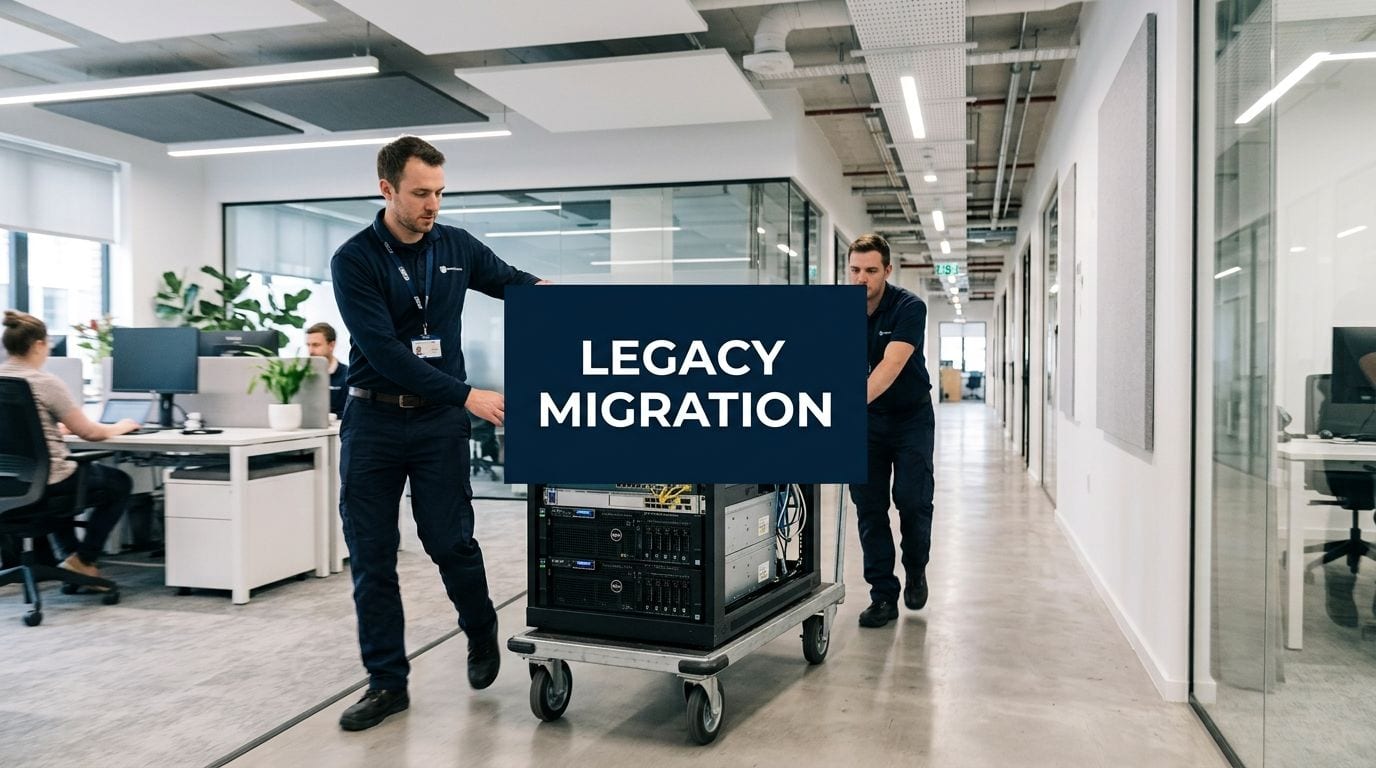
If you're the in-house IT manager staring at an office move plan, you're probably getting pulled in three directions at once. The business wants a clean move date, facilities wants the floor plan signed off, and users assume their systems will work on Monday morning as if nothing changed.
That's where office relocations catch people out. A legacy system migration during a move isn't only about applications and data. It also includes ageing switches in the comms cabinet, cabling that was never labelled properly, analogue door entry, inherited CCTV, patchy Wi-Fi, power feeds with no resilience, and a server room design that made sense ten years ago but doesn't fit the new site.
Treat the move as both a digital migration and a physical infrastructure rebuild. If you split those into separate projects, the gaps will show up at cutover.
Why Your Next Office Move Is a Migration Ticking Clock
An office move compresses decisions. You don't get the luxury of fixing one system at a time over several quarters. Leases end, builders need access, furniture arrives, and your users still expect line-of-business systems, phones, printing, door access, and connectivity to work on day one.

The first mistake is defining “legacy” too narrowly. In relocation work, legacy usually means any critical component that no longer fits the target environment. That might be an unsupported application, but it can also be old structured cabling, oversized on-prem kit that won't suit the new comms room, access control tied to outdated credentials, or a server room built around assumptions the new site won't support.
What makes relocation projects unforgiving
The failure pattern is well known. More than 80% of legacy data migration projects in the UK context either fail or exceed their budget, with 60% failing on the first attempt, according to RecordPoint's legacy data migration analysis. During a relocation, those risks get amplified because technical decisions depend on physical deadlines.
A missed dependency rarely stays isolated. If cabling certification slips, switch installation slips. If comms room power isn't ready, servers stay in transit or remain live at the old site longer than planned. If access control is commissioned late, your own engineers and suppliers can't get into the spaces they need to finish.
Practical rule: If a system needs power, a pathway, a rack position, a network port, or a secure room, it belongs inside the migration plan, not in a separate “facilities” spreadsheet.
What counts as success
Success isn't just moving equipment from one postcode to another. It means users can authenticate, key applications can reach their data, security systems operate correctly, and support teams know what changed. It also means the new site is better than the old one, not just familiar.
A solid programme starts by putting the office move on a proper technical timeline, with decisions locked early enough for procurement, testing, and installation. A realistic office relocation timeline proves useful for this purpose, because it forces digital and physical workstreams to line up before the cutover weekend.
Auditing Your Legacy Estate Before You Move a Single Server
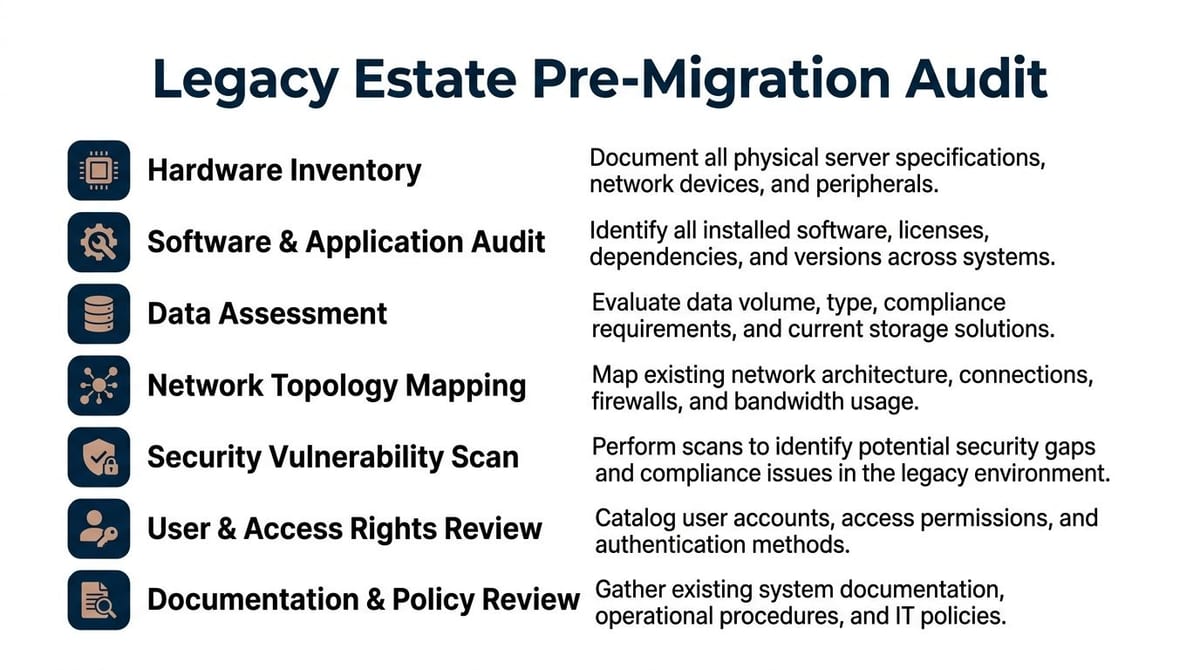
Most migration problems are visible before the move, but only if someone takes the time to look properly. A pre-move audit is more than an asset register. It's a structured check of what exists, what depends on what, and what will break if you move it without redesigning it.
A reliable approach begins with Discovery and Assessment, where teams map applications, data stores, dependencies, and performance roadblocks to create a sound basis for decisions, as outlined in Butterfly Data's legacy migration methodology.
Audit the digital estate
Start with the systems users shout about last. Finance exports, badge databases, print servers, BMS integrations, CCTV recording storage, telephony handoffs, and old file shares often matter more on move weekend than the headline applications.
Use a checklist like this:
- Application mapping: List business applications, who owns them, where they run, and what other systems they rely on.
- Data dependencies: Record source databases, file shares, retention requirements, and any scheduled jobs or integrations.
- Authentication paths: Confirm how systems authenticate users and what happens if the primary route is unavailable.
- Performance baseline: Capture the current pain points now, so you can tell the difference between inherited issues and migration issues later.
- Backup and recovery state: Verify what's recoverable in practice, not what the documentation says should be recoverable.
If you're moving any Windows estate with file services or user data, it's worth checking whether Volume Shadow Copy is being used properly before migration. In practice, it often reveals where users rely on ad hoc restores that no one included in the move plan.
Audit the physical infrastructure
Many “software” migration plans often fall apart. The application may be cloud-ready, but the office still needs resilient access, power, data, and security.
Check the following:
- Structured cabling: Condition, category, fibre runs, patching standards, cabinet layouts, and labelling quality.
- Comms rooms and server rooms: Rack space, cooling path, power circuits, UPS coverage, physical security, and access times for engineers.
- Network topology: Core, edge, firewall placement, WAN links, Wi-Fi density, and any single points of failure.
- Security systems: Door controllers, intercoms, alarm interfaces, CCTV cameras, retention storage, and remote access arrangements.
- Building constraints: Landlord restrictions, out-of-hours access, asbestos considerations, riser access, and permitted working windows.
A relocation audit should tell you not only what you own, but what you can safely retire, what must be retained temporarily, and what should never be moved as-is.
Audit the people and compliance layer
Technical maps matter, but migrations fail because ownership is vague. Every critical service needs a named business owner, a technical owner, and a move-day contact.
Also confirm:
- Who approves downtime for each business system.
- Who validates success after migration.
- What data handling rules apply to archives, exports, and temporary storage.
- Which suppliers hold hidden knowledge about old access panels, telecom circuits, or proprietary kit.
A proper audit gives you something more useful than a spreadsheet. It gives you a decision base.
Rehost, Refactor, or Replace? The Migration Decision Matrix
Once the audit is complete, the next job is deciding what to do with each service. Not every legacy platform deserves the same treatment. Some should move fast with minimal change. Others need redesign. A few should be left in place temporarily and wrapped so the business can keep operating while you unwind them safely.
The practical options are rehost, refactor, replace, and encapsulate.
How to choose without overengineering
Rehost is useful when the service still works, the timeline is tight, and the immediate problem is location rather than functionality. Refactor fits systems with real business value but too much technical debt to keep untouched. Replace is right when the product no longer meets operational or compliance needs. Encapsulate works when a legacy element has to stay for a period, but you want cleaner integration around it.
A common example is telephony during a move. If the business still depends on old desk handsets, fax devices, lifts, alarms, or door-entry hardware, ripping everything out at once usually creates risk. In those cases, resources on connecting legacy phones to cloud calling can help you bridge legacy endpoints while the rest of the estate modernises.
Migration Strategy Decision Matrix
| Strategy | Best For | Relative Cost & Effort | Risk Level | Example Scenario |
|---|---|---|---|---|
| Rehost | Stable systems that need a new home quickly | Lower than redesign options | Moderate | Moving a well-understood internal app onto newer virtual infrastructure before lease end |
| Refactor | Systems worth keeping, but with clear performance or integration issues | Higher because code and platform changes are involved | Higher than rehost | Updating a business-critical application so it works properly with modern authentication and monitoring |
| Replace | Commodity functions or unsupported products | Variable, often high upfront but cleaner long term | Moderate to high depending on change impact | Swapping an outdated access control platform for a modern IP-based system |
| Encapsulate | Legacy elements that can't be retired immediately | Moderate | Lower operational shock, but depends on interface quality | Keeping an old records system live while exposing selected functions to newer services |
The questions that drive the choice
Ask these before committing to a path:
- Is the system business-critical? If yes, minimise abrupt change unless you have time for deep testing.
- Is the code or platform supportable? If not, replacement or encapsulation is usually safer than pretending the issue will wait.
- Does the move date force speed? If yes, rehosting may be the right first move, not the final state.
- Is the technical debt visible in operations? Frequent manual workarounds, brittle integrations, and specialist-only support are signs that “lift and shift” won't solve much.
- Can users absorb process change during relocation? If not, avoid combining a major workflow redesign with move weekend.
The best migration strategy is the one that reduces risk at the point of highest pressure. During a relocation, that pressure point is usually go-live, not architectural purity.
Executing the Migration with Minimal Disruption
Execution is where good plans earn their keep. This is also the phase where teams are tempted into a big-bang cutover because it looks clean on paper. In office relocations, that approach often creates the widest blast radius.
The commercial risk is real. 42% of UK businesses report that legacy migration failures during office fit-outs cause 8+ hours of critical downtime, costing £45,000–£120,000 per incident in lost productivity and server room access, according to Aquarius Reporting on migration disruption during office moves.
Why phased cutover usually wins
A phased cutover gives you room to isolate failure. That matters when the new site includes fresh cabling, newly commissioned racks, revised WAN handoffs, updated access control, and changed user seating plans. If one element misbehaves, you want options.
A practical execution plan usually includes:
- Parallel environments: Keep the old and new environments available long enough to compare outputs, connectivity, and user experience.
- Pilot migration: Move a low-risk subset first, ideally with users who'll give clear feedback.
- Defined rollback points: Decide in advance what failure looks like and when you stop pushing forward.
- Freeze control: Lock avoidable changes in the days around cutover.
- Move-day contacts: Publish one list covering internal owners, facilities, carriers, electricians, access-control engineers, and application suppliers.
What to test before the switch
Don't stop at ping tests and login screens. Test workflows that reflect how people work in the first hour after arrival.
Focus on:
- Authentication and permissions across critical apps and shared resources.
- Printing, scanning, and telephony because users notice these instantly.
- Door access, CCTV visibility, and alarm paths because security failures can halt other remedial work.
- Server room readiness, including power, patching, cabinet access, cooling, and out-of-hours escalation.
- Remote access and support tooling so the helpdesk can respond without improvising.
A disciplined change management strategy helps here because technical readiness alone won't protect you if users don't know what has changed, where to sit, how to connect, or who to contact.
“If the rollback plan only exists in one engineer's head, you don't have a rollback plan.”
Keep the operational wrapper tight
The migration itself is only half the work. The wrapper around it prevents confusion.
That means clear comms before the move, status updates during the cutover, and short approval chains when something slips. It also means someone owns the physical site sequence. There's no benefit in delivering servers to a room that hasn't passed electrical sign-off, or commissioning edge switches before patching is certified.
Beyond Migration: Building an Autonomous Unmanned-Ready Site
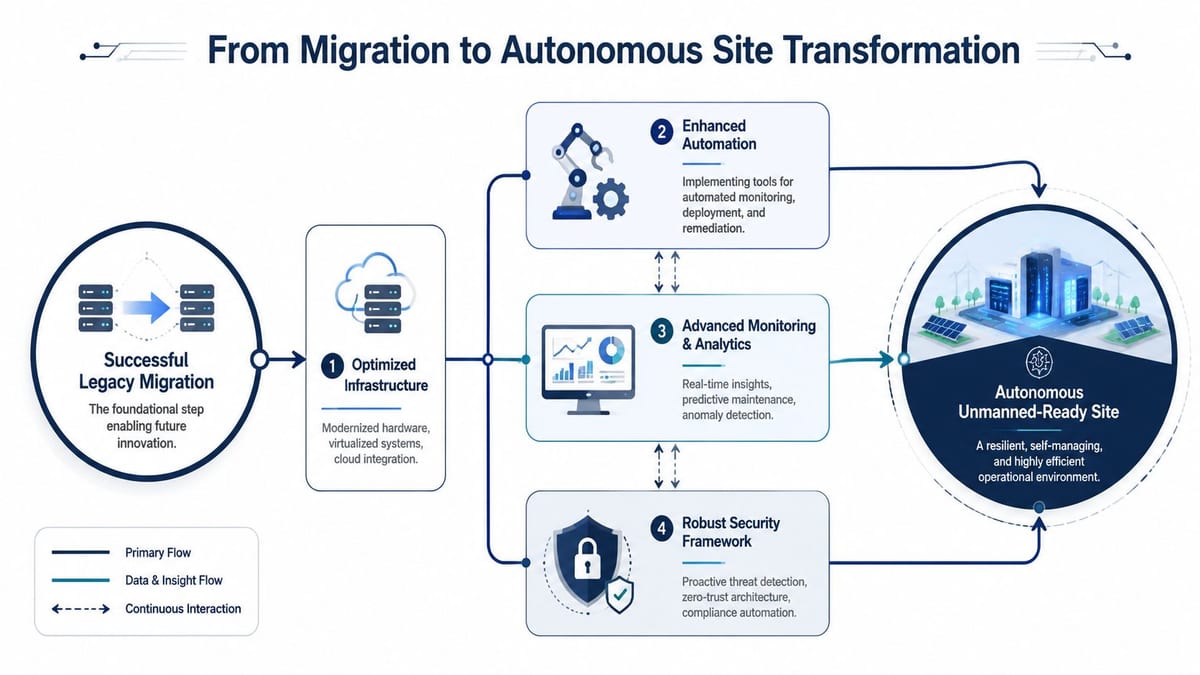
A relocation gives you a rare chance to stop carrying old constraints into the next building. If you only migrate systems, you preserve yesterday's operating model. If you redesign the site properly, you can build out fully autonomous unmanned building units that are easier to run, easier to secure, and less dependent on daily on-site intervention.
In practice, unmanned building management means automating core property functions through integrated access control, AI-powered CCTV monitoring, remote HVAC and lighting control, and proactive maintenance alerts so the building can operate without constant human presence, as described in Constructive-IT's guide to unmanned building management.
What unmanned building management means on the ground
It isn't a gimmick and it isn't just “smart locks”. It's an operating model where the building keeps functioning securely when no one is physically present.
That usually includes:
- Access control: Digital credentials, scheduled permissions, and remote revocation.
- CCTV: IP-based cameras with central visibility and event-led review.
- Power and environmental control: Remote management of lighting, comms spaces, and essential plant interfaces.
- Maintenance alerts: Sensors and monitoring that flag faults before users discover them.
- Remote support pathways: Secure access for diagnostics without sending someone to site for every issue.
Common use cases include satellite offices, serviced suites, managed workspaces, mixed-use commercial units, warehouses, healthcare support buildings, and out-of-hours operational sites where staffing every entrance or comms area doesn't make sense.
Why many unmanned building projects fail
Most failures aren't caused by the concept. They happen because teams design access, power and data as separate disciplines.
A lock might look perfect in the spec, but it still needs the right door set, the right wiring route, the right controller position, and reliable network visibility if it forms part of a managed estate. CCTV has the same problem. Cameras need power, structured cabling, switching capacity, storage planning, and a retention model that matches how the site is used.
Commercial electrical installation and certification sit in the middle of this. If electrical works, containment, low-voltage cabling, and network design are handled in isolation, the handover becomes messy and support becomes worse. The building may be technically “finished” but operationally fragile.
Design principle: Every autonomous function should be traced back to three things together. Power source, data path, and access method.
Why battery-less NFC proximity locks are often the right fit
For many unmanned environments, battery-less NFC proximity locks are a sensible choice because they reduce one of the most common maintenance burdens in distributed estates. You don't have battery replacement cycles to track across doors, and you avoid the familiar problem of a lock failing at the wrong time because routine maintenance slipped.
They also make operational sense where staff turnover, temporary access, or contractor visits are common. NFC credentials can be managed quickly, and the absence of battery maintenance is useful in sites that aren't staffed every day.
That doesn't mean they're automatically right everywhere. Door material, fire-door requirements, escape compliance, frequency of use, and the wider access architecture all matter. A good design starts with the use case, not the catalogue.
Maintenance and operational realities
Autonomous doesn't mean maintenance-free. It means maintenance is planned, visible, and less dependent on reactive callouts.
Plan for:
- CCTV lens cleaning and retention checks
- Access reviews and credential housekeeping
- Electrical inspection and certification records
- Rack, switch, and uplink health monitoring
- Firmware and platform updates
- Spare parts policy for readers, locks, and network hardware
If those routines aren't assigned clearly, the site will drift back into a semi-managed state.
Your Go-Live Checklist for a Smooth Transition
Go-live weekend should feel controlled, not heroic. If the plan depends on last-minute decisions, forgotten passwords, and suppliers “doing their best”, the migration isn't ready.
What to confirm before the first user arrives
Use a short operational checklist and stick to it:
- On-site engineering cover: Confirm who is physically present, when they arrive, and which rooms they can access.
- Helpdesk briefing: Make sure first-line support knows the likely user issues, the expected workarounds, and the escalation path.
- Business validation contacts: Have named users from key departments available to test the tasks that matter most to them.
- Security readiness: Verify access control, alarms, and CCTV are functioning before the building fills up.
- Comms room status: Check power, patching, cabinet security, cooling, and labelling one final time.
What to do in the first week
The first week is where hidden defects surface. Don't rush to declare success because the move happened.
Focus on these actions:
- Run a post-migration data quality assessment. Successful transitions require a post-migration check to confirm the new system's data is complete, accurate, and consistent with the original legacy data.
- Track user pain points daily. Small frictions reveal misconfigurations faster than formal project reports do.
- Update the documentation. Rack layouts, patch schedules, access permissions, support notes, and asset locations must match reality.
- Decommission deliberately. Remove or retire old equipment in a controlled way so you don't carry avoidable technical debt into the new site.
- Review the move properly. Capture what failed, what nearly failed, and what should be standard next time.
The move isn't finished when the van leaves. It's finished when the new site is supportable by the people who have to run it every day.
A good office relocation proves more than your ability to transport systems. It proves you can align infrastructure, security, power, access, support, and user readiness into one controlled change.
If you're planning a relocation, fit-out, or major infrastructure refresh, Constructive-IT can support the full path from survey and design through cabling, electrical coordination, server room readiness, security integration, migration planning, and on-site go-live support. That kind of end-to-end view is often what keeps a legacy system migration from becoming two separate projects that fail in the gaps.