
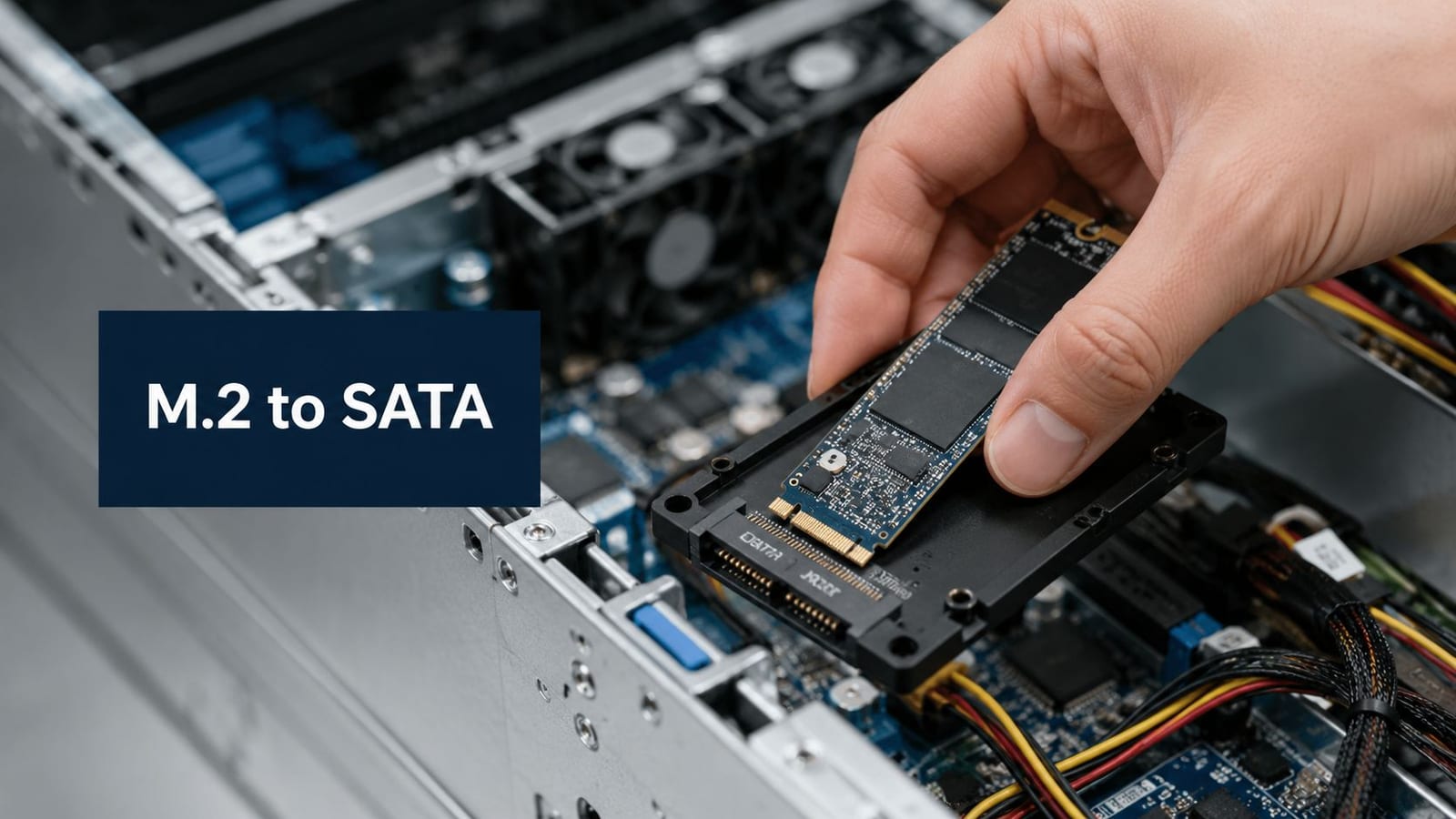
The server-room refresh is already scheduled, the 2.5-inch hot-swap bays are available, and the spare SSDs on the shelf are M.2. Or the opposite has happened: the new CCTV retention appliance accepts SATA drive connections, while procurement has standardised on M.2 modules. Someone suggests an M.2 to SATA converter, and the project appears to have a quick fix.
That assumption causes avoidable failures. An adapter can solve a physical packaging problem, but it can't turn an NVMe drive into a SATA device, correct an unsuitable BIOS configuration, or compensate for poor power, cooling, cabling, and commissioning. For office relocations, server-room refreshes, CCTV systems, and fully autonomous unmanned building units, the converter needs to be treated as an integration decision, not a cheap accessory.
The Real-World Problem Behind M.2 to SATA Conversion
A typical UK office relocation creates an awkward handover. The server team has approved a storage standard, the cabling contractor has installed or reused 2.5-inch equipment, and the facilities team needs the CCTV and access-control systems operational before the building opens. The drives and bays may both be perfectly serviceable, yet they don't match.
That mismatch appears in several places:
- Server-room spares: A team may have compatible M.2 SATA SSDs but only 2.5-inch SATA caddies available.
- Office moves: Existing desktops, small servers, and appliances may rely on 2.5-inch bays while the replacement stock uses M.2 modules.
- CCTV retention boxes: Video systems often inherit a fixed enclosure design, making drive form factor part of the installation constraint.
- Standardisation programmes: Procurement may favour one SSD format, while legacy hardware continues to dictate another.
The UK retail record shows that this isn't a new enthusiast niche. A StarTech.com M.2 SATA SSD to 2.5-inch SATA adapter was listed on Amazon.co.uk on 29 November 2016, with a UK reseller listing tracked later, and one listing showed a price of about £22.69. The product supports M.2 sizes 2230, 2242, 2260, and 2280, but explicitly excludes NVMe and AHCI PCI-Express SSDs, as shown by the UK StarTech adapter listing.
The commercial risk isn't the adapter cost. It's the delay caused when a drive appears to fit, fails to enumerate, and then moves between the server team, cabling team, supplier, and manufacturer without a clear owner. A procurement line that states only “M.2 SSD adapter” is incomplete. The specification must state protocol, keying, supported length, host interface, boot requirements, cooling, and warranty responsibility.
Understanding M.2 Form Factors and Keying
M.2 describes a physical module family, not a single storage technology. The module is 22 mm wide, while its length varies across common formats from 30 mm to 110 mm. Retail listings for SATA adapters commonly identify 2230, 2242, 2260, and 2280 sizes, so the digits matter: the first two describe width and the remaining digits describe length.
Read the drive label before reading the adapter packaging. A module marked 2280 is longer than a 2242 module, and an enclosure needs either the appropriate mounting point or a stated range that includes that length. A drive can have the correct protocol and still fail because the board or retaining bracket can't secure its physical size.
Keys are the plug shape
The notch in the connector is the practical clue. Think of it as a keyed electrical plug:
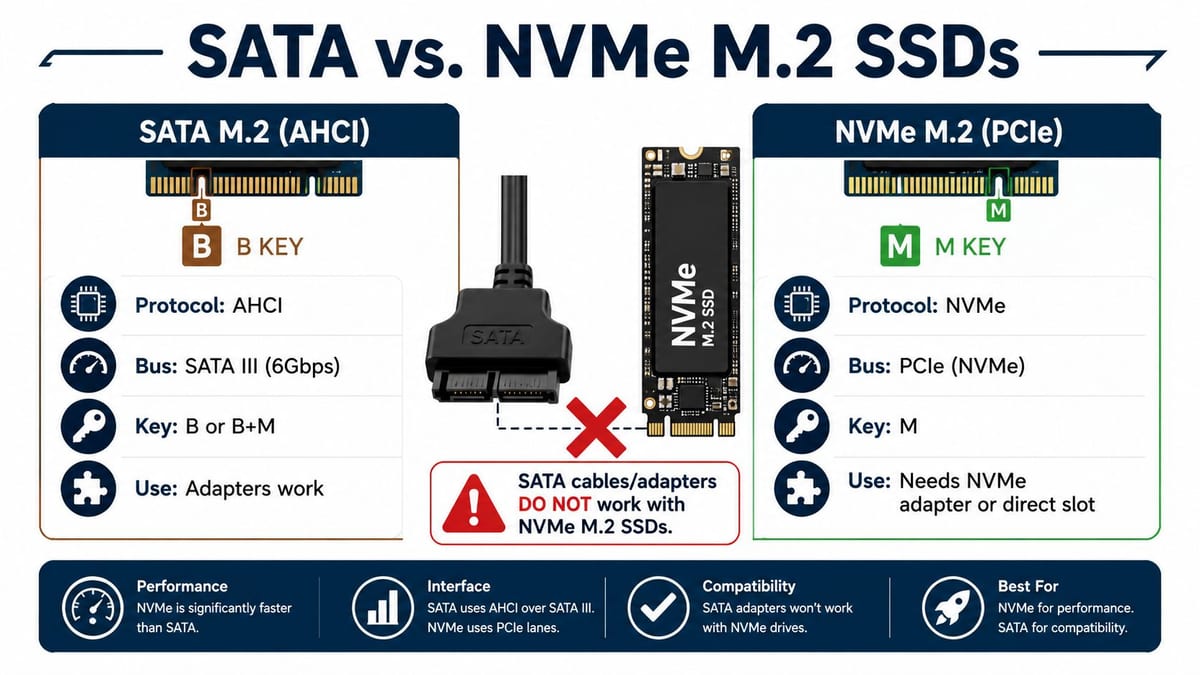
- B-key: The notch position identifies one contact arrangement commonly associated with SATA and other interfaces.
- M-key: The notch differs and is commonly associated with PCIe and NVMe designs.
- B+M-key: Two notches allow the module to fit a wider range of physically compatible sockets, but the drive's protocol still decides whether it will work.
Physical insertion isn't proof of electrical compatibility. A B+M SATA module may fit a socket that also accepts other M.2 devices, but the host still needs to support the signals carried by that socket. The same principle applies to an adapter. The key helps prevent the wrong module from being inserted, but it doesn't make every M.2 drive interchangeable.
The ATP guide to M.2 B, M, and B+M keys is useful background when translating a supplier datasheet into a purchase decision. In an office refresh, record the drive's length, key, protocol, and interface as separate fields rather than relying on a product name.
Why Protocol Matters More Than Physical Fit
Two M.2 drives can look almost identical on a workbench and still speak different electrical languages. A SATA-based M.2 SSD uses the SATA protocol, commonly through AHCI, while an NVMe M.2 SSD uses PCIe. An M.2 to SATA converter is designed for the first category. It routes a SATA M.2 drive into a conventional SATA connection, rather than translating PCIe into SATA.
That distinction explains the most frustrating installation report: “The drive clicks into place, but the BIOS can't see it.” The module may be seated correctly, the retaining screw may be secure, and the adapter may be connected to power and data. If the drive is NVMe and the adapter only supports SATA, the system has no compatible storage path to discover.
The UK distributor documentation for these adapters makes the constraint explicit. Farnell's M.2 SATA adapter datasheet states that B-key or B+M-key SATA SSDs are supported, while NVMe and AHCI PCIe M.2 drives aren't, and unsupported PCIe drives won't enumerate.
Practical rule: Treat “M.2” as a form factor label. Treat “SATA”, “AHCI”, “NVMe”, and “PCIe” as the compatibility decision.
The BIOS symptom is only the symptom
A missing drive isn't automatically a failed adapter. The troubleshooting sequence should begin with the drive label and supplier datasheet, then move to keying, cabling, port configuration, and firmware. If the host is configured for a RAID-only storage path, a single SATA device may also be absent from the expected boot or disk-management screen even though the hardware is healthy.
For teams refreshing mixed estates, the distinction between SATA and SAS is also important. A SATA adapter doesn't provide SAS behaviour, dual-porting, or enterprise SAS features, so the SATA versus SAS comparison should form part of the server compatibility review.
The red flag is a procurement description that says only “M.2 compatible”. That wording isn't enough. Require the supplier to state M.2 SATA support, accepted keying, supported module lengths, and the exact host-side connection.

Adapter Types Available to UK IT Teams
The category contains several different products that are often grouped under the same search term. Choosing the right one depends on whether the requirement is mechanical conversion, multiple-drive management, or PCIe expansion.
Single-drive 2.5-inch enclosures
The most familiar product accepts a compatible M.2 SATA SSD and presents it as a 2.5-inch SATA device. This is the sensible choice when a laptop SSD, desktop bay, or server caddy has a SATA connection and the existing drive is the right protocol.
UK retail catalogues show this format has been established for years. Scan listed Akasa and ICY DOCK converter products on 4 August 2016, while Currys Business listed a StarTech M.2 SATA SSD to 2.5-inch SATA adapter in 2025, according to the Scan M.2, U.2, and mSATA adapter catalogue. The same retail evidence describes a 2.5-inch SATA enclosure supporting M.2 2230, 2242, 2260, and 2280 drives at up to 6Gbps, the SATA III ceiling.
Dual-drive SATA adapter cards
A dual M.2 SATA adapter is a different proposition. It can combine two compatible SATA M.2 modules and provide storage modes including RAID 0, RAID 1, spanning, and JBOD. That may suit a small server or appliance that has a 2.5-inch form factor but needs mirrored storage or a managed combination of drives.
Don't assume that the presence of RAID modes makes the card a server RAID controller. Check where the array is created, how failure is reported, whether the host sees one logical volume or separate devices, and how replacement drives are handled.
PCIe carrier boards
A PCIe carrier board is intended for an NVMe M.2 drive in a server or workstation with spare PCIe lanes and no native M.2 socket. It isn't an M.2 to SATA converter. The host-side interface is PCIe, and the platform must support the carrier, the drive protocol, booting from that path if required, and suitable cooling.
The choice is straightforward when the requirements are written accurately. A single SATA module belongs in a 2.5-inch SATA enclosure. A mirrored pair may justify a dual SATA adapter. An NVMe module needs a suitable NVMe carrier or native PCIe-capable slot.
Pre-Purchase Compatibility Checklist
Before a supplier quote is approved, turn the requirement into yes-or-no questions. Each answer should be recorded against the asset, not left in an email thread.
- Is the SSD SATA-based? If the label or datasheet says NVMe or PCIe, a SATA converter isn't suitable.
- Does the key match the adapter specification? Confirm B-key or B+M-key support where required. A module that fits physically may still use the wrong protocol.
- Does the host provide a 2.5-inch SATA bay and a SATA data path? A caddy may provide mechanical space without providing the required controller connection.
- Is the expected SATA revision documented? SATA II operates at 3Gbps, while SATA III supports up to 6Gbps. The Serial ATA connector reference helps teams verify the physical connection, but the host controller and adapter specification still need checking.
- Does the adapter support the module length? Confirm 2230, 2242, 2260, or 2280 support rather than assuming every mounting hole is present.
- Can the platform boot from the converted drive? Check firmware support, UEFI or CSM expectations, and whether the storage controller exposes the device during boot.
- Is the intended controller mode compatible? AHCI, RAID, and vendor-specific storage modes can change how the BIOS and operating system present the disk.
- Who owns the warranty and RMA process? Record whether a failed adapter, SSD, caddy, or backplane is replaced by the supplier, server vendor, or installation contractor.
The same discipline applies to the surrounding fit-out. A converter installed in a server room is only one part of a controlled system. Structured cabling should be tested and warranted, electrical works should be certified, and storage integration should have a documented acceptance test.
Use the following video as a visual aid when briefing technicians, but keep the supplier's written compatibility statement as the contractual reference.
Installation and BIOS Settings Step by Step
A controlled installation starts before the server is opened. Confirm the change record, maintenance window, backup status, asset identifiers, and rollback plan for a production appliance. For a laptop rescue or a non-production test bench, the same technical sequence applies with less operational risk.
Prepare the hardware
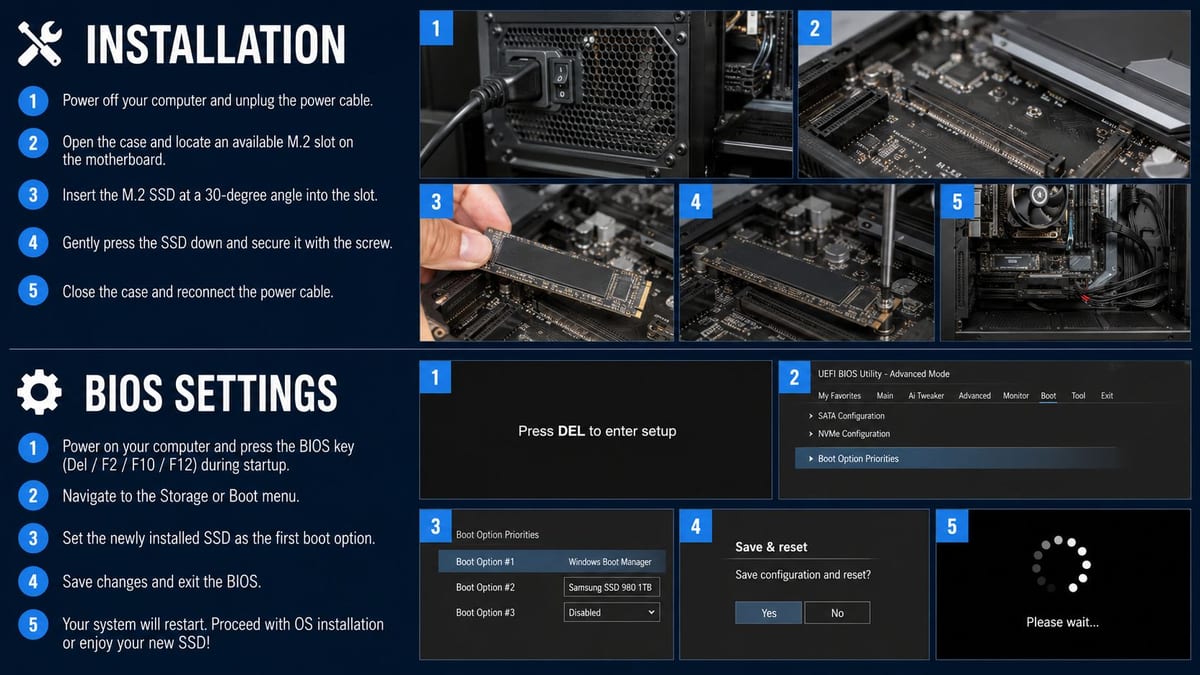
Use ESD precautions and inspect the module, adapter, retaining screw, caddy, SATA data lead, and power connection. Seat the M.2 SSD fully into the adapter at the correct angle, lower it onto the standoff, and tighten the retaining screw only enough to hold the board securely. Over-tightening can damage the module or board.
Install the populated enclosure into the 2.5-inch bay or hot-swap caddy. Attach SATA data and power, check that the cable isn't under strain, and verify that the backplane connector is properly seated. In a CCTV retention box, label the drive position and record its serial number before closing the chassis.
Verify firmware before configuring storage
Power on and enter the BIOS or UEFI interface. Confirm that the SATA port is enabled and set to the intended controller mode. If the platform is configured for RAID-only operation, the device may not appear where you expect, so document the current setting before changing it.
Check whether the operating system uses UEFI or legacy compatibility support. CSM settings must match the installed operating system and bootloader. Save changes only through the approved change process, then verify that the drive is recognised before creating partitions, migrating data, or attempting RAID configuration.
Installation order matters: Seat the drive, verify the physical path, confirm firmware detection, then configure the operating system or array.
For a server-room rollout, test one representative unit first. Record BIOS settings, firmware versions, drive health data, boot behaviour, hot-swap response, and recovery steps before repeating the installation across the estate.
Performance and Reliability Considerations
An M.2 SATA SSD in a 2.5-inch adapter remains a SATA device. A UK retail description of this converter class specifies support up to 6Gbps, which reflects the SATA III interface ceiling rather than the flash module's theoretical peak. The adapter can improve packaging flexibility, but it can't provide NVMe performance.
That limitation isn't automatically a problem. A CCTV retention box may need dependable sequential writes, predictable replacement, and compatibility with an existing SATA backplane. A converted SATA SSD can be a practical choice when the appliance, software, and monitoring process are already built around SATA.
A virtualisation host is different. It may depend on high I/O concurrency, low latency, and rapid access across multiple active workloads. In that environment, paying for an NVMe-native bay or a properly supported PCIe carrier may be more sensible than placing a SATA module behind a converter. The right comparison is between the complete platform designs, not between two bare drive benchmark figures.
Reliability belongs in the acceptance test
Check SMART visibility through the host operating system or management layer. Confirm that the adapter doesn't hide essential health information, and record the SSD's endurance rating, temperature behaviour, firmware, and replacement procedure. In a tightly packed 1U server, restricted airflow can cause sustained-write performance to fall as temperatures rise, so physical clearance and thermal monitoring should be part of the design.
For dual-drive products, document the array mode and rebuild process. RAID 1, spanning, JBOD, and RAID 0 have very different failure consequences, and the adapter's labels alone don't create a backup. A retention appliance still needs a recovery plan, while a server refresh needs tested restoration and monitoring.
The fast SSD drives guidance is relevant when the business requirement is performance rather than simple compatibility. Use conversion where it preserves a useful existing platform, not where it conceals the need for a better storage architecture.
Troubleshooting and Procurement Recommendations
Day-two support calls usually follow a small number of patterns. Start with the simplest explanation and change one variable at a time.
| Symptom | First checks | Likely decision |
|---|---|---|
| Drive isn't detected | Keying, SATA versus NVMe protocol, seating, power, BIOS port status | Replace the incompatible converter or correct the connection |
| Drive is detected but slow | SATA mode, host revision, cable, backplane, workload, thermal conditions | Confirm the platform ceiling before replacing hardware |
| Drive drops out under load | Power stability, adapter temperature, airflow, firmware, backplane contact | Move the device, improve cooling, or select a better-supported platform |
| Array is degraded | Drive health, adapter firmware, slot mapping, replacement procedure | Follow the documented rebuild process and confirm monitoring |
A converter shouldn't be the automatic response to every M.2 and SATA mismatch. If the host is being replaced, an NVMe-native bay may provide a cleaner support model. If the estate needs simple SATA performance and long-term predictability, buying a new SATA SSD may be less risky than introducing an adapter between the drive and the backplane.
The UK market evidence supports treating the product category as established rather than experimental. Scan listings show M.2-to-SATA products in UK retail channels by 4 August 2016, the StarTech listing was already present on Amazon.co.uk on 29 November 2016, and Currys Business still listed a StarTech adapter in 2025, as recorded in the UK adapter catalogue. That history doesn't remove compatibility checks, but it does support including the adapter as a defined line item in a fit-out specification.
Unmanned building projects expose the same integration problem at a larger scale. An autonomous unmanned building unit isn't just a room with locks and cameras. It needs a certified electrical backbone for door controllers, CCTV, switches, lighting, and network equipment. Access control depends on reliable data connectivity, and storage devices in CCTV or building-management systems depend on power quality, cooling, firmware, and documented maintenance.
What unmanned building management means in practice
The building operates with limited routine attendance, so faults must be prevented, detected, and recoverable without treating access, power, and data as separate projects. This commonly applies to remote offices, warehouses, plant rooms, utility facilities, storage sites, and distributed commercial units.
Battery-less NFC proximity locks are selected for operational reasons. UK access-control guidance describes NFC energy transfer for phone- or card-based access, avoiding routine battery replacement and reducing site visits. It also identifies audit trails and estate-wide mobile access as useful capabilities for facilities teams, as outlined by iLOQ's critical infrastructure guidance.
CCTV, access control, network switches, and lighting still need dependable electrical installation and certification. UK building-integration guidance stresses UPS support for access control and programme time for electrical works, structured cabling tests, CCTV commissioning, lock programming, network sign-off, and cross-system testing. The smart building sensors guidance reflects the practical point that testing devices individually isn't enough. Teams must test the complete operating sequence, including outage recovery and communications failure.
For an office move, server-room expansion, or fully autonomous unmanned building fit-out, send suppliers a single coordinated specification. State the M.2 protocol and key, adapter type, host bay, BIOS requirements, power and cooling assumptions, CCTV retention role, cabling test requirements, commercial electrical installation and certification responsibilities, commissioning method, and post-deployment support. That prevents the same box from being handed between cabling and server teams without a clear integration owner.
Constructive-IT plans and delivers office relocations, server-room expansions, and autonomous building fit-outs with storage integration, structured cabling, CCTV, network infrastructure, and certified electrical works coordinated as one programme. Visit Constructive-IT to discuss your requirements and arrange a practical survey, specification, installation, and sign-off plan.