


Extending WiFi With Router A Guide to Flawless Office Coverage
- Craig Marston
- Jan 7
- 16 min read

When you need to get Wi-Fi into those tricky dead zones in a commercial space, using a second router is often the most reliable way to get the job done. This usually means setting it up as a wired access point, a wireless repeater, or a network bridge to push your main Wi-Fi signal further.
Out of all the options, a wired access point is the best method by a country mile. It gives you the fastest speeds and the most stable connection possible.
Why Your Office Wi-Fi Keeps Failing
The single router that works perfectly well in your house just isn't built to handle the demands of a commercial building. In places like offices or hospitals, standard Wi-Fi setups often crumble, leading to frustrating connectivity problems that are far more complex than a few simple dead spots.
The real culprits are often invisible but have a massive impact on performance. Everyday building materials are one of the biggest offenders. Unlike the plasterboard walls at home, commercial spaces are often built with reinforced concrete, steel beams, and insulated glass. These dense materials can seriously weaken or even block Wi-Fi signals, creating unpredictable coverage gaps that bring productivity to a halt.
The Challenge of a Crowded Airspace
It's not just physical barriers causing headaches. The modern office is a high-density environment packed with devices all fighting for the same wireless airspace. Laptops, smartphones, wireless printers, and even the microwave in the kitchen all contribute to radio frequency (RF) interference, which can slow your network to a crawl and cause connections to drop without warning.
This problem gets much worse with the sheer number of users. A single router can quickly become overwhelmed when dozens of employees try to connect at once for video calls, large file transfers, and cloud-based applications. The result is a sluggish, unreliable network that simply can't keep up. To get a better handle on these issues, you can check out our guide to fix your office WiFi signal strength.
Planning for a Reliable Network
Making common data network mistakes during the initial setup can lead to years of poor performance. This is precisely why professional network planning is non-negotiable for any commercial space, especially during an office relocation or a new fit-out where reliability is critical from day one.
A proper plan involves more than just plugging in another router; it's about creating a robust, certified, and tested network. There are three main strategies for extending Wi-Fi with a router, and each one has its own specific use case:
Wired Access Point: This is the gold standard. It involves connecting the second router to your main one with a physical fibre cable installation, guaranteeing the best performance.
Wireless Repeater: Here, the second router picks up the existing Wi-Fi signal and rebroadcasts it. It's easier to set up but comes with a significant hit to performance.
Network Bridge: This method is used to wirelessly link two separate networks, which is perfect for connecting adjacent buildings without running a cable between them.
Understanding these methods is the first step toward building a network that actually works for your business.
Blueprint Your Network With a Professional Site Survey
Before you even think about running a single cable or plugging in a new router, the most important work happens in the planning stage. Trying to extend your Wi-Fi without a proper site survey is like building a house without a blueprint; you might end up with something that stands, but it certainly won’t be reliable or efficient.
This foundational step is what separates a quick, makeshift fix from a certified, high-performance network. It saves countless hours of troubleshooting and serious money down the line, especially during complex projects like an office relocation or a new commercial fit-out.
Mapping Your Physical and Digital Landscape
A professional site survey always kicks off with a detailed walkthrough of your space. The aim is to build a comprehensive map that doesn't just show the physical layout, but also reveals the unique radio frequency (RF) personality of your environment. This isn’t about measuring square footage; it's about understanding exactly how your workspace will interact with Wi-Fi signals.
The key goals of this initial mapping are to:
Identify High-Demand Zones: Pinpoint areas like conference rooms, collaborative hubs, and executive offices where you can expect a high density of users and bandwidth-hungry applications.
Locate Potential Interference Sources: Document anything that could disrupt your Wi-Fi signals. This includes the usual suspects like microwaves and cordless phones, but also less obvious culprits such as HVAC systems, lift motors, and even the dozens of neighbouring networks bleeding through the walls.
Assess Physical Obstacles: Get a feel for the building materials. Reinforced concrete walls, metal filing cabinets, and even large fish tanks can absorb or reflect Wi-Fi signals, creating dead zones where you'd least expect them.
From Guesswork to Data-Driven Decisions
The real power of a site survey comes from ditching assumptions and gathering hard data. Using specialised tools, engineers measure existing signal strength, noise levels, and channel utilisation throughout the entire premises. This data is then used to create a visual "heat map."
A heat map is essentially your floor plan overlaid with colours representing signal strength. Green areas show strong coverage, while yellow and red highlight weak spots or total dead zones. This visual guide is invaluable, as it instantly flags problem areas and helps us pinpoint the optimal locations for new routers or access points.
A classic data network mistake is placing access points based on convenience rather than actual coverage needs. A heat map takes the guesswork out of the equation, ensuring every device is positioned for maximum performance and minimal channel interference—the absolute fundamentals of a successfully certified and tested network delivery.
This methodical approach is absolutely critical in places like hospitals, where reliable connectivity is non-negotiable, or during an office relocation where the network has to work perfectly from day one.
Aligning Strategy With Business Needs
The insights we gain from a site survey directly shape the network design. For example, if the survey reveals significant structural interference between floors, a strategy relying on wireless repeaters would be doomed from the start. Instead, the data would point towards a more robust solution, like installing fibre cable to connect wired access points on each level.
This planning phase also ensures the final network is not only functional but tidy and manageable. It includes plans for professional cable management, making sure the infrastructure is organised and easy to maintain. This foresight prevents the "server room spaghetti" that plagues so many businesses, leading to a tidy desk and an even tidier communications cabinet.
The demand for these meticulously planned networks is soaring. In the UK, the wireless router market, which is vital for extending Wi-Fi, hit USD 773.70 million and is set to grow significantly. This trend is fuelled by the connectivity demands of office fit-outs and the national shift to full-fibre broadband, which has seen gigabit-capable access nearly double to over 70% of UK premises.
For businesses, this means partnering with an Excel accredited partner for a surveyed installation isn’t a luxury. It’s a strategic investment that comes with a 25-year equipment warranty, guaranteeing your network is ready for the future. You can delve deeper into the trends of the European wireless router market on cognitivemarketresearch.com.
Choosing Your Extension Method: Wired vs. Wireless
Right, so you’ve done the groundwork with a site survey. You now have the data you need to make a smart call on the hardware and strategy. When you're looking to extend Wi-Fi with a router in a commercial setting, you really have three main routes to go down. Each has its place, and picking the right one is absolutely fundamental to building a network that’s not just working, but properly certified, reliable, and secure.
Your decision will boil down to one core question: wired or wireless? While wireless options seem convenient, I'll be blunt: a hardwired connection is almost always the superior choice for any business-critical operation. Let's break down the logic behind each method to help you figure out the best fit for your office layout and performance needs.
This flowchart lays out the core steps of a proper site survey—the crucial first phase before you even think about which extension method to use.
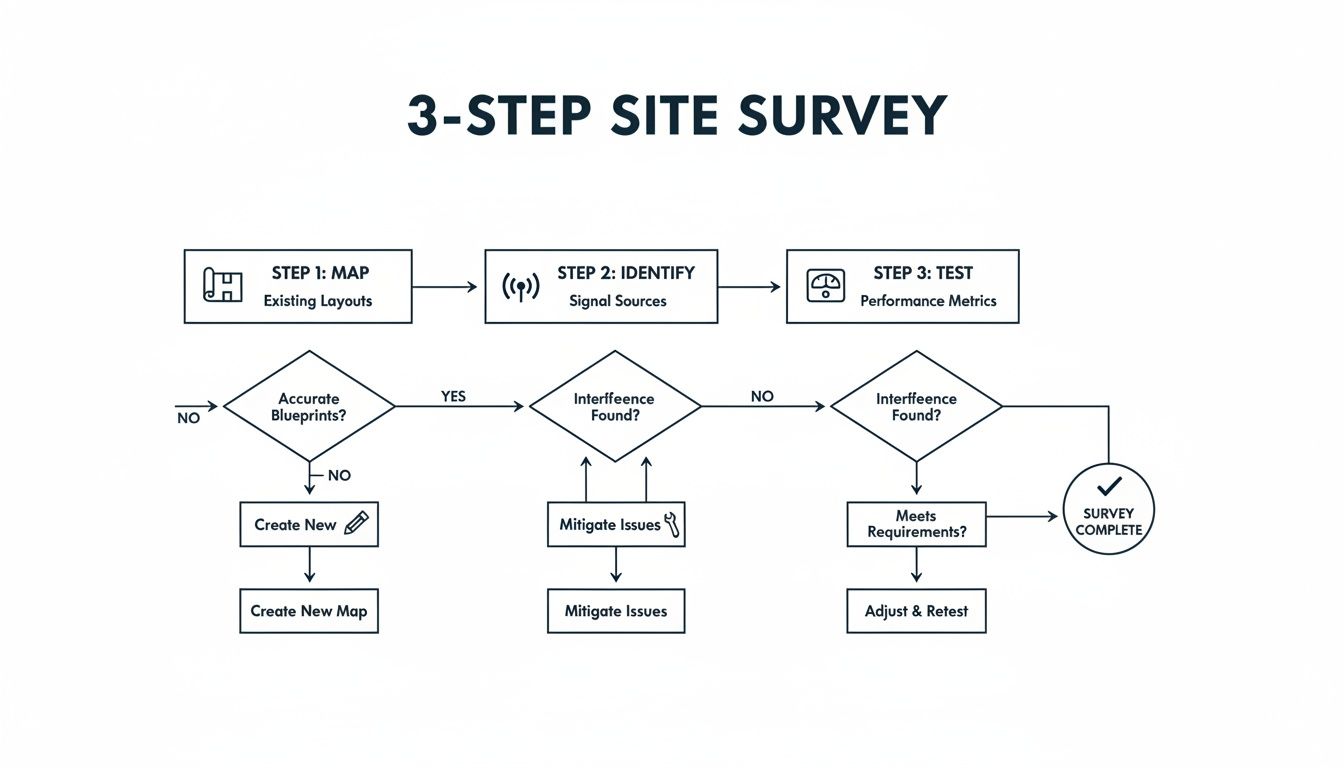
As the diagram shows, a successful network extension starts with mapping the physical space, sniffing out signal interference, and testing performance. It’s a data-driven process that takes all the guesswork out of the equation.
The Gold Standard: Wired Access Point
The most robust and dependable way to extend your Wi-Fi is to configure a second router as a wired Access Point (AP). This means running a physical data cable—usually a high-performance Cat6 or even fibre optic for longer runs—from your main router to the second one.
This direct, physical link completely sidesteps the signal loss and interference you get with wireless solutions. By hardwiring the connection, you’re feeding the second router the full, uncompromised speed from your main network, which it can then broadcast at its absolute best. It's the only method that guarantees you won’t accidentally create a bottleneck.
Of course, for this to work, you need to configure that second router correctly. The most critical step is to disable its DHCP server function. Your main router must be the only device on the network handing out IP addresses. If you have two, they'll start fighting, causing critical IP conflicts that will bring your entire network to a grinding halt.
You’ll also want to set the SSID (network name) and password to be identical to your main network. This creates one seamless, unified network, allowing devices to automatically hop to the strongest signal as people move around the office. No manual reconnecting, no dropped calls. This is the cornerstone of any professionally delivered, tested network.
The Compromise: Wireless Repeater Mode
Another option is to set up a router in wireless repeater (or extender) mode. Here, the second router wirelessly catches the signal from your main one and simply rebroadcasts it to cover a wider area. The big selling point is how easy it is to set up—no drilling holes or running cables.
But—and it’s a big but—that convenience comes at a serious cost to performance. A wireless repeater has to use the same radio to both receive and transmit data, a process that effectively cuts its potential bandwidth in half. This performance hit makes it a poor choice for most commercial environments, like busy offices or hospitals, where speed and reliability are non-negotiable.
While it might seem like a quick fix for a small, low-priority dead spot, relying on a repeater for business operations is a classic networking mistake. The connection will be slower and far less stable, leading to frustrated users and hampered productivity. For a deeper dive, have a look at our comparison of mesh WiFi vs WiFi extenders for business networks.
In a professional context, like an office relocation or a new fit-out, a wireless repeater should be seen as a last resort, not a primary strategy. The long-term performance issues almost always outweigh the short-term installation convenience.
The Specialist: Wireless Bridge
The third method, setting up a wireless bridge, is a much more specialised tool. This is the perfect solution for linking two separate networks in different buildings where running a physical cable is either impractical or financially out of the question. Think connecting your main office to a nearby warehouse or an annex building across a car park.
In this setup, two routers (or dedicated bridging devices) create a point-to-point wireless link. One is wired into the main network, and the other is placed in the remote building. They communicate exclusively with each other, creating a stable "bridge" that extends your network across the gap.
Unlike a repeater that sprays a signal in all directions, a bridge creates a focused, directional connection. This makes it far more reliable and secure for connecting separate buildings. It’s an elegant solution that avoids the high cost and disruption of civil works like digging trenches for fibre cable.
This strategic choice is becoming more common as UK businesses expand. The home and office Wi-Fi router market is forecast to grow at an 8.13% CAGR to 2033, driven by smart office demands and the need to connect expanded premises. This growth reflects a broader trend, with Ofcom reporting that while 96% of premises in England have access to decent fixed wireless networks, other regions are falling behind. This data just hammers home the importance of professional optimisation and choosing the right tool for the job, backed by an Excel accredited partner who can offer a 25-year equipment warranty for true peace of mind.
Comparison of WiFi Extension Methods
Choosing the right method is critical for building a network that performs as expected. This table breaks down the key differences to help you decide which approach best fits your business needs.
Method | Best For | Performance Impact | Complexity | Infrastructure Requirement |
|---|---|---|---|---|
Wired Access Point | High-performance, reliable coverage in offices, hospitals, and schools. | Negligible. Delivers full network speed and stability. | Medium. Requires router configuration (DHCP disabled). | Ethernet (e.g., Cat6) or fibre cabling from main router. |
Wireless Repeater | Quick fixes for small, non-critical dead zones in low-traffic areas. | High. Reduces bandwidth by up to 50%. Prone to interference. | Low. Easiest to set up, but least reliable. | None, just a power socket within range of the main router. |
Wireless Bridge | Connecting networks between separate buildings where cabling is not feasible. | Low. Creates a stable, high-speed point-to-point link. | High. Requires precise alignment and specific hardware. | Clear line-of-sight between the two bridge points. |
As you can see, each method serves a distinct purpose. The Wired Access Point is the undisputed champion for performance inside a single building, the Wireless Bridge excels at connecting separate locations, and the Wireless Repeater should only ever be a temporary fix for a non-essential problem.
Optimising Security and Performance on Your Extended Network
Getting your Wi-Fi signal to reach every corner of a commercial building is a great first step, but the job is far from over. An expanded network inevitably means a larger attack surface and more places for performance bottlenecks to hide. The focus has to shift from pure coverage to smart control—making your network not just bigger, but faster and more secure.
This is where the real work of post-setup optimisation begins. It’s the critical phase that turns a functional network into a high-performance, resilient one. Skipping these steps is a classic data network mistake that can undermine the entire project, leaving you with security holes and frustrating lag for users.
Bolstering Your Network Defences
First things first: lock down your newly expanded network. Simply relying on the default settings is like leaving the front door wide open for trouble. What you need is a multi-layered security approach to properly protect sensitive company data.
Start with the strongest encryption your hardware can handle, which right now is WPA3. It offers a huge security leap over its predecessor, WPA2. Just be aware that some older office gear, like printers or scanners, might not play nicely with WPA3. If that’s the case, you can set up a separate, isolated network segment with WPA2 as a practical workaround, without weakening your main network's security.
Another incredibly powerful tool is a dedicated guest network. This simple move walls off visitors' devices from your core business network, stopping any potential threats from crossing over. It’s a straightforward but highly effective way to provide access without introducing unnecessary risk.
For an even tighter grip, you can use MAC address filtering. Every device has a unique Media Access Control (MAC) address. By creating an "allow list" of approved MAC addresses, you can make sure that only company-owned and authorised devices are able to connect, slamming the door on any unauthorised hardware.
Fine-Tuning for Peak Performance
Once your security is solid, it's time to get the best possible performance out of your network. A classic problem in busy offices is Wi-Fi channel congestion. Most routers will automatically pick a channel, but they often end up crowding onto the same popular frequencies as your neighbours, causing a heap of interference.
Manually selecting your Wi-Fi channels can make a world of difference. Grab a Wi-Fi analyser tool to see which channels are least crowded in your area, and then assign your routers and access points to these clearer frequencies. It’s a simple tweak that can dramatically cut down on interference and boost connection stability.
One of the most misunderstood settings is transmission power. It's tempting to crank it to maximum, thinking bigger is better, but this often just creates more signal noise and interference. The real goal is to provide just enough power for seamless coverage, creating smaller, more efficient Wi-Fi "cells" that don't overlap too much.
This kind of methodical testing and adjusting is the bedrock of a certified network delivery.
Prioritising Critical Business Traffic
Let's be honest, not all network traffic is created equal. A video conference with a major client is infinitely more important than someone streaming music in the background. This is precisely where Quality of Service (QoS) rules come in.
QoS lets you tell your network which types of data packets get to jump the queue. You can set up rules to give preferential treatment to specific applications, such as:
VoIP Calls: To keep your phone system audio crystal-clear.
Video Conferencing: To prevent frustrating stuttering and lag during important meetings.
Cloud Application Data: To guarantee your critical business software is always responsive.
By properly configuring QoS, you ensure that essential business operations always have the bandwidth they need, even when the network is under load. This is a key part of professional network optimisation. To really stay on top of things, it pays to learn more about effective network performance monitoring to improve UK office networks, as it gives you the data you need to keep improving.
When to Call a Professional for Certified Network Installation

While sorting out your Wi-Fi with an extra router can sometimes be a straightforward in-house job, there are definite moments when the DIY route shifts from a smart cost-saver to a costly mistake. Spotting these tipping points is absolutely vital, especially in a business setting, to avoid performance nightmares, security holes, and frustrating downtime.
A simple DIY fix might just about cut it for a small office with basic needs. But the moment things get more complex, the risks of getting it wrong multiply, and the value of bringing in an expert becomes crystal clear.
Navigating High-Stakes Environments
Some projects are simply too important to leave to chance. In these situations, anything less than a flawless installation can have serious consequences, and calling in a certified team isn’t just a good idea—it's essential for keeping the business running.
Think about these high-stakes scenarios:
Multi-Floor Commercial Buildings: Wi-Fi signals notoriously struggle to push through thick concrete floors. Professionals use specialised tools to plan and install structured cabling, like fibre or Cat6, to guarantee strong, consistent connectivity on every level.
High-Density Environments: Places like hospitals or busy corporate offices have hundreds of devices all screaming for bandwidth at the same time. A professional design manages this traffic jam, preventing the entire network from grinding to a halt during peak hours.
Critical Office Relocations: When you're moving premises, the network has to work perfectly from the second you flick the switch. A pro team ensures you walk into a tested, certified, and fully operational network, delivering zero downtime on day one.
In these kinds of environments, a casual approach just won't fly. The complexity demands a properly planned, engineered, and certified network from the ground up.
The Tangible Benefits of Professional Certification
Working with a certified installer, especially an Excel accredited partner, brings guarantees that go way beyond just getting a decent signal. It introduces a level of quality and accountability that you simply can't replicate with an internal job.
One of the biggest advantages is the 25-year equipment warranty. This isn't just about replacing a faulty part; it's a long-term promise that the entire cabling system—every cable, socket, and patch panel—will perform to its specified standard for decades. For your bottom line, that means predictable costs and complete peace of mind.
A certified network delivery means every single fibre and copper cable has been rigorously tested with specialised equipment. This process verifies performance under real-world load, catches any installation flaws, and guarantees your infrastructure can handle its rated speeds, taking all the guesswork out of the equation.
This assurance is invaluable in places like hospitals, where network reliability can literally be a matter of life and death, or in commercial buildings where every minute of downtime costs money. When you do decide to bring in the experts, it's vital to choose the right information technology company that understands your specific needs.
The Long-Term Value of Expert Cable Management
Beyond day-one performance, a professional installation delivers long-term operational wins. A key part of any certified network delivery is meticulous cable management. A well-organised comms cabinet with neatly routed cables isn't just about looking good; it's about creating a safe, efficient, and easy-to-maintain environment.
A tidy setup means that future troubleshooting, upgrades, or equipment swaps are faster and far less disruptive. This organised approach prevents the tangled "spaghetti" that plagues so many server rooms, which can lead to accidental disconnections and turn fault-finding into a nightmare.
Ultimately, investing in a professional installation ensures your network isn't just extended, but fortified. It’s a strategic move that delivers a reliable, secure, and future-proofed foundation for your business, all backed by warranties and certifications that protect your investment for years to come.
Got Questions About Extending Your Business Wi-Fi?
Even with a solid plan, a few questions always crop up when you’re expanding a business network. Getting straight, practical answers is the key to avoiding common data network mistakes and making sure your project runs smoothly. Here are some of the most frequent queries we hear from IT managers tackling a Wi-Fi expansion.
Can I Use a Different Brand of Router to Extend My Wi-Fi?
Yes, you absolutely can, especially if you’re using the recommended wired "Access Point" mode. For the core job of broadcasting a Wi-Fi signal, different brands play together surprisingly well.
Where it gets tricky is with more advanced features. If you're aiming for seamless roaming or true mesh capabilities, sticking with the same manufacturer usually makes for a much smoother integration and far simpler management down the line. A professional site survey can pinpoint the best hardware for your specific environment, regardless of the brand, making sure performance always comes first.
Will Extending Wi-Fi Create a Second Network I Have to Manually Switch To?
Not if it’s configured correctly. One of the main goals here is to create a single, unified network that covers your entire space. To get this right, you need to set the extender's SSID (the network name) and password to be identical to your main router's.
By also placing them on different, non-overlapping Wi-Fi channels, your devices will automatically and seamlessly hop over to the strongest signal as you move through the office. It provides a completely uninterrupted connection, with no need for any manual switching.
What's the Real Difference Between an Access Point and a Repeater?
It all comes down to how it connects back to your main network. A true Access Point (AP) is hardwired with a physical Ethernet cable, which should be part of a proper structured cabling system. This wired link gives you maximum speed and rock-solid reliability because it isn't fighting for wireless airspace.
A repeater, on the other hand, connects wirelessly. This means its radio has to do double duty: receiving the signal and then rebroadcasting it. This process effectively cuts your potential bandwidth in half, which makes it a poor choice for most business applications in commercial buildings. For performance and reliability, a wired AP is always the superior option.
For any critical environment, like hospitals or during an office relocation, relying on a wired connection via professionally installed fibre or copper cable is non-negotiable. It’s the only way to guarantee the performance needed for business continuity.
Why Does Professional Network Testing and Certification Matter So Much?
Professional testing with certified equipment verifies that your entire network infrastructure—from the fibre cable in the wall to the port on your desk—is performing to the correct standard. It’s designed to catch installation flaws or cable damage that basic connectivity checks would completely miss, preventing frustrating performance bottlenecks later.
For a business, this certification is your guarantee that the network can actually handle the speeds you’re paying for. It’s essential for reliability and is often required to validate long-term warranties, such as a 25-year equipment warranty from an Excel accredited partner. This certified network delivery ensures your infrastructure is robust, manageable, and ready for whatever you throw at it in the future.
At Constructive-IT, we specialise in designing and installing certified, high-performance networks for commercial spaces, ensuring your office relocation or upgrade is seamless. Learn how our expert team can deliver a warrantied, tested, and tidy network infrastructure for your business at https://www.constructive-it.co.uk.
Comments