


What is Network Redundancy: Essential Guide to Zero Downtime
- Craig Marston
- 13 hours ago
- 16 min read

Network redundancy is all about building a strategic safety net for your IT. In simple terms, it's the practice of creating backup routes and duplicating the most important bits of your network to keep your business online, no matter what.
Think of it as a plan B that kicks in automatically. If one connection or piece of hardware fails, your data traffic instantly reroutes through a secondary path, keeping your operations running without a single hiccup.

Understanding the Core of Network Redundancy
Imagine your office’s internet connection is a single bridge leading into a bustling city. If that bridge closes for any reason—an accident, roadworks, or a total collapse—all traffic grinds to a halt.
For a business, that means no emails, no video calls, no access to your cloud apps, and certainly no sales. Everything just stops. That one weak link is what we call a single point of failure, and it can be catastrophic.
Network redundancy is the simple but powerful strategy of building a second, or even a third, bridge. This isn't just about having spare parts tucked away in a cupboard; it’s about having a live, automated system of duplicate components and alternative data paths ready to take over instantly. If one route fails, everything just keeps flowing.
Why It Matters More Than Ever
Here in the UK, this idea is now a cornerstone of reliable IT, especially as businesses juggle hybrid working and critical projects like office relocations. With more than 28% of workers in Great Britain now working in a hybrid model, our reliance on constant connectivity has absolutely skyrocketed.
This massive shift underscores why duplicating network components is no longer a luxury but a fundamental business requirement. You can explore more on these evolving work trends in the UK to see the full picture.
This proactive approach is what separates a resilient business from one that’s constantly putting out fires. It provides a robust foundation that supports everything from daily operations to major IT projects.
The Goal of Redundancy: The primary objective is to eliminate single points of failure. A single point of failure is any part of a system that, if it fails, will stop the entire system from working. By duplicating these critical points, you build a network that can withstand unexpected issues.
Before diving deeper, let's break down the core ideas into a simple table. It's a quick way to see why each piece of the puzzle matters.
Key Redundancy Concepts at a Glance
This table breaks down the fundamental principles of network redundancy, making the core ideas easy for any manager to quickly grasp.
Concept | Simple Explanation | Business Impact if Lacking |
|---|---|---|
High Availability | Keeping your network online and accessible as close to 100% of the time as possible. | Costly downtime, lost sales, frustrated staff, and damage to your reputation. |
Fault Tolerance | The ability of your network to continue operating even after a component fails. | A single hardware failure (like a switch or router) can bring the entire business to a standstill. |
Single Point of Failure | Any single component whose failure would cause the whole system to stop working. | High risk of a complete outage from one small issue, like a cut cable or a faulty power supply. |
As you can see, these aren't just technical terms; they're business concepts that directly impact your bottom line.
A well-designed redundant network delivers tangible benefits:
Maximised Uptime: Dramatically reduces the risk of costly outages caused by hardware failure, cable damage, or internet provider issues.
Business Continuity: Ensures that critical operations, like customer communications and sales, can continue even when something goes wrong.
Enhanced Reliability: Creates a more dependable and predictable IT environment, which builds trust with both your employees and your customers.
For any business planning an office fit-out or a server room upgrade, getting your head around network redundancy is the first step toward preventing catastrophic downtime. It’s the bedrock of modern, resilient IT.
The Building Blocks of a Resilient Network
Achieving genuine network resilience isn't about finding a single magic bullet. Instead, it's about methodically building layers of protection, much like building a house. Each layer addresses a different potential point of failure, and together they create a robust structure that can withstand unexpected problems.
Understanding these individual building blocks is the first step to designing a network that simply won't let you down. True resilience starts with the physical connections that carry your data and extends all the way to protecting against major disasters.
Link and Path Redundancy
The most fundamental layer is link redundancy, which is all about the physical pathways your data travels along. Imagine the main fibre optic cable running into your server room is accidentally cut during some routine building maintenance. Without a backup, your entire operation grinds to a halt. It's a surprisingly common scenario.
A simple, practical example is installing two completely separate structured fibre optic cables from your internet provider's entry point to your server room. Crucially, these cables should run through different physical routes. If one is damaged, network traffic automatically flicks over to the second link without anyone needing to lift a finger. This simple physical duplication prevents a common and highly disruptive single point of failure.
Building on this is path diversity, which takes things a step further by using multiple internet service providers (ISPs). If your primary provider suffers a major local outage, your network can failover to a connection from a completely different company, keeping your office online. For any modern business that relies on cloud services, having diverse paths is non-negotiable. If you'd like to dive deeper into advanced network routing, our guide on how SD-WAN works offers some great insights.
Device Redundancy
Next up, we look at the hardware itself. Device redundancy means having duplicate critical kit like routers, switches, and firewalls. Your primary router might be a top-of-the-line model, but it's still just a piece of electronics that can fail without warning from a power surge or simple component wear and tear.
In a redundant setup, a secondary router is configured and ready to take over instantly. This automated process is known as failover. The moment the primary device goes offline, the backup device jumps in, inheriting its duties and keeping the network ticking along smoothly. For a busy office, the transition is so seamless that most users will never even notice a problem occurred.
A resilient network doesn't just recover from failures; it anticipates them. By duplicating critical links, devices, and power sources, you are engineering a system where downtime becomes an anomaly rather than an inevitability.
Implementing network redundancy is a crucial piece of a broader strategy of essential security solutions for businesses, safeguarding both your physical and digital assets.
Power Redundancy
Often overlooked but critically important, power redundancy protects against electrical issues. A simple power cut or a tripped circuit breaker can take your entire network offline, even if all your data links and hardware are in perfect working order.
This layer involves a few key elements:
Uninterruptible Power Supplies (UPS): Think of these as big battery packs. They provide immediate power to critical equipment during an outage, giving them enough time to either shut down safely or run until a generator kicks in.
Dual Power Supplies: Many enterprise-grade servers and network devices come with two separate power supply units (PSUs).
Separate Electrical Circuits: Each PSU is then plugged into an independent electrical circuit, fed from a different part of your distribution board. If one circuit fails, the device just keeps drawing power from the second one, ensuring it never blinks.
Geographic Redundancy
Finally, for the ultimate level of protection against large-scale disasters like a fire, flood, or a major regional power grid failure, there's geographic redundancy. This is serious stuff—it involves maintaining a complete duplicate of your critical IT infrastructure at a separate physical location, often many miles away.
If your primary site becomes completely inaccessible, you can failover your entire operation to this secondary data centre. While it's the most complex and costly form of redundancy to set up, for organisations where any downtime is catastrophic—like financial institutions or healthcare providers—it provides the highest possible level of business continuity.
Proven Designs for a Bulletproof Network
Knowing the building blocks of resilience is one thing, but piecing them together into a smart, reliable strategy is the real challenge. To build a network that can genuinely take a punch, you need to lean on proven design patterns. These models give you a clear framework for figuring out just how much redundancy you need, helping you balance the cost against what level of risk your business can stomach.
We're moving from the 'what' to the 'how'. These designs cut through the technical jargon, giving you a practical handle on making the right call, whether you're mapping out a full data centre expansion or just sorting out your office Wi-Fi.
This diagram breaks down the core pillars of network resilience, showing how link, device, and power redundancy all fit together to form a complete strategy.
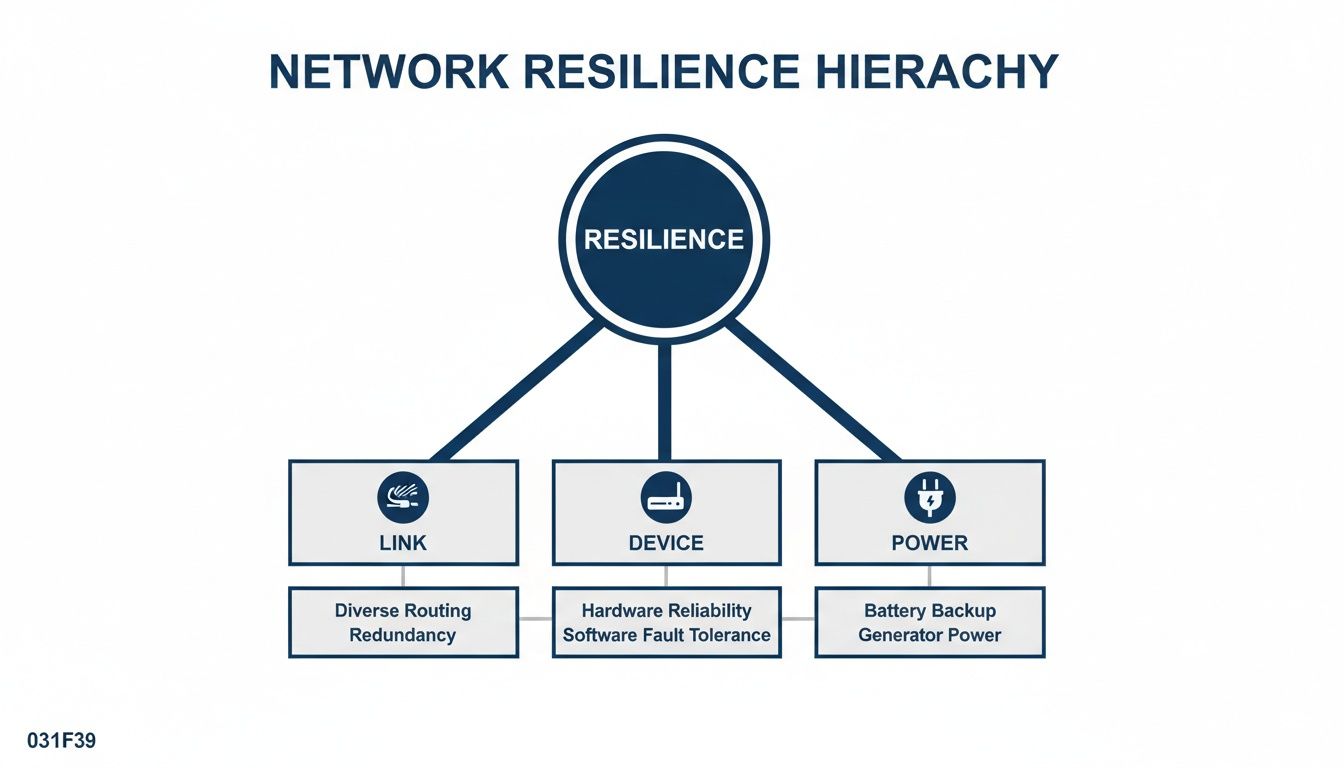
As you can see, true resilience is a layered game. You need to protect your physical connections, your hardware, and your power sources to be properly covered.
N, N+1, and 2N: What Do They Actually Mean?
The most common way to talk about redundancy levels is with the 'N' model. It’s just a straightforward shorthand for quantifying how much backup capacity is built into your system.
N: This is the baseline. It represents the exact number of components your network needs to function. If you need one main router to operate, N=1. This setup has zero redundancy. If that router fails, you're offline. Simple as that.
N+1: This is the go-to model for most businesses because it strikes a great balance between cost and resilience. It means you have the required components (N) plus one extra backup unit (+1). So, if your server room needs two core switches to handle daily traffic, an N+1 design means you install a third identical switch, ready to take over if one of the live ones gives up.
2N (or N+N): This is the top tier, designed for maximum availability. Here, you’re not just adding a spare part; you're building a complete, mirrored duplicate of your entire system. If your primary setup (N) has two routers and three switches, a 2N design means you have a second, identical system with its own two routers and three switches running right alongside it.
The importance of this kind of planning is starkly reflected in the wider economy. In the UK, a recent three-month period saw 124,000 redundancies, according to Statista. For anyone managing a critical facility, that number is a powerful reminder of how disruptive downtime can be. A resilient network design prevents operational 'redundancies' in your performance, ensuring a single failure doesn't halt productivity.
Active/Standby vs. Active/Active: How Your Spares Kick In
Beyond just having extra kit, you need to decide how that backup equipment will behave. This brings us to two main setups: Active/Standby and Active/Active.
The choice between Active/Standby and Active/Active is a strategic one. It forces you to decide if your backup gear should be a silent guardian, waiting for a crisis, or an active participant that boosts performance every single day.
With an Active/Standby model, think of it like having a substitute player warming up on the bench. Your main device (the Active one) handles all the network traffic. The secondary device (Standby) is powered on and ready to go but sits idle until something goes wrong. When the primary fails, the standby unit jumps into the game. It’s effective, but the switchover can sometimes cause a tiny, momentary blip in service.
An Active/Active setup, on the other hand, is like having two star players on the pitch at the same time. Both devices are online and processing traffic simultaneously, sharing the workload. This approach, often seen in a mesh topology in networking, brings two massive benefits. First, you get better performance day-to-day because you're using all your resources. Second, if one device fails, the other is already running and simply picks up the slack instantly, making the failover completely seamless for your users.
Comparing Network Redundancy Models
To help you decide which approach best fits your organisation's budget and risk tolerance, here’s a quick comparison of these common redundancy models.
Model | Description | Best For | Cost/Complexity |
|---|---|---|---|
N | The absolute minimum required. No backup. | Non-critical systems where downtime is acceptable. | Lowest cost, very simple. |
N+1 | One extra component is on standby for the entire group. | Most businesses needing a good balance of cost and uptime. | Moderate cost and complexity. |
2N | A complete, mirrored duplicate of the entire system. | Mission-critical operations where any downtime is catastrophic. | Very high cost, highly complex. |
Active/Standby | A backup device waits idly to take over upon failure. | Systems that can tolerate a brief interruption during failover. | More affordable than Active/Active. |
Active/Active | All devices share the workload simultaneously. | High-performance systems needing seamless, instant failover. | Higher cost, uses all resources. |
Each model offers a different trade-off between protection and price. Understanding these options is the first step in building a network that’s not just powerful, but genuinely resilient.
How to Justify the Cost of Network Redundancy
Pitching an investment in something designed not to be noticed can feel like a tough sell. Decision-makers often ask the same valid question: is network redundancy worth the cost? The answer becomes much clearer when you reframe the conversation from an expense to an insurance policy against catastrophic financial and reputational damage.
Building a powerful business case isn't about technical jargon; it's about translating risk into pounds and pence. The key is to calculate the true, comprehensive cost of downtime for your specific organisation. This goes far beyond just a few missed sales.
Calculating the Real Cost of an Outage
When your network goes down, the financial impact spreads rapidly. It’s crucial to look beyond the obvious and quantify the hidden costs that quickly add up. A robust calculation should always include:
Lost Revenue and Sales: This is the most direct cost. How many transactions, orders, or billable hours are lost for every minute you’re offline?
Plummeting Team Productivity: If your team of 50 people can't access their tools, you're not just losing their output; you're paying their salaries for them to sit and wait.
SLA Penalties and Contractual Fines: Do your client agreements include uptime guarantees? A single outage could trigger costly financial penalties.
Damage to Customer Trust: This long-term cost is harder to quantify but can be the most damaging. An unreliable service drives customers to your competitors.
By putting a number on these factors, you can demonstrate that the cost of prevention is almost always far lower than the cost of a single major failure.
Translating Uptime Percentages into Real-World Risk
Talking about "nines" of availability can sound abstract. To make the risk tangible, translate these percentages into the actual amount of potential downtime your business could face over a year.
The goal is to make the risk impossible to ignore. When a director sees that 99.9% uptime still means over eight hours of potential downtime per year, the need for a redundant secondary internet line suddenly becomes crystal clear.
Here’s a quick breakdown:
99% Uptime (Two Nines): 3.65 days of potential downtime per year.
99.9% Uptime (Three Nines): 8.77 hours of potential downtime per year.
99.99% Uptime (Four Nines): 52.6 minutes of potential downtime per year.
99.999% Uptime (Five Nines): 5.26 minutes of potential downtime per year.
This simple translation helps stakeholders visualise the real-world impact and justify spending on redundant Wi-Fi access points or failover routers. From here, you can perform more advanced analysis by diving into network performance monitoring to identify your most vulnerable points.
The UK’s current economic landscape only amplifies the value of this investment. With rising unemployment figures and redundancy numbers, businesses simply cannot afford self-inflicted operational disruptions from network failures during critical projects like an office relocation. For IT managers planning performance upgrades, building in redundancy with dual WAN links or load-balanced switches becomes a non-negotiable part of safeguarding the business against preventable losses. You can find further details in this UK labour market briefing which highlights the economic pressures.
A Practical Checklist for Your Next IT Project

Theory is great, but it’s action that builds the resilient infrastructure your business actually needs. Turning the concepts of network redundancy into a real-world, successful outcome demands a structured approach. This checklist will walk you through the essential stages of implementation, making sure no critical step gets missed during your next office fit-out, relocation, or network upgrade.
Following these steps methodically will take you from simply understanding what is network redundancy to engineering it effectively. Each stage builds on the last, giving you a system that isn't just redundant on paper, but genuinely resilient when it matters most. Let's get started.
Step 1: Perform a Thorough Risk Audit
Before you can design a solution, you have to know what you’re up against. The first step is a detailed risk audit to map out every single point of failure (SPOF) in your current or proposed setup. This isn't just about looking at the main router; it's a top-to-bottom review.
Look at everything. Trace the physical path of your incoming fibre cables. Check the individual power supplies in your core switches. Are all your critical servers plugged into the same electrical circuit? Does your entire Wi-Fi network depend on a single controller? Pinpointing these weak links is the most important step in building a robust strategy.
Step 2: Set Clear Availability Goals
Not everything needs the same level of protection. Your availability goals should tie directly back to business impact. Sit down with department heads and senior managers to classify your services and applications.
Mission-Critical Systems: These are the services that bring the business to a grinding halt if they fail—think payment processing or the primary customer database. These demand the highest level of redundancy, like a 2N Active/Active design.
Business-Critical Systems: Important services where a brief outage is painful but not catastrophic, like internal email or your CRM. An N+1 Active/Standby model is often a perfect fit here.
Non-Essential Systems: Services where downtime is an inconvenience but has a low financial impact, such as a development server. A basic N model might be perfectly acceptable.
Step 3: Design the Right Solution
With your risks identified and goals defined, you can start designing the right solution using the models we've already covered. This is where you select the right mix of link, device, power, and path redundancy to hit your targets without blowing the budget.
For instance, a mission-critical application might need dual internet connections from different providers (path diversity), clustered firewalls in an Active/Active setup (device redundancy), and servers with dual power supplies plugged into separate UPS systems (power redundancy). This layered approach is your best defence against different types of failure.
Step 4: Ensure Professional Installation
A brilliant design is completely useless if the execution is sloppy. The physical installation is where the details really matter. This includes professional commercial electrical installation to guarantee clean, redundant power, as well as certified structured cabling to create a rock-solid data backbone.
A redundancy plan is only as strong as its weakest link. Certified installation ensures that your cabling, power, and hardware are implemented to the highest industry standards, eliminating potential points of failure that could otherwise go unnoticed until it's too late.
Step 5: Conduct Rigorous Failover Testing
You absolutely cannot wait for a real outage to find out your redundancy plan doesn’t work. Rigorous, repeated testing is non-negotiable. This means simulating various failure scenarios to confirm that your systems failover automatically and seamlessly, just as you designed them to.
Pull the plug on a primary internet connection. Power down a core switch. Trip a circuit breaker on a UPS. Each test should validate that the backup systems kick in correctly and that service is restored within your predefined timeframes. Document every result and tweak your configurations until the process is flawless.
Step 6: Establish Ongoing Monitoring and Maintenance
Redundancy isn't a "set it and forget it" solution. You need robust monitoring tools that give you real-time visibility into the health of all your network components. These systems should alert you instantly if a redundant link drops or a backup device fails, letting you fix the issue before a second failure causes a full-blown outage.
Regular maintenance is also key. This means applying security patches, updating firmware, and periodically re-testing failover mechanisms to make sure everything stays in perfect working order. To truly manage the physical components that underpin network redundancy, implementing robust asset tracking is crucial. Consider these essential asset tracking best practices for your next project.
Building Resilient Infrastructure from the Ground Up
A truly resilient network isn’t just about the clever routers and switches. It’s a complete ecosystem where data, power, and physical security all work in perfect harmony. This holistic approach is essential when building out fully autonomous unmanned building units, where on-site intervention is not an immediate option.
This is where professional expertise really makes a difference. It’s about ensuring your redundancy strategy is built on a rock-solid foundation, literally from the ground up.
Integrating Core Infrastructure for Unmanned Buildings
Unmanned building management means creating self-sufficient spaces—like co-working offices, self-storage units, or remote data centres—that operate without daily staff. In practice, this requires a flawless integration of access control, power management, data connectivity, and security systems like CCTV. Many unmanned projects fail because these core components are designed in isolation. If the network goes down, the access control fails. If the power trips, both are useless.
This is exactly why access, power, and data must be designed together. For instance, choosing battery-less, NFC proximity locks is a strategic real-world decision. They draw power from the user's device upon entry, eliminating the huge operational headache of replacing batteries across hundreds of doors. This design choice, however, is entirely dependent on a resilient network and power infrastructure to authenticate users.
Maintenance and operational considerations are paramount. A certified commercial electrical installation ensures redundant power circuits feed your network gear and access controllers. Integrated CCTV not only provides security but also allows for remote visual verification of issues, preventing unnecessary call-outs. When everything is designed as one cohesive system, a failure in one area doesn't trigger a domino effect that brings your entire unmanned operation to a standstill.
From Server Room to End User
This thinking doesn’t stop at the comms room door; it extends all the way to the end user. A robust network plan considers everything from how a fully autonomous, unmanned building unit might operate to how a busy office floor maintains seamless connectivity for every single user.
It’s about designing your LAN/WAN and Wi-Fi systems with redundancy baked in from day one. A redundant Wi-Fi design, for instance, might use overlapping access point coverage and dual controllers. If one AP fails, users are automatically handed over to the next nearest one without even noticing a blip.
True network resilience is an engineered outcome, not an accident. It comes from treating the entire infrastructure stack—from the electrical intake to the Wi-Fi access point—as a single, interconnected system.
By partnering with a team that can plan, engineer, and deliver this entire stack, you move beyond simply buying redundant hardware. You’re investing in a system where zero downtime is the expected standard. If your goal is to create an unmanned facility that is reliable and truly autonomous, a unified infrastructure is not just a benefit—it's a requirement.
Your Network Redundancy Questions, Answered
Taking the plunge on a new redundancy strategy always brings up a few practical questions. Getting straight answers is key to making the right call for your business. Here, we tackle the most common queries we hear from managers, helping you move forward with confidence.
How Much Redundancy Do I Actually Need?
This is usually the first question on everyone's mind, and the honest answer is: it depends entirely on your business's tolerance for downtime. A small office might only need a backup internet connection from a different provider—an N+1 model—which is a fantastic and highly effective starting point.
But for a 24/7 e-commerce site or a critical healthcare facility, the stakes are much higher. These operations often require a fully mirrored system (2N) or even a geographically separate backup site to handle a true disaster recovery scenario.
The best way to figure it out is to ask one simple question: "How much revenue and productivity do we lose for every single hour we're offline?" Answering that honestly makes it much easier to justify the right level of investment.
Isn't Redundancy Just the Same as Having a Backup?
It’s a common point of confusion, but they serve completely different purposes. Think of a backup as a copy of your data for recovery after a disaster has already happened. The restoration process can take hours, sometimes even days, to complete.
Redundancy, on the other hand, is all about preventing that downtime from happening in the first place. A redundant power supply kicks in instantly to keep a server running; a data backup is what you use to restore files after that server has already failed and been replaced. A complete business continuity plan absolutely needs both working together.
Can Adding Redundancy Slow Down My Network?
If it's implemented poorly, yes. This is a common pitfall of DIY setups where poorly configured routing protocols can create network loops or sluggish failover times, actually hurting performance instead of helping.
However, a professionally designed 'Active/Active' redundant system can actually make your network faster. Because all the components are running at the same time, they share the workload through a process called load balancing. This not only provides a completely seamless failover but can also increase the overall speed and capacity of your network. The key is expert configuration to ensure the system is both fast and resilient.
At Constructive-IT, we specialise in designing and building resilient infrastructures from the ground up, ensuring your network is engineered for zero downtime. If you're planning a project and want to ensure every component works together seamlessly, visit our website at https://www.constructive-it.co.uk to see how our integrated approach can deliver the uptime your business demands.
Comments