


Mesh networking topology: Build resilient networks for modern UK buildings
- Craig Marston
- Feb 4
- 15 min read

Think of your office network. Does it have a single point of failure? Most traditional networks, like the classic ‘star’ topology, rely on a central hub or switch. If that one piece of equipment goes down, your entire network grinds to a halt. It’s like a city with only one main road – a single accident causes total gridlock.
A mesh networking topology throws that entire concept out the window. Instead of a central chokepoint, devices (or ‘nodes’) connect directly to as many other nodes as they can. This creates a resilient, self-healing web of connections where data has multiple paths it can take. It’s a completely decentralised approach that massively boosts reliability.
Understanding the Core of Mesh Networking

Let's go back to that city analogy. A mesh network isn't a city with one main road; it’s a city with an interconnected grid of streets, alleys, and avenues. If one road is blocked by roadworks, there are dozens of other ways to get where you’re going.
Data packets in a mesh network do exactly the same thing. They intelligently find the fastest and most efficient route available at any given moment.
In a mesh network, every device acts as part of the infrastructure. Each node can not only send and receive its own data but also relay data for other nodes, extending the network's reach and resilience.
This dynamic, self-healing capability is the real game-changer. If a node suddenly goes offline or a connection is blocked, the network instantly and automatically reroutes traffic through other available nodes. There's no manual intervention needed. For any modern UK business that simply can't afford downtime, this built-in redundancy is essential.
Key Characteristics of a Mesh Topology
This unique structure gives a mesh network several defining features that set it apart from older designs. Grasping these is key to understanding why it’s the go-to choice for so many critical applications.
Decentralised Communication: With no single point of failure, the network’s reliability isn't hanging by a thread on one central device. It's inherently more robust.
Self-Healing Paths: The network automatically adapts to disruptions. When a node fails, data packets are simply rerouted through a different path, ensuring connectivity never drops.
Scalability: Adding new devices is simple. Each new node just integrates into the web, making the whole structure stronger and extending its coverage area.
Enhanced Reliability: Because there are so many potential paths for data, the chance of a complete network failure is incredibly low. This makes it perfect for supporting critical systems like CCTV and access control.
How Mesh Compares to Traditional Networks
To get a clearer picture, it helps to see how mesh stacks up against the old guard. Here’s a quick rundown.
Mesh Topology At A Glance
Attribute | Mesh Topology | Star Topology | Bus Topology |
|---|---|---|---|
Reliability | Very high; self-healing and redundant | Moderate; vulnerable to central hub failure | Low; single cable failure affects all devices |
Scalability | High; easy to add new nodes | Moderate; limited by central hub's ports | Low; difficult to add nodes without disruption |
Performance | High; multiple paths prevent bottlenecks | Good; but slows down under heavy load | Poor; data collisions are common |
Cost | Can be higher due to cabling/node complexity | Lower; requires less cabling than mesh | Very low; simplest and cheapest to cable |
Best For | Critical systems, large areas, IoT, offices | Small to medium offices, home networks | Small, simple, temporary networks |
As you can see, while traditional topologies have their place, they often can't keep up with the demands of a modern workplace. Star networks are fragile, and bus networks can get bogged down with data collisions that slow everyone down.
The mesh topology neatly solves these problems by spreading the workload and providing those all-important redundant pathways. To see how this works in the real world, consumer-grade solutions like the Linksys Velop mesh system offer a great insight into the principles. For a UK office fit-out or relocation, this level of resilience isn't just a nice-to-have; it's fundamental for business continuity.
Full Mesh vs Partial Mesh Architectures
When you start digging into mesh networking, one of the first things you’ll realise is that not all mesh networks are built the same way. The architecture you choose will directly impact everything from performance and resilience to the final cost. The two main designs you'll come across are full mesh and partial mesh.
Think of a full mesh network as the ultimate communication web. In this setup, every single node—every access point, every switch—is connected directly to every other node in the network. It’s like a small team meeting where everyone can talk directly to everyone else, with no need for a moderator to pass messages along. This creates an incredible level of redundancy.
If one connection fails, data has dozens of other routes it can take. This makes full mesh the gold standard for mission-critical systems where even a second of downtime is a disaster, like in military networks or the core internet backbone. But, as you can imagine, this level of connectivity comes at a price. It requires a huge number of connections and a mountain of cabling, making it incredibly complex and expensive to implement at scale.
The Practical Choice: Partial Mesh
This is where the partial mesh topology comes in, offering a much more balanced and practical approach that most UK businesses will find perfect for an office fit-out or relocation. In a partial mesh, only some nodes are connected to all the others, while most are only connected to two or three of their neighbours.
This creates a smarter structure where key devices—like your core servers or primary access points—act as highly connected hubs, while less critical devices just connect to them. You still get the brilliant self-healing benefits of a mesh network, but you dramatically slash the complexity and cost that comes with a full mesh design. It’s a pragmatic compromise, delivering robust reliability without the insane cabling bill of connecting absolutely everything to everything else.
A partial mesh topology provides a strategic balance between the exceptional redundancy of a full mesh and the practical cost constraints of a real-world business environment. It’s about building a smart, resilient network, not just an over-engineered one.
The move towards these smarter network designs is clear in the market. In the UK, the wireless mesh network market hit a revenue of USD 742.9 million in 2023, and it's projected to climb to USD 1,035.6 million by 2030. This growth shows just how many businesses are choosing mesh for reliable, scalable Wi-Fi that can cover large spaces without being chained to traditional wiring. You can learn more about the UK's wireless mesh network market growth on Grandview Research.
Comparing the Two Architectures
Getting to grips with the key differences will help you decide which approach is right for your needs. Each has its own strengths and weaknesses depending on what you’re trying to achieve.
Feature | Full Mesh Topology | Partial Mesh Topology |
|---|---|---|
Redundancy | Extremely high; every node has multiple direct paths. | High; still offers self-healing and multiple paths. |
Cost | Very high due to extensive cabling and hardware ports. | Moderate; significantly cheaper than a full mesh. |
Complexity | High; difficult to install and manage. | Lower; simpler to design, install, and troubleshoot. |
Scalability | Difficult; adding a new node requires connecting it to all others. | Easier; new nodes only need to connect to a few key points. |
Ideal Use | Military networks, core internet backbones. | Most businesses, large offices, warehouses, and campuses. |
For most commercial uses, from open-plan offices to multi-floor buildings, a partial mesh network strikes the perfect balance. It gives you the seamless connectivity and reliability you need for day-to-day operations without the eye-watering cost and complexity of a full mesh setup. You can explore this further in our guide on mesh Wi-Fi vs. range extenders for your UK office network. It’s a practical approach that ensures your network is both resilient and cost-effective.
Building out fully autonomous unmanned units
One of the most powerful applications for a robust mesh networking topology is the creation of fully autonomous, unmanned building units. In practice, this means managing spaces like co-working offices, self-storage facilities, or apartment blocks with minimal to no on-site staff. Tenants or users are given secure, temporary access credentials (often via a smartphone app), allowing them to enter and use the facilities independently.
However, many unmanned building projects fail. The reason is often a siloed approach to planning. A company might install a cutting-edge smart lock system but neglect the underlying network that keeps it online. Or they focus on Wi-Fi coverage but forget that the smart locks also need reliable power. Success depends on designing access, power, and data as one integrated system. Without a resilient data network like a mesh topology, a single internet outage or power cut can render the entire building inaccessible, leading to operational chaos and frustrated customers.
Designing the Integrated System
To avoid failure, these three pillars must be planned together from day one:
Access Control: Battery-less, NFC proximity locks are often the best choice for unmanned sites. They draw power from the user's phone during the 'tap', eliminating the immense maintenance headache of changing hundreds of batteries. This significantly lowers operational costs and ensures a lock never fails due to a dead battery.
Power: Your network infrastructure—access points, switches, and CCTV cameras—must be supported by a commercial electrical installation with built-in redundancy, such as Uninterruptible Power Supplies (UPS). This ensures your core systems remain online even during a local power outage.
Data: A mesh networking topology provides the resilient, self-healing data connectivity essential for unmanned operations. It guarantees that access logs are always uploaded, security camera feeds are uninterrupted, and management software can always communicate with on-site devices.
This holistic approach is critical. Operational considerations, like how you'll perform maintenance without disrupting tenants, must be factored into the initial design. Certified electrical work isn't just a recommendation; it's a legal and safety requirement. By building a unified strategy, you create a truly autonomous and reliable unmanned building that works.
Planning Your Mesh Network Deployment
A successful mesh network isn’t something you can just throw together by plugging in a few access points and hoping for the best. Far from it. Real network resilience and performance are born out of meticulous planning, long before a single device is ever installed. This is especially true during an office fit-out or relocation, where you have a golden opportunity to get the foundations right from the very start.
It all kicks off with a professional Wi-Fi survey. This isn’t just a quick walk-around; it’s a technical deep dive into your physical space. Using specialised tools, engineers map out exactly how radio frequency (RF) signals behave throughout your premises. They’ll pinpoint potential trouble spots—thick concrete walls, lift shafts, or even high-density metal shelving—that can absolutely kill a Wi-Fi signal. The result is a detailed blueprint showing the perfect spot for each access point to guarantee seamless coverage everywhere, from the busiest open-plan areas to the quietest corner offices.
Integrating Mesh with Your Structured Cabling
While "wireless" is in the name, the best-performing mesh networks have a wired heart. A massive part of the planning process is deciding how your mesh nodes will connect back to your core network. The gold standard here is a wired backhaul. This is where each access point is linked back to a network switch using structured cabling like Cat6, Cat6a, or even fibre optic lines. This gives every node a rock-solid, high-speed connection, ensuring maximum performance and reliability.
By making the most of your existing or newly installed cabling, you're building a smarter, more efficient system. It means the wireless part of your network is only used for that final hop to user devices, not for node-to-node chatter. This frees up huge amounts of valuable airtime. For a closer look at this hybrid approach, you can learn more about how to extend Wi-Fi with Ethernet for flawless UK office coverage in our detailed guide.
Switch-Level and Capacity Considerations
Your mesh access points will all plug into your network switches, so planning at this level is absolutely crucial. You need to be sure your switches can handle not just the data, but also the power.
There are a few key things to sort out at the switch level:
Power over Ethernet (PoE): Most modern mesh APs get their power through the Ethernet cable using PoE. You need to add up the total power draw of all your planned APs and make sure your switches have a big enough power budget to handle it without getting overloaded.
Port Capacity: It sounds obvious, but make sure you have enough free switch ports for every access point, plus a few spares for any future expansion. You’ll thank yourself later.
VLAN Configuration: For better security and traffic management, you'll probably want to segment your network with VLANs. This means you can create separate virtual networks for guest Wi-Fi, corporate traffic, and sensitive systems like your CCTV.
Beyond just getting a connection, you have to balance coverage with capacity. It’s one thing to have a strong signal everywhere; it’s another thing entirely for that signal to hold up when hundreds of devices are trying to connect at once. This is where the data from your initial survey becomes invaluable, helping to flag high-density areas that might need more access points just to handle the load and prevent bottlenecks before they happen.
The diagram below shows how a well-planned mesh network intelligently reroutes data to keep everyone online, even when a path is blocked.
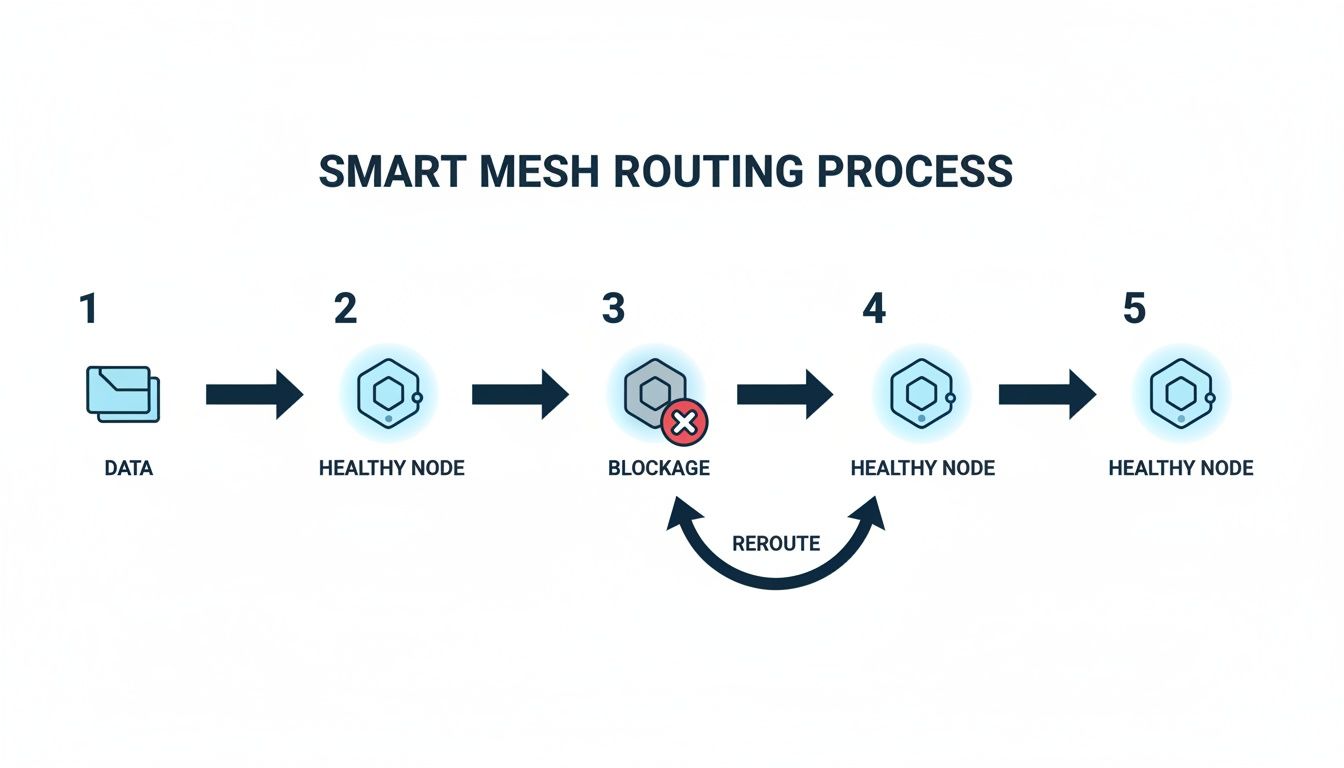
This self-healing capability is the real magic of mesh networking, where smart routing protocols constantly find the best path to keep data flowing smoothly.
Mesh Network Implementation Checklist
To help bring all these planning elements together, here’s a practical checklist for IT and facilities managers overseeing a mesh deployment in a new or refurbished office. Following these steps methodically will ensure a smooth and successful rollout.
Phase | Key Action | Consideration |
|---|---|---|
1. Discovery & Survey | Conduct a professional RF site survey. | Map out physical obstructions (walls, lifts), identify sources of interference, and determine initial AP placement zones. |
2. Design & Architecture | Finalise AP locations and plan backhaul strategy. | Decide between wired (preferred) or wireless backhaul for each node. Plan structured cabling routes (Cat6/6a/Fibre). |
3. Hardware & Cabling | Procure APs, switches, and cabling. | Calculate the total PoE power budget. Ensure switches have enough ports and PoE capacity. Choose cabling that meets future bandwidth needs. |
4. Network Configuration | Configure switches and network settings. | Set up VLANs for security (e.g., Guest, Corporate, IoT). Configure DHCP scopes and firewall rules. |
5. Physical Installation | Install structured cabling and mount access points. | Run cables according to plan. Mount APs in their optimal locations for coverage and minimal visual impact. |
6. System Configuration | Set up the mesh controller and provision APs. | Configure SSIDs, security protocols (WPA3), and routing policies. Update all firmware to the latest stable version. |
7. Testing & Validation | Perform post-installation coverage and performance tests. | Use survey tools to verify signal strength and identify any remaining dead zones. Conduct speed and load tests in high-density areas. |
8. Handover & Monitoring | Document the network and set up monitoring tools. | Create detailed network diagrams and documentation. Configure alerts for offline APs or performance degradation. |
This checklist turns a complex project into a manageable process, making sure no critical step is overlooked from start to finish.
Securing Your Mesh Network Infrastructure
The very thing that makes a mesh network so resilient—its decentralised nature—also opens up a whole new can of worms when it comes to security. With so many different connection points and your data weaving its way through multiple nodes, keeping unauthorised eyes out becomes a top priority. A robust mesh network simply has to be built on a foundation of modern security protocols if you're going to trust it with sensitive company data.
The video below gives an excellent rundown of the key security challenges you'll face and how to solve them when designing a mesh network.
Fortunately, any professional-grade mesh system worth its salt today comes armed with powerful security features designed to shut down these threats. The current industry standard is WPA3 (Wi-Fi Protected Access 3), and it offers a massive security leap over its predecessors. It wraps all the data travelling across your network in much stronger encryption, making it incredibly difficult for anyone to eavesdrop on your traffic.
Core Security Protocols and Best Practices
Securing a mesh network isn’t about ticking one box; it’s about layering your defences. Relying on a single feature just isn't going to cut it. For any UK business handling client information or connecting vital systems like CCTV, a multi-faceted approach is absolutely essential.
Here are the key security measures you should have in place:
WPA3 Encryption: This is non-negotiable. It protects against common hacking methods and ensures that even if a password was somehow compromised, all your past data traffic remains encrypted and unreadable.
Network Segmentation: Use VLANs (Virtual Local Area Networks) to slice your network into separate, isolated zones for different uses. A classic example is your guest Wi-Fi, which should be completely walled off from your internal corporate network and sensitive systems like building access control.
Strong Administrative Passwords: The first thing an attacker will try is the default username and password on your access points and network controller. Change them immediately. Weak or default credentials are an open invitation.
Regular Firmware Updates: Manufacturers are constantly releasing updates to patch security holes as they're discovered. Set these updates to happen automatically so your hardware is always protected against the latest known threats.
Monitoring Performance and Ensuring Reliability
Security isn't just about stopping breaches. It's also about making sure the network is reliable for the critical systems that depend on it. Continuously monitoring performance is vital for maintaining the health of your mesh infrastructure, especially when it’s supporting operational tech like CCTV and building access systems.
A secure network is a reliable network. Monitoring key performance metrics gives IT teams the foresight to resolve potential issues before they impact business operations, ensuring systems like CCTV feeds and smart locks remain consistently online.
You need to actively track metrics like latency (the delay in data transmission) and backhaul capacity (the speed of the connection between nodes and your core network). High latency can cause annoying lag in video calls or delays in access control commands, while a choked backhaul can slow the entire network to a crawl. By keeping a close eye on these figures, you can be confident your mesh network is not only secure but also consistently fast and dependable for every critical application you throw at it.
Where Mesh Networks Really Shine in UK Workplaces
The theory behind mesh networking is great, but its real value becomes obvious when you see it solving genuine business headaches. Its sheer flexibility makes it a fantastic fit for all sorts of modern UK workplaces, especially those with tricky connectivity challenges that older network designs just can't cope with.

From huge, open-plan offices to beautiful listed buildings, mesh delivers the kind of stable, blanket coverage that keeps a business running smoothly.
Large Open-Plan Offices and Flexible Workspaces
In today's dynamic offices, people are constantly on the move with laptops, tablets, and phones. A traditional network really struggles with this, creating infuriating Wi-Fi dead zones in meeting rooms or breakout areas just when you need them most.
This is where a mesh network excels. It creates one single, seamless network, allowing your team to roam freely without ever dropping a connection. That means video calls and cloud collaboration tools work flawlessly, no matter where an employee decides to work from that day. It’s the perfect foundation for hot-desking and agile work environments.
Historic and Listed Buildings
Many UK businesses are based in stunning but awkward listed buildings where you can't just drill through thick stone walls to run new cables. For these situations, a wireless mesh topology is the ideal solution. By placing nodes strategically, you can wrap the entire building in reliable Wi-Fi without any invasive installation.
This approach cleverly preserves the building's architectural integrity while delivering the modern, high-performance connectivity that’s essential for any business today.
A well-designed mesh network provides the reliable backbone needed for operational technology. This is crucial in environments where systems like automated machinery, environmental sensors, and security cameras must remain consistently online.
Smart Warehouses and Industrial IoT
A modern warehouse is a complex ecosystem, often packed with hundreds of Internet of Things (IoT) devices—from handheld scanners and robotic vehicles to climate sensors. These spaces are notoriously difficult for Wi-Fi because of their sheer size and the metal racking that loves to block signals.
Mesh networking provides the robust, widespread coverage needed to connect all these devices reliably. The self-healing nature of mesh is particularly vital here; if one access point gets blocked or fails, the network instantly reroutes traffic, ensuring critical supply chain operations continue without a hitch. To see the bigger picture, consider how ROI-driven industrial IoT solutions absolutely depend on this kind of resilient network to work effectively.
Your Mesh Networking Questions, Answered
To round things out, let's tackle some of the most common questions we hear from businesses considering a move to a mesh network. These are the practical, real-world queries that come up time and time again.
Is a Mesh Network Actually Better Than Wi-Fi Extenders?
Yes, and it’s not even a close contest. While an extender simply grabs a weak Wi-Fi signal and blasts it out again – often creating a second, clunky network in the process – a mesh system is far more intelligent.
A mesh topology builds a single, unified network. All the nodes talk to each other, figuring out the clearest and fastest route for your data. As you walk through the office, your device is seamlessly handed off to the best access point without you ever noticing. This completely eliminates the connection drops and performance headaches that are the hallmark of extenders, making mesh the only sensible choice for a professional environment.
How Many Access Points Will My Office Need?
There's no magic number here. The right amount depends entirely on your office's size, layout, and even the materials used in its construction – concrete walls block signals far more effectively than simple plasterboard. The number of people and devices connecting also plays a huge part.
This is exactly why a professional Wi-Fi site survey is a non-negotiable first step. Guesswork leads to dead zones or, just as bad, spending money on hardware you don't actually need.
A site survey isn't just a quick walk-around. It uses specialised tools to map out signal strength and identify the precise number and placement of nodes required to give you flawless coverage everywhere. It's a data-driven approach that gets it right the first time.
Can a Mesh Network Use Our Existing Wired Infrastructure?
Absolutely, and frankly, it's the best way to do it. The gold standard is a hybrid approach where your mesh access points use your existing structured cabling for their main connection back to the network. This is known as a 'wired backhaul'.
Using a wired backhaul delivers the maximum possible speed and rock-solid stability to each node. The mesh intelligence then handles the wireless side of things, creating that seamless bubble of coverage between the nodes for all your devices. A professional installer will design a system that makes the most of your current assets while giving your wireless capabilities a massive upgrade. For more on this, you can learn about improving UK office networks through performance monitoring in our related guide.
How Does Mesh Support Systems Like CCTV And Access Control?
A modern mesh network provides the stable, widespread connectivity that systems like CCTV and access control thrive on. For security cameras, it means you can get reliable, high-quality video streams from locations where running a dedicated network cable would be a nightmare, or just too expensive.
It's the same story for access control. A resilient mesh network ensures your smart locks and entry systems are always online and responsive. Because the network is self-healing, a single point of failure won't take down your whole security setup, making it an ideal foundation for these critical systems.
Planning a network upgrade or a full office fit-out needs an expert eye to avoid costly mistakes. The team at Constructive-IT has over 20 years of experience designing and installing the robust network, power, and access systems that power UK businesses. If you're ready to build a smarter, more resilient building, schedule a consultation with our experts today to create an integrated solution that’s ready for whatever comes next.
Comments